From Words to Attention: How a Model Turns Text into Numbers, and Reads Them
Before a model can read, each word has to become numbers: vocabularies, token IDs, and the embedding lookup, on a 12-word toy you can run. Then the one idea behind every transformer — attention — and the encoder-versus-decoder split that decides which models classify and which ones write. Math-free.
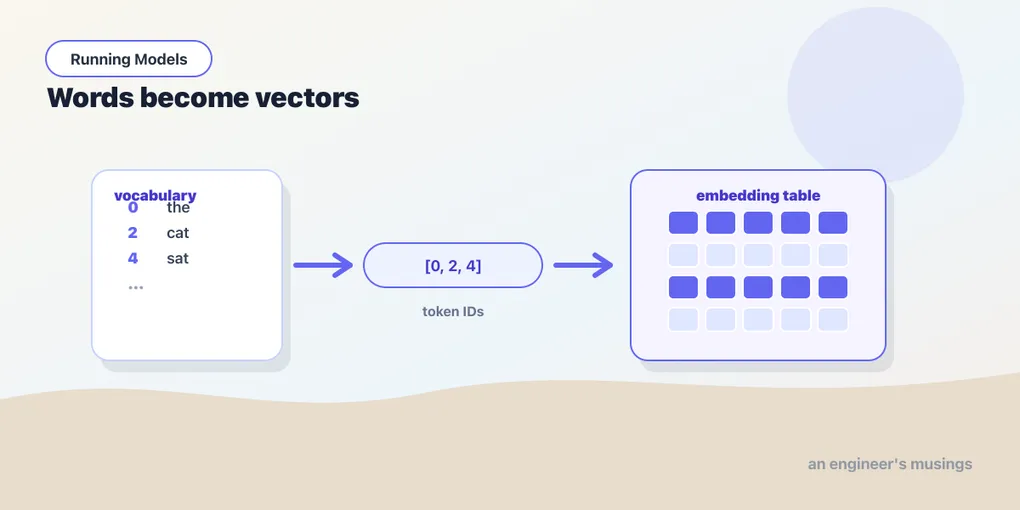
A photo is already a grid of numbers, so ResNet could get straight to work. Text isn’t so lucky. A model only ever does arithmetic: it multiplies, adds, and compares numbers. It cannot multiply the word “cat.” So before we open a real language model in the next chapter, there are two things to settle: how a word becomes something a model can compute with at all, and how, once every word is a row of numbers, those rows get to consult each other — because a pile of word-vectors isn’t reading. The first half of this chapter is the lookup. The second half is attention, the one idea behind every transformer, and the split that decides whether a model classifies or writes.
▶ Open the companion notebook in Colab
Run against: PyTorch 2.2.2 on CPU (macOS).
A vocabulary is just a numbered list
A model doesn’t know every word in English. It knows a fixed list — its vocabulary — decided before training and frozen from then on. Every word the model will ever handle has a slot in that list, and the slot’s position is its ID.
Real vocabularies run to tens of thousands of entries, and nobody writes them by hand: a separate tokenizer training step builds the list from a big corpus, keeping the words and word-fragments common enough to earn a slot (chapter 16 is about the real thing). Ours we’ll just type out; twelve entries is enough to see the whole idea:
vocab = ["the", "a", "cat", "dog", "sat", "ran",
         "on", "mat", "sofa", "and", "big", "small"]

stoi = {word: i for i, word in enumerate(vocab)}
print(stoi["cat"])   # 2
That stoi (“string to integer”) dictionary is the entire vocabulary, really: a lookup from word to slot number. "the" is 0, "cat" is 2, "sofa" is 8. Nothing clever yet — it’s a coat check, handing each word a numbered ticket.
A sentence becomes a row of IDs
With the lookup in hand, turning a sentence into numbers is one line — split it into words, swap each for its ID:
sentence = "the cat sat on the mat"
ids = [stoi[word] for word in sentence.split()]
print(ids)   # [0, 2, 4, 6, 0, 7]
Six words in, six numbers out. Notice "the" became 0 both times it appeared — the same word always maps to the same ID, which is exactly what you want. The model now has something it can hold in a tensor.
This toy version has two obvious cracks, and real tokenizers exist to seal them. Hand it "kitten" and stoi["kitten"] blows up with a KeyError — our vocabulary never heard of it. And splitting on spaces is crude: punctuation, capitalization, and rare words all need handling. The real tokenizers of chapter 16 fix both by breaking text into subword pieces, so they can always compose a word they’ve never seen from fragments they know. The principle is identical to what you just did, though — text in, integer IDs out.
But IDs aren’t meaningful numbers
Here’s the trap. We have numbers now, but they’re the wrong kind of numbers. "cat" is 2 and "sofa" is 8 — that does not make a sofa “four times” a cat, or place "on" (6) halfway between them in meaning. The IDs are arbitrary labels; their numeric values are noise. Feed them straight into arithmetic and the model would read a fiction that “mat” (7) is one more than “on” (6).
What we actually want is a number for each word that carries some sense of the word — and one number per word is far too cramped to hold meaning. So we give each word a small list of numbers instead: a vector. “cat” and “dog” should end up with similar vectors because they behave similarly; “cat” and “sofa” should end up far apart. That richer representation is called an embedding.
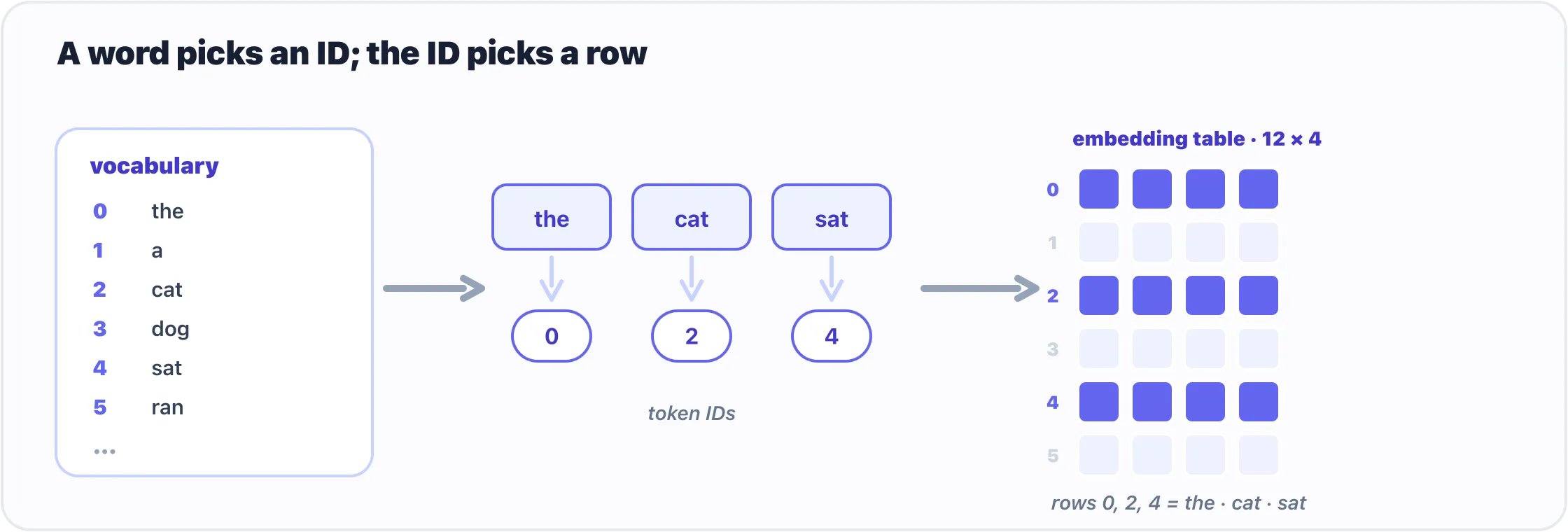
Three steps: a word picks its ID from the vocabulary, and the ID picks its row from the embedding table.
The mechanism is a second lookup table. Picture a grid with one row per vocabulary word, and a handful of numbers across each row. To embed a word, you take its ID and grab that row. ID 2 → row 2 → the vector for “cat.” Looking up an embedding is nothing more exotic than reading a row out of a table by its number.
Build the lookup in PyTorch
PyTorch hands you that table as a layer, nn.Embedding. You tell it how many rows (the vocabulary size) and how wide each row is (the vector length):
import torch
import torch.nn as nn

embed = nn.Embedding(num_embeddings=len(vocab), embedding_dim=4)

print(embed.weight.shape)   # torch.Size([12, 4])
There’s the grid: twelve rows, four numbers each. embed.weight is the table — every word’s vector stacked up, 12 × 4 numbers the model will learn. Now feed it the sentence’s IDs:
x = torch.tensor(ids)        # [0, 2, 4, 6, 0, 7]
vectors = embed(x)
print(vectors.shape)         # torch.Size([6, 4])
Read that shape as “six words, each now a vector of four numbers.” The sentence that started as a string is finally a tensor a model can do arithmetic on. And because the lookup is pure indexing, the two 0s in the input come back as the same row — vectors[0] and vectors[4] are identical, both the vector for “the.”
Our toy uses width 4 so it fits on the page. Real models go wide: DistilBERT, next chapter, uses 768, and large language models use 1024, 4096, or more. That number — the embedding dimension — is just how many numbers each word gets to carry. Bigger means more room for nuance.
Where the meaning comes from
One honest caveat. Print a vector from our embed and it’s gibberish — nn.Embedding starts the whole table as random numbers, so right now “cat” and “dog” are no closer than “cat” and “sofa.” The table is a blank set of coordinates, not a map. We never filled it in, and on this twelve-word toy we can’t: there’s no text here to learn from.
So where do the numbers come from? Training — though never the table on its own. The embedding layer rides along inside a bigger model that’s been set a language task, like predict the next word or fill in a blanked-out word. To get good at that task, the model is pushed toward one trick: give words that appear in similar contexts similar vectors. “cat” and “dog” both turn up near “fed the,” “chased the,” and “my pet,” so a model that parks their two rows close together predicts a little better, and training nudges them there. Do that across billions of words and the random grid becomes a map: “cat” and “dog” as neighbors, “big” and “small” on opposite sides. You know a word by the company it keeps, and the embedding table is where that company gets recorded.
Real vocabularies get their vectors the same way. The embedding layer inside DistilBERT is an nn.Embedding exactly like ours — same lookup, just 30,522 × 768 instead of 12 × 4 — learned jointly with the rest of the model on a mountain of text. You rarely train one yourself: you load a pretrained model and its table arrives already meaningful. Chapter 19 is all about reading that finished geometry: measuring which vectors sit close, and using it to search by meaning.
For now the point is narrower and structural: every word has become a vector you can look up. That is the input the rest of the architecture is built on — and on its own it is not yet reading.
Why a Linear or a Conv can’t read
Try to feed a sentence of word-vectors to the tools you already have and you hit a wall, the same way an MLP hit a wall on images.
- A
Linearlayer has no sense of order. Flatten “dog bites man” into a row of numbers and it’s the same bag of words as “man bites dog” — yet the meaning flipped. Word order carries the message, and a fully-connected layer treats its inputs as an unordered list, exactly the flaw that sank the flat MLP on images in chapter 12. - A
Conv2donly looks locally. Convolution’s whole trick is the small window: it sees a pixel with its immediate neighbors. That’s perfect for edges and strokes, and useless for “this pronoun refers to that noun at the start of the paragraph.” Language is full of long-range ties that no small sliding window can reach. - Reading one word at a time is slow and forgetful. The older fix, the recurrent network (RNN), walked the sentence left to right, carrying a running memory. It worked, but it processed words strictly in sequence (so it couldn’t use a modern GPU’s parallelism well) and its memory faded over long distances: the words at the start were a rumor by the end.
What you’d really want is a layer where every word can look directly at every other word and decide, for itself, which ones matter. That’s attention.
Attention: every word looks at every other
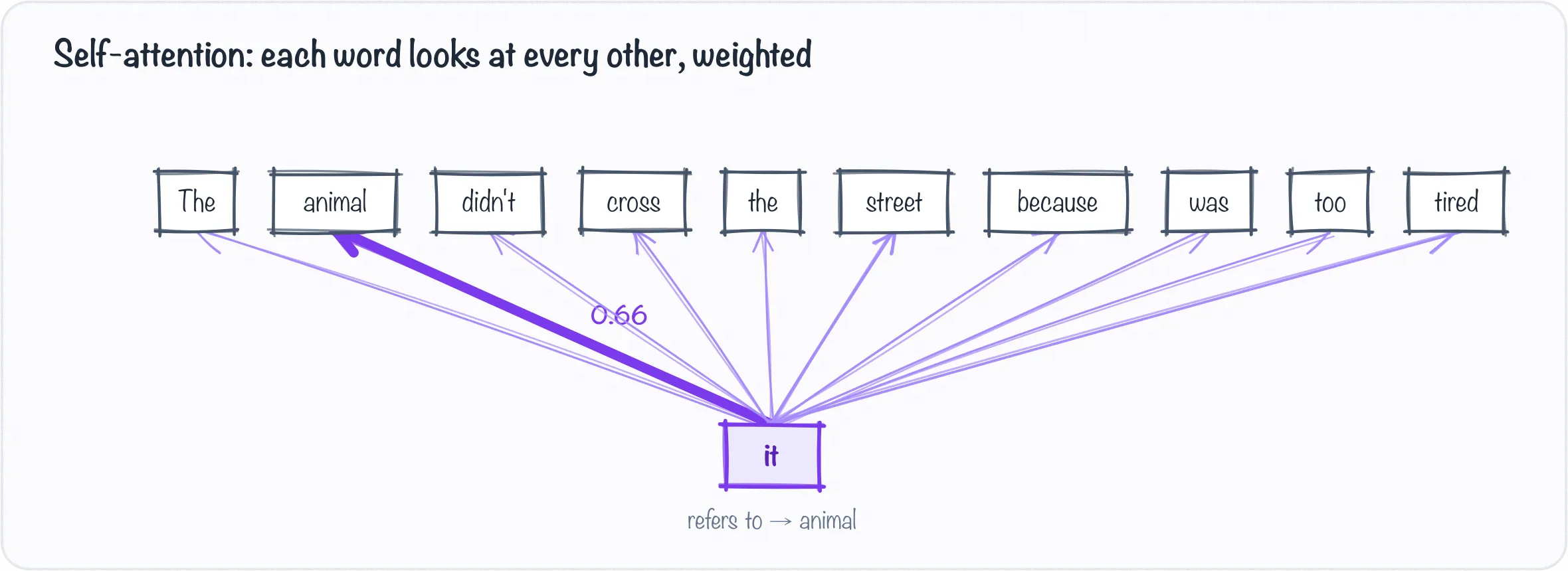
Self-attention lets every word weigh every other — here “it” leans almost entirely on “animal.” The weights shown are illustrative.
Here’s the whole intuition in one sentence: attention lets each word gather information from all the other words, weighted by how relevant each one is.
Take “The animal didn’t cross the street because it was too tired.” What does “it” refer to? You know instantly: the animal, not the street. Attention is the mechanism that lets the model figure out the same thing. When the model processes “it,” attention lets that position look at every other word and assign each a weight — a high weight on “animal,” a low weight on “street” — then build “it“‘s representation as a blend of the words it decided were relevant. Every word does this, for every other word, at the same time.
That “for every other word” is the key difference from a sliding window. Attention isn’t local. The word at position 2 can attend just as easily to position 200 as to position 3: distance costs it nothing. The long-range tie that defeated convolution is the thing attention does first.
When a layer does this with the sentence looking at itself — every word attending to every other word in the same sequence — it’s called self-attention, and it’s the engine of the whole architecture. You will see it run several times in parallel, as heads (nhead=8, or MultiHeadSelfAttention in a printout); each head is free to track a different kind of relationship, and their results are combined. For running models, “multi-head” means “several attentions at once,” and that is all you need.
The transformer block: attention plus a little thinking
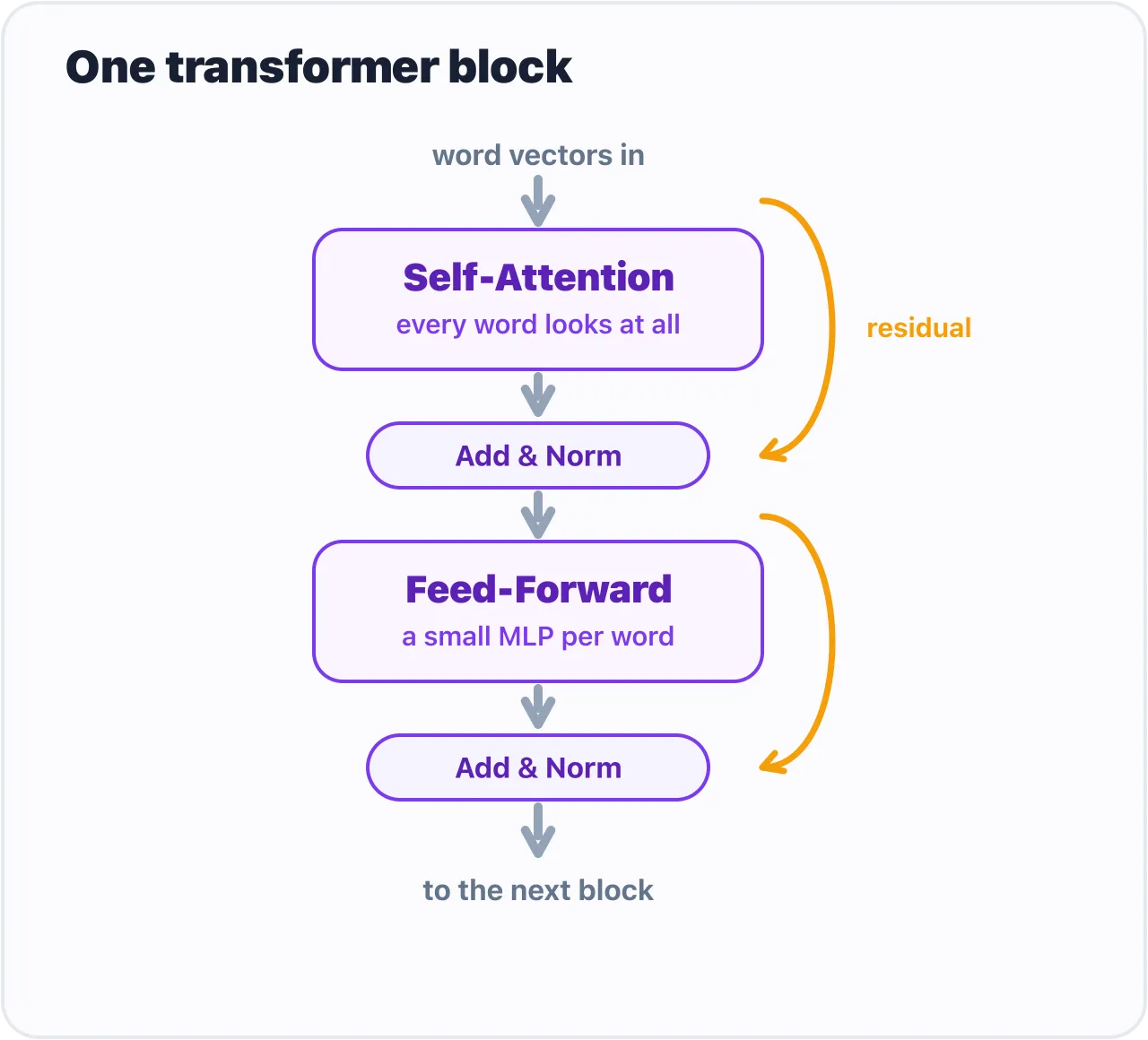
One transformer block: self-attention, then a feed-forward MLP, each wrapped by a residual and a norm.
Attention on its own gathers context, but it doesn’t do much with it. So a transformer pairs it with a small ordinary network and stacks the pair. One transformer block is just two steps:
- Self-attention — every word gathers relevant context from the rest of the sentence.
- A feed-forward network — a small MLP (two
Linearlayers with a nonlinearity between them, exactly the kind you built in chapter 11) that processes each position a little further.
Two supporting pieces ride along, and you can read past them the way you read past BatchNorm in ResNet: a residual connection (add the input back after each step, so signal flows cleanly through a deep stack) and layer normalization (keep the numbers in a steady range). Attention, feed-forward, add, normalize — that’s the block. Same shape in, same shape out: six word-vectors go in, six come back, each now blended with the others. Rewriting every word’s vector using the rest of the sentence is the block’s whole job, and it does that without changing how many words there are or how wide they sit.
A “transformer” is just a tall stack of these identical blocks, fed by the embedding lookup from the first half of this chapter — the lookup happens once, up front, not inside each block. The famous models differ mostly in how many blocks they stack and which way they face, not in what’s inside each one. (If you want to see a block as six lines of PyTorch and count its parameters, Appendix A does that; the next chapter prints a real one instead.)
Encoder, decoder, and the models you’ve heard of
Transformers come in two flavors, and the difference is just what each word is allowed to look at:
- Encoders let every word see the whole sentence, both directions. Great for understanding a fixed piece of text: classification, search, embeddings. BERT is the famous one, and DistilBERT, which we’ll read next chapter, is its compact cousin.
- Decoders let each word see only the words before it, never ahead. That’s what you need to generate text one word at a time, which is why the GPT family (and the chatbots built on it) are decoders.
This split is the one piece of Part II that you will use every time you load a model, because it is what the Hugging Face class names encode. AutoModelForSequenceClassification wants an encoder and puts a classifier on top of it; AutoModelForCausalLM wants a decoder and puts a next-token predictor on top. Pick the class that matches the model’s flavor and the task, and the library does the rest; pick the wrong one and you get an error, or worse, a model that runs and means nothing. Chapters 17 and 22 are where that choice gets made for real.
Same block in both cases. The whole zoo of language models is this one idea — a lookup, then attention, wrapped in a block, stacked deep — pointed at different jobs.
Gotchas
- IDs are labels, not quantities. Token
8is not “more” than token2. The arithmetic only starts after the embedding lookup turns an ID into a row. - A fresh
nn.Embeddingknows nothing. Its rows are random until a model is trained around it. Meaning arrives with pretrained weights, never with the layer. - Attention is not a window. If you catch yourself thinking “it looks at nearby words,” that is convolution. Attention looks at all of them and decides which are near in meaning.
- Encoder or decoder decides the class. The most common
transformersmistake past chapter 17 is asking an encoder to generate or a decoder to classify. The model’s card says which it is; theAutoModelFor…name says which you asked for.
What’s next
You’ve now seen the whole path from text to reading: a word picks its ID from the vocabulary, the ID picks its row from the embedding table, and attention lets every row consult every other, a block at a time. That is a transformer, and there is nothing else in one.
So let’s open a real one. DistilBERT is a genuine, pretrained transformer with about sixty-six million numbers inside, and when we print it you’ll find nothing but the embedding table, attention, feed-forward layers, and norms you just met, repeated six times over.
Comments