Reading a Vision Model: Convolution, and ResNet Up Close
Open a real pretrained image classifier — ResNet-18 — and read it like a spec sheet: the one new layer vision models add (convolution), the layer tree, the eleven million parameters, and the named weights, all with the nn.Module skills from the last chapter. Math-free.
In chapter 4 you ran ResNet-50 on a photo and read its verdict without once looking inside. Now you have the tools to look. ResNet-18 is its smaller sibling — a real, pretrained image classifier with about eleven million numbers inside — and this chapter reads it with exactly the skills from chapter 11: print the module tree, count the parameters, walk them by name. There is one layer in it you have not met, the one that lets a network see, so we start there. By the end, the printout that looked like a wall of text will read as a table of contents.
▶ Open the companion notebook in Colab
Run against: PyTorch 2.2.2 and torchvision 0.17.2 on CPU (macOS).
The three layers you’ll see everywhere
A real model’s printout is a wall of layer types, but you can read almost anything in this book knowing just three:
nn.Linear— a weighted sum (chapter 11). Every “fully connected” layer is this. The one at the very end of a classifier turns the model’s internal numbers into one score per category.nn.Conv2d— slides a small filter over an image. This is the new one, and the next section is about it. It is the workhorse of every vision model, ResNet included.nn.ReLU— keep the positives (chapter 11). Negatives become zero, positives pass through — the nonlinear kink between the heavier layers.
You’ll also spot BatchNorm2d, MaxPool2d, and Dropout in the wild. They’re supporting cast — steadying, shrinking, and regularizing the signal — and you can read right past them on a first pass. Weighted sum, slide a filter, keep the positives carries you a long way.
Why images need a new layer
Nothing stops you from feeding an image to the kind of stack you built in chapter 11. An image is just a grid of numbers — a 28×28 grayscale digit is 784 of them — and if you flatten that grid into a row, a Linear will happily take it:
import torch
import torch.nn as nn

mlp = nn.Sequential(
    nn.Flatten(),            # a 28x28 image -> a row of 784 numbers
    nn.Linear(28 * 28, 100),
    nn.ReLU(),
    nn.Linear(100, 10),      # 10 digit classes
)

img = torch.rand(1, 1, 28, 28)   # one 1-channel 28x28 image
print(mlp(img).shape)            # torch.Size([1, 10]) — it runs!
It runs. People really did classify digits this way, and it sort of works. But “sort of” is the operative word, because flattening throws something precious away, and it does so in three ways at once:
- It ignores layout. The moment you flatten, pixel
(0,0)and its neighbor(0,1)become “input #1” and “input #2” — no more related, as far as the model is concerned, than two random entries in the row. Every fact about nearby pixels forming an edge, a curve, a stroke is gone. - The parameters explode. That first
Linearconnects every input to every hidden unit. For a small grayscale image into a modest hidden layer, that’s already enormous:
big = nn.Linear(28 * 28, 1000)
print(sum(p.numel() for p in big.parameters()))   # 785000
785,000 weights — for one tiny grayscale image into one layer. A real color photo is millions of pixels; the math falls apart fast.
- It can’t generalize across position. Shift the digit one pixel to the right and every input value changes, so the network sees something entirely new. It has to learn the “7” all over again in its new spot.
Convolution: slide a small filter
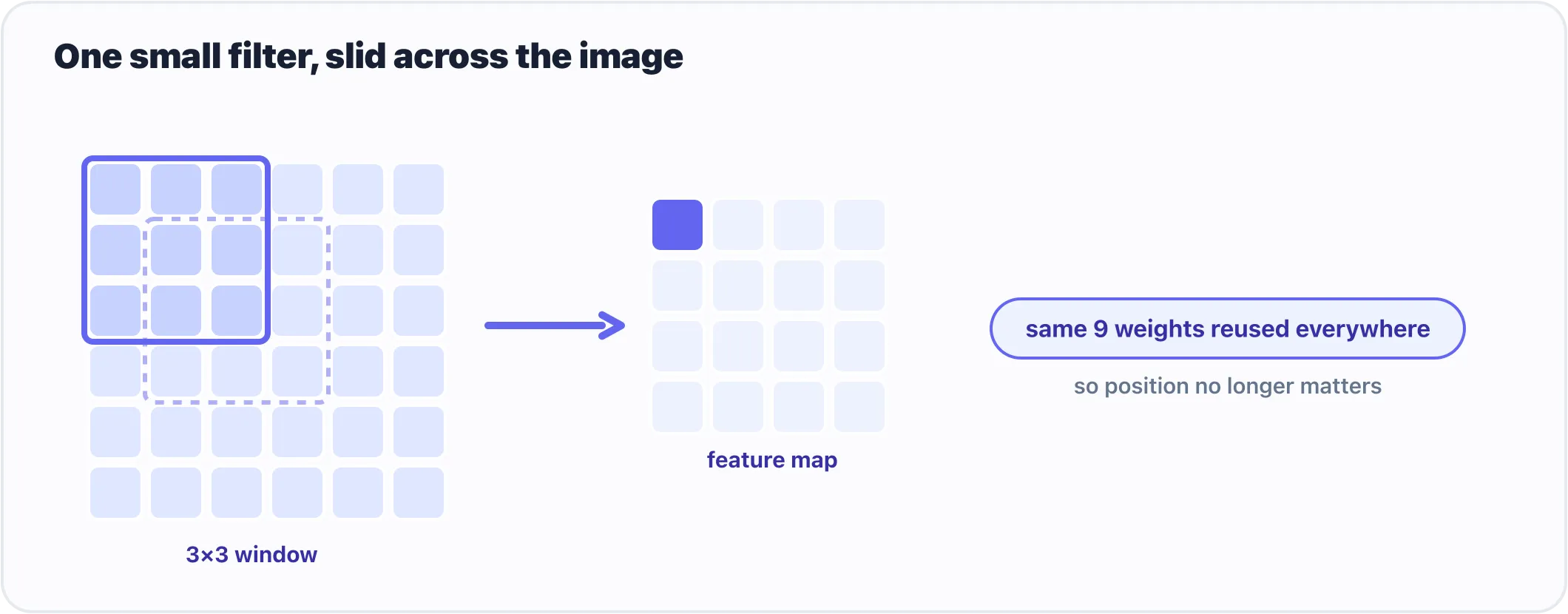
One small filter slides across the image, reusing the same weights at every position.
The new layer is nn.Conv2d, and its one-line intuition is slide a small filter over the image. Instead of wiring every pixel to every output, a convolution takes a tiny window — say 3×3 or 5×5 — and drags it across the picture, looking for one pattern (an edge, a corner, a blob of color) and reporting where it found that pattern. One filter, slid over the whole image. A layer holds several such filters, each hunting for a different pattern, and its output is one map per filter of where that pattern showed up.
Watch how that one move solves all three problems:
- It respects layout. The filter only ever looks at a pixel together with its neighbors — the little window — so spatial structure is baked in, not thrown away.
- It barely has any parameters. A 5×5 filter is 25 numbers, reused at every position. Six of them, with a bias each, is 156 parameters:
conv = nn.Conv2d(1, 6, kernel_size=5)   # 1 input channel, 6 filters, each 5x5
print(sum(p.numel() for p in conv.parameters()))   # 156
Compare that to the 785,000 the flat Linear wanted. You’re not learning a separate weight per pixel; you’re learning a few small pattern-detectors and applying them everywhere.
- It generalizes across position. Because the same filter slides everywhere, a “7” detected in the corner uses the exact same weights as a “7” in the center. Learn the pattern once, spot it anywhere.
Two small supporting layers ride along with convolution in almost every vision model. nn.MaxPool2d shrinks the image by keeping only the strongest signal in each little patch (the largest value in every 2×2 block, halving the height and width), which makes the model smaller and a little more robust to small shifts. nn.Flatten is the bridge back to the Linear world: after the convolutions and pooling have distilled the image into a small stack of feature maps, you flatten that into a row and hand it to a Linear to make the final decision.
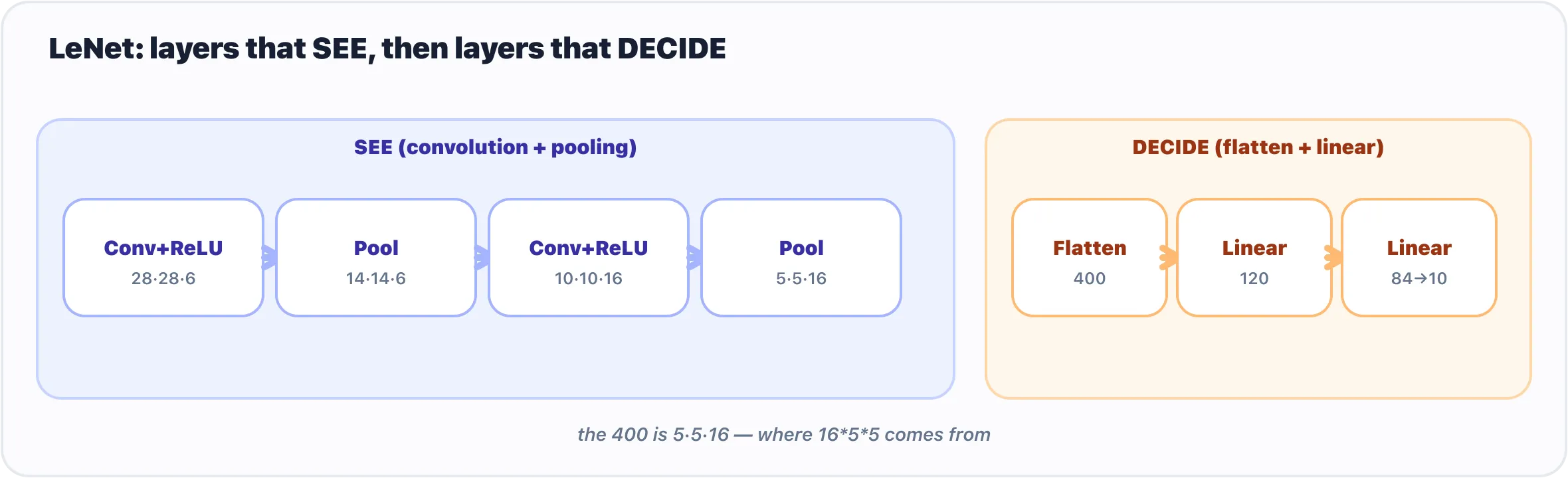
Every convolutional classifier is a sandwich: convolution and pooling that see, then linear layers that decide.
So a convolutional network is a sandwich: convolutions and pooling to see, then Linear layers to decide. Stack a few convolutions and the model builds up a hierarchy on its own — early layers catch edges, later ones assemble edges into shapes, and shapes into whole objects. That is the shape of every vision model built since the first one in 1998 (Appendix A builds that one, LeNet, in twelve lines, if you want to see the sandwich at its smallest), and it is the shape of ResNet.
Loading ResNet-18 and reading it
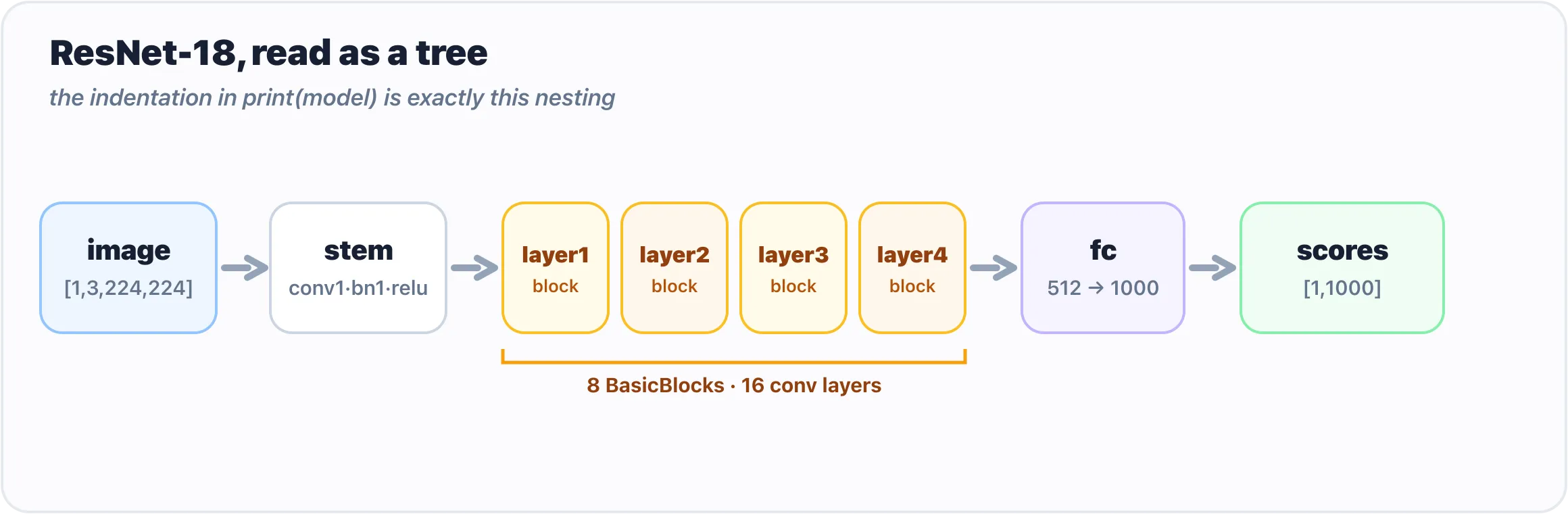
The indentation in print(model) is exactly this nesting: a stem, four stages, and one classifier.
Let’s grab a small, famous vision model with its pretrained weights already loaded:
from torchvision.models import resnet18, ResNet18_Weights

model = resnet18(weights=ResNet18_Weights.DEFAULT)
That weights=ResNet18_Weights.DEFAULT is torchvision’s modern way of saying “give me the best official pretrained weights for this model,” exactly as you did for ResNet-50 in chapter 4. (You’ll still see older tutorials write pretrained=True; that’s the deprecated spelling of the same idea.) The first run downloads the weights; after that they’re cached.
Now do the exact same thing you did with your tiny Sequential — just print it:
print(model)You’ll get a long, indented outline. Don’t read every line; read the shape of it, the same way you read your three-line stack. The top says ResNet(, and then nested inside are things like:
ResNet(
  (conv1): Conv2d(3, 64, kernel_size=(7, 7), stride=(2, 2), padding=(3, 3), bias=False)
  (bn1): BatchNorm2d(64, ...)
  (relu): ReLU(inplace=True)
  (layer1): Sequential(
    (0): BasicBlock(
      (conv1): Conv2d(64, 64, kernel_size=(3, 3), ...)
      ...
    )
  )
  ...
  (fc): Linear(in_features=512, out_features=1000, bias=True)
)
That indentation is the tree — the same kind your toy had, just deeper. ResNet contains a conv1, a bn1, a relu, then several Sequential blocks (layer1…layer4), and finally an fc at the end. Read the first line as the sandwich’s first slice: Conv2d(3, 64, kernel_size=(7, 7)) takes the 3 colour channels of a photo and slides 64 different 7×7 filters over them. Then the four layer stages do the same thing deeper and deeper, and a closing Linear (fc) turns 512 numbers into 1000 — one score per ImageNet category, which is the [1, 1000] you read in chapter 6. Each named line is a sub-module. This printout is the model’s table of contents — and you just read it without knowing any math.
Counting the parameters
The parameters are the actual learned numbers living inside those layers — the weights tuned during training so the model does something useful. Same idea as your toy’s sixty-seven numbers; there are just a great many more. Count ResNet-18’s in one line:
total = sum(p.numel() for p in model.parameters())
print(f"{total:,} parameters")   # 11,689,512 parameters
It’s the same line you ran on your three-layer net. Roughly 11.7 million numbers — which sounds enormous until you remember today’s language models are in the billions. ResNet-18 is the compact, friendly one.
To see where those numbers live, iterate over them by name — but just the first few, or you’ll be scrolling for a while:
for name, p in list(model.named_parameters())[:5]:
    print(name, tuple(p.shape))
conv1.weight (64, 3, 7, 7)
bn1.weight (64,)
bn1.bias (64,)
layer1.0.conv1.weight (64, 64, 3, 3)
layer1.0.bn1.weight (64,)Two things worth noticing. First, the names mirror the tree you saw in print(model): layer1.0.conv1.weight is “the weight of conv1, inside block 0, inside layer1.” It’s just a path — the same kind of path as the 0.weight / 2.weight on your Sequential, only longer — and it is the same key you would find in the model’s state dict. Second, every parameter is a tensor with a shape, and now you can even read the first one: (64, 3, 7, 7) is 64 filters, each looking at 3 colour channels through a 7×7 window. That is the convolution section, written as a shape.
Gotchas
print(model)shows structure, not the weights. It lists layers and their sizes — it does not dump eleven million numbers (thank goodness). To touch actual values you go through.parameters(),.named_parameters(), or.state_dict().for p in model.parameters()will flood your screen. A real model has hundreds of parameter tensors. Always slice —list(model.named_parameters())[:5]— when you just want a peek.- Random weights ≠ a useful model.
resnet18()with noweights=gives you the architecture with random numbers — an empty shell that outputs noise. The pretrained weights are the whole product; always passweights=...when you want a model that actually works. - Channels first. Every
Conv2dhere expects[batch, channels, height, width], which is why chapter 5 made a fuss about[1, 3, 224, 224]. An image that arrives channels-last has to be permuted before the first layer will accept it. - You don’t need
model.eval()ortorch.no_grad()just to look. Those matter when you run the model for real predictions, as in chapter 4; printing structure and counting parameters needs neither. - The depth is the only thing that’s new. If ResNet feels intimidating, it’s the length of the printout, not the kind of thing in it. Convolution, ReLU, a Linear at the end — the same three layers, repeated.
What’s next
The box is glass, even at eleven million numbers. ResNet is an nn.Module — a deep tree of Conv2d, ReLU, and Linear layers you can name — and reading it took one new idea (slide a filter) on top of what you already had.
But every layer in it is built to see. The models that read text, translate, answer questions, and power the chatbots you’ve actually talked to belong to a different family — the transformer. Before we open one of those, there’s a quieter question to settle: a model only ever does arithmetic, so how does a word become something it can compute with at all? And once it is numbers, how does one word find out what the others mean?
Next: From Words to Attention: How a Model Turns Text into Numbers, and Reads Them.
Comments