What a Model Is Made Of: Build One from a Single Layer Up
A gentle, math-free look at what a neural network is actually made of — layers and parameters — by building one yourself in PyTorch, from a single nn.Linear up to a small stack, and reading its insides. Beginner-friendly.
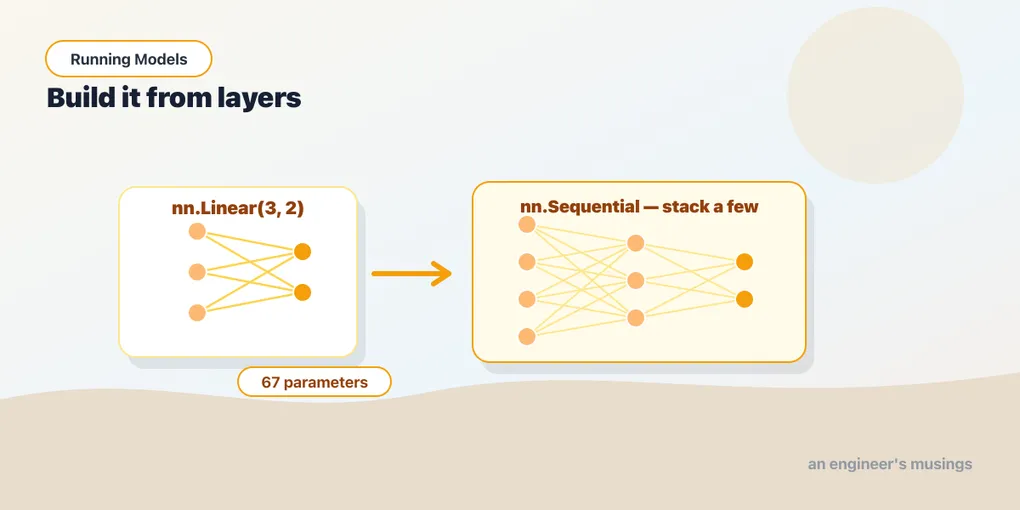
“A model” is one of those phrases that sounds like it should be mysterious. You have run one — ResNet-50 took a photo and named the dog — and you did it without knowing what was inside. That is fine, and it will stay fine. But you also printed model at one point and got a wall of indented lines, and a shape error in chapter 9 named a layer you had never heard of. This part of the book exists so that those printouts read as a table of contents rather than noise.
The way in is to build the smallest honest model there is, then a slightly bigger one, out of parts you’ll recognize — not because you will ever build models for a living, but because a model you assembled in six lines is one you can read, and every model you download is the same thing with more lines. Nothing here gets trained; we’re assembling and inspecting. By the end the box will be made of glass.
▶ Open the companion notebook in Colab
Run against: PyTorch 2.2.2 on CPU (macOS).
A model is an nn.Module
In PyTorch, almost every model you’ll ever run is an instance of one base class: nn.Module. That’s the common shape. A language model, an image classifier, a speech recognizer — under the hood they’re all nn.Modules, which means once you can read one, you can read them all.
An nn.Module does two jobs:
- It holds layers, and layers can hold other layers, so a model is really a tree. A big model is a module made of modules made of modules.
- It knows how to do a forward pass: take an input, push it through those layers in order, and produce an output. That’s the thing that happens when you call
model(x).
We’ll build up to this gently — the smallest model that exists, then a slightly bigger one we assemble ourselves. (Reading a real, famous model is the next two chapters.) The part we’re not touching is how the numbers inside got to be the right numbers — that’s training, that’s the Training Models book, and you don’t need it to run anything.
The simplest model: a single nn.Linear
The smallest honest model in PyTorch is one layer. The friendliest one to start with is nn.Linear, which does a weighted sum: it takes some input numbers, multiplies each by a learned weight, adds them up (with a bias), and produces output numbers. Let’s make one that takes 3 numbers in and gives 2 back:
import torch
import torch.nn as nn

layer = nn.Linear(3, 2)   # 3 numbers in, 2 numbers out
print(layer)
Linear(in_features=3, out_features=2, bias=True)That’s already a complete nn.Module — the very same base class the giant models are built on. Printing it shows its configuration: three inputs, two outputs, a bias. No tree yet, because there’s only one layer.
Inside it live the parameters — the actual numbers, the things training would tune. A Linear keeps two of them, a weight and a bias, and you can look at their shapes:
print(layer.weight.shape)   # torch.Size([2, 3])
print(layer.bias.shape)     # torch.Size([2])
Six weights (one for each input-to-output pairing) and two biases (one per output) — eight numbers in all, and every one is a tensor with a shape, exactly the thing chapter 2 made routine. Now push something through it:
features = torch.rand(3)        # the actual input: just 3 numbers, shape [3]
x = features.unsqueeze(0)       # tack on a batch dimension -> shape [1, 3]
out = layer(x)

print(x.shape)                  # torch.Size([1, 3])
print(out.shape)                # torch.Size([1, 2])
Calling layer(x) is a forward pass: numbers go in the top, the weighted sum happens, numbers come out the bottom. That’s the entire job of a model — here on the smallest possible scale.
There’s a small ceremony in that snippet worth pausing on. Your real data is just three numbers — torch.rand(3), shape [3]. But models expect a whole batch of inputs at once (it’s how they stay efficient), even when you have only one. So we unsqueeze(0) — the move from chapter 2 — to wrap our lone example in a batch of one, turning shape [3] into [1, 3]. The model reads that leading 1 as “one example in this batch.” You’ll be tacking it on constantly.
Stacking a few: a tiny network
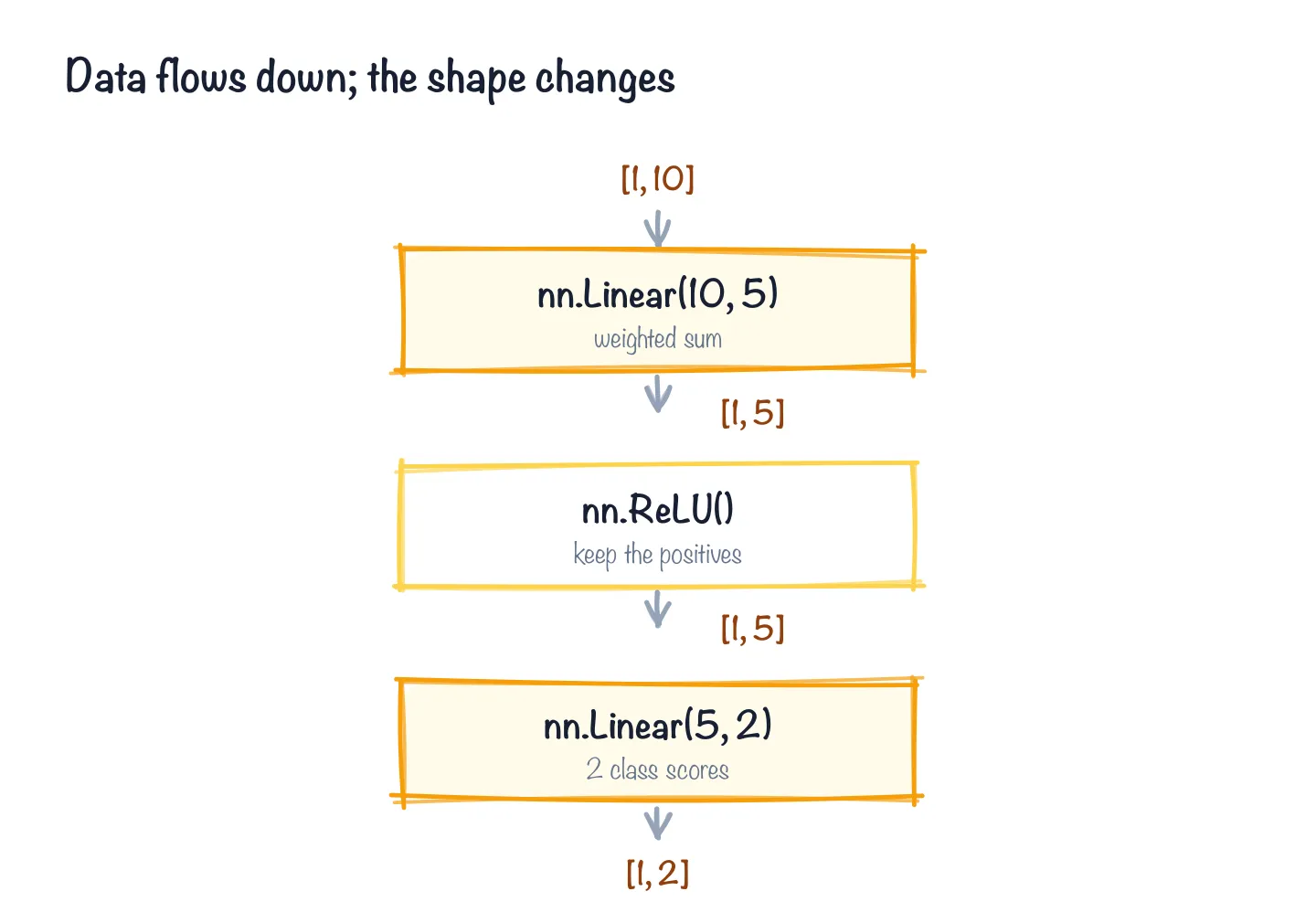
Data flows top to bottom; the shape changes at each layer.
One layer is a model, but real models are layers stacked on layers. nn.Sequential is the simplest way to stack — it just means “run these in order, top to bottom.” Let’s build three layers deep:
net = nn.Sequential(
    nn.Linear(10, 5),   # weighted sum: 10 numbers in, 5 out
    nn.ReLU(),          # keep the positives
    nn.Linear(5, 2),    # weighted sum: 5 numbers in, 2 out
)

print(net)
Sequential(
(0): Linear(in_features=10, out_features=5, bias=True)
(1): ReLU()
(2): Linear(in_features=5, out_features=2, bias=True)
)That middle nn.ReLU() is the other layer type you’ll meet constantly, and it’s almost comically simple: keep the positives — any negative number becomes zero, positives pass through unchanged. It’s the little nonlinear “kink” between the weighted sums that lets a stack represent complicated relationships instead of collapsing into one big straight line.
That printout is a little tree — three lines, one per layer, each tagged with an index: (0), (1), (2). (Hold on to those numbers; they come back when we name the parameters.) This is a complete nn.Module too: it takes 10 numbers, squeezes them to 5, zeroes out the negatives, then squeezes to 2. Feed it a single example and watch it run — same batch-of-one move as before, now with ten numbers going in:
features = torch.rand(10)       # 10 real input numbers, shape [10]
x = features.unsqueeze(0)       # wrap them in a batch of one -> shape [1, 10]
out = net(x)

print("input shape: ", tuple(x.shape))     # (1, 10)
print("output shape:", tuple(out.shape))   # (1, 2)
print("output:", out)
That call, net(x), is the entire idea of a forward pass, now with more than one stop: data goes in the top, flows down through each layer in turn, and comes out the bottom transformed. The first Linear turns 10 numbers into 5, ReLU clips the negatives, the second Linear turns those into 2. No magic, no training, no math you had to do — just numbers flowing through a stack.
The two output numbers are meaningless here because nobody taught this little net anything; its weights are random. But the mechanics are identical to a real model’s — exactly the mechanics ResNet ran in chapter 4, with eleven million numbers instead of sixty-seven.
Counting and naming the parameters
The layers are the structure; the parameters are the actual numbers living inside them. You already peeked at a single Linear’s weight and bias. Across a whole model you can count them all in one line:
total = sum(p.numel() for p in net.parameters())
print(f"{total} parameters")   # 67 parameters
net.parameters() hands you every parameter tensor in the model; .numel() is “number of elements” in one tensor; summing gives the grand total. Sixty-seven numbers — tiny, but counted with the exact same line you’d run on a model with millions. When people say a network “has 100 billion parameters,” this is the count they mean.
To see where those numbers live, walk them by name:
for name, p in net.named_parameters():
    print(name, tuple(p.shape))
0.weight (5, 10)
0.bias (5,)
2.weight (2, 5)
2.bias (2,)The names are a little map of the model: 0 is the first Linear, 2 is the second — index 1 is the ReLU, which has no numbers of its own, so it never shows up. Every parameter is a tensor with a shape, and that’s genuinely the whole inventory of this model: four tensors, sixty-seven numbers, no secrets. The same named_parameters() walk works on an eleven-million-parameter network; it just prints more lines.
The state dict: a model’s numbers, as a dictionary
Those names matter for one more reason, and it is the most practical thing in this chapter. Ask a model for its state dict and you get exactly that inventory as a plain Python dictionary — parameter name to tensor:
state = net.state_dict()
print(list(state.keys()))        # ['0.weight', '0.bias', '2.weight', '2.bias']
print(state["0.weight"].shape)   # torch.Size([5, 10])
That dictionary is the model’s knowledge. The architecture (the nn.Sequential you typed) is the empty vessel; the state dict is everything training poured into it. Which is why a “pretrained model” on disk is, nearly always, a saved state dict: a file of named tensors, and nothing else. When torchvision downloaded ResNet-50’s weights in chapter 4, it fetched a state dict and loaded it into a freshly built ResNet with load_state_dict. When Hugging Face downloads a checkpoint, the .safetensors file is the same idea with a safer file format. Save and load look like this:
torch.save(net.state_dict(), "tiny.pt")

fresh = nn.Sequential(nn.Linear(10, 5), nn.ReLU(), nn.Linear(5, 2))   # same architecture, random numbers
fresh.load_state_dict(torch.load("tiny.pt"))                           # <All keys matched successfully>
That last line is the contract. load_state_dict matches the file’s names and shapes against the model’s, and it refuses anything that does not line up: change nn.Linear(10, 5) to nn.Linear(10, 6) and it throws a size-mismatch error naming the key. Chapter 15 leans on exactly this to load weights that were never on the Hub at all.
Gotchas
print(model)shows structure, not the weights. It lists layers and their sizes — it does not dump every number. To touch actual values you go through.parameters()or.named_parameters().- Random weights ≠ a useful model. Build a fresh
nn.Linearornn.Sequentialand its numbers are random, so its outputs are noise. “Pretrained” is what makes a model worth running; those carefully-tuned weights are the whole product. Loading the architecture without the weights gives you an empty shell. - Inputs need a batch dimension. Our data was ten numbers (shape
[10]), but the model wanted them shaped[1, 10]— a batch of one. That’s exactly what theunsqueeze(0)was for. Most models expect a batch even when you have a single input, and forgetting it is the most common shape error you’ll hit (chapter 6 has the full story). - Output numbers usually aren’t probabilities yet. A model’s raw outputs (often called logits) are just scores — they can be negative, and they don’t sum to 1. Turning them into “87% confident it’s a cat” is the softmax step from chapter 6.
for p in model.parameters()will flood a real model’s screen. Our toy has four tensors; a real one has hundreds. Slice it —list(model.named_parameters())[:5]— when you just want a peek.- You don’t need
model.eval()ortorch.no_grad()just to look. Those matter when you run a model for real predictions, as you did in chapter 4; building, printing, and counting parameters needs neither. - A state dict only fits its own architecture. The names and shapes are the contract. Loading one into a model with a different layer size fails loudly, which is the good kind of failure; loading the wrong model’s state dict with coincidentally matching shapes is the bad kind, and nothing warns you.
What’s next
The box is glass now — you built it. A model is an nn.Module: a tree of layers, each holding a pile of numbers, with a forward pass that flows data down through the tree, and a state dict that is those numbers as a dictionary you can save, load, and inspect. You made one from a single Linear, stacked a few into a working net, then counted and named every parameter inside. Notice we never trained anything; we only assembled and looked.
(If you are curious where these shapes came from — the single layer is a 1958 perceptron, the little stack is the network that broke a famous deadlock — Appendix A tells that story. It is a good story and you do not need it to read ResNet.)
Now let’s read a real one. ResNet-50 took your photo in chapter 4 and you never looked inside; its little brother ResNet-18 has eleven million numbers and, it turns out, nothing in it but the layers you just named plus one new one.
Next: Reading a Vision Model: Convolution, and ResNet Up Close.
Comments