Tensors on the Move: GPUs, NumPy, and Back
A beginner-friendly guide to moving PyTorch tensors between the CPU and GPU with .to(device), trading data with NumPy, and pulling a single value out with .item() — no math required.
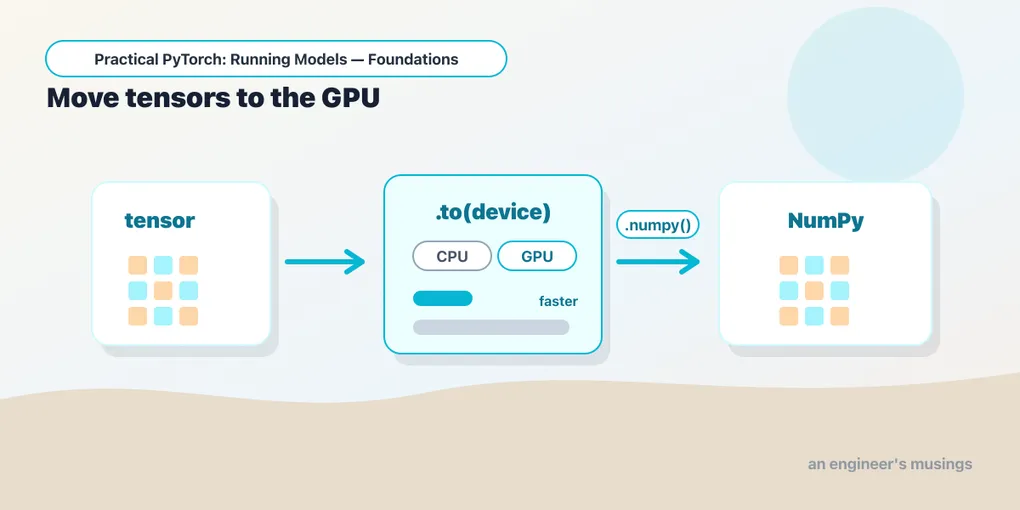
Series: Practical PyTorch: Running Models — Foundations — Part 3 of 7
Last post you got comfortable making and reshaping tensors. We kept setting one thing aside, though — the feature that makes tensors special instead of just “NumPy arrays with extra steps.” A tensor can pick up and move onto a GPU, where the same arithmetic runs dramatically faster, and it can hand its numbers back to ordinary Python whenever you need them. This short post is about that border crossing: getting a tensor onto the GPU, bringing it home, and trading data with NumPy. It’s the last piece of pure tensor-handling before we point them at a real model.
Open the companion notebook in ColabWhy a GPU at all
A CPU is a brilliant generalist — a few very fast cores that do one thing after another. A GPU is the opposite: thousands of small cores that do the same simple operation on piles of numbers all at once. That happens to be exactly the shape of the work a neural network does — the @ matrix multiplies from last post, repeated over and over on big grids of numbers. On a large tensor a GPU can be tens of times faster than a CPU, which is the whole reason it’s worth the trouble of moving data there.
The catch: a tensor lives in one place at a time. It’s either on the CPU or on the GPU, and an operation can only combine tensors that are in the same place. So “where does this tensor live?” — the .device question from last post — becomes something you actually have to manage.
Asking whether a GPU is even there
Back in Part 1 we ran one line to check:
import torch

print(torch.cuda.is_available())   # True if a GPU is attached, else False
cuda is NVIDIA’s GPU technology, and it’s what Colab gives you when you pick a GPU runtime (Runtime → Change runtime type → GPU). If that printed False, you’re on CPU only — everything below still runs, it just won’t get the speedup. Nothing breaks.
The one device line to rule them all
Here’s the pattern to learn and reuse in every notebook. Instead of hard-coding "cuda" (which crashes on a machine with no GPU) or "cpu" (which leaves all that speed on the table), you pick the best available device once, into a variable:
device = "cuda" if torch.cuda.is_available() else "cpu"
print(device)
Then you move a tensor there with .to(device):
x = torch.rand(2, 3)
print(x.device)        # cpu — where it was born

x = x.to(device)
print(x.device)        # cuda:0  (if a GPU is attached) or cpu otherwise
That device line is a small kindness to yourself: the same notebook runs untouched on a laptop with no GPU and on a Colab GPU runtime. You’ll see .to(device) applied to models too, later in the series — the idea is identical, and a model only works when it and its input tensors are on the same device.
One thing worth seeing clearly: a tensor on the CPU and a tensor on the GPU behave identically. Same shape, same indexing, same arithmetic, same everything from last post. The only difference is speed, and the GPU’s edge only shows up once tensors get large — for tiny examples the CPU is often quicker, because just getting data over to the GPU costs a little time.
a = torch.rand(1000, 1000).to(device)
b = torch.rand(1000, 1000).to(device)

c = a @ b              # runs on the GPU if one's attached
print(c.device)        # the result lands wherever its inputs were
Notice you never said “do this on the GPU.” You moved the inputs, and the result simply appears on the same device. That’s the whole mental model: move the data, and the math follows it.
Coming home, and talking to NumPy
The trip is round. The world outside PyTorch — plotting libraries, pandas, plain Python — speaks NumPy, the standard array library, and it only understands CPU data. So when you want to hand a tensor’s numbers to that world, you bring it back to the CPU and convert:
import numpy as np

t = torch.tensor([1.0, 2.0, 3.0])
arr = t.numpy()                 # tensor -> NumPy array  (CPU only)

arr2 = np.array([4.0, 5.0, 6.0])
back = torch.from_numpy(arr2)   # NumPy array -> tensor
If t were on the GPU, that .numpy() would error — NumPy can’t read GPU memory. The fix is to send it home first, and you’ll see this exact two-step constantly:
result = x.cpu().numpy() # GPU -> CPU -> NumPyA subtlety worth knowing but not fearing: torch.from_numpy and .numpy() share memory when they can — the tensor and the array point at the same underlying numbers, so changing one can change the other. It’s a performance win, and it only surprises you the day you didn’t expect an edit to ripple across. If you want a clean, independent copy, call .clone() on the tensor (or .copy() on the array).
Pulling out a single number with .item()
Last post’s reductions — .sum(), .mean(), .max() — gave you back a tensor holding one number, like tensor(3.5). That’s still a tensor, which is awkward the moment you want a normal Python value to print nicely, compare with >, or stick in a list or a dictionary. .item() pulls that single value out as a plain Python float or int:
score = torch.tensor(0.98)
print(score.item())             # 0.98  — a normal Python float, not a tensor

g = torch.tensor([1.0, 2.0, 3.0])
print(g.mean().item())          # 2.0   — reduce, then unwrap
That .mean().item() combo — collapse a tensor to one number, then unwrap it — is one of the most common little gestures in the whole series. When a model hands you back a confidence score next, this is how you read it as an honest number.
Gotchas
The device-and-conversion missteps that bite everyone exactly once:
- CPU and GPU tensors don’t mix. Trying to combine a
cputensor with acudatensor errors out with a “expected all tensors to be on the same device” message. Move both to the samedevicefirst — this is the classic GPU-era beginner error. .numpy()only works on the CPU. A GPU tensor has to come home before NumPy can read it:x.cpu().numpy(). The error otherwise is blunt but clear.- Moving is a copy, not free.
.to("cuda")ships the numbers across to the GPU, which takes a little time. Do it once per tensor, not inside a tight loop — shuttling data back and forth repeatedly can cost more than the GPU ever saves you. .item()is for one number only. It unwraps a single-element tensor. Call it on a tensor with more than one number and it complains — for a whole tensor of values, use.tolist()instead.from_numpyshares memory. The new tensor and the original array can be two views of the same numbers. If you need them independent,.clone()the tensor.
What’s next
That’s tensors, end to end: you can build them, reshape them, do math on them, move them onto a GPU for speed, bring them home, and trade their numbers with NumPy and plain Python. It’s a genuinely complete toolkit, and you got here without a single derivative.
Now we put it to use. We’ve talked about tensors flowing through a model without ever looking at one — so next we pry the lid off and read a real network like a spec sheet.
Next: Reading Tensor Shapes Without Panicking, where the shapes you’ve been printing turn into a practical debugging skill.
Target keyword(s): pytorch move tensor to gpu, pytorch to device, pytorch tensor numpy, pytorch cuda is_available.
Comments