What Actually Flows Down a Flow
The Mule event, message, payload, attributes, and vars — the data model every flow rides on, and the #[...] expressions you use to reach into it.
You have a running app. A request goes in, Hello, Mule! comes out, and in between two components did their work. But what travelled between them? “The request” is the intuitive answer and it’s not quite right — and the gap between the intuitive answer and the real one is the single most useful thing to get straight before we go further. Almost every bug you’ll write in your first month traces back to a fuzzy picture of what’s moving down the flow and how to reach into it.
So let’s build that picture precisely, using the exact app from last post as the ground.
A flow is a pipeline of processors
A flow is an ordered list of steps. The first step is special — it’s the source (also called the trigger or inbound endpoint), the thing that starts the flow when something happens outside: an HTTP request arrives, a schedule ticks, a file lands. In our app the source is the http:listener. Everything after the source is an event processor — set-payload was one — and they run strictly top to bottom, each handed the result of the one before it.
That “handed the result of the one before it” is the whole game. Processors form a chain, and the thing passed hand to hand down the chain has a name and a shape.
The Mule event
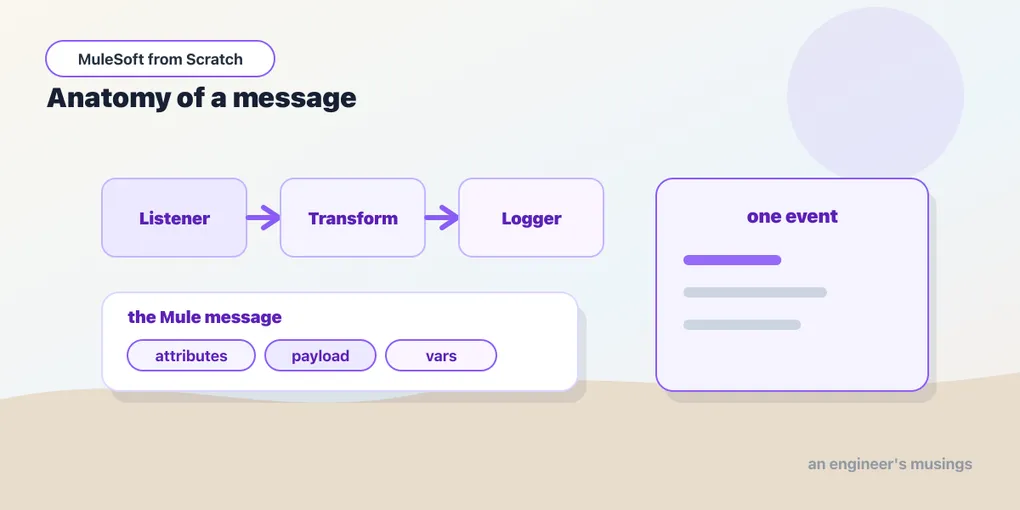
What flows down a flow is a Mule event. Not the raw HTTP request, not a bare string — an event, which is a container with two parts: a message, and a set of variables. The event is created by the source and then passed into the first processor; each processor can transform it and returns a new version, which is passed to the next. By the time the event reaches the bottom of the flow, the source turns whatever’s in it into the outbound response.
Inside the event, the message is the primary cargo and it itself splits in two: payload and attributes.
Payload and attributes
The payload is the body — the actual content you’re moving. For an incoming HTTP request it’s the request body; after set-payload value="Hello, Mule!" it’s that string; after a database query it’s the rows; after a Transform Message it’s whatever you transformed to. The payload is the data. It’s the part you’ll reference constantly.
The attributes are the metadata about the payload, and they’re specific to whatever produced the message. For an HTTP listener, attributes carry the request method, the path, the query parameters, the headers, the URI parameters. They’re the envelope, not the letter. When a later component sets a new payload but you still want the original request’s headers, you reach for attributes — they ride alongside the payload rather than being overwritten by it.
Here’s the shape of an event as it enters our flow, sketched as data:
Mule Event
├── Message
│   ├── payload    → (the request body)
│   └── attributes → { method: "GET", requestPath: "/hello",
│                      queryParams: {...}, headers: {...} }
└── Variables      → { }   (empty so far)
Variables ride alongside
The event’s second part is its variables — usually just called vars. These are your scratch space: values you set at one point in the flow and read at another, that aren’t the payload and aren’t request metadata. Say you call a downstream API and its response becomes the new payload, but you still need a customer ID from three steps ago. You stash it in a var early, and it survives every payload change after it.
The key distinction: the payload is what each processor operates on and frequently replaces, while vars persist across the whole flow untouched unless you deliberately change them. Payload is the conveyor belt; vars are the pockets you put things in so the belt doesn’t carry them off. The Set Variable component creates one, and vars live for the duration of the event.
Reaching into the event with #[...]
You now know the event has a payload, attributes, and vars. How do you actually read them? Through DataWeave expressions, written inside #[ ]. Anywhere a component takes a value, you can give it a literal (like the string we typed last post) or an expression — Mule sees the #[...] wrapper and evaluates the DataWeave inside against the current event. The top-level names are exactly the parts we just mapped out:
#[payload]— the current payload#[attributes]— the message attributes (so#[attributes.method]is the HTTP method,#[attributes.queryParams.id]a query parameter)#[vars]— your variables (so#[vars.customerId]reads a var you set)
Next post is entirely about the language inside those brackets. For now, know that #[...] is the doorway from a component’s configuration into the live data of the event.
The Logger, your window into the flow
The one component you’ll use more than any other while learning is the Logger — it writes a value to the console and passes the event through unchanged. Drop it anywhere and print exactly what’s in the event at that point:
<flow name="helloFlow">
    <http:listener config-ref="httpListenerConfig" path="/hello"/>
    <logger level="INFO" message="#['Request from ' ++ attributes.headers['user-agent']]"/>
    <set-payload value="Hello, Mule!"/>
    <logger level="INFO" message="#['Responding with: ' ++ payload]"/>
</flow>
Two loggers, before and after the set-payload. The first reads a request header off attributes — the payload hasn’t been touched yet. The second reads payload after it was set, so it prints Responding with: Hello, Mule!. That difference, printed at two points in the same flow, is the event model made visible: attributes describe the request throughout, while the payload is whatever the most recent processor left in it. (++ is DataWeave’s string concatenation — more of that next post.) When a flow misbehaves, a couple of loggers showing you the payload before and after a step is the fastest debugging you own.
Reuse: sub-flows and Flow Reference
One more structural piece. As flows grow, you’ll want to name a reusable chunk of processing and call it from several places. A sub-flow is a flow with no source — just a named sequence of processors — and the Flow Reference component invokes it, passing the current event in and getting the result back, like a function call:
<sub-flow name="enrichCustomer">
    <set-variable variableName="tier" value="#[payload.plan]"/>
    <!-- more processing... -->
</sub-flow>

<flow name="orderFlow">
    <http:listener config-ref="httpListenerConfig" path="/orders"/>
    <flow-ref name="enrichCustomer"/>
    <set-payload value="#[vars.tier]"/>
</flow>
The event flows into enrichCustomer, the sub-flow sets a var, and control returns to orderFlow with that var still on the event — because it’s the same event passing through, pocket contents and all. That’s the reuse mechanism the whole platform uses; the alternative, VM queues for genuinely async hand-offs, waits for the advanced series.
Final thoughts
Payload, attributes, vars, wrapped in an event, flowing top to bottom through processors — that’s the entire data model, and it does not get more complicated as the apps do. A batch job processing a million records, an API composing three downstream calls, an error handler catching a timeout: all of them are moving this same event down a flow and reaching into it with #[...]. Get comfortable picturing the event at each step and the rest of MuleSoft is learning which processors to put in the chain.
And the language inside those brackets — the one you use to read the payload, reshape it, turn JSON into XML — is DataWeave. That’s next, and it’s the skill that separates people who use Mule from people who fight it.
Next: DataWeave basics
Comments