Routing and Cycles: Building the Agent Loop by Hand
Conditional edges that pick the next node from state, the cycle that turns a graph into an agent, the recursion limit that stops a runaway (and its surprising default), and Command — the return value that updates state and routes in one move. Then we rebuild create_agent from scratch.
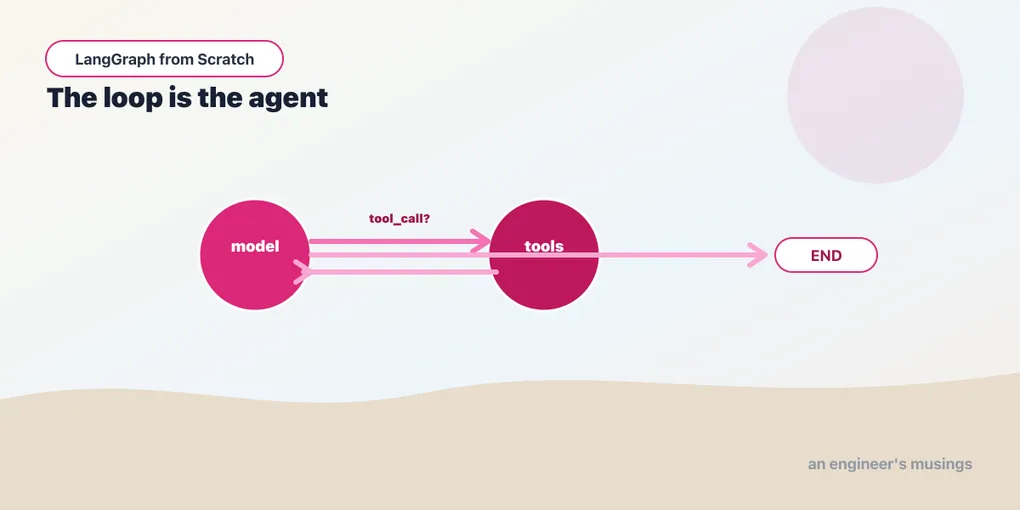
A graph with only plain edges is still a straight line — each node hands to a fixed next node, and you might as well have used a pipe. The two things that make a graph worth having are branches (pick the next node based on what happened) and cycles (loop back and try again). A branch is how an agent decides between answering and using a tool; a cycle is how it keeps working until it’s done. Put them together and you get the agent loop from Chapter 1. We’ll build it by hand at the end of this chapter, so create_agent stops being magic and becomes a graph you could have written. Run against langgraph 1.2.9.
Conditional edges
A plain add_edge("a", "b") always goes to b. A conditional edge runs a function that inspects the state and returns the name of the next node:
def route(state) -> str:
    if state["score"] >= 50:
        return "pass_node"
    return "fail_node"

builder.add_conditional_edges("grader", route, {"pass_node": "pass_node", "fail_node": "fail_node"})
Three parts: the source node ("grader"), the router function (route), and a path map from the router’s return values to actual node names. After grader runs, route reads the state and picks where to go. The router is plain Python. It can branch on anything in the state, call helper functions, whatever. But it should be fast and side-effect-free, because its only job is to choose. Do the work in a node; make the decision in the router.
The path map does double duty. It documents the branch’s possible destinations, and it constrains them: LangGraph uses it to draw the graph and to catch a typo’d node name at compile time rather than at runtime. You can omit it if the router returns node names directly, but naming the destinations keeps the graph drawable and typo-proof. A router can also return the END sentinel to finish, which is how a branch decides the graph is done rather than continuing.
There’s a special, powerful case: a conditional edge from START. Instead of a fixed entry node, the router picks which node runs first based on the input. And as Chapter 13 will show, a router from START that returns a list is how you fan out to many nodes at once. For now, hold the simple case: a conditional edge chooses one next node from the state.
Cycles: an edge that goes back
Nothing stops an edge from pointing at a node that already ran. That’s a cycle, and it’s how a graph loops:
g.add_edge("work", "check")
g.add_conditional_edges("check", lambda s: "work" if not s["done"] else END,
                        {"work": "work", END: END})
check sends control back to work until done flips true. This is the entire basis of iterative behavior: retry until success, refine until a critic approves, keep calling tools until the model is satisfied. A pipe fundamentally cannot express this; a graph does it with one edge pointing backward. The loop’s exit lives in the router (else END), and that’s the part you must get right. A cycle with no reachable END runs forever.
The recursion limit, and its real default
To keep a buggy loop from spinning forever, LangGraph enforces a recursion limit: a maximum number of steps (super-steps, really) after which it raises GraphRecursionError rather than hanging. Most tutorials get the default wrong, and it’s easy to verify: the default is not 25. In langgraph 1.2.9, an unbounded loop runs to a default of 10007 steps before it errors:
GraphRecursionError: Recursion limit of 10007 reached without hitting a stop condition.
You can increase the limit by setting the `recursion_limit` config key.
Verified: with no config the limit is 10007, and setting {"recursion_limit": 5} makes the error report a limit of 5. The much-repeated “default 25” is stale. The modern default is high enough that you’ll rarely hit it by accident. That cuts the other way: a genuinely runaway loop churns through ten thousand steps before it stops (and, if it calls a model each pass, ten thousand model calls). So the recursion limit is a backstop against a bug, not a design tool. Set a lower limit deliberately when you want a tight cap (app.invoke(input, {"recursion_limit": 20})). Far more important, make sure your router has a real termination condition so the limit never fires. A correct exit beats any limit.
Command: update and route in one move
There’s a second way to route, and it reads more naturally when a node’s decision and its state change belong together. A node can return a Command instead of a plain dict, carrying both an update (the state delta) and a goto (the next node):
from typing import Literal
from langgraph.types import Command

def triage(state) -> Command[Literal["billing", "support"]]:
    topic = classify(state["messages"][-1])
    return Command(
        update={"topic": topic},                                 # write to state
        goto="billing" if topic == "billing" else "support",     # and route
    )
With Command, the node itself decides where control goes, so you don’t need a separate conditional-edge function. The Command[Literal["billing", "support"]] return annotation plays the path map’s role — it tells LangGraph the reachable destinations so the graph stays drawable. Conditional edges keep routing logic out of the node — cleaner when the routing is a pure function of state. Command puts it in the node, cleaner when the node already did the work to decide. Both are first-class, and you’ll mix them. Command comes into its own in multi-agent handoffs, where one agent transferring control to another is exactly an “update the state and go there” move. So we lean on conditional edges here and return to Command when agents start handing off.
Rebuilding create_agent
Now the payoff. Chapter 1 showed that create_agent compiles to this graph:
graph TD;
    __start__ --> model;
    model -.-> __end__;
    model -.-> tools;
    tools -.-> model;
With conditional edges and a cycle, you can build it yourself. The model node calls the LLM; a router checks whether the model asked for a tool; if so, go to the tools node and loop back, otherwise end:
from typing import Annotated, TypedDict
from langgraph.graph import StateGraph, START, END
from langgraph.graph.message import add_messages
from langgraph.prebuilt import ToolNode
from langchain_core.tools import tool

@tool
def multiply(a: int, b: int) -> int:
    """Multiply two integers."""
    return a * b

model = init_chat_model("ollama:llama3.2:3b").bind_tools([multiply])

class State(TypedDict):
    messages: Annotated[list, add_messages]

def call_model(state):
    return {"messages": [model.invoke(state["messages"])]}

def should_continue(state):
    return "tools" if state["messages"][-1].tool_calls else END

g = StateGraph(State)
g.add_node("model", call_model)
g.add_node("tools", ToolNode([multiply]))
g.add_edge(START, "model")
g.add_conditional_edges("model", should_continue, {"tools": "tools", END: END})
g.add_edge("tools", "model")          # the cycle: after tools, back to the model
agent = g.compile()

agent.invoke({"messages": [("user", "What is 12 times 8?")]})["messages"][-1].content
# 'The answer to "What is 12 times 8?" is 96.'
Verified end to end against the local model: it took four turns — the question, the model requesting multiply(12, 8), the tool returning 96, and the model’s final answer. That’s the ReAct loop, and it’s the entire graph behind create_agent. Map it back to the diagram: should_continue is the model -.-> tools / model -.-> __end__ decision, and g.add_edge("tools", "model") is the tools -.-> model loop. add_messages on the state channel is what lets each pass see the whole growing conversation, including the tool’s result. There is nothing else in there.
This is why the series drops to hand-built graphs when the prebuilt agent doesn’t fit: you now know exactly what you’d be modifying. Want a step between tool and model — a validation node, a logging node, a human check? Add it to this graph. Want two models, or a router that picks among several tool sets, or a hard cap on tool calls? Change these edges. create_agent is the convenient default; this four-node graph is what it’s a default for. Everything in the building-an-agent chapter about customizing it is really about editing this.
Final thoughts
Branches and cycles are the whole reason to use a graph. A conditional edge routes on state and constrains its destinations through a path map. A cycle loops until the router says END. The recursion limit (10007 by default, not 25) is a backstop against a missing exit, not a design tool. And Command fuses a state update with a route when the two belong together. Assemble a model node, a tools node, a conditional edge, and a back-edge, and you’ve rebuilt create_agent. The prebuilt agent is not a black box but a graph you can open and edit. That editability is the entire point of learning the graph.
Next: persistence and memory — checkpointers and threads, which let a graph pause, remember, and resume across separate invocations.
Comments