The StateGraph from Scratch
The mental model that makes everything after it click: state as a typed schema (TypedDict or Pydantic), nodes as functions returning partial updates, edges as wiring, and reducers — the rule that decides whether a channel overwrites, merges, or runs your own custom merge.
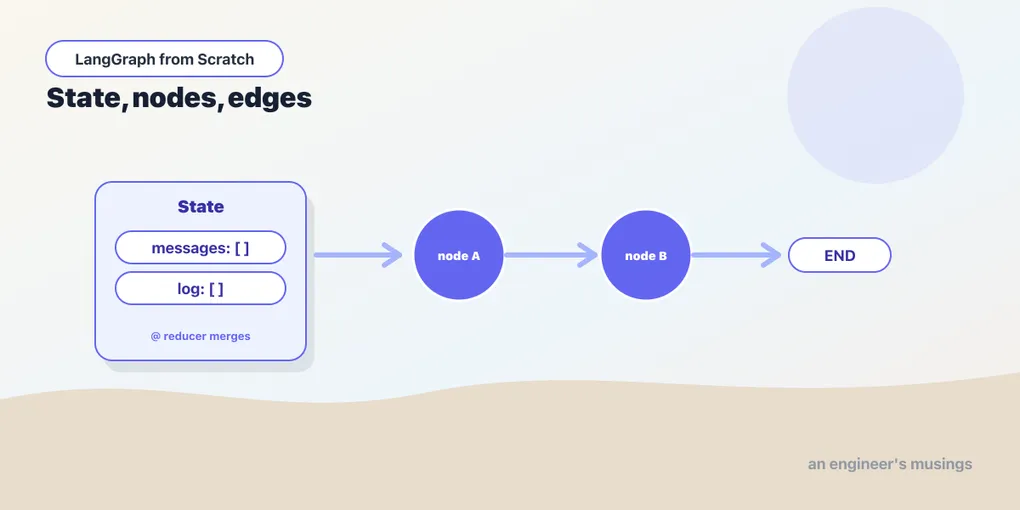
Everything so far has been a straight pipe: data in one end, out the other. A graph is what you reach for when the flow branches, loops, or pauses — and Chapter 1 showed that even a create_agent is one of these underneath. This is the chapter where “an agent is a graph” stops being a slogan and becomes something you build with your hands. We construct a StateGraph from an empty constructor up. Once its three pieces — state, nodes, edges — click, every advanced feature in the rest of the series is a small variation on them. Run against langgraph 1.2.9.
Why a graph needs state
A single model call is stateless — messages in, a message out. But a real process has steps: retrieve, then reason, then call a tool, then answer. Those steps need somewhere to leave notes for each other — the retrieved context, the conversation, a flag saying “the human approved.” That shared notebook is the state, and it’s the first thing that separates a graph from a pipe. In a pipe, each stage’s output is simply the next stage’s input; there’s no shared scratchpad. In a graph, every node reads from and writes to one shared, typed state. That’s what lets a later node use what an earlier one figured out, even across a loop or a pause.
So a LangGraph program is three things:
- State: a shared, typed object every node can read and write — the graph’s working memory.
- Nodes: functions that take the state and return an update to it.
- Edges: the wiring that says which node runs next.
You define the state’s shape, write the nodes, connect them with edges, and compile(). That’s the entire model. Let’s build one.
State is a typed schema
The state declares the named channels the graph carries. The common form is a TypedDict:
from typing import TypedDict

class State(TypedDict):
    question: str
    answer: str
Each key is a channel — a named slot nodes read from and write to. The compiled graph’s input and output are dicts of this shape. Think of it as a small, explicit set of labeled slots, not a bag of loose variables. Naming the channels up front is what lets LangGraph route data between nodes and merge their updates predictably.
You can also declare state as a Pydantic model, which buys you input validation — the graph rejects an invocation whose input doesn’t match the types:
from pydantic import BaseModel

class State(BaseModel):
    question: str
    answer: str = ""
One verified wrinkle: even with a Pydantic state schema, the graph’s output is still a plain dict, not a model instance. The schema validates and shapes input, but you read results with result["answer"], not result.answer. Use a TypedDict for simplicity (this series’ default), and Pydantic when you want the input validation. The graph behaves the same either way.
Nodes return partial updates
A node is a function from state to a partial update — a dict of just the channels it wants to change. It does not mutate the state in place, and it does not return the whole state; it returns only its delta:
def answer_node(state: State) -> dict:
    q = state["question"]
    return {"answer": f"You asked: {q}"}   # only touches the 'answer' channel
Returning a partial update is the key discipline, and it’s what makes nodes composable. answer_node reads question and writes answer; it says nothing about question, so question is left untouched. Each node declares only what it produces, and LangGraph merges those declarations into the evolving state. This is different from ordinary function-calling, where you’d thread the whole state through every call. Here a node is a small, focused transform that announces its one contribution and ignores the rest.
Edges wire it together
Edges connect nodes. Two sentinels, START and END, mark where execution enters and leaves:
from langgraph.graph import StateGraph, START, END

builder = StateGraph(State)
builder.add_node("answer", answer_node)
builder.add_edge(START, "answer")
builder.add_edge("answer", END)

graph = builder.compile()
graph.invoke({"question": "what is a graph?", "answer": ""})
# {'question': 'what is a graph?', 'answer': 'You asked: what is a graph?'}
The string "answer" is the node’s name — how edges refer to it and how it shows up when you draw the graph. compile() returns a CompiledStateGraph, and — the through-line from Chapter 3 — it’s a Runnable. It has invoke, stream, and batch. So a graph drops into any place a chain would, and a chain drops into a graph as a node. The two systems are one substrate; the graph just adds the branches and loops the pipe couldn’t express.
Reducers: overwrite, merge, or your own rule
Here is the concept that separates people who “get” LangGraph from people who fight it. When a node returns an update to a channel, what happens to the value already there? By default it’s overwritten — the new value replaces the old:
class State(TypedDict):
    value: int   # plain channel: each write overwrites
If node A writes value=1 and node B writes value=2, the final value is 2. Last write wins. That’s right for a channel holding a single current value, like answer. It’s exactly wrong for a channel that should accumulate — a log, a list of results, a conversation. For those you attach a reducer: a function that says how to combine the old value with the new. You declare it with Annotated:
from typing import Annotated
import operator

class State(TypedDict):
    value: int                               # overwrite
    log: Annotated[list[str], operator.add]  # merge by concatenation
Now a write to log appends instead of replacing, because operator.add on lists concatenates. Verified: with node A returning {"value": 1, "log": ["a"]} and node B returning {"value": 2, "log": ["b"]}, the final state is value=2 (overwritten) and log=['a', 'b'] (merged). The channel’s type annotation decides its behavior. So getting the reducer right is the difference between a graph that does what you mean and one where a list mysteriously keeps resetting to a single element.
A reducer is just a function (old, new) -> merged, so you can write your own when neither overwrite nor append fits. Say a channel should keep the highest value any node has written:
def keep_max(old: int, new: int) -> int:
    return max(old, new)

class State(TypedDict):
    high_score: Annotated[int, keep_max]
Verified: a node writing 6 over an existing 3 on a keep_max channel leaves 6; writing 2 over 6 would leave 6. Custom reducers are how you express “these updates combine this way.” They become essential the moment two nodes write the same channel at once. That’s exactly what happens with the parallel fan-out in Chapter 13, where concurrent writers must have a reducer or their updates would clobber each other.
The message reducer
The channel you’ll carry in almost every real graph is the conversation, and it gets a purpose-built reducer, add_messages:
from typing import Annotated
from langgraph.graph.message import add_messages

class State(TypedDict):
    messages: Annotated[list, add_messages]
add_messages does more than append, and the “more” is worth knowing. It appends new messages, yes — but it also updates an existing message by id. Verified: reducing [AIMessage("v1", id="x")] with [AIMessage("v2", id="x")] yields a single message with content "v2", not two. That upsert-by-id behavior is what lets a node revise a message the graph already holds rather than duplicating it — streaming a partial then finalizing it, or correcting a tool result. For any graph that talks to a model, which is most of them, Annotated[list, add_messages] is the messages channel you want. It’s exactly the channel create_agent uses internally.
A graph with two nodes
Put it together with state that carries a message list and accumulates a log:
from typing import Annotated, TypedDict
import operator
from langgraph.graph import StateGraph, START, END
from langgraph.graph.message import add_messages
from langchain_core.messages import AIMessage

class State(TypedDict):
    messages: Annotated[list, add_messages]
    log: Annotated[list[str], operator.add]

def greet(state):    return {"messages": [AIMessage("hello")],   "log": ["greet"]}
def farewell(state): return {"messages": [AIMessage("goodbye")], "log": ["farewell"]}

g = StateGraph(State)
g.add_node("greet", greet)
g.add_node("farewell", farewell)
g.add_edge(START, "greet")
g.add_edge("greet", "farewell")
g.add_edge("farewell", END)
app = g.compile()

result = app.invoke({"messages": [], "log": []})
# messages: [AIMessage('hello'), AIMessage('goodbye')]   (add_messages appended both)
# log:      ['greet', 'farewell']                        (operator.add appended both)
Two nodes, run in sequence, each returning a partial update; the reducers merged those updates into the growing state. There’s no hidden machinery. The entire execution is “run the node, apply its update through the reducers, follow the edge to the next node,” repeated until END. Hold that loop in your head, and the rest of Act 2 is small additions to it: a conditional edge (which node next?), a checkpointer (save the state), an interrupt (pause the loop).
Final thoughts
A StateGraph is a typed state, nodes that return partial updates, and edges that order them, compiled into a Runnable that behaves like any chain. State can be a TypedDict or a validating Pydantic model, and either way you read results as a dict. The one idea that repays real attention is the reducer. A plain channel overwrites; an Annotated channel merges with the function you name (operator.add, add_messages, or your own). That choice is what makes concurrent and accumulating updates behave. Get the state schema and its reducers right and everything downstream — routing, persistence, human pauses, streaming, multi-agent — is just more nodes and edges over that same state. You have the substrate. Next we make it branch.
Next: routing and cycles — conditional edges that pick the next node from state, and the loop that turns a graph into an agent.
Comments