Held Together by Strings: Namespaces, Labels, and Selectors
Kubernetes has almost no hard-coded relationships — a Service finds pods by label, and a quota can silently refuse every one of them.
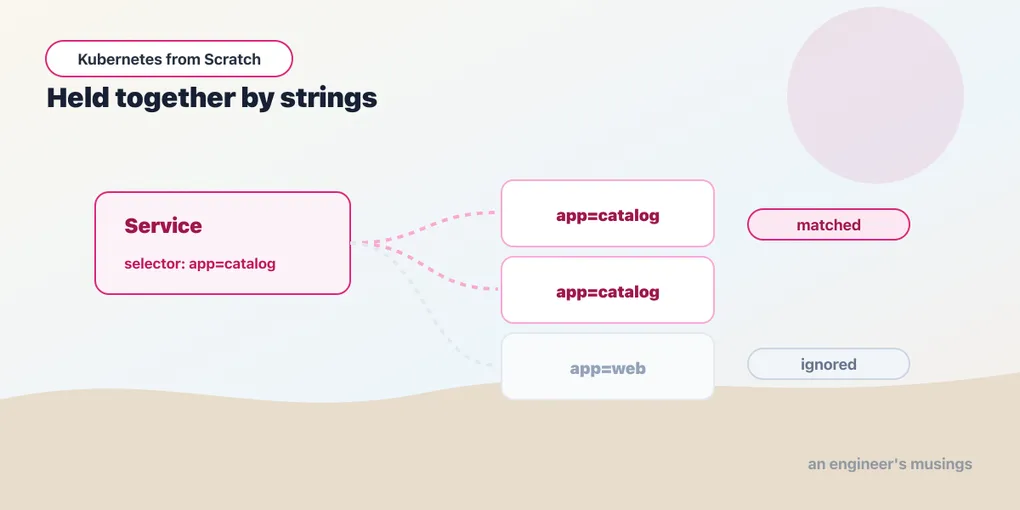
Someone on the team tidies the manifests. The app: catalog label looks amateurish next to the officially recommended app.kubernetes.io/name: catalog, so they change it — in the Deployment’s pod template, in the Service selector, everywhere, consistently. The diff is clean. The review is a thumbs-up. The apply goes green.
And the storefront starts returning 502s, because the catalog Service now has zero endpoints. Every catalog pod is Running. Every one of them is 1/1. Every one of them answers /books correctly if you port-forward straight to it. Nothing is broken, except that the Service can no longer find the pods it is supposed to be in front of, and the only reason it ever could was a string.
That is the whole subject of this chapter. In Kubernetes, almost nothing is wired to anything else by a reference. There is no foreign key from a Service to its pods, no pointer from a Deployment to the pods it manages, no membership list anywhere — there is a query. A Service says “route to whatever matches app=catalog” and the control plane goes and looks. Get the string wrong and the query returns nothing — which is not an error, because an empty result is a perfectly valid result.
The label model is the API
Look at what the bookshop’s catalog manifest actually says. The Deployment:
spec:
  selector:
    matchLabels:
      app: catalog
  template:
    metadata:
      labels:
        app: catalog
        part-of: bookshop
And the Service, in the same file:
kind: Service
metadata:
  name: catalog
spec:
  selector:
    app: catalog
The Deployment and the Service never mention each other. They do not have to. They both mention app: catalog, and that shared string is the entire connection between “the thing that keeps two replicas running” and “the thing that gives them a stable address”. The pods themselves have no idea either of these objects exist.
Once you see it, you see it everywhere. A ReplicaSet adopts pods that match its selector. A NetworkPolicy allows traffic to pods that match a podSelector, from pods that match another one, in namespaces that match a namespaceSelector. A PodDisruptionBudget protects pods that match a selector. Node affinity selects nodes — by their labels, naturally. And kubectl get pods -l app=catalog is not a convenience wrapper over some internal list — it is exactly the same query the Service runs, typed by you instead of by the endpoints controller.
One structural link is not a label, and it deserves a name so you do not go hunting for it later: owner references. When a ReplicaSet creates a pod, it stamps an ownerReferences entry on that pod pointing back at itself, and the garbage collector uses it to cascade-delete the pods when the ReplicaSet goes away. So deletion follows the ownership pointer, while selection — who belongs to whom, right now — follows the label. The two can disagree. Delete a ReplicaSet with --cascade=orphan and its pods survive with their labels intact but their owner gone; they are now orphans, matching a selector that nothing claims. The next ReplicaSet whose selector matches them will adopt them — stamp its own ownerReferences on them and count them toward its replica total, which is how you can scale a Deployment to three and get one new pod instead of three. I did not stage an orphan in the lab, so treat that mechanism as described rather than demonstrated. The split it rests on — ownership for deletion, labels for selection — is real, and it is the thing to remember.
Labels versus annotations
Both are map[string]string on metadata. They are not interchangeable, and the difference is one word: queryable.
A label is indexed by the API server. You can select on it, and so can every controller in the cluster. That power costs you constraints — keys and values are limited to 63 characters, values must be alphanumeric with dashes, dots and underscores in the middle, and there is no room for a JSON blob or a paragraph of prose. Labels are for identity — what is this thing, what does it belong to, which release is it from.
An annotation is not indexed and cannot be selected on. In exchange it will hold anything — a multi-line certificate, a checksum, an entire JSON document, a link to a runbook. Annotations are for tools and humans: kubectl.kubernetes.io/last-applied-configuration (how kubectl apply remembers what it last sent), the pile of nginx.ingress.kubernetes.io/* keys that configure an ingress controller, the checksum/config annotation Helm charts use to force a rollout when a ConfigMap changes.
The rule is short. If you will ever want to write -l on it, it is a label. If it is data about the object rather than the object’s identity, it is an annotation. Putting a git commit SHA on a pod as a label is fine and useful — putting the commit message on as a label is a rejected object.
Selectors, against a real cluster
The bookshop namespace has six pods: two catalog, one orders, two web, one postgres. Every one of them carries part-of: bookshop on the pod template, and its own app label. Here is what the selector language does with that, run against Kubernetes 1.36.1:
kubectl get pods -n bookshop -l app=catalog                # -> 2 pods
kubectl get pods -n bookshop -l 'app in (catalog,orders)'  # -> 3 pods
kubectl get pods -n bookshop -l 'app!=web'                 # -> 4 pods
kubectl get pods -n bookshop -l part-of=bookshop           # -> 6 pods
kubectl get pods -n bookshop -l '!part-of'                 # -> 0 pods
The first is equality-based — key equals value. The second and third are set-based: in, notin, and !=, plus the two existence forms — a bare key means “this label exists” and !key means “this label is absent”. That last query is the one to internalize. -l '!part-of' returns zero because every pod in the namespace has the label, and it is the fastest way to find the thing you forgot to label — apply your labelling convention, then ask the cluster which pods do not have it. A non-empty answer is a bug.
Not every field accepts both dialects. A Service’s spec.selector is a plain map — equality only, ANDed together. There is no matchExpressions there and there never has been; if you need “route to canary or stable”, you do it with a label both of them carry, not with a set-based selector. Deployments, ReplicaSets, NetworkPolicies, PDBs and Jobs use the richer LabelSelector type, which has both matchLabels and matchExpressions, and ANDs everything together. Multiple selector terms are always AND. There is no OR in a selector except through in (...) on a single key. Design your labels knowing that.
The label every Deployment adds behind your back
Ask a catalog pod what labels it has and there is one you never wrote:
app=catalog,part-of=bookshop,pod-template-hash=77cbd47878pod-template-hash is a hash of the pod template, computed by the Deployment controller and stamped onto the ReplicaSet and every pod it creates. You did not put it there, you cannot usefully set it yourself, and it is the reason rollouts work at all.
Here is the mechanism. A Deployment does not manage pods — it manages ReplicaSets, one per version of the pod template. When you change the image from bookshop:v1 to bookshop:v2, the template changes, so the hash changes, so the Deployment creates a new ReplicaSet — and that ReplicaSet’s selector is your selector plus pod-template-hash=<its own hash>. Now the old ReplicaSet and the new one are both watching the cluster for pods matching app=catalog, and they do not fight over each other’s pods, because each one’s selector also pins the generation. Without that extra label, the old ReplicaSet would see the new pods, count them toward its own replica target, and immediately delete a few of them. The hash is what keeps two generations of the same Deployment from eating each other.
Now notice what the Service selects on: app: catalog, and nothing else. It has no hash in it. So during a rollout, the Service’s endpoints span both generations at once — old pods and new pods, in the same load-balancing pool, at the same time. That is not a bug; it is the definition of a rolling update. It is also exactly why the chapter on Deployments could show a default rolling update dropping live requests: the Service is happily selecting a pod that the kubelet is already terminating, because the label still matches and the endpoint has not yet been withdrawn from every node.
Two practical consequences. Never put pod-template-hash in a selector you write — it is an implementation detail and it changes on every deploy. And when you are debugging a stuck rollout, kubectl get rs -n bookshop and reading the hashes is how you tell which generation is which.
The selector is immutable, and this will hurt you
So the labels are the wiring. The natural next question is: can I rewire a running Deployment? Try it. Patch the selector and the template labels together, so they stay consistent — the honest version of the change, not a half-edit:
The Deployment "catalog" is invalid: spec.selector: Invalid value:
{"matchLabels":{"app":"catalog2","part-of":"bookshop"}}: field is immutable
A Deployment’s spec.selector cannot be changed after creation. Not with apply, not with patch, not by being careful. The only way to change it is to delete the Deployment and create it again — which means the pods go away and come back, which means downtime unless you orchestrate it, which means the tidy-up nobody scheduled is now a change-managed event.
The reason is the adoption logic above: a running ReplicaSet’s ownership of its pods is defined by the selector, and letting you mutate it mid-flight would let a Deployment silently disown a set of live pods with nothing left to manage them. Kubernetes chose “you cannot” over “here be dragons”.
The consequence for you is a design rule, and it is one of the few in Kubernetes that is genuinely irreversible: decide your label scheme before you ship. Keep the selector minimal and permanent — one or two keys that identify the workload and will never change, like app: catalog. Put everything volatile — version, release, env, team, commit — on the pod template as labels outside the selector, where you can freely change them and still select on them with kubectl. A selector containing version: v1 is a Deployment you can never upgrade.
This lands again later. The packaging chapter migrates the bookshop’s Kustomize base from the deprecated commonLabels to the modern labels field, and the two do not behave the same: commonLabels injects its labels into selectors, labels does not by default. Change one to the other on a live cluster and the computed selector changes, and the apply fails with the exact error above. The fix is the same as it is here — delete and recreate — and it is a genuinely unpleasant thing to discover during a production upgrade.
Which naming scheme should you pick? The community’s answer is the app.kubernetes.io/* set — name, instance, version, component, part-of, managed-by. They are verbose, they are what Helm charts emit by default, and they are what dashboards expect. This book uses short bare keys (app, part-of) because they fit in a code block and read out loud, and that is a trade this book is making on purpose. Whatever you pick, pick it once, and put the selector keys in the category of decisions you make like you mean it.
Namespaces: what they scope, and what they very much do not
A namespace is a name for a slice of the cluster. It scopes four things that matter:
Names. Two objects of the same kind can share a name if they are in different namespaces. catalog in bookshop and catalog in bookshop-staging are different Deployments, and that is the everyday reason namespaces exist — you can run the same manifests twice.
RBAC. A Role and RoleBinding grant permissions inside one namespace. This is the real mechanism behind “the payments team can deploy to payments and nowhere else” — the chapter on RBAC takes it apart.
Quotas and limits. ResourceQuota and LimitRange are namespaced objects that apply to everything created in that namespace. That is most of the rest of this chapter.
DNS. A Service gets <service>.<namespace>.svc.cluster.local. In the same namespace you can just say catalog — from another namespace you need catalog.bookshop.
Now the part people get wrong. A namespace is not a security boundary, and it is not an isolation boundary. It does not stop traffic. Pods in namespace A can open a TCP connection to pods in namespace B by default, and the chapter on Services showed exactly that: a fully qualified DNS name reaches straight across. The default Kubernetes network model is flat — every pod can reach every other pod’s IP, everywhere in the cluster, regardless of namespace. A namespace changes what a name resolves to; it does not change what a packet can reach.
Isolation is something you add: a NetworkPolicy to control traffic, RBAC to control the API, a ResourceQuota to control consumption, and — if you actually mean multi-tenancy with untrusted tenants — probably separate clusters, because a shared kernel and a shared control plane leave a lot of surface. “We put them in different namespaces” is a statement about naming, not about safety.
Not everything is namespaced, either. Nodes, PersistentVolumes, StorageClasses, ClusterRoles, and CustomResourceDefinitions are cluster-scoped — they exist once, for everyone. Run kubectl api-resources --namespaced=false once against your cluster: it prints precisely which objects a namespace-scoped tenant can still see and, if you are careless with RBAC, edit.
The centrepiece: a quota that eats every pod and says nothing
Here is the failure this chapter exists for. Make a namespace and give it a small quota — two pods, and 200 millicores of total CPU requests:
apiVersion: v1
kind: ResourceQuota
metadata:
  name: caps
  namespace: tiny
spec:
  hard:
    pods: "2"
    requests.cpu: 200m
Now deploy something into it. Not a hand-crafted manifest — the laziest possible thing, the command every engineer has typed:
kubectl create deploy over --image=bookshop:v1 --replicas=3 -n tinyThe container in that Deployment sets no CPU request, because kubectl create deploy does not set one. Here is what you get:
Zero of three pods. Not two — which is what the pods: "2" line would lead you to expect. Zero. And kubectl get deploy -n tiny shows this:
over 0/3That is it. No error. No warning. The Deployment object is healthy, the apply succeeded, and the readout looks like a cluster that is merely slow — like an image is still pulling, like a node is busy. Wait five minutes and it says the same thing. The kubectl create command exited zero.
The truth is two objects down. kubectl describe rs -n tiny — the ReplicaSet, not the Deployment — has it in its events:
Error creating: pods "over-79f449f8d4-n9782" is forbidden: failed quota: caps:
must specify requests.cpu for: bookshop
Read the message carefully, because every noun in it is doing work. caps is the name of the ResourceQuota. bookshop is the name of the container — kubectl create deploy derived it from the image name. And the demand is the surprising part: not “you exceeded the quota”, but “you must specify a CPU request”.
That is the key fact, and it is the thing about ResourceQuota that nobody tells you: once a namespace has a quota on requests.cpu, a CPU request becomes mandatory for every pod in that namespace. The quota cannot count what you did not declare, so it refuses to admit the pod at all. It is not a limit you can bump into — it is a schema you must now satisfy.
You can see it plainly by skipping the Deployment and creating a bare pod with no requests:
Error from server (Forbidden): pods "norequest" is forbidden: failed quota: caps:
must specify requests.cpu for: norequest
Same rejection, but look at where it landed: on your terminal, synchronously, in red. You asked the API server for a pod and it said no, to your face.
That contrast is the general lesson, and it is much bigger than quotas. When you create an object directly, admission errors come back to you. When a controller creates it on your behalf, they do not. The ReplicaSet controller is the one being told no, over and over, and it does what controllers do with a failure: it records an event, backs off, and tries again. Your Deployment is not failed, because the Deployment is fine — it faithfully created a ReplicaSet. The ReplicaSet is not failed either; it is retrying. Nothing in the chain is in an error state, and so nothing surfaces an error. The system is behaving correctly and telling you nothing.
This is why kubectl get events -n <ns> --sort-by=.lastTimestamp is not a debugging trick — it is the first thing you type when a controller-owned object “looks slow”. Slow and forbidden are indistinguishable from the top.
LimitRange: the thing that ships with the quota
If a quota on requests.cpu makes requests mandatory, and most manifests in the wild do not set requests, then a quota on a shared namespace will reject most of what people try to deploy into it — and reject it silently, through the mechanism above. The standard answer is to pair the quota with a LimitRange, which supplies the defaults the quota now insists on:
apiVersion: v1
kind: LimitRange
metadata:
  name: defaults
  namespace: tiny
spec:
  limits:
    - type: Container
      defaultRequest:          # applied when the container sets no request
        cpu: 50m
        memory: 64Mi
      default:                 # applied when the container sets no limit
        cpu: 200m
        memory: 128Mi
      max:                     # a ceiling nobody in this namespace may exceed
        cpu: "1"
        memory: 512Mi
A LimitRange is a mutating and validating admission step on pod creation. defaultRequest fills in a request the author omitted, default fills in a limit, and min and max reject anything outside the band — three jobs, one object. With that object in the namespace, the same lazy kubectl create deploy now produces pods that do have a CPU request — 50m each — and the quota can count them. (It would then admit two pods and refuse the third, hitting pods: "2" for real, which is the failure you wanted in the first place.)
I verified the failure in the lab; I did not re-run the whole scenario with the LimitRange in place, so treat the manifest above as documented behavior rather than as something this chapter watched work. What is verified, and what you should carry away, is the shape of the problem: a ResourceQuota without a LimitRange is a trap for everyone who deploys into that namespace, and the trap is silent. If you are the person adding quotas to a shared cluster, add both, in the same commit, or you will spend the next week explaining why nothing deploys.
Two more things about quotas, before you meet them in anger. They cover more than CPU and memory — requests.storage, persistentvolumeclaims, and object counts (count/deployments.apps, count/services, count/secrets) are all quotable, and object-count quotas are how a platform team stops one namespace from creating fifty thousand ConfigMaps and hurting etcd. And a quota is evaluated at admission, against the sum of what is currently admitted — so raising a quota does not retroactively schedule the pods it previously refused, it just lets the retrying controller finally succeed on its next attempt. Which, mercifully, it will — because it never stopped trying.
Final thoughts
The thing that makes Kubernetes composable is that it refuses to know what belongs to what. A Service does not have a list of pods — it has a question. A NetworkPolicy does not have a list of clients — it has a question. That is why you can drop a new controller into a cluster and have it work on objects that were created years before it existed — it just asks the same question everyone else is asking, and the answer is a set of labels that were already there.
The bill for that flexibility comes due in two places, and both are in this chapter. The first is that a typo is not an error — it is an empty set, and an empty set is a valid answer that no component will complain about. The second is that the one string you most need to get right, the selector, is the one string you are not allowed to change. Kubernetes will let you rename almost anything except the thing that says who you are.
So spend the twenty minutes. Pick the label keys, write them down, put the volatile ones outside the selector, and put a LimitRange next to every ResourceQuota. Then go and look at what happens to a pod that is correctly labelled, correctly quota’d, and still refuses to run — because the next chapter is about the scheduler, and Pending is a word it will say to you for hours without ever once calling it an error.
Next: Pending Forever: What the Scheduler Is Really Telling You
Comments