ConfigMaps and Secrets: One Edit, Three Different Answers
Change one ConfigMap key and three consumers of it behave three different ways — one updates about a minute later, one updates never, and one updates never but looks identical in the YAML.
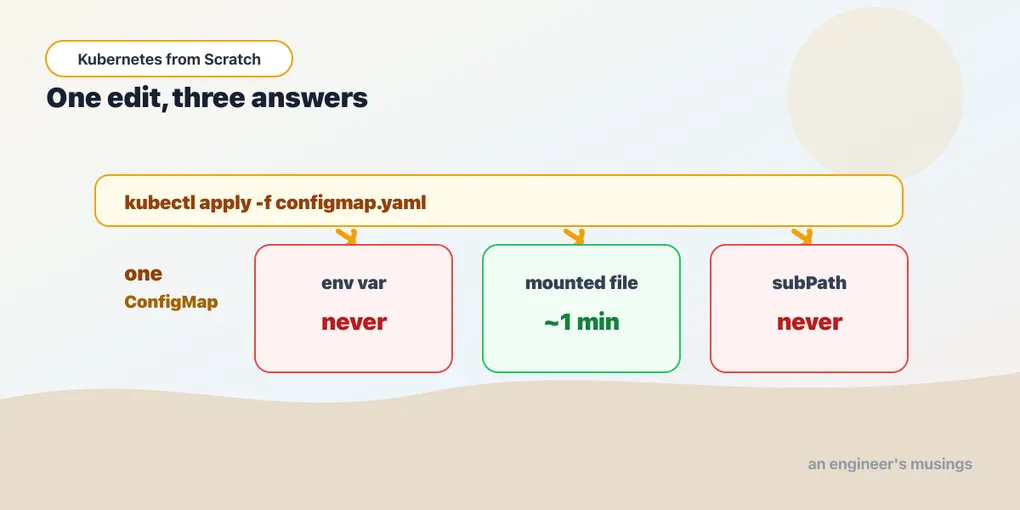
Someone edits a ConfigMap to change the storefront banner for a sale. kubectl apply -f config.yaml. They refresh the page: old banner. Refresh again: old banner. They start to type out a question in Slack, refresh once more out of habit — and there it is, the new banner, with no restart and no explanation for the delay. Delightful, if slightly unnerving. So they change the greeting in the same file, apply again, and settle in to wait the same minute. The greeting does not change. It stays the old one at five minutes. They restart the Deployment “just in case”, the greeting is right, and they conclude that ConfigMap updates take a restart — which is almost true, and they file it away.
Two weeks later a different service reads its banner through a subPath mount, and that one never updates at all — not on the file change, not after a minute, not ever. Only after a restart. So the rule becomes “you always need a restart”, which is also almost true, and also wrong, and the person who wrote both rules is now confidently wrong in two directions.
Those three behaviours are all real, they all happen on the same cluster, from the same ConfigMap, in the same pod, at the same time. This chapter runs them side by side and watches. Everything here was executed against the lab cluster — kind v0.32.0, Kubernetes 1.36.1 — and one of the results contradicts advice you will find repeated on a hundred pages, so I’ll show you the raw evidence for that one.
Configuration is just data with a name
A ConfigMap is a named bag of key/value pairs in a namespace. That’s it. It has no schema, no type system, no validation. Kubernetes does not know or care what the values mean.
apiVersion: v1
kind: ConfigMap
metadata:
  name: bookshop-config
data:
  GREETING: "The Bookshop"
  CURRENCY: "$"
  banner.txt: "Free shipping on orders over 30"
A Secret is the same object with two cosmetic differences — the values are base64-encoded in the API, and the kind is called Secret. We’ll get to what that does and doesn’t buy you (the short version is “less than you think”), but first, the thing that actually determines your operational life: how a pod consumes this data. Not where it’s stored. How it’s consumed.
The bookshop’s Secret is created imperatively, because checking a Secret into git is a category of mistake this book would rather not model:
kubectl create secret generic bookshop-secrets -n bookshop \
  --from-literal=API_KEY=sk-live-abcd1234 \
  --from-literal=PGPASSWORD=s3cret
There are exactly three ways to get that data into a container, and they behave completely differently. The rest of this chapter is that sentence, demonstrated.
Way one: environment variables
The web service takes its greeting, currency, and API key as environment variables, and it takes them wholesale:
envFrom:
  - configMapRef:
      name: bookshop-config
  - secretRef:
      name: bookshop-secrets
envFrom says “every key in that object becomes an environment variable” — no mapping, no list, no maintenance when you add a key. The alternative is env: with a valueFrom.configMapKeyRef per variable, which is more typing and buys you two things: you can rename a key on its way in, and you can pull a single key out of a large ConfigMap without dragging the rest of it into the process environment. Use envFrom when the object exists to configure that one workload — use env/valueFrom when you’re picking one value out of something shared.
Then the Go code does the least surprising thing possible:
"Greeting": bookshop.Env("GREETING", "The Bookshop"),Which is the entire point. The application reads environment variables, exactly like it would on a laptop, and knows nothing about Kubernetes.
$(VAR) expansion, and why order matters
There’s a feature here people miss, and the catalog service uses it. The database password is sensitive, so it comes from the Secret. The rest of the DSN — host, port, database, sslmode — is not sensitive, and putting it in the Secret would mean base64-ing a connection string to hide a hostname nobody cares about. So catalog composes them:
env:
  - name: PGPASSWORD
    valueFrom:
      secretKeyRef:
        name: bookshop-secrets
        key: PGPASSWORD
  - name: DATABASE_URL
    value: postgres://bookshop:$(PGPASSWORD)@postgres:5432/bookshop?sslmode=disable
Kubernetes expands $(PGPASSWORD) in an env value using the variables already declared in the same list. Verified in the lab: it expands, catalog authenticates to Postgres, and the storage chapter’s five books come back over that connection. And the constraint in that sentence is load-bearing — order matters. The referenced variable must appear earlier in the env list. Reference one that hasn’t been declared yet and the expansion doesn’t happen; you get the literal $(PGPASSWORD) in your connection string, and a password-authentication failure that looks like the Secret is wrong when the Secret is fine. It is one of the few places in Kubernetes YAML where list order is semantic rather than cosmetic.
I ran both halves of that, because a rule about ordering is exactly the kind of thing people repeat without testing. Declaring EARLY before the LATE it references:
EARLY = url://user:$(LATE)@host
LATE  = s3cret
The reference is left as a literal string. Not an error, not a warning, not an empty value — the characters $(LATE), passed to your database driver as if they were a password. That is the failure this rule protects you from, and it looks exactly like a wrong Secret.
And here is one that surprised me, and that contradicts a thing I have read more than once: variables arriving via envFrom are available for $(...) expansion. With GREETING coming in from the ConfigMap through envFrom, and a separate env: entry referencing it:
GREETING     = The Bookshop (SUMMER SALE)
FROM_ENVFROM = greeting=The Bookshop (SUMMER SALE)
It expanded. So the rule is not “only explicitly-declared variables can be referenced” — it is narrower and simpler than that: you can reference anything that is already known when your entry is evaluated, which means everything from envFrom, plus the env: entries above you in the list. Order within env: is what bites; envFrom is fine. (Verified on Kubernetes 1.36.1. If you have read otherwise, so had I.)
Way two: a file
The banner is different. It’s a piece of content, not a knob, and the bookshop deliberately consumes it as a file:
volumeMounts:
  - name: config
    mountPath: /etc/bookshop
volumes:
  - name: config
    configMap:
      name: bookshop-config
That mounts the ConfigMap as a directory. Every key becomes a file whose name is the key and whose content is the value — so /etc/bookshop/banner.txt exists, and the app reads it:
func banner() string {
	b, err := os.ReadFile(bookshop.Env("BANNER_FILE", "/etc/bookshop/banner.txt"))
	if err != nil {
		return "(no banner mounted)"
	}
	return strings.TrimSpace(string(b))
}
Note the fallback. A missing file is a design decision, not a crash. (In the lab I only ever read banner.txt out of that directory; the other two keys are projected as files there too, per the projection rules, but I didn’t go looking at them.)
Way three: a subPath mount, which is the trap
Sometimes you don’t want a directory. You want to drop one file into a directory that already has other things in it — an nginx conf into /etc/nginx/conf.d, an application.yaml into an app’s config dir — and a plain ConfigMap mount would replace that whole directory with only your keys, hiding everything the image shipped. That is a genuinely destructive behaviour and it surprises people. The escape hatch is subPath:
volumeMounts:
  - name: config
    mountPath: /etc/sub/banner.txt
    subPath: banner.txt
Four lines instead of two. Same volume, same ConfigMap, same key. Reads like a minor variation on the previous block. It is not a minor variation, and the next section is why.
The experiment: change the ConfigMap and touch nothing else
Both mounts are live in the web pod at once — the directory mount at /etc/bookshop/banner.txt, the subPath mount at /etc/sub/banner.txt — and GREETING is in the environment via envFrom. Three consumers of one ConfigMap.
Now edit the ConfigMap. GREETING goes from The Bookshop to The Bookshop (SUMMER SALE); banner.txt goes from Free shipping on orders over 30 to HALF PRICE TODAY. Apply it. Do nothing else — no rollout, no delete, no restart. Then poll the running pod for ninety-five seconds:
t+5s    env=The Bookshop   file=Free shipping on orders over 30   subPath=Free shipping on orders over 30
t+35s   env=The Bookshop   file=Free shipping on orders over 30   subPath=Free shipping on orders over 30
t+70s   env=The Bookshop   file=HALF PRICE TODAY                  subPath=Free shipping on orders over 30
t+95s   env=The Bookshop   file=HALF PRICE TODAY                  subPath=Free shipping on orders over 30
Three columns, three outcomes, one edit.
The environment variable never updates. Not at 95 seconds, not at 95 minutes. It is stale for the entire life of the process, and the reason is not a Kubernetes design decision so much as a Unix one: a process’s environment is handed to it at execve time. There is no mechanism, in Linux, by which an outside party changes the environment of a running process. The kubelet could not update GREETING in that container if it wanted to. Nothing is polling, nothing is retrying, nothing is broken — the value was copied into the process at birth and the ConfigMap is not consulted again.
The mounted file updates in place — with no restart, no rollout, and no signal. The banner() function reads the file on each request, so the storefront’s banner changed while the process kept running. That is the thing files buy you that env vars cannot.
But look at when it changed: it was still stale at 35 seconds and fresh by 70. Not instant. This is the number I got wrong the first time I ran this experiment, and the tempting summary — “mounted files update immediately” — is false in a way that will hurt you. The kubelet does not watch the ConfigMap and pounce; it refreshes projected volumes on a periodic sync, whose documented default is a minute, with an API-server cache in front of it. So the honest statement is: a mounted ConfigMap is eventually consistent, on the order of a minute. Do not build anything that needs the new value to land by a deadline. Build things that tolerate a stale value for a minute, or force a rollout and be sure.
The subPath mount never updates. Ever. Ninety-five seconds in, the file at /etc/sub/banner.txt still says Free shipping on orders over 30, and it will still say that in an hour. Only a new pod fixes it.
That is the trap, and it is a nasty one, because look at the two mounts again — they differ by one field. Same volume. Same key. Same ConfigMap. In a code review, subPath: banner.txt reads like a detail — a path tidy-up, at most. In production it is the difference between “config changes take effect” and “config changes take effect after a restart that nobody scheduled”, and the gap between those two sentences is where an incident lives.
The mechanism, as I understand it — and I verified the behaviour, not the internals — is that a projected ConfigMap volume is updated by writing the new content into a fresh hidden directory and atomically flipping a symlink, so a reader never sees a half-written file. A subPath mount doesn’t participate in that: it bind-mounts one specific file at container start, and the bind survives the symlink flip pointing at the old content. The volume moved on; the bind didn’t.
So: if you need live updates, do not use subPath. If you must use subPath (because the target directory has to keep its other files), accept that you have chosen restart-to-update semantics, and write that down in a comment next to the mount, because the next person will not infer it from four lines of YAML.
Making env vars update: stamp a checksum
Since the environment can’t change under a running process, the only way to pick up a new value is a new process — which means a new pod, which means a rollout. And a rollout only happens when the pod template changes.
Editing a ConfigMap does not change the pod template. From the Deployment’s point of view, nothing happened, so it does nothing. Correctly. Which is exactly why kubectl apply -f config.yaml appears to do nothing at all.
The standard fix is to make the pod template change whenever the config does, by stamping a hash of the config into an annotation on the template:
SUM=$(kubectl get cm bookshop-config -n bookshop -o jsonpath='{.data}' | shasum | cut -c1-12)

kubectl patch deploy web -n bookshop -p \
  "{\"spec\":{\"template\":{\"metadata\":{\"annotations\":{\"config/checksum\":\"$SUM\"}}}}}"
The annotation’s value is meaningless — nothing reads it. Its only job is to be different when the ConfigMap is different, so that the Deployment sees a changed template and does what Deployments do. Verified in the lab: the pods roll, and the new pods come up with GREETING = The Bookshop (SUMMER SALE).
If that feels like a hack, it is one, and it’s the sanctioned hack. Helm charts do exactly this in a template (checksum/config: {{ include ... | sha256sum }}), Kustomize does the moral equivalent by appending a content hash to the ConfigMap’s name so that changing the data changes the name and therefore the pod spec that references it, and the packaging chapter revisits both. The mechanism underneath is always the same: force the template to change, because the template is the only thing a Deployment watches.
rollout status can report success too early
One thing bit me while running this, and it will bite anyone who scripts it. Immediately after the kubectl patch, kubectl rollout status reported success — for the previous generation. The Deployment controller had not yet observed the new spec, so from its point of view the old rollout was complete and everything was fine. A curl right after that “success” hit an old pod with the old greeting.
rollout status is not lying; it is answering about the state it has seen. If you script config-triggered rollouts in CI, wait on .status.observedGeneration catching up to .metadata.generation, or check the pod-template hash on the pods, rather than trusting an immediate rollout status. This is the same class of trap as the dropped requests in the rollout chapter: the tooling reports success against a question slightly narrower than the one you asked.
The surprise: banner.txt as an environment variable
Here’s the claim you will find repeated everywhere. A ConfigMap key like banner.txt is not a valid C identifier, because it contains a dot. Therefore, the lore says, envFrom skips it, and the kubelet emits an event with reason InvalidVariableNames telling you which keys it dropped.
That is not what happens on Kubernetes 1.36.1. printenv inside the running web pod:
banner.txt=HALF PRICE TODAYThe variable is there. It is genuinely in the process environment — envFrom did not skip it. And I went looking for the event that supposedly accompanies the skip, across the namespace, and found zero events with an Invalid reason. Nothing was skipped, so nothing was reported.
What is true is narrower, and it’s probably where the lore came from: the shell cannot dereference it. $banner.txt parses as the variable $banner (empty) followed by the literal .txt, so a shell script reading config this way sees nothing and concludes the variable doesn’t exist. But a program that calls getenv("banner.txt") — which is what Go’s os.Getenv does — gets HALF PRICE TODAY back, because the process environment is a list of KEY=VALUE strings and the kernel has no opinion about dots.
I’m flagging this loudly because it is exactly the failure mode this book is trying to avoid. The “it gets skipped” claim is plausible, widely repeated, cites a real validation concept, and is contradicted by ninety seconds with a real cluster. If you’re relying on that behaviour — say, deliberately putting dotted keys in a ConfigMap expecting envFrom to filter them out for you — re-run it on your version before you trust it. Mine is 1.36.1, and on 1.36.1 they come straight through.
Secrets: base64 is not encryption
Now the part where I take something away from you.
$ kubectl get secret bookshop-secrets -n bookshop -o jsonpath='{.data.API_KEY}' | base64 -d
sk-live-abcd1234
That is the whole story. Base64 is an encoding, chosen so that arbitrary binary — a TLS key, a certificate — can live in a JSON field. It is not a cipher, it has no key, and it stops precisely nobody. Anyone who can get secrets in a namespace can read every secret in it, in plaintext, with one pipe.
So what does the Secret kind actually buy you over a ConfigMap?
-
A separate RBAC surface.
get configmapsandget secretsare different permissions — that is the biggest real benefit, and it’s the one people forget to actually use, because putting a value in a Secret does nothing if the ServiceAccounts in that namespace can read secrets anyway. The RBAC chapter is where this becomes concrete. -
It isn’t written to the node’s disk. A Secret mounted as a volume is backed by tmpfs — memory, not disk. That one is easy to check rather than believe, so I did:
$ kubectl exec envtest -- mount | grep /etc/sec tmpfs on /etc/sec type tmpfs (ro,relatime,size=4008684k,noswap)tmpfs,ro, andnoswap— in memory, read-only, and never paged out to disk. The kubelet also only fetches a Secret onto a node where a pod actually needs it. -
Slightly better hygiene by default.
kubectl get secret -o yamlgives you base64 rather than the plaintext staring back from a terminal that’s being screen-shared — a speed bump, not a control. -
Encryption at rest is available, and it is opt-in. By default, a Secret in etcd is base64 — meaning, effectively, plaintext to anyone with the etcd data files or a backup of them. You turn on real encryption with an
EncryptionConfigurationon the API server, ideally backed by a KMS. I did not configure that on this kind cluster, so I’m not going to show you output for it; know that it is a thing you must choose, and that most people who assume Kubernetes encrypts their secrets have not chosen it.
And what it doesn’t buy: rotation, an audit trail of who read what, expiry, versioning, or any protection against a pod that can read its own environment. The honest answer for production is that Kubernetes Secrets are a delivery mechanism, not a secret manager. The real answer is to keep the material in something built for it — Vault, or a cloud secret manager — and sync it in, with the External Secrets Operator or the Secrets Store CSI driver. Neither of those is in this lab, so treat that paragraph as a direction to walk in rather than a step I’ve verified for you.
One more thing, since we’re being honest: env vars are the worst way to consume a secret. They show up in /proc/<pid>/environ, they get inherited by every child process, they get dumped into crash reports and logging middleware that helpfully serializes the environment. The bookshop’s web service takes API_KEY through envFrom because that is what real apps do and pretending otherwise would be dishonest — and it masks the key before rendering it, which is the least it can do. A file mount from a Secret is meaningfully better. It’s also more work, which is why almost nobody does it.
Sharp edges worth knowing before you need them
A few things I did not run in this lab, flagged as such, because a book that only tells you what fit in the experiment is not a book:
- A missing ConfigMap or Secret stops the pod from starting. If a pod references an object that doesn’t exist, the container can’t be created and you get a config error state rather than a crash loop — the pod never runs at all. You can make a reference tolerant with
optional: true, which is worth knowing exists and is usually the wrong choice: a silently-missing config is a worse failure than a pod that refuses to start. - ConfigMaps and Secrets are capped at roughly 1 MiB, because they live in etcd, which is not a file server. If you’re mounting anything approaching that size, you’ve reached for the wrong object.
immutable: truemarks a ConfigMap or Secret unchangeable. You then create a new object rather than editing the old one, which pairs naturally with the Kustomize name-hash pattern above, and lets the kubelet stop watching the object entirely — a real scalability win in big clusters, and a real safety win anywhere, since nobody can hand-edit prod config out from under a running pod.- Nothing validates your config. A typo’d
CURRENCYis a typo’dCURRENCY— Kubernetes will happily hand your application garbage, and your application’s job is to notice. Validate at startup and fail loudly: a pod that refuses to become ready because its config is nonsense is doing you an enormous favour, and the health chapter is where that stops being a slogan. - A ConfigMap is namespaced, and there is no inheritance. If two namespaces both need the same config, two ConfigMaps exist — one per namespace — and keeping them in step is your problem, not the cluster’s. The packaging chapter is where that stops being copy-paste.
Final thoughts
The lesson of this chapter is not “use files, not env vars”, though files are underrated. It’s that the same data, consumed three ways, gives you three different update semantics, and the YAML barely hints at which one you’re getting. Two of them are indistinguishable at a glance and behave like opposites.
That’s the thing to take away, and it generalizes past ConfigMaps: in Kubernetes, how a thing is wired into a pod changes what it does far more than what the thing is. The ConfigMap didn’t behave three ways. The three consumers did.
So pick deliberately. If a value must be picked up without a restart — a feature flag, a banner, a log level — mount it as a file, read it on each use, and skip subPath. If it’s a startup parameter that a process is entitled to assume is constant — a database URL, a port — put it in the environment, and stamp a checksum so that changing it forces the rollout it deserves. And if it’s a secret, put it in a Secret, then go read the RBAC chapter, because base64 is a costume, not a lock.
Comments