The Rollout Said Success. The Client Saw a 000.
Deployments, ReplicaSets, and the default rolling update that drops live requests while kubectl reports a clean rollout — reproduced three times, then fixed.
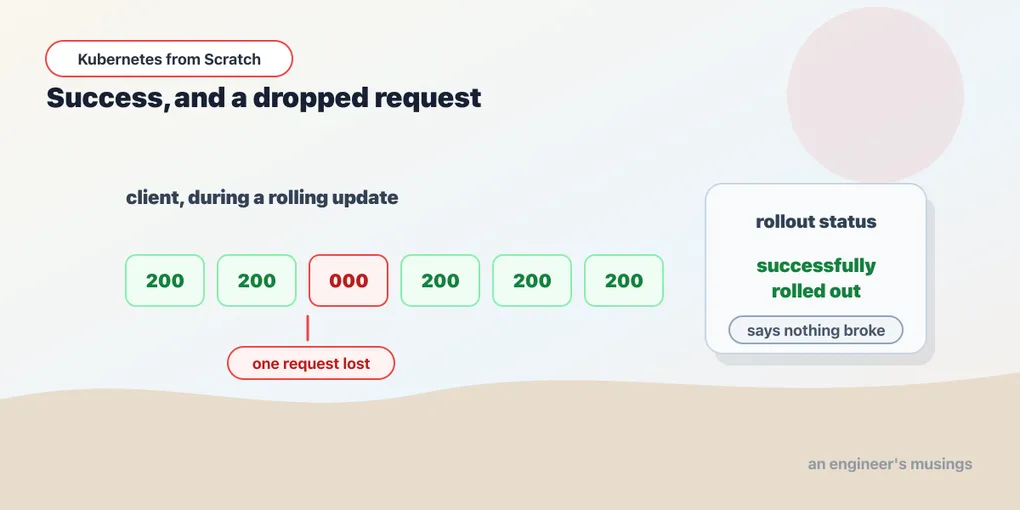
Here is a rollout of the bookshop’s storefront from v1 to v2, with a client hammering it the entire time. Nothing exotic. A stock Deployment, the default strategy, two replicas, one image change:
$ kubectl set image deploy/web web=bookshop:v2 -n bookshop
deployment.apps/web image updated

$ kubectl rollout status deploy/web -n bookshop
Waiting for deployment "web" rollout to finish: 1 out of 2 new replicas have been updated...
Waiting for deployment "web" rollout to finish: 1 out of 2 new replicas have been updated...
Waiting for deployment "web" rollout to finish: 1 out of 2 new replicas have been updated...
Waiting for deployment "web" rollout to finish: 1 old replicas are pending termination...
Waiting for deployment "web" rollout to finish: 1 old replicas are pending termination...
Waiting for deployment "web" rollout to finish: 1 old replicas are pending termination...
deployment "web" successfully rolled out
Successfully rolled out. Green. And the client that was hitting the shop in a loop throughout, tallying the HTTP status codes it got back, reported this:
   1 000
  59 200
Fifty-nine 200s and one 000. 000 is what curl -w '%{http_code}' prints when there was no HTTP response at all — no status line, no body, nothing; the connection simply died. Somebody’s request to your bookshop went into a hole in the ground, while Kubernetes told you in green text that the deployment had succeeded.
That is not a bug in kind, and it is not a bug in Kubernetes. It is the default behaviour of a rolling update against an application that does not handle SIGTERM — which is to say, against most applications. “Zero-downtime deployments” is one of the three things everybody knows about Kubernetes, and out of the box it is not true.
This chapter builds the machinery that makes a rollout possible — Deployments, ReplicaSets, the hash that ties them together — and then spends its second half taking that dropped request apart until it stops being a mystery and becomes a race condition you can name, reproduce on demand, and fix.
The chain: Deployment, ReplicaSet, Pod
You met this in the first chapter, from the bottom up. Delete a pod, ask it who owns it, and follow the trail:
ReplicaSet/catalog-58544d89f4
Deployment/catalog
Now build it in the other direction, which is how it actually happens.
You write a Deployment. It contains a replicas count, a selector, and a pod template — a complete pod spec with a metadata and a spec, exactly the fields you wrote by hand in the last chapter.
apiVersion: apps/v1
kind: Deployment
metadata:
  name: web
spec:
  replicas: 2
  selector:
    matchLabels:
      app: web
  template:
    metadata:
      labels:
        app: web
    spec:
      containers:
        - name: web
          image: bookshop:v1
          command: ["/usr/local/bin/web"]
          ports:
            - name: http
              containerPort: 8080
The Deployment controller reads that and does not create pods. It creates a ReplicaSet — one whose pod template is a copy of the Deployment’s. The ReplicaSet controller reads that, and creates the pods. Three objects, two controllers, one loop each.
The obvious question is why. A ReplicaSet already does the thing you want — it keeps N pods alive, level-triggered, forever. So why is there a second object stacked on top of it that mostly just forwards your intent?
Because a rollout is the act of running two ReplicaSets at once. A ReplicaSet’s pod template is effectively immutable in practice — it exists to hold one version of one pod, at some count. So to move from v1 to v2, something has to create a second ReplicaSet with the new template, then walk one of them up and the other one down, in steps, while watching whether the new pods actually come up. That “something” is the Deployment. The Deployment is not a fancier ReplicaSet — it is a ReplicaSet scheduler, and its entire reason to exist is version transitions.
Which is why the ReplicaSet’s name is not web-1 or web-abc123 but this:
web-5bff69ccb   2     2     2     19s
web-64b74f5cf   0     0     0     2m16s
5bff69ccb and 64b74f5cf are pod-template hashes — a hash of the pod template itself, computed by the Deployment controller, stamped onto the ReplicaSet’s name and onto a pod-template-hash label that goes into the ReplicaSet’s selector and every pod it creates. That single design choice does a surprising amount of work:
- It makes ReplicaSets content-addressed. Change the image and you get a new hash, therefore a new ReplicaSet. Change it back and you get the old hash again — and the Deployment controller finds the existing ReplicaSet and scales it up rather than creating a duplicate. This is why
rollout undois instantaneous. - It keeps the two generations’ pods from being confused with one another. Both sets of pods carry
app: web, so the Service in front of them selects both (deliberately — that is what makes the traffic shift gradual). But each ReplicaSet’s own selector includes itspod-template-hash, soweb-5bff69ccbcounts only its own pods and never tries to adopt the old ones.
Look again at those two rows, because the second one is the interesting one. web-64b74f5cf — the old ReplicaSet, the v1 one — is still there. It has zero pods. It is not deleted — it is scaled to zero, sitting on disk holding the complete pod template of the version you just replaced. That is not garbage. That is your rollback.
What the API server fills in behind you
The Deployment above is thirty lines. Ask the API what it actually stored, and it is considerably more, because the API server defaults everything you left out. The fields that matter for a rollout:
  strategy: RollingUpdate
  maxSurge: 25%
  maxUnavailable: 25%
  revisionHistoryLimit: 10
  progressDeadlineSeconds: 600
Take them one at a time, because every one of them is a policy decision made on your behalf.
strategy: RollingUpdate — replace pods gradually, keeping the service up. The alternative is Recreate: kill every old pod, wait for them to be gone, then start the new ones. Recreate means downtime, on purpose, and it is exactly right when the new version cannot coexist with the old one — which is why the bookshop’s Postgres Deployment uses it.
I assumed, when I wrote that manifest, that a rolling update on Postgres would fail — that the ReadWriteOnce volume could not attach to a second pod and the rollout would stall with a Multi-Attach event. So I flipped it to RollingUpdate to show you the error. There is no error. The rollout succeeds. And what it does instead is much worse, which is the storage chapter’s problem and not this one — so I will only give you the punchline here: ReadWriteOnce means one node, not one pod, and on this cluster both pods land on the same node and both mount the same directory. Recreate is not protecting you from a failed attach. It is protecting you from two Postgres processes writing to one data directory, which Kubernetes will let you do, cheerfully, with both pods reporting Ready.
maxSurge: 25% — how many pods above the desired count the rollout may temporarily create. maxUnavailable: 25% — how many below the desired count it may drop to. Together they define the shape of the wave. The percentages are of the desired replica count, and they are rounded (surge up, unavailable down — that rounding rule I am taking from the API reference, not from something I ran). What I can show you is what those defaults resolved to on a two-replica Deployment, and it is right there in the rollout status: “1 out of 2 new replicas have been updated”, then “1 old replicas are pending termination”. One new pod comes up. Only then does one old pod go away. The rollout never dips below two available pods.
Hold onto that: the default rolling update never intentionally reduces capacity. Which makes the dropped request even more annoying, because on paper there was always a healthy pod ready to serve it.
revisionHistoryLimit: 10 — how many old, scaled-to-zero ReplicaSets to keep around. Ten rollbacks’ worth of history, at the cost of ten near-empty objects in etcd. Set it to 0 and you can never roll back; set it to 200 and kubectl get rs becomes unreadable — which is a nuisance, not a crisis, so err high.
progressDeadlineSeconds: 600 — if the rollout makes no forward progress for ten minutes, the Deployment is marked as failed to progress. Note what that does not say — it does not say it rolls back. Kubernetes has no automatic rollback. It marks a condition on the object, stops trying quite so hard, and waits for a human. If your CI pipeline runs kubectl rollout status with a timeout and then walks away on failure, you have just left a half-migrated Deployment in production. (I did not stall a rollout in the lab to watch this happen; the deadline value is from the API, and the absence of an automatic rollback is a design fact you can confirm by noticing there is no field in the spec that would configure one.)
Doing the rollout
Two ways to change the image. The one you use in an experiment:
$ kubectl set image deploy/web web=bookshop:v2 -n bookshop
deployment.apps/web image updated
And the one you use in real life: edit the YAML in Git, and kubectl apply it. The cluster cannot tell the difference — both are a PATCH to the same object — but only one of them leaves a record anyone can read. (See the first chapter’s grumble about imperative commands, which I meant.)
Either way, the Deployment controller notices its pod template no longer hashes to 64b74f5cf, creates web-5bff69ccb, and starts the wave. kubectl rollout status blocks and narrates, which is exactly what you want in a CI job, since it exits non-zero if the rollout fails.
When it finishes, the shop is serving the new version:
$ curl -s localhost:30080/version
{
  "pod": "web-5bff69ccb-4b98r",
  "version": "v2"
}
The pod name carries the template hash, so the version string and the pod name agree with each other. This is a small gift you should give yourself in every service you write: an endpoint that says which build and which pod answered. It turns “is the new version live?” from a question into a curl.
History, and the annotation that replaced --record
$ kubectl rollout history deploy/web -n bookshop
deployment.apps/web
REVISION  CHANGE-CAUSE
1         <none>
2         pick up v2
Two revisions, and the second one has a human-readable reason. Where did that come from?
Not from --record. kubectl has a --record flag that stashes the command you typed into an annotation, and every old tutorial tells you to use it. It has been deprecated for years and it is still here, which is worse than gone — it works, so nobody notices the warning:
$ kubectl set image deploy/web web=bookshop:v2 --record
Flag --record has been deprecated, --record will be removed in the future
It does not appear in kubectl set image --help any more. It still runs. This is the shape of a Kubernetes deprecation, and chapter one’s componentstatuses was the same story: loud warning, indefinite reprieve. Do not build a habit on a flag that announces its own funeral every time you use it.
CHANGE-CAUSE is, and always was, nothing more than the value of the kubernetes.io/change-cause annotation on the pod template. You set it yourself:
$ kubectl annotate deploy/web -n bookshop kubernetes.io/change-cause="pick up v2"or, better, you put it in the YAML you are applying, where it belongs, alongside the image change it explains. <none> for revision 1 is what an unannotated revision looks like, and it is what most of your revisions will look like until somebody on the team decides to care.
Rolling back is the payoff for everything the pod-template hash bought you:
$ kubectl rollout undo deploy/web -n bookshopThe Deployment controller does not rebuild anything. web-64b74f5cf still exists, still holds the v1 template, and is sitting at zero. Undo scales it back up and scales the current one down — the same rolling wave, in reverse. It is fast because the answer was already in etcd.
Which brings us to the thing this chapter is really about, because that reverse wave has exactly the same problem as the forward one.
Reproducing the dropped request
The bookshop’s web Deployment, as it ships in the companion repo, carries a fix for this. We are going to take it out first, because you cannot appreciate the fix until you have made the bug happen on demand.
Remove the lifecycle: block from manifests/bookshop/web.yaml, apply, and let the pods settle. Now put a client in a loop against the shop — hit localhost:30080 as fast as it will answer, record every status code, and count them at the end.
First, a control. Run the loop with no rollout at all, so we know the harness itself is not flaky:
steady state, no rollout: 81 x 200, 0 failuresEighty-one requests, eighty-one 200s. The client is fine, the NodePort is fine, the app is fine. Whatever we see next is caused by the rollout and by nothing else.
Now roll, three times, and count.
rollout, no preStop (3 trials): 2x000/177x200 | 1x000/182x200 | 1x000/182x200Every single trial dropped requests. Not “sometimes, under load, on a bad node” — three for three, on an idle three-node laptop cluster, with two replicas and a rollout that, as we established above, never intentionally dropped below two available pods. kubectl rollout status reported success all three times.
Four dropped requests out of 545. Call it 0.7%. Now imagine that rate against a service taking two thousand requests a second and deploying eight times a day, and you have a persistent, unattributable background hum of client errors — the kind your on-call chases for a quarter and never catches, because every time they look, the deployment is green and the pods are healthy.
Why it happens
The instinct is that the new pod was not ready yet. It is a good instinct and it is wrong — readiness is handled. Kubernetes will not send traffic to a pod that has not passed its readiness probe, and it will not remove an old pod until a new one is available. The arrival side of the rollout is correct.
The bug is on the departure side, and it is this:
Pod deletion is concurrent, not ordered.
When the Deployment decides an old pod must go, it deletes it, and two completely independent things then begin to happen, in parallel, with no barrier between them:
- The kubelet on that pod’s node sees the
deletionTimestamp, and — as we walked through in the last chapter — runs thepreStophook if there is one, then sendsSIGTERMto the container. - The endpoint controller sees the pod is terminating and removes its address from the Service’s EndpointSlice. That change then has to propagate: to the API server, out to every node’s kube-proxy, and from each kube-proxy into that node’s actual packet-forwarding rules — iptables, in a default kind cluster.
Step 2 is a distributed update — it has to reach three nodes. It involves a watch, a controller, a write, three more watches, and three rounds of rule rewriting. Optimistically it takes tens of milliseconds; under load, considerably more.
Step 1 is a local kill(2). It takes a microsecond.
There is nothing in Kubernetes that makes step 1 wait for step 2. Nothing — no barrier, no ordering, no acknowledgement. They are two loops observing the same fact and reacting at wildly different speeds, and the fast one is the one that kills your server.
Now add the application. The bookshop’s Serve is a bare http.ListenAndServe with no signal handling whatsoever — the most common shape of application code in the world. SIGTERM arrives; the Go runtime’s default disposition terminates the process; the listening socket closes immediately.
So for a window of a few tens of milliseconds, this is the state of your cluster:
- The pod’s process is dead. Its port is closed. The kernel on that node will answer any new connection to it with a TCP RST.
- Some node’s iptables rules still point at it, because kube-proxy on that node has not been told yet.
- A customer’s request arrives at that node, gets DNAT’d to the dead pod, and is refused.
curl reports 000. The load balancer above you reports a 502. The customer sees an error page. And Kubernetes — every controller of which is behaving exactly as designed — reports a healthy, successful rollout, because from the cluster’s point of view nothing went wrong at all. Two pods were desired, two pods were available, the new ReplicaSet reached its count. The system never had an opinion about the request that died in the gap.
Say it plainly, because it is the single most useful thing in this chapter: Kubernetes guarantees that a pod is removed from the EndpointSlice. It does not guarantee that the removal has landed anywhere before your container is killed. The gap between those two sentences is where your requests go.
The fix that works on code you cannot change
The container has to keep serving through that window — that is the entire fix, and it is that simple. If the process stays alive and the listener stays open for a few seconds after the delete, kube-proxy gets its update on every node, the routes stop pointing at the pod, and then the pod can die with nobody sending it anything.
The preStop hook does exactly that:
          lifecycle:
            preStop:
              exec:
                command: ["sleep", "5"]
Read the sequence from the last chapter again with this in place. The pod is marked for deletion. The kubelet runs preStop — sleep 5 — and does not send SIGTERM until it returns. Meanwhile the container’s HTTP server is untouched: still listening, still answering, still healthy. Five seconds later the sleep exits, SIGTERM lands, the process dies instantly as it always did — but by now, no rule anywhere in the cluster points at it, so nothing is sent to it, so nothing is dropped.
Same three trials, same client, same cluster, with the hook in place:
rollout, preStop sleep 5 (3 trials):
    trial A (v2->v1) ->  237 200
    trial B (v1->v2) ->  237 200
    trial C (v2->v1) ->  234 200
Seven hundred and eight consecutive 200s. Zero failures, in either direction, three times.
Two details that matter and that people get wrong:
The sleep is spent inside the grace period, not on top of it. terminationGracePeriodSeconds defaults to 30, and the preStop hook’s runtime comes out of that budget. Five seconds of sleep leaves twenty-five for the process to shut down after SIGTERM. If you write preStop: sleep 60 and leave the grace period at 30, the kubelet will SIGKILL your container at the thirty-second mark, mid-hook — you will have converted a rare dropped request into a guaranteed hard kill. Any preStop longer than a couple of seconds should come with an explicit terminationGracePeriodSeconds set comfortably above it.
The exec form needs a sleep binary. The bookshop’s image is Alpine-based, so sleep is there. On a distroless or scratch image there is no shell and no coreutils, and exec: ["sleep", "5"] fails outright — the hook errors, and the kubelet proceeds to SIGTERM immediately, which is precisely the situation you were trying to avoid, now with an event log entry. The alternatives are a preStop httpGet against an endpoint in your own app that blocks for a few seconds, or doing the wait in code. I ran neither of those; the exec form above is the one with numbers behind it.
The trap inside the fix
Now the detail that catches even people who know all of the above, and which I want you to feel rather than read.
You have just been told the fix. You edit web.yaml, add the lifecycle: block, and kubectl apply. The Deployment controller sees a changed pod template, computes a new hash, creates a new ReplicaSet, and rolls.
That rollout still drops requests.
Of course it does. Look at what is actually being deleted during it: the old pods. The ones from the ReplicaSet whose template does not have the hook, because the hook is the thing you just added. A pod’s spec is fixed the moment it is created; you cannot retrofit a lifecycle hook onto a running pod, and kubectl apply does not try to. The new pods have the hook. The old pods — the ones being killed, the ones whose sockets are slamming shut ahead of kube-proxy — do not.
So the fix takes effect on the rollout after the one that introduces it. That generalizes into a rule: a change to the pod template applies to the pods the change creates, never to the pods the change destroys. The same is true of a fix to your terminationGracePeriodSeconds, your resource limits, your probes, your SIGTERM handling. The rollout that ships the improvement is always run under the old rules. If you are fixing a shutdown bug, budget for one more bad deploy, and do it at 3pm on a Tuesday rather than during Black Friday.
The fix that works on code you can change
The preStop hook is a workaround, and I want to be honest about that. It is the right workaround — for a vendor image, a legacy service, a language runtime whose HTTP server you do not control — and it is genuinely the reason the bookshop ships with it. But the proper fix lives in the application.
The naive version of “graceful shutdown” is to catch SIGTERM and call server.Shutdown(). This does not fix the bug. http.Server.Shutdown closes the listening sockets immediately and then waits for in-flight requests to finish. Closing the listener immediately is the exact behaviour that produced the dropped request. You will have carefully drained the requests that had already arrived, while continuing to refuse the ones still being routed to you. The graphs will not move.
The correct sequence, in any language, is:
- Catch
SIGTERM. - Start failing your readiness probe. This tells the cluster you are going away for reasons other than deletion — for a node drain, for an eviction — and it is the belt to the deletion path’s braces.
- Keep serving. Sleep. Five seconds is a common number, and it should be comfortably longer than the propagation delay you actually measure in your cluster. Your listener stays open; you answer everything that arrives.
- Then stop accepting new connections and drain the in-flight ones —
server.Shutdown(), or whatever your framework calls it. - Exit zero, well inside
terminationGracePeriodSeconds.
Notice that step 3 is the preStop hook, moved inside the process. It is the same fix in a different place — and that is not a coincidence. The problem is a propagation delay in someone else’s control loop, and the only possible remedy is to outlive it. There is no clever signal, no annotation, no field in the Deployment spec that closes the gap. You wait it out, or you drop requests.
Final thoughts
“Zero-downtime deployments, out of the box” is the line on the slide, and it is the kind of true that costs you money. Every individual component in that rollout behaved correctly. The Deployment controller kept two pods available. The scheduler placed them. The readiness probe gated traffic to the new pod. The endpoint controller removed the old address. kubectl reported, accurately, that the desired state had been reached. And a customer’s request still died, because the system that removes the route and the system that kills the process are different loops running at different speeds, and nobody promised you they would agree.
That is the shape of nearly every hard Kubernetes bug you will ever have. Not a component failing — a component succeeding, at its own job, on its own schedule, while the fact it depends on is still in flight somewhere else. The cluster is eventually consistent, and “eventually” is a word that means “not during the ten milliseconds we are discussing.”
The lesson generalizes past rollouts. Any time you find yourself assuming that two things in Kubernetes happen in an order — that the endpoint is gone before the pod dies, that the ConfigMap is read before the app starts, that DNS knows about the Service before the first request goes out — stop and ask which controller establishes that order. Often the answer is none, and the guarantee you were relying on was one you invented.
Which is a good moment to go and look at the object that has been quietly doing most of the work in this chapter, and that we have used without ever defining: the thing that had an EndpointSlice, that kube-proxy was programming, that kept pointing at a dead pod. Two pods came and went during that rollout, with different names and different IPs, and the client kept hitting one unchanging address the whole way through.
Comments