The Pod Is Not a Container
Why Kubernetes wraps your container in a thing you didn't ask for, what the 320 kB container you never deployed is doing on your node, and the pull-policy default that ruins everybody's first afternoon with kind.
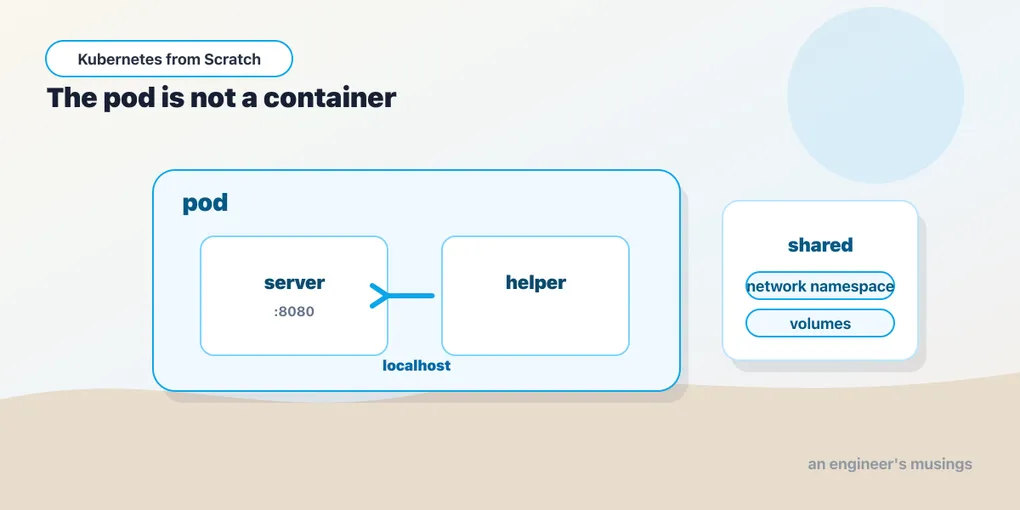
Everybody’s first reaction to a pod is that it is a container with paperwork.
You have a container. You want it to run. Kubernetes hands you a YAML document with a spec.containers array in it — an array — and you put your one container in it, and you look at it and you think: why is this a list? I have one thing. Why is there a wrapper object with its own name, its own IP, its own lifecycle, its own status, sitting between me and the thing I actually wanted to run? It has the look of an abstraction invented by a committee that had already bought the whiteboard.
Then you shell into a worker node and count containers:
pause containers on worker: 4
registry.k8s.io/pause                           3.10                 873ed75102791       320kB
There are four containers running on that node that you never deployed, from an image you have never heard of, all 320 kilobytes of it. They are the wrapper. They are load-bearing. And once you know what they hold, the array stops looking like paperwork and starts looking like the only sane design.
What a pod actually is
A pod is not a container, and it is not a group of containers either. A pod is a shared execution context — a set of Linux namespaces and a set of volumes — into which one or more containers are placed.
Concretely, containers in the same pod share:
- The network namespace. One IP address for the whole pod — one port space, one loopback. Two containers in a pod can talk to each other over
localhost, and they cannot both bind port 8080, because they are, as far as the kernel’s networking stack is concerned, on the same machine. - The IPC namespace. Shared memory and semaphores work between them.
- Volumes. Any volume declared on the pod can be mounted into any container in it — at whatever path each one likes.
- The lifecycle and the fate. They are scheduled together onto one node, they live together, and they die together. A pod is never half on one node.
And — this is the bit that people quietly assume and get wrong — containers in a pod do not share a filesystem root. Each container still has its own image, its own /usr, its own libraries, its own view of the world at /. The only filesystem they share is whatever volume you explicitly mount into both. That is exactly the right split — shared runtime context, private dependencies.
So the pod is the unit of co-location and co-scheduling, and the container is the unit of packaging. Those are genuinely different concerns, and every system that has conflated them — Docker Compose included — has ended up growing a second concept to un-conflate them.
Prove it
Assertions are cheap. Here is a two-container pod that demonstrates both halves of the claim — shared network and shared volume — using nothing but the bookshop image and a shell.
apiVersion: v1
kind: Pod
metadata:
  name: sidecar-demo
spec:
  volumes:
    - name: shared
      emptyDir: {}
  containers:
    - name: server
      image: bookshop:v1
      command: ["/usr/local/bin/catalog"]
      volumeMounts:
        - name: shared
          mountPath: /shared
    - name: helper
      image: bookshop:v1
      command: ["/bin/sh", "-c", "sleep 3600"]
      volumeMounts:
        - name: shared
          mountPath: /shared
Two containers, same image (it happens to have curl in it, which is why we can use it as the helper), one emptyDir volume mounted into both. The server runs the catalog service, which listens on 8080. The helper just sleeps, so we can exec into it.
First, the network. From inside helper, ask localhost for the catalog’s version endpoint:
$ kubectl exec sidecar-demo -c helper -- curl -s http://localhost:8080/version
{
  "pod": "?",
  "version": "v1"
}
The helper container has no HTTP server in it. It has never bound port 8080. It curled localhost and reached a server running in a different container, with a different filesystem, started from a different command. That works because both containers are in the same network namespace: from the kernel’s point of view, localhost for the helper is localhost for the server. This is not a Kubernetes routing feature, and no proxy was involved. It is one loopback interface with two processes on it.
While you are here, notice the "pod": "?". The bookshop app reads its pod name from a POD_NAME environment variable, which the real Deployments populate from the downward API. This hand-written Pod has no env: block at all, so the app falls back to ?. That is a small thing, but it is the first hint that a bare Pod is a stripped-down object — everything the Deployments give you is something you have to remember.
Now the volume. Write a file from the helper, and read it from the server:
$ kubectl exec sidecar-demo -c helper -- sh -c 'echo "written by helper" > /shared/note.txt'
$ kubectl exec sidecar-demo -c server -- cat /shared/note.txt
written by helper
Two containers, one file. The emptyDir volume was created when the pod was scheduled, it lives on the node’s disk, it is mounted into both containers, and it will be deleted the instant the pod is deleted — that is what “empty dir” means, and it is why emptyDir is for scratch space and caches and handoffs, never for data you would miss.
Finally, look at how the pod reports itself:
sidecar-demo 2/2 Running 0 9sThe READY column counts containers, not pods. 2/2 means “two of the two containers in this pod are ready.” A 1/2 is a pod that is running and half-broken — one container up, one crashed or failing its readiness probe — and it is a state you will stare at for a while during your first sidecar incident. kubectl get pods will show you Running next to it, cheerfully, because the pod is running. The fraction is the part that is telling you the truth.
The 320 kB container you never deployed
Back to those four mystery containers.
When the kubelet is told to run a pod, it does not start your container first. It starts a sandbox — a container whose entire job is to be born, create the network and IPC namespaces, and then do nothing at all, forever. Everything else in the pod is then started joined to that container’s namespaces. That container is pause, and here it is on the node, with the containerd label that ties it to the pod it belongs to:
"io.kubernetes.cri.sandbox-name": "catalog-58544d89f4-wlvdx"

pause containers on worker: 4
registry.k8s.io/pause                           3.10                 873ed75102791       320kB
Four pause containers on that worker means four pods on that worker. One sandbox per pod, always, whether the pod has one container in it or six.
Why does the namespace-holder need to be a container at all, rather than something the kubelet sets up directly? Because namespaces in Linux live as long as a process holds them open. If the network namespace belonged to your application’s process, then the moment your app crashed, the namespace would be destroyed — and with it the pod’s IP address, its ARP entries, its whole network identity. The pause container is the process that never dies, so the namespace survives your container crashing and restarting.
That is the mechanism behind a behavior you have probably already seen and filed under “huh” — a container in a pod restarts (the RESTARTS counter ticks up) and the pod keeps the same IP. Of course it does. The IP belongs to the sandbox, and the sandbox never restarted. Only your container did.
The pause binary does approximately nothing, and that is the specification, not a criticism — it holds the namespaces open, it blocks on a signal, and when PID-namespace sharing is enabled it sits at PID 1 and reaps orphaned processes so the pod does not slowly fill with zombies. Three hundred and twenty kilobytes. It is the smallest and most load-bearing thing in your cluster, and nobody has ever thanked it.
restartPolicy, and what “restart” means
A pod has a restartPolicy, and its three values are the whole of the pod’s own crash-handling story:
Always— restart the container whenever it exits, for any reason, success or failure. This is the default, and it is what you want for a server.OnFailure— restart only on a non-zero exit. What you want for a batch job that should not run twice on success.Never— let it stay dead.
(That Always is the default is something I am taking from the API reference — not from a command I ran on the lab cluster. Everything else in this chapter you can watch happening in the output.)
The critical word is container. restartPolicy governs the kubelet restarting containers inside the pod, in place, on the same node, keeping the same pod name and the same IP. It has nothing whatsoever to do with the pod being recreated. A pod is never rescheduled — not by the kubelet, not by anyone. If the node it is on dies, that pod is gone — something above it has to make a new one, and “something above it” is the subject of the next chapter.
Two other consequences follow, and they are the source of a lot of confused 3am debugging.
Restarts are backed off — the kubelet waits longer and longer between attempts, and a container that keeps dying settles into CrashLoopBackOff, which is not really an error state at all but a status update: I am still trying — just slowly now. And because the restart happens in place, the old container’s filesystem is gone but the pod’s volumes are not — an emptyDir survives a container restart and dies with the pod. That asymmetry catches people. The pod is the boundary for volumes; the container is the boundary for restarts.
Init containers, and sidecars that start first
Pods have a second container list: initContainers. They run to completion, in order, before any app container starts, and if one of them fails, the pod’s restartPolicy decides whether the whole sequence is retried. They are the answer to “wait for the database to have a schema,” “fetch a config file,” “chown a volume” — anything that must be done before the app is up.
The mental model is that init containers are a prologue and containers: are the show — which is fine, right up until you want a helper that runs alongside the app but has to be ready before it. A proxy that intercepts the app’s traffic, say, or an agent that must be listening before the app makes its first call. Put that helper in containers: and the ordering is undefined — all app containers start in parallel, and your app can absolutely make its first outbound call before the proxy is up. That was a real, ugly, long-lived Kubernetes wart — and it is the exact problem the service-mesh world spent years papering over with retry loops.
The modern fix is the native sidecar: an entry in initContainers that carries restartPolicy: Always. That flag changes the contract — the container starts in init order (so, before the app containers), but it is not waited on for completion; once it is started, the sequence proceeds, and the container keeps running for the life of the pod. Prologue and show.
Here it is, run:
initContainers:
  - name: setup
    image: bookshop:v1
    command: ["sh", "-c", "echo 'init: ran first, exited'; sleep 2"]
  - name: catalog-sidecar
    image: bookshop:v1
    command: ["/usr/local/bin/catalog"]
    restartPolicy: Always      # this one field is what makes it a sidecar
containers:
  - name: main
    command: ["sh", "-c", "sleep 3; curl -s http://localhost:8080/version; sleep 300"]
Three containers, in three different roles, and the pod behaves exactly as the contract promises. The plain init container ran to completion first:
$ kubectl logs sidecar-native -c setup
init: ran first, exited
The sidecar started next and kept running, so by the time the main container came up it had something to talk to on localhost:
$ kubectl logs sidecar-native -c main
main: sidecar answers ->
{
  "pod": "?",
  "version": "v1"
}
And the pod reports:
sidecar-native 2/2 Running 0 11s2/2, not 1/1 — the native sidecar is counted in the readiness fraction alongside the app container, even though it is declared under initContainers. That is the tell that it is not really an init container at all; it is a long-running container that merely gets to start like one.
The two-container pod from earlier in this chapter is the old kind of sidecar — both containers in containers:, no ordering guarantee, which is fine when the helper is a log shipper and disastrous when it is a proxy.
When a pod should hold two containers — and when it very much shouldn’t
The shared-namespace trick is seductive, and the failure mode is that people start using a pod as a tiny virtual machine. Resist it. The test is not “do these two things belong to the same team” or “do they talk to each other a lot.” The test is: must these two processes scale, restart, and die together, on the same machine, or the design is wrong?
Say yes and it belongs in the pod:
- A log or metrics shipper that reads a file the app writes to a shared
emptyDir. It is useless without the app, and it must be on the same node to see the file. - A proxy that intercepts the app’s traffic on
localhost. This is the entire architecture of a sidecar service mesh, and it only works because of the shared network namespace — the proxy binds a port, the app’s traffic is redirected to it, and neither one has to know. - A config reloader that watches a mounted volume and pokes the app when it changes.
- An init container that runs a schema migration, waits for a dependency, or fixes the ownership of a volume.
Say no and it belongs in its own Deployment:
- Your app and its database. Two containers in one pod means one scaling unit; you cannot have three app replicas and one Postgres, because scaling the pod to 3 gives you three Postgres containers fighting over one volume. The bookshop keeps
catalogandpostgresas separate Deployments precisely so that this remains a sentence you never have to say to an auditor. - Two services that merely call each other.
orderscallscatalog— that is what Services and cluster DNS are for. Co-locating them because it “saves a hop” trades a millisecond for the ability to deploy, scale, and roll back either one independently, which is a bad trade every time.
The rule of thumb people use is “one concern per container, one unit of scaling per pod,” and it holds up. When you find yourself wanting a third container so that two unrelated things can share a filesystem, what you actually want is a volume, and probably a different design.
One small operational consequence of the multi-container pod, which you will hit within ten minutes: kubectl logs sidecar-demo fails when the pod has more than one container, because kubectl does not know which one you meant. You need -c:
$ kubectl logs sidecar-demo -c serverThe same -c applies to kubectl exec. This is a trivial annoyance the first time and a genuinely useful discipline afterwards, because it forces you to say which process you are actually interested in.
The pull-policy trap that ruins your first afternoon
Now the one that gets everybody, and it gets them on day one with kind.
You built the image. You loaded it into the nodes with kind load docker-image. You can see it sitting on the worker’s containerd:
docker.io/library/bookshop latest 665ffc9a3cabf 34.5MBThere it is. 34.5 megabytes, on the node, right now. And your pod says:
latest-trap 0/1 ErrImagePull 0 12skubectl describe gives you the verbatim reason, and it is a good one:
Warning  Failed     11s   kubelet  spec.containers{latest-trap}: Failed to pull image "bookshop:latest": failed to pull and unpack image "docker.io/library/bookshop:latest": failed to resolve reference "docker.io/library/bookshop:latest": pull access denied, repository does not exist or may require authorization: server message: insufficient_scope: authorization failed
Warning  Failed     11s   kubelet  spec.containers{latest-trap}: Error: ErrImagePull
Normal   BackOff    10s   kubelet  spec.containers{latest-trap}: Back-off pulling image "bookshop:latest"
Read the error carefully, because it is telling you something surprising. pull access denied, repository does not exist or may require authorization — from docker.io. Kubernetes is not failing to find your image. It is not even looking on the node. It went to Docker Hub, asked for library/bookshop:latest, and Docker Hub, which has never heard of your bookshop, told it to get lost. Every person who has ever hit this has spent the next twenty minutes convinced that kind load silently failed.
kind load worked fine. The problem is imagePullPolicy, and specifically its default, which is not a constant. It depends on your tag:
  bookshop:v1     -> IfNotPresent
  bookshop:latest -> Always
  bookshop        -> Always
An explicit, non-latest tag defaults to IfNotPresent — use the local copy if it is there. But :latest, and an image reference with no tag at all (which Kubernetes resolves to :latest), default to Always: go to the registry, every single time, on every pod start, and never mind what is cached on the node.
The default is not stupid — it is precisely right for the world it was designed for. :latest is a moving tag. If you name a moving tag and Kubernetes quietly served you a cached copy from three weeks ago, that would be a far nastier bug than a failed pull, and a much harder one to see. So when you tell Kubernetes “give me whatever latest means”, it takes you at your word and goes and asks. The default is honest. It is just fatal in a local cluster with no registry behind it.
There are three ways out, and only two of them are good:
- Use real tags.
bookshop:v1,bookshop:v2. This is why the companion repo builds two tagged images and never uses:latest— and it is why the rollout in the next chapter is even possible to observe, sincev1andv2are the same code with a different stamp. - Set
imagePullPolicy: IfNotPresentexplicitly on the container. It says what you mean, it works everywhere, and it survives somebody later changing the tag. imagePullPolicy: Never— never pull, only ever use what is already on the node. It works, and it will bite you the day that manifest runs somewhere the image isn’t preloaded, at which point the pod fails for the mirror-image reason and you get a confused afternoon of a different flavour. (I did not reproduce that one; only theAlwaysfailure above was run.)
The deeper lesson will keep paying out for the rest of this book: a Kubernetes default is a decision somebody made about a world that might not be yours. Nearly all of them are defensible. Several will still cost you an outage — and one of them, in the very next chapter, is going to drop live customer requests on the floor while kubectl reports success.
How a pod dies
A pod’s STATUS column is a friendly summary, and underneath it there is a formal phase with five values — Pending, Running, Succeeded, Failed, Unknown — which I am reciting from the API reference rather than from a command I ran. What matters is not the enum but the shutdown sequence, because that is where the next chapter’s disaster lives.
When something deletes a pod, the following happens — and the ordering is the whole point:
- The pod is marked for deletion in the API. It gets a
deletionTimestamp, and its status flips toTerminating. It is still running. - The kubelet on its node notices, runs the container’s
preStophook if it has one, waits for that hook to finish, and only then sendsSIGTERMto the container’s main process. - A clock starts:
terminationGracePeriodSeconds, which defaults to 30. ThepreStophook’s runtime is spent inside that budget, not on top of it. - If the process is still alive when the clock runs out, it gets
SIGKILL, which it cannot catch, and the pod is force-removed from the API.
So a pod deletion is a negotiation, not an execution — Kubernetes asks nicely for thirty seconds and then stops asking. A well-behaved server catches SIGTERM, stops taking new work, finishes what is in flight, and exits with a clean zero well inside the budget.
The bookshop, as shipped, does not do this. Its Serve function is a bare http.ListenAndServe with no signal handler at all, which means SIGTERM kills it instantly, mid-request, without so much as a log line. That is not sloppiness on the author’s part; it is the single most common shape of real-world application code, and it is deliberately preserved here — because it is the ingredient that turns a perfectly ordinary rolling update into dropped customer requests, and I want you to watch it happen.
Why you will almost never write a Pod
Here is the punchline of the whole chapter, and it is slightly perverse.
Everything above is how pods work. Now delete the one you just made:
$ kubectl delete pod sidecar-demo
pod "sidecar-demo" deleted
It is gone. It stays gone.
Contrast that with the previous chapter, where deleting catalog-58544d89f4-4h2kb got you a brand-new catalog-58544d89f4-hcdgt two seconds later. The difference is not the pod. The pods are the same kind of object. The difference is that the catalog pod had an owner — a ReplicaSet that was counting — and sidecar-demo has nobody. No controller is watching it. Nothing has an opinion about how many sidecar-demos the world ought to contain. So when it dies, that is the end of the story.
And “when it dies” covers more ground than you would like. A bare pod does not survive its node being drained for an upgrade. It does not survive the node being evicted under memory pressure. It does not survive the node being replaced by your cloud provider’s autoscaler on a Tuesday. It does not move, because nothing can move it — the pod’s nodeName is written once and never rewritten. Bare pods are pets in the most literal sense, and the whole point of the machinery above them is that you should not have any.
So why did I make you write one? Because everything above the pod — Deployments, StatefulSets, DaemonSets, Jobs, the operators you will install, the mesh sidecars you will inherit — is a machine for producing pod specs. Every one of those objects has a template: inside it, and inside that template is a spec: with the exact fields you just used: containers, volumes, restartPolicy, imagePullPolicy, initContainers. You will spend the rest of your Kubernetes career editing pod specs. You will just do it from a distance, through a controller, so that when one dies, something is counting.
Final thoughts
The pod is the seam where Kubernetes admits what a container really is. A container was never a machine. It is a process in a set of namespaces with a filesystem strapped to it, and the useful unit of deployment turned out to be one step up from that: a tiny fake machine with one IP, one loopback, some shared scratch disk, and a few processes that trust each other completely.
Once you see it that way, the design decisions stop being trivia. Containers in a pod share localhost because that is what makes a sidecar possible without a network hop. The IP belongs to a 320 kB container that does nothing, because a namespace needs a process to hold it open and that process must never die. READY counts containers because the pod’s health is genuinely a conjunction. And a pod on its own is mortal in a way that nothing in a production cluster should be — which is why the first thing anyone does with a pod is stop writing them by hand and hand the job to something that counts.
That something is a Deployment, and the next chapter is where the whole thing gets interesting: it is where I show you that the rolling update you have been trusting drops live requests, and that kubectl tells you it worked.
Comments