The Cluster That Puts It Back
A control plane, some nodes, and one loop that refuses to let your pod stay deleted — the idea the rest of this book rests on.
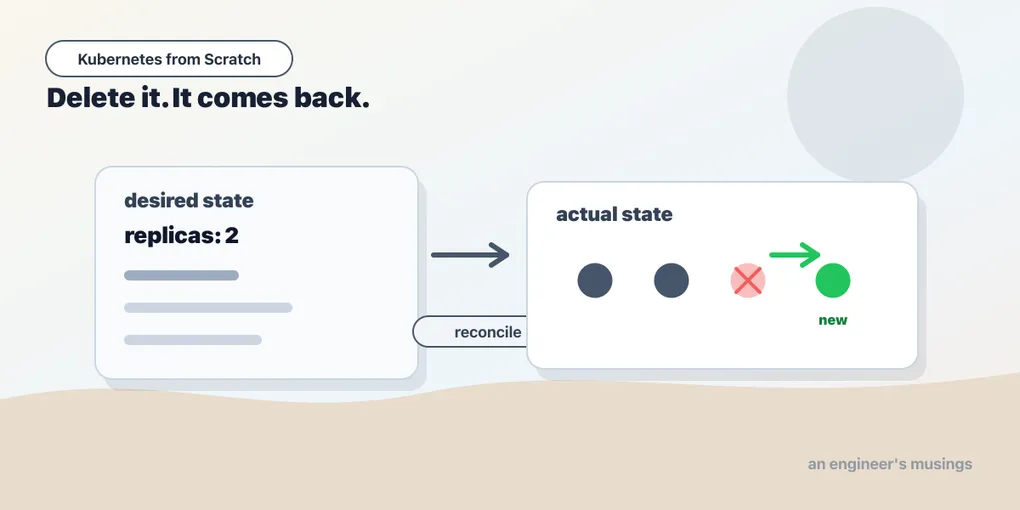
You know how a server works. You SSH in, you find the process, you kill it. It dies. It stays dead until you or systemd or a cron job starts it again, and if none of those things happen, it is dead until Tuesday. That is the model in your head, and it has been correct for your entire career.
Now do it in Kubernetes:
$ kubectl delete pod catalog-58544d89f4-4h2kb -n bookshop
pod "catalog-58544d89f4-4h2kb" deleted
The pod is gone. You can watch it go — it goes to Terminating, its container gets a signal, containerd reaps it, and the record disappears from the API. And roughly two seconds later, without you touching anything:
after:  catalog-58544d89f4-hcdgt Running
after:  catalog-58544d89f4-wlvdx Running
There are two catalog pods again. Not the one you killed — 4h2kb is gone for good, and hcdgt is a new pod with a new IP that started from a fresh container. Nobody was paged. Nothing retried. No event handler fired on your delete and helpfully undid it. Something in the cluster simply noticed that the world had drifted from what it was supposed to be, and moved the world back.
That is not a feature of Kubernetes. That is Kubernetes. Everything else in this book — Services, ConfigMaps, rollouts, autoscaling, the operators that install your database — is that same loop with a different noun in it. If you take one idea out of this chapter, take that one, because every confusing thing you will hit later dissolves the moment you ask “which controller is watching this, and what does it think the world should look like?”
This chapter builds you a real cluster, walks the pieces, and then makes you watch the loop run.
Declaring, not doing
Start with the shift in posture, because it is what makes the rest legible.
The imperative style — the one you have been using since forever — is a sequence of commands. Start the process. If it dies, start it again. If the box dies, provision another box, install the runtime, copy the artifact, start the process. Every step is a verb, and every verb has to be issued by someone or something at the right time. Your ops knowledge is a pile of verbs.
Kubernetes asks you for a noun instead. You submit an object — a YAML document describing a thing that should exist — and the cluster’s job is to make reality match it. “There should be two catalog pods running image bookshop:v1.” You do not say start them. You do not say restart them if they crash, or reschedule them if a node dies. You state the shape of the world, and controllers argue reality into that shape, continuously, forever, whether or not you are looking.
This is why kubectl delete pod is such a good first lesson. Deleting the pod did not change the declaration. The declaration still says two catalog pods. So you took the count to one, and a controller took it back to two, and it will do that every single time, including at three in the morning while you sleep and including when you are absolutely certain you meant it.
So the corollary, out loud and early: if you want a pod to stay gone, you have to change the declaration, not the world. Fighting the loop is a beginner’s move, and everyone does it once.
What a cluster is made of
A Kubernetes cluster is two categories of machine wearing one API.
The control plane is the brain. Four processes matter:
- etcd — the database. A distributed key-value store holding every object in the cluster: every Pod, every Deployment, every Secret, every ServiceAccount. If etcd is gone, your cluster is gone; the running containers keep running for a while, but the cluster has amnesia and can no longer do anything about anything.
- kube-apiserver — the front door, and the single most important box on the diagram. It is a REST server that validates, defaults, authorizes, and persists objects. Nothing else writes to etcd. Not the scheduler, not the controllers, not the kubelet on your nodes, not you. Every actor in the system is a client of the API server, and the API server is the only thing holding a pen. Internalize that and half of Kubernetes’ architecture stops looking arbitrary — there is one writer, one source of truth, and one place to authorize, audit, and validate every change.
- kube-scheduler — decides which node each new pod lands on. That is genuinely all it does. It watches for pods with no node assigned, scores the nodes that could take them, and writes the choice back — through the API server, of course. It does not start anything.
- kube-controller-manager — a single binary hosting dozens of control loops: the Deployment controller, the ReplicaSet controller, the node lifecycle controller, the job controller, and more. This is the process that put your catalog pod back.
The nodes are the muscle. On each one:
- kubelet — the agent. It watches the API server for pods assigned to its node, and makes them real by talking to the container runtime. It reports back what actually happened. The kubelet is the only component that touches containers.
- container runtime — containerd, in kind and in most clusters. It pulls images and runs containers.
- kube-proxy — programs the node’s packet-forwarding rules so that a Service’s virtual IP reaches a real pod. It will get a chapter of its own, and it will earn it.
- CNI plugin — gives pods IPs and makes pod-to-pod traffic work across nodes. In kind that plugin is
kindnet.
Notice what is missing from that list: a message bus, a job queue, an agent that pushes work to nodes. There isn’t one. The control plane does not send pods to nodes. It writes an object saying “this pod belongs on k8s-lab-worker”, and the kubelet on k8s-lab-worker — which is watching the API server — notices and acts. Everything is pull, everything is a watch on the API server, and every component’s job is to reduce the difference between what the API says and what it can see.
Build the cluster
Enough architecture. You need a cluster you can break.
We are using kind — Kubernetes IN Docker. It runs each “node” as a Docker container with a kubelet and containerd inside it, which is a delightful piece of engineering and completely convincing for everything in this book except the parts where I will explicitly say it isn’t. Install kind, Docker, and kubectl, and pin your versions:
$ kind version
kind v0.32.0
$ kubectl version --client
Client Version: v1.36.1
Pin kubectl to match your cluster. A kubectl more than a minor release away from the API server will warn you about version skew, and — much worse — will occasionally be missing the field you are trying to set. If you installed kubectl through your OS package manager two years ago, replace it now.
Everything in this book was run against Kubernetes 1.36.1, kind 0.32.0, kubectl 1.36.1, with helm 4.2.3 and Gateway API 1.4.0 in the chapter that needs them. That is not decoration. Kubernetes minors move quickly: defaults change, flags get deprecated, and a feature that was alpha two releases ago is now the only way to do the thing. Every command and every line of output you see in this book was run on that cluster on a real afternoon. Where I state something I did not run, I say so.
The cluster definition lives in the companion repo, book-companion/k8s-bookshop, in cluster/kind.yaml:
kind: Cluster
apiVersion: kind.x-k8s.io/v1alpha4
name: k8s-lab
nodes:
  - role: control-plane
    extraPortMappings:
      - containerPort: 30080
        hostPort: 30080
        protocol: TCP
  - role: worker
  - role: worker
Three nodes, on purpose. A single-node cluster is faster to start and hides everything interesting — scheduling has no decision to make, a DaemonSet looks like a Deployment, and the chapter on taints has nowhere to put a pod. The extraPortMappings block punches a hole from your laptop to the control-plane node’s port 30080, which is where the bookshop will eventually answer.
Then, in the companion repo:
$ make upThat target does four things, and each one is a lesson:
kind create cluster --config cluster/kind.yaml— three containers become three nodes.docker buildthe bookshop image twice, taggedbookshop:v1andbookshop:v2. They are the same application; the version string is stamped in at build time. Two identical-but-labelled images is what makes a rollout observable.kind load docker-image bookshop:v1 bookshop:v2 --name k8s-lab. Your kind nodes do not share your Docker daemon’s image cache. They are separate containers with their own containerd. Skip this step and every pod isErrImagePull, and you will spend forty minutes convinced your registry credentials are broken.kind loadcopies the image into each node’s containerd.kubectl apply -k manifests/bookshop— the bookshop itself.
The bookshop
The running example for the whole book is a small online bookshop, three Go services in one image, each started with a different command:.
- catalog serves
/booksand/books/{isbn}. It reads Postgres whenDATABASE_URLis set and falls back to an in-memory seed of four books when it is not, so it works in every chapter — including the ones before we give it a database. - orders takes
POST /orders, validates the ISBN by callinghttp://catalog, and records the order. That call is what will prove cluster DNS works, and it is also what will break in an instructive way when we get it wrong. - web is the storefront. It calls catalog and orders and renders HTML, reading its greeting from a ConfigMap, its banner from a mounted file, and an API key from a Secret.
- postgres is stock
postgres:17-alpinewith a volume.
Every service also exposes /healthz, /readyz, /version, and a set of switches for breaking things on purpose: /debug/unready, /debug/break, and /debug/eat?mb=N, which allocates and touches N megabytes so we can earn an honest OOMKill later. The application is deliberately naive in one place — it does not handle SIGTERM at all — and that single omission is going to cost us production traffic two chapters from now.
The control plane is made of pods
Here is the first thing that trips people. Ask kind what is running in kube-system:
$ kubectl get pods -n kube-system -o custom-columns=NAME:.metadata.name,NODE:.spec.nodeName
NAME                                            NODE
coredns-589f44dc88-8d99k                        k8s-lab-control-plane
coredns-589f44dc88-kzr5x                        k8s-lab-control-plane
etcd-k8s-lab-control-plane                      k8s-lab-control-plane
kindnet-46mqk                                   k8s-lab-control-plane
kindnet-9vtqq                                   k8s-lab-worker2
kindnet-wmxxt                                   k8s-lab-worker
kube-apiserver-k8s-lab-control-plane            k8s-lab-control-plane
kube-controller-manager-k8s-lab-control-plane   k8s-lab-control-plane
kube-proxy-4lhvp                                k8s-lab-control-plane
kube-proxy-pkhvx                                k8s-lab-worker2
kube-proxy-tp9xb                                k8s-lab-worker
kube-scheduler-k8s-lab-control-plane            k8s-lab-control-plane
Read the shape of that list, not just the names.
The four control-plane components — etcd, kube-apiserver, kube-controller-manager, and kube-scheduler — are pods. Kubernetes is running Kubernetes. And that ought to raise an obvious objection: if the API server is a pod, and pods are created through the API server, who created the pod that is the API server? Worse: the scheduler is what assigns pods to nodes, so who scheduled the scheduler?
The answer is static pods, and you can see them on disk:
$ docker exec k8s-lab-control-plane ls /etc/kubernetes/manifests/
etcd.yaml
kube-apiserver.yaml
kube-controller-manager.yaml
kube-scheduler.yaml
The kubelet on the control-plane node watches that directory and runs whatever pod manifests it finds there, with no API server and no scheduler involved at all. Those four components are files on a disk that the kubelet starts unconditionally at boot. Once the API server is up, the kubelet registers mirror pods for them so they show up in kubectl get pods — which is why they are visible above, why their names are suffixed with the node name rather than a random hash, and why their owner is the node itself:
$ kubectl get pod -n kube-system kube-scheduler-k8s-lab-control-plane \
    -o jsonpath='{.metadata.ownerReferences[0].kind}'
Node
They are not managed by any controller. Delete one and the kubelet puts it straight back, because the file is still on disk. The chicken-and-egg problem is solved by a directory.
kube-proxy and kindnet appear once per node — three of each. That is a DaemonSet: “one pod on every node,” a shape we will meet properly later. It makes sense as soon as you say what they do out loud — both of them program the local machine’s networking, so both of them have to be on the local machine.
coredns has two replicas, both on the control-plane node here because that is where the scheduler happened to put them. Cluster DNS is not special infrastructure — it is a Deployment with a Service in front of it, running in your cluster like anything else, and you can break it exactly the way you can break your own app.
If you want a second opinion on the control plane’s health, there is an old command that still answers:
$ kubectl get componentstatuses
Warning: v1 ComponentStatus is deprecated in v1.19+
NAME                 STATUS    MESSAGE   ERROR
scheduler            Healthy   ok
controller-manager   Healthy   ok
etcd-0               Healthy   ok
componentstatuses is a small monument. That warning says the API was deprecated in v1.19. The cluster you are running is 1.36. Seventeen minor releases have shipped since somebody wrote “we should remove this,” and the command still works, still returns Healthy, and still lies to you if you use it as a real health check — it only knows about the components on the local control plane and it has no idea about your nodes. Kubernetes deprecates loudly and removes slowly — a deprecation warning is a weather forecast, not an eviction notice. You will meet the same pattern again in the chapter on rollouts, where kubectl --record has been deprecated for years, still works, and still prints a warning nobody reads. Beta APIs and in-tree cloud providers do get removed hard; flags mostly just get shouted at forever.
The loop, watched
Now the centrepiece. The bookshop is up:
$ kubectl get pods -n bookshopThere are two catalog pods:
before: catalog-58544d89f4-4h2kb
before: catalog-58544d89f4-wlvdx
Delete one of them, wait a couple of seconds, and list again:
after:  catalog-58544d89f4-hcdgt Running
after:  catalog-58544d89f4-wlvdx Running
wlvdx was never touched. 4h2kb is gone forever. hcdgt is new — new name, new IP, new container, same everything else. The replacement is not a resurrection; the cluster does not restore your pod, it satisfies your declaration with a fresh one, and the difference matters enormously for anything that kept state on local disk.
So who did it? Ask the pod:
$ kubectl get pod catalog-58544d89f4-hcdgt -n bookshop \
    -o jsonpath='{.metadata.ownerReferences[0].kind}/{.metadata.ownerReferences[0].name}'
ReplicaSet/catalog-58544d89f4
And ask that the same question, and you get:
ReplicaSet/catalog-58544d89f4
Deployment/catalog
There is the whole chain, and it is the anatomy of the entire system:
Deployment/catalog → ReplicaSet/catalog-58544d89f4 → Pod/catalog-58544d89f4-hcdgt.
You wrote the Deployment. The Deployment controller read it and created a ReplicaSet. The ReplicaSet controller read that and created pods. Each object carries an ownerReferences field pointing at its parent, which is how the cluster knows what belongs to what — and, incidentally, how garbage collection works: delete the Deployment, and the ReplicaSet and pods go with it, because they are owned.
The ReplicaSet is the one that put your pod back, and the way it did so is the important part. The ReplicaSet controller did not receive a “pod deleted” event and run a handler that says “create a replacement.” It runs a loop. Every time anything happens to anything it cares about, it wakes up and does this:
- Read the desired state:
spec.replicas: 2. - Count reality: how many pods currently match my label selector and are not being deleted?
- If reality is short, create pods. If reality is over, delete pods. Otherwise, go back to sleep.
Deleting your pod took the count from 2 to 1. The controller woke up, subtracted, and created one pod. That is it. That is the loop.
The distinction has a name, and it is the one to carry out of this chapter: the controller is level-triggered, not edge-triggered. An edge-triggered system reacts to events — “a pod was deleted” — and is therefore only as reliable as its event delivery. Miss the message and you never recover; deliver it twice and you overreact. A level-triggered system reacts to state — “there is one pod, there should be two” — and simply does not care how it got that way, or whether it was asleep when it happened, or whether it has already tried and failed. Restart the controller-manager mid-incident and the next loop iteration reads etcd, sees one pod, and fixes it. Nothing is lost, because nothing was ever in flight.
This is the property that makes Kubernetes durable enough to trust, and it is also the property that makes it infuriating when you are trying to do something by hand. You cannot win an argument with a level-triggered controller. It has more patience than you.
What the loop will not do for you
The loop is not magic, and the boundaries are sharp.
It only fixes what a controller is watching. Create a bare Pod — a kind: Pod you wrote yourself, with no Deployment above it — and delete it, and it stays deleted. Forever. Nothing owns it, so nothing is counting it, so nothing notices it is gone. This is the single biggest reason nobody writes bare Pods in production, and the next chapter is going to make you write one anyway so that you feel it.
It reconciles the objects, not the world inside them. If your container starts and immediately serves 500s, every controller in the cluster is satisfied. The ReplicaSet wanted two pods; there are two pods; the loop is quiet. Kubernetes does not know what your application is for. The only channel through which you can tell the cluster “this pod is not actually working” is the probes — and the chapter on health is where we find out exactly how much a Ready pod is promising you, which turns out to be less than you would like.
It cannot fix what it cannot schedule. If you ask for a pod that needs more memory than any node has, the ReplicaSet controller creates the Pod object faithfully, the scheduler looks at it, finds nowhere to put it, and leaves it Pending — forever, quietly, with the reason buried in an event. The declaration is satisfied at one level and stuck at another. Learning to find that seam is most of what debugging a cluster is.
The imperative escape hatch, and why to distrust it
kubectl will happily let you skip the YAML. kubectl run, kubectl scale, kubectl expose, kubectl edit, kubectl set image — every one of them is a verb, and every one of them works.
They work because they are thin: each one loads the object, mutates it, and PUTs it back through the API server. The cluster only ever sees a declaration. But you have now created a declaration that exists nowhere except in etcd. Your Git repo says replicas: 2. Your cluster says replicas: 8, because someone scaled it during an incident in March. The next time anyone runs kubectl apply, the cluster snaps back to 2 in the middle of the afternoon, and nobody can explain why traffic fell over.
The imperative commands are for asking questions and for experiments you intend to throw away. This book uses them constantly, because we are running experiments. Your production cluster’s desired state belongs in a file, in Git, applied by something that is not a human being holding a terminal.
Final thoughts
The hardest part of learning Kubernetes is not the YAML. It is not even the networking, though the networking will make you doubt yourself. It is that you have to stop thinking of the cluster as a machine that executes your commands and start thinking of it as a machine that holds an opinion about the world and acts on it continuously — an opinion you happen to be able to edit.
That is a genuinely different relationship with a computer. You are not the operator any more; you are the person who writes down what “correct” means. The cluster does the operating, tirelessly, level-triggered, at 3am, whether or not you agree in the moment. Everything that follows in this book is a variation on that: a Service is a controller’s opinion about which pods should receive traffic, a Deployment is a controller’s opinion about how many pods of which version should exist, a CRD is you teaching the cluster to hold an opinion about a noun that Kubernetes has never heard of.
You will spend your first month fighting the loop. Then one day a node will die at 2am and you will find out in the morning, from a graph, that the cluster moved eleven pods and nobody noticed. That is the day it clicks.
Comments