Nothing Is Deleted Until Something Deletes It
Four maintenance procedures, two of which did nothing the first time I called them, and one of which will happily eat a file your table still needs. What each one actually reclaims, in what order, measured on the bookshop.
Chapter 12 ended with a table that was in better shape and taking up more room. One hundred and fifty data files became one, the query got 7.5 times faster, and the directory on disk went from 15,595,789 bytes to 16,257,218. That is the correct behaviour — and it is also an unpaid bill.
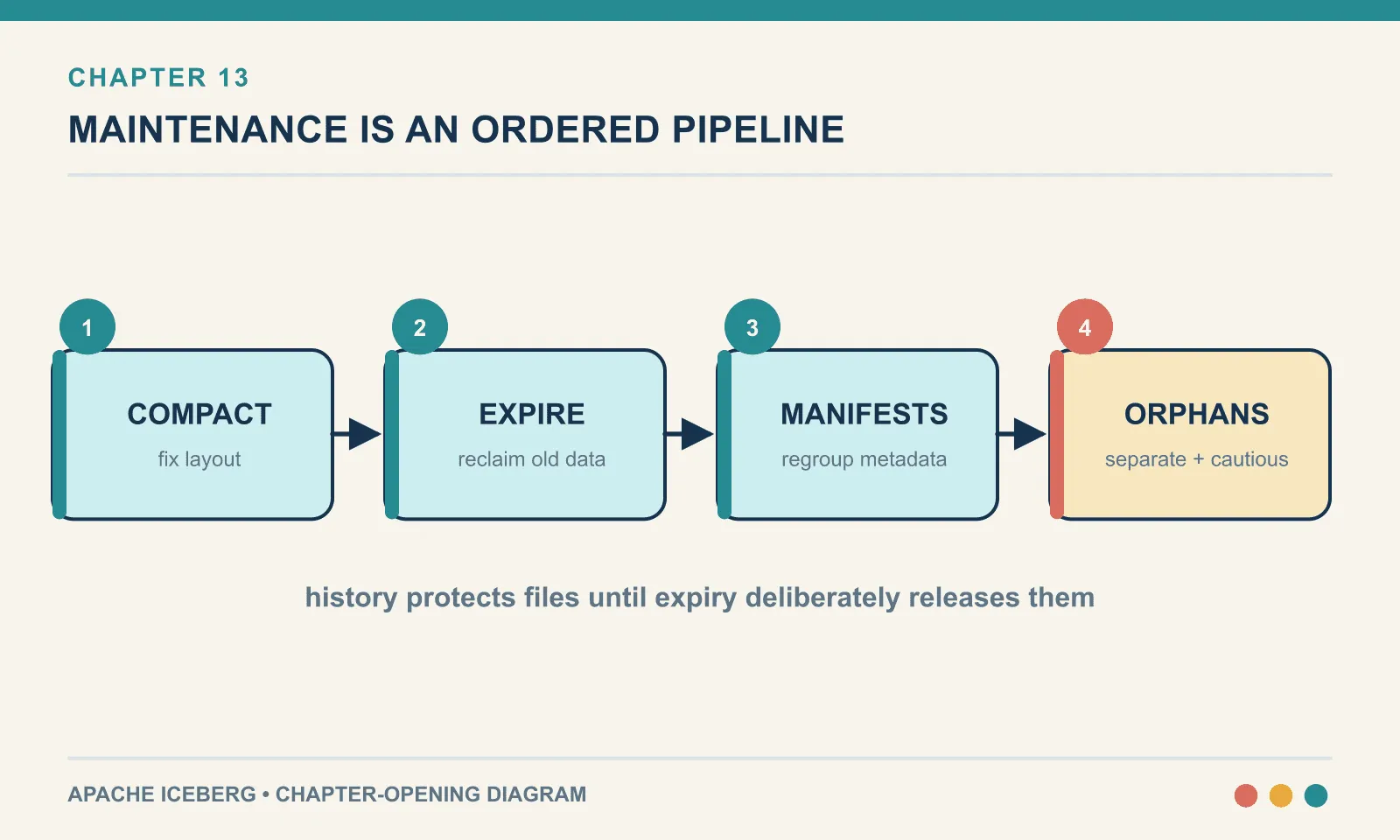
The old layout remains readable because an Iceberg table is a chain of snapshots, each one a complete list of files. Compaction adds a snapshot; it does not remove any. Every earlier snapshot still names the files it named yesterday. Iceberg will not delete a file that a retained snapshot still needs. The whole point of keeping the snapshot is that you can read it.
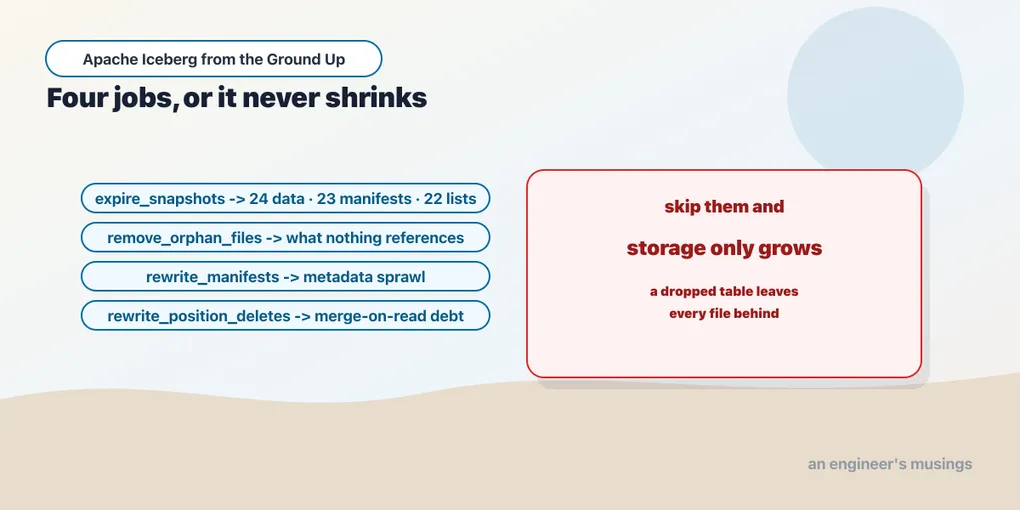
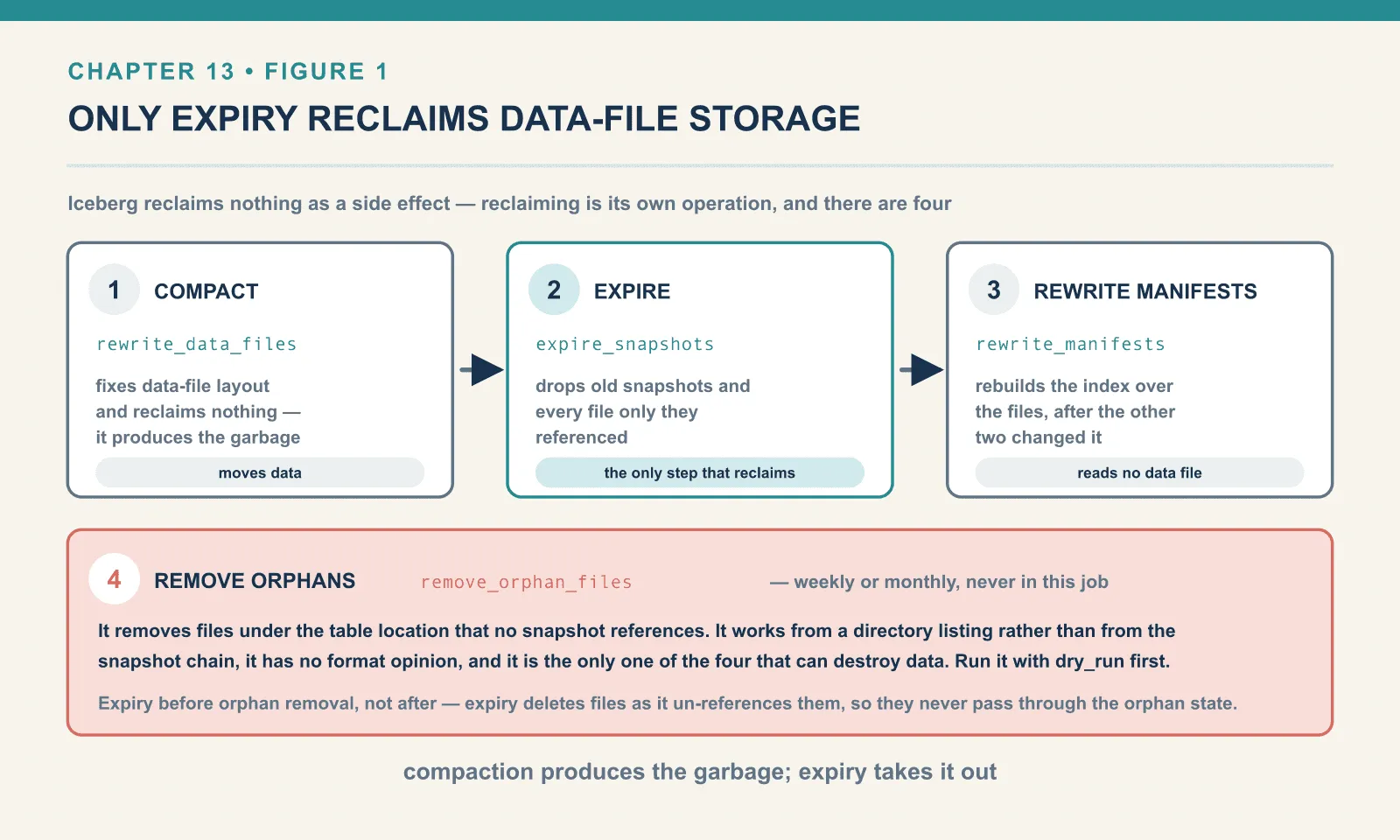
So Iceberg never reclaims anything as a side effect. Reclaiming is its own operation, and there are four of them.
| Procedure | What it removes | Does it move data? |
|---|---|---|
expire_snapshots | old snapshots, plus every file only they referenced | no |
remove_orphan_files | files under the table location that no snapshot references | no |
rewrite_manifests | manifest fragmentation | no, metadata only |
rewrite_position_delete_files | small delete files | rewrites deletes only |
Two of those four did nothing at all the first time I called them with their documented minimum arguments. One of them can delete a file your table is actively using. This chapter runs all four on the bookshop orders table, in the lab pinned in chapter 11: Iceberg 1.11.0, PySpark 4.1.3, iceberg-spark-runtime-4.1_2.13:1.11.0, the REST catalog, Java 21.
expire_snapshots, and the second silent no-op
Same wreck as before: 12,000 orders, 150 micro-batch commits, 150 data files, 150 snapshots.
orders BEFORE: data_files=150 data_bytes=447029 manifests=51 snapshots=150 metadata_log=101
               disk=1202f/15438147B {'parquet': 150, 'manifest': 150, 'metadata.json': 151, 'manifest-list': 150}
The minimum documented call is the table name:
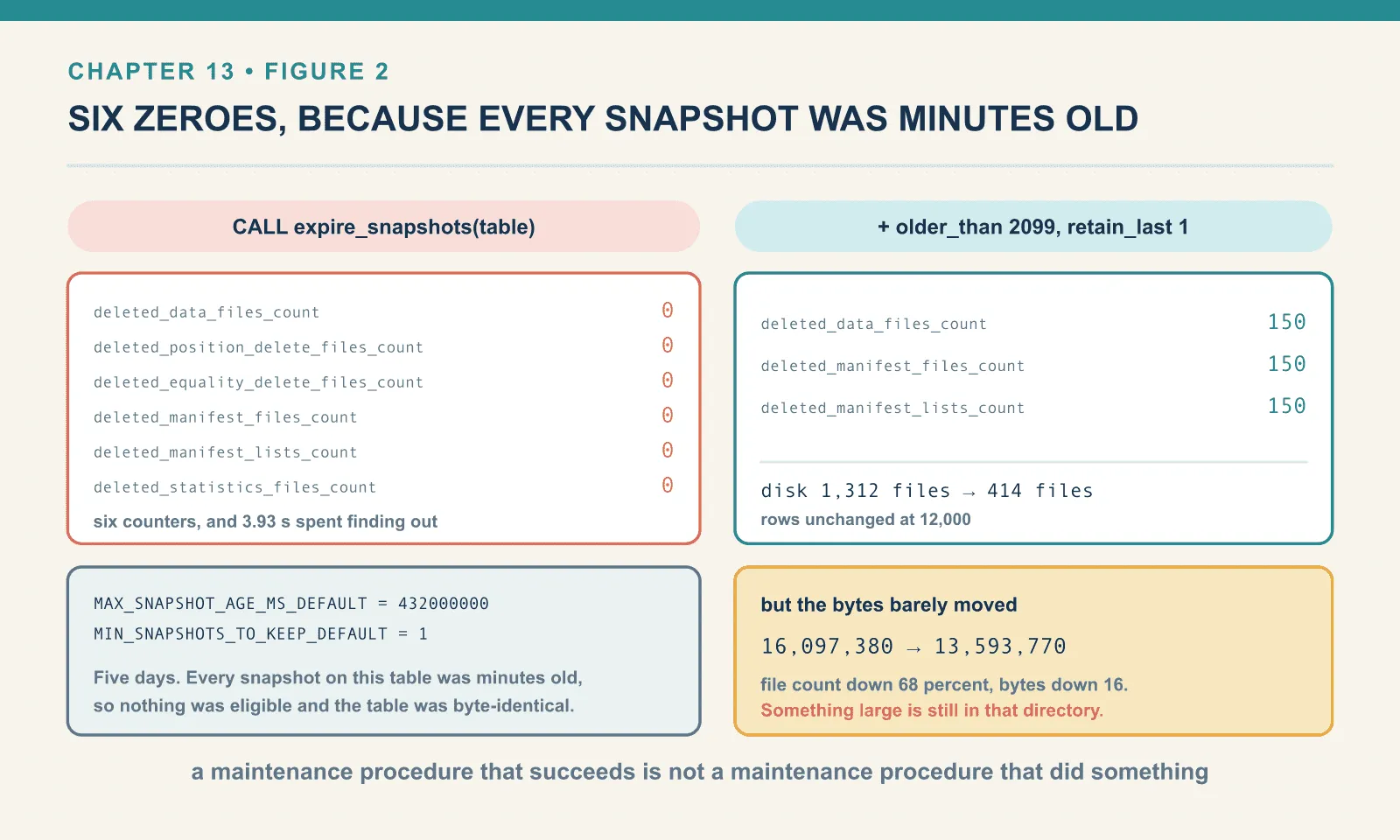
CALL ice.system.expire_snapshots(table => 'ch13.orders')-> {'deleted_data_files_count': 0, 'deleted_position_delete_files_count': 0,
'deleted_equality_delete_files_count': 0, 'deleted_manifest_files_count': 0,
'deleted_manifest_lists_count': 0, 'deleted_statistics_files_count': 0} in 3.93s
orders AFTER : data_files=150 ... snapshots=150 disk=1202f/15438147B (identical)Six counters, all zero — and four seconds spent finding that out. Same failure mode as chapter 12’s compaction no-op, and the same lesson. A maintenance procedure that succeeds is not a maintenance procedure that did something. Assert on the state, never on the exit code.
The cause here is a time default rather than a count default. With no older_than, expiry falls back to the table’s history.expire.max-snapshot-age-ms. Read that constant out of the 1.11.0 runtime and you get MAX_SNAPSHOT_AGE_MS_DEFAULT = 432000000, which is five days. Every snapshot on this table was minutes old. There was nothing eligible, and Iceberg said so in the only way it has — six zeroes.
The companion default is MIN_SNAPSHOTS_TO_KEEP_DEFAULT = 1, which is why you can never accidentally expire your way to a table with no current state.
Five days is a sensible production default — and a terrible lab default. To see the procedure work, hand it an older_than that everything falls under, and tell it how many snapshots to keep regardless:
CALL ice.system.expire_snapshots(
  table       => 'ch13.orders',
  older_than  => TIMESTAMP '2099-01-01 00:00:00',
  retain_last => 1)
Before that, though, compact. Expiring first would only throw away history and leave the 150 files still live in the current snapshot.
rewrite_data_files -> {'rewritten_data_files_count': 150, 'added_data_files_count': 1,
                       'rewritten_bytes_count': 447029, ...} in 3.10s
after compaction: data_files=1 data_bytes=91627 manifests=52 snapshots=151 metadata_log=101
                  disk=1312f/16097380B {'parquet': 151, 'manifest': 202, 'metadata.json': 152, 'manifest-list': 151}

expire_snapshots(older_than=2099, retain_last=1)
  -> {'deleted_data_files_count': 150, 'deleted_manifest_files_count': 150,
      'deleted_manifest_lists_count': 150, ...} in 6.53s

after expiry : data_files=1 data_bytes=91627 manifests=52 snapshots=1 metadata_log=101
               disk=414f/13593770B {'parquet': 1, 'metadata.json': 153, 'manifest': 52, 'manifest-list': 1}
rows: 12000
That is what reclaiming looks like. 1,312 files down to 414, and 150 obsolete Parquet files removed so that exactly one remains — the compacted one. The row count did not move.
The counters explain what expiry reclaimed; the remaining bytes explain what it left behind.
Expiry deletes far more than snapshots. The name says snapshots, and it removed 150 of those. But the counters show it also deleted 150 manifests and 150 manifest lists. This is the operation that actually cleans up after compaction, which is why “run compaction nightly” is incomplete advice. Compaction produces the garbage; expiry takes it out.
The disk figure did not fall nearly as far as the file count. 16.1 MB became 13.6 MB, a 16 percent saving. The file count dropped by 68 percent. Something large is still there.
The metadata.json files nobody deletes
The remaining directory contains far more metadata versions than data files:
{'parquet': 1, 'metadata.json': 153, 'manifest': 52, 'manifest-list': 1}One data file. One manifest list. One hundred and fifty-three metadata.json files. Expiry did not touch a single one. Each is a full serialisation of the table state, including its snapshot log, so they are not small. They are the 13.6 MB.
Deleting old metadata versions has its own switch, separate from snapshot expiry, and it is off:
METADATA_DELETE_AFTER_COMMIT_ENABLED_DEFAULT = False
METADATA_PREVIOUS_VERSIONS_MAX_DEFAULT = 100
Iceberg keeps a metadata log of previous versions, capped at 100, which is why metadata_log=101 throughout. But keeping the log bounded and deleting the files that drop out of it are two different things. Only the first is on by default. Turn the second one on:
ALTER TABLE ice.ch13.orders SET TBLPROPERTIES (
  'write.metadata.delete-after-commit.enabled' = 'true',
  'write.metadata.previous-versions-max'       = '3')
The property takes effect on the next commit, not immediately. One ordinary insert later:
after enabling delete-after-commit + one commit:
  {'parquet': 2, 'metadata.json': 56, 'manifest': 53, 'manifest-list': 2}
metadata_log entries: 4
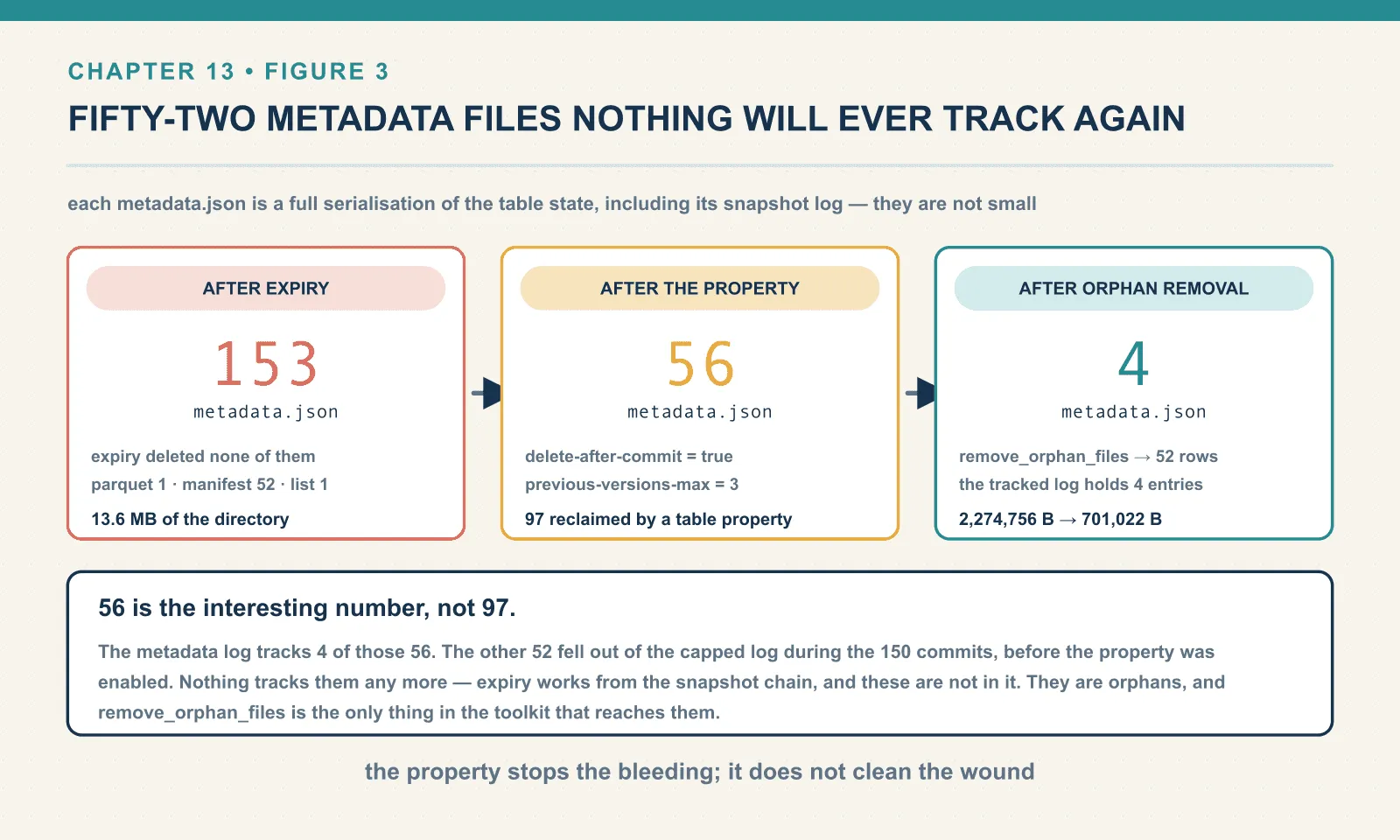
153 down to 56. That is 97 files reclaimed by a table property rather than by a procedure.
And 56 is the interesting number, not 97. The metadata log holds 4 entries now, so only 4 of those 56 files are tracked. The other 52 fell out of the capped log during the 150 commits, before the property was enabled. Nothing tracks them any more. No procedure named in this chapter’s table will find them — expiry works from the snapshot chain, and these are not in it.
Those untracked files are orphans; reclaiming them requires the directory-based procedure below.
Orphans: what they are, and the two guards in front of them
An orphan file is a file under the table’s location that no snapshot references. They arrive in more ways than people expect:
- A write job that produced data files and then died before the commit.
- A compaction that was killed after writing its output and before swapping the pointer.
- Files left behind by a
CommitStateUnknownException, where the client genuinely does not know whether the commit landed. - Metadata files that fell out of a capped log, as above.
- Anything a human copied into the directory.
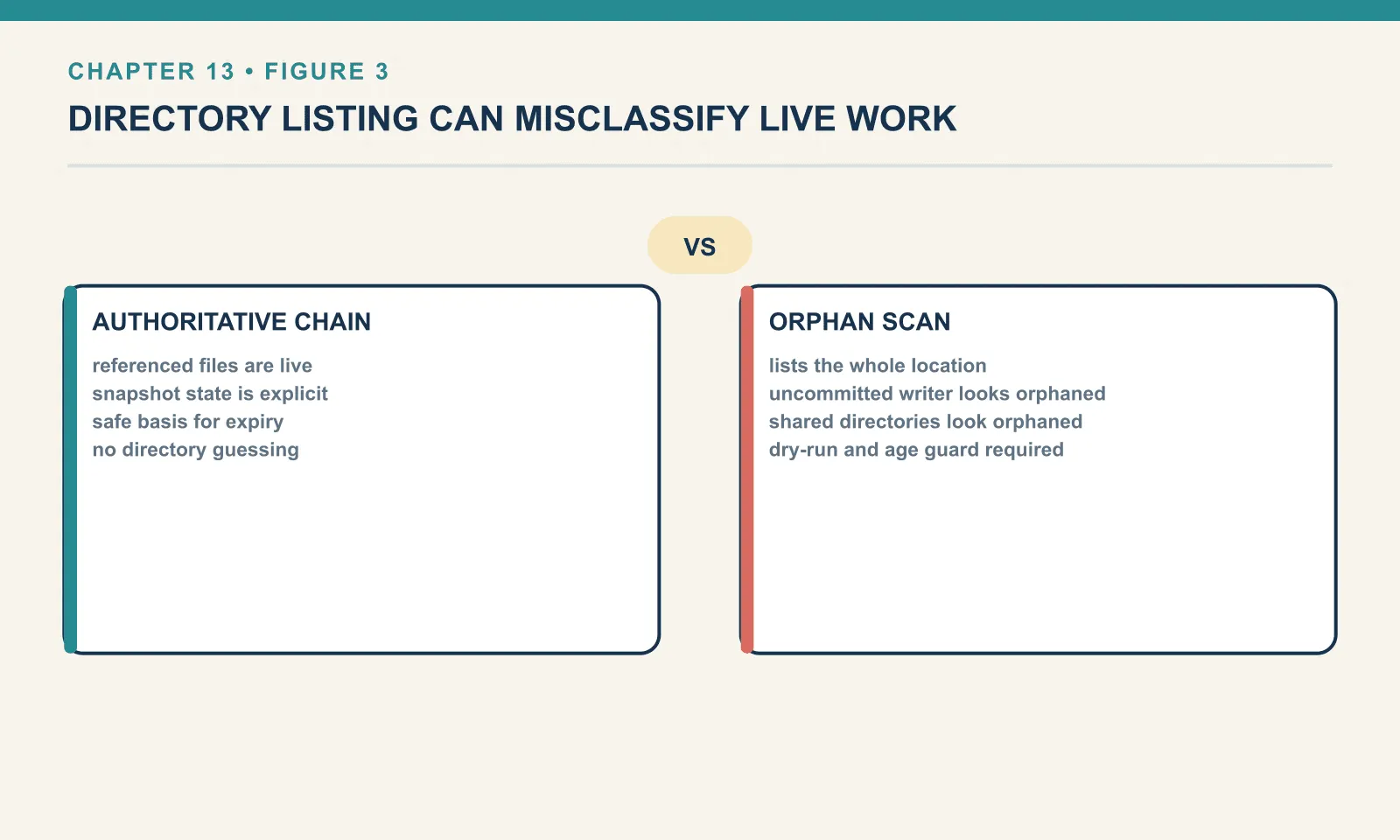
The procedure that removes them is remove_orphan_files, and it is the only one in this chapter that can destroy data. Everything else works from the snapshot chain, which is authoritative. This one works from a directory listing compared against the chain. And a directory listing includes files being written right now by a job that has not committed yet.
Iceberg knows this, and it puts two guards in the way.
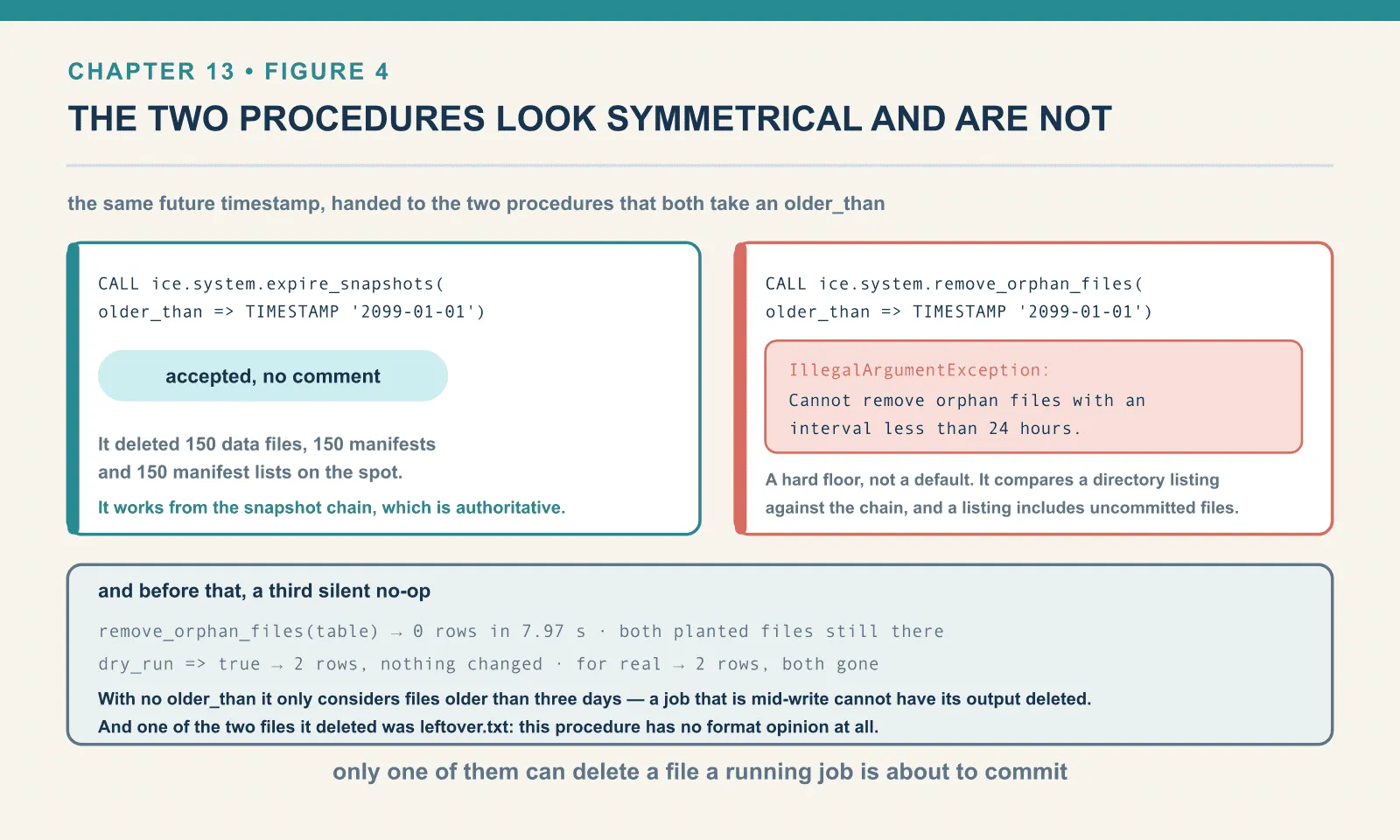
The first is a default age. I planted two orphans in the table’s data/ directory. One is a copy of a real Parquet file under a name nothing references; the other is a plain text file that is not Iceberg at all. Then I called the procedure with its minimum arguments:
CALL ice.system.remove_orphan_files(table => 'ch13.orders')remove_orphan_files(table) -> 0 rows returned in 7.97s
orphan present: True | stray: TrueNothing. Both files still there. The third silent no-op in three chapters — and this one for a good reason. With no older_than, the procedure only considers files older than three days. A job that is mid-write cannot have its output deleted from under it.
This procedure also has a different result shape from the others. It returns one row per deleted file rather than a summary row, so “zero rows” is the success-with-nothing-done signal. If your wrapper does .collect()[0] you get an IndexError rather than a clean report — which is how I found out.
So do the obvious thing and pass a future timestamp, the way expire_snapshots accepted one:
CALL ice.system.remove_orphan_files(
  table      => 'ch13.orders',
  older_than => TIMESTAMP '2099-01-01 00:00:00')
IllegalArgumentException: Cannot remove orphan files with an interval less than 24 hours.
Executing this procedure with a short interval may corrupt the table if other operations are
happening at the same time. If you are absolutely confident that no concurrent operations will
be affected by removing orphan files with such a short interval, you can use the Action API to
remove orphan files with an arbitrary interval.That is the second guard, and it is a hard floor rather than a default. expire_snapshots accepted TIMESTAMP '2099-01-01' without comment; remove_orphan_files refuses anything inside 24 hours. The two procedures look symmetrical and are not. Only one of them can delete a file that a running job is about to commit.
The error also tells you the escape hatch honestly: the Java Action API will do it, the SQL procedure will not. If you find yourself reaching for that, read the sentence in the middle of the message again.
The right way to demonstrate it, then, is to make the orphans genuinely old. Iceberg decides eligibility from file modification time — so backdating the two planted files by ten days is enough:
before: {'parquet': 3, 'leftover.txt': 1, 'metadata.json': 56, 'manifest': 53, 'manifest-list': 2} (228, 2277662)

dry_run -> 2 rows in 5.81s
   would delete: leftover.txt
   would delete: 00000-orphan-left-by-a-failed-job.parquet
  still present: True True

for real -> 2 rows in 1.71s
   deleted: leftover.txt
   deleted: 00000-orphan-left-by-a-failed-job.parquet
  still present: False False
rows still readable: 12080
dry_run => true lists exactly what a real run would delete and changes nothing. Here it exposed a detail worth checking before every run: leftover.txt was eligible too, and the real run deleted it. The procedure does not restrict itself to Parquet or Avro. It has no format opinion at all. Anything under the table location that the snapshot chain does not reference is an orphan, including files put there by something other than Iceberg. If you keep a README, a _SUCCESS marker or an export in your table’s directory, this procedure will remove it.
Now point the same procedure at those 52 untracked metadata.json files from the previous section, aged the same way:
aged 56 metadata.json files by 10 days
remove_orphan_files -> 52 rows in 1.40s
after: {'parquet': 2, 'manifest': 53, 'metadata.json': 4, 'manifest-list': 2} (122, 701022)
metadata_log entries: 4
rows still readable: 12080
2,274,756 bytes to 701,022. The 4 tracked metadata files survived, the 52 untracked ones went, and the table still reads. That closes the loop opened two sections ago. Turning on delete-after-commit stops the bleeding but does not clean the wound, and remove_orphan_files is the only thing in the toolkit that reaches those files.
Where this one is dangerous
Orphan removal is safe only if its directory listing can be compared correctly with the table’s references. A shared directory, a different path spelling or an unfinished write can break that assumption.
It compares a listing against the chain, so anything not in the chain loses. Two tables sharing a directory. A table whose files live somewhere the snapshot chain spells differently. A job writing into the location without committing. All three look identical to this procedure: files that nothing references.
The location argument is a loaded weapon. It lets you scope the scan to a subdirectory, which is genuinely useful on a large table. It also lets you point the procedure at a directory that is not the table’s, and it will not stop you.
Scheme and path spelling matter on object storage. A table whose metadata records s3://bucket/x while the listing returns s3a://bucket/x produces a total mismatch. Every real file then looks unreferenced. Iceberg has a prefix_mismatch_mode argument for exactly this, with ERROR as the safe setting. I did not exercise it. This lab runs on a local file:// warehouse where no mismatch is possible. I passed a location without a scheme and got a correct result, which proves nothing about the S3 case. Treat this paragraph as documentation, not as measurement, and set prefix_mismatch_mode => 'ERROR' on a first run against object storage.
The operational rule that follows: run it rarely, and run it with dry_run first. Keep older_than generously large, and never point it anywhere but the table’s own location.
rewrite_manifests: the one that moves no data
Chapter 11 measured two kinds of fragmentation. Compaction fixes one. This procedure fixes the other — and it is the cheapest useful thing in this chapter, because it never reads a data file.
A clean 150-commit table, no compaction yet:
BEFORE: data_files=150 manifests=51 manifest_bytes=387327 added=51 existing=99 deleted=0
        plan_files=150 plan_best=0.089s
387 kB of manifest describing 447 kB of data, spread across 51 files.
CALL ice.system.rewrite_manifests(table => 'ch13.manifests_demo')-> {'rewritten_manifests_count': 51, 'added_manifests_count': 1} in 1.28s
AFTER : data_files=150 manifests=1 manifest_bytes=20263 added=0 existing=150 deleted=0
plan_files=150 plan_best=0.015s
snapshot ops (last 2): ['append', 'replace']
rows: 12000Fifty-one manifests into one. Manifest bytes fell from 387,327 to 20,263, a 19x reduction, and scan planning went from 89 ms to 15 ms.
The byte figures are deterministic. Rewrite the manifests on this table again and you get the same sizes. The timings are single measurements on a small table, so treat the direction as the finding and the ratio as an illustration. Planning gets faster because there is less metadata to open. How much faster depends on your table, not on this one.
The column that makes the point is data_files. It reads 150 before and 150 after. Not one byte of data was rewritten. The table’s physical layout is exactly as fragmented as it was; only the index over it was rebuilt. If you have a table with acceptable file sizes and slow planning, this is the procedure, and it costs almost nothing to run.
The second use is subtler, and it is the direct sequel to chapter 12. Compact that same table and look at what compaction leaves in the metadata:
rewrite_data_files -> {'rewritten_data_files_count': 150, 'added_data_files_count': 1, ...}
AFTER compaction: data_files=1 manifests=2 manifest_bytes=25950 added=1 existing=0 deleted=150
                  plan_files=1 plan_best=0.008s

+------+---+---+---+
|length|  a|  e|  d|
+------+---+---+---+
| 18521|  0|  0|150|
|  7429|  1|  0|  0|
+------+---+---+---+
Two manifests. One is 7,429 bytes and holds the single new data file. The other is 18,521 bytes and holds 150 entries, all of them marked deleted. Compaction did not discard the record of the files it replaced. It wrote a manifest saying “these 150 are gone”. That record is what lets an incremental reader work out what changed between two snapshots.
It is useful — and it is also two-thirds of your metadata describing files that no longer exist. One more call:
rewrite_manifests again -> {'rewritten_manifests_count': 2, 'added_manifests_count': 1}
AFTER manifest rewrite: data_files=1 manifests=1 manifest_bytes=7431 existing=1 deleted=0
                        plan_files=1 plan_best=0.003s
25,950 bytes to 7,431, and planning from 8 ms to 3 — a difference small enough that only the byte figures are worth quoting. The order that falls out of this is compact, then expire, then rewrite manifests. The manifest rewrite goes last, because it is the one that cleans up after the other two.
Delete files, and a metadata table that is not what it looks like
Measuring rewrite_position_delete_files requires separating data files from delete files. The familiar .files table includes both, so its total alone cannot tell you whether delete-file maintenance helped.
.files is the union of data files and delete files. It is not the data-file list, despite the name — and despite every earlier chapter in this book using it as if it were. On a table with no deletes the two are the same, which is why it has been safe so far. On a merge-on-read table it is not:
ch13.mor2 files by content: [Row(content=0, n=91), Row(content=1, n=24)]
    data_files 91
    delete_files 24
    position_deletes 95
content=0 is data, content=1 is position deletes. Three separate metadata tables say so directly: .data_files, .delete_files, and .position_deletes. The last of those lists the individual deleted row positions rather than the files holding them. Use those. There is also .all_delete_files, which spans every snapshot rather than the current one. It will cheerfully report 97 delete files on a table that currently has 24.
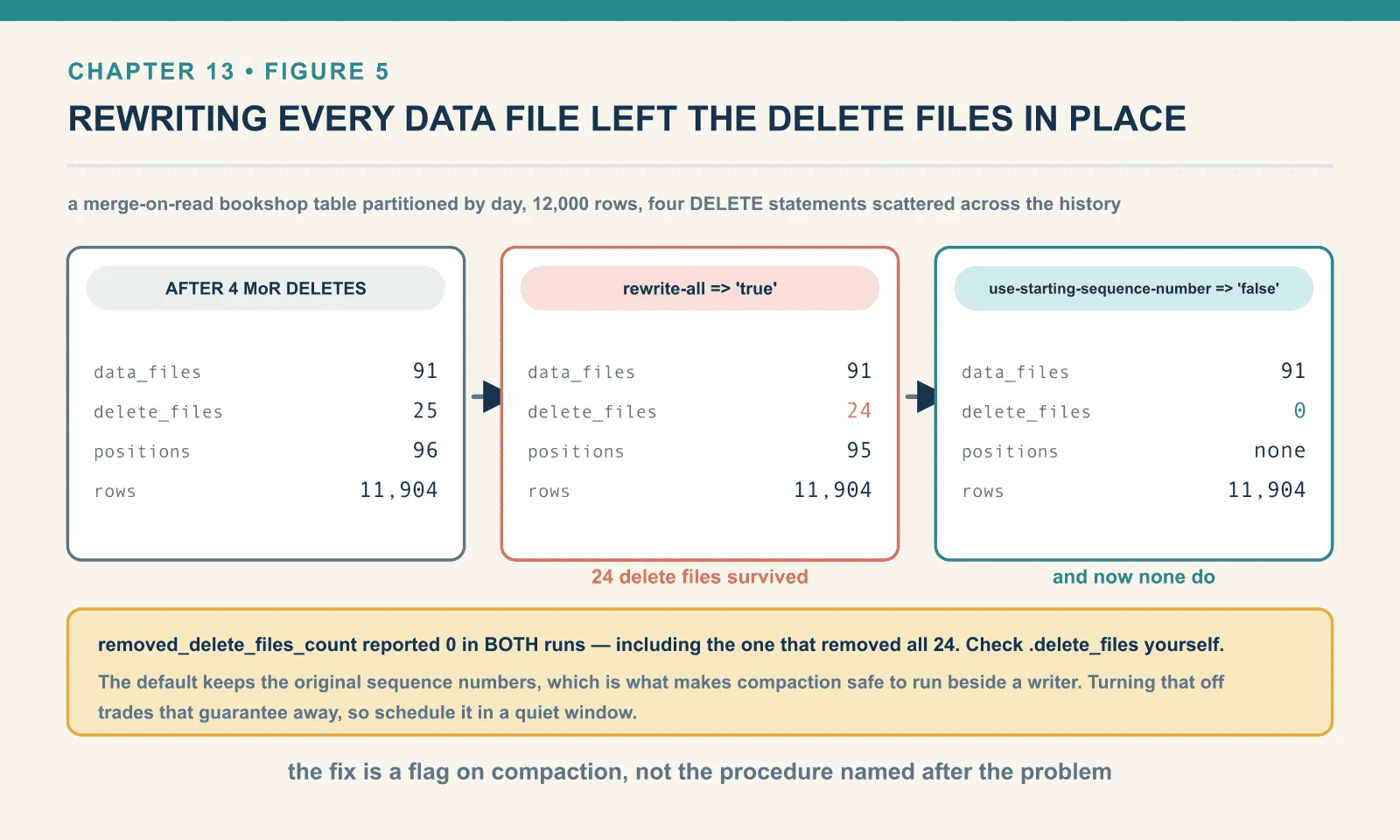
Now the procedure. A merge-on-read bookshop table partitioned by day, 12,000 rows, then four DELETE statements each touching rows scattered across the whole history:
after load            data_files=91 delete_files=0                rows=12000 scan_best=0.469s disk=(190, 340054)
after 4 MoR deletes   data_files=91 delete_files=25 delete_rows=96 rows=11904 scan_best=0.481s disk=(412, 608188)
CALL ice.system.rewrite_position_delete_files(table => 'ch13.mor2')-> {'rewritten_delete_files_count': 0, 'added_delete_files_count': 0,
'rewritten_bytes_count': 0, 'added_bytes_count': 0}Zero — and with min-input-files lowered to 2, still zero.
There was nothing to do, and working out why is more useful than the procedure would have been. Twenty-five delete files across the partitions that the deletes touched works out at one per partition, and one file per group is below any grouping threshold. When Spark applies a merge-on-read delete to a partition that already has a delete file, it rewrites that partition’s delete file rather than adding another. On an unpartitioned table I ran thirty separate DELETE statements and ended with exactly one delete file holding 900 positions.
So: I could not construct a case, using Spark SQL alone, where rewrite_position_delete_files had any work to do. The condition it exists for is many small delete files in the same partition. That is what streaming writers produce when each checkpoint emits its own deletes. This lab has no Flink or Kafka Connect, so that case is described here and not run — the honest state, flagged where the claim is made. Chapter 17 is where streaming ingestion lives, and it carries the same flag.
The trap: compaction does not remove your deletes
The remaining question is whether data-file compaction removes the read-time work of applying deletes. Here is ordinary compaction against that table, rewriting every data file:
CALL ice.system.rewrite_data_files(
  table => 'ch13.mor2',
  options => map('rewrite-all','true'))
-> {'rewritten_data_files_count': 91, 'added_data_files_count': 91,
'rewritten_bytes_count': 316119, 'removed_delete_files_count': 0}
after: data_files=91 delete_files=24 delete_rows=95 rows=11904Every data file was rewritten, and 24 delete files survived. The rows they mark are still logically deleted, still applied on every read, still costing you the merge at scan time. Compaction did not resolve them.
This is deliberate. By default use-starting-sequence-number is on, which means rewritten files inherit the sequence number of the files they replace. That is what makes compaction safe to run concurrently with writers. A delete file committed after the files being compacted still applies correctly to the rewritten output, because that output is dated as of the original. The cost is that the older delete files also still apply, so they cannot be dropped.
Turn it off and the deletes are resolved into the data:
CALL ice.system.rewrite_data_files(
  table => 'ch13.mor2',
  options => map('rewrite-all','true','use-starting-sequence-number','false'))
before data_files=91 delete_files=24 deleted_rows=95 rows=11904
-> {'rewritten_data_files_count': 91, 'added_data_files_count': 91,
'rewritten_bytes_count': 315570, 'removed_delete_files_count': 0}
after data_files=91 delete_files=0 deleted_rows=None rows=11904Twenty-four delete files to zero, and the row count held at 11,904. The deleted rows are now genuinely absent from the data files rather than masked by a side table.
Two footnotes on that output. removed_delete_files_count reported 0 in both runs, including the one that removed all 24. The counter is not telling you the truth about delete files, so check .delete_files yourself. And the flag is only safe when nothing else is committing deletes to the table while it runs — which is exactly the concurrency guarantee it is trading away. Schedule it in a quiet window.
The order, and why it is this order
Each maintenance step leaves work for the next. Data rewrites create obsolete files; expiry reclaims them; a manifest rewrite then tidies the metadata.
1. Compact. Fix data-file layout first. It is the operation that produces the most garbage, so running it first means one expiry cleans up after everything.
2. Expire snapshots. This is the only step that reclaims data-file storage, and it is the step people forget. Without it, compaction is a storage leak with good intentions.
3. Rewrite manifests. Last of the three, because compaction and expiry both change what the manifests should contain. Doing it first means doing it twice.
4. Remove orphan files — on a much slower schedule. Weekly or monthly, never in the same job as the rest, with dry_run first and a generous older_than. It is the only step that can lose data. Unlike the others, it is not fixing a problem the previous steps created.
The ordering also has to account for files that are still referenced and queries that are still running.
Expiry before orphan removal, not after. Expiry deletes files as it un-references them. Referenced files become deleted files directly, without ever passing through the orphan state. Running orphan removal first just means scanning a directory full of files that expiry is about to delete properly.
Nothing here is safe with an aggressive older_than while writers are live. Expiry with older_than => now will remove a snapshot that a long-running query is still reading. That query then fails on a missing file. The five-day default exists because somebody’s query is always still running.
A schedule that works:
-- nightly, scoped to what changed
CALL ice.system.rewrite_data_files(table => 'bookshop.orders',
     where => "order_ts >= TIMESTAMP'<yesterday, midnight UTC>'");
CALL ice.system.expire_snapshots(table => 'bookshop.orders',
     older_than => TIMESTAMP '<now minus 7 days>', retain_last => 10);
CALL ice.system.rewrite_manifests(table => 'bookshop.orders');

-- weekly, separately, watched
CALL ice.system.remove_orphan_files(table => 'bookshop.orders', dry_run => true);
Pick the expiry window from how far back anyone needs to time travel, not from how much storage you want back. That number is a data-retention decision — and it belongs to whoever answers the audit questions.
One last thing the expiry window quietly controls: branches and tags survive it. A tagged snapshot has its own retention. MAX_REF_AGE_MS_DEFAULT in the runtime is 9223372036854775807, which is to say forever. If you need one specific state kept past the expiry horizon, tag it rather than lengthening the window for everything. (I read that default out of the jar rather than testing tag retention against a real expiry; chapter 16 is where branches and tags are exercised properly.)
Final thoughts
Iceberg has no garbage collector. It has four procedures with narrow, non-overlapping jobs. Their defaults are tuned so that a careless call is a no-op rather than a disaster. And it has no opinion whatsoever about when you should run them.
That is the right design, and it produces a specific failure mode in the field. Tables get compacted diligently and never expired. The storage bill grows, and nobody connects it to the maintenance job that is supposed to prevent exactly that. The diagnostic is one query. Compare sum(file_size_in_bytes) from .data_files against what the table’s directory actually occupies. On the wreck in this chapter that ratio was 91,627 bytes against 13.6 MB. Every one of those megabytes had a procedure that could have removed it.
Three chapters have now assumed the table was already Iceberg. The next one is about the tables that are not — the directory of Parquet that chapter 1 broke on purpose. The question there is what it costs to adopt one without rewriting a byte.
Next: Migrating In
Comments