The Procedure That Reports Success and Does Nothing
rewrite_data_files is one call, and the first thing it did on my table was politely change nothing. This chapter pins the default that caused it, then measures bin-pack, sort and z-order compaction on the bookshop orders table.
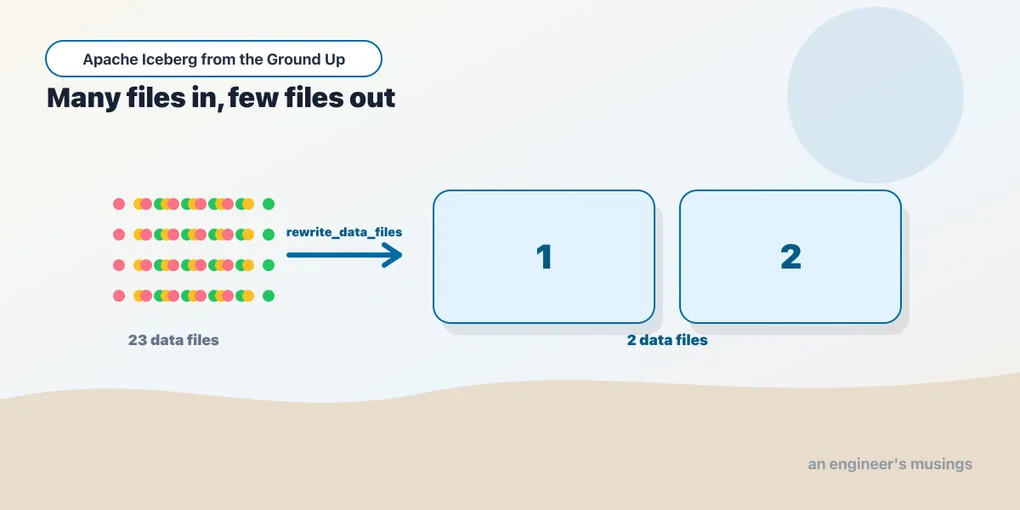
Chapter 11 left the bookshop orders table in a bad state on purpose: 12,000 rows across 150 data files, 15.5 MB on disk for 447 kB of data, and a full scan running 4.9 times slower than the same rows in a single file. This chapter fixes it.
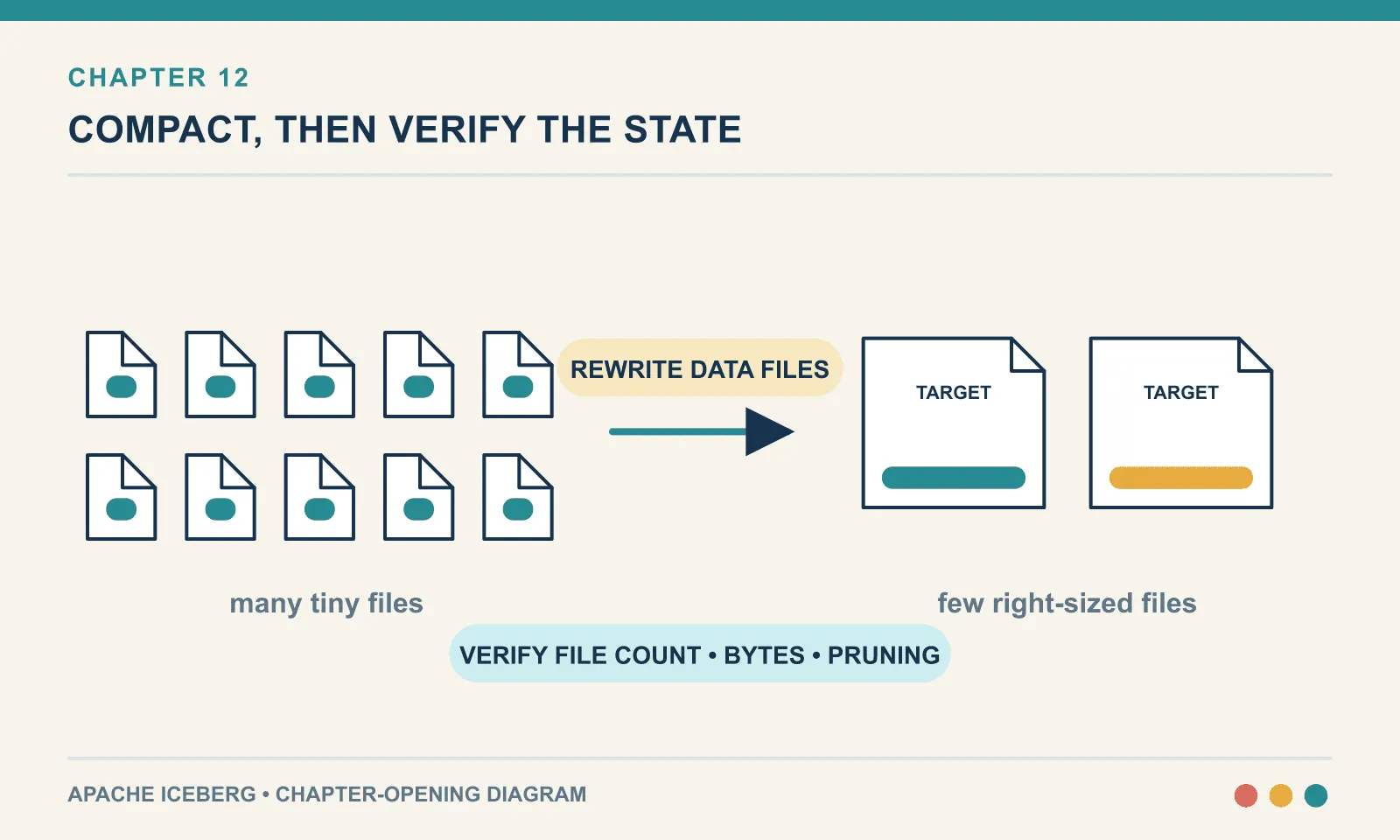
The fix is one procedure call, but it still pays all the costs of a write. Compaction rewrites your data and commits the result as an ordinary snapshot. Its cost, effect on storage and choice of files all follow from that mechanism.
It is a rewrite, so it costs compute proportional to the data it touches — and on object storage it costs reads, writes and requests.
It is committed as a snapshot, so it competes with your writers for the commit and it makes the table temporarily bigger rather than smaller.
And “your data” is a scope you choose. Compaction has a default idea of what deserves rewriting, and that default is conservative. Not knowing it means you call the procedure, get a success, and change nothing at all. That happened to me on the first attempt, so we may as well start there.
Same lab as chapter 11: Iceberg 1.11.0, PySpark 4.1.3, iceberg-spark-runtime-4.1_2.13:1.11.0, the REST catalog, Java 21.
The call that did nothing
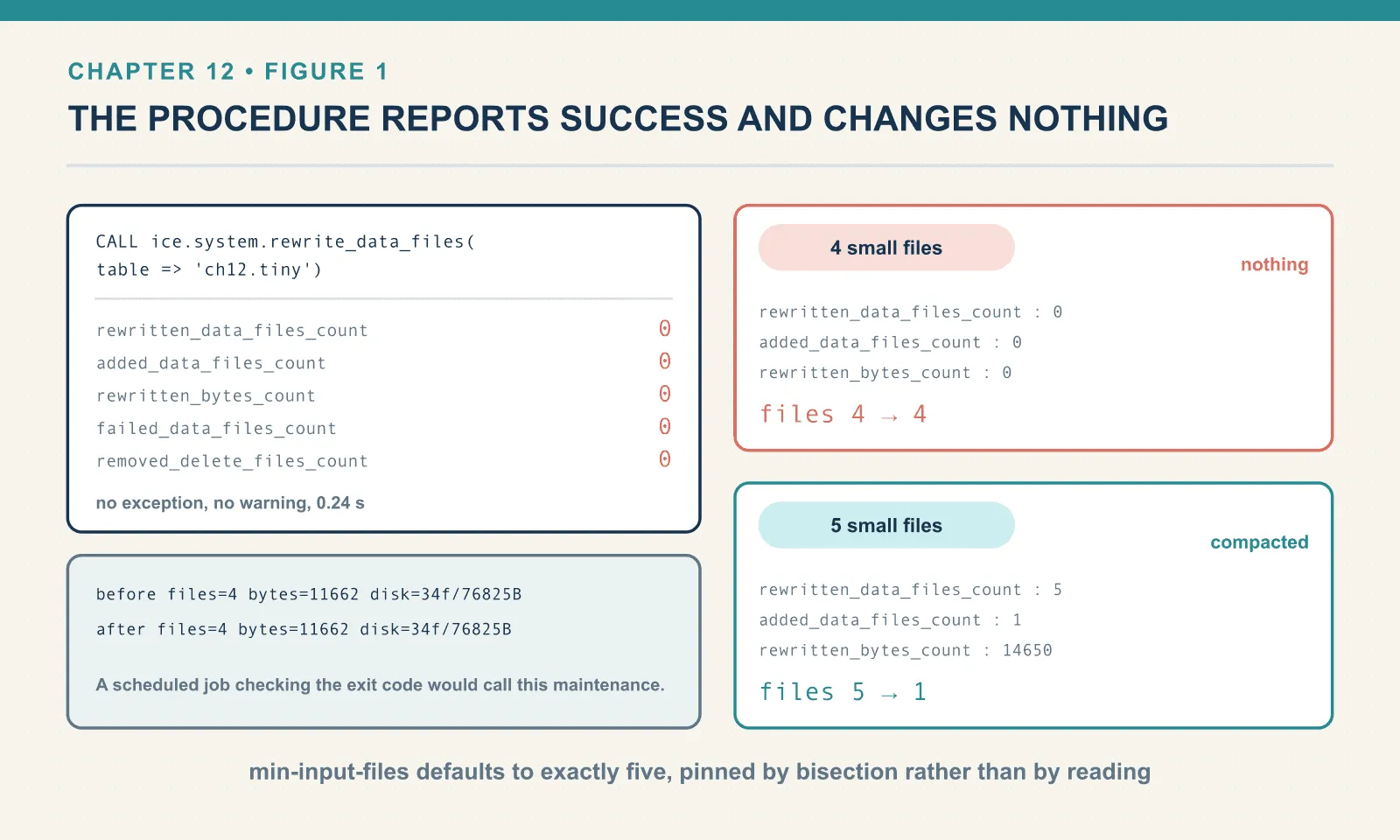
Here is a table with four small files. Four files, 11,662 bytes, four commits.
tiny BEFORE: files=4 bytes=11662 avg=2915 min=2894 max=2951 snaps=4 disk=34f/76825BThe documented way to compact a table is rewrite_data_files, and the documented minimum call is the table name:
CALL ice.system.rewrite_data_files(table => 'ch12.tiny')rewrite_data_files (no options) -> {'rewritten_data_files_count': 0, 'added_data_files_count': 0,
'rewritten_bytes_count': 0, 'failed_data_files_count': 0,
'removed_delete_files_count': 0} in 0.24s
tiny AFTER : files=4 bytes=11662 avg=2915 min=2894 max=2951 snaps=4 disk=34f/76825BNo exception, no warning — a result row, a duration, and a table in exactly the state it was in before. If you were running this from a scheduled job and checking the exit code, you would conclude your maintenance was working.
The cause is min-input-files. Iceberg groups candidate files per partition, and it will not rewrite a group unless the group is big enough to be worth a commit. So what is “big enough”? The documentation says the default is five. Rather than take that on trust, here is the same procedure against two tables built identically, one with four small files and one with five:
4 small files -> {'rewritten_data_files_count': 0, 'added_data_files_count': 0,
                  'rewritten_bytes_count': 0, ...}  files 4 -> 4
5 small files -> {'rewritten_data_files_count': 5, 'added_data_files_count': 1,
                  'rewritten_bytes_count': 14650, ...}  files 5 -> 1
The default is exactly five, pinned by bisection rather than by reading. Below it, nothing happens and the procedure says so in a way you have to know to look for.
Override it and the same table compacts:
CALL ice.system.rewrite_data_files(
  table => 'ch12.tiny',
  options => map('min-input-files','2'))
-> {'rewritten_data_files_count': 4, 'added_data_files_count': 1, 'rewritten_bytes_count': 11662, ...}
tiny AFTER : files=1 bytes=5336 avg=5336 min=5336 max=5336 snaps=5 disk=50f/130983BFour files became one, and the data shrank from 11,662 bytes to 5,336 — exactly the compression recovery chapter 11 predicted.
The number that ought to bother you is disk. It went from 34 files and 76,825 bytes to 50 files and 130,983 bytes. Compaction made the table 70 percent bigger. Hold that thought; it gets its own section.
An aside on how the options behave
A misspelled option could make a maintenance job silently use a default you meant to override. Iceberg catches that case. Here the call includes an option that does not exist:
CALL ice.system.rewrite_data_files(
  table => 'ch12.tiny',
  options => map('banana','yes','min-input-files','2'))
IllegalArgumentException: Cannot use options [banana], they are not supported by the action
or the rewriter BIN-PACKIt refuses, by name — and it tells you which rewriter it validated against. That is not the norm in this corner of the ecosystem. DuckDB’s own COPY … (FORMAT iceberg) accepts an option called banana without complaint, and silently replaces the table it was asked to append to. Plenty of data tooling takes an unknown keyword, drops it, and reports success. Here a typo’d option is a loud failure rather than a quiet one, which means the only silent no-op in this procedure is the min-input-files threshold above.
Compacting the wreck
Now the real table. 150 files, one per micro-batch commit.
BEFORE: files=150 bytes=447029 avg=2980 min=2871 max=3016 snaps=150 disk=1202f/15595789B
        agg best 0.646  runs ['1.274', '0.727', '0.646', '0.737']
CALL ice.system.rewrite_data_files(table => 'ch12.orders_stream')-> {'rewritten_data_files_count': 150, 'added_data_files_count': 1,
'rewritten_bytes_count': 447029, 'failed_data_files_count': 0,
'removed_delete_files_count': 0} in 1.36s
AFTER : files=1 bytes=91677 avg=91677 min=91677 max=91677 snaps=151 disk=1312f/16257218B
agg best 0.086 runs ['0.095', '0.086', '0.133', '0.104']
rows still: 12000One hundred and fifty files into one, in 1.36 seconds. Data bytes fell from 447,029 to 91,677, a 4.9x reduction from compression alone. The aggregation went from 0.646 seconds to 0.086, which is 7.5 times faster. The row count is unchanged — the assertion that matters most, and the one easiest to forget to make.
The commit it produced is not special:
snapshot ops: ['append', 'append', 'replace']A replace snapshot. Iceberg records that a set of files was swapped for another set representing the same rows. Everything the format does for ordinary writes applies — it is atomic, readers in flight finish against the old file list, and the previous state remains addressable.
The partitioned table is where the numbers get loud. This one had 20 commits, each spreading rows across all 91 day-partitions:
BEFORE: files=1820 bytes=3581984 avg=1968 min=1734 max=2001 snaps=20 disk=3762f/4236895B
        agg best 4.810  runs ['5.199', '4.810', '5.146', '6.328']

-> {'rewritten_data_files_count': 1820, 'added_data_files_count': 91,
    'rewritten_bytes_count': 3581984, ...} in 17.94s

AFTER : files=91 bytes=338822 avg=3723 min=2607 max=3871 snaps=21 disk=3990f/4867794B
        agg best 0.377  runs ['0.379', '0.377', '0.379', '0.381']
partitions: Row(n=91, f=91)
1,820 files to 91, one per partition, in 18 seconds. The full scan went from 4.81 seconds to 0.377, 12.8 times faster. And notice the variance collapsed too: the before-runs range from 4.8 to 6.3 seconds, the after-runs are all 0.377 to 0.381. Fragmented tables are not just slow, they are unpredictably slow — how long a scan takes depends on how many small reads happen to contend.
Compaction did not touch history:
oldest snapshot 3157560524341670730 append rows: 80The first micro-batch commit is still queryable, still holds its original 80 rows, and still points at data files that compaction replaced. Those files are all still on disk. Which brings us to the invoice.
Compaction makes your table bigger
Look at the disk figures across all three compactions:
| table | disk before | disk after |
|---|---|---|
tiny | 34 files / 76,825 B | 50 files / 130,983 B |
orders_stream | 1,202 files / 15,595,789 B | 1,312 files / 16,257,218 B |
orders_spread | 3,762 files / 4,236,895 B | 3,990 files / 4,867,794 B |
Every one went up. This is not a defect, and not a surprise once you have internalised the model. It is also the single most common way people conclude that compaction “did not work”.
Compaction adds a snapshot. It never removes one. The new snapshot references one tidy file. The previous 150 snapshots still reference the 150 original files. Iceberg will not delete a file a retained snapshot still needs, because that would break time travel. So after compaction your table holds the old layout and the new one.
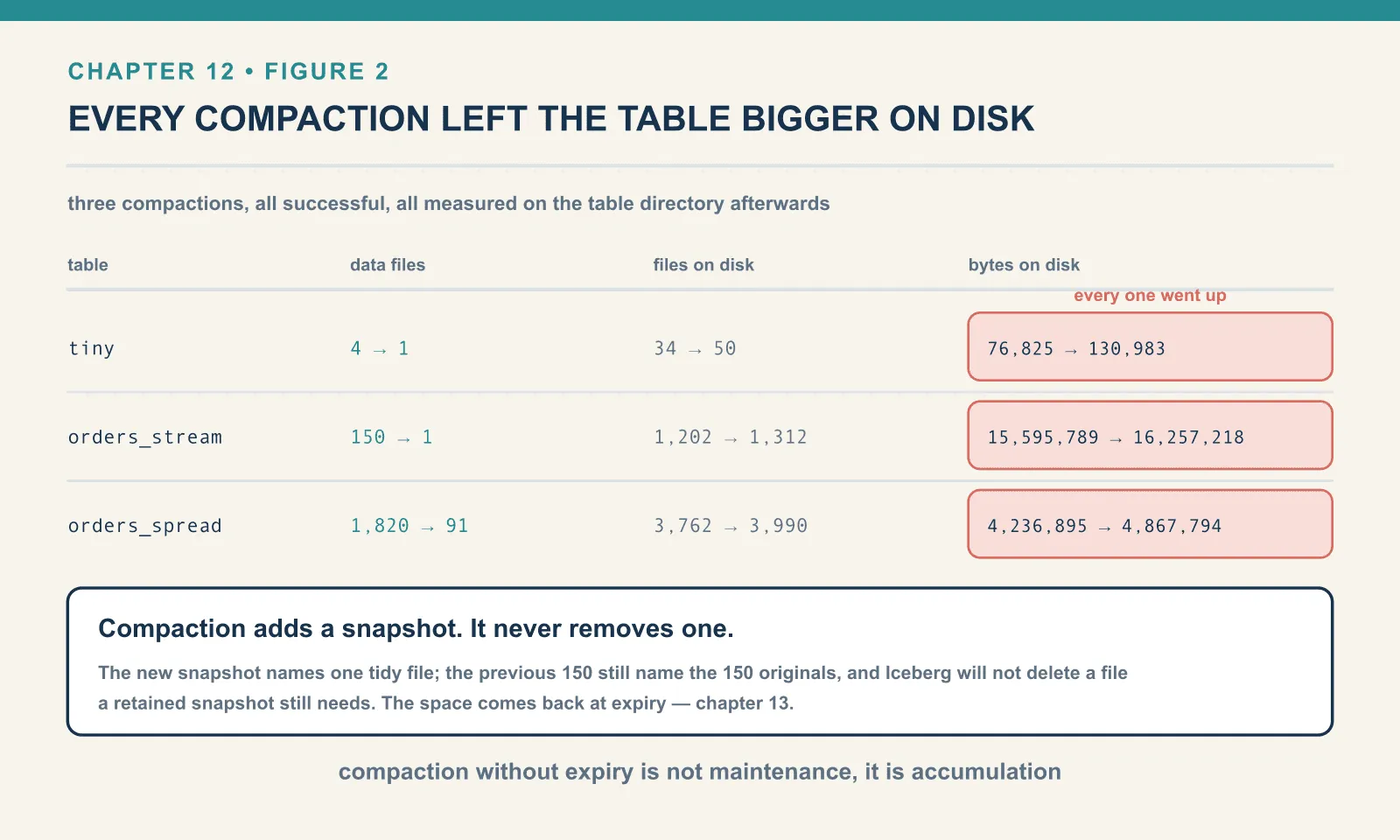
The space comes back when the old snapshots expire. That is a separate operation, with its own semantics, its own ordering constraints, and its own way of doing nothing when you call it wrong. It is chapter 13. Compaction without expiry is not maintenance, it is accumulation. If you schedule one and not the other, storage grows monotonically and you will eventually be paging someone about a bucket.
The other direction: compaction splits, too
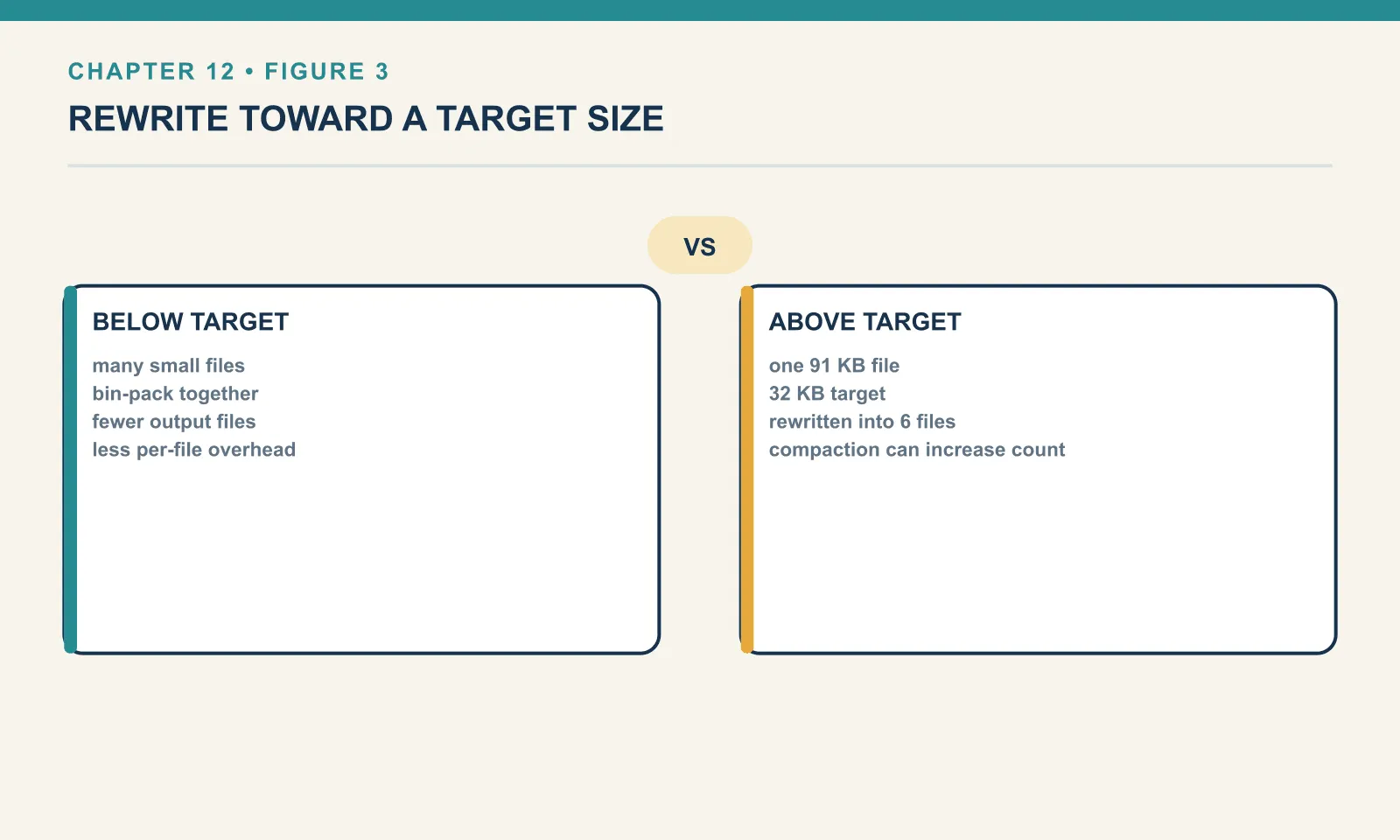
The name suggests merging, but rewrite_data_files does not merge. It rewrites toward a target size — and a file above the target gets split just as readily as files below it get combined.
The target is write.target-file-size-bytes, and its default is not a small number. Read straight out of the 1.11.0 runtime, WRITE_TARGET_FILE_SIZE_BYTES_DEFAULT is 536870912 — 512 MB. Every “compaction” in this chapter so far has been the procedure trying and failing to reach half a gigabyte with a toy table.
Point it somewhere achievable and the direction reverses. Taking the single 91,677-byte file produced above:
CALL ice.system.rewrite_data_files(
  table => 'ch12.orders_stream',
  options => map('target-file-size-bytes','32768','rewrite-all','true'))
BEFORE: files=1 bytes=91677 avg=91677 min=91677 max=91677
-> {'rewritten_data_files_count': 1, 'added_data_files_count': 6, 'rewritten_bytes_count': 91677, ...}
AFTER : files=6 bytes=124975 avg=20829 min=20394 max=21511One file became six, and the total bytes went up, from 91,677 to 124,975, for exactly the reason chapter 11 gave: smaller files compress worse. This is the small-files problem being manufactured by the tool that exists to fix it, which is a useful thing to have seen once. Set target-file-size-bytes deliberately, or leave it alone.
Note also rewrite-all. Without it, the rewriter skips files that are already close enough to target — that is what the min-file-size-bytes and max-file-size-bytes ratios are for. With it, everything in scope is rewritten regardless. It is the right flag for a one-off correction and the wrong one for a nightly job.
Sorting: the strategy that changes what queries read
Bin-pack compaction, the default, cares only about size. It fills files up to the target and pays no attention to what is inside them — which fixes per-file overhead and nothing else.
Sort compaction can also reduce which files a query has to open. Iceberg records per-column lower and upper bounds for every data file. A query with WHERE customer_id = 42 can skip any file whose recorded range excludes 42 without reading a byte of it. Whether that skipping is worth anything depends entirely on how the values are distributed across files. In a table written in arrival order the answer is usually “not at all”, because every file contains roughly the full range of every column.
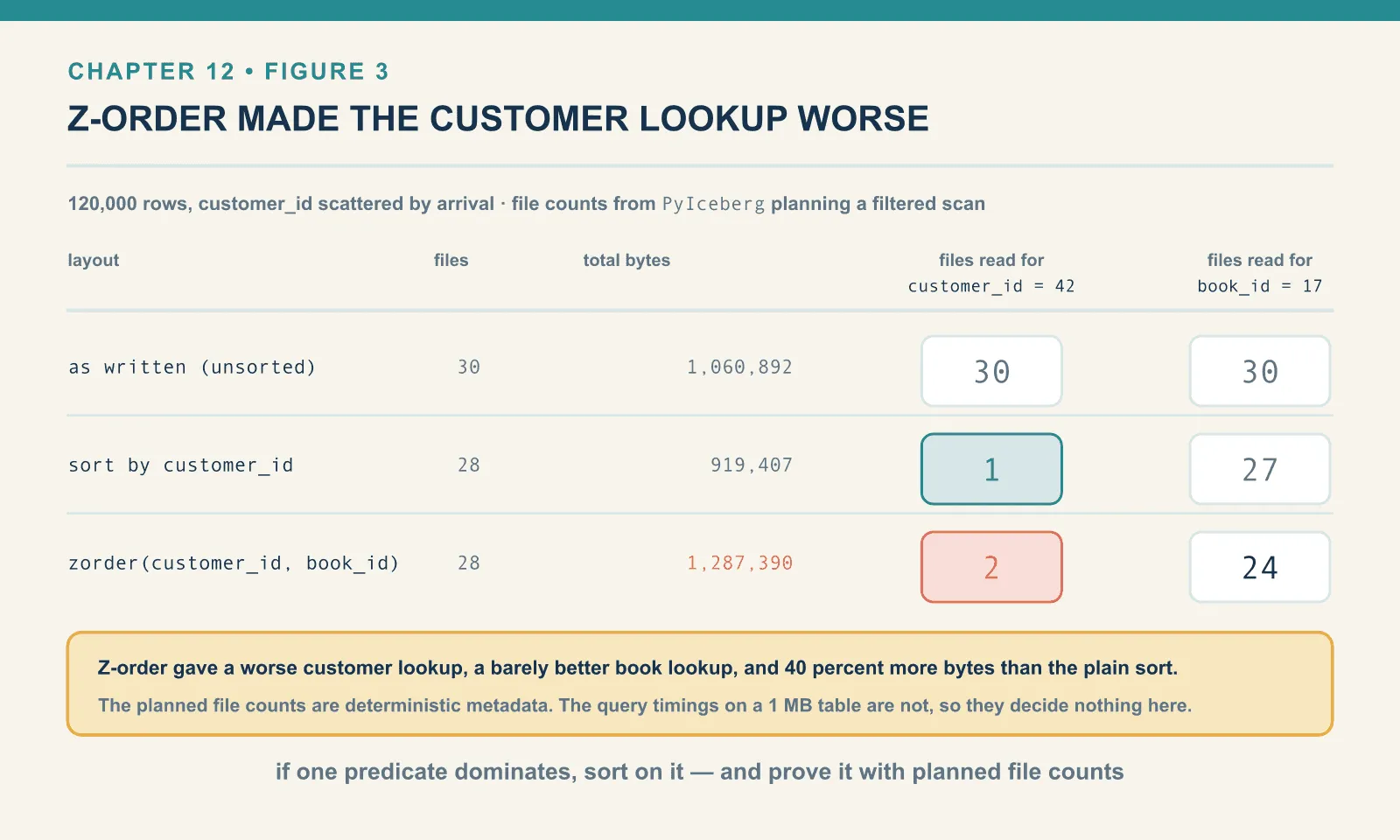
Here is that measured. A 120,000-row bookshop orders table with customer_id values scattered by arrival, written at a 128 kB target so there is something to prune:
as written (unsorted)  files= 30 avg=  35363 bytes= 1060892 |
                       scan-all= 30 cust=42 ->  30 files | book=17 ->  30 files | query best 0.332s rows=24
The file counts on the right come from PyIceberg planning the scan with a row filter and never executing it, which is the cleanest way to ask “how many files would this query open”. For customer_id = 42, the answer is all thirty. Every file’s bounds span nearly the whole customer range, so nothing can be skipped, and the query reads the entire table to return 24 rows.
Now sort-compact it:
CALL ice.system.rewrite_data_files(
  table => 'ch12.skew',
  strategy => 'sort',
  sort_order => 'customer_id ASC NULLS LAST',
  options => map('rewrite-all','true','target-file-size-bytes','131072'))
sort compaction -> {'rewritten_data_files_count': 30, 'added_data_files_count': 28,
'rewritten_bytes_count': 1060892, ...}
after sort by customer_id files= 28 avg= 32835 bytes= 919407 |
scan-all= 28 cust=42 -> 1 files | book=17 -> 27 files | query best 0.170sThirty files to one. Same rows, same table, same query. The only thing that changed is which rows live next to which. Now 27 of the 28 files can be eliminated from the plan before any I/O happens.
Two more things fell out of that run and both are worth keeping. The total bytes dropped from 1,060,892 to 919,407, because sorting groups similar values and similar values compress better. And the file count went from 30 to 28, because sorting changed how well the data packed against the target size.
The cost is stated in the same output. This was rewrite-all, so all 1 MB was read and rewritten. On a real table sorting is the most expensive maintenance operation you own, because it is a global shuffle. It is also the one with the largest payoff — and that payoff is durable until the next batch of unsorted writes lands on top.
Z-order, and an honest result
The obvious complaint about sorting is that it only helps one column. Rows sorted by customer_id tell you nothing useful about book_id. Z-ordering is the standard answer. Interleave the bits of several columns so that values close in any of them tend to land near each other. You trade a perfect sort on one column for a decent clustering on several.
CALL ice.system.rewrite_data_files(
  table => 'ch12.skew',
  strategy => 'sort',
  sort_order => 'zorder(customer_id, book_id)',
  options => map('rewrite-all','true','target-file-size-bytes','131072'))
after zorder(cust,book) files= 28 avg= 45978 bytes= 1287390 |
scan-all= 28 cust=42 -> 2 files | book=17 -> 24 files | query best 0.106sPut the three states side by side:
| layout | files | total bytes | files read for customer_id = 42 | files read for book_id = 17 |
|---|---|---|---|---|
| as written | 30 | 1,060,892 | 30 | 30 |
sort by customer_id | 28 | 919,407 | 1 | 27 |
zorder(customer_id, book_id) | 28 | 1,287,390 | 2 | 24 |
Z-ordering made the customer lookup worse (2 files instead of 1), improved the book lookup only slightly (24 instead of 27), and inflated the table by 40 percent against the sorted version, from 919 kB to 1.29 MB. On this data, on these two columns, it was a bad trade.
I am reporting that rather than tuning until it looked good, because the shape of the result generalises even though the exact numbers do not. Z-ordering does not give you two good sorts. It gives you one mediocre clustering and spends compression to do it. It pays off only when your workload queries several columns with comparable frequency and none of them dominates. If one predicate dominates, sort on it. Measure the file counts before and after; do not assume z-order is the more advanced choice because it has the more advanced name.
(One caution on my own numbers: the query timings here — 0.332, 0.170, 0.106 seconds — are best-of-four on a 1 MB table and the z-order run being fastest is almost certainly noise. The planned file counts are the robust signal, because they are deterministic and come from metadata rather than from a stopwatch.)
Scoping a rewrite, and the timezone that ate a partition
Compacting a whole table nightly is fine until the table is large, at which point you want to touch only what changed. The where argument scopes the rewrite:
CALL ice.system.rewrite_data_files(
  table => 'ch12.orders_spread',
  where => "order_ts >= TIMESTAMP'2026-04-01' AND order_ts < TIMESTAMP'2026-04-02'",
  options => map('min-input-files','2'))
The setup: a table sitting at 91 partitions with 91 files, then three extra commits landing in the first two days of April.
orders_spread partitions before extra churn: Row(n=91, f=91)
after 3 churn commits: Row(n=91, f=100)
scoped rewrite -> {'rewritten_data_files_count': 8, 'added_data_files_count': 2, ...}
after scoped rewrite: Row(n=91, f=94)
It worked, and the arithmetic checks out: 100 files minus 8 rewritten plus 2 added is 94. But look at the numbers again. I asked for one day. It rewrote eight files into two, which is two partitions’ worth, not one.
The two partitions come from two definitions of a day. Iceberg’s days() transform bucketises timestamps by UTC day. Spark’s TIMESTAMP'2026-04-01' literal is resolved in the session timezone, which on this machine is America/Los_Angeles. So local April 1st runs from 07:00 UTC on the 1st to 07:00 UTC on the 2nd, and touches two UTC partitions.
Here is that made visible on a clean table. Row counts by local date, then row counts by partition:
tz: America/Los_Angeles
local-date row counts: [Row(d='2026-04-01', n=134), Row(d='2026-04-02', n=133), Row(d='2026-04-03', n=133)]
partition row counts : [Row(partition=Row(order_ts_day=2026-04-01), record_count=95),
                        Row(partition=Row(order_ts_day=2026-04-02), record_count=133),
                        Row(partition=Row(order_ts_day=2026-04-03), record_count=134)]
rows in UTC day 1: Row(count(1)=134)
Local day 2026-04-01 holds 134 rows. Partition 2026-04-01 holds 95. They are not the same set of rows. They are offset by seven hours: the SQL predicate follows the local definition, and the partition layout follows the UTC one.
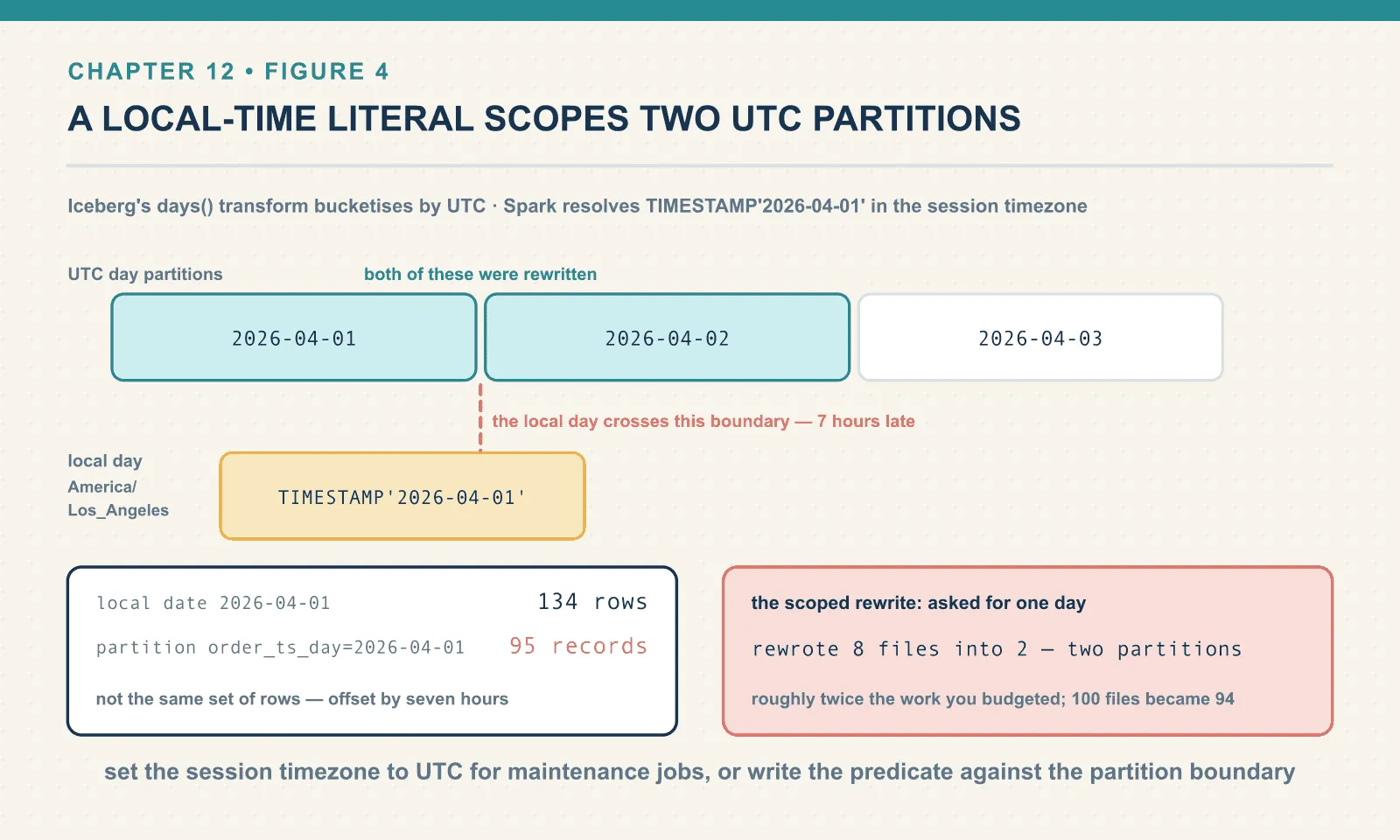
Nothing here is wrong, and no query returns a wrong answer. But two practical things follow. A “compact yesterday” job scoped with a local-time literal will touch two partitions rather than one, doing roughly twice the work you budgeted. And when you check the partitions table to confirm the job worked, the partition you expected to see tidied may not be the one that was.
Set spark.sql.session.timeZone to UTC for maintenance jobs, or write the predicate against the partition boundary rather than the local calendar. Either works. Not knowing which of the two you are doing is what costs you.
Partial progress
A failed rewrite can waste all the work completed before the failure, because by default a rewrite is one commit. Every file group is rewritten, then the whole thing lands as a single replace snapshot. If it fails partway through — or if a concurrent writer wins the commit race — everything is thrown away and you have burned the compute for nothing. On a large table that is an expensive way to lose.
partial-progress.enabled breaks it into several commits:
CALL ice.system.rewrite_data_files(
  table => 'ch12.pp',
  options => map('partial-progress.enabled','true','partial-progress.max-commits','4'))
files: 546 snapshots: 6
rewrite with partial progress -> {'rewritten_data_files_count': 546, 'added_data_files_count': 91,
'rewritten_bytes_count': 1276703, ...}
files: 91 snapshots: 10
ops: ['append','append','append','append','append','append','replace','replace','replace','replace']546 files became 91, and the snapshot count went from 6 to 10 rather than to 7. Four replace snapshots instead of one. Each landed independently, so a failure after the second would have left two-thirds of the work committed and useful.
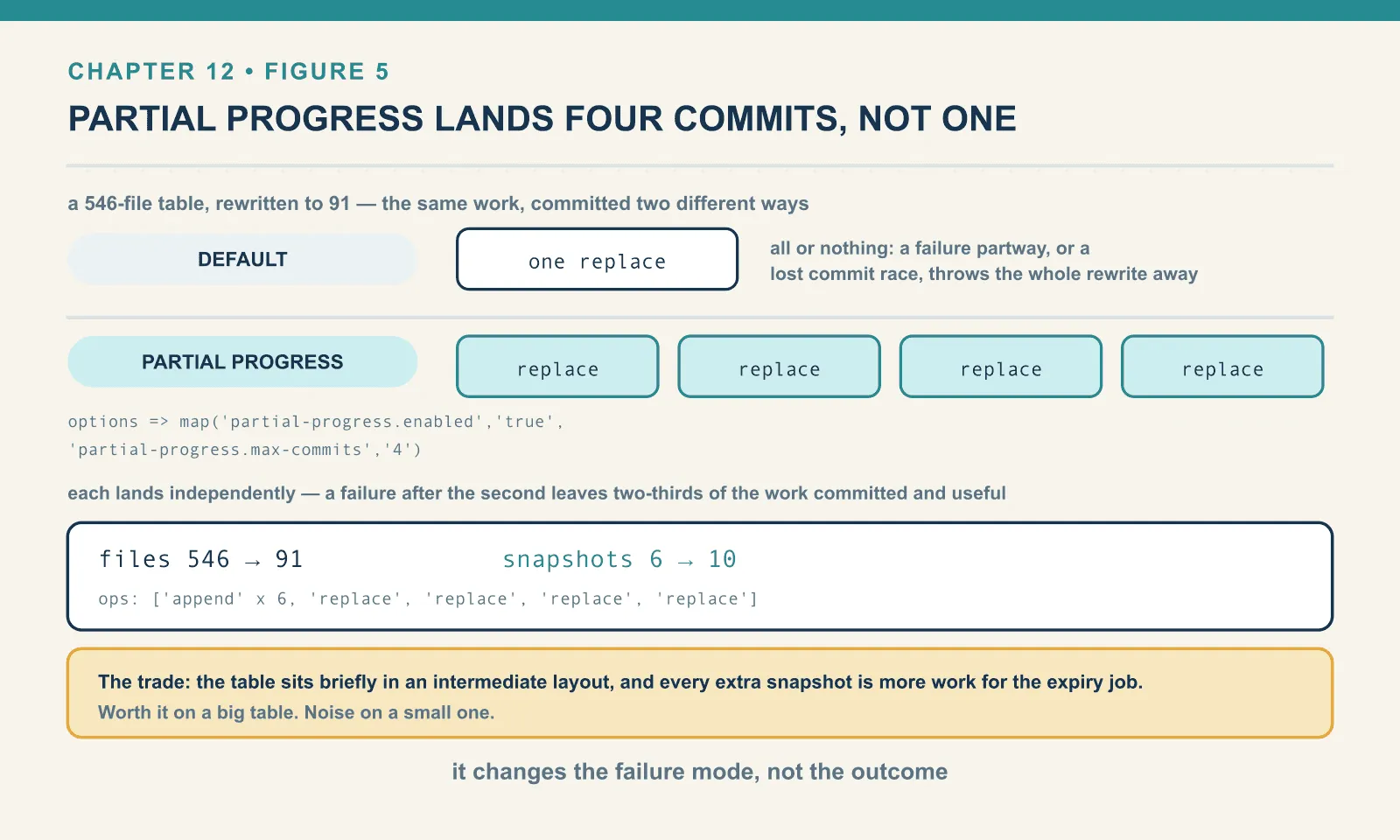
The trade is that the table sits briefly in an intermediate layout, and that you generate more snapshots — more work for the expiry job in chapter 13. For a big table it is worth it. For a small one it is noise.
Operating it
Pulling the settings together, here is what I would actually schedule against a table that receives frequent small commits.
CALL ice.system.rewrite_data_files(
  table    => 'bookshop.orders',
  where    => "order_ts >= TIMESTAMP'<yesterday, midnight UTC>'",
  options  => map(
    'min-input-files',            '5',
    'target-file-size-bytes',     '536870912',
    'partial-progress.enabled',   'true',
    'partial-progress.max-commits','10'))
The scope and defaults in that call each have an operational reason.
Scope by time, not by table. History does not re-fragment. Compacting the whole table nightly rewrites 90 days of already-tidy data to fix one day of mess.
Leave min-input-files at 5 unless you know why you are lowering it. The default exists to stop the job rewriting a partition to save nothing. If you lower it to 2, as this chapter did, you will get commits that move almost no data.
Run expiry after it, always. Otherwise the storage that compaction is meant to reclaim only ever grows. Chapter 13.
Expect commit conflicts and let it retry. Compaction is a commit like any other. If a writer lands first, the rewrite fails on the swap and must be retried against the new state. partial-progress limits how much you lose when it happens.
Sort only when a predicate justifies it, and prove the benefit with planned file counts before and after rather than with a stopwatch. Sorting is the expensive one.
And one note pointing forward: on a merge-on-read table, plain compaction does not apply your position deletes. The rewritten files keep the sequence number of the files they replaced, so the delete files still apply and still cost you at read time. There is a flag that changes this, it has a real trade-off, and it belongs with the rest of the delete-file maintenance in the next chapter.
Final thoughts
Compaction is the operation people expect to be a button, and it very nearly is. The procedure call hides decisions that matter when you schedule it. A group below the threshold is left alone. A successful rewrite adds storage until old snapshots expire. And a target below the current file size can increase the file count. All three happened on these small bookshop tables.
The measurements are all cheap. files before and after tells you whether it ran. sum(file_size_in_bytes) tells you whether compression came back. PyIceberg’s planned file count under a filter tells you whether sorting bought anything. Comparing the on-disk footprint before and after tells you that you still owe the table an expiry.
That last debt is the whole of the next chapter, and it is where the storage bill finally comes down.
Comments