Adopting Files You Did Not Write
add_files, snapshot and migrate turn a directory of Parquet into an Iceberg table without rewriting it. Then expire_snapshots deleted the original Parquet, which is the part nobody warns you about.
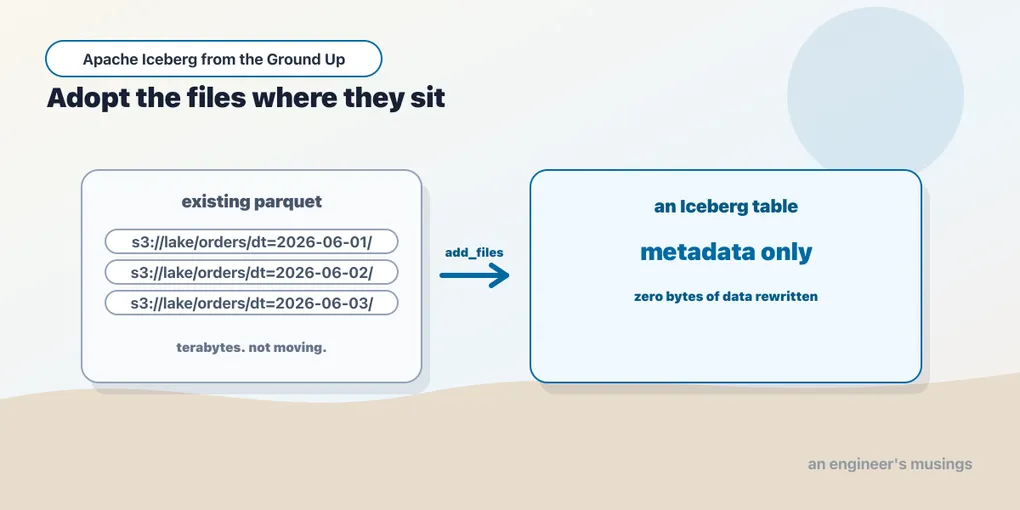
The directory of Parquet files that broke four ways in chapter 1 is still the migration problem: how do you give existing files a table’s guarantees? The intervening chapters started with new Iceberg tables.
Almost nobody is. The realistic situation is a bucket with several terabytes in it, laid out dt=2026-04-01/part-00000.parquet and registered in a Hive metastore or in Glue. Four teams read it, and a job nobody wants to touch writes it. Somebody has decided it should be Iceberg. The obvious plan is to read it all and write it all back out as an Iceberg table. That plan is correct, slow and expensive, and on a large enough table it is a project rather than a task.
Iceberg offers three procedures that avoid the rewrite entirely, by importing the file references rather than the files. They differ in what happens to the source, and choosing between them is almost the whole decision:
| Procedure | What you end up with | The source afterwards | Data rewritten |
|---|---|---|---|
add_files | files added to an Iceberg table you already made | untouched, still its own table | none |
snapshot | a new Iceberg table shadowing the source | untouched, still writable, now independent | none |
migrate | the source table replaced in place by an Iceberg table | renamed to <name>_BACKUP_ | none |
All three are cheap because none of them reads your data. They also leave two systems claiming the same files — a problem when one starts reclaiming storage. The bookshop runs below show both the import and what subsequent maintenance does to the source.
Same lab as chapters 11 to 13: Iceberg 1.11.0, PySpark 4.1.3, iceberg-spark-runtime-4.1_2.13:1.11.0, the REST catalog, Java 21.
Before anything else: should you?
A rewrite may be the work your table needs. Adoption saves that work by preserving the files as they are, including any layout problems that sent you looking for a migration.
Adoption imports your existing layout, exactly as it is. File sizes, sort order, partition scheme, compression, all of it. Say you are moving to Iceberg because the table is a mess of small files. Adopting it gives you an Iceberg table that is a mess of small files, plus a maintenance job. You have changed who tracks the files, not how they are arranged.
You get identity partitioning, not hidden partitioning. This one undercuts one of Iceberg’s headline features. A Hive-style directory laid out dt=2026-04-01/ has a column called dt, and an adopted table partitions by the identity of that column. It does not partition by days(order_ts), because there is no transform recorded anywhere in a directory name. So you keep the Hive bargain from chapter 8. Your queries must filter on dt by name, in the shape the layout expects, and filtering on the real timestamp prunes nothing. Chapter 9’s partition evolution can move you to a transform later, but only new data lands under the new spec.
The physical files stay wherever they are. For add_files and snapshot, the data does not move into your warehouse. Your Iceberg table points across a directory boundary at somebody else’s files, forever, or until you compact.
The clean decision rule: adopt when the layout is already the layout you want, and rewrite when it is not. Adoption is a fast way to get transactional guarantees, schema evolution and time travel over a dataset that is otherwise fine. It is not a way to fix a dataset that is not.
The dataset
A legacy bookshop orders extract, written by Spark the way a Hive-era pipeline would have written it: partitioned directories, one Parquet file each, no metadata layer at all.
spark.table("ice.ch14.src").write.partitionBy("dt").parquet(f"file://{LEG}/orders_parquet")legacy parquet: 30 data files, 62 files total, 1717835 bytes, 30 dt directories120,000 orders over thirty days. This is the chapter-1 table, at chapter-1 scale, with all four of chapter 1’s problems intact.
add_files
add_files imports file references into an Iceberg table that already exists. So you create the table first, with a schema and partition spec matching what is on disk.
CREATE TABLE ice.ch14.adopted
  (order_id BIGINT, customer_id INT, book_id INT, status STRING, amount DOUBLE, dt STRING)
  USING iceberg PARTITIONED BY (dt);

CALL ice.system.add_files(
  table        => 'ch14.adopted',
  source_table => '`parquet`.`file:///.../legacy/orders_parquet`');
The backtick-quoted `parquet`.`path` form points at a bare directory rather than a catalog table. It also accepts a real table identifier, which is what you use against Hive or Glue.
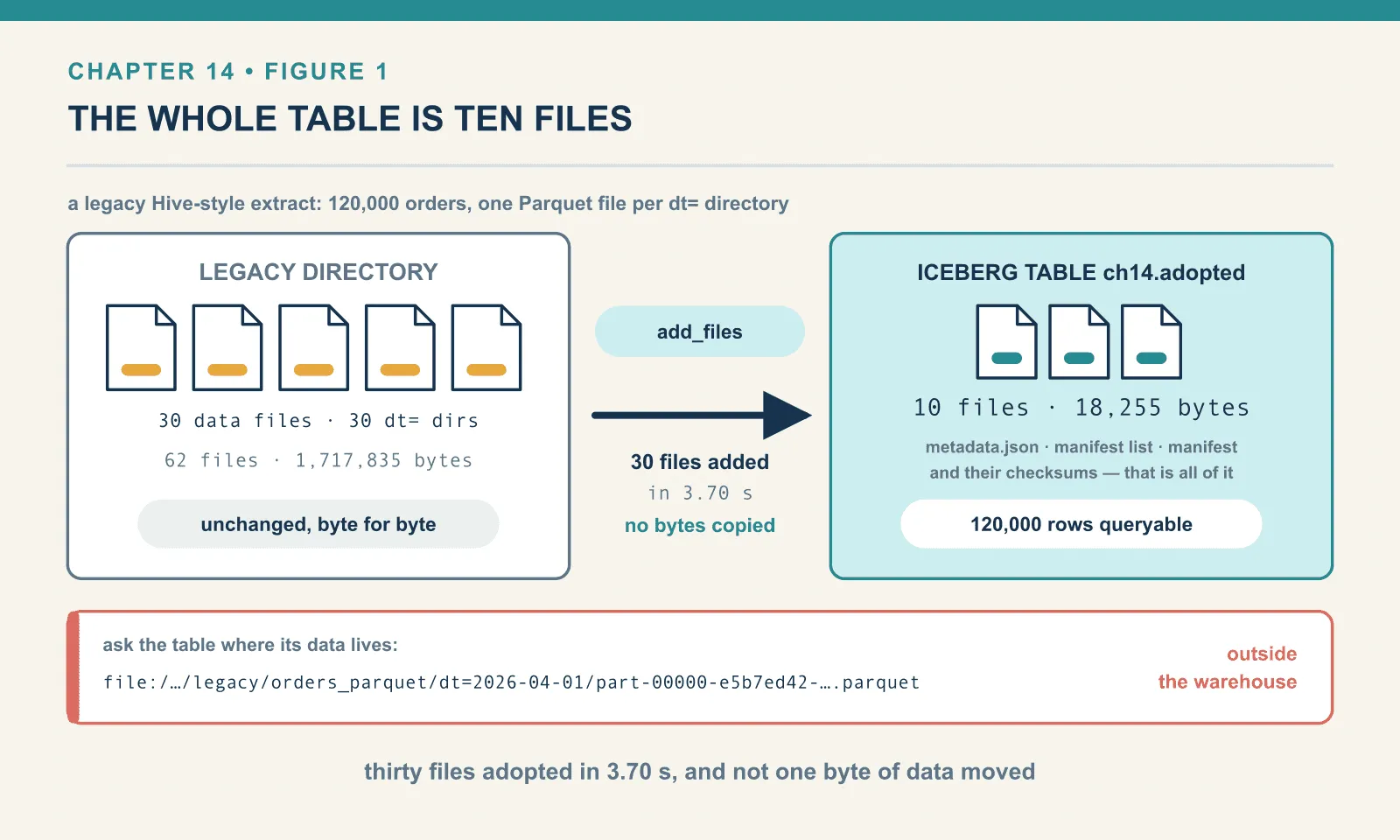
add_files -> {'added_files_count': 30, 'changed_partition_count': None} in 3.70s
iceberg rows: 120000
iceberg data files: 30 bytes 1704259
iceberg table dir: (10, 18255)
legacy dir now  : (62, 1717835)
partitions: Row(n=30, f=30)
120,000 rows are queryable as an Iceberg table. Every guarantee this book has spent thirteen chapters on now applies to them.
The Iceberg table’s own directory holds ten files and 18,255 bytes. That is the entire cost: one metadata.json, a manifest list, a manifest, and their checksums. The legacy directory is byte-for-byte what it was, 62 files and 1,717,835 bytes, because nothing was copied. Ask the table where its data lives and it tells you plainly:
file:/Users/sathyasankar/workspace/iceberg-verify/legacy/orders_parquet/dt=2026-04-01/
     part-00000-e5b7ed42-24f9-4354-a076-714054f64348.c000.snappy.parquet
That path is outside the warehouse. The catalog knows about a table whose files are somewhere else entirely — and it does not mind at all.
(One cosmetic note: changed_partition_count came back None rather than 30. The counter is not populated on this path in 1.11.0. added_files_count is the one to assert on.)
The comparison I expected to be lopsided, and was not
The pitch for add_files is that it is nearly free while a rewrite is expensive. So here is the rewrite, on the same data, in the same session:
CREATE TABLE ice.ch14.rewritten USING iceberg PARTITIONED BY (dt) AS
SELECT order_id, customer_id, book_id, status, amount, dt FROM ice.ch14.src
CTAS rewrite -> 2.42s, files 30, bytes 764472, dir (66, 786029)
add_files was 0.7x fasterThe full rewrite was faster. 2.42 seconds against 3.70, and it produced a table less than half the size: 764,472 bytes against 1,704,259.
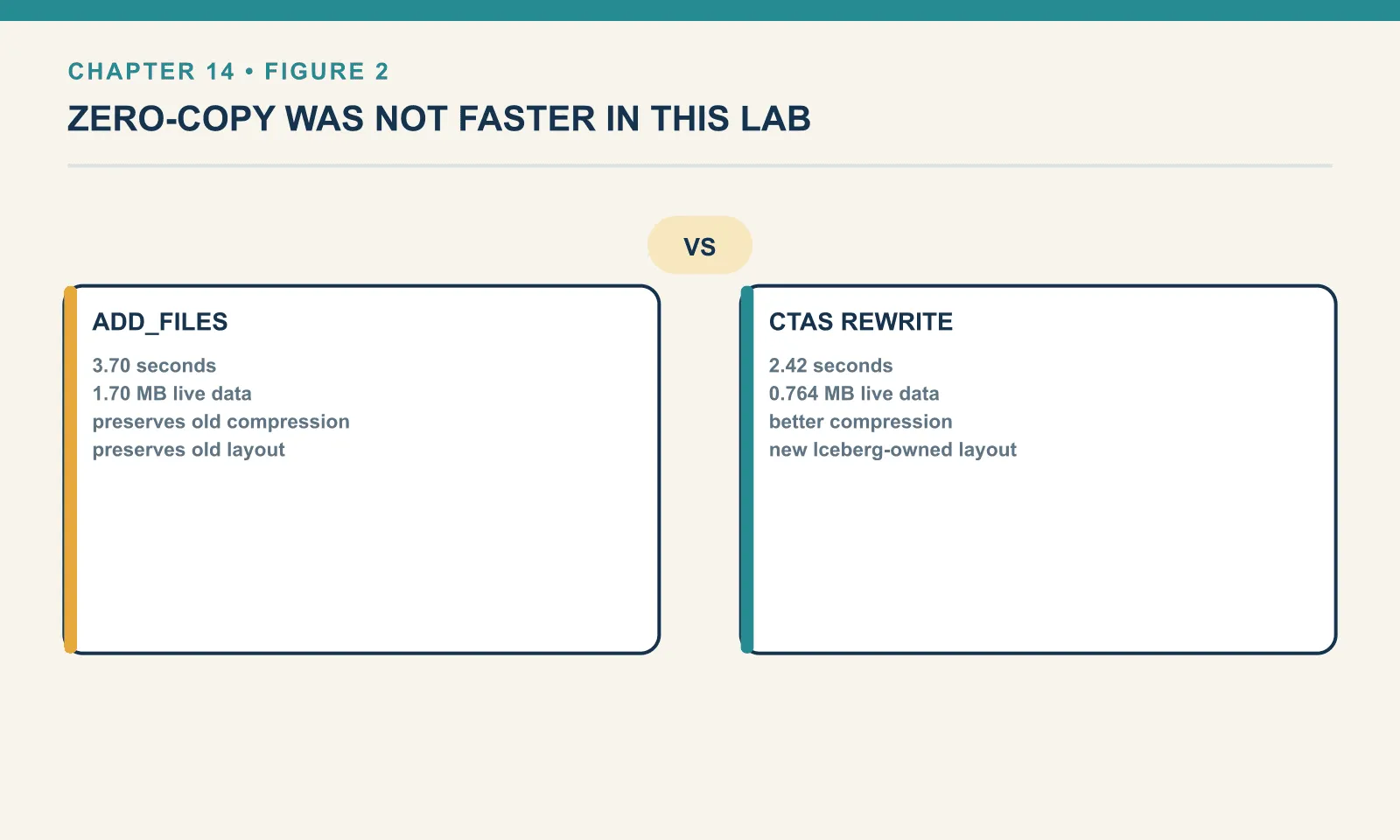
I am reporting that rather than burying it, because it is the honest result and because the reason generalises even though the number does not. At 1.7 MB across 30 files, neither operation is I/O-bound. Both are dominated by fixed costs: Spark job setup, catalog round trips, footer reads. And add_files has to open every source file’s footer anyway, to record its schema, bounds and row count into a manifest. It does not read the data, but it does not read nothing either. Meanwhile the rewrite got to re-encode the whole dataset in one pass. It compressed 2.2 times better than the original layout, because it wrote larger, better-packed files.
The crossover is real — and it is a scale effect. Reading 30 Parquet footers is a fixed cost that barely grows with row count; re-encoding a terabyte is not. At terabyte scale add_files is minutes and the rewrite is hours, and that is the case the procedure exists for. I did not measure that case, and I am not going to quote a multiplier for it. What this lab does establish is the shape of the trade. Adoption pays a small fixed cost per file; rewriting pays a large cost per byte. So the answer flips somewhere, and on a small table it has already flipped the other way.
The 2.2x compression difference is the more useful finding at this scale, and it points back at the earlier warning. Adoption preserves your layout including its inefficiency. If your legacy files are badly packed, adopting them is instant. You then pay for the bad packing on every query until you compact. And at that point you have done the rewrite anyway, just later and as a separate job.
Adding the same files twice
The obvious way to corrupt a table this way is to run the import twice. Iceberg checks:
second add_files -> IllegalStateException: Cannot complete import because data files to be
imported already exist within the target table:
file:/.../legacy/orders_parquet/dt=2026-04-21/part-00000-e5b7ed42-...
The refusal names the offending file, so you can identify the repeated import before it changes the row count.
There is a flag to turn that off, and it does exactly what it says:
with check_duplicate_files=false -> {'added_files_count': 30, ...} rows now 240000Every row in the table is now duplicated, silently, with no error. The same 30 files are referenced twice by the same snapshot, and every aggregate over that table is wrong by a factor of two.
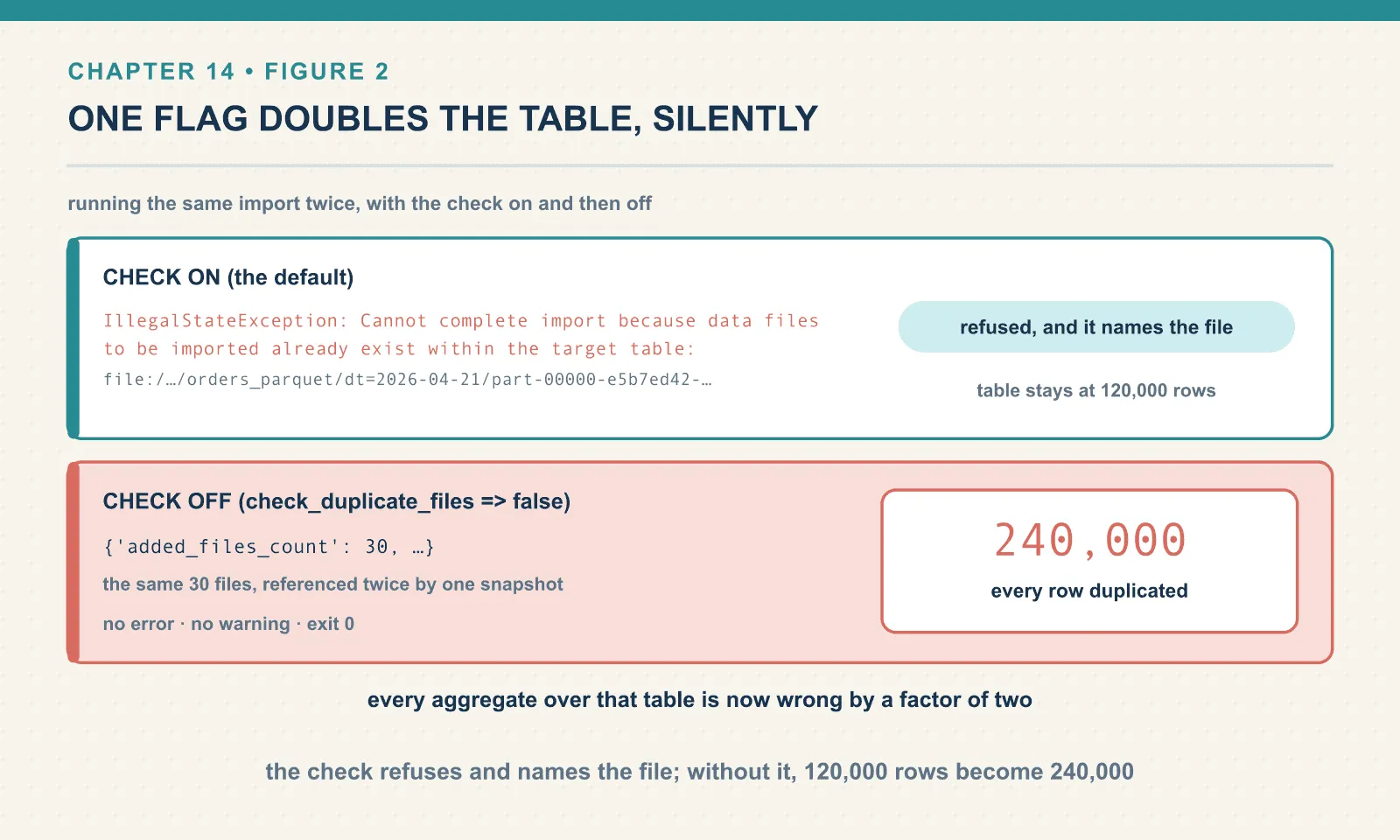
check_duplicate_files exists because the check is a scan of the target’s manifests, and that is not free on a large table. It is a real cost, and there are cases for skipping it. It is also the single easiest way to double a table in this book. If you turn it off, do it in a job that cannot run twice.
Importing one partition at a time
A terabyte-scale import is better done in pieces, and partition_filter scopes it:
CALL ice.system.add_files(
  table            => 'ch14.adopted2',
  source_table     => '`parquet`.`file:///.../legacy/orders_parquet`',
  partition_filter => map('dt','2026-04-03'))
partition_filter add_files -> {'added_files_count': 1, ...} rows 4000One file, 4,000 rows, one partition. This is how you do a real migration. Import day by day, and verify counts against the source as you go. Keep each commit small enough that a failure costs you one partition rather than the whole import.
The teeth: Iceberg will delete your source data
The shared-files problem appears when maintenance runs after adoption.
After add_files, the Iceberg table considers those Parquet files to be its files. Not references it borrowed. Its files, which it is responsible for, and which its garbage collector is entitled to remove once nothing references them any more.
So: adopt a copy of the legacy directory, delete one day through the Iceberg table, and run the maintenance from chapter 13.
shared: files under dt=2026-04-05 before: 2

DELETE FROM ice.ch14.shared WHERE dt = '2026-04-05'
after DELETE, files still on disk: 2

CALL ice.system.expire_snapshots(table => 'ch14.shared',
     older_than => TIMESTAMP '2099-01-01 00:00:00', retain_last => 1)
-> {'deleted_data_files_count': 1, 'deleted_manifest_files_count': 1,
    'deleted_manifest_lists_count': 1, ...}

after expire, source dir exists: True files: 0
other days intact: 30
The original Parquet file is gone from the legacy directory.
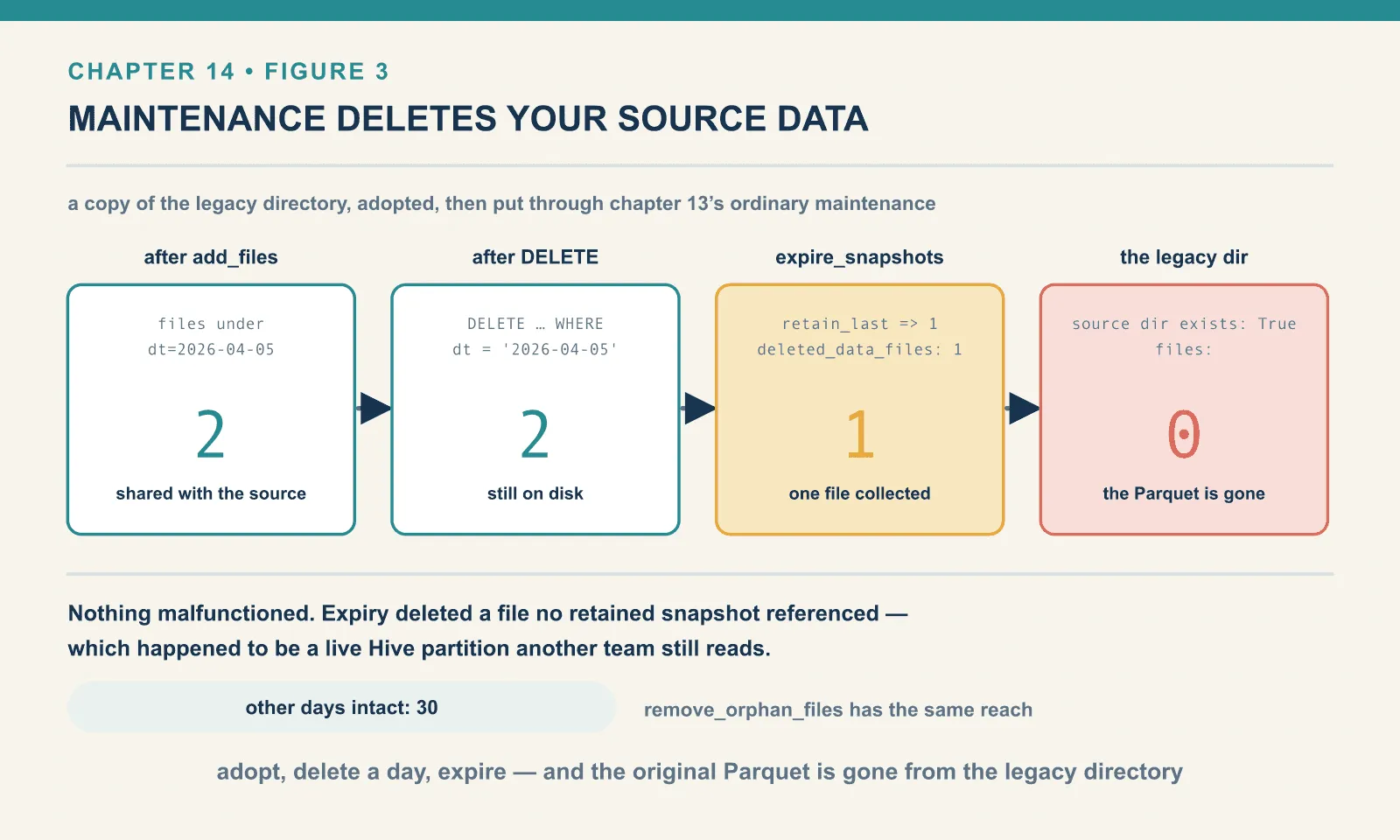
Nothing malfunctioned. The DELETE created a snapshot that no longer references that file. Expiry found a file that no retained snapshot needs, and deleted it. That is precisely the behaviour chapter 13 spent three thousand words establishing as correct. It just happens to be operating on data that another system still thinks is a live Hive partition.
That successful cleanup leaves the migration with three operational risks:
- Any team still reading the legacy path is reading data that your Iceberg maintenance job can remove.
remove_orphan_filesinherits the same reach. Files under the imported location that the table does not reference are, by its definition, orphans.- The window between adopting a table and switching all readers to it is a window in which running your normal maintenance can destroy the fallback.
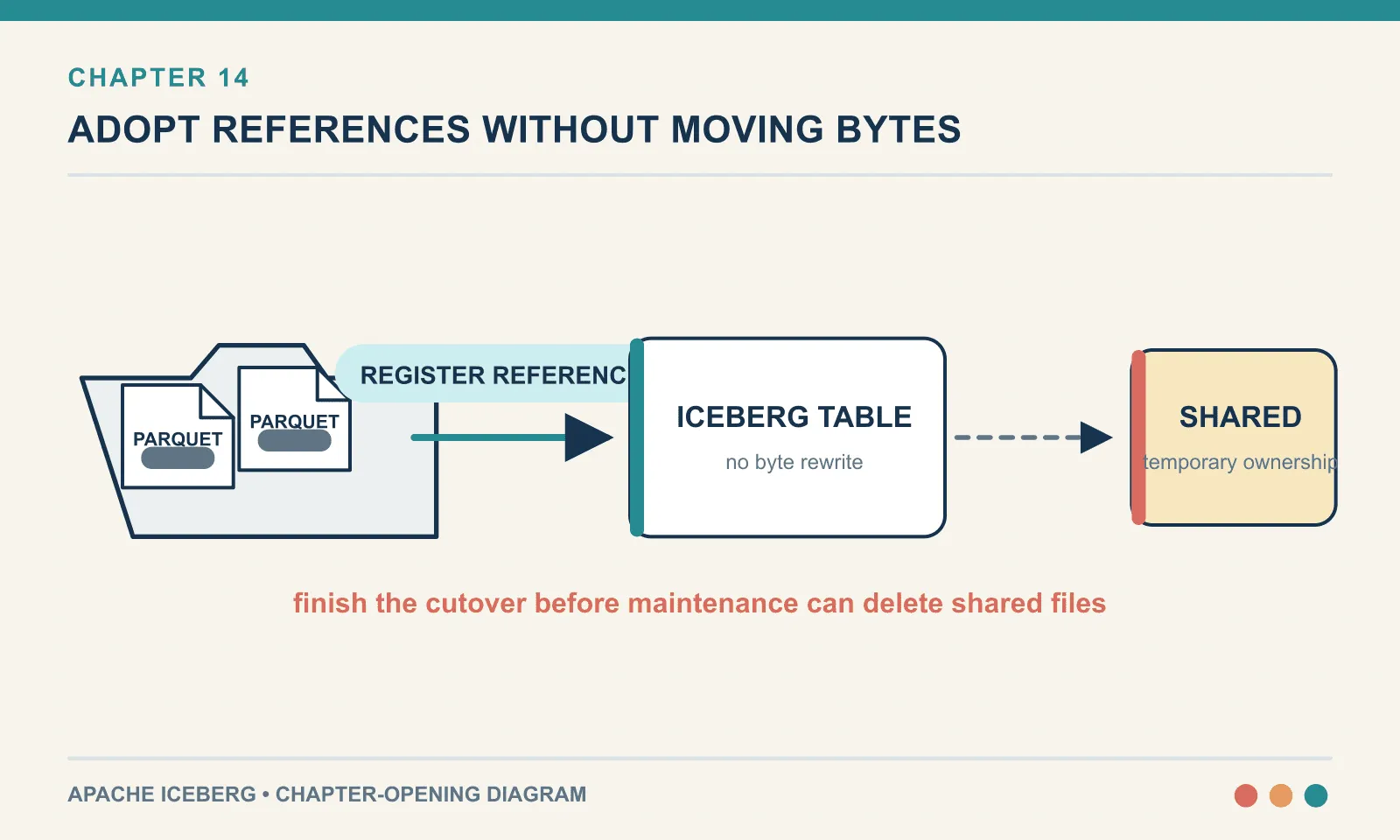
So the practical sequence is: adopt, do not run expiry or orphan removal, cut readers and writers over, verify, then compact. Compaction moves the data into your warehouse, and only then do you turn maintenance on. The alternative is to import into a copy of the source data and accept the storage cost until the cutover is finished. The one thing you cannot do is leave the legacy path in service as a safety net while the Iceberg table is under normal management.
snapshot: the same thing, safely
Which is exactly what the snapshot procedure is for. It creates a new Iceberg table over the source’s existing files. The two then diverge — the moment either one is written to, they are separate tables.
CALL ice.system.snapshot('spark_catalog.ch14.legacy_a', 'ice.ch14.snap_orders')snapshot -> {'imported_files_count': 30} in 3.43s
snap rows: 120000
snap table dir: (6, 14991)
a file_path: file:/.../legacy/legacy_a/dt=2026-04-01/part-00000-9cdbac0e-....snappy.parquet
source still readable as parquet: 120000Same trick as add_files: a 15 kB table over somebody else’s megabytes. The difference is what happens next. Insert into the Iceberg table, and the new row does not go anywhere near the legacy directory:
after INSERT: snap rows 120001 | source rows 120000
new file path: ['file:/.../wh/ch14/snap_orders/data/dt=2026-09-09/
                 00000-452-7b350454-4219-4e7c-a3c6-e2907a2916a7-0-00001.parquet']
New writes land in the warehouse. The original 30 files are still read in place from the legacy path. The table is a hybrid — and that is the intended shape.
Writes to the source do not reach the snapshot either. Here the import is repeated on a second pair of tables, so the row counts stay distinguishable. Then three rows go to the Iceberg side and two to the Hive side:
start:        source 120000 | snap 120000
+3 to snap:   source 120000 | snap 120003
+2 to source: source 120002 | snap 120003
snap dir: (14, 32355) | source dir: (66, 1607061)
Fully independent in both directions, from the moment of import.
This is the procedure to reach for when you want to test a migration. Point your queries at the snapshot table, compare results, run your dashboards against it, try compaction on it. The real table keeps running untouched throughout — nobody downstream sees anything. When you are satisfied, throw it away and do the real migration, or promote it.
Two cautions carry over. It still shares the original files, so expiry on the snapshot table can still delete data the source depends on. The mechanism is identical to the section above — only the intent differs. And it is a snapshot: source rows written after the import will never appear in it. That property is what makes it safe, and also what makes it stale.
migrate: replacement in place
migrate is the one that commits. It converts the source table itself, at the same location, and preserves the original as a backup table pointing at the same files.
CALL spark_catalog.system.migrate('ch14.legacy_c')before: rows 120000 provider ['parquet'] dir (62, 1604484)
migrate -> {'migrated_files_count': 30} in 3.09s
after: rows 120000 provider ['iceberg'] dir (68, 1619462)
BACKUP_ rows: 120000 provider ['parquet']
partitions: Row(n=30, f=30)
spec: [Row(partition=Row(dt='2026-04-20')), Row(partition=Row(dt='2026-04-22'))]Three seconds, and the table that was Parquet is Iceberg. Same name, same location, same 120,000 rows, and every query written against it keeps working. The directory grew by six files and 15 kB: the metadata tree, written alongside the data that was already there.
legacy_c_BACKUP_ is the original table definition, still parquet, still holding 120,000 rows. That is your rollback. It is a rollback of the table registration rather than of the data, because it points at the same files the Iceberg table now claims. Which means the hazard from three sections ago applies to it too. (I verified the hazard on an add_files table, not on a migrate backup. The file-sharing mechanism is the same, but I did not separately run expiry against a migrated table to watch the backup break.)
Note the partition spec: Row(dt='2026-04-20'). Identity partitioning on the string column, exactly as warned at the top of the chapter. Not days().
Now write to the migrated table:
after INSERT rows: 120001
new file: file:/.../wh/ch14/legacy_c/data/dt=2026-12-25/00000-448-b62680d8-...-00001.parquet
BACKUP_ rows after: 120000
The new row landed under data/dt=2026-12-25/, a data/ subdirectory that did not exist before. It sits alongside the thirty original dt= directories at the top level. The table’s storage is now a mixture of the Hive layout and Iceberg’s. That is harmless, since nothing lists directories any more, but it will confuse the next person who looks at the bucket. And the backup table stayed at 120,000, because it is a Hive table that finds its data by listing dt= directories and does not know data/ exists.
When migrate fails
I ran migrate against a table whose location the catalog server could not write to, and the failure is worth showing because of how it ended.
migrate -> CommitStateUnknownException: Service failed: 500: Failed to create file:
file:/.../legacy/legacy_e/metadata/00000-5b584fcc-....metadata.json
and in the log:
ERROR MigrateTableSparkAction: Failed to perform the migration, aborting table creation
and restoring the original table
Afterwards:
source survived? rows 120000 provider ['parquet']The source table was restored, intact, still Parquet, still 120,000 rows. That is a genuinely good property. The alternative failure mode is “your production table is now neither one thing nor the other”.
The specific cause is a quirk of this lab, and it should not read as an Iceberg limitation. migrate writes the new Iceberg metadata into the source table’s own location. In this setup the REST catalog fixture runs in a container that only has the warehouse directory bind-mounted. The legacy path exists on the host and not in the container, so the server could not create the file. Put the source under the mounted warehouse and the same command succeeds in three seconds, as the previous section shows.
The transferable lesson is the general one: migration writes metadata next to your data, so whatever component creates the table must have write access to the source location. On S3 that is an IAM question, and it is worth answering before the migration window rather than during it.
A caveat about this lab’s catalogs
The snapshot and migrate procedures need the source table registered in Spark’s session catalog. This limits what the lab proves, because its session catalog is in-memory:
catalogImplementation: in-memoryso tables do not survive a restart of the Spark session. The procedures behaved correctly, the file handling is real, and the row counts are real. But a production migration reads its source from a Hive metastore or AWS Glue, and I did not stand one of those up. Metastore-specific behaviour is not tested here. That means: how table properties and SerDe settings carry across, what happens to a table with a non-default input format, and how Glue’s own table versioning interacts with the rename to _BACKUP_. Treat the mechanics as verified and the metastore integration as unverified.
Choosing
Is the existing layout the layout you want?
├── no  → rewrite. CTAS, or add_files then compact. You are paying for the rewrite either way.
└── yes → do you need to keep the source working?
          ├── yes, permanently  → add_files into a new table. Never run expiry until cutover.
          ├── yes, for testing  → snapshot. Independent, disposable, safe.
          └── no                → migrate. In place, with a _BACKUP_ table for rollback.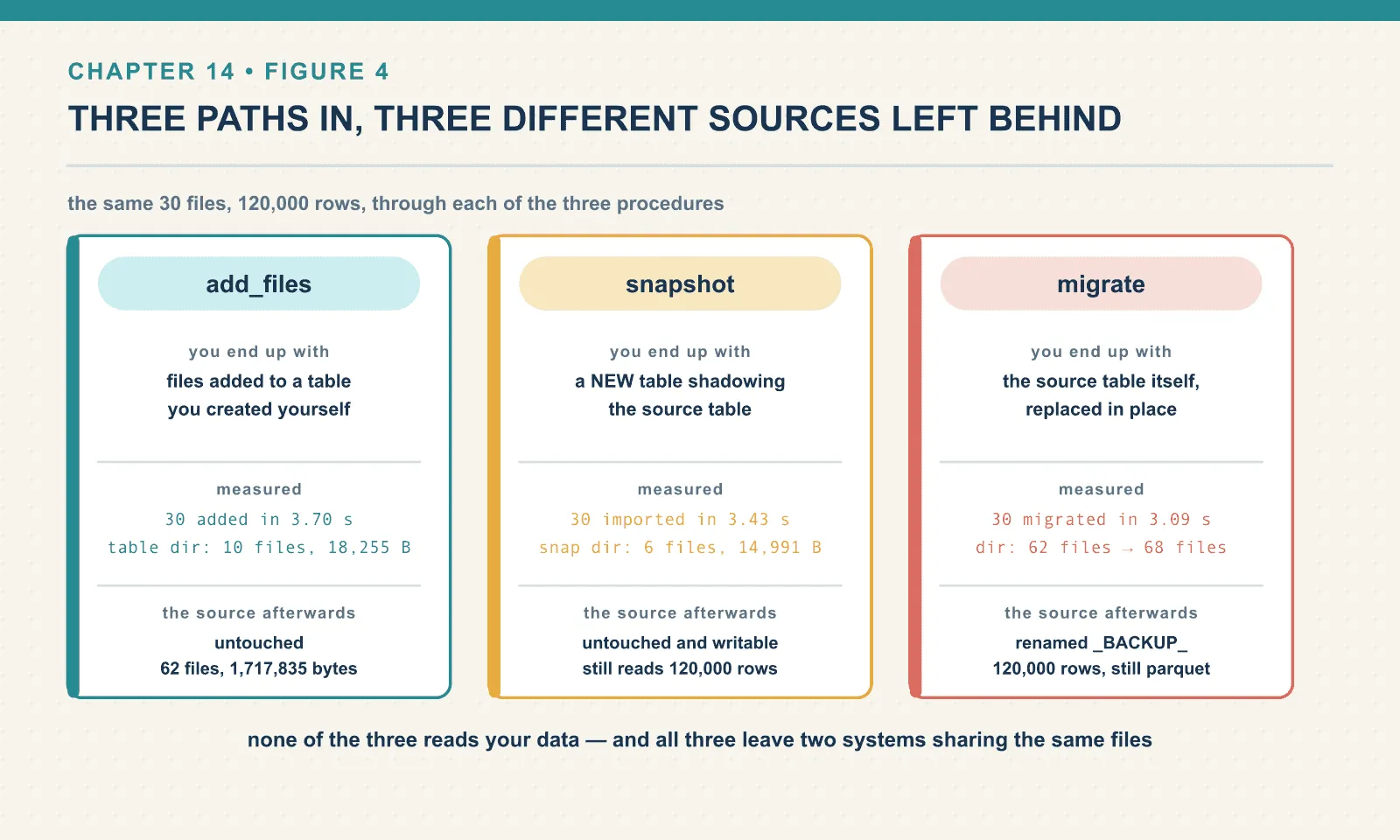
And the operational rules that apply to all three:
Import in partition-sized pieces with partition_filter, verifying counts as you go.
Leave check_duplicate_files on unless you have a specific reason and an idempotent job.
Do not schedule maintenance against an adopted table until the cutover is complete. Expiry can remove source data that a legacy reader still needs, with no error from the maintenance job.
Compact after cutover. It moves data into your warehouse, ends the file sharing, and gives you back the compression that adoption preserved the loss of. After that the table is an ordinary Iceberg table, and chapters 11 to 13 apply unmodified.
Final thoughts
Adoption is the cheapest genuinely useful thing in this book. Thirty seconds of procedure call, and a directory that had no atomicity, no schema authority, no history and no concurrency control has all four. No data movement, no downtime.
The bill arrives later, and it arrives in an unexpected currency. You do not pay in compute. You pay in the fact that two systems now believe they own the same bytes, and one of them has a garbage collector. Every hazard in this chapter is a variation on that one sentence, and every mitigation is a version of “finish the cutover before you turn maintenance on”.
That completes the operating arc. The table can be built, wrecked, measured, compacted, expired and adopted. All of it happened through one engine — and the entire argument for a table format is that it does not have to. The next arc puts other engines on the same table.
Next: Reading From Everywhere
Comments