Deleting a Row From an Immutable File
Parquet files cannot be edited, so Iceberg offers two ways to delete a row — rewrite the file, or write a note saying it is gone. Both measured, with the read cost each one moves around.
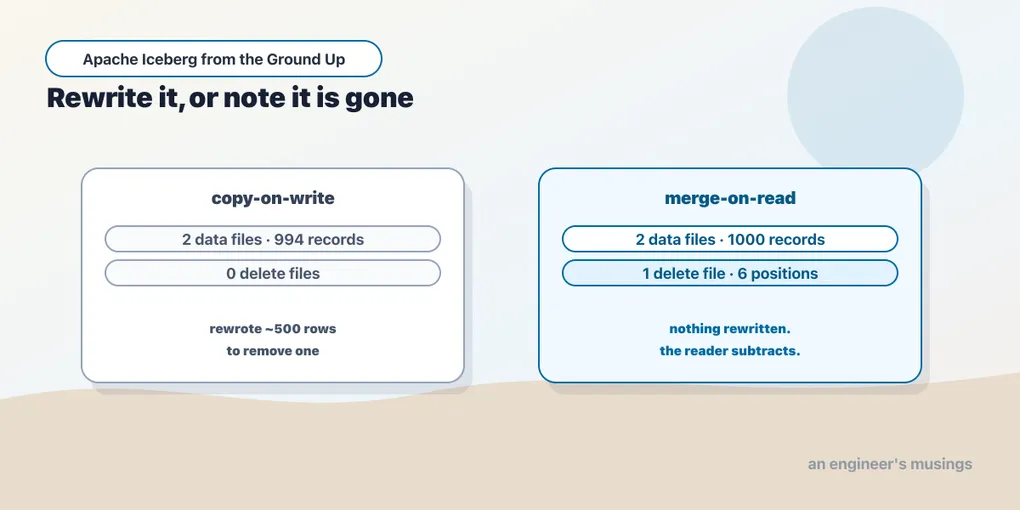
Deleting one row can force a writer to rewrite hundreds of surviving rows. PyIceberg takes that copy-on-write path; comparing it with merge-on-read requires a writer that implements both.
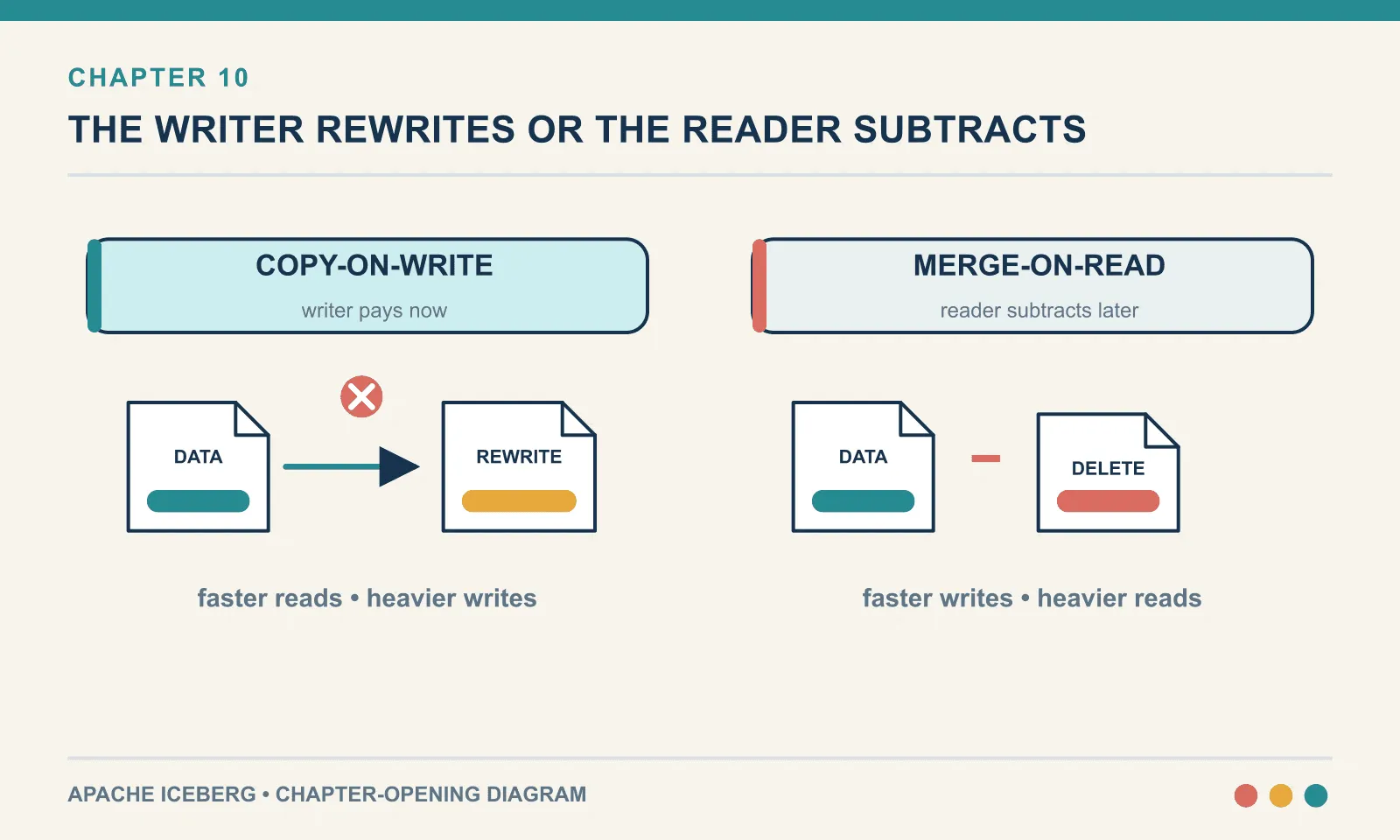
Delete a row with PyIceberg and it tells you itself:
UserWarning: Merge on read is not yet supported, falling back to copy-on-writeThere are two ways to delete a row from an Iceberg table. PyIceberg implements one of them. This chapter needs both, so this is where Spark arrives.
Pinned for the rest of the book: PySpark 4.1.3, Iceberg runtime 1.11.0, against the REST catalog from chapter 5.
Why deleting a row is hard at all
Parquet files are immutable. Not by policy — by construction. A Parquet file is a sequence of compressed column chunks with a footer of offsets and statistics. There is no way to remove a row from the middle without rewriting the whole thing. Object storage agrees: you can PUT an object or DELETE it, and you cannot edit sixty bytes in the middle.
So “delete order 7” cannot mean what it means in Postgres. It has to be expressed some other way, and Iceberg offers exactly two.
Copy-on-write. Read the file containing order 7, write a new file with every row except that one, and mark the old file deleted. The table’s data files always contain exactly the live rows.
Merge-on-read. Leave the file alone. Write a small side file that says row 7 of that file is gone, and have every reader subtract it at query time.
Neither is correct in general. They move cost between writing and reading, and which one you want depends on which of those you do more of.
Installing Spark, and the trap in the version numbers
Spark and the Iceberg runtime must agree on versions. An unpinned install breaks that agreement before the session even starts:
pip install pyspark # DO NOT do thisAt the time of writing that installs PySpark 4.2.0, and there is no Iceberg runtime built for Spark 4.2. The published artifacts are iceberg-spark-runtime-4.1_2.13, 4.0_2.13 and 3.5_2.12. The default install lands you on a Spark version Iceberg does not support yet, and the error you get is a ClassNotFoundException that says nothing about versions.
Pin it:
pip install "pyspark==4.1.3"ICEBERG = "org.apache.iceberg:iceberg-spark-runtime-4.1_2.13:1.11.0"That coordinate encodes three versions: the Spark minor (4.1), the Scala minor (2.13), and Iceberg itself (1.11.0). All three have to line up with each other and with your installed PySpark. It is the single most common way a reader’s first Iceberg-on-Spark session fails.
The rest of the session config is the catalog you already have:
spark = (SparkSession.builder
    .config("spark.jars.packages", ICEBERG)
    .config("spark.sql.extensions",
            "org.apache.iceberg.spark.extensions.IcebergSparkSessionExtensions")
    .config("spark.sql.catalog.ice", "org.apache.iceberg.spark.SparkCatalog")
    .config("spark.sql.catalog.ice.type", "rest")
    .config("spark.sql.catalog.ice.uri", "http://localhost:8181")
    .master("local[2]").getOrCreate())
Note local[2]. This is one JVM on your laptop, not a cluster. Nothing in this book needs a cluster.
Choosing a mode
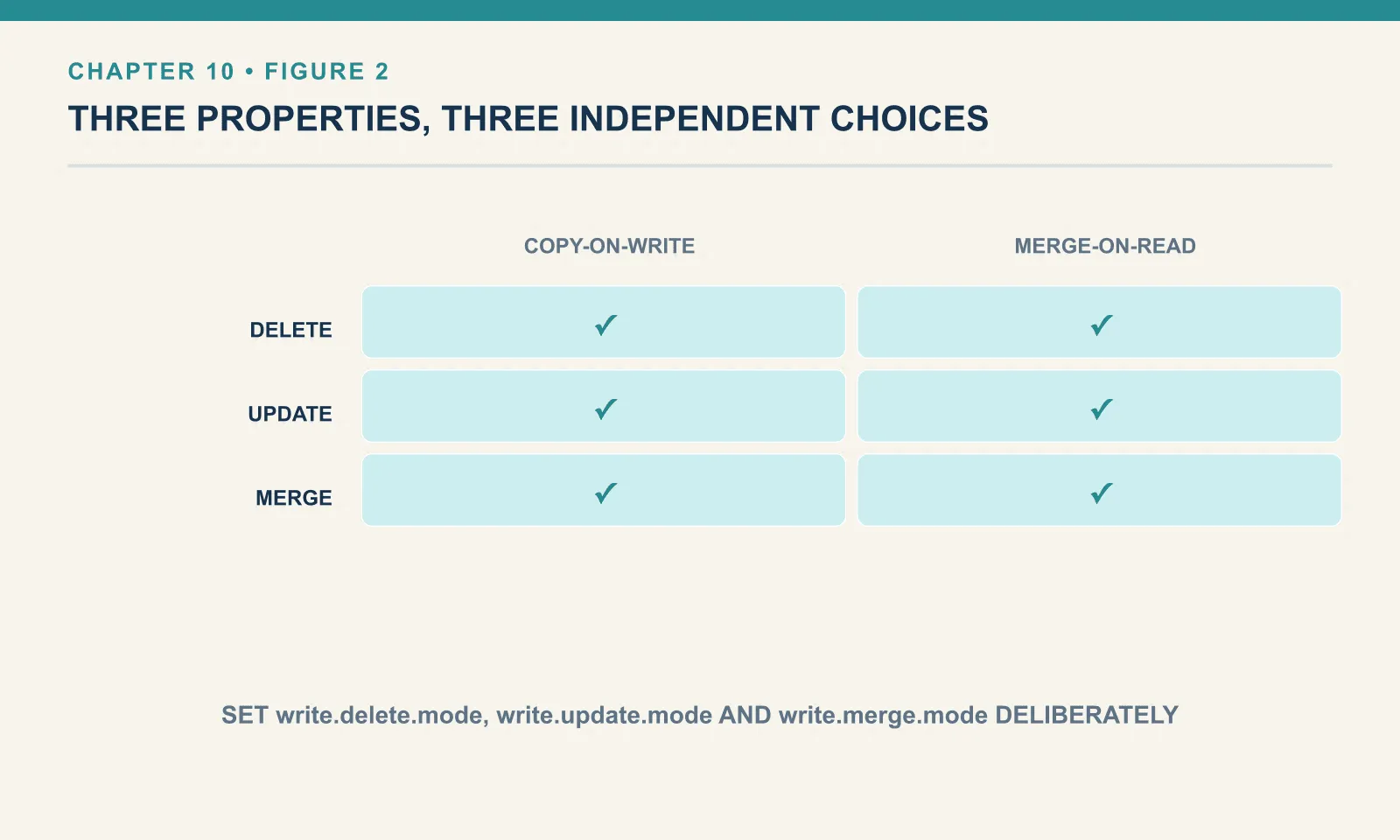
The behaviour is a table property, and there are three of them because there are three ways to modify rows:
CREATE TABLE ice.bookshop.orders_mor (
  order_id BIGINT, customer_id BIGINT, status STRING, amount DOUBLE
) USING iceberg TBLPROPERTIES (
  'write.delete.mode' = 'merge-on-read',
  'write.update.mode' = 'merge-on-read',
  'write.merge.mode'  = 'merge-on-read'
);write.delete.mode, write.update.mode and write.merge.mode are set independently, and forgetting one is a real source of confusion. A table can be merge-on-read for DELETE and copy-on-write for MERGE INTO at the same time, behaving inconsistently for reasons that are entirely your own doing.
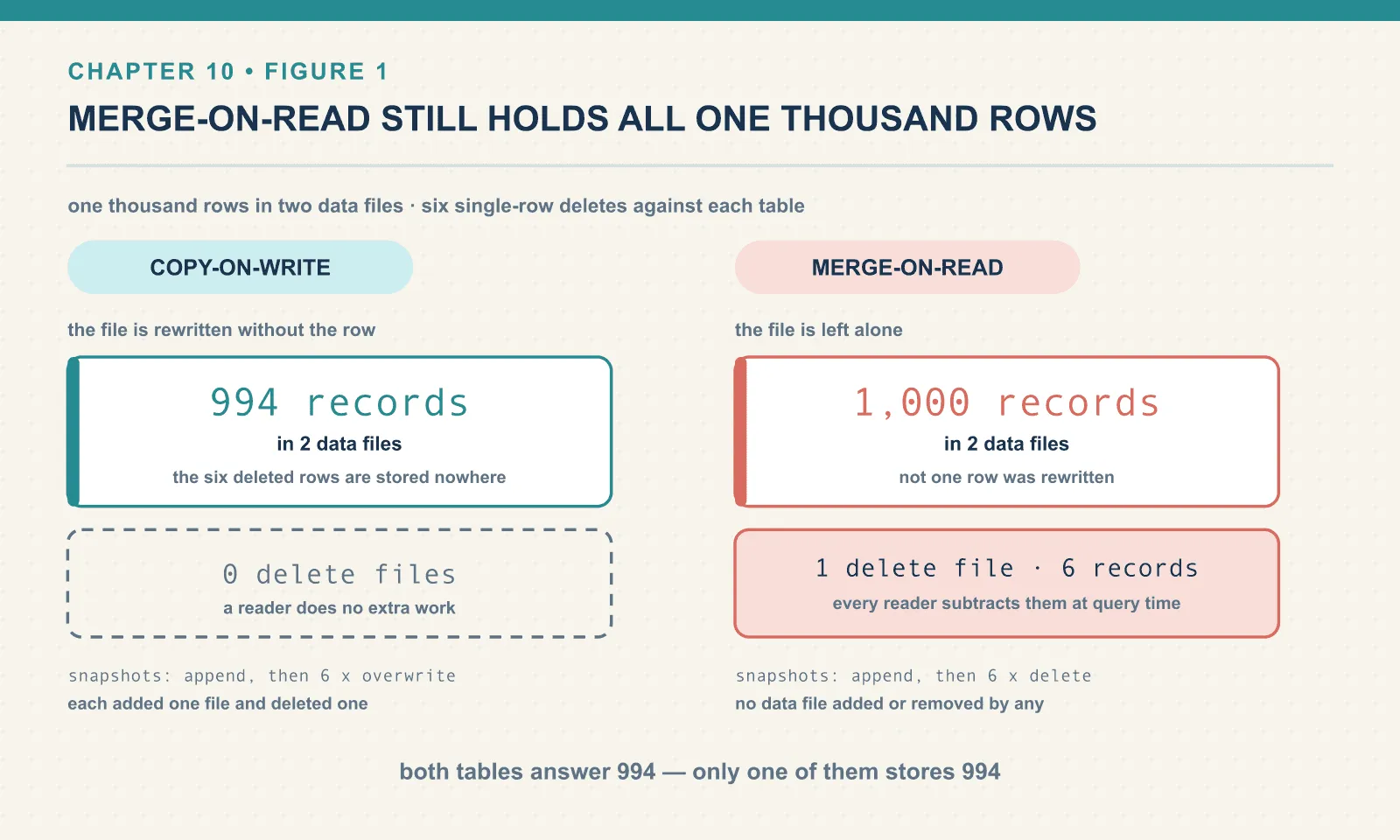
Two identical tables, one thousand rows each, and six single-row deletes against each. These are deliberately minimal — order_id, status, amount and nothing else. The subject here is where the bytes go, and the bookshop’s other five columns would only pad the file sizes.
Copy-on-write, measured
content 0 (data): 2 files, 994 records
delete_files    : 0
Nine hundred and ninety-four records in two data files. The deleted rows are not stored anywhere — they were dropped when the files were rewritten. Look at the snapshot operations:
[('append','2',None), ('overwrite','1','1'), ('overwrite','1','1'),
 ('overwrite','1','1'), ('overwrite','1','1'), ('overwrite','1','1'), ('overwrite','1','1')]
Every delete is an overwrite that added one file and deleted one file. Six deletes, six file rewrites.
Each of those rewrote roughly five hundred rows to remove one. That is the cost model. A copy-on-write delete is proportional to the size of the files it touches, not the number of rows you asked to remove. Deleting one row from a one-gigabyte file rewrites a gigabyte. Deleting one row from each of a hundred files rewrites all hundred.
What you get for it is that reads are completely unaffected. The data files contain the live rows and nothing else, so a query does no extra work, and every statistic in the manifests stays exactly true.
Merge-on-read, measured
Same table, same six deletes:
content 0 (data)            : 2 files, 1000 records
content 1 (position deletes): 1 file,  6 records
The data files still hold all one thousand rows. Nothing was rewritten. A separate file records six positions, and the query returns 994 by subtracting them at read time.
The operations tell the same story from the other side:
[('append','2',None), ('delete',None,None), ('delete',None,None), … ]delete, not overwrite — and no data files added or removed by any of them.
A gotcha that caught me while writing this
My first measurement script reported data_files=3 for the merge-on-read table and I nearly wrote that down. It is wrong, and the reason is worth passing on.
The .files metadata table includes delete files. It has a content column: 0 for data, 1 for position deletes, 2 for equality deletes. Count rows without grouping by it and you silently mix the two. Iceberg provides the split tables:
SELECT count(*) FROM ice.bookshop.orders_mor.data_files    -- 2
SELECT count(*) FROM ice.bookshop.orders_mor.delete_files  -- 1
If you are ever going to quote a file count for a merge-on-read table, use data_files and delete_files, or group .files by content. Otherwise you will report a table as having more data files than it does, at exactly the moment you are trying to reason about compaction.
The delete files churn, too
The current delete-file count hides the work done by earlier deletes. Comparing it with history exposes that churn:
delete_files      (current) : 1 file,  6 records
all_delete_files  (history) : 6 files, 21 records
Six deletes produced six delete files across history, holding 1, 2, 3, 4, 5 and 6 positions respectively. Each delete rewrote the delete file for that data file with every deletion so far, rather than adding another one alongside.
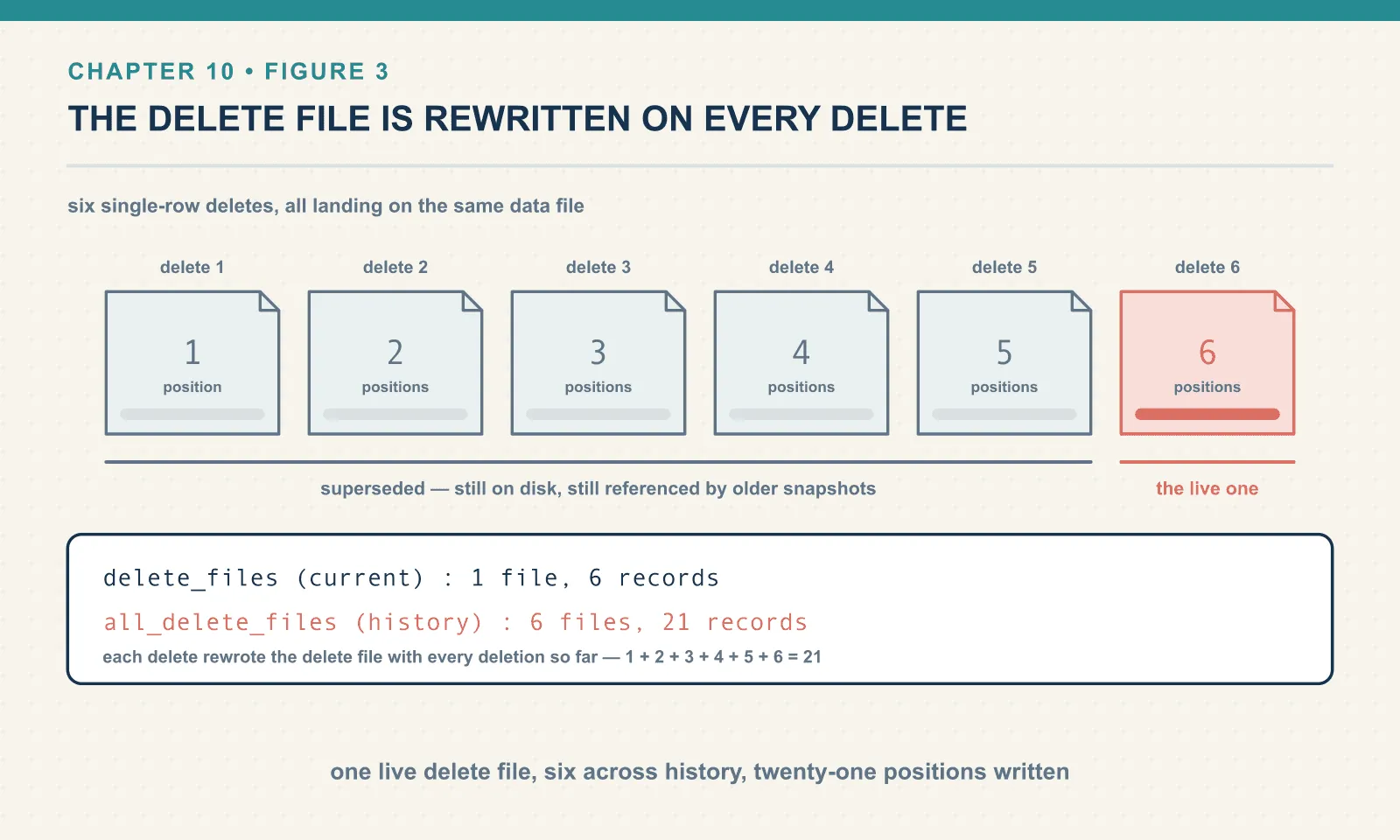
That is better than the alternative, since a reader merges one delete file per data file rather than six. But it means the delete file is rewritten on every delete, and it grows. On a table where a nightly job deletes a few thousand rows, the delete file is rewritten nightly and gets steadily larger, until compaction folds it back into the data files.
The five superseded delete files are still on disk, because older snapshots still reference them. Chapter 13 is where they actually go away.
The arithmetic that decides it
Copy-on-write pays at write time, once, and reads are free. Choose it when deletes are rare, when reads vastly outnumber writes, or when read latency is what you are judged on. Batch tables that get corrected occasionally are the classic case.
Merge-on-read pays a little at write time and a little on every read until you compact. Choose it when writes are frequent and small, when your deletes touch rows scattered across many files, or when write latency matters — streaming and CDC workloads, essentially.
The trap is that merge-on-read’s cost is invisible on the day you enable it and compounds quietly. A table with two delete files reads fine. A table with four hundred is slow for reasons that do not show up in the query plan as anything more informative than “reading more files”. Merge-on-read is not a way to avoid compaction; it is a way to defer it. A merge-on-read table without a maintenance job is a table that gets slower every week. That is chapters 11 through 13, and they are not optional reading if you choose this mode.
Updates are deletes wearing a hat
DELETE is the clean case. UPDATE is the one that shows what merge-on-read really costs, because a row cannot be edited in place any more than it can be removed.
Twenty thousand rows, written once into each of two tables:
CREATE TABLE ice.bookshop.upd_cow (order_id BIGINT, status STRING, amount DOUBLE) USING iceberg
  TBLPROPERTIES ('write.update.mode'='copy-on-write');

INSERT INTO ice.bookshop.upd_cow SELECT id, 'placed', id * 1.0 FROM range(20000);
That lands as four data files, and it is worth knowing why, because the number is not Iceberg’s doing. Spark writes one file per write task, and this session runs local[4]. Run the identical statement under local[2] and you get two files instead:
master=local[4]  ->  4 data files for 20,000 rows
master=local[2]  ->  2 data files for 20,000 rows
So if you follow along with a different session, expect a different starting count. What matters below is not the absolute number but how it moves. Now update one row in each table:
copy-on-write  data_files/delete_files  (4, 0) -> (4, 0)   op=overwrite
merge-on-read  data_files/delete_files  (4, 0) -> (5, 1)   op=overwrite
Copy-on-write rewrote a whole file to change one field: still four files, no delete files.
Merge-on-read produced five data files and one delete file because an update is a delete plus an insert. A position delete masks the old row. The new version is appended in a fresh data file holding exactly one row, leaving the table with one more data file than it started with.
Those two shapes are stable. Running the pair six times, interleaved, gives (4, 0) for copy-on-write and (5, 1) for merge-on-read every single time.
The timings are not. My first measurement had copy-on-write at 1,151 ms against merge-on-read’s 500 ms. That looks decisive. It is mostly JVM warm-up: the first UPDATE in a session pays for class loading and JIT that later ones do not.
Discard two warm-up trials, interleave six more, and the medians come out at 328 ms for copy-on-write and 287 ms for merge-on-read. About 1.15x — not the 2.3x the first run implied.
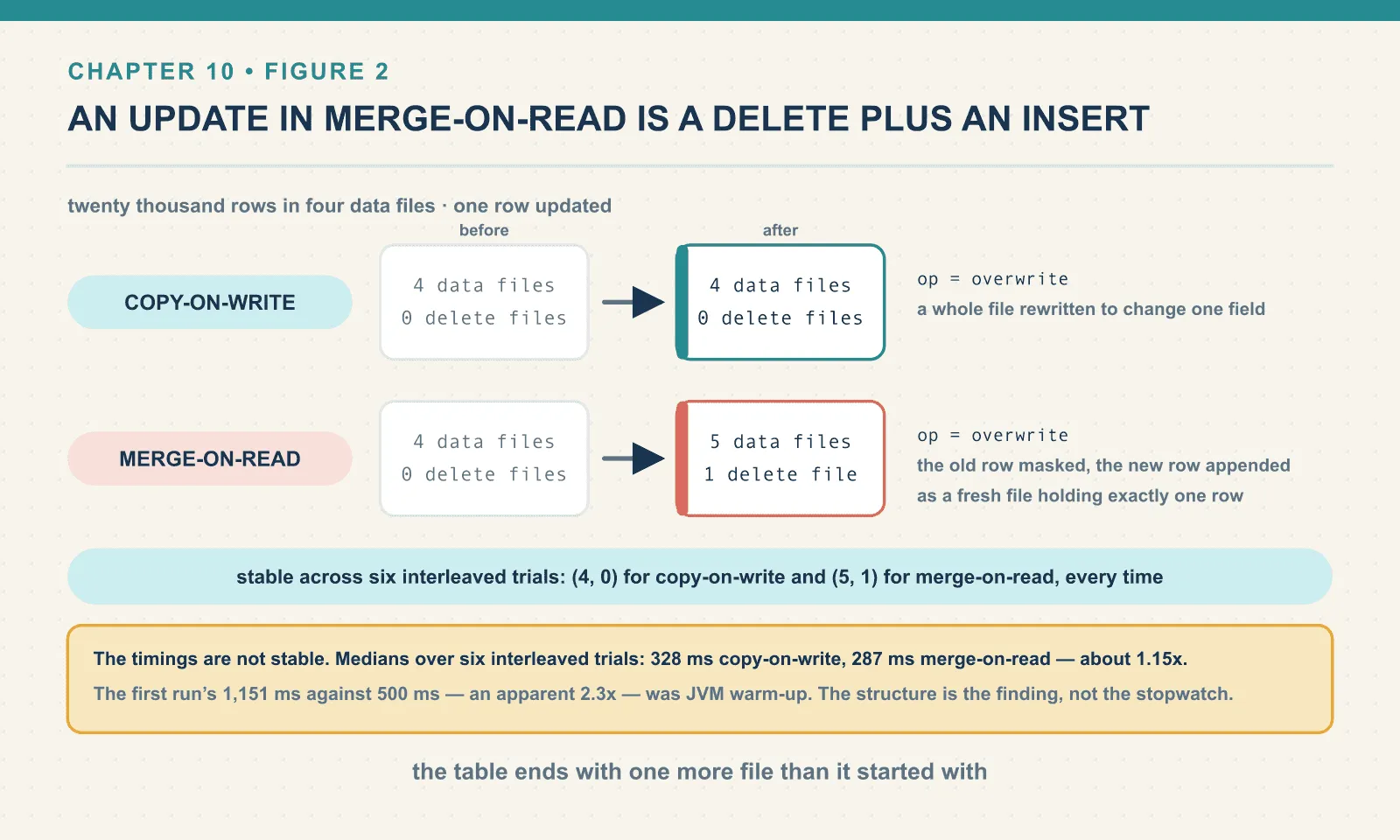
So the honest version of this comparison is structural rather than temporal. Merge-on-read writes less work, because it never rewrites the surviving rows. But twenty thousand rows in four small files is not enough work for that to dominate a measurement.
Scale the files up and the gap opens. Copy-on-write’s cost tracks the bytes it must rewrite; merge-on-read’s does not. That is a claim about the cost model, and this lab is too small to be its evidence.
Which means a merge-on-read table under a steady update load grows data files and delete files simultaneously. That is a faster write and two kinds of debt.
Does the read cost actually grow? Measured
The story everyone tells is that merge-on-read degrades reads as delete files pile up. Here is that claim tested. Forty thousand rows bucketed into sixteen files, timing a full aggregate best-of-three after each round of deletes:
 0 deletes:  117.1 ms   data_files=16 delete_files=0 positions=0
 4 deletes:  145.6 ms   data_files=16 delete_files=4 positions=4
 8 deletes:  145.3 ms   data_files=16 delete_files=7 positions=8
16 deletes:  149.1 ms   data_files=16 delete_files=8 positions=16
The honest reading of that is not the one I expected. The cost is a step, not a slope. Going from zero delete files to four cost about a quarter. Going from four to sixteen cost nothing measurable.
Treat those millisecond figures as a shape rather than as constants. Re-running the ladder on a pre-warmed JVM gave medians of 110, 153, 155 and 138 ms — the step is in the same place and the tail is still flat, but sixteen delete files measured faster than four, which is noise rather than a finding. What reproduces is the shape. The individual numbers do not, and a benchmark this small cannot make them.
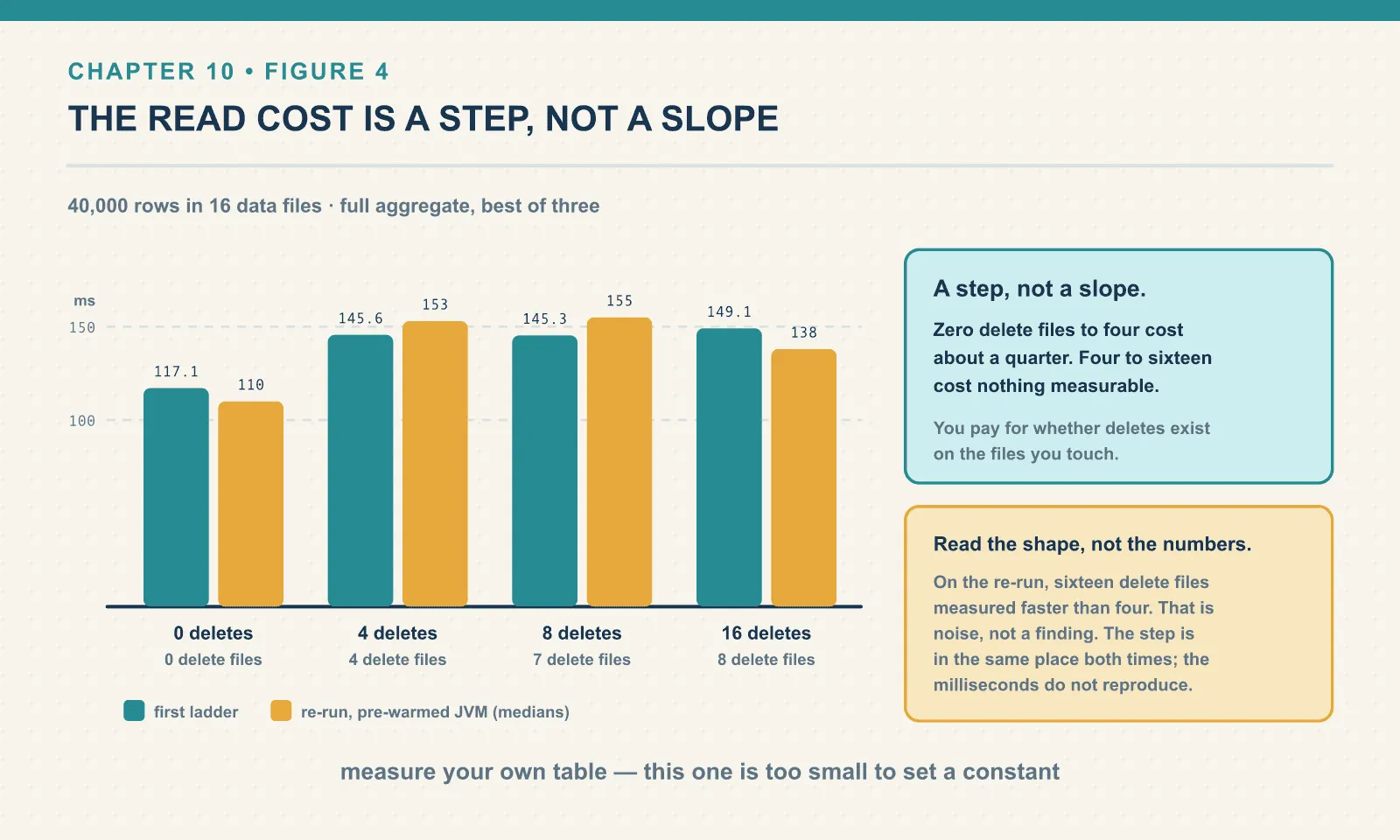
That makes sense once you see the mechanism from chapter 3. The reader has to consult the delete files for the data files it opens. Once it is doing that at all, a few more positions in an already-open bitmap are nearly free. What you pay for is whether deletes exist on the files you touch, far more than how many.
Two caveats, and they matter more than the numbers. Sixteen delete files across sixteen data files is a tidy ratio. The pathological case is thousands of delete files against a handful of data files — which a streaming writer produces, and which this lab cannot. And the aggregate here touches every file anyway; a selective query that would otherwise prune to one file pays proportionally much more.
The read penalty is real, but this table gives no basis for treating it as linear. Your query and writer determine its shape: how many files the query touches, and how many delete files the writer leaves against each one. Those are the conditions to preserve in a useful measurement.
Switching modes does not undo anything
A table’s mode is a property, so you can change your mind:
ALTER TABLE ice.bookshop.orders SET TBLPROPERTIES ('write.delete.mode'='copy-on-write');Then delete one more row:
before : rows=39983 data_files=16 delete_files=8 deleted_positions=16
after  : rows=39982 data_files=16 delete_files=8 deleted_positions=16
op     : overwrite
The delete worked — one row fewer — and it worked the copy-on-write way, rewriting a data file and adding no delete file. But the eight delete files from before the switch are all still there, still holding sixteen positions, still being consulted on every read.
Changing the property changes what happens next. It does not retroactively fold the existing merge-on-read debt back into the data. Only compaction does that, which is chapter 12 — where even compaction turns out not to do it by default.
Position deletes and equality deletes
Everything above used position deletes — “row 7 of this specific file is gone.” They are precise. They also require the writer to know exactly which file and offset holds the row, which means the writer has to have found it first.
Iceberg has a second kind. Equality deletes say “any row where order_id = 7 is gone”, without naming a file at all. That is much cheaper for a writer that is streaming and does not want to look anything up. It is much more expensive for a reader, which now has to evaluate a predicate against every candidate row rather than skipping known positions.
Equality deletes are the streaming writer’s mechanism — Flink and Kafka Connect produce them, and Spark SQL does not. I could not produce one for this chapter. The lab has no Flink, and no amount of Spark SQL will emit an equality delete. What is in the chapter is what was run, which is position deletes only. Chapter 17 covers the streaming path, also without a running Flink, and says so there too.
Two things about them are worth knowing even without a demo. Iceberg ships a maintenance action to convert equality deletes into position deletes, precisely because the read cost is bad enough to be worth a background job. And equality deletes survive into format version 3 unchanged. V3’s deletion vectors replace the position delete encoding only, which chapter 20 takes apart in detail.
Final thoughts
The deletion files in this chapter were all .parquet. On a v3 table they would be .puffin — a deletion vector, one per data file, replaced rather than accumulated. That is a real improvement to the merge-on-read cost model and it is the headline of chapter 20.
But the choice itself does not go away. A row cannot be removed from an immutable file, so somebody pays: the writer rewrites, or the reader subtracts. Every table format, every lakehouse, every “we support updates now” announcement is a position on that trade. Iceberg’s contribution is to make it a property you set per table with your eyes open, rather than a behaviour you discover in production.
That choice sets the maintenance work too. Copy-on-write pays for replacing data during the mutation; merge-on-read leaves delete files for readers until compaction folds them in. The next chapters measure the files each workload accumulates and the work needed to keep them manageable.
Next: The Small-Files Problem
Comments