Field IDs, or How to Rename a Column Without Losing Your Data
Every column has a number, and the number is the column. This chapter renames, drops, re-adds and promotes columns on a live table, finds a table that lies about itself, and finds an off-by-one-word bug in PyIceberg's type-promotion rules.
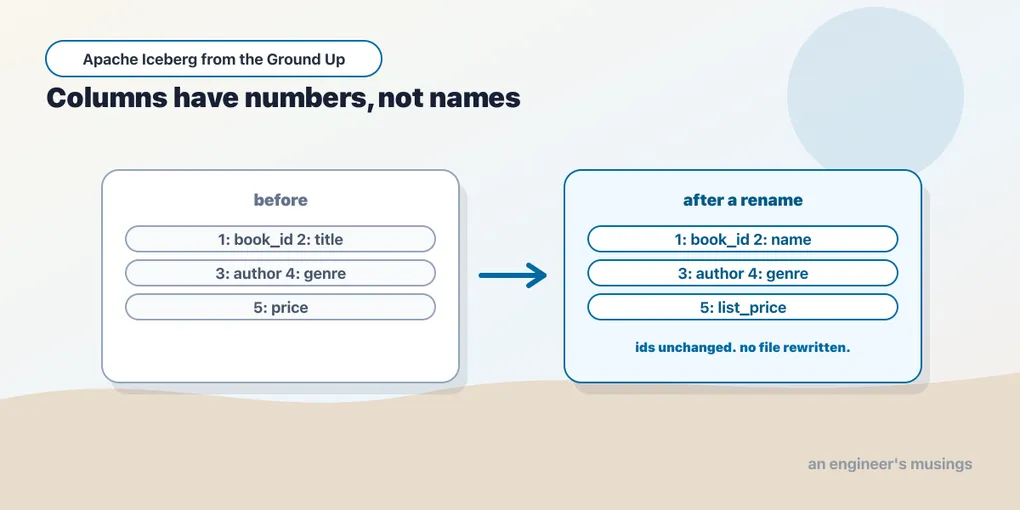
Somebody wants a column renamed. title should be book_title, because there are three other tables with a title column and none of them mean the same thing.
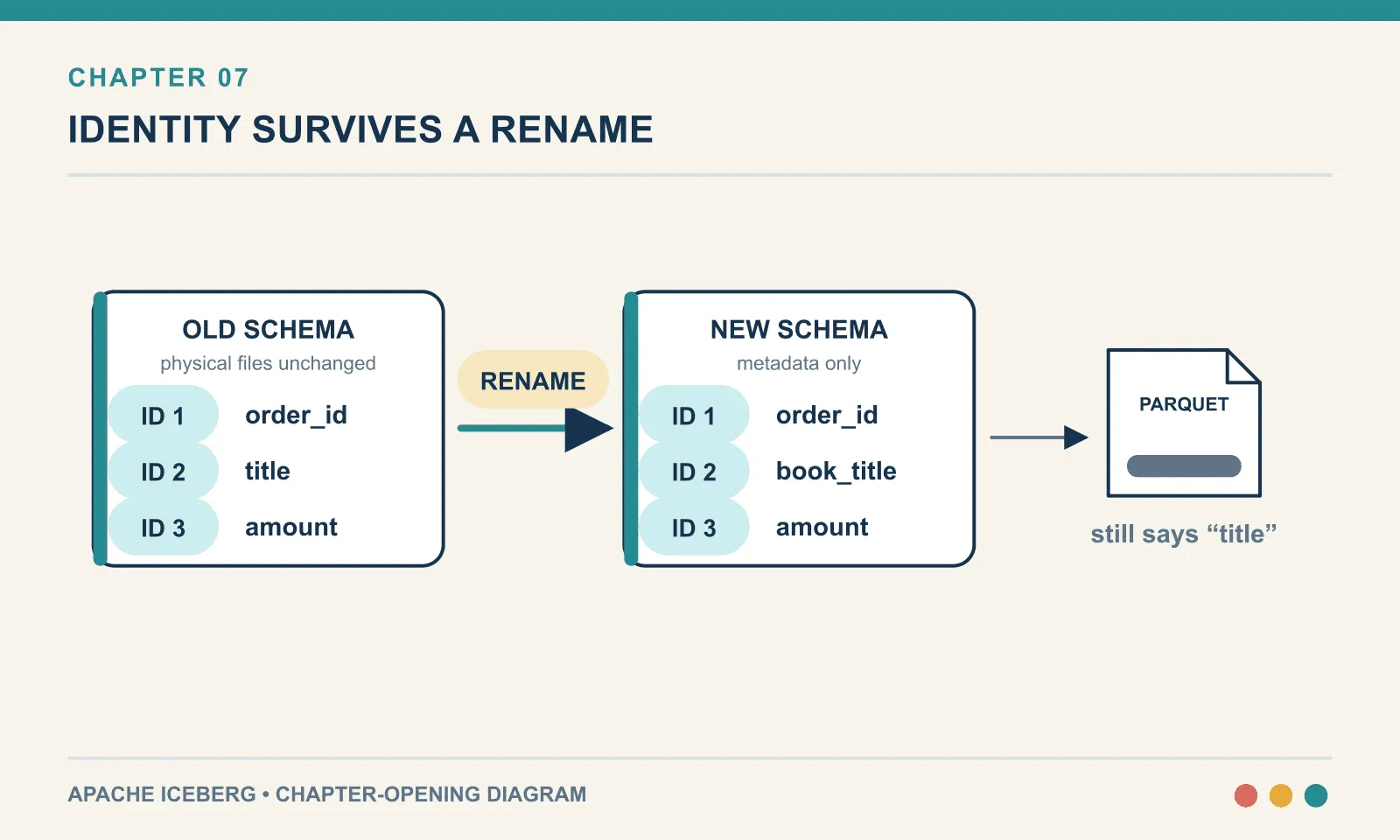
On a directory of Parquet files this is a request to rewrite the table. Not because renaming is expensive — because the name is the column. Every file has title written into its own schema, and every reader finds the column by looking for that string. The moment the table definition says book_title while the files say title, the two have stopped referring to the same thing. Chapter 1 showed how that ends: a query that succeeds, returns a plausible number, and is wrong.
On an Iceberg table it is one line, it rewrites nothing, and the files on disk go on saying title forever.
The mechanism is a single design decision made at the bottom of the format. Everything in this chapter follows from it, including the parts that surprise people. Everything here runs on PyIceberg 0.11.1 against the bookshop orders table from chapter 6 — a SQLite catalog, a local directory, no JVM.
Names are not identity
Start with the schema Iceberg keeps:
for f in t.schema().fields:
    print(f"  {f.field_id:>3}  {f.name:<14} {str(f.field_type):<12} required={f.required}")
1 order_id long required=True
2 customer_id long required=True
3 title string required=False
4 country string required=False
5 quantity int required=False
6 amount double required=False
7 status string required=False
8 ordered_at timestamp required=TrueThe column on the left is the whole idea. Every field has an integer field ID, assigned when the field is created, never reused, and never changed. The name is a label attached to the ID. The ID is the column.
That would be a bookkeeping detail if it stayed in the catalog. It does not. Look at what the writer put in the Parquet file:
for fld in pq.read_schema(data_file):
    print(" ", fld.name, dict(fld.metadata or {}))
order_id {b'PARQUET:field_id': b'1'}
customer_id {b'PARQUET:field_id': b'2'}
title {b'PARQUET:field_id': b'3'}
country {b'PARQUET:field_id': b'4'}
quantity {b'PARQUET:field_id': b'5'}
amount {b'PARQUET:field_id': b'6'}
status {b'PARQUET:field_id': b'7'}
ordered_at {b'PARQUET:field_id': b'8'}Parquet has a per-column field_id slot in its own metadata, and Iceberg fills it in. So the file is self-describing in the way that matters: it says this column is field 3, not merely this column is called title.
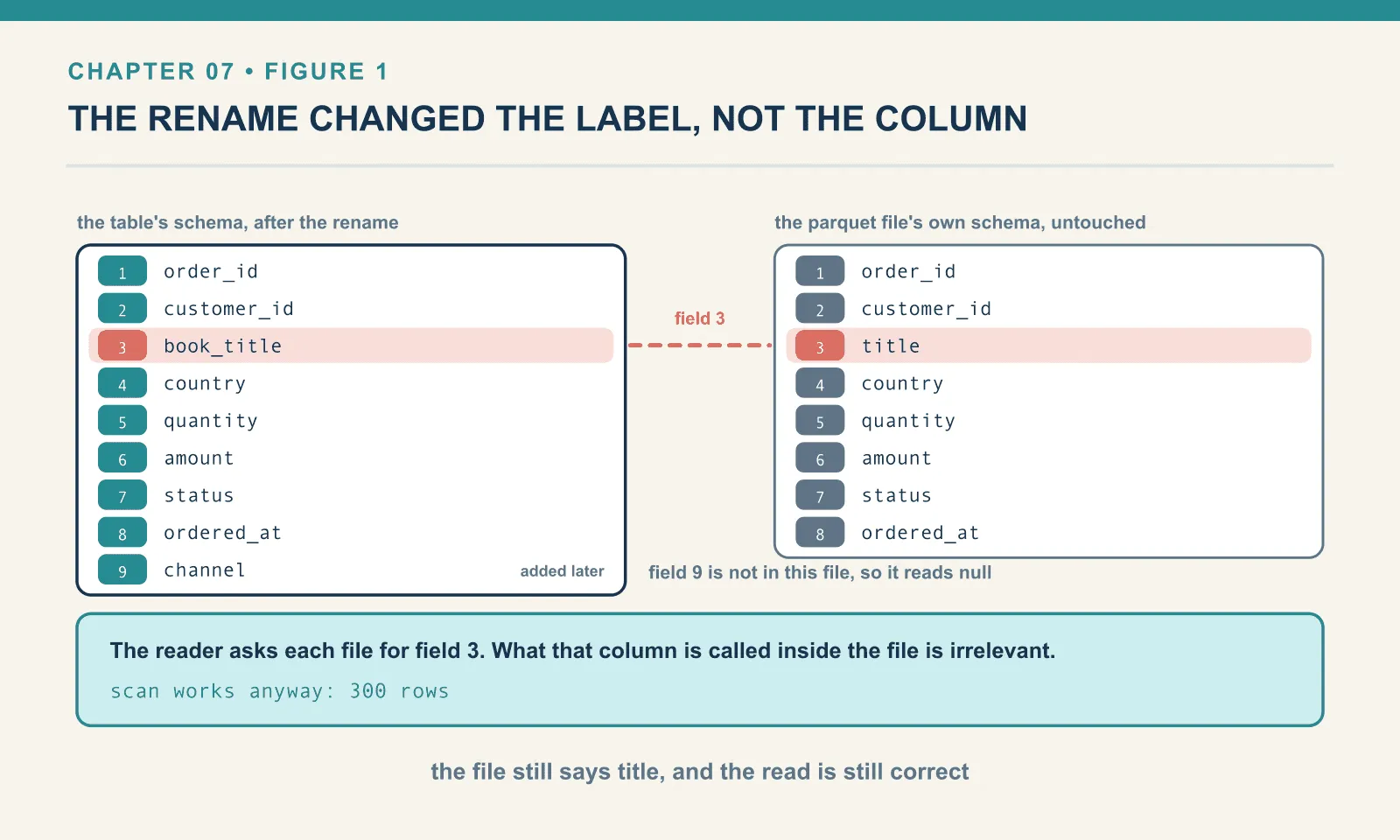
A read now works differently from anything a directory can do. The reader takes the table’s current schema and finds that field 3 is called book_title and is a string. Then it goes to each data file and asks for field 3. What that column is called inside the file is irrelevant. It could be called title. It could be called x. It is field 3.
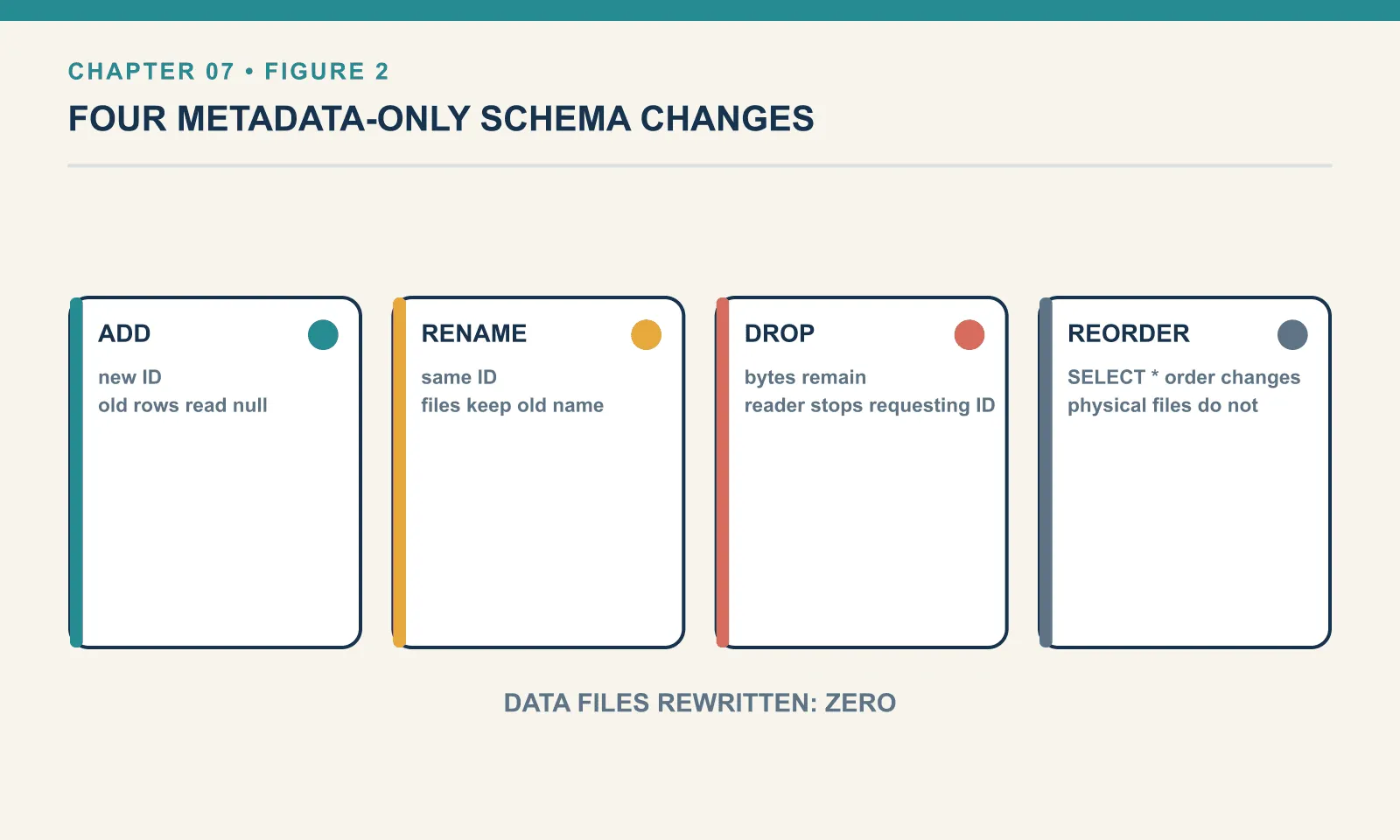
Adding a column changes no data
Adding channel allocates a new field ID. Existing files have no value for it, so the reader must supply null:
with t.update_schema() as u:
    u.add_column("channel", StringType(), doc="web / app / phone")
9 channel string required=False
data files before: 3 after: 3 rewritten: False
rows: 300 channel distinct: {None}
schema_id now: 1 schemas retained: [0, 1]Three data files before, the same three after — checked by comparing the sets of paths, not by counting. No file was touched. The three hundred existing rows read back with channel as None, because the reader asks each file for field 9, does not find it, and supplies null.
Two things to notice in that output beyond the obvious. The new field got ID 9, one past the highest ID ever used in this table. And the schema got a new schema_id, with the old one retained. Iceberg keeps every schema version the table has ever had, exactly as it keeps every snapshot.
The doc argument is worth using. It is a comment stored in the table metadata, it survives every engine, and it is the only documentation about the column that cannot get separated from it.
Renaming, and the file that never found out
A rename keeps field 3 and changes the name attached to it:
with t.update_schema() as u:
    u.rename_column("title", "book_title")
3 book_title string required=False
rows: 300 sample: DuneThree hundred rows, and book_title holds Dune. Nothing was rewritten — the three appends happened before the rename and their files have not been opened since.
Which means the files disagree with the table, in writing:
parquet columns on disk: ['order_id', 'customer_id', 'title', 'country', 'quantity', 'amount', 'status', 'ordered_at']
iceberg schema names   : ['order_id', 'customer_id', 'book_title', 'country', 'quantity', 'amount', 'status', 'ordered_at', 'channel']
scan works anyway      : 300
The word title is still on disk, and will be until something rewrites that file for an unrelated reason. It does not matter. The reader never looked at it.
This is the single clearest demonstration of what field IDs buy. In a name-resolved world the state above is a broken table. Here it is Tuesday.
The stored data survives, but callers using the old name still need to change. A filter on title fails:
t.scan(row_filter=EqualTo("title", "Dune"))ValueError: Could not find field with name title, case_sensitive=TrueAnd appending an Arrow table that still has the old column produces an error whose wording will briefly confuse you:
ValueError: PyArrow table contains more columns: title. Update the schema first (hint, use union_by_name).It says more columns because from PyIceberg’s point of view your dataframe carries a column the table does not have. It is not wrong, exactly. The actual problem is that your producer has not been updated. A rename is safe for the stored data, and a breaking change for everything that writes or queries by name. The format solved the hard half of the problem, not the whole of it.
Dropping, and the trap that IDs close
Drop a column:
with t.update_schema() as u:
    u.delete_column("country")
after drop: ['order_id', 'customer_id', 'book_title', 'quantity', 'amount', 'status', 'ordered_at', 'channel', 'region']
rows: 300
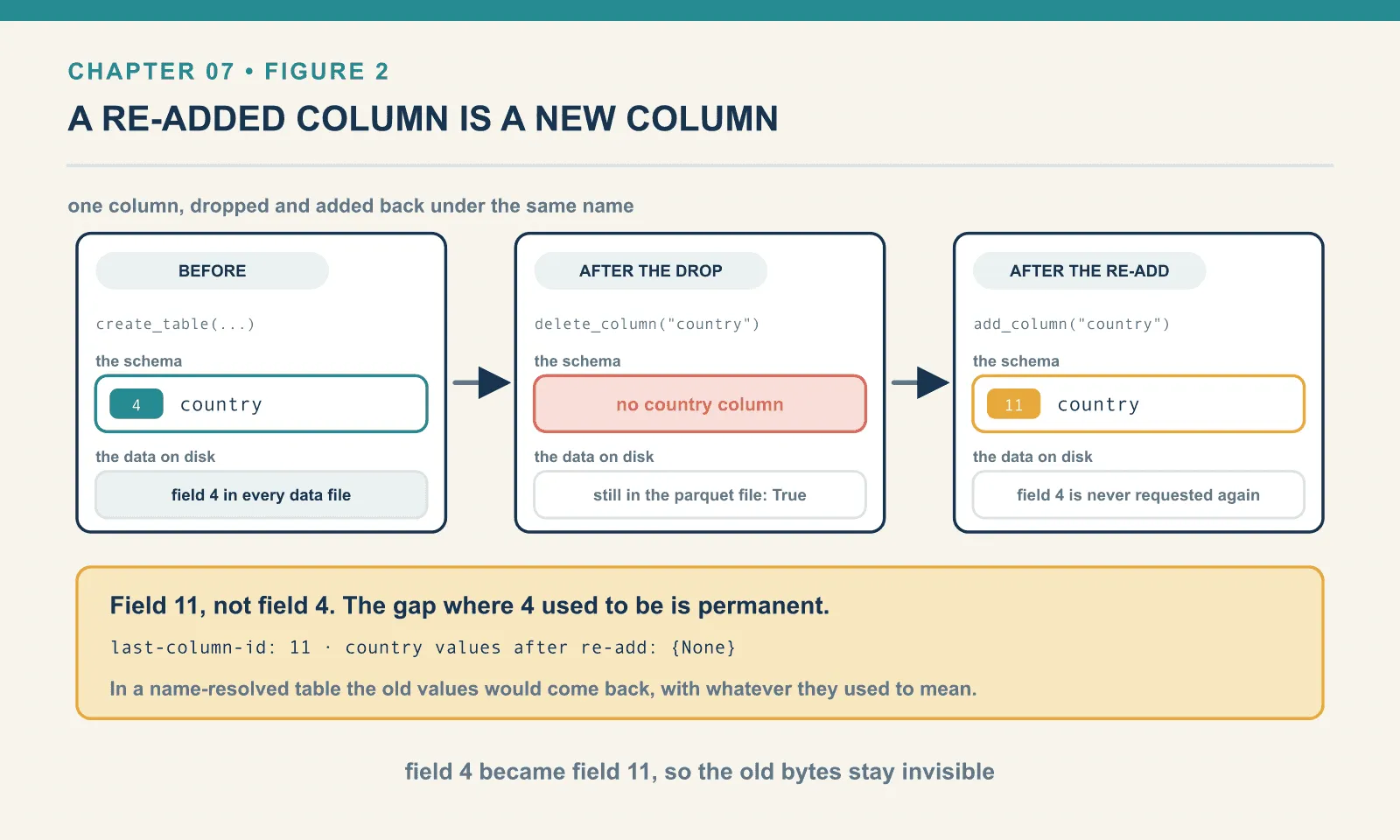
country still in the parquet file: TrueMetadata-only again, and the data is still physically there. Field 4 sits in all three Parquet files, complete, and is simply never requested. It costs storage until something rewrites those files. Chapter 12 comes back to that point: a dropped column is not a space saving.
Now the interesting half. Add country back:
with t.update_schema() as u:
    u.add_column("country", StringType())
1 order_id long required=True
2 customer_id long required=False
3 book_title string required=False
5 quantity long required=False
...
11 country string required=False
country values after re-add: {None}Field 11, not field 4. The gap where 4 used to be is permanent. The three hundred rows read back with country as null, even though the old values are sitting in the files a few bytes away.
That is the correct answer, and it is worth dwelling on why. In a name-resolved table, dropping a column and adding one with the same name resurrects the old data. Silently, and with whatever semantics it had before — which may be nothing like what the new column means. Somebody drops region because it held ISO country codes, adds region back to hold sales territories, and half the table quietly comes back full of country codes. IDs make that impossible: a new field is a new field, and the old bytes belong to a field nobody is asking about any more.
The cost is that you cannot use drop-and-re-add to change a column’s type or meaning in place. If you want the old values under the new column you must write them, which is the honest amount of work.
Reordering is cosmetic
with t.update_schema() as u:
    u.move_first("status")
    u.move_after("channel", "book_title")
['status', 'order_id', 'customer_id', 'book_title', 'channel', 'quantity', 'amount', 'ordered_at', 'region', 'country']
arrow column order: ['status', 'order_id', 'customer_id', 'book_title', 'channel', 'quantity', 'amount', 'ordered_at', 'region', 'country']
field ids: [7, 1, 2, 3, 9, 5, 6, 8, 10, 11]The scan hands back columns in the schema’s order, and the IDs are undisturbed — 7 first, then 1, 2, 3. Column order in Iceberg is presentation, not physical layout, and moving a column costs one metadata write.
This matters for callers that read columns by position. Iceberg resolves them by ID, so reordering changes SELECT * order without changing its contents; positional readers still see a different presentation.
Type promotion, and exactly what is allowed
Two promotions on the bookshop table:
with t.update_schema() as u:
    u.update_column("quantity", field_type=LongType())
with t.update_schema() as u:
    u.update_column("amount", field_type=DoubleType())
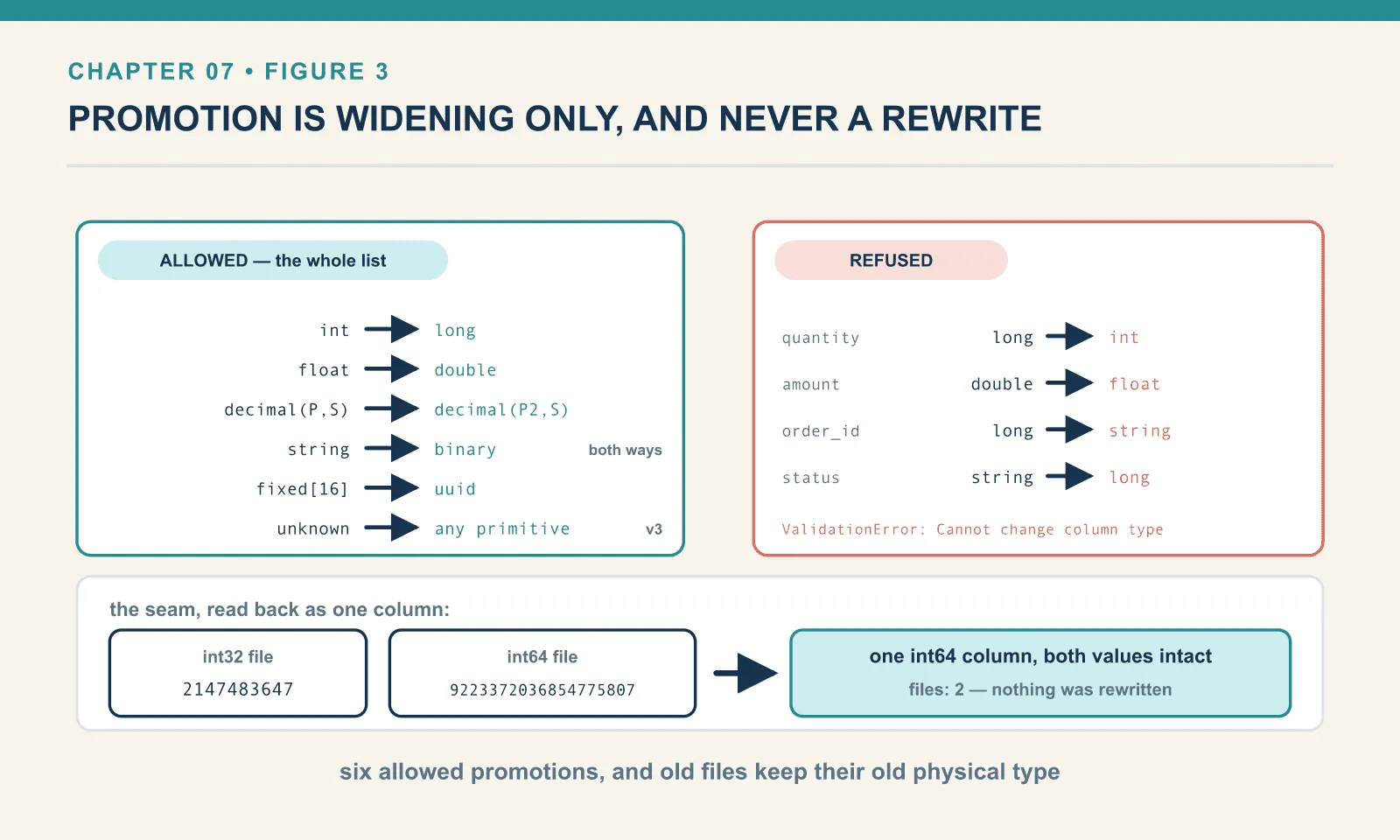
OK quantity -> long
OK amount -> doubleAnd the four obvious things people try, each refused:
FAIL quantity -> int    : ValidationError: Cannot change column type: quantity: long -> int
FAIL amount   -> float  : ValidationError: Cannot change column type: amount: double -> float
FAIL order_id -> string : ValidationError: Cannot change column type: order_id: long -> string
FAIL status   -> long   : ValidationError: Cannot change column type: status: string -> long
The rule is that a promotion must be widening and lossless. Old files keep their old physical type forever, and the reader has to be able to convert every value it finds. An int column promoted to long leaves int32 in the existing Parquet files and writes int64 in new ones; the reader upcasts on the way out. Reversing that would mean promising that no stored value overflows, which nobody can promise.
Watch it work across the seam:
after promotion: [{'id': 1, 'qty': 2147483647}, {'id': 2, 'qty': 3}]
arrow type now: int64
mixed int32/int64 files read as one table:
  [{'id': 3, 'qty': 9223372036854775807}, {'id': 1, 'qty': 2147483647}, {'id': 2, 'qty': 3}]
files: 2
Two files, one written int32 and one int64, both holding their type’s maximum value. They read back as a single int64 column with both values intact. No rewrite, no loss.
Here is PyIceberg 0.11.1’s full promotion set, read from its own dispatch table rather than from documentation: int → long, float → double, decimal(P,S) → decimal(P',S) widening precision, string ↔ binary in both directions, fixed[16] → uuid, and the v3 unknown → any primitive. That is a short list, and it is short on purpose.
A bug in the decimal rule
Decimal widening is the one to test carefully, and testing it turned up something real:
OK   decimal(12, 2)     # from decimal(9, 2) — precision widened, scale unchanged
OK   decimal(12, 4)     # scale changed 2 -> 4
FAIL decimal(9, 2)      # ValidationError: Cannot change column type: price: decimal(12, 4) -> decimal(9, 2)
The middle line should not be OK. The Iceberg promotion rules allow decimal(P,S) → decimal(P2,S) where the precision grows and the scale is identical. Change the scale and you change what the stored unscaled integers mean. PyIceberg accepted it anyway, and here is why:
@promote.register(DecimalType)
def _(file_type: DecimalType, read_type: IcebergType) -> IcebergType:
    if isinstance(read_type, DecimalType):
        if file_type.precision <= read_type.precision and file_type.scale == file_type.scale:
file_type.scale == file_type.scale. The field is compared against itself, so the scale check is always true and every scale change passes. One word.
The behaviour that follows is not as bad as it could be. Reading the table back after the illegal promotion returns correct values:
before: [{'id': 1, 'price': Decimal('12.50')}, {'id': 2, 'price': Decimal('7.99')}, ...]
after:  [{'id': 1, 'price': Decimal('12.5000')}, {'id': 2, 'price': Decimal('7.9900')}, ...]
PyIceberg’s reader casts through PyArrow, which rescales properly, so twelve pounds fifty stays twelve pounds fifty. But you now have a table whose metadata records a promotion the specification does not permit. I have not tested what a different engine does with it — Spark does not arrive until chapter 10. This is exactly the class of divergence chapter 18 is about. Do not change a decimal’s scale. If PyIceberg lets you, that is not permission.
Nullability, and a table that lies
Making a required column optional is always safe:
required -> optional: OKGoing the other way is not, and is refused:
ValueError: Cannot change column nullability: country: optional -> requiredThere may already be nulls in the column. Iceberg will not let you assert something about stored data that it cannot check without reading all of it.
Unless you insist. update_schema takes allow_incompatible_changes, and it does what it says:
with t3.update_schema(allow_incompatible_changes=True) as u:
    u.update_column("note", required=True)
optional -> required with allow_incompatible_changes: OK
schema: [('id', True), ('note', True)]
read back (note has a NULL in it): [{'id': 1, 'note': 'x'}, {'id': 2, 'note': None}]The column is now declared required and still contains a null. Every reader that trusts the schema is being lied to by the table’s own metadata: a code generator, a downstream loader that skips null checks on required fields, an engine that plans on non-nullability.
The same flag will take you somewhere worse:
with t.update_schema(allow_incompatible_changes=True) as u:
    u.update_column("id", field_type=StringType())
long -> string with allow_incompatible_changes: OK
schema: [('id', 'string'), ('note', 'string')]
READ FAILS: ResolveError: Cannot promote long to stringThe commit succeeded. The table is now unreadable — every scan raises, because the reader reaches a file holding long and is asked for string. It is recoverable, since the schema is metadata and you can change it back; setting the type to long again brought the rows straight back. But between those two commits the table was a table nobody could query, and no warning was issued at any point.
Treat allow_incompatible_changes=True as what it is: a way to write metadata that the format’s own rules reject. There are legitimate uses during a migration you fully control. There is no legitimate use in a scheduled job.
Adding a required column, and a v3 feature on a v2 table
Adding a required column is refused for the obvious reason:
ValueError: Incompatible change: cannot add required column: regionEvery existing row would have a null in a field declared non-null. Unless the column comes with a default. Here it is on a two-column throwaway table that already holds two rows, so the effect on existing data is easy to see:
with t2.update_schema() as u:
    u.add_column("region", StringType(), required=True, default_value="EU")
with default_value: OK
schema: [(1, 'id', True, None, None), (2, 'name', False, None, None), (3, 'region', True, 'EU', 'EU')]
read back: [{'id': 1, 'name': 'a', 'region': 'EU'}, {'id': 2, 'name': 'b', 'region': 'EU'}]Rows written before the column existed read back as EU, with no file rewritten. The value is stored once in the schema and materialised at read time. That is exactly the right design, and considerably better than the migration this would be in a database.
Here is the part to be careful with. Look at what went into the metadata file:
{"id": 3, "name": "region", "type": "string", "required": true,
 "initial-default": "EU", "write-default": "EU"}
format version: 2
format-version in metadata: 2initial-default and write-default are format v3 features, and this is a format v2 table. PyIceberg wrote them anyway. A reader that implements v2 strictly is entitled to ignore fields it does not know, which would give it a null in a column marked required.
I have not tested what another engine does with this table, because the only engine in this chapter’s environment is PyIceberg. What I can say is that a v2 reader is under no obligation to honour that metadata. The safe version of this operation is to upgrade the table to v3 first — chapter 19 — or to add the column as optional and fill it yourself. If you use default_value, know that you have used a v3 feature, whatever the table says its version is.
Time travel across a rename
The bookshop table has been through nine schema versions. Its first snapshot predates the rename, so reading it asks which schema belongs to that earlier state:
old = t.scan(snapshot_id=first_snapshot).to_arrow()
print("snapshot 1 columns:", old.column_names)
snapshot 1 columns: ['order_id', 'customer_id', 'title', 'country', 'quantity', 'amount', 'status', 'ordered_at']
snapshot 1 rows : 100
schema ids retained: [0, 1, 2, 3, 4, 5, 6, 7, 8]
snapshot schema_id : [(8633273259493773719, 0), (4012455259446278702, 0), (8223081118807324600, 0)]title, not book_title. No channel, no region. quantity back to int.
A snapshot pins a schema as well as a file list. Every snapshot records the schema_id that was current when it was committed, and a time-travelling read resolves through that schema rather than today’s. Which is correct. The point of time travel is to see the table as it was, and the table as it was had a column called title.
A query that works against the live table can therefore fail against a snapshot from before a rename, and vice versa. Reproducing an old result requires the old query’s column names as well as its snapshot id.
The metadata carries all of this:
current-schema-id: 8 | schemas kept: 9
last-column-id: 11
schema 0 field names: ['order_id', 'customer_id', 'title', 'country', 'quantity', 'amount', 'status', 'ordered_at']
schema 8 field names: ['status', 'order_id', 'customer_id', 'book_title', 'channel', 'quantity', 'amount', 'ordered_at', 'region', 'country']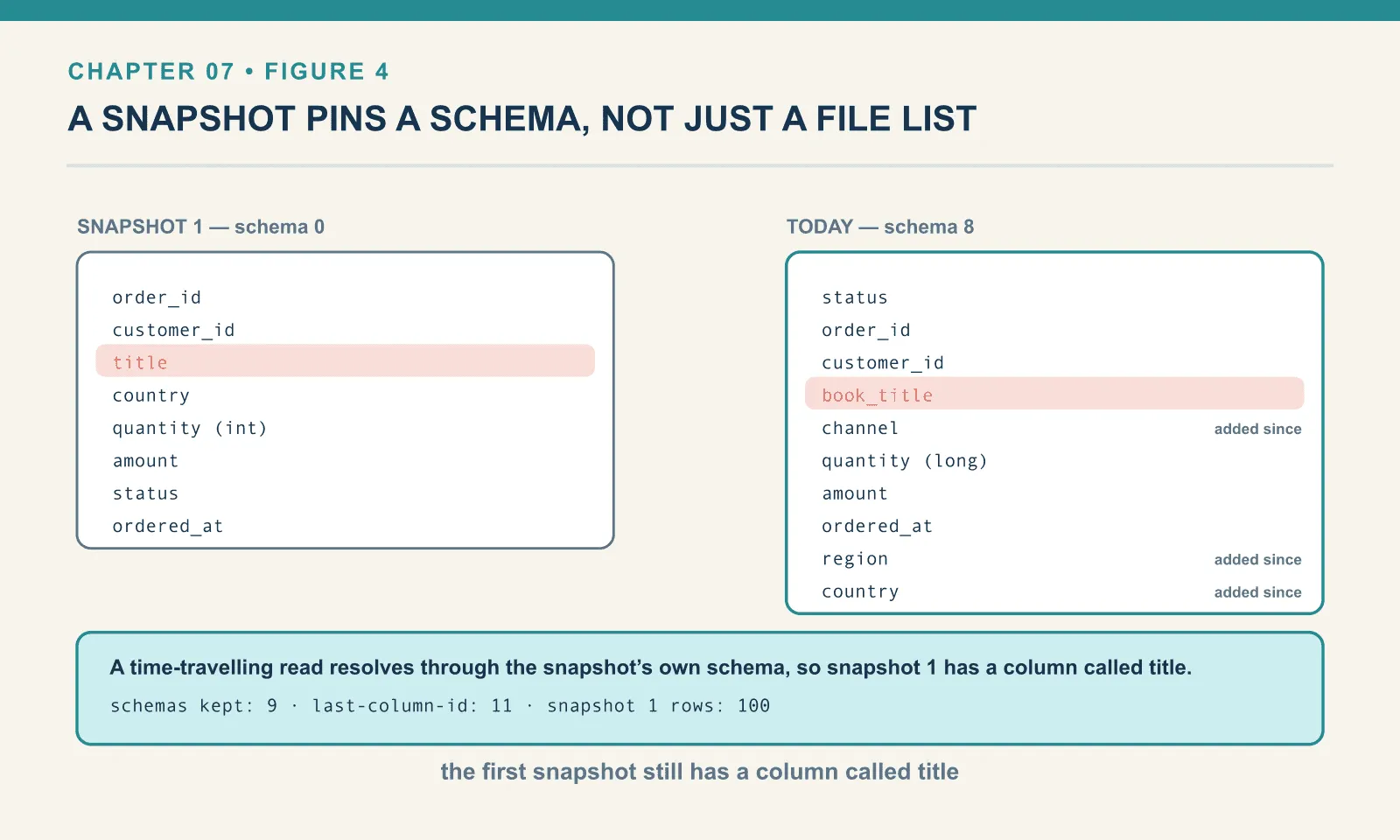
Nine schemas retained, and last-column-id: 11 — the counter that guarantees a new field never reuses a retired ID. That counter is why drop-and-re-add cannot resurrect anything. It is the one piece of state that must never go backwards.
The rest of the surface
Nested types evolve too, with paths instead of names:
with t3.update_schema() as u:
    u.add_column(("addr", "country"), StringType())
    u.rename_column(("addr", "postcode"), "postal_code")
2: addr: optional struct<3: city: optional string, 4: postal_code: optional string, 5: country: optional string>
[{'order_id': 1, 'addr': {'city': 'Bath', 'postal_code': 'BA1', 'country': None}},
{'order_id': 2, 'addr': {'city': 'Ely', 'postal_code': 'CB7', 'country': None}}]Struct fields get IDs from the same counter as top-level ones, and the same rules apply at every depth.
union_by_name takes a whole schema — an Iceberg schema or a PyArrow one — and adds whatever is missing:
with t3.update_schema() as u:
    u.union_by_name(new_arrow_schema)
['order_id', 'addr', 'gift_message', 'promo_code']This is the right tool when an upstream producer has gained columns and you want the table to follow. It only ever adds. It will not drop a column that disappeared upstream and it will not rename anything, so it cannot destroy data. That is precisely why it is safe to run automatically, and why it should never be your only schema management.
Names must stay unique, and the error tells you which IDs collided:
ValueError: Invalid schema, multiple fields for name promo_code: 6 and 7And Iceberg is case-sensitive by default, which is a live cross-engine hazard:
added 'title' next to 'Title': ['id', 'Title', 'title']Two distinct fields, differing only in case, accepted without complaint. Spark SQL is case-insensitive by default, and cannot resolve either of them unambiguously. Do not do this. If a producer hands you Title and title, rename one before it reaches the table.
What schema evolution is not
It is not a data migration. Renaming amount to amount_gbp does not convert anything; promoting int to long does not change a stored value; adding a column does not populate it. Every one of these operations changes how the bytes are interpreted, and none of them changes the bytes. That is the source of both the speed and the entire risk profile.
It is not free of downstream cost. The stored data survives a rename; your dbt models, your BI tool’s saved queries, your Airflow DAG’s SELECT list and every notebook anybody wrote do not. The format guarantees you will not lose data. It guarantees nothing about your Monday morning.
And it is not a reason to be casual with the schema. Field IDs are permanent, the ID counter only goes up, and the metadata keeps every version. That is nine schemas in a table that has existed for the length of one chapter. Evolution is cheap enough that the temptation is to iterate in production. Resist it a little. Each change is a commit, each commit is a snapshot, and a table with two hundred schema versions is telling a story about the team that owns it.
Two safe habits, stated plainly. Add columns rather than repurposing them, because a new ID cannot inherit an old meaning. And when a producer changes shape, prefer union_by_name and an explicit rename over a drop and a re-add. The drop is the only operation here that throws information away.
Final thoughts
Field IDs are the least glamorous idea in the format and possibly the most valuable. One integer per column, written into the table metadata and into every data file, and the entire class of name-resolution disasters stops being possible. Renames are metadata, drops are metadata, reorders are metadata, and a re-added column cannot inherit a dead one’s data.
What the IDs cannot do is make the change safe for anything outside the table. That is the recurring shape of this arc: the format removes the data risk and leaves you the coordination problem. It is the right division of labour, but it is not the same as the problem going away.
The next chapter applies the same trick to the other thing a Hive table forced into its file paths and could never change afterwards: the partitioning.
Comments