The Table Remembers
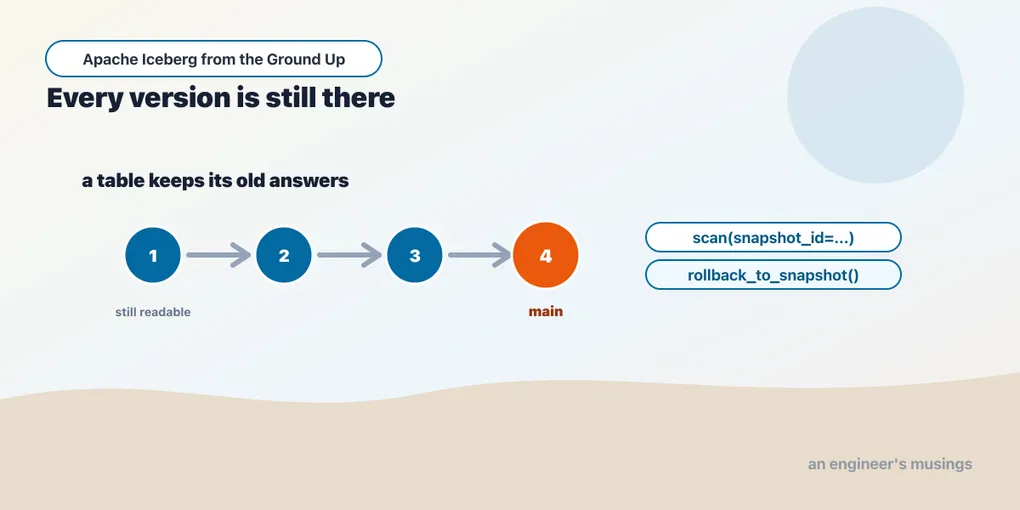
Every commit leaves a complete, readable copy of what the table was. This chapter reads yesterday's table, rolls one back, discovers that rollback deletes nothing, and finds out what PyIceberg's expire_snapshots does not do.
Somebody asks what the numbers looked like on Tuesday.
On an application database the answer is a shrug and a restore. Postgres holds the current state and a write-ahead log that exists to survive a crash, not to answer questions. Getting Tuesday back means finding Tuesday’s backup, standing up a second instance, and pointing something at it. Nobody does this casually.
On a directory of Parquet the answer is worse. Chapter 1 showed why: the old files were deleted, and nothing recorded that they had ever been the table.
On an Iceberg table it is one argument to a scan.
That is not because somebody bolted a history feature on. It falls out of the design. A table is a list of files, and changing the table means publishing a new list. The old list is a small piece of metadata that there is no particular reason to throw away. History is what you get when you stop overwriting the answer to what does this table contain.
This chapter is about that machinery, and about the four places it does not do what people assume. Everything here runs on PyIceberg 0.11.1 and Python 3.13 against a SQLite catalog and a local directory. No JVM, no Docker, no cloud. The bookshop orders table carries through the rest of the book:
from pyiceberg.catalog.sql import SqlCatalog

cat = SqlCatalog("book", uri="sqlite:///cat.db", warehouse="file:///abs/path/wh")
cat.create_namespace_if_not_exists("bookshop")
t = cat.create_table("bookshop.orders", schema=SCHEMA)
SCHEMA is the eight-field version of the orders table this arc works with — order_id, customer_id, title, country, quantity, amount, status and ordered_at. It is the same table chapter 3 took apart, and the field IDs are the ones printed there — order_id is 1, ordered_at is 8. Chapter 7 evolves it, and does so properly and measurably. orders(n, start, day) below is a helper that builds an Arrow table of n deterministic bookshop rows.
What a snapshot actually is
Three days of orders, three appends:
t.append(orders(100, start=1,   day="2026-06-01"))
t.append(orders(100, start=101, day="2026-06-02"))
t.append(orders(100, start=201, day="2026-06-03"))
rows: 300Now look at what those three calls left behind. Every Iceberg table exposes metadata tables through t.inspect, and snapshots is the one to start with:
for r in t.inspect.snapshots().to_pylist():
    print(r["committed_at"], r["snapshot_id"], "parent=", r["parent_id"], r["operation"])
    print("   ", json.dumps(dict(r["summary"]), sort_keys=True))
2026-08-28 07:38:22.876000 3980006843811930532 parent= None append
{"added-data-files": "1", "added-files-size": "4545", "added-records": "100",
"total-data-files": "1", "total-files-size": "4545", "total-records": "100", ...}
2026-08-28 07:38:22.901000 8745609421666159300 parent= 3980006843811930532 append
{"added-data-files": "1", "added-files-size": "4578", "added-records": "100",
"total-data-files": "2", "total-files-size": "9123", "total-records": "200", ...}
2026-08-28 07:38:22.920000 4460006199689358250 parent= 8745609421666159300 append
{"added-data-files": "1", "added-files-size": "4615", "added-records": "100",
"total-data-files": "3", "total-files-size": "13738", "total-records": "300", ...}Three rows for three commits. Each carries an id, a timestamp, the id of the commit it followed, the kind of operation, and a summary of what changed.
The added-records: 100 summary can make a snapshot look like a diff, but each snapshot describes the complete list of files in the table at that moment. The second names both data files; the third names all three. The committer writes the added-* counters for your convenience. Reading the snapshot uses the whole list.
That is why time travel is cheap and why it is not a special code path. Reading an old snapshot is the ordinary read, with a different list.
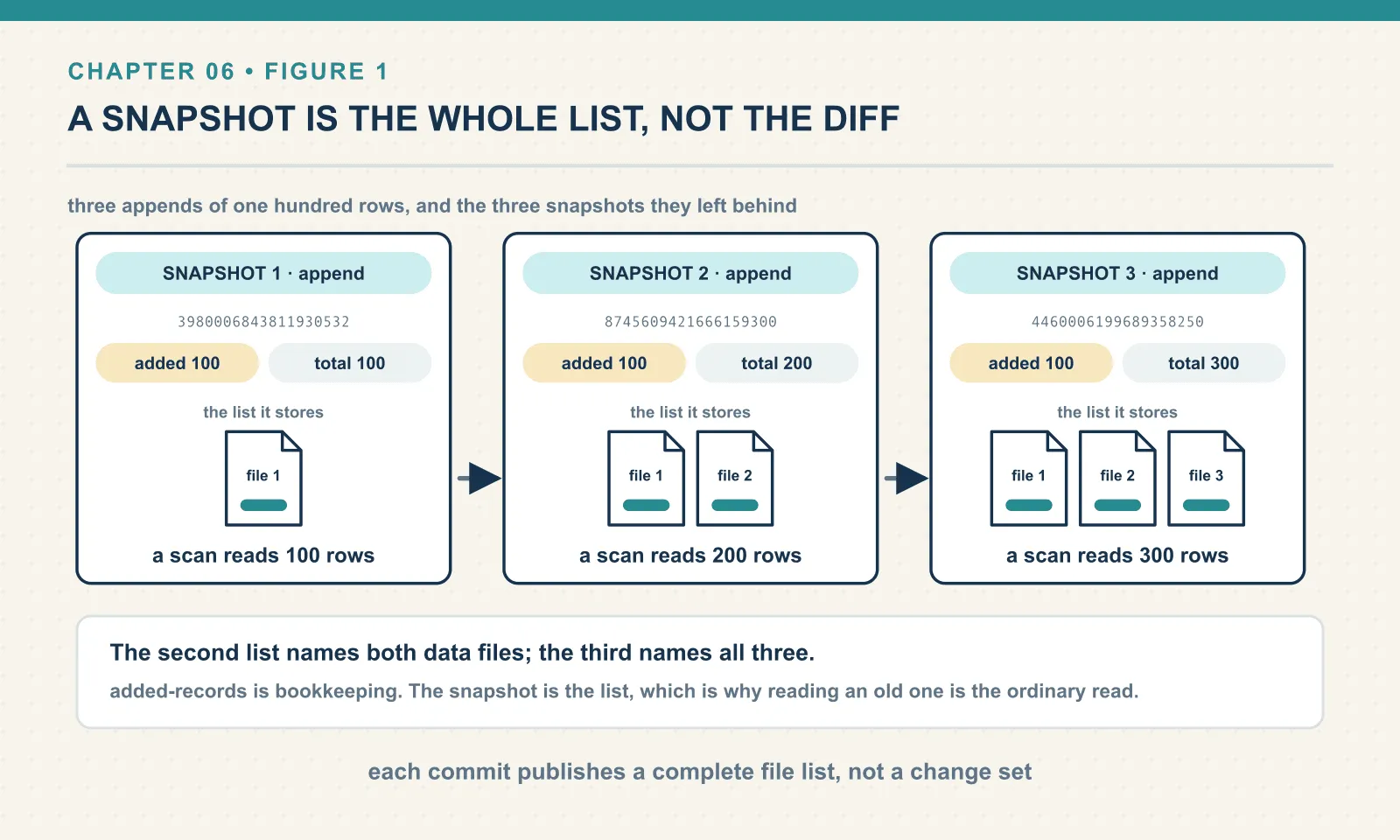
The summary distinguishes two families of counter, and mixing them up is the usual confusion on a first look at a snapshots table. added-records and deleted-records describe this commit. total-records, total-data-files and total-files-size describe the table as of this commit. A snapshot with added-records: 100 and total-records: 300 did not add three hundred rows.
The underlying objects say the same thing in fewer words:
for s in t.snapshots():
    print(s.snapshot_id, "parent=", s.parent_snapshot_id, "seq=", s.sequence_number,
          "ts=", s.timestamp_ms, s.manifest_list.split('/')[-1])
3980006843811930532 parent= None seq= 1 ts= 1787902702876 snap-3980006843811930532-0-442916cb-….avro
8745609421666159300 parent= 3980006843811930532 seq= 2 ts= 1787902702901 snap-8745609421666159300-0-20bb47ed-….avro
4460006199689358250 parent= 8745609421666159300 seq= 3 ts= 1787902702920 snap-4460006199689358250-0-5937cac4-….avro
current: 4460006199689358250Each snapshot points at exactly one manifest list — the file chapter 3 walked — and at its parent. The parent_snapshot_id chain is what makes this a history rather than a bag of versions. The sequence_number is a monotonic counter that matters enormously from chapter 10 onward. It is how a reader knows whether a delete file applies to a given data file.
The snapshot ids are random 64-bit numbers. They are not sequential, they encode nothing, and you cannot guess the next one. Which is deliberate: two writers generating ids independently must not collide.
Reading Tuesday
Time travel is one keyword argument:
for sid in [s.snapshot_id for s in t.snapshots()]:
    print(sid, "->", len(t.scan(snapshot_id=sid).to_arrow()), "rows")
3980006843811930532 -> 100 rows
8745609421666159300 -> 200 rows
4460006199689358250 -> 300 rowsAn old snapshot is a full table, not a fragment, so everything a normal scan does works against it — projection, filters, the lot:
t.scan(snapshot_id=first, row_filter=EqualTo("country", "GB")).to_arrow()filtered at snap1: 20Snapshot ids are awkward to carry around, so there is a timestamp form. It resolves to the most recent snapshot at or before the instant you name:
mid = (TS[1] + TS[2]) // 2          # between the second and third commits
snap = t.snapshot_as_of_timestamp(mid)
as of 1787902702910 -> 8745609421666159300 ==S[1]? True
rows: 200Two edges worth knowing before you build a pipeline on this. Asking for an instant before the table existed returns None rather than raising. A job that reads snapshot_as_of_timestamp(...).snapshot_id then fails with an AttributeError about NoneType, which tells you nothing useful about the real problem:
before the table existed: NoneAnd the boundary is inclusive. A timestamp exactly equal to a commit’s own timestamp resolves to that commit, not the one before it:
exactly at TS[1]: 8745609421666159300 ==S[1]? TrueAn id that does not exist gets you a clear error, which is more than most systems manage:
ValueError: Snapshot not found: 1234567890The thing time travel is actually for
Historical queries are the demo. The load-bearing use of snapshots is that every read is pinned to one, which is where a table format buys you isolation.
Load the table, hold the handle, and let somebody else commit:
stale = cat.load_table("bookshop.orders")
print("stale sees:", len(stale.scan().to_arrow()))

t.append(orders(50, start=301, day="2026-06-04"))     # another process, in effect

print("after a 50-row append elsewhere, stale still sees:", len(stale.scan().to_arrow()))
stale sees: 300
after a 50-row append elsewhere, stale still sees: 300
stale.current_snapshot(): 4460006199689358250
after refresh(): 350 6525057115153987299The second handle keeps reading three hundred rows across a commit that made it three hundred and fifty. It is not caching results; it is holding a snapshot id and resolving files from it. Nothing it reads can shift underneath it. The list it reads from is immutable, and the files in that list are never modified in place.
This is what chapter 1’s broken directory could not do. A dashboard running six queries against this table gets six answers from one state of the world, as long as it holds one handle. When it calls refresh() it moves forward, deliberately, at a moment of its choosing.
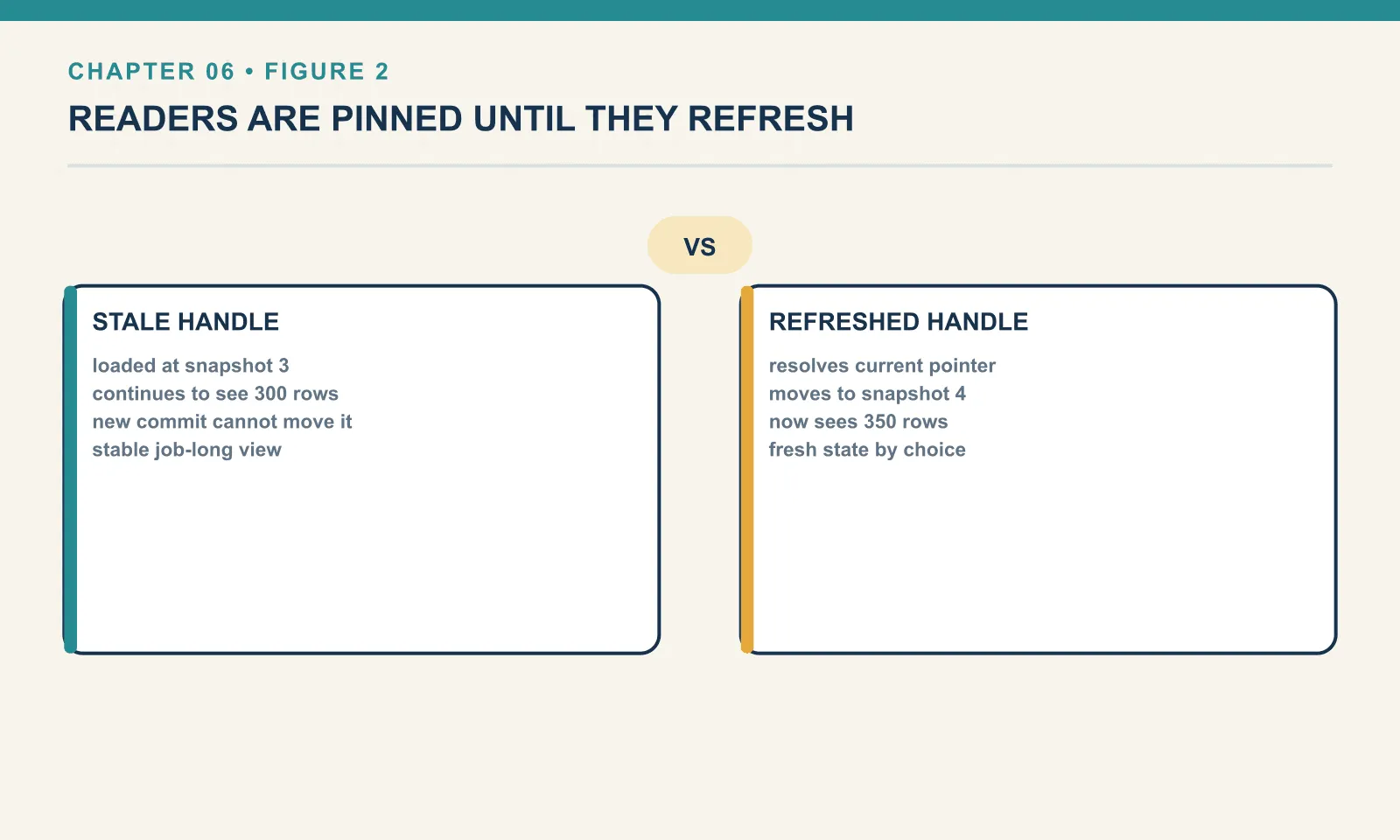
The flip side is the one that bites: a long-lived handle does not see new data. A service that loads a table at startup and holds it will serve stale results forever and never error. If you want current data you call refresh(), or you reload the table, and you decide where in your code that happens.
Stamping a commit with what you know
The summary is not a closed set. append and the other write methods take snapshot_properties, and whatever you pass lands in the snapshot summary alongside the counters:
t.append(orders(10, start=351, day="2026-06-05"),
         snapshot_properties={"job": "nightly-load",
                              "run-id": "2026-06-05T02:00",
"source": "orders_api"}){"added-data-files": "1", "added-files-size": "3551", "added-records": "10",
"job": "nightly-load", "run-id": "2026-06-05T02:00", "source": "orders_api",
"total-data-files": "5", "total-files-size": "21452", "total-records": "360", ...}That dictionary makes a snapshot traceable to a job and its logs. When a bad number appears in a dashboard six weeks later, you need to know which run produced the snapshot behind it. The summary can answer that question only if the writer recorded the information at commit time.
Rollback moves a pointer, and that is all it does
A bad refresh gives rollback a concrete job. Deliberately replace every GB order with a batch marked cancelled, keeping the current snapshot id so the change can be undone:
before_ov = t.current_snapshot().snapshot_id
t.overwrite(orders(20, start=1, day="2026-06-01", status="cancelled"),
            overwrite_filter=EqualTo("country", "GB"))
operations: ['append', 'append', 'append', 'append', 'append', 'overwrite', 'append']
rows now: 308Two snapshots again, as in chapter 1 — and the shorthand that chapter used needs a precise correction. A full overwrite records delete then append. A filtered overwrite records overwrite then append. Both were run side by side on two throwaway tables:
full overwrite ops:     ['append', 'append', 'append', 'delete', 'append']
filtered overwrite ops: ['append', 'overwrite', 'append']
The overwrite snapshot’s summary shows what copy-on-write costs:
{"added-data-files": "5", "added-records": "288", "deleted-data-files": "5",
 "deleted-records": "360", "removed-files-size": "21452", "total-records": "288", ...}
Twenty GB rows had to go, so five data files were read, rewritten without them, and swapped in. Three hundred and sixty records were removed and two hundred and eighty-eight added, to change twenty. That arithmetic is the entire argument for merge-on-read, and chapter 10 is about it.
Undo the refresh:
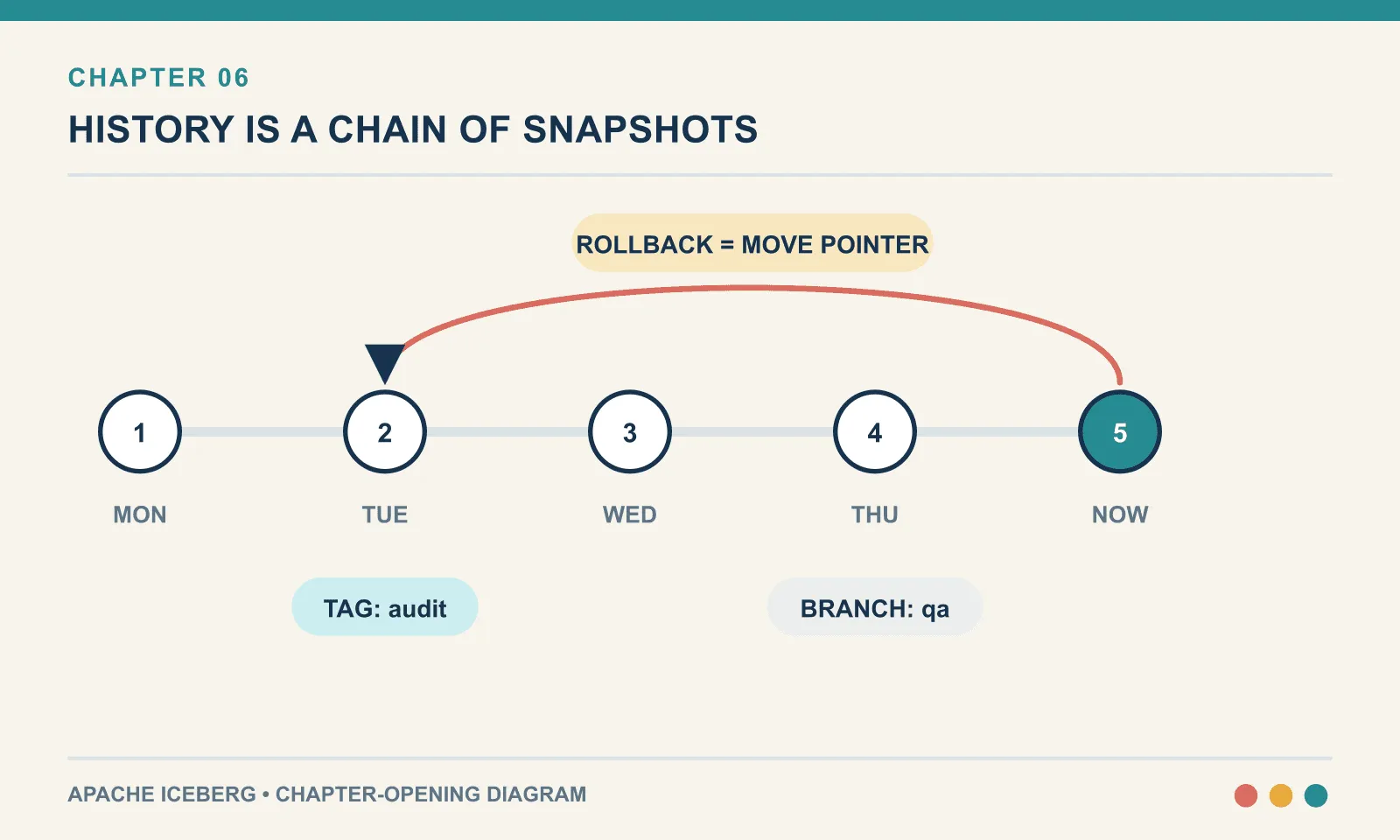
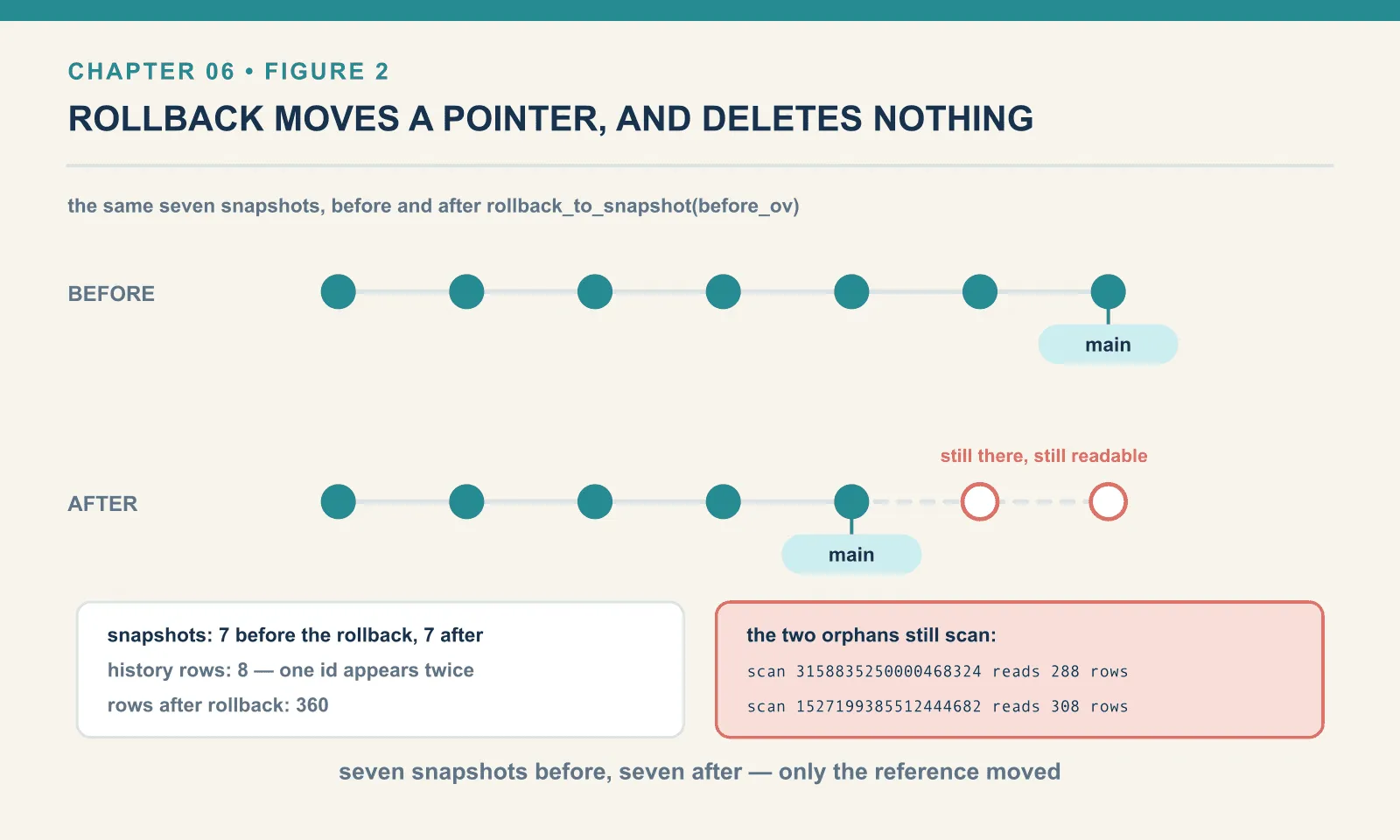
t.manage_snapshots().rollback_to_snapshot(before_ov).commit()pre-rollback snapshot count: 7
rows after rollback: 360
post-rollback snapshot count: 7
current: 3542421924821968592 == before_ov? TrueThree hundred and sixty rows, the pre-overwrite figure. And the snapshot count did not change. Rollback did not delete the snapshots it rolled past. It moved one pointer, the main branch reference, back to an earlier snapshot. Everything else stayed exactly where it was.
Two metadata tables tell the story from different angles, and the difference between them is worth understanding rather than memorising. snapshots lists every snapshot the table still retains. history lists every time the current pointer moved:
   2026-08-28 07:38:22.876000 3980006843811930532 ancestor= True
   2026-08-28 07:38:22.901000 8745609421666159300 ancestor= True
   2026-08-28 07:38:22.920000 4460006199689358250 ancestor= True
   2026-08-28 07:38:23.006000 6525057115153987299 ancestor= True
   2026-08-28 07:38:23.052000 3542421924821968592 ancestor= True
   2026-08-28 07:38:23.157000 3158835250000468324 ancestor= False
   2026-08-28 07:38:23.172000 1527199385512444682 ancestor= False
   2026-08-28 07:38:23.199000 3542421924821968592 ancestor= True
Eight rows for seven snapshots, and one id appears twice. It was current, then the overwrite happened, then rollback made it current again. The is_current_ancestor flag marks the two snapshots that are no longer on the path from the root to the head. They are not deleted, not hidden, and not corrupt. They are simply not in the current lineage.
Which means the bad refresh is still fully readable:
orphaned snapshot ids: [3158835250000468324, 1527199385512444682]
  scan 3158835250000468324 -> 288 rows
  scan 1527199385512444682 -> 308 rows
You can time travel into a rolled-back state. If the rollback was itself the mistake, you have not lost anything: the state is right there under its id.
Append after a rollback and the shape becomes clear:
new head parent: 3542421924821968592 == before_ov? True
snapshot count: 8
history rows: 9
rows: 365
The new commit’s parent is the snapshot we rolled back to, so the two orphaned snapshots now hang off a fork in the chain. This is a commit graph, not a commit list, and it behaves like one.
Two limits on rollback, both discovered by trying:
ValueError: Cannot roll back to snapshot, not an ancestor of the current state: 7088116512391872385You may only roll back along your own lineage. Jumping the pointer onto an unrelated branch head is set_current_snapshot, a different and blunter instrument. And the obvious one: rollback does not undo the writes, it hides them. Every file the overwrite wrote is still on disk. Nothing has been reclaimed. Reclaiming is expiry, a separate decision with its own consequences — the end of this chapter, and again chapter 13.
Tags and branches: names for snapshots
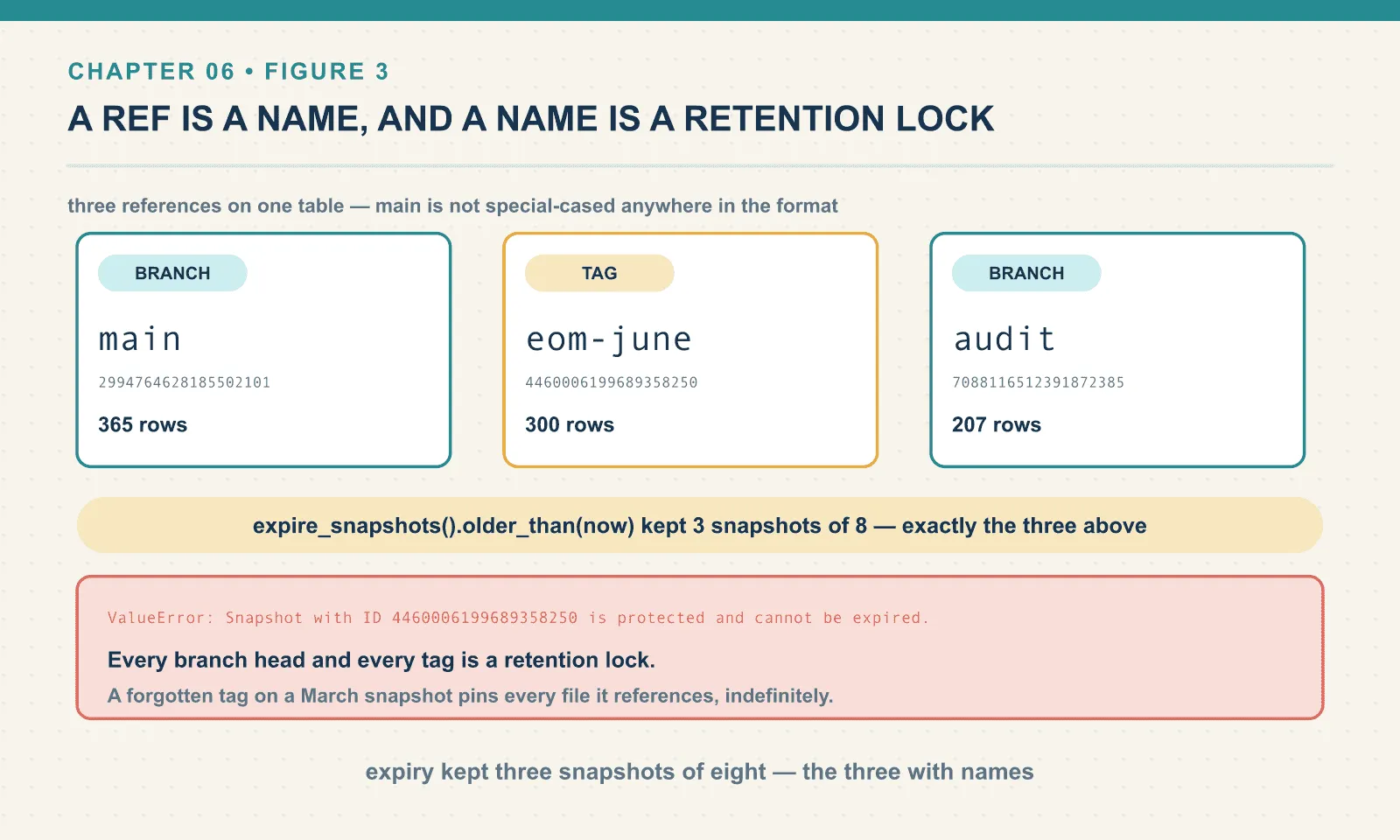
main is not special-cased anywhere in the format. It is a reference — a named pointer at a snapshot — and a table can have as many as you like. t.inspect.refs() lists them, and a fresh table has exactly one:
t.manage_snapshots().create_tag(S[2], "eom-june").commit()
t.manage_snapshots().create_branch(S[1], "audit").commit()
{'main': ('BRANCH', 2994764628185502101),
'eom-june': ('TAG', 4460006199689358250),
'audit': ('BRANCH', 7088116512391872385)}A tag is an immutable name for one snapshot. eom-june will mean that exact table state for as long as the tag exists. That is the difference between “our month-end numbers” and “whatever the table said when somebody happened to run the report.” If a regulator asks what you filed, a tag is the answer; a timestamp is an argument.
A branch is a movable pointer, and PyIceberg will write to one:
t.append(orders(7, start=5000, day="2026-06-07"), branch="audit")main rows : 365
audit rows: 207The audit branch started at the two-hundred-row snapshot and now holds two hundred and seven. main did not move. That is the mechanism behind write-audit-publish: stage a load on a branch, run your checks against it, and fast-forward main only if they pass. Chapter 16 builds it properly, because the branch-merge operations live on the Spark side.
One rough edge, and it will catch you: PyIceberg’s scan does not take a ref name.
t.scan(snapshot_id="eom-june")ValueError: Snapshot not found: eom-juneSpark SQL reads FROM bookshop.orders VERSION AS OF 'eom-june' happily. In PyIceberg you resolve the name yourself, which is one extra line:
t.scan(snapshot_id=t.snapshot_by_name("eom-june").snapshot_id).to_arrow()scan a tag: 300Incremental reads, and an honest gap
Here is the operation people reach for once they understand snapshots: give me the rows that arrived since the last time I ran. It is the foundation of every incremental pipeline, and Iceberg has all the information required: snapshot A’s file list, snapshot B’s file list, and manifest entries that record whether a file was added or removed.
PyIceberg 0.11.1 does not expose it. There is no incremental_scan, and scan() takes a single snapshot_id and no start bound. The concept exists inside the library only in the REST catalog’s server-side scan-planning model. There the request object carries start-snapshot-id and end-snapshot-id fields, with this validation:
ValueError: end-snapshot-id is required when start-snapshot-id is specifiedThat is the wire protocol for a catalog that plans scans for you, not a client API you can call. Spark has the feature — .option("start-snapshot-id", …).option("end-snapshot-id", …) on an incremental append read — and it belongs to chapter 16.
For an append-only range, PyIceberg can expose the files added between two snapshots. Taking the difference between their file lists shows how an incremental read avoids scanning the whole table:
def files_at(tbl, sid):
    return {f.file.file_path for f in tbl.scan(snapshot_id=sid).plan_files()}

added = files_at(t, snap_c) - files_at(t, snap_a)
inc = pa.concat_tables([pq.read_table(p.replace("file://", "")) for p in sorted(added)])
files at 3980006843811930532 : 1
files at 4460006199689358250 : 3
added between: 2
incremental rows: 200
order_id range: 101 - 300Two hundred rows, ids 101 to 300, which is exactly the two appends between those snapshots. No table scan, no watermark column, no WHERE updated_at > that you have to trust the upstream to maintain.
Now the reason this stays a hand-rolled trick rather than something you ship. Run the same diff across the overwrite:
before_ov: 3542421924821968592 -> after the overwrite+append: 1527199385512444682
naive 'added files' count: 6
naive 'new rows since' : 308  (actual new rows: 20)
Six files “added”, three hundred and eight rows in them, and only twenty of those rows are new. The other two hundred and eighty-eight are the copy-on-write rewrite. They are unchanged rows, copied into fresh files because a file next to them had to lose twenty rows.
An incremental read is only meaningful across append-only snapshots. This is not a PyIceberg limitation — it is the semantics of the feature. Spark’s incremental read enforces it. When the range contains a non-append operation it refuses to run, rather than quietly handing you duplicates. If you build the hand-rolled version, check the operations in your range first, and stop if any of them is not append.
The bill, and what expiry does not do
Snapshots are cheap but not free. The metadata cost is proportional to commits, and every commit writes a new metadata.json, a new manifest list, and at least one manifest. The bigger cost is that old data files cannot be deleted while a snapshot references them, which is exactly the point and exactly the expense.
Reclaiming space means expiring snapshots. PyIceberg’s version:
t.maintenance.expire_snapshots().older_than(now).commit()snapshots: 8
after older_than(now): 3
kept: [(4460006199689358250, 'append'),
(2994764628185502101, 'append'),
(7088116512391872385, 'append')]
refs: {'main': 2994764628185502101,
'eom-june': 4460006199689358250,
'audit': 7088116512391872385}Eight snapshots down to three, and the three survivors are precisely the ones a reference points at. Every branch head and every tag is protected from expiry, which makes a tag a retention lock as much as a name. Try to expire one by id and it says so:
ValueError: Snapshot with ID 4460006199689358250 is protected and cannot be expired.That is a genuinely useful property, and a trap in the other direction. A forgotten tag on a snapshot from March pins every data file that snapshot references, indefinitely, and nothing will warn you. When a table’s storage bill will not go down, the refs table is the first place to look.
Time travel to an expired snapshot fails the way you would hope:
ValueError: Snapshot not found: 3158835250000468324Removing snapshots from metadata does not tell us whether storage was reclaimed. The file counts before and after expiry answer that separately:
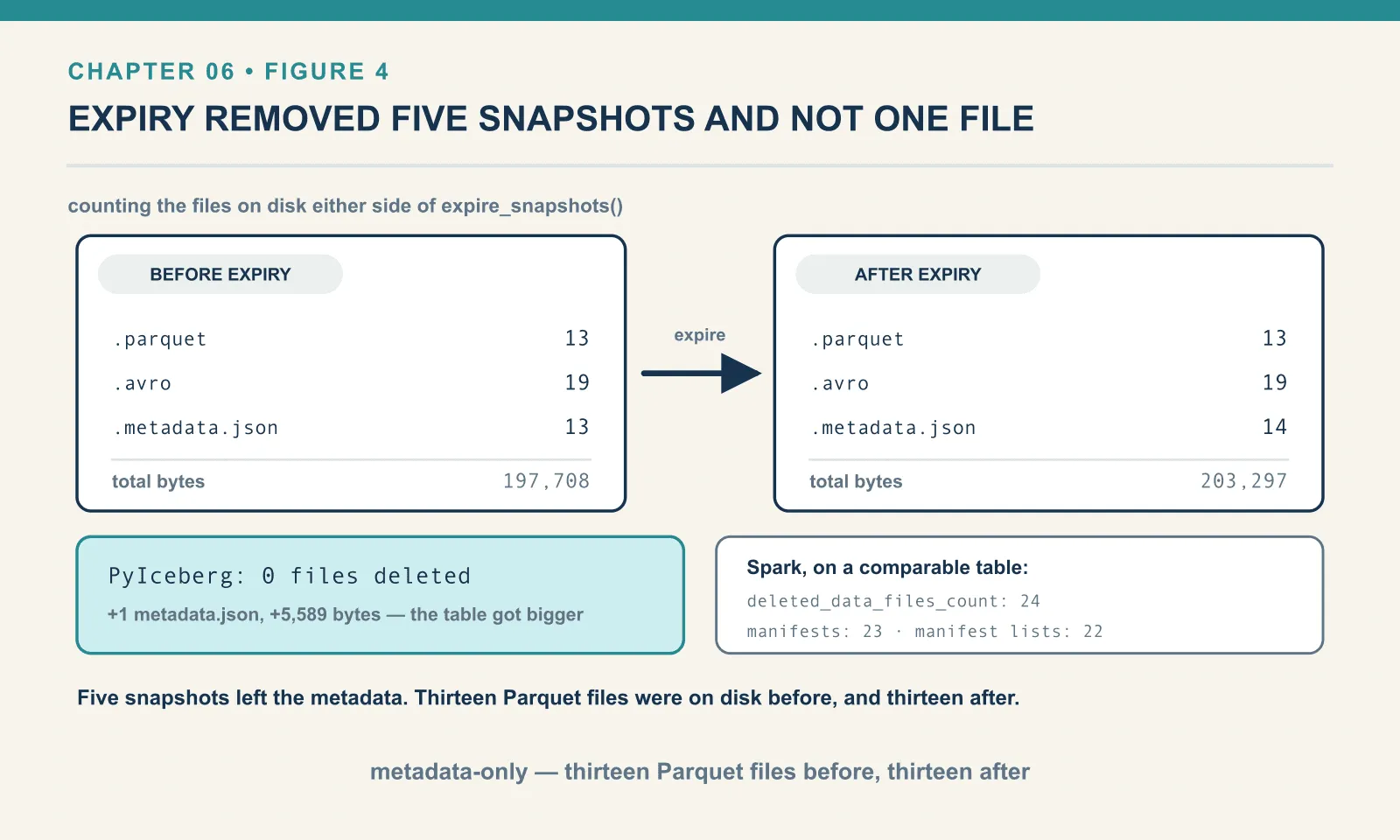
on disk BEFORE expiry: {'.parquet': 13, '.avro': 19, '.metadata.json': 13}  197708 bytes
on disk AFTER  expiry: {'.parquet': 13, '.avro': 19, '.metadata.json': 14}  203297 bytes
Nothing was deleted. Thirteen Parquet files before, thirteen after, while the current snapshot references six of them. The table got bigger, because expiry is itself a commit and wrote another metadata.json.
PyIceberg’s expire_snapshots is a metadata-only operation. It removes snapshots from the table metadata and stops there. Reading the source confirms what the file counts showed. The whole of its commit is a single RemoveSnapshotsUpdate carrying the ids, with no file deletion anywhere in the path.
This is a real difference from the reference implementation, and it matters if you are picking a tool for maintenance. Spark’s expire_snapshots procedure does delete, and it deletes considerably more than snapshots. On a comparable table it reported deleted_data_files_count: 24, deleted_manifest_files_count: 23, deleted_manifest_lists_count: 22. In PyIceberg those twenty-four data files would have stayed on disk, unreferenced, invisible to every query and fully billed. The word for a file like that is orphan, and hunting them is chapter 13’s problem.
These defaults are worth knowing. They are library constants rather than table properties, so they do not show up when you print t.properties — which on this table returns {}:
history.expire.max-snapshot-age-msdefaults to 432000000, five days.history.expire.min-snapshots-to-keepdefaults to 1.write.metadata.previous-versions-maxdefaults to 100, andwrite.metadata.delete-after-commit.enableddefaults to False — so oldmetadata.jsonfiles accumulate rather than being trimmed.
Five days is the number to argue with. It is sensible for a table under continuous maintenance. It is far too short if your idea of time travel is “we can always go back and check.” Whatever retention you actually need, set it explicitly on the table. The default was not chosen with your audit requirement in mind.
When not to reach for this
Time travel is genuinely excellent at three things: recovering from a bad write, reproducing a query somebody ran last week, and giving a reader a stable view for the length of a job. Those are the uses that pay.
It is a poor fit for three others, and each is a mistake I have watched a team make.
It is not a backup. Snapshots live in the same metadata as the table, in the same bucket, under the same credentials. A DROP TABLE, a deleted prefix, or an over-enthusiastic lifecycle rule takes the history with the data. Time travel protects you from bad writes, not from lost storage.
It is not slowly-changing-dimension history. Snapshot ids are commit identifiers, not business time. If you need to know what a customer’s address was in March, model it. The answer must survive expiry, and snapshots will not.
It is not an audit log of who changed what. A snapshot records that the file list changed and what the counters were. It does not record which rows changed or who asked for it, unless you put that in snapshot_properties yourself. Row-level lineage is a format v3 feature and chapter 20’s subject.
And the operational point underneath all three: retention is finite and expiry is a job that somebody has to run. A table nobody maintains keeps every snapshot forever and grows metadata until planning gets slow. A table maintained on defaults keeps five days. Neither of those is a policy — pick one on purpose.
Final thoughts
Everything in this chapter came from one design decision made back in chapter 3. A table is an explicit list of files, and changing it publishes a new list. History is the old lists. Time travel is reading one. Rollback is pointing at one. Tags are names for them. Branches are lists that move independently. Isolation is every reader holding one for the duration.
The same separation between metadata and data also makes schema, partitioning and layout changes possible. The next three chapters follow those changes, including the limits of what new metadata can do for files already written.
The next one starts with a rename, which is the single operation that has destroyed more Hive tables than any other.
Next: Field IDs, or How to Rename a Column Without Losing Your Data
Comments