The Only Part of Iceberg You Can Ping
A catalog server is the one piece of Iceberg that listens on a port. This chapter stands one up, watches the compare-and-swap from chapter 4 become an HTTP 409, and moves a table between two catalogs without touching a single byte of data.
The catalog from chapter 4 was a twenty-kilobyte file on a laptop. It did its job perfectly: it resolved a name to a pointer and swapped that pointer conditionally, which is the entire contract.
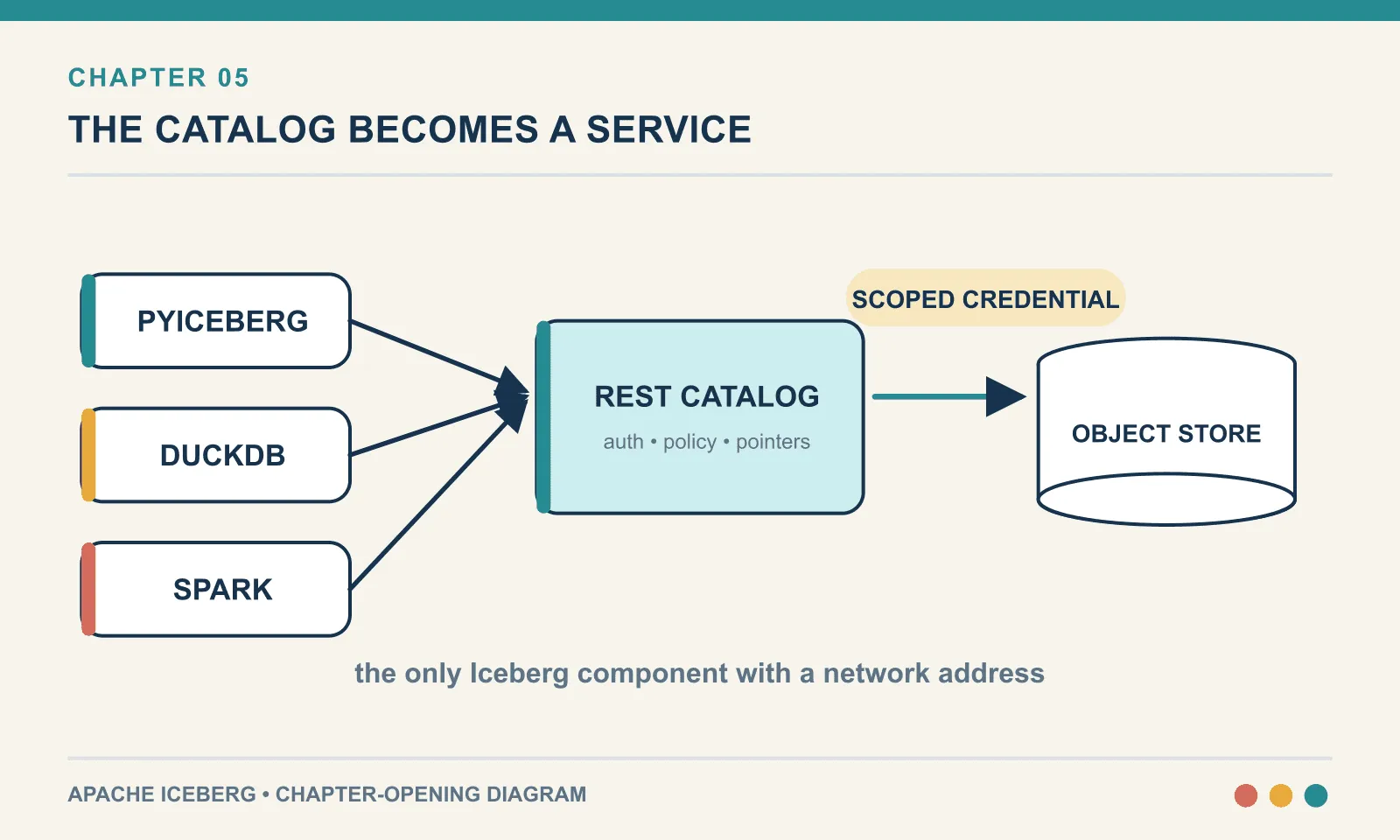
It also cannot be reached from another machine and cannot tell one caller from another. And it has no idea that the warehouse it points into might need credentials the caller does not have. Those three gaps are not bugs in SQLite. They are the reason production catalogs are servers.
A REST catalog puts that shared service in front of the pointer store. It adds the first container in this book; no more infrastructure is needed until chapter 10.
Everything here was run against apache/iceberg-rest-fixture:1.10.1, PyIceberg 0.11.1 and DuckDB 1.5.5 on Python 3.13. The landscape section near the end is explicitly documentation-sourced rather than executed, and says so where it starts.
One container
WH=/absolute/path/to/iceberg-verify/wh

docker run -d --name icerest -p 8181:8181 -v $WH:$WH \
  -e CATALOG_WAREHOUSE=file://$WH \
  -e CATALOG_CATALOG__IMPL=org.apache.iceberg.jdbc.JdbcCatalog \
  -e CATALOG_URI='jdbc:sqlite:file:/tmp/iceberg_rest_mode=memory' \
  -e CATALOG_JDBC_INITIALIZE=true \
  apache/iceberg-rest-fixture:1.10.1
curl -s -o /dev/null -w '%{http_code}\n' http://localhost:8181/v1/config200The warehouse is bind-mounted at the same absolute path inside and outside the container. This looks fussy and is load-bearing. The catalog stores absolute paths in metadata_location, and the container writes some files while your local Python writes others. If the path means different things on the two sides, the pointer resolves for one and not the other. Mounting $WH:$WH rather than $WH:/warehouse makes the question disappear.
No MinIO, no S3, no cloud account. A common assumption is that a REST catalog implies object storage. It does not. The catalog stores the pointer; the engine reads and writes the files; both can be looking at a local directory. That removes an entire container from this lab.
It is small. The image is 516 MB and the running container sits at 159 MiB resident and about 1.4% of a CPU while idle. This is not Spark.
If PyIceberg cannot reach it, the failure is unambiguous, which is worth knowing before you spend twenty minutes on a subtler theory:
ConnectionError: HTTPConnectionPool(host='localhost', port=8182): Max retries exceeded
with url: /v1/config (Caused by NewConnectionError(...))
What is actually inside it
The server log identifies the store behind the HTTP endpoint:
docker logs icerest | head -2[main] INFO org.apache.iceberg.rest.RESTCatalogServer - Creating rest_backend catalog with properties:
{jdbc.password=password, jdbc.user=user,
catalog-impl=org.apache.iceberg.jdbc.JdbcCatalog, jdbc.schema-version=V1,
warehouse=file:///…/iceberg-verify/wh,
uri=jdbc:sqlite:file:/tmp/iceberg_rest_mode=memory,
jdbc.strict-mode=true, jdbc.initialize=true}
[main] INFO org.apache.iceberg.CatalogUtil - Loading custom FileIO implementation: org.apache.iceberg.hadoop.HadoopFileIOJdbcCatalog and jdbc:sqlite reveal the familiar machinery: the same five-column table and conditional UPDATE from chapter 4, backed by SQLite. A Jetty server now handles requests in front of it.
This is not an artefact of how I started the container, either. Inspect the image’s own defaults and the SQLite backend is baked in:
CATALOG_CATALOG__IMPL=org.apache.iceberg.jdbc.JdbcCatalog
CATALOG_URI=jdbc:sqlite:/tmp/iceberg_catalog.db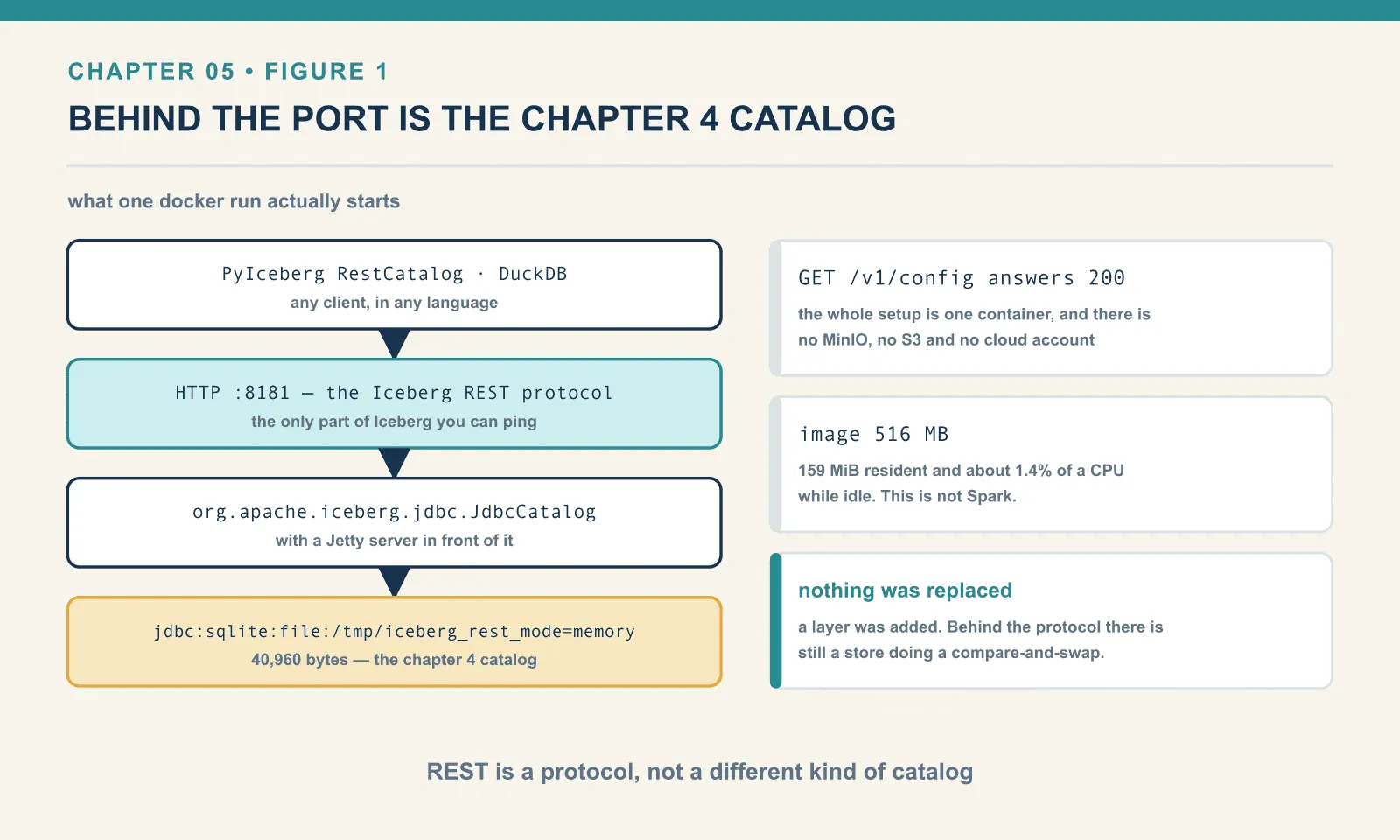
I labour the point because of the mental model people arrive with. They expect REST to be a different kind of catalog, the way Postgres is a different kind of database from SQLite. It is not. REST is a protocol, and behind it there is always still a store doing a compare-and-swap. Polaris keeps that store in a relational database. Glue keeps it in Glue. The fixture keeps it in SQLite in /tmp, which is why the environment variable that configures it is spelled CATALOG_URI and begins jdbc:.
The protocol and the interface
A Python caller and a catalog server have two different contracts to honour. Both get called “the catalog”, which can obscure what changes when you replace an implementation.
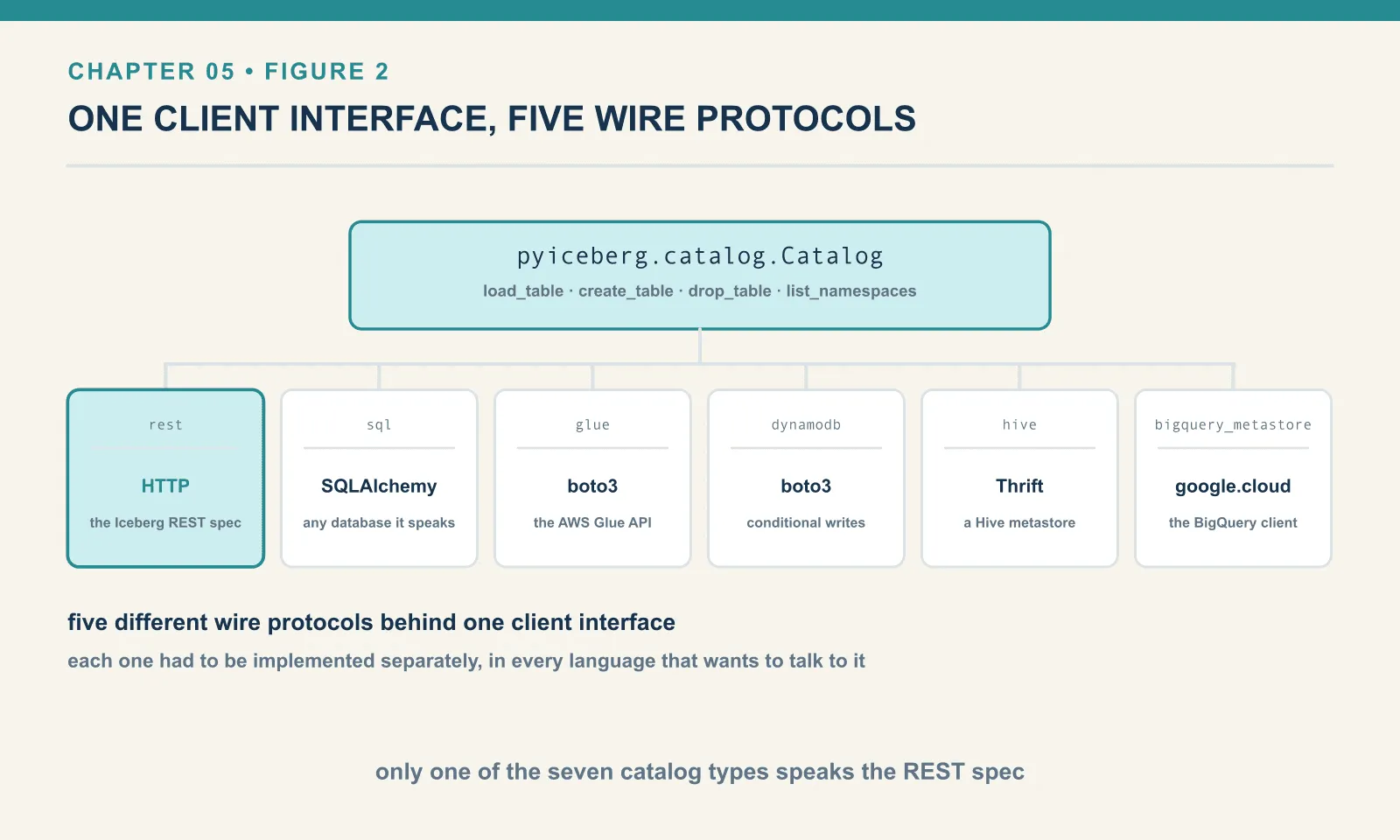
The client-side interface is pyiceberg.catalog.Catalog, an abstract base class with methods like load_table, create_table, drop_table, list_namespaces. Chapter 4 used SqlCatalog; this chapter uses RestCatalog; both are subclasses. Any code written against the base class works with either:
def report(cat: Catalog, ident: str) -> None:
    t = cat.load_table(ident)
    print(f"  {type(cat).__name__:<14} {len(t.scan().to_arrow()):>3} rows, "
          f"{len(t.metadata.snapshots)} snapshots")
RestCatalog 15 rows, 3 snapshotsThe wire protocol is the Iceberg REST catalog specification: a set of HTTP endpoints with defined request and response bodies. It is a completely separate thing, and only one of PyIceberg’s seven catalog types speaks it.
Check what the others actually talk to, by looking at their imports:
glue                 import boto3
hive                 from hive_metastore.ttypes import …
dynamodb             import boto3
bigquery_metastore   from google.cloud.bigquery import …
sql                  from sqlalchemy import …
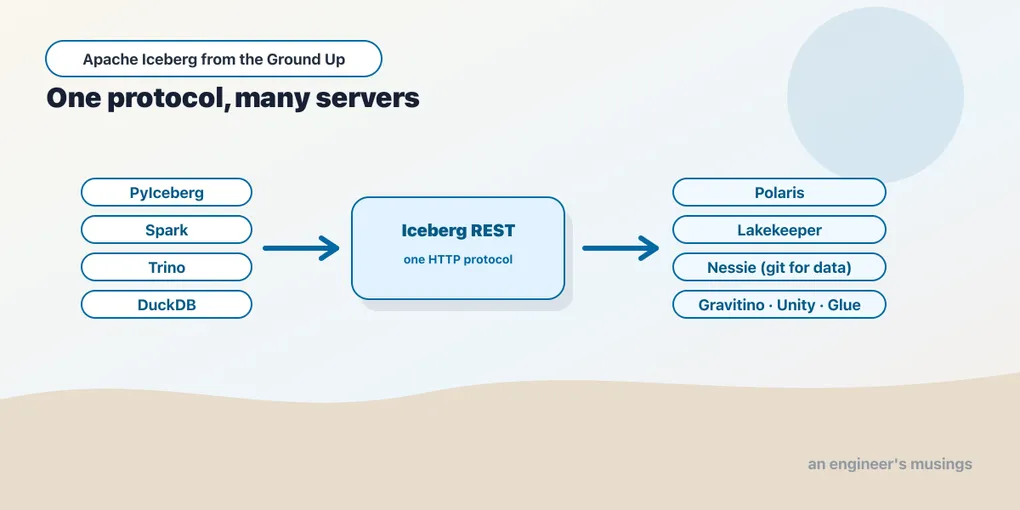
Boto3 to the AWS Glue API. Thrift to a Hive metastore. SQLAlchemy to a database. Five different wire protocols behind one client interface. Each one had to be implemented separately, in every language that wants to talk to it. That is exactly the problem the REST spec exists to end. Write one HTTP client and you can talk to any conforming catalog, in any language, without a vendor SDK.
That is the whole argument for the REST protocol. It also explains why every catalog vendor in the next section leads with “implements the Iceberg REST API.”
The server describes its own protocol
GET /v1/config is the first call any client makes, and its most interesting field is a list of the endpoints this particular server implements:
{
  "defaults": {},
  "overrides": {},
  "endpoints": [
    "GET v1/config",
    "GET /v1/{prefix}/namespaces",
    "POST /v1/{prefix}/namespaces",
    "HEAD /v1/{prefix}/namespaces/{namespace}",
    "GET /v1/{prefix}/namespaces/{namespace}",
    "DELETE /v1/{prefix}/namespaces/{namespace}",
    "POST /v1/{prefix}/namespaces/{namespace}/properties",
    "GET /v1/{prefix}/namespaces/{namespace}/tables",
    "POST /v1/{prefix}/namespaces/{namespace}/tables",
    "GET /v1/{prefix}/namespaces/{namespace}/tables/{table}",
    "POST /v1/{prefix}/namespaces/{namespace}/register",
    "POST /v1/{prefix}/namespaces/{namespace}/tables/{table}",
    "DELETE /v1/{prefix}/namespaces/{namespace}/tables/{table}",
    "POST /v1/{prefix}/tables/rename",
    "POST /v1/{prefix}/transactions/commit",
    "GET /v1/{prefix}/namespaces/{namespace}/views",
    …
  ]
}
Twenty-six endpoints on this server. That is the entire surface area of an Iceberg catalog: namespaces, tables, views, a rename, and a multi-table transaction commit. Nothing about data, because the catalog never sees any.
defaults and overrides are how a server pushes client configuration down the wire. A real catalog uses them to tell every client which warehouse to use, which FileIO implementation to load, or which S3 region applies. defaults can be overridden by the client; overrides cannot. The fixture sends neither, so ours are empty. I have not exercised them against a server that populates them.
{prefix} is multi-tenancy. A catalog hosting several warehouses uses the prefix to route. The client asks for warehouse analytics, the server hands back prefix: "analytics", and every subsequent URL carries it. Our fixture returns no prefix, which is why the traffic below hits /v1/namespaces with nothing in between. It also means the fixture ignores the warehouse name entirely. You can prove that by attaching with a fictional one: DuckDB connected happily to 'not-a-real-warehouse' and read the tables.
The client is expected to respect this list rather than assume. PyIceberg parses it into a set and gates calls on it:
if Capability.V1_TABLE_EXISTS not in self._supported_endpoints:
    …
with a hardcoded fallback for older servers that predate the field. So a modern client against an old server degrades rather than 404s.
The commit, over the wire
Now the payoff. Point PyIceberg at the server and log every HTTP call it makes.
cat = RestCatalog("prod", uri="http://localhost:8181")
cat.create_namespace("ch05")
t = cat.create_table("ch05.orders", schema=schema)
POST /v1/namespaces -> 200
POST /v1/namespaces/ch05/tables -> 200Two calls. Now an append, with the request body:
t.append(batch(1, 3)) POST /v1/namespaces/ch05/tables/orders -> 200{
"identifier": {"namespace": ["ch05"], "name": "orders"},
"requirements": [
{"type": "assert-ref-snapshot-id", "ref": "main", "snapshot-id": null},
{"type": "assert-table-uuid", "uuid": "6fad11a0-c6d1-4423-a215-f3a94c45d9dd"}
],
"updates": [
{"action": "add-snapshot", "snapshot": {
"snapshot-id": 8029181147895830854, "sequence-number": 1,
"manifest-list": "file:///…/wh/ch05/orders/metadata/snap-8029181147895830854-….avro",
"summary": {"operation": "append", "added-data-files": "1", "added-records": "3",
"total-data-files": "1", "total-records": "3", …}}},
{"action": "set-snapshot-ref", "ref-name": "main", "type": "branch", …}
]
}Look at requirements. That is chapter 4’s WHERE clause, promoted to a protocol.
The SQL catalog said update the pointer only if it still equals the string I read. The REST client says apply these updates only if branch main still points at snapshot null, and only if this table still has UUID 6fad11a0. Same compare-and-swap, expressed in the vocabulary of tables rather than of rows.
Commit again and the requirement fills in:
"requirements": [
  {"type": "assert-ref-snapshot-id", "ref": "main", "snapshot-id": 8029181147895830854},
  {"type": "assert-table-uuid", "uuid": "6fad11a0-c6d1-4423-a215-f3a94c45d9dd"}
]
updates (actions only): ['add-snapshot', 'set-snapshot-ref']The separation of requirements from updates is the design worth stealing. The client sends a set of preconditions and a set of changes. The server checks all the preconditions and applies all the changes, or applies none. Because the requirements name a branch, this generalises immediately to the branching and tagging that chapter 16 uses for write-audit-publish. And because the whole thing is one document, the POST /v1/{prefix}/transactions/commit endpoint can carry several tables’ worth atomically.
The assert-table-uuid requirement is the belt-and-braces one. It catches the case where the table was dropped and recreated under the same name while you were working. The snapshot id might coincidentally match, but the identity does not.
When two writers collide over HTTP
Same experiment as chapter 4, different catalog. Two processes load ch05.orders, both see main at the same snapshot, both append at the same instant.
[alpha] main -> 8409940677021007964
[alpha] COMMITTED -> main is now 6253933308039093875
[bravo] main -> 8409940677021007964
[bravo] HTTP 409 <- {"error": {"message": "Requirement failed: branch main has changed:
                                expected id 8409940677021007964 != 6253933308039093875",
                     "type": "CommitFailedException", "code": 409}}
[bravo] CommitFailedException: Requirement failed: branch main has changed:
        expected id 8409940677021007964 != 6253933308039093875
rows: 5
ids: [1, 2, 3, 9, 301]An HTTP 409 Conflict, with a body that names the requirement that failed, the id the client expected, and the id it actually found. Compare that with what the SQLite catalog managed in chapter 4:
CommitFailedException: Table has been updated by another process: bookshop.orders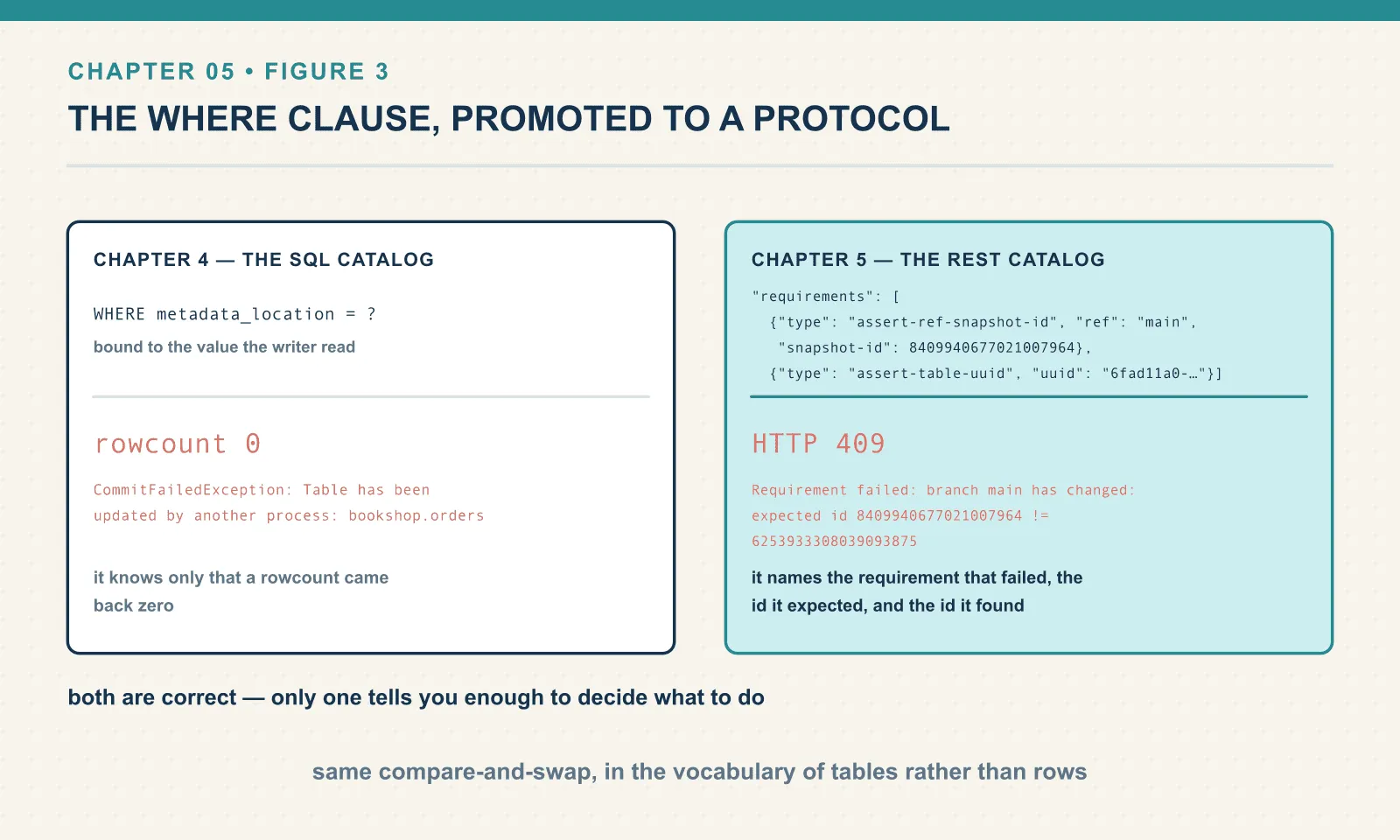
Both are correct. Only one tells you enough to decide what to do. The SQL catalog knows only that a rowcount came back zero. The REST server evaluated a named requirement and can say which one and by how much. When you are staring at a conflict in production at two in the morning, that difference is the whole game.
The HTTP layer does not add commit retries. PyIceberg’s REST client wraps requests in a retry decorator, but its exception types show the limited purpose:
_RETRY_ARGS = {
    "retry": retry_if_exception_type((AuthorizationExpiredError, UnauthorizedError)),
    "stop": stop_after_attempt(2),
    "before_sleep": _retry_hook,     # refreshes the auth token
    "reraise": True,
}
It retries an expired token, once, after refreshing it. A 409 is not retried. Deciding whether to replay your write is still your job.
Credential vending
Here is the capability that makes a REST catalog qualitatively different from a database with a pointer in it. It is the reason large organisations adopt one.
The problem: your analyst needs to read sales.orders, which lives at s3://warehouse/sales/orders/. To read it, the analyst’s process needs S3 credentials. Grant them, and they can read the whole bucket — every table, including the ones they are not entitled to. S3 permissions are about prefixes and your access rules are about tables.
Credential vending closes that gap. The client asks the catalog for a table, and the catalog checks its own authorization rules. If the caller is entitled, the catalog mints a short-lived, narrowly-scoped credential — an STS token for exactly that prefix, say — and returns it alongside the metadata. The client never holds standing storage credentials at all.
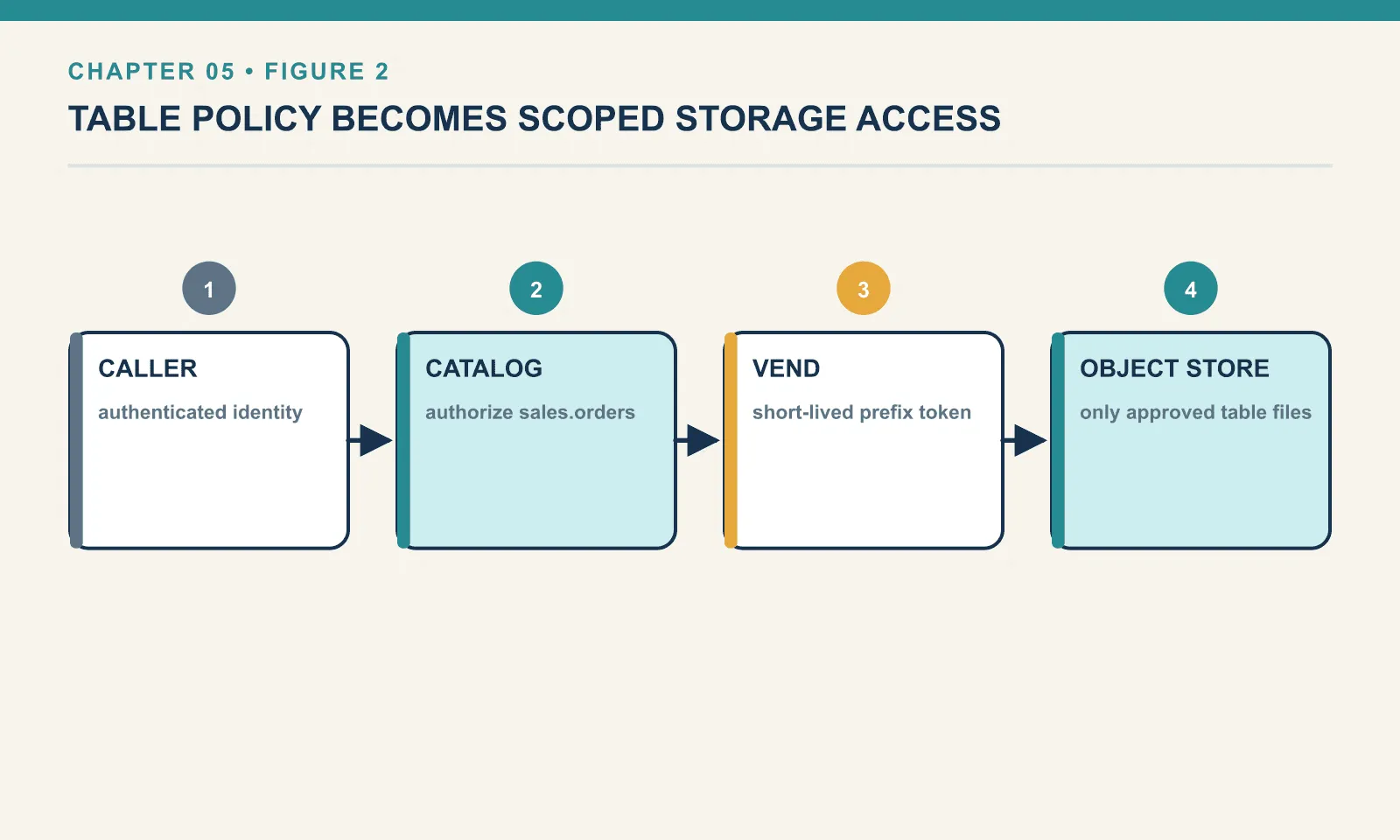
PyIceberg asks for this on every request, by default:
X-Iceberg-Access-Delegation: vended-credentials
User-Agent: PyIceberg/0.11.1
X-Client-Version: PyIceberg 0.11.1
The spec defines a second mode, remote-signing. The client sends the catalog an unsigned request and gets a signed one back, so no credential ever reaches the client at all.
Our fixture ignores the header entirely. Ask it to load a table with the delegation header set:
curl -s -H 'X-Iceberg-Access-Delegation: vended-credentials' \
     http://localhost:8181/v1/namespaces/ch05/tables/orders
top-level keys : ['metadata-location', 'metadata']
config : None
storage-credentials : NoneNo config, no storage-credentials. That is correct behaviour here rather than a limitation. The warehouse is a local directory, so there is nothing to vend. I have not exercised credential vending against a catalog that implements it. The mechanism above is from the specification and from PyIceberg’s client-side handling of it, not from a run. Take it as the shape of the thing, and verify against whichever catalog you actually deploy.
One detail in that response is run and is worth having. The top-level keys are metadata-location and metadata. The server returned the fully parsed table metadata inline, so loading a table over REST costs one HTTP round trip and zero storage reads. The SQL catalog had to hand back a path and let the client go and fetch it. Small difference; it is one fewer object-storage GET on every table load, across every engine, forever.
Server-side scan planning, and a client that is ahead of its server
The most consequential thing in the recent REST spec is scan planning. Today, planning a query means the client reads the manifest list, then reads every manifest, then filters. On a large table that is many object-storage GETs before a single row is read, repeated by every engine independently.
The spec moves it to the server: POST /v1/{prefix}/namespaces/{ns}/tables/{t}/plan with your filter, and the server returns the file scan tasks. The catalog already has the metadata warm and it can cache aggressively. It can also enforce row and column filters while it is at it.
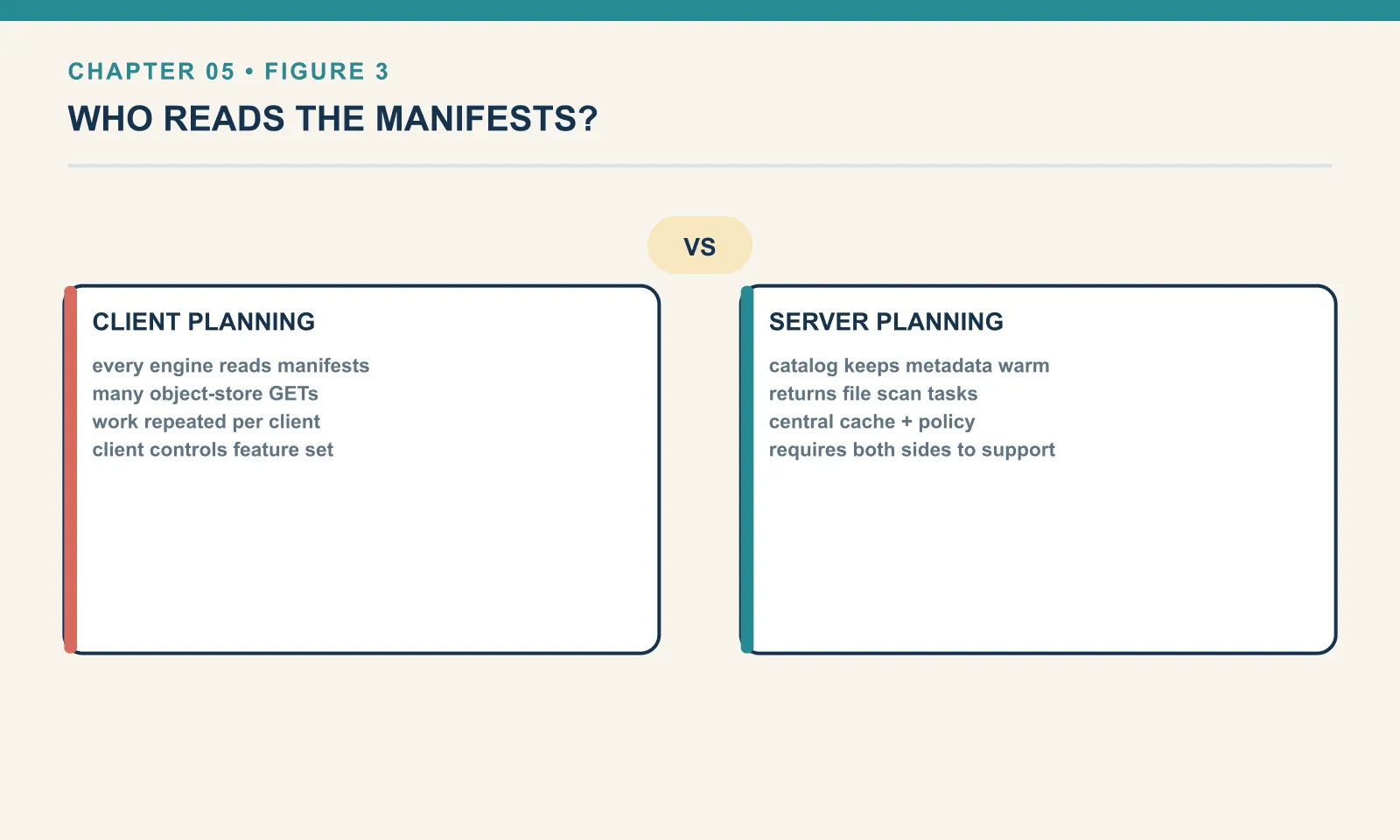
PyIceberg 0.11.1 has the client side. There is a whole pyiceberg/catalog/rest/scan_planning.py module, with PlanTableScanRequest, PlanSubmitted, PlanCompleted, FetchScanTasksRequest — including the asynchronous flow where the server hands back a plan-id to poll.
The fixture does not implement it, and the negotiation handles that cleanly:
endpoints the server advertised  : 26
V1_SUBMIT_TABLE_SCAN_PLAN offered: False
default client, planning on?     : False
client opts in, planning on?     : False
The second line is why the fourth is what it is. The client-side flag is off by default, so I turned it on:
RestCatalog("prod", uri="…", **{"rest-scan-planning-enabled": "true"})and it stayed off, because the check is an and:
def supports_server_side_planning(self) -> bool:
    return Capability.V1_SUBMIT_TABLE_SCAN_PLAN in self._supported_endpoints and property_as_bool(
        self.properties, REST_SCAN_PLANNING_ENABLED, REST_SCAN_PLANNING_ENABLED_DEFAULT
    )
You cannot opt into a capability the server does not advertise. That is exactly the right failure: no 404, no half-working path, just the old client-side planning. It is also a good demonstration of why /v1/config returns an endpoint list at all. So: server-side scan planning is verified as present in the client and absent from this server. Its performance benefit is unmeasured here.
The other thing a catalog holds: views
Tables are not the only object a catalog stores. Iceberg has a view specification, and it is separate from the table spec — its own format version, its own UUID, its own metadata file.
The fixture advertises the endpoints for it, alongside the table ones:
GET    /v1/{prefix}/namespaces/{namespace}/views
POST   /v1/{prefix}/namespaces/{namespace}/views
GET    /v1/{prefix}/namespaces/{namespace}/views/{view}
POST   /v1/{prefix}/namespaces/{namespace}/views/{view}
POST   /v1/{prefix}/views/rename
DELETE /v1/{prefix}/namespaces/{namespace}/views/{view}
HEAD   /v1/{prefix}/namespaces/{namespace}/views/{view}
Creating one is ordinary SQL:
CREATE VIEW ice.bookshop.gb_orders AS
  SELECT order_id, amount FROM ice.bookshop.orders WHERE country = 'GB';
SELECT count(*), sum(amount) FROM ice.bookshop.gb_orders -> (2, 15.0)
SHOW VIEWS IN ice.bookshop -> ['gb_orders']Fetch the view’s metadata from the catalog and the shape is familiar but not identical to a table’s:
keys              : ['current-version-id', 'format-version', 'location', 'properties',
                     'schemas', 'version-log', 'versions', 'view-uuid']
format-version    : 1        current-version-id: 1        versions: 1
representations   : [('sql', 'spark')]
stored SQL        : SELECT order_id, amount FROM ice.bookshop.orders WHERE country='GB'
schema            : ['order_id', 'amount']
A view stores SQL, tagged with the dialect that wrote it. ('sql', 'spark'). The representation list can hold the same view expressed for several engines, because count(*) FILTER (WHERE …) is not spelled identically everywhere. An engine reading a view for which it has no representation is entitled to refuse rather than guess. That is the honest answer to “can any engine read any view”, and it is a weaker guarantee than the one tables give.
It is versioned, but it has no snapshots. CREATE OR REPLACE VIEW does not overwrite; it appends:
versions now: 2 | current schema: ['order_id']Two versions, and the schema narrowed. The old definition is still recorded, which is the same instinct as a table’s snapshot list. But there is no data, so there is nothing to time-travel through. The metadata tables you learned in chapter 3 simply are not there:
SELECT * FROM ice.bookshop.gb_orders.snapshots
-> [TABLE_OR_VIEW_NOT_FOUND] … `gb_orders`.`snapshots` cannot be found
PyIceberg knows views exist without being able to use them. catalog.view_exists("bookshop.gb_orders") returns True, and that is close to the extent of it. There is no load_view handing you something queryable. Views are, for now, an engine-side feature that the catalog merely stores.
That last point generalises to the thing this chapter has been circling. A catalog is not only a pointer store. It is the shared namespace an organisation agrees on, and the more object types it holds, the more of your platform depends on picking the right one.
The fixture is not a catalog
Before the landscape, the warning this chapter owes you.
curl -s -o /dev/null -w '%{http_code}\n' http://localhost:8181/v1/namespaces
curl -s -o /dev/null -w '%{http_code}\n' \
     -H 'Authorization: Bearer not-a-real-token' http://localhost:8181/v1/namespaces
200
200No token: 200. A garbage token: also 200. There is no authentication, no authorization and no TLS.
The storage is worth a look too, because it is a nice illustration of how easily a “temporary” setup becomes permanent. Peer inside the container:
docker exec icerest ls -la /tmp/-rw-r--r-- 1 iceberg iceberg 40960 Aug 28 07:47 iceberg_rest_mode=memoryThat is a forty-kilobyte SQLite database with a very silly name. Look again at the CATALOG_URI in the docker run at the top of this chapter. It reads jdbc:sqlite:file:/tmp/iceberg_rest_mode=memory, and the ? that should sit before mode=memory is not there. The intent was an in-memory database. What the driver got was a file path containing an equals sign, which it created without complaint.
Nothing failed, nothing warned, and the catalog worked perfectly for every experiment in this chapter. That is a small lesson in its own right about connection strings. The practical consequence is that the catalog database lives in the container’s writable layer rather than on a volume. So docker rm destroys every table registration while leaving every data file untouched. Recovery is register_table, one table at a time, by hand: the chapter 4 disaster scenario, now with a container in it. If you want this to survive, put the database on the bind mount alongside the warehouse.
I have left the typo in rather than tidying it away, because it produced the single best piece of evidence in this chapter.
It is called a fixture because it is a test fixture. It exists so that client authors and readers of books can exercise the protocol. Do not put it on a network you do not own, and do not let it become the thing your team quietly depends on.
The landscape
Everything in this section is from project documentation, not from a run. I stood up one catalog for this book. Treat the specifics as a map of where to look, and verify against whatever you deploy. This is also the part of the book most likely to be stale by the time you read it.
Apache Polaris is the reference open-source implementation, donated by Snowflake and now an Apache project. It implements the Iceberg REST API and is built around multi-engine interoperability. Snowflake’s hosted version is Open Catalog. If you want the thing the spec authors point at, this is it.
Lakekeeper is a REST catalog written in Rust, on top of iceberg-rust. Its documentation leads with credential vending and with authorization that goes past plain RBAC into ReBAC and ABAC via OpenFGA. There is also an OPA bridge, so query engines enforce the same policy. It governs non-Iceberg tables too. If your problem is governance rather than throughput, this is the one to look at first.
Project Nessie is the interesting one, because it is not just another implementation. It is a different model. Nessie is a transactional catalog with Git-like semantics: branches, tags, merges, and cross-table transactions. You create a branch, run a whole pipeline against it, validate the result, and merge — atomically, across many tables at once. Iceberg’s own branches (chapter 16) are per-table; Nessie’s are per-catalog. It exposes an Iceberg REST endpoint alongside its native API. If you have ever wanted an environment where “the ETL is half-done” is not a visible state, this is the shape of the answer.
Apache Gravitino sits one level up: a federated metadata lake, or a catalog of catalogs. It runs an Iceberg REST server that proxies to Hive or JDBC backends. It also federates non-Iceberg things — relational databases, filesets, and increasingly AI assets. You reach for it when you have several catalogs already and the problem is that nobody can find anything.
Unity Catalog, open-sourced by Databricks and now an LF AI & Data project, implements the Iceberg REST catalog API alongside its own and the Hive metastore API. Its pitch is breadth: tables, files, functions and models under one governance model.
AWS Glue is the widest-deployed catalog that is not natively REST. It has its own API, which is why PyIceberg ships a boto3-based glue client. AWS then added an Iceberg REST endpoint in front of it (https://glue.<region>.amazonaws.com/iceberg), which also fronts S3 Tables. It is authenticated with SigV4 and governed through IAM and Lake Formation. That is the pattern to expect from every cloud vendor: keep the proprietary catalog, bolt the standard protocol onto it. Google announced a managed Iceberg REST interface for BigQuery in April 2026.
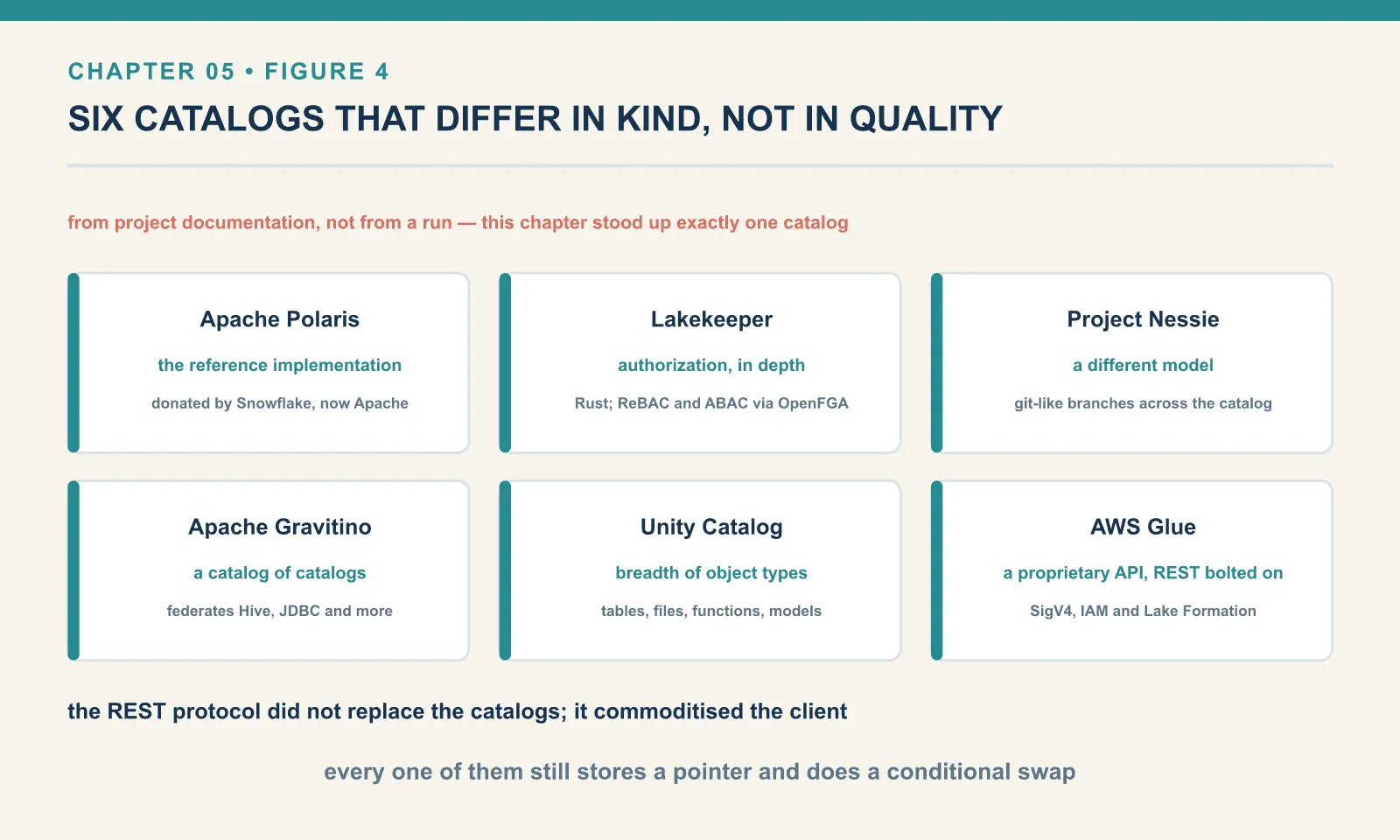
The pattern across all of them is worth naming. The REST protocol did not replace the catalogs; it commoditised the client. Every one of these systems still stores a pointer and does a conditional swap. What changed is that you no longer need a vendor’s SDK, in the vendor’s language, to talk to it.
Moving a table between catalogs
The table’s files belong to neither catalog implementation. Changing catalogs therefore means handing the pointer to a new authority — a useful property when the service you need outgrows the one you started with.
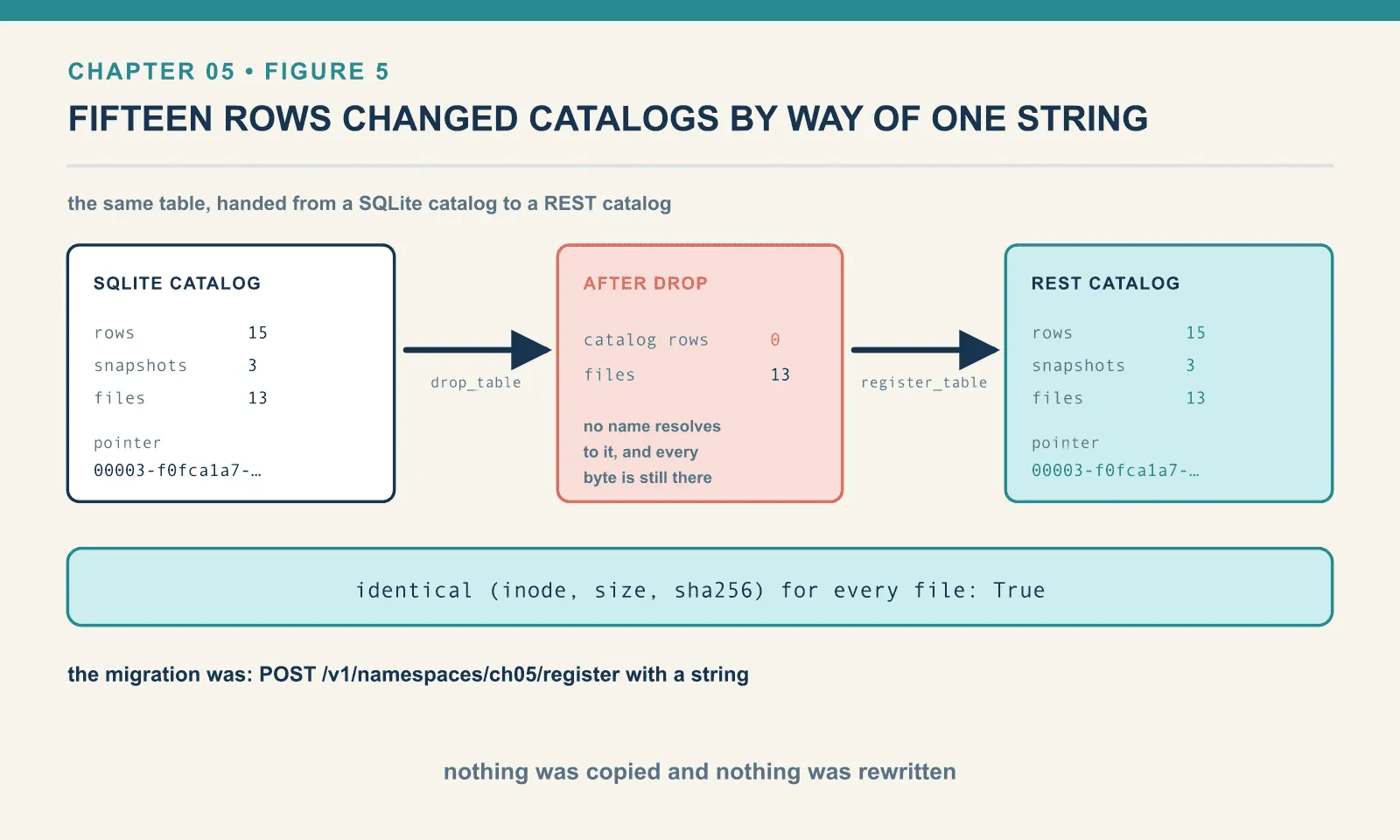
Build a table in a plain SQLite catalog, exactly as in chapter 4. Fifteen rows, three appends:
=== in the SQLite catalog ===
rows      : 15
snapshots : 3
files     : 13
pointer   : 00003-f0fca1a7-eba5-48e6-bd74-5e8a8e46e048.metadata.json
Take a fingerprint of every file in the warehouse first — inode, size and SHA-256 — so that “the data did not move” is a measurement rather than a claim.
Now drop it from the SQLite catalog. Chapter 4 established what that does and does not do:
local.drop_table("ch05.backlist")=== after DROP TABLE in the SQLite catalog ===
catalog rows: 0
files : 13Zero rows in the catalog, thirteen files still on disk. Hand the same pointer to the REST catalog:
rest = RestCatalog("prod", uri="http://localhost:8181")
rest.register_table("ch05.backlist", loc)
=== after REGISTER TABLE in the REST catalog ===
rows : 15
snapshots : 3
files : 13
pointer : 00003-f0fca1a7-eba5-48e6-bd74-5e8a8e46e048.metadata.json
identical (inode, size, sha256) for every file: True
data-file paths still point into the old warehouse: TrueFifteen rows, three snapshots, same pointer filename. Every file in the warehouse has the same inode, same size and same content hash as before the migration. Nothing was copied and nothing was rewritten. The data files are still sitting under the directory the SQLite catalog created for them, because the paths inside the manifests are absolute and nobody had any reason to change them.
The migration was: POST /v1/namespaces/ch05/register with a string.
And you can go and look at where the string landed. The server’s own SQLite file, the one with the silly name, is a chapter 4 catalog:
docker exec icerest sh -c "grep -a -o -m1 'ch05_swap[^\"]*metadata.json' '/tmp/iceberg_rest_mode=memory'"ch05_swap/ch05/backlist/metadata/00003-f0fca1a7-eba5-48e6-bd74-5e8a8e46e048.metadata.jsonThe same pointer, character for character, that the SQLite catalog held before the migration and that the REST client reports now. It crossed a network, a JVM, a Jetty server and a JDBC driver, and arrived as itself, sitting in a table called iceberg_tables. The protocol changed. The thing being pointed at did not.
Two caveats, both real. Registration is a pointer handoff, not a lock. Nothing prevented the SQLite catalog from still holding it too, and two catalogs pointing at one table is a data-loss race waiting to happen, because each one’s compare-and-swap is blind to the other’s. Drop from the old catalog first, verify, and only then register. And the new catalog must be able to read the path in the pointer. That is why this lab bind-mounts the warehouse at an identical path on both sides. A real migration between clouds is a data migration, not a pointer migration.
Three engines, one table, no arrangement
The table now lives in the REST catalog. Read it from somewhere else entirely — DuckDB, through its own Iceberg extension, over the same HTTP:
INSTALL iceberg; LOAD iceberg;
ATTACH 'warehouse' AS ice (TYPE ICEBERG, ENDPOINT 'http://localhost:8181');
AUTHORIZATION_TYPE is 'oauth2', yet no 'secret' was provided, and no client_id+client_secret
were provided. Please provide one of the listed options or change the 'authorization_type'.DuckDB assumes OAuth 2, because a real catalog wants credentials. The fixture wants none, so say so:
ATTACH 'warehouse' AS ice (TYPE ICEBERG, ENDPOINT 'http://localhost:8181',
                           AUTHORIZATION_TYPE 'none');
tables DuckDB found in ch05: [('ch05', 'backlist'), ('ch05', 'orders')]
ice.ch05.orders : [(5, 44.0)]
ice.ch05.backlist : [(15, 180.0)]And the same two tables through PyIceberg, for comparison:
ch05.orders      5 44.0
ch05.backlist    15 180.0
Exact agreement, including on backlist — the table that was created by one catalog and registered into another. DuckDB has no idea any of that happened, and there is nothing in the table for it to notice.
A word on AUTHORIZATION_TYPE 'none', because it is the sort of flag that spreads by copy-paste. It is correct here and wrong nearly everywhere else. Against Polaris, Lakekeeper or Glue, none will fail. And if it ever succeeds against a catalog you did not intend to be open, you have found a much more serious problem than a connection string. The right value against a real catalog is oauth2 with a client id and secret, or whatever that vendor requires.
(This settles a loose end from the DuckDB book, which reached the OAuth error and stopped. The missing key is AUTHORIZATION_TYPE 'none', and with it DuckDB 1.5.5 reads Iceberg over REST perfectly. Chapter 15 collects the rest of the cross-engine story, including DuckDB as a genuine transactional writer through a catalog.)
Choosing one, and when not to
If you are on AWS and already using Glue or S3 Tables, use the Glue REST endpoint. The catalog you are arguing about is the one you already run.
If you want open source you host yourself, start at Polaris for reference-implementation fidelity or Lakekeeper if fine-grained authorization is the actual requirement.
If your pain is pipeline atomicity across many tables — the “half the warehouse is updated” problem — Nessie’s branching model solves something the others do not. That is a different decision from picking a catalog.
If you have one team, one engine and one writer, you do not need any of this yet. SqlCatalog against Postgres is a spec-conforming catalog, and it is the same class chapter 4 used. It is a connection string rather than a service to operate. Moving to a REST catalog later costs you what we just did: a drop and a register.
The thing genuinely worth planning for is that the catalog becomes the choke point for both availability and access control. Every read and every write goes through it. That is a lot of leverage in one component. It is why credential vending is a good idea, and why running a test fixture in production is a bad one.
Final thoughts
Chapter 4 reduced Iceberg’s transactionality to one conditional UPDATE. This chapter did nothing to that idea; it only moved it behind a socket. The requirements array in a REST commit is the WHERE clause. The 409 is the zero rowcount. Behind the fixture there is, demonstrably, still a SQLite file doing the work.
What the network layer buys is everything that needs a server. That is a component that can authenticate a caller, decide what they may see, hand out a scoped credential for exactly that, and eventually plan their scan for them. None of that is expressible in a pointer store, and all of it is expressible in a request.
And the pointer nature of the whole design showed its hand in the migration. Fifteen rows and three snapshots changed catalogs by way of a single string, with every file keeping its inode. A table that can be handed between authorities that cheaply is a table that was never really owned by either of them.
That is enough infrastructure. Everything for the next five chapters runs against this catalog with the client you already have, so we can finally spend some time on what the format actually gives you. It starts with the thing we have been quietly accumulating since chapter 2: every one of those old pointer values is still there.
Comments