The Row That Owns the Warehouse
The whole of an Iceberg table's transactionality fits in one database row and one UPDATE statement. This chapter opens the catalog, watches the pointer move, races two writers into it, and hand-builds the filesystem catalog that Iceberg deliberately does not ship.
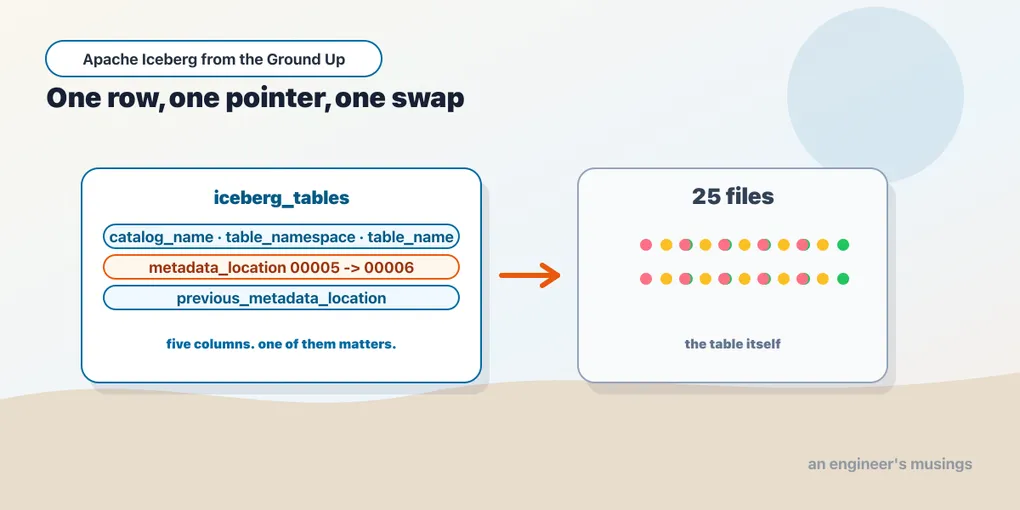
Chapter 1 ended on a promise it did not keep. A table format, we said, is an explicit list of files plus an atomic way to swap one list for another. The word carrying all the weight in that sentence is atomic. Object storage does not offer atomicity, and neither does a filesystem above the level of a single file. So where does it come from?
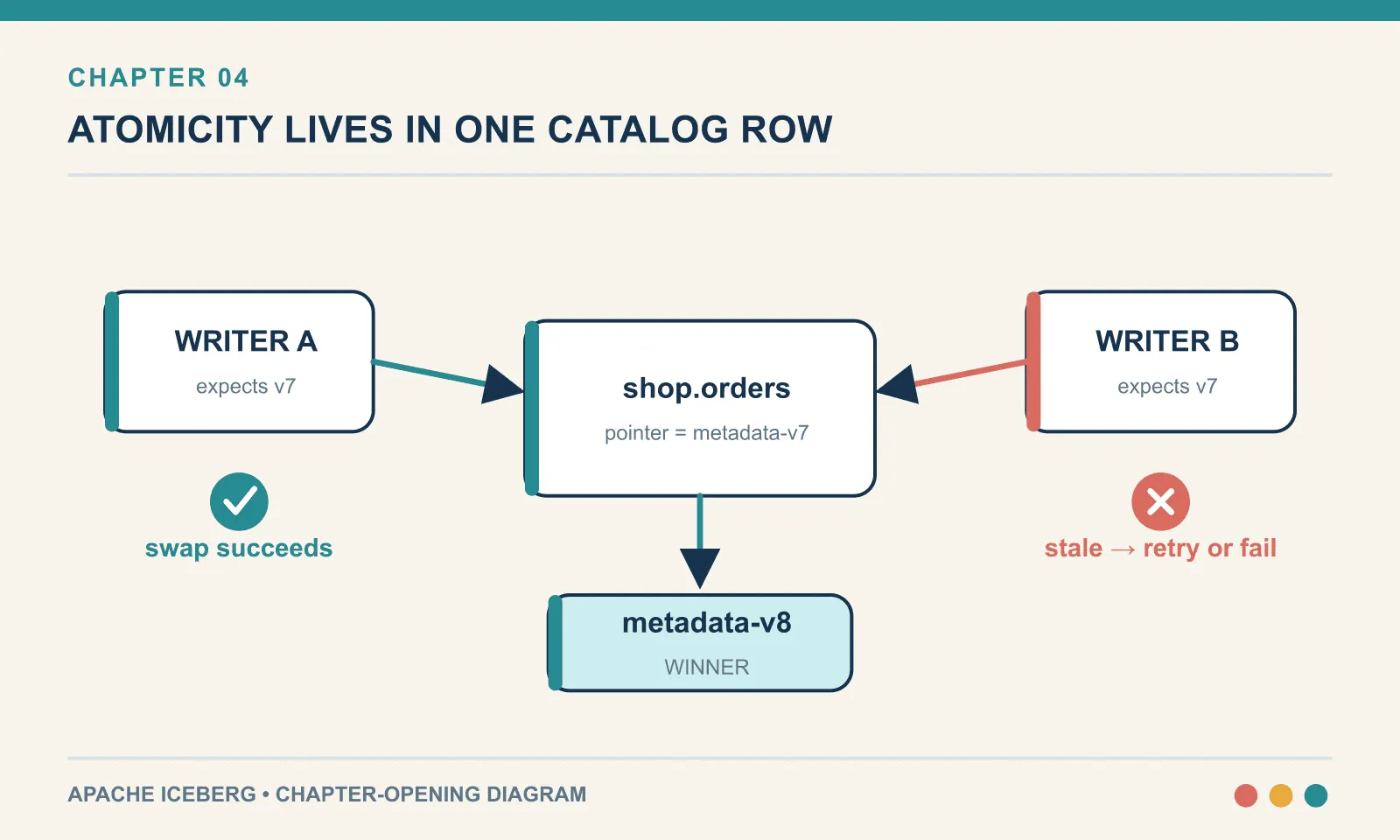
In the SQL catalog, that guarantee comes from one row and a conditional UPDATE. The warehouse can keep all its immutable files; only the row needs a transaction.
Everything below was run against PyIceberg 0.11.1 on Python 3.13, with a SQLite catalog and a local directory, and no server, no cloud, no JVM. It is the same setup chapters 2 and 3 used, and the last chapter that will need nothing else.
Where we are
The bookshop has an orders table. Three appends of three rows each:
from pyiceberg.catalog.sql import SqlCatalog

cat = SqlCatalog("bookshop",
                 uri="sqlite:///labs/ch04/cat.db",
                 warehouse="file:///abs/path/labs/ch04/wh")
cat.create_namespace_if_not_exists("bookshop")
t = cat.create_table("bookshop.orders", schema=schema)
for i in range(3):
    t.append(batch(1 + i*3, 3))
rows : 9
snapshots : 3
warehouse : 13 files 32763 catalog db: 20480 bytes
breakdown : {'parquet': 3, 'metadata.json': 4, 'avro': 6}Thirteen files in the warehouse, holding nine rows. Chapter 3 took a table this shape apart layer by layer and accounted for every one of those files. This chapter is about the twenty-kilobyte SQLite file sitting off to the side, which chapter 3 did not open.
The entire catalog
The complete .dump fits below: two tables, their schemas and every row. It gives us enough to trace exactly what a commit changes.
CREATE TABLE iceberg_namespace_properties (
	catalog_name VARCHAR(255) NOT NULL,
	namespace VARCHAR(255) NOT NULL,
	property_key VARCHAR(255) NOT NULL,
	property_value VARCHAR(1000) NOT NULL,
	PRIMARY KEY (catalog_name, namespace, property_key)
);
INSERT INTO "iceberg_namespace_properties" VALUES('bookshop','bookshop','exists','true');
CREATE TABLE iceberg_tables (
	catalog_name VARCHAR(255) NOT NULL,
	table_namespace VARCHAR(255) NOT NULL,
	table_name VARCHAR(255) NOT NULL,
	metadata_location VARCHAR(1000),
	previous_metadata_location VARCHAR(1000),
	PRIMARY KEY (catalog_name, table_namespace, table_name)
);
INSERT INTO "iceberg_tables" VALUES('bookshop','bookshop','orders',
  'file:///…/labs/ch04/wh/bookshop/orders/metadata/00003-e4a3d8c0-….metadata.json',
  'file:///…/labs/ch04/wh/bookshop/orders/metadata/00002-aa8430b0-….metadata.json');
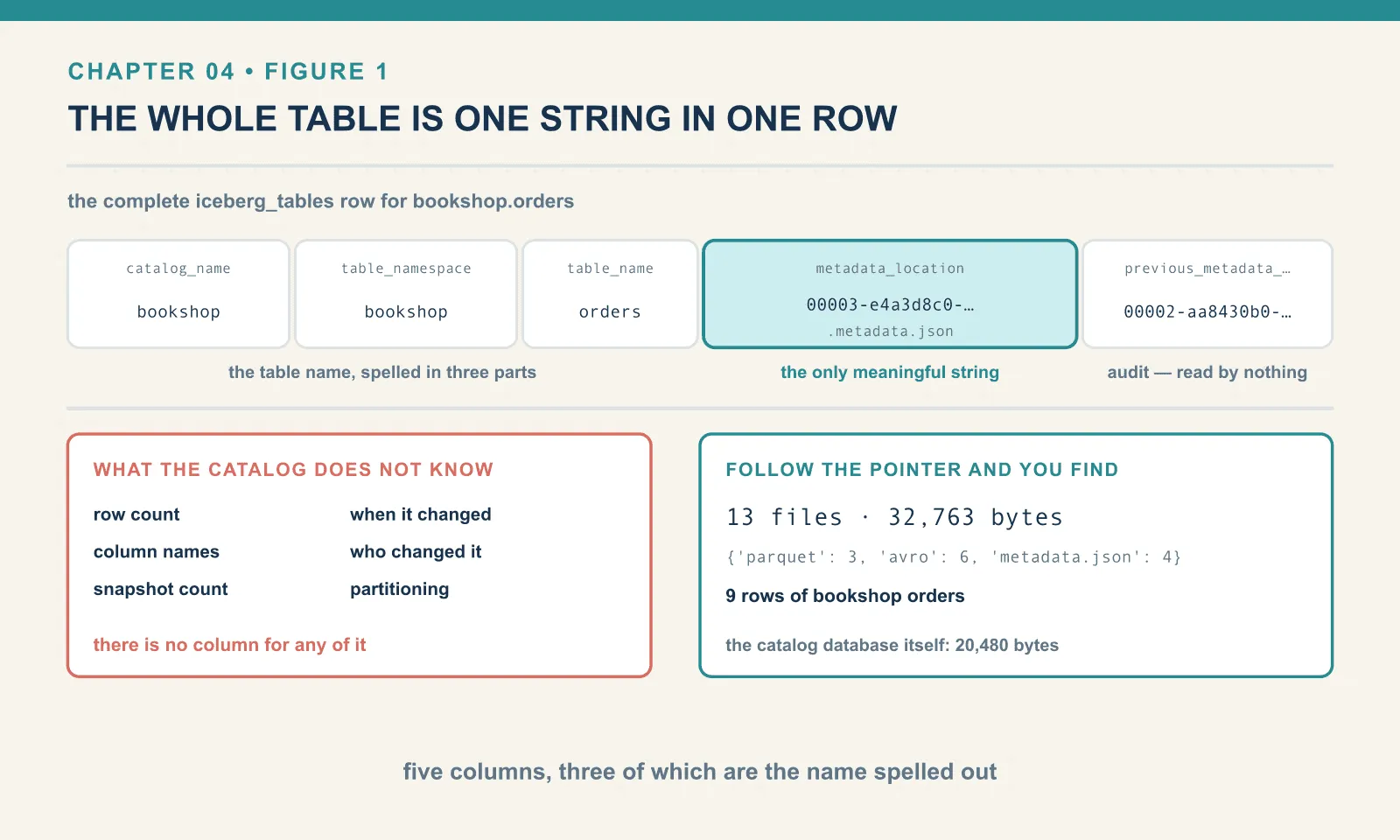
Two tables. One of them exists only to record that a namespace exists at all. That is why its single row has the property exists = true and no other content. The other has five columns, three of which are the table’s name spelled out in parts.
So the catalog holds one meaningful string per table: metadata_location. Behind that one path is everything a reader needs to know what bookshop.orders contains — its schema, its snapshots, its partitioning, the list of manifests that leads to the list of data files. The catalog does not have a copy. It has the address.
The trailing column, previous_metadata_location, is a convenience rather than a mechanism. It records where the pointer was before the last commit. It is not the table’s history, which lives inside metadata.json as the metadata-log. Nothing reads it during a normal query. Sit with those proportions for a second. Thirteen files, thirty-two kilobytes of warehouse, nine rows of bookshop orders, and the authoritative answer to what is in this table right now is a single VARCHAR.
What the catalog does not know
Ask this database how many rows bookshop.orders has. There is no column for it. Ask what its columns are called and there is no column for that either. Ask when it last changed, who changed it, how many snapshots it has, whether it is partitioned. None of it is here.
A Hive metastore knew all of those things, and that was precisely its problem. It held a copy of information that also existed in storage, and the two drifted. MSCK REPAIR TABLE exists because a metastore’s idea of a table’s partitions could disagree with the directories that actually existed. Somebody had to go and reconcile them. An Iceberg catalog cannot drift, because it duplicates nothing in the first place. It answers exactly one question, and the answer is a pointer. Everything else is derived by following it.
One consequence surprises people the first time they hit it: the catalog cannot answer any interesting question without reading a file from storage. SHOW TABLES is a database query. DESCRIBE TABLE is a database query plus an object-storage GET. Chapter 5 shows a REST catalog that softens this by returning the parsed metadata inline. The underlying division of labour never changes.
The commit
Watch the pointer move. Here is one more append against the same table:
t.append(one_more_order)BEFORE metadata_location : 00003-e4a3d8c0-….metadata.json
previous_metadata_location : 00002-aa8430b0-….metadata.json
AFTER metadata_location : 00004-14dda10a-….metadata.json
previous_metadata_location : 00003-e4a3d8c0-….metadata.json
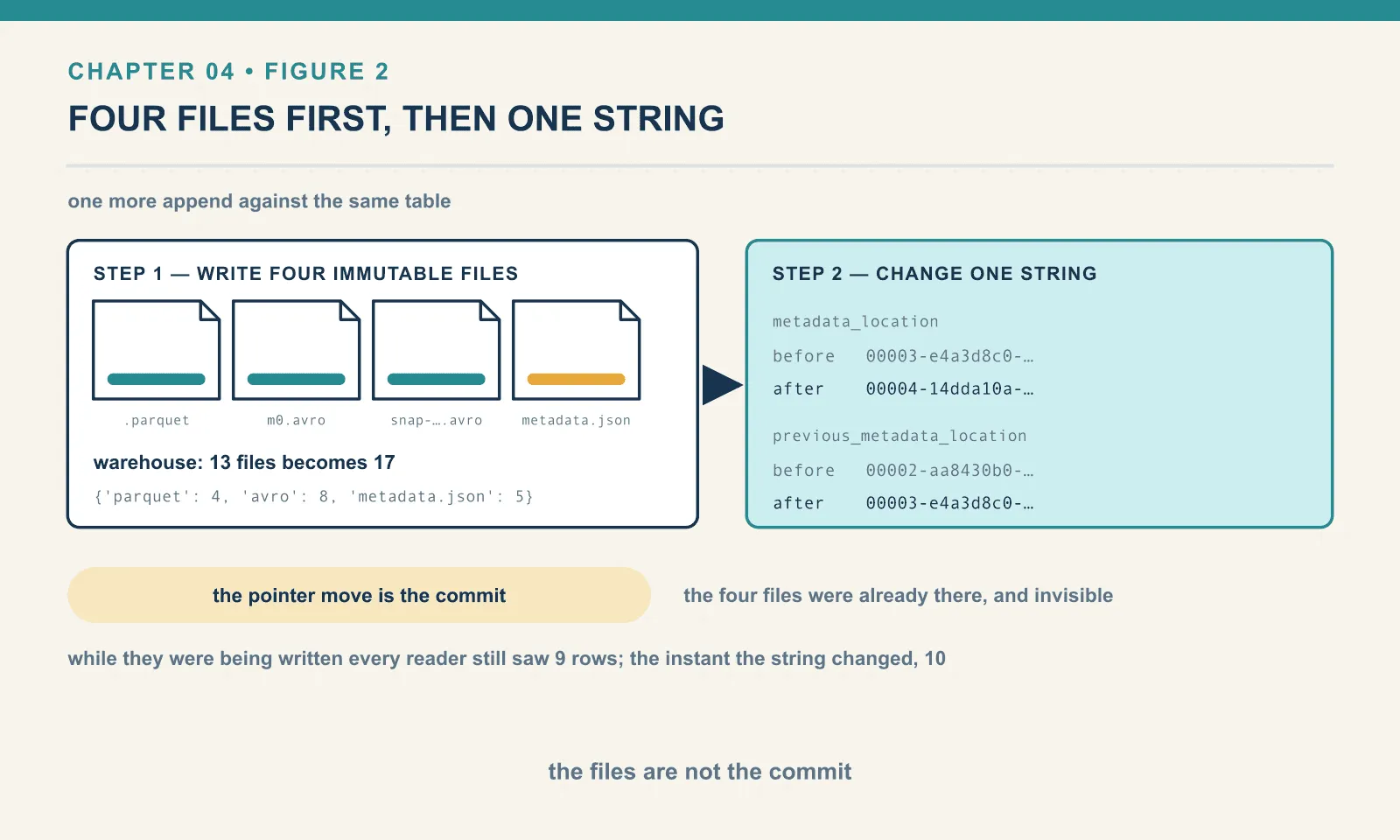
warehouse : 17 files {'parquet': 4, 'avro': 8, 'metadata.json': 5}Four files were added to the warehouse: a Parquet file with the new row, a manifest describing it, a manifest list for the new snapshot, and a fresh metadata.json. All four were written before anything changed in the catalog. While they were being written the table still had nine rows to every reader in the world.
Then one string changed, and the table had ten — that is the whole of it. A commit is a write of new immutable files followed by a single-value update in the catalog. The files are not the commit. The pointer move is the commit. It is the only step that has to be atomic, which is why it is the only step that happens somewhere other than object storage.
The swap, exactly
“Atomic” is doing less work here than “conditional”. Turn on SQLAlchemy’s engine log and PyIceberg shows you the statement it issues:
UPDATE iceberg_tables
   SET metadata_location = ?, previous_metadata_location = ?
 WHERE iceberg_tables.catalog_name = ?
   AND iceberg_tables.table_namespace = ?
   AND iceberg_tables.table_name = ?
   AND iceberg_tables.metadata_location = ?
with these parameters:
('…/00005-8432fbcd-….metadata.json',      -- the new pointer
 '…/00004-14dda10a-….metadata.json',      -- the old pointer, for the audit column
 'bookshop', 'bookshop', 'orders',
 '…/00004-14dda10a-….metadata.json')      -- and the same old pointer AGAIN, in the WHERE
The last parameter is the mechanism. The writer read the pointer at the start of its work and held on to it. Now it says: set the pointer to this new value, but only if it is still the value I read.
Then it checks how many rows it changed:
result = session.execute(stmt)
if result.rowcount < 1:
    raise CommitFailedException(f"Table has been updated by another process: {namespace}.{table_name}")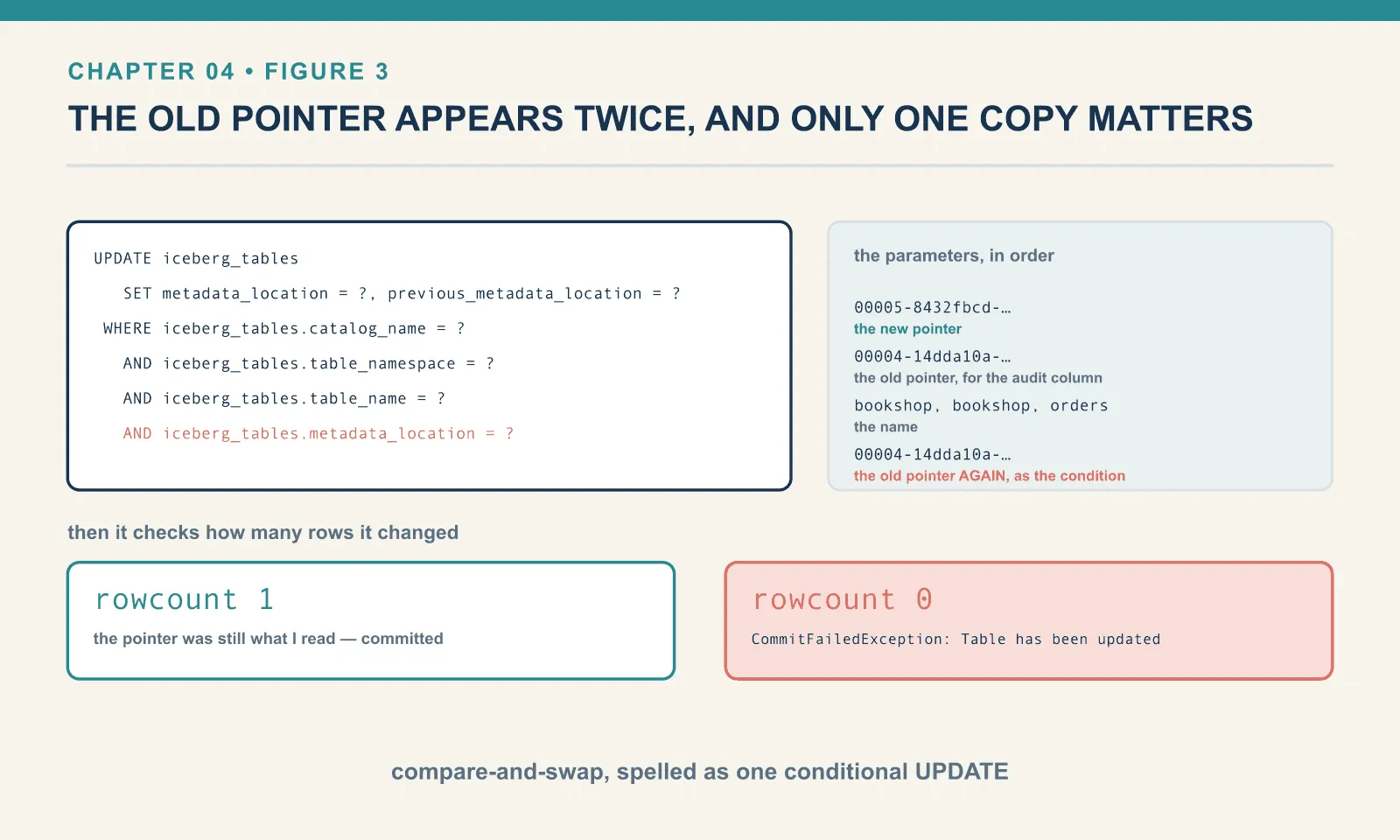
That is compare-and-swap, the same primitive an atomic integer uses in a CPU, applied to a VARCHAR. There is no lock, nothing is held across the writer’s work, and a reader is never blocked. The writer does its whole job optimistically and finds out at the last instant whether it was allowed to.
A single UPDATE … WHERE statement is atomic in every relational database. The guarantee comes for free from a component that already had it. Iceberg did not invent transactional storage. It arranged for a table’s transactionality to fit inside one row of something that already was transactional.
Two writers, and what happens to the loser
Two writers can both finish their files while working from the same old pointer. To make that overlap visible, two processes load the table, sit for a second and a half, then both append:
files before: {'parquet': 5, 'avro': 10, 'metadata.json': 6}
[alpha] loaded pointer: 00005-8432fbcd-….metadata.json
[alpha] COMMITTED -> 00006-70db48b3-….metadata.json
[bravo] loaded pointer: 00005-8432fbcd-….metadata.json
[bravo] CommitFailedException: Table has been updated by another process: bookshop.orders
files after : {'parquet': 7, 'avro': 14, 'metadata.json': 8}
Both processes read pointer 00005. Alpha’s UPDATE matched one row and won. Bravo’s matched zero and raised.
Now look at the file counts, because they are the part nobody mentions. Two Parquet files were added, not one, and four Avro files, not two. Two metadata.json files, not one. Bravo wrote its entire commit before it discovered it had lost. It wrote a data file, a manifest, a manifest list and a complete new table metadata document. Only then did it issue the UPDATE that failed.
Those files are still on disk and nothing points at them. Walking the table’s metadata to collect every reachable path and diffing that against the directory:
files on disk        : 29
files reachable      : 25
unreachable (orphans): 4
    00000-0-23a1d34a-….parquet
    00006-119a0b2f-….metadata.json
    23a1d34a-…-m0.avro
    snap-760373860059058757-0-23a1d34a-….avro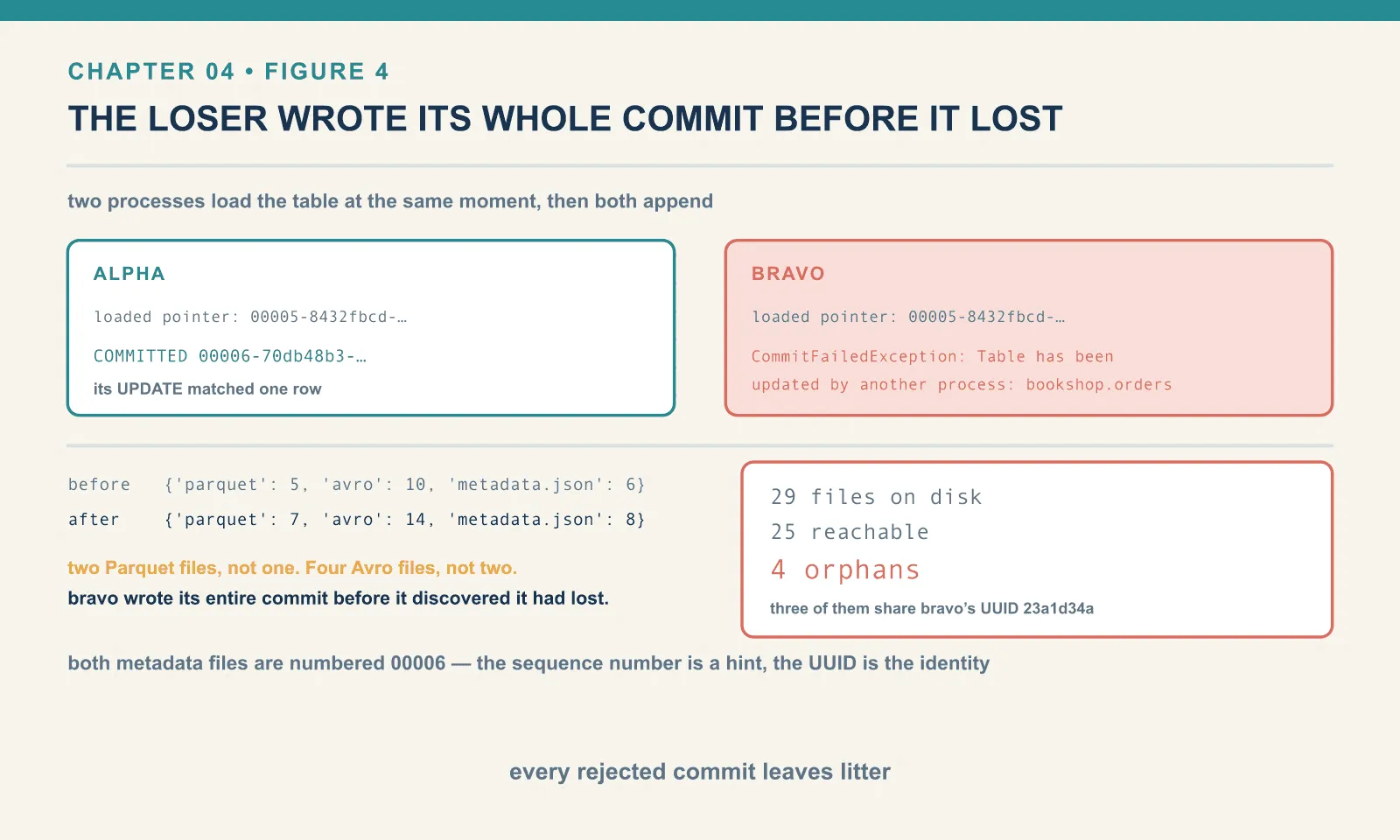
Exactly four files are unreachable. Three share the UUID 23a1d34a, which traces bravo’s write through the layers. These orphan files came from the normal operation of an optimistic protocol: the writer had to finish its files before it could attempt the swap. Rejected commits therefore leave files to clean up, even without a crash or a bug. Chapter 13 handles that cleanup.
There is a second detail hiding in that list. Bravo’s orphaned metadata file is 00006-119a0b2f, and alpha’s committed one is 00006-70db48b3. Both are numbered 00006. The sequence number in the filename is a hint for humans, not an identity. The UUID is the identity. Two writers can both believe they are producing version six, and Iceberg does not care, because nothing about correctness depends on that number. Hold on to this. In twenty minutes it will be the difference between a catalog that works and one that eats your data.
About that retry
PyIceberg surfaced the failure rather than retrying. The conflict bravo hit was a metadata conflict, not a data conflict. Alpha appended three rows; bravo wanted to append one; those two intentions do not actually contradict each other. A client that re-read the table and replayed bravo’s append against snapshot 00006 would produce a correct result, and other Iceberg clients do exactly that. (The Java implementation retries commits by default under the commit.retry.* table properties. I have not run the Java client for this book, so take that as documentation rather than measurement. What was measured here is that PyIceberg does not.)
But “re-run my write against the new state” is only safe for some writes. Replaying an append is fine. Replaying an overwrite whose predicate was computed from the old state is not, and a library cannot tell the difference by looking at a function call. PyIceberg’s position is that surfacing the exception is the honest default. Retrying is the caller’s decision.
The practical shape of that decision: catch CommitFailedException, reload the table, and only then decide whether recomputing is meaningful. Do not wrap append in a blind retry loop and consider the problem handled.
The catalog holds the pointer, not the data
Chapter 2 noted in passing that dropping a table deletes no files. Now that you have seen the catalog, it is obvious why. The interesting half is what that makes possible.
cat.drop_table("bookshop.orders")before drop : catalog rows=1 files=29 table rows=12 snapshots=6
after drop : catalog rows=0 files=29
load_table -> NoSuchTableError: Table does not exist: bookshop.ordersTwenty-nine files before, twenty-nine after. All DROP TABLE did was delete one row from iceberg_tables. The table is gone in the sense that no name resolves to it. It is entirely present in the sense that every byte is still sitting in the warehouse.
Which means it can come back:
cat.register_table("bookshop.orders", loc) # loc = the old metadata_locationafter register: catalog rows=1 files=29 table rows=12 snapshots=6
previous_metadata_location is now: None
metadata_log entries kept : 6Twelve rows, six snapshots, complete history. The table was restored by writing one string into one row.
Two things follow. The first is operational. In PyIceberg, drop_table and purge_table are separate methods, and only the second touches storage. drop_table takes no purge argument at all. If you have ever assumed that dropping a lakehouse table reclaims its storage, check your catalog’s semantics. On this one it does not, and your bucket has been growing.
The second consequence is architectural: moving a table between catalogs means moving its pointer. The files stay in place, with no export or rewrite. Chapter 5 performs that handoff.
Note also that previous_metadata_location came back as NULL. The audit column starts a fresh chain after a registration — more evidence that it is bookkeeping rather than machinery. The real history is inside the metadata file, and it survived intact.
The catalog Iceberg does not ship
Now the question this chapter has been circling. If a commit is just “swap a pointer”, why do you need a database at all? The metadata files are already sitting in a directory, numbered in order. Why not let the highest number win?
That design exists. It is the Hadoop catalog, sometimes called the filesystem or directory catalog. Nearly every early Iceberg tutorial used it, because it required nothing. The algorithm is exactly what you would guess: to read the table, list the metadata directory and take the highest version; to commit, write version N+1.
A fifteen-line implementation lets us isolate the decisive part: how two writers claim the next version.
def current_version():
    vs = [int(basename(p)[1:].split(".")[0]) for p in glob(f"{DIR}/v*.metadata.json")]
    return max(vs) if vs else 0

def claim_excl(n, who):                  # atomic create-if-absent
    fd = os.open(f"{DIR}/v{n}.metadata.json", os.O_CREAT | os.O_EXCL | os.O_WRONLY)
    os.write(fd, f'{{"written-by":"{who}"}}'.encode()); os.close(fd)

def claim_put(n, who):                   # check, then put
    p = f"{DIR}/v{n}.metadata.json"
    if os.path.exists(p):
        raise FileExistsError(p)
    time.sleep(0.05)                     # the window, widened so it is observable
    open(p, "w").write(f'{{"written-by":"{who}"}}')
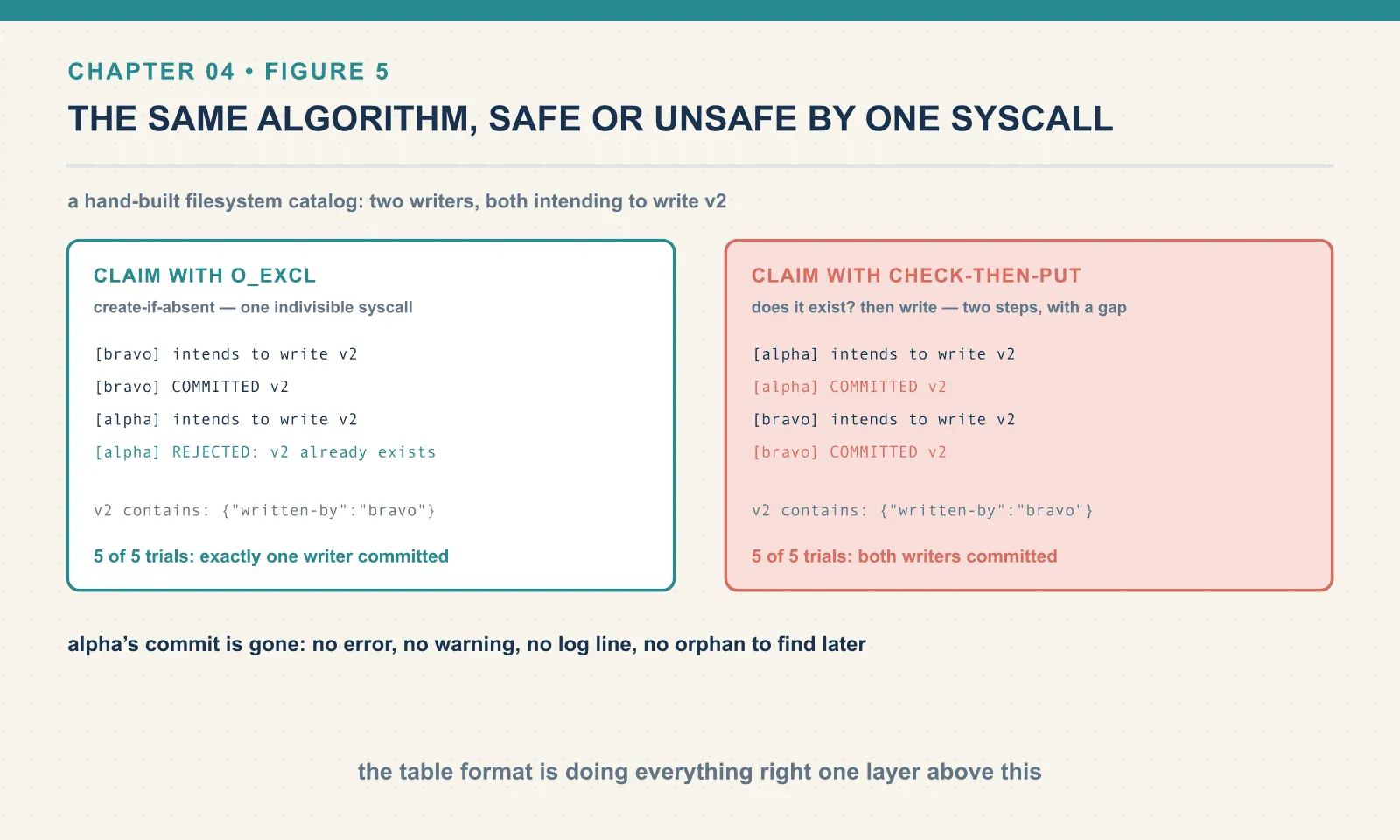
Two writers, one seeded v1, both intending to write v2, released at the same wall-clock instant. First with O_EXCL. That is the POSIX flag that makes “create this file only if it does not exist” a single indivisible syscall.
[bravo] intends to write v2
[bravo] COMMITTED v2
[alpha] intends to write v2
[alpha] REJECTED: v2 already exists
  --> v2 contains: {"written-by":"bravo"}
That works. It is a correct compare-and-swap: the file’s existence is the compare, and the create is the swap. Five trials out of five, exactly one writer committed.
Now the same algorithm with the other primitive. Nothing changed except how the file gets claimed:
[alpha] intends to write v2
[alpha] COMMITTED v2
[bravo] intends to write v2
[bravo] COMMITTED v2
  --> v2 contains: {"written-by":"bravo"}
Both writers report success. One of them is lying. Five trials out of five, both processes exited zero, and v2 holds whichever write finished last. Alpha’s commit is gone: no error, no warning, no log line, no orphan to find later. This is chapter 1’s directory failure returning in a nicer suit. The table format is doing everything right, and the guarantee is evaporating one layer below it.
I widened the race window with a deliberate sleep so the outcome is reproducible rather than occasional. That is honest about the demonstration and not about the risk. Shortening the window does not close it. It only makes the loss rarer, and therefore harder to attribute when it happens.
Why this is specifically an object-storage problem
The two versions above differ in one thing: whether the store offers an atomic create-if-absent.
A POSIX filesystem does. So does HDFS, whose atomic rename is what the Hadoop catalog was actually designed around. It writes a temporary file and renames it into place, and the rename either happens or does not.
S3 historically offered neither, and there is no rename in the S3 API. What object-storage clients call a rename is a CopyObject followed by a DeleteObject — two operations with a gap in the middle. And a plain PutObject will happily overwrite an existing key, which is claim_put above, with the same result.
This is not a marginal opinion. Here is Ryan Blue, Iceberg’s original author, proposing on the project’s dev list that HadoopTableOperations and HadoopCatalog be deprecated and moved into test code:
It is only safe to use hadoop tables with HDFS; most local file systems, S3, and other common object stores are unsafe.
and, on why they should not sit in the main module:
there’s an appearance that they are a reasonable choice
The second quote is the one that matters for a book. The filesystem catalog is not obscure. It is the default in a great many blog posts, it requires no infrastructure, and it works perfectly in every single-writer demo anybody ever runs. Its failure needs concurrency, and concurrency is exactly what nobody has while they are learning.
(One caveat I am flagging rather than claiming. S3 gained conditional writes in 2024 — PutObject with If-None-Match — which is the missing create-if-absent primitive, and there has been work to build on it. I have not run any of it. This lab has no S3 and no MinIO, so everything in this section about object storage is argument and citation, not measurement. What I did measure is the local pair above. The same algorithm is safe or unsafe depending purely on whether the claim is one indivisible operation.)
Which is why PyIceberg does not offer one
Ask PyIceberg what catalogs it knows about:
from pyiceberg.catalog import AVAILABLE_CATALOGS[<CatalogType.REST: 'rest'>, <CatalogType.HIVE: 'hive'>, <CatalogType.GLUE: 'glue'>,
<CatalogType.DYNAMODB: 'dynamodb'>, <CatalogType.SQL: 'sql'>,
<CatalogType.IN_MEMORY: 'in-memory'>, <CatalogType.BIGQUERY: 'bigquery'>]Seven types, and not one of them is a filesystem or Hadoop catalog. There is no way to spell it. A reader coming from a tutorial that pointed Spark at hadoop will search for the equivalent here, fail to find it, and conclude something is missing. Nothing is missing. The option was never offered.
The closest thing is in-memory, and it comes with its own disclaimer in the source:
class InMemoryCatalog(SqlCatalog):
    """
    An in-memory catalog implementation that uses SqlCatalog with SQLite in-memory database.

    This is useful for test, demo, and playground but not in production as it does
    not support concurrent access.
    """
InMemoryCatalog inherits the real SqlCatalog implementation — its database simply lives in memory and vanishes when the process ends.
Four catalogs, four primitives, one contract
Every catalog type in that list solves the same problem. Each borrows atomicity from whatever its backing system already had. The mechanisms are visible in PyIceberg’s own source, and they are not the same shape.
SQL does the compare-and-swap we watched: UPDATE … WHERE metadata_location = <what I read>, then check rowcount. Works on SQLite, Postgres, MySQL — anything SQLAlchemy speaks.
Glue uses AWS’s own optimistic concurrency. It passes the table’s VersionId to UpdateTable, and catches the failure the service raises:
except self.glue.exceptions.ConcurrentModificationException as e:
    raise CommitFailedException(…)
DynamoDB uses a conditional write, which is the same idea in DynamoDB’s vocabulary:
condition_expression=f"attribute_not_exists({DYNAMODB_COL_IDENTIFIER})"Hive is the odd one out, and it shows its age. It takes an actual lock, and waits:
lock: LockResponse = open_client.lock(self._create_lock_request(database_name, table_name))
if lock.state != LockState.ACQUIRED:
    if lock.state == LockState.WAITING:
        self._wait_for_lock(database_name, table_name, lock.lockid, open_client)
    else:
        raise CommitFailedException(f"Failed to acquire lock for {table_identifier}, state: {lock.state}")
Pessimistic rather than optimistic: hold the lock, do the swap, release. It works. It also introduces a component that can hold a lock while its holder dies, which is a category of operational problem the other three do not have.
Four implementations, four primitives, one contract. That contract is the actual definition of an Iceberg catalog, and it fits in a sentence: resolve a table name to a metadata pointer, and swap that pointer only if it still has the value the writer expects. Anything that can do those two things can be a catalog. Anything that cannot, is not — regardless of how convenient it looks.
What a practitioner actually tunes here
Two table properties in this area will eventually be your problem, and both have defaults that surprise people.
write.metadata.previous-versions-max              100
write.metadata.delete-after-commit.enabled        False
The second one is the sharp edge. Old metadata.json files are not cleaned up by default. Every commit writes one, and every one stays. This chapter’s table went from four metadata documents to eight without ever exceeding twelve rows. A table that commits every five minutes writes about a hundred thousand of them a year, none of which anything will ever read again.
Turning deletion on makes each commit remove metadata files beyond previous-versions-max. It is off by default because those files are the escape hatch. register_table against an old metadata.json is a rollback of last resort, and deleting them removes it. That trade — recoverability against file count — is one you should make on purpose rather than inherit.
Note the scope carefully. This property governs the metadata.json documents only. Manifests, manifest lists, data files and orphans like bravo’s are a different problem with different tools. Chapter 13 covers all of them together.
What the catalog costs you
You now have a stateful component in the critical path of every read and every write. If the catalog is down, the table is unreadable, even though every byte of it is sitting in a bucket that is up. That is a strictly worse availability story than a directory of Parquet, and it is not a theoretical concern.
It must be backed up, and separately from your data, because the two are no longer in the same place. Our whole catalog is twenty kilobytes. That sounds reassuring until you notice that losing it means losing the name-to-pointer mapping for every table you own. The data survives; the ability to find it does not, at least not without walking the warehouse and guessing. (It is recoverable — register_table against the highest-numbered metadata file, per table, by hand. You do not want to be doing that under pressure.)
It becomes a contention point. Every commit for every table goes through it. SQLite is fine for one writer on a laptop and wrong for anything else. That is why the same SqlCatalog class points at Postgres in production without a line of application code changing.
And it is where access control has to live, because it is the only component that sees every request. A catalog that just resolves pointers cannot tell one caller from another. That is most of why chapter 5’s catalogs are servers rather than databases.
Final thoughts
The largest idea in Iceberg is that a table’s transactionality can be made small enough to fit somewhere that already has transactions. Not a distributed consensus protocol, not a lock service, not a rewrite of object storage: one row, one conditional UPDATE, and a discipline about which order things are written in.
Everything else in the format is downstream of that. Snapshots are the old pointer values you kept. Time travel is reading one of them. Concurrent writes work because the swap is conditional and fail loudly because it can only be conditional, not merging. Even the orphan files exist because optimism means some writers do their whole job and then find out they lost.
And the one place the design genuinely breaks is where somebody removes the row: where the “catalog” is a directory listing and the swap is a plain PUT. Both of our writers committed, both exited zero, and one commit is simply not there. That is the outcome the entire component exists to prevent.
The catalog we have been using is a file on a laptop. It cannot authenticate anyone, cannot be reached from another machine, and would collapse under two real writers. The next chapter replaces it with a server. That introduces the only thing in Iceberg that is not a file format or a client library: a network protocol.
Comments