Four Layers and a Pointer
Open an Iceberg table and account for every file in it — why each commit adds exactly four, why the metadata is a tree rather than a list, and how a query answers from statistics without opening a single data file.
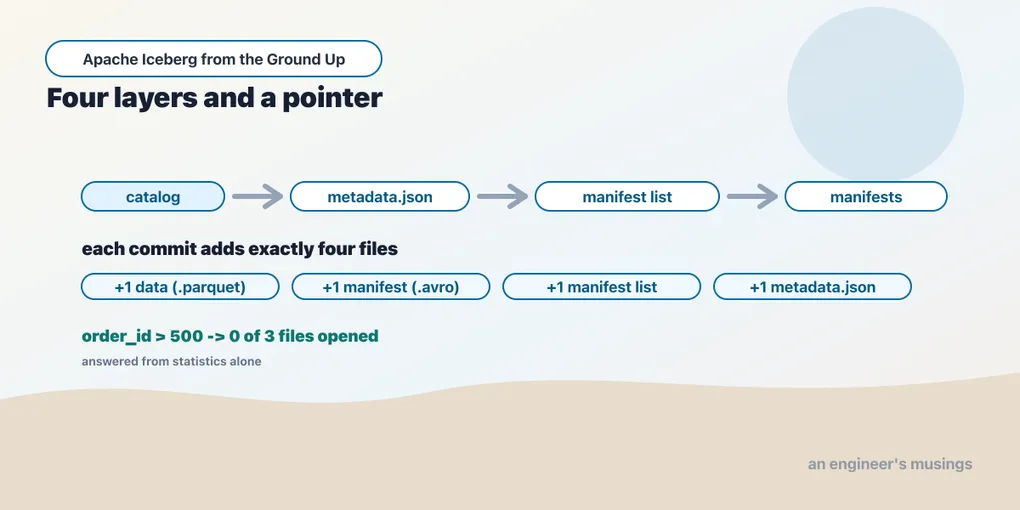
A few appends leave more metadata files than data files in an Iceberg warehouse. Before tuning or cleaning up that warehouse, you need to know which files describe the table, which belong to a snapshot, and which hold the rows.
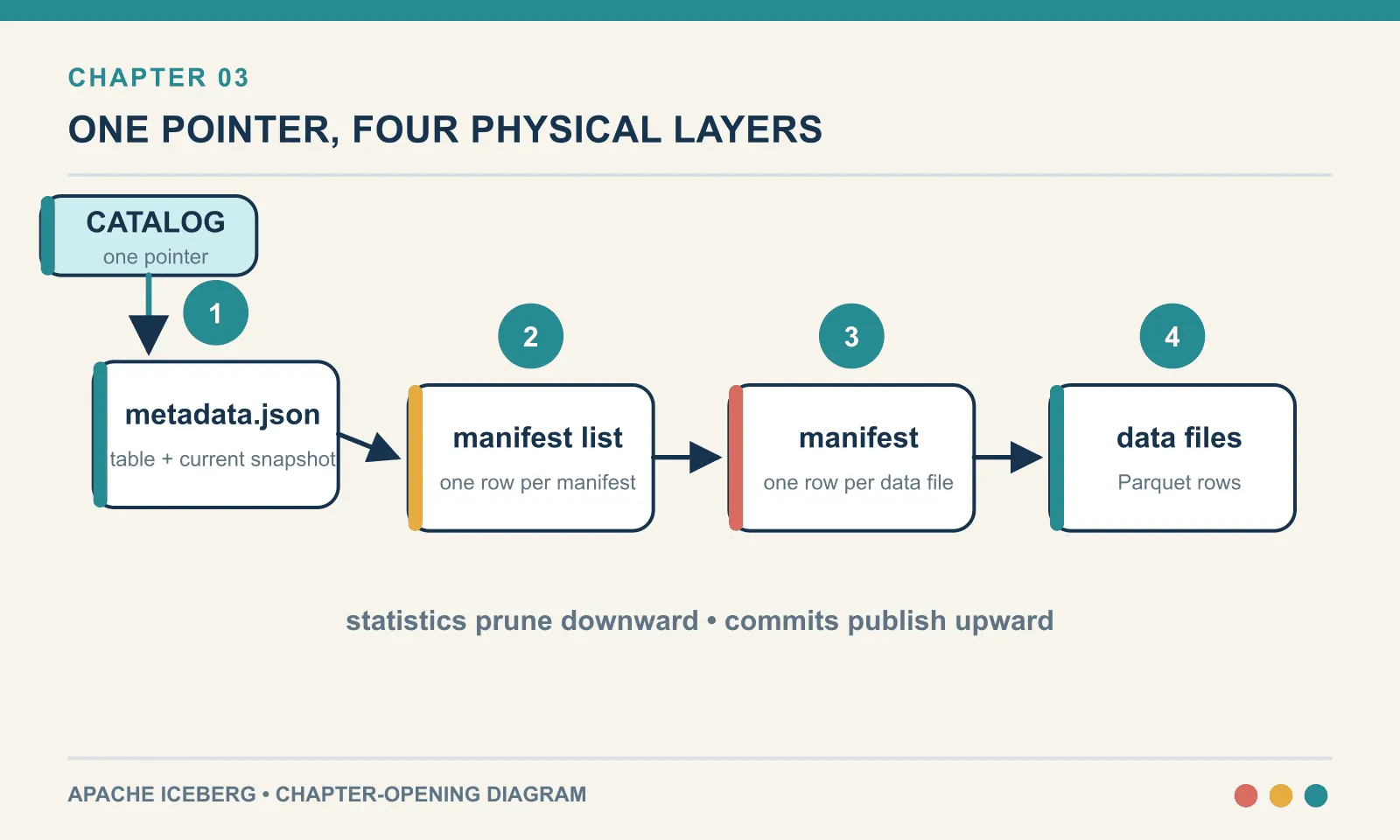
Compaction, time travel, schema evolution and partition pruning all operate on this structure. Following one table from its catalog pointer down to its Parquet files makes those operations easier to reason about.
Run against PyIceberg 0.11.1 on a fresh bookshop.orders table — three appends of one hundred rows each. This is the running example for the rest of the book, so here is its schema once:
1: order_id     required long        5: quantity    int
2: customer_id  required long        6: amount      double
3: title        string               7: status      string
4: country      string               8: ordered_at  required timestamp
Chapter 7 evolves it, and the field IDs above are why that is safe.
The rule: every commit adds exactly four files
Start by counting. Here is the warehouse after each step, classified by what kind of file appeared:
after create_table     total   1  {'metadata.json': 1}
after append 1         total   5  {'data': 1, 'manifest': 1, 'manifest list': 1, 'metadata.json': 2}
after append 2         total   9  {'data': 2, 'manifest': 2, 'manifest list': 2, 'metadata.json': 3}
after append 3         total  13  {'data': 3, 'manifest': 3, 'manifest list': 3, 'metadata.json': 4}
One, five, nine, thirteen. Each commit adds exactly four files, one at each of four layers. create_table adds only the top one, because a table with no data needs nothing below it.
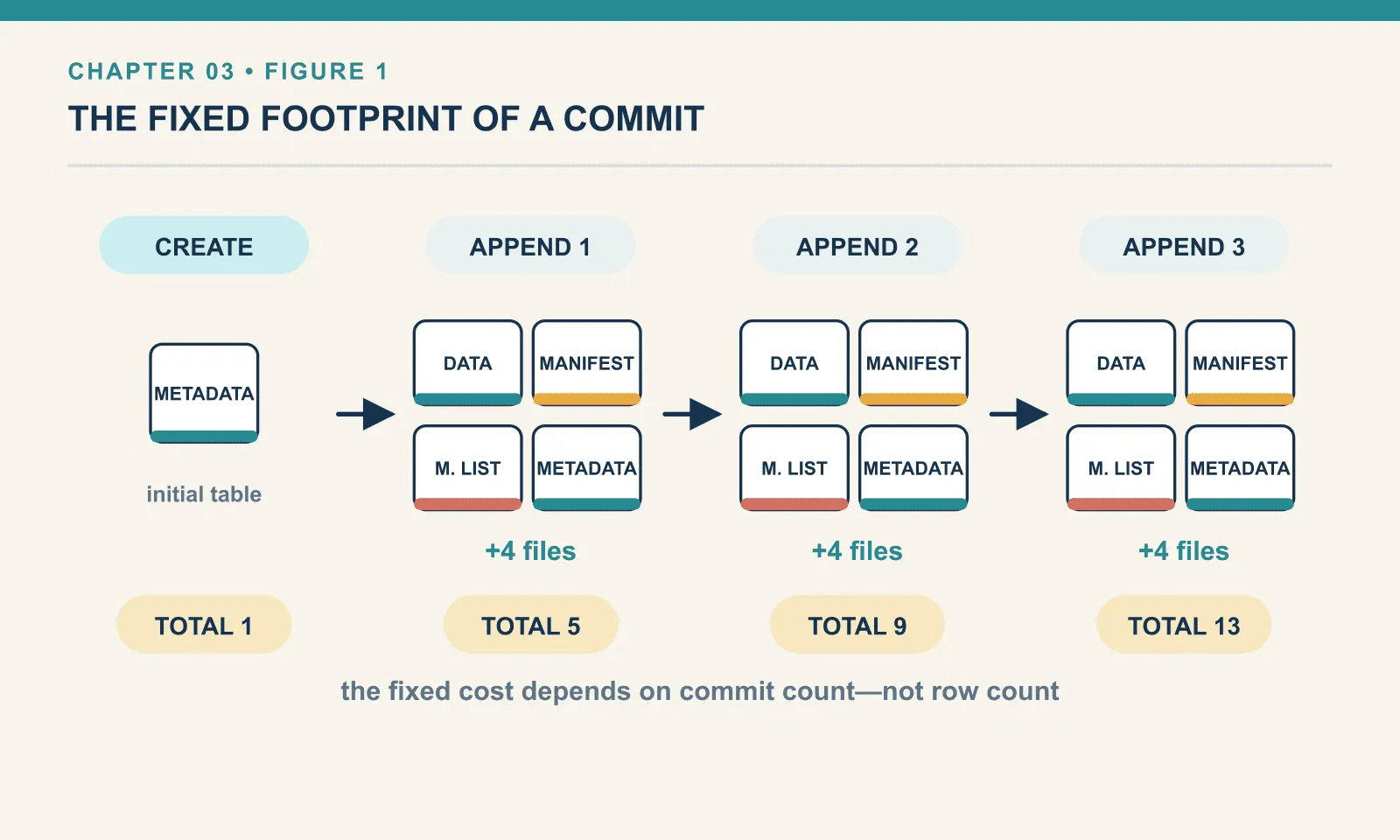
That single pattern explains the cost finding from chapter 1, where three hundred rows occupied four data files and twenty-one files in total. It was not overhead in some vague sense. It was four files per commit, and there had been several commits.
The four layers, from the top:
catalog  ──▶ metadata.json   ──▶ manifest list ──▶ manifest(s) ──▶ data files
(1 row)      (the table)         (a snapshot)      (file groups)   (Parquet)
The catalog holds a pointer to exactly one metadata.json. That file is the table. Everything else hangs beneath it.
Where the files actually sit
The warehouse separates data from metadata into two directories:
bookshop/orders/data     ->  3 files
bookshop/orders/metadata -> 10 files
Two directories per table. data/ holds Parquet; metadata/ holds everything else — the JSON, the manifest lists and the manifests together. The split matters operationally. A lifecycle rule that expires objects by prefix will treat those two very differently, and pointing one at metadata/ will destroy a table while leaving all its data intact.
The location is a table property, not a convention Iceberg enforces. Data files do not have to live under the table path at all. Chapter 14 relies on that when it adopts existing Parquet files where they already are.
Layer 1 — metadata.json, the table itself
This is a plain JSON file, which means you can read it with cat. It has twenty-one top-level keys:
['current-schema-id', 'current-snapshot-id', 'default-sort-order-id', 'default-spec-id',
 'format-version', 'last-column-id', 'last-partition-id', 'last-sequence-number',
 'last-updated-ms', 'location', 'metadata-log', 'partition-specs', 'partition-statistics',
 'properties', 'refs', 'schemas', 'snapshot-log', 'snapshots', 'sort-orders',
 'statistics', 'table-uuid']
Those twenty-one keys divide into identity, definitions, history and configuration. The distinction helps explain which parts change during a commit.
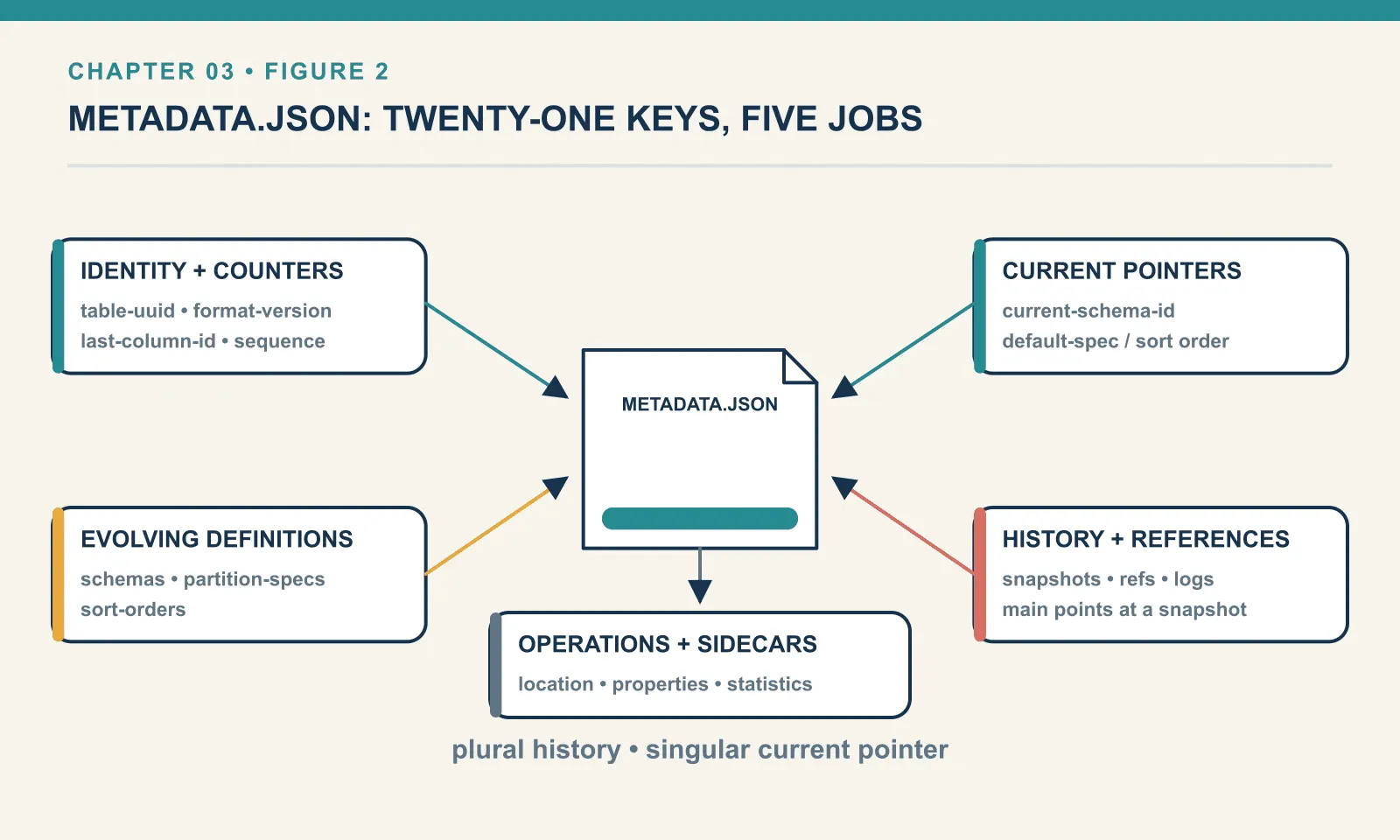
Identity and version.
format-version: 2
table-uuid: 2f4d1a97-3b52-4a1e-9c6f-0d81b7e5a233
last-column-id: 8
last-sequence-number: 3
The UUID is the table’s permanent identity, independent of its name or location. Rename it, move it, and the UUID follows. last-column-id is the high-water mark for field IDs: the next column added gets 9. No ID is ever reused, which is precisely what makes renames safe in chapter 7.
Plural definitions, singular defaults. Notice that it is schemas, partition-specs and sort-orders — all plural — each paired with a current-schema-id, default-spec-id or default-sort-order-id. A table does not have a schema. It has a list of every schema it has ever had, plus a note saying which one is current. Same for partitioning and sort order.
schemas: 1 | partition-specs: 1 | sort-orders: 1 | snapshots: 3 | metadata-log: 3Our table has one of each because it has never evolved. That plurality is the whole mechanism behind chapters 7 and 9. Evolving a schema appends a new entry and moves the pointer. Older data files stay readable because the schema they were written under is still right there.
Two keys that look empty and are not optional. statistics and partition-statistics are lists, empty on this table, that point at Puffin files. Puffin is a sidecar format holding sketches an engine cannot cheaply derive from manifests. The manifests give exact per-file minimums, maximums and null counts, which is enough to prune. What they cannot give is a distinct count, because you cannot add up distinct counts from separate files without double-counting. So a planner that wants to know roughly how many distinct customers a table holds reads an NDV sketch from a Puffin file instead. Nothing in this book writes one. Puffin returns in chapter 20 wearing a different hat: it is also the container for v3’s deletion vectors.
History. snapshots is the list of table versions, and refs names them:
refs: {'main': {'snapshot-id': 6488880964964305976, 'type': 'branch'}}There is a branch called main, and it is a reference to a snapshot — the same idea as a git branch. It is also the basis for the branching and tagging that chapter 16 uses for write-audit-publish. A table you never branch still has main.
Each snapshot carries a summary:
manifest-list: snap-6488880964964305976-0-67aa980b-….avro
summary:       {'operation': 'append', 'added-files-size': '4216', 'added-data-files': '1',
                'added-records': '100', 'total-data-files': '3', 'total-delete-files': '0'}
operation is why chapter 1 could see ['append','append','append','delete','append'] and infer that an overwrite is internally two steps. The running totals are how tools report table size without touching data. And manifest-list is the link down to layer 2.
Layer 2 — the manifest list, one row per manifest
Each snapshot points at exactly one manifest list — the snap-*.avro file. It is not a list of data files. It is a list of manifests:
67aa980b-…-m0.avro | added_data_files: 1 | length: 4799
45d3becb-…-m0.avro | added_data_files: 1 | length: 4797
20074712-…-m0.avro | added_data_files: 1 | length: 4793
Three manifests, because there were three appends and each wrote its own. The columns available here are worth knowing, because they are the coarse filter:
['content', 'path', 'length', 'partition_spec_id', 'added_snapshot_id',
 'added_data_files_count', 'existing_data_files_count', 'deleted_data_files_count',
 'added_delete_files_count', 'existing_delete_files_count', 'deleted_delete_files_count',
 'partition_summaries']
partition_summaries is the important one on a partitioned table. It records the range of partition values inside each manifest, so a query can discard an entire manifest — and everything under it — without opening it. On our unpartitioned table it does nothing, which is one of several reasons chapter 8 exists.
Note also content and the *_delete_files_count columns. Delete files are tracked here alongside data files. That is how merge-on-read works at all, and it is chapter 10’s subject.
Layer 3 — a manifest, one row per data file
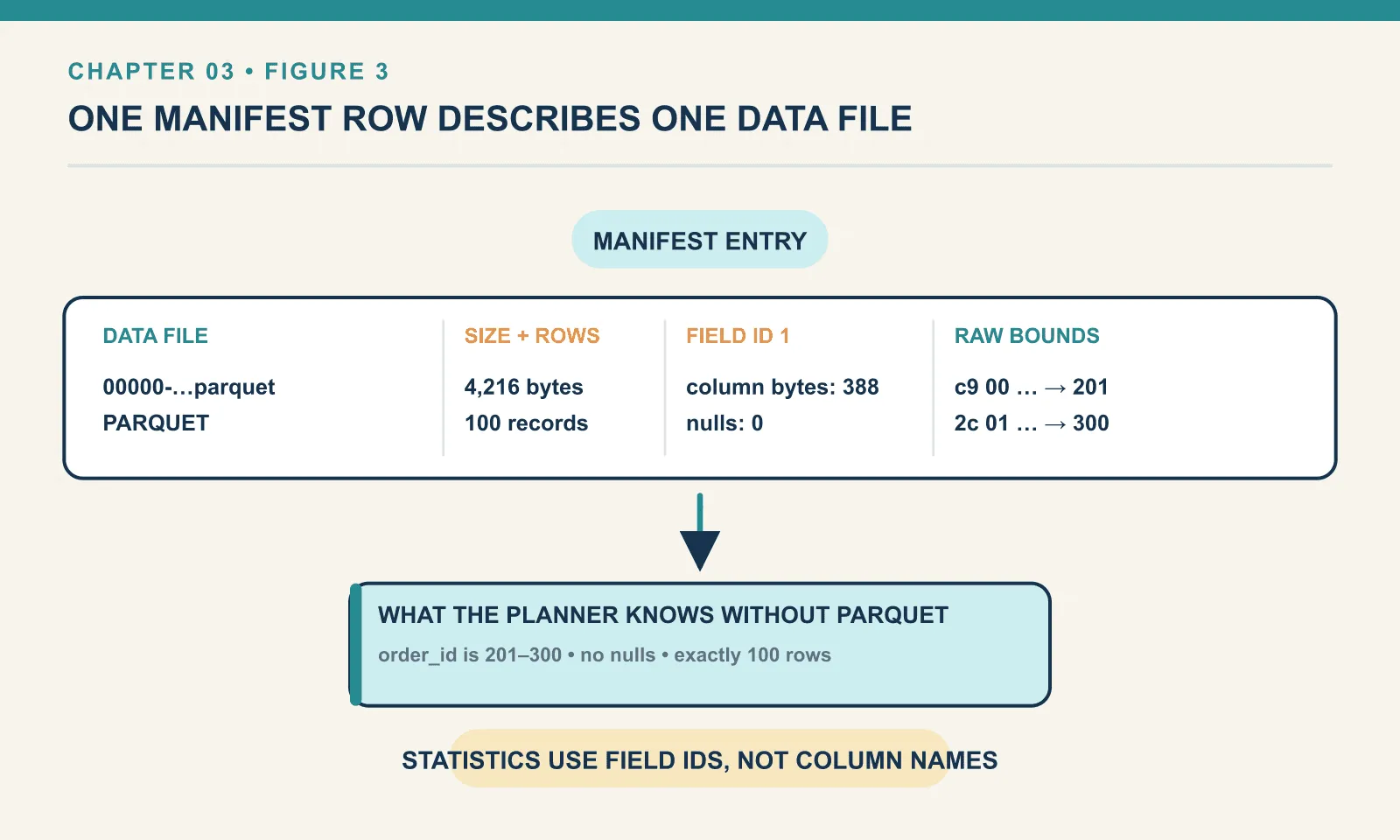
Open a manifest and you finally reach individual files. Each row describes one data file, and carries statistics:
00000-0-67aa980b-….parquet
record_count: 100 | file_size: 4216 | format: PARQUET
column_sizes : [(1, 388), (2, 144), (3, 143), (4, 93), (5, 111), (6, 336), (7, 93), (8, 529)]
null_counts  : [(1, 0), (2, 0), …]
lower_bounds : [(1, b'\xc9\x00\x00\x00\x00\x00\x00\x00'), (7, b'placed'), …]
upper_bounds : [(1, b',\x01\x00\x00\x00\x00\x00\x00'), (7, b'placed'), …]
Everything is keyed by field ID, not name. (1, 388) means field 1 occupies 388 bytes. The statistics survive a rename for free, because they never knew the name.
The bounds are raw bytes. b'\xc9\x00\x00\x00\x00\x00\x00\x00' is a little-endian 64-bit integer, and it is 201. Storing them undecoded keeps the manifest compact and type-agnostic. PyIceberg will decode them for you:
order_id     lower=201                  upper=300                  nulls=0
customer_id  lower=1                    upper=5                    nulls=0
title        lower=Anathem              upper=Neuromancer          nulls=0
country      lower=GB                   upper=US                   nulls=0
quantity     lower=1                    upper=3                    nulls=0
amount       lower=30.0                 upper=79.5                 nulls=0
status       lower=placed               upper=placed               nulls=0
ordered_at   lower=2026-06-01 00:00:00  upper=2026-06-01 01:39:00  nulls=0
The planner can use all of that without opening a single Parquet file. It knows this file holds orders 201 to 300, all placed, with amounts between 30.0 and 79.5. They were placed within a hundred minutes of each other, and no column contains nulls.
Layer 4 — the data files
The bottom is unremarkable, which is a feature:
00000-0-67aa980b-….parquet | rows: 100 | bytes: 4216
00000-0-45d3becb-….parquet | rows: 100 | bytes: 4198
00000-0-20074712-….parquet | rows: 100 | bytes: 4171
Ordinary Parquet. Any tool that reads Parquet can read these bytes. What it cannot do is know which of them are currently part of the table, which is the entire difference chapter 1 was about.
The read path, and files that never get opened
Now watch the structure do its job. Here are four queries, and how many of the three data files each one actually planned to read:
order_id >= 1        -> 3 of 3 files planned, rows returned: 300
order_id > 250       -> 1 of 3 files planned, rows returned: 50
order_id > 500       -> 0 of 3 files planned, rows returned: 0
status == 'shipped'  -> 1 of 3 files planned, rows returned: 100
order_id > 250 touched one file, because the other two have upper bounds of 100 and 200 and cannot possibly contain a match.
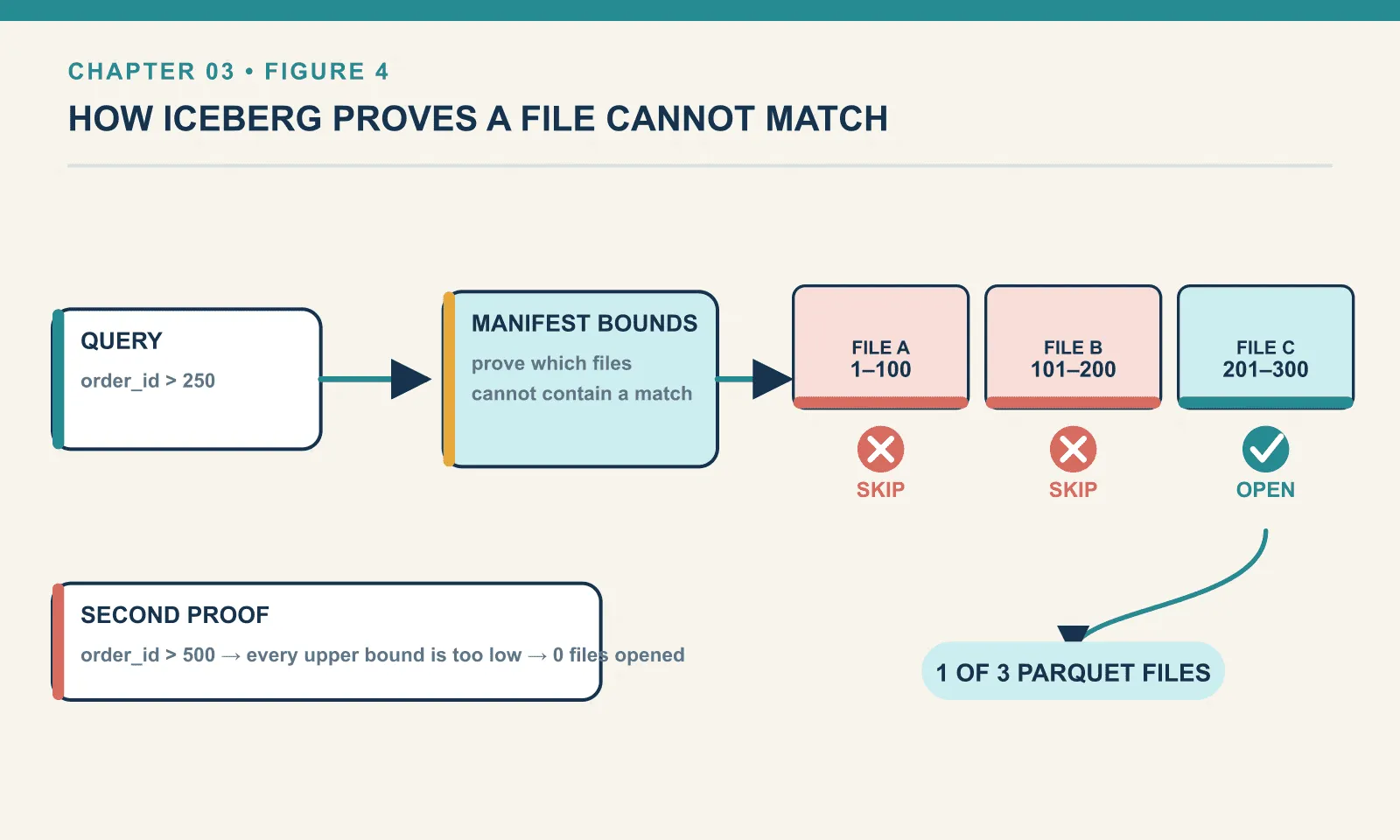
order_id > 500 touched none. The query returned a correct, empty answer having opened zero data files. The manifests alone were enough to prove no row could qualify. That is not a cache and not a shortcut. It is arithmetic on the bounds we just read.
And status == 'shipped' pruned to one file on a string column, with no partitioning and no index. It worked purely because each file happened to be written with a single status and the bounds recorded it. That last clause matters: the pruning worked because of how the data was laid out. Lay the same rows down in a shuffled order and every file’s bounds would span every status, pruning nothing. This is why sort order is a performance lever, and it is chapter 9.
You can see this yourself on any table:
list(t.scan(row_filter="order_id > 500").plan_files()) # []plan_files is the honest window into what a query will read. When someone tells you Iceberg made a query faster, this is where you check.
Why a tree, and why Avro
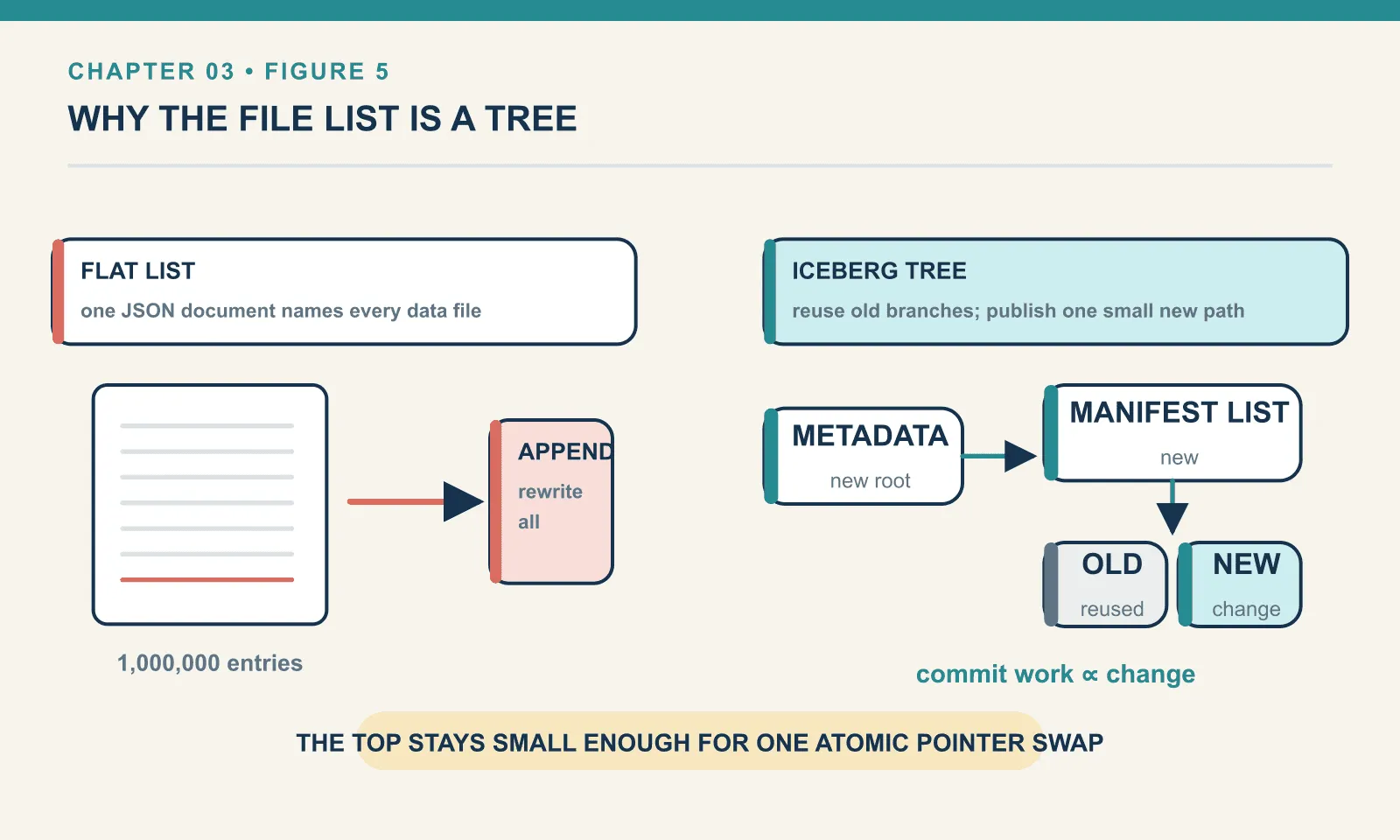
Why not put the file list in metadata.json? Because it would have to be rewritten in full on every commit. A table with a million data files would rewrite a million-entry JSON document to add one row. Splitting it into manifests means a commit writes one small manifest and one manifest list that references the existing ones. The tree exists so that commits stay proportional to the change, not to the table.
Why Avro for the middle layers and JSON at the top? The top file is read once per query and benefits from being human-readable. The middle layers are read in bulk, are strongly typed, and evolve. Avro is compact, has a real schema, and appends cheaply. You will never edit them by hand, and you are not meant to.
What a delete does to the tree
Everything so far was appends, which only add. Deleting is where the structure earns its keep. Delete the last fifty rows:
t.delete("order_id > 250")rows now: 250
data files now: 3Still three files. Look at the manifest entries and you can see exactly what happened:
status 1  seq 4  00000-0-04d77cfa-…  rows  50    <- new
status 2  seq 3  00000-0-67aa980b-…  rows 100    <- marked DELETED
status 1  seq 2  00000-0-45d3becb-…  rows 100
status 1  seq 1  00000-0-20074712-…  rows 100
The status field takes three values: 0 = EXISTING, 1 = ADDED, 2 = DELETED.
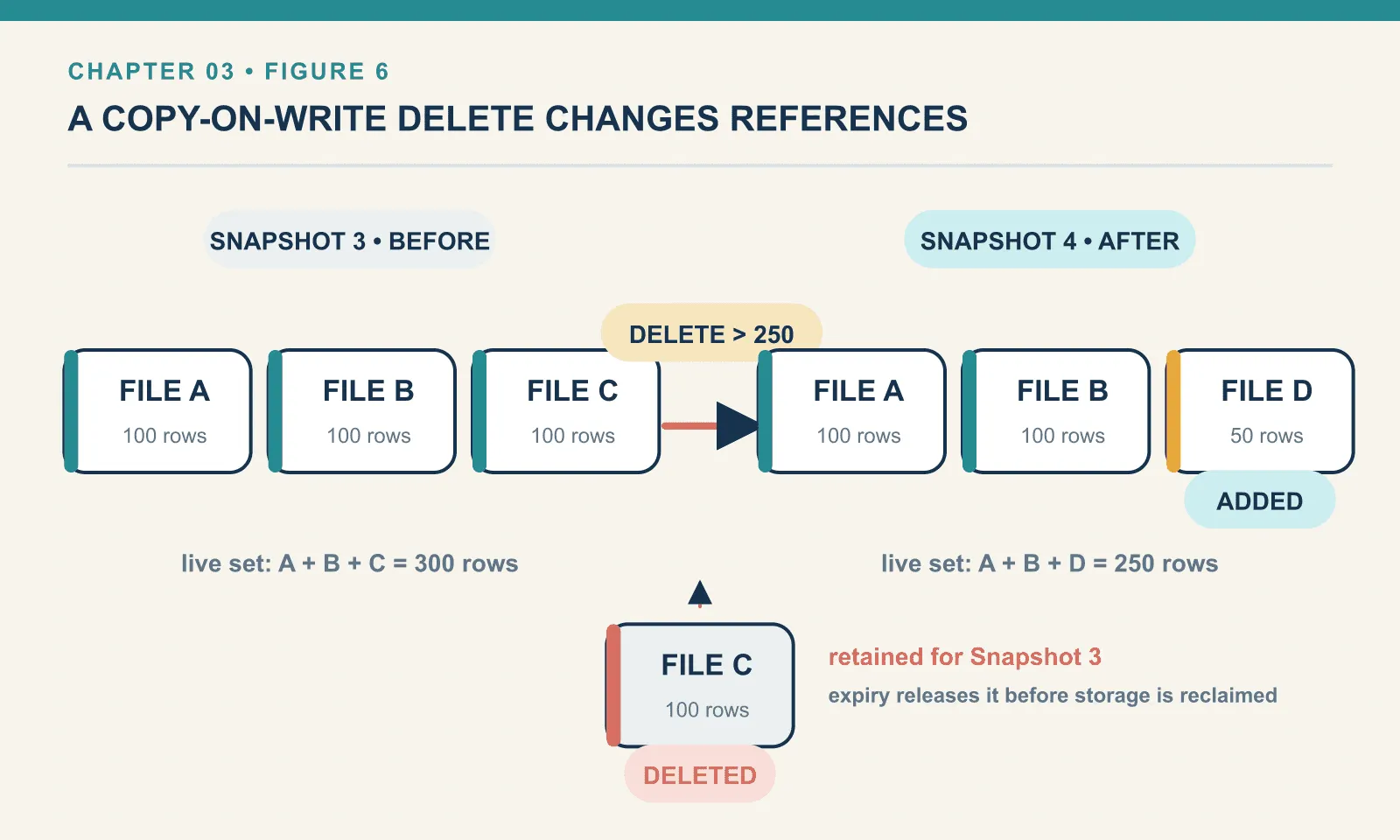
Iceberg did not edit the 100-row file, because Parquet files are immutable. It read the fifty surviving rows out of it, wrote them to a new file, and marked the original DELETED. That is copy-on-write. The snapshot summary confirms there is no third thing going on:
{'added-files-size': '3808', 'removed-files-size': '4216',
 'added-data-files': '1', 'deleted-data-files': '1',
 'added-records': '50', 'deleted-records': '100',
 'total-data-files': '3', 'total-records': '250', 'total-files-size': '12177',
 'total-delete-files': '0', 'total-position-deletes': '0'}
total-delete-files: 0. No delete file was written; the deletion is expressed purely by which data files the manifest says are live.
Two consequences worth carrying. Deleting fifty rows rewrote a hundred. The cost of a copy-on-write delete scales with the files touched, not the rows removed, which is why deleting one row from a one-gigabyte file rewrites a gigabyte. And the old file is still on disk, because a previous snapshot still references it. That is what makes time travel work, and what makes chapter 13’s snapshot expiry necessary before storage is actually reclaimed.
There is an alternative: write a small file that says “row 47 of that file is gone” and leave the original alone. That is merge-on-read, and it is chapter 10.
Do manifests grow forever?
A natural worry, given that each commit adds one of everything. Twelve more single-row appends:
after append  1: data files  4 | manifests  4 | snapshots  5
after append  4: data files  7 | manifests  7 | snapshots  8
after append  8: data files 11 | manifests 11 | snapshots 12
after append 12: data files 15 | manifests 15 | snapshots 16
One manifest per data file, exactly, with no merging. The counts track each other precisely, and commit.manifest-merge.enabled is unset on this table.
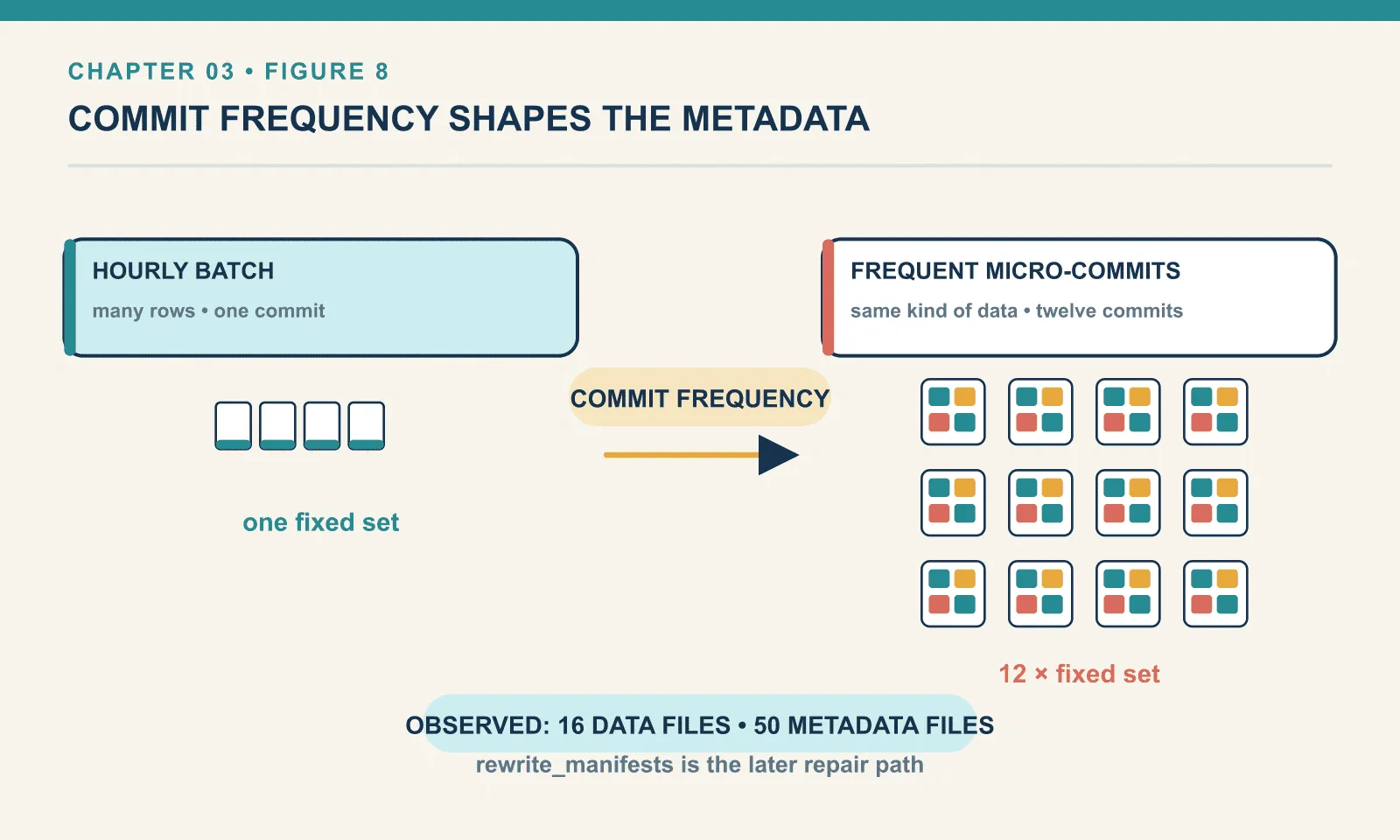
The result on disk is lopsided:
data dir: 16 files | metadata dir: 50 filesFifty metadata files against sixteen data files, for a table holding a few hundred rows. This is chapter 1’s cost finding again, now with a mechanism attached. It is not that Iceberg is heavy. It is that every commit writes a fixed four files regardless of how much data it carries, so a table written in small increments accumulates metadata far faster than data.
Iceberg’s answer is to merge manifests during commits once enough small ones pile up, governed by commit.manifest-merge.enabled and commit.manifest.min-count-to-merge. That did not happen here. I am not going to claim why from a single unpartitioned PyIceberg table. What I can say is what was observed: a straightforward sequence of appends produced a manifest per commit and merged none of them. The repair path is rewrite_manifests, which PyIceberg does not implement at all, and which chapter 13 runs from Spark.
The operational consequence is that commit frequency shapes an Iceberg table’s metadata independently of data volume. A streaming job committing every ten seconds and a batch job committing hourly can hold identical data and accumulate very different amounts of metadata.
The metadata log
One last key. metadata-log records every metadata.json this table has ever had:
00000-cc0bde69-….metadata.json | snapshot: None
00001-d880b5a0-….metadata.json | snapshot: 3648361078733550186
00002-f9a09046-….metadata.json | snapshot: 731466282651299659
00003-8313a350-….metadata.json | snapshot: 6488880964964305976
Four entries for four commits, and the first has no snapshot because it was the empty table from create_table.
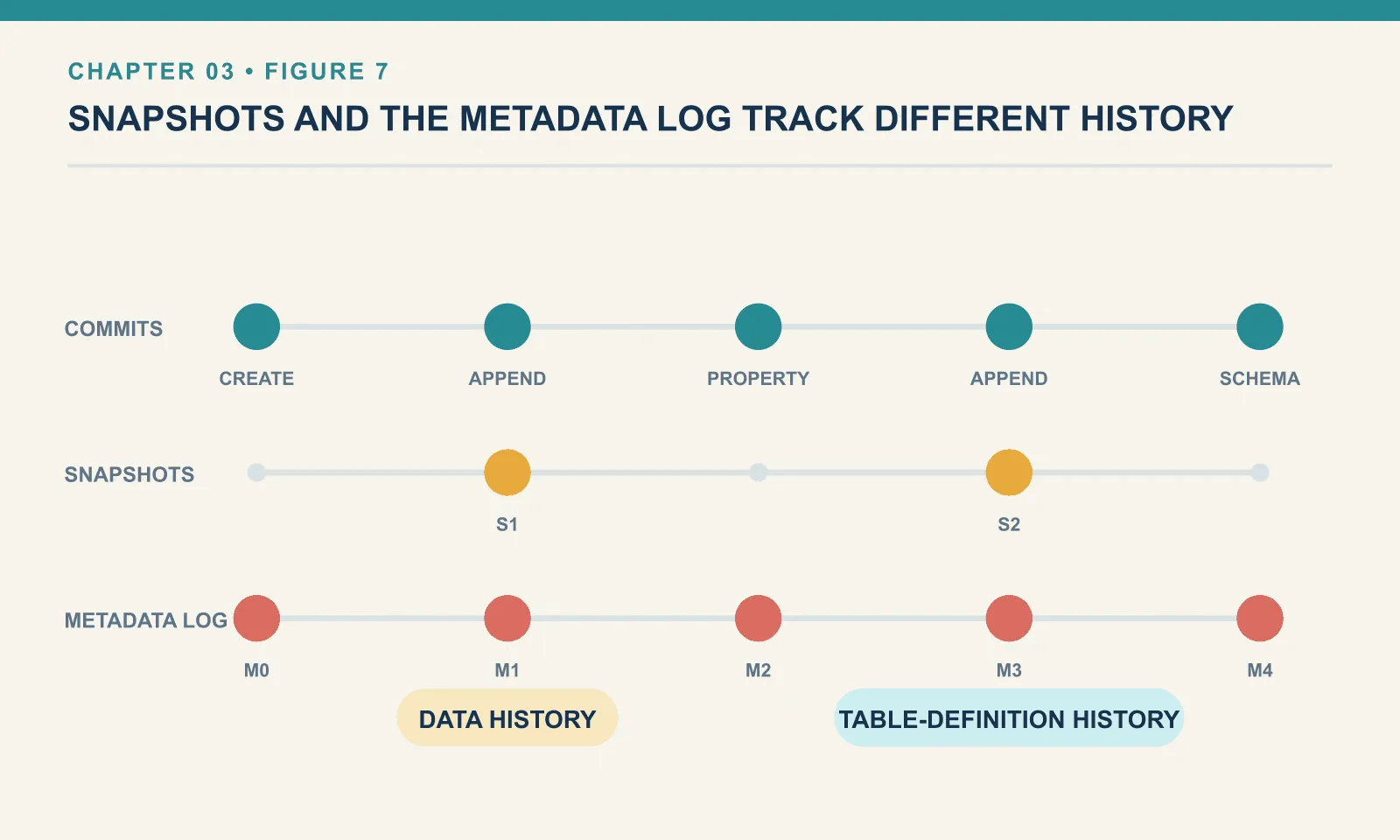
This is a different history from snapshots, and the distinction is easy to miss. Snapshots track data versions. The metadata log tracks file versions of the table definition, including commits that changed no data at all — setting a property, evolving a schema. Expiring snapshots does not by itself trim this log. write.metadata.previous-versions-max governs it, and it is one of the quieter contributors to metadata sprawl in chapter 13.
Final thoughts
An Iceberg table is a pointer to a JSON file, which names a list of manifests, which name data files and describe what is inside them. Four layers, and every one of them is a file you can open.
The shape is not arbitrary. Each layer exists to keep the layer above it small. Statistics live beside file names, so the planner never opens data it does not need. Manifests are grouped, so a commit rewrites a little rather than everything. The top file is small enough that swapping it is one atomic operation.
That last point is the one worth carrying forward. The whole tree is designed so that publishing a new version of a table is a single pointer swap — and a pointer swap needs somewhere to swap it. That somewhere is the catalog, which we have been using since chapter 2 without ever looking inside it.
Comments