Building the Fine-Tuning Laboratory
Prepare the router project, check one answer, and save a reproducible baseline before looking inside the inference code.
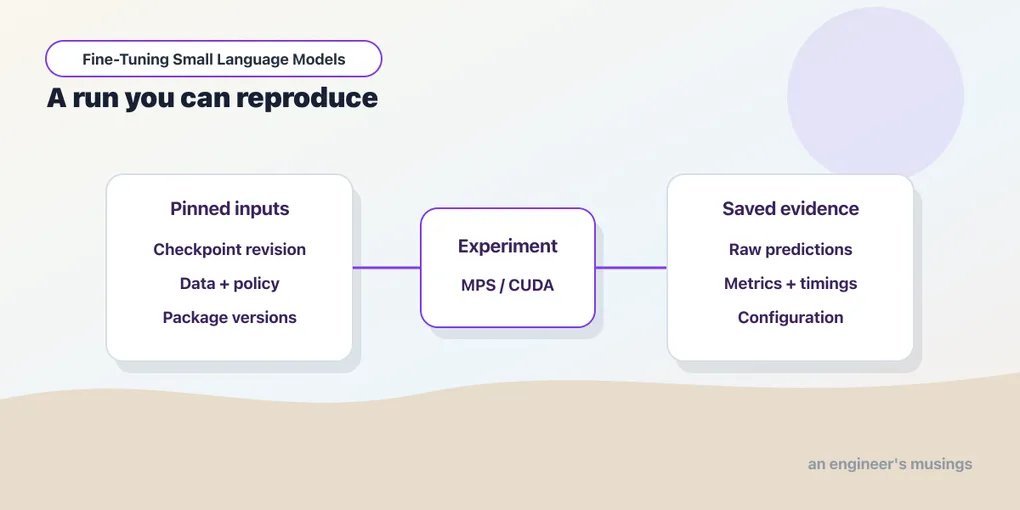
The bookshop router has a clear job: receive a request and return one destination label — and we now need to make it run. This chapter takes us from the companion project to one model response, then to a saved comparison of the prompting methods from Chapter 2.
Our first experiment uses the existing model without updating its weights. By the end, we should be able to find an individual answer, check the configuration that produced it, and carry the saved results into Chapter 5.
You can also follow that investigation using the companion’s published results without running Qwen locally. Both paths lead to the same files: individual predictions and a summary of the experiment.
Run against: Python 3.13.3; PyTorch 2.8.0; Transformers 4.56.2; Datasets 4.1.1; PEFT 0.17.1; TRL 0.23.1; scikit-learn 1.7.2. The local inference experiment used an Apple M1 Ultra with 64 GiB unified memory, macOS 26.6.2, and MPS. The standard-library saved-answer activity ran with Python 3.13.5 against the published baseline-v1 records for test-017 and test-037.
Not run. CUDA inference and CPU-only Qwen benchmarking are outside this laboratory setup. CPU ran the companion’s small mechanics demonstrations. Importing TRL and constructing a PEFT adapter do not verify a training workload; Chapters 7–9 contain the actual router training experiments.
Prepare the companion project
The public fine-tuning-specialists project contains the code, example data, and recorded results. Clone it and enter its root directory:
git clone https://github.com/book-companion/fine-tuning-specialists.git
cd fine-tuning-specialists
All remaining commands run in this directory, and the published experiment is already in runs/baseline-v1/, so we can inspect an answer before installing any model libraries. Leave that directory intact — a new experiment will use a new directory.
Read one saved response
The .jsonl extension means JSON Lines: each line is a separate JSON record. This standard-library script reads the saved responses and selects one by request ID, prompting method, and repetition. Save it as read_saved_answer.py in the companion directory and run python3 read_saved_answer.py with your existing Python 3 installation.
import json
from pathlib import Path

path = Path("runs/baseline-v1/predictions.jsonl")
records = [json.loads(line) for line in path.read_text().splitlines()]
row = next(
    record for record in records
    if record["id"] == "test-017"
    and record["mode"] == "twenty"
    and record["repeat"] == 0
)
for field in ("text", "gold", "raw", "prediction"):
    print(f"{field}: {row[field]}")
print("Correct:", row["prediction"] == row["gold"])
text: Read this pasted email and summarize the complaint.
gold: DOCUMENT
raw: DOCUMENT
prediction: DOCUMENT
Correct: Truegold is the expected destination, raw is the model’s original text, and prediction is the label accepted by the parser. This answer passes both checks — it has the required form and matches the expected route — and the script only reads stored results; it does not load or call the model.
You can inspect the same file in a text editor without Python. To continue using published results, jump to Find one answer in the saved run. To produce your own responses, continue with local setup.
Before a local model run
Local execution adds dependencies, model files, and a compute device; these are the prerequisites and checkpoints for the recorded path:
| Item | What to check |
|---|---|
| Tools | Git for the clone above, Python 3.13, and uv; python3 --version and uv --version identify the available tools. |
| Environment | Install requirements-frozen.txt into .venv; the validation command and six router tests below should pass before loading Qwen. |
| Device | The recorded model run uses Apple Silicon/MPS. The machine had 64 GiB unified memory, but the run needed far less: the float32 weights occupy about 2.4 GB, and the whole process peaked at about 5.1 GB. Both figures are recorded in the run’s results.json. |
| Model files | The first model load in smoke.py downloads the pinned files from Hugging Face if they are absent from the local model cache. It needs network access for that download; later runs reuse the cache. |
| First success | A completed smoke-test response establishes the request-to-answer path. Compare the returned label with the policy separately. |
These commands describe the recorded macOS environment. The saved-results activity remains available on other machines while you prepare a compatible model setup. model.json identifies the checkpoint and settings; router.py runs the comparison.
Install the project environment
A virtual environment keeps this project’s packages separate from other Python work, and ours lives in .venv.
The commands below assume Python 3.13 and uv, the environment and package-management tool used here, are available; the uv installation guide covers macOS, Linux and Windows. These commands and paths describe the recorded macOS setup, and a different operating system or accelerator may need its own compatible environment.
uv venv --python 3.13 .venv
uv pip install --python .venv/bin/python -r requirements-frozen.txt
The first command creates .venv, and the second installs the versions listed in requirements-frozen.txt into it. A pin fixes a dependency to a particular version instead of asking for whatever happens to be newest.
The original run used Python 3.13.3. Record your exact interpreter and package versions with your results, because the frozen file describes the measured macOS environment rather than every machine.
We call .venv/bin/python explicitly in the remaining commands. That selects the project’s interpreter even if you have not activated the environment in your shell — installing packages into one interpreter does not help a command that accidentally runs with another.
The main tools are PyTorch, which performs the model’s numerical calculations, and Transformers, which loads the model and tokenizer and generates text. The same installation includes tools for later training chapters; Appendix A lists their roles.
Once the comparison begins, keep the environment fixed. Upgrading packages between prompting methods would change the tools while we are trying to measure the effect of examples, so make upgrades between named experiments and repeat the setup checks afterward.
Check the examples before loading the model
Our requests have three roles: demonstrations can appear in prompts, development cases help us check setup and investigate behavior, and test cases are reserved for the comparison after its settings have been fixed. A file’s split field records which of these collections it belongs to.
The files live under data/: demonstrations.jsonl, development.jsonl, and test.jsonl — and like the saved responses, each contains one JSON record per line.
The companion contains 40 demonstrations, 10 development cases, and 50 test cases, with every destination equally represented: eight demonstrations, two development cases, and ten test cases each. Equal counts make the destinations easy to compare.
Before downloading or loading Qwen, check the files. --validate-only checks allowed labels, split fields, and duplicate text across the collections, then prints the count of each label in each collection. It does not import or download Qwen:
.venv/bin/python router.py --validate-only{
"demonstrations": {
"DATABASE": 8,
"DOCUMENT": 8,
"WEB": 8,
"CALCULATOR": 8,
"GENERAL_LLM": 8
},
"development": {
"DATABASE": 2,
"DOCUMENT": 2,
"WEB": 2,
"CALCULATOR": 2,
"GENERAL_LLM": 2
},
"test": {
"DATABASE": 10,
"DOCUMENT": 10,
"WEB": 10,
"CALCULATOR": 10,
"GENERAL_LLM": 10
}
}If the counts match, the files have passed these structural checks. Next, run six small checks of the router code, covering data separation, allowed-label parsing, invalid-output accounting, balanced fixed prompts, and the example selector’s boundaries. Select test_router.py to run these checks without including the training tests used in later chapters:
.venv/bin/python -m unittest discover -s . -p 'test_router.py'The recorded run printed six dots, one per test, followed by OK. Your elapsed time will differ:
......
----------------------------------------------------------------------
Ran 6 tests in 1.067s

OK
Passing these checks means the files and tested code rules are ready for the model run — not that the model will choose the right routes.
The duplicate check lowercases text and normalizes whitespace before comparing it, which catches the same sentence written with different capitalization or spacing. It cannot establish that two differently worded requests are independent, or that their labels are correct, so each row also retains its source history, called provenance, and a rationale for its expected label. These are AI-assisted synthetic teaching examples without independent human annotation; build_data.py can reconstruct the original fixture files and their recorded explanations.
Keep the model and its settings fixed
Open model.json. A model name identifies a repository, and a revision identifies a particular version of its files. The runner loads the model and tokenizer from the same recorded revision, so later changes at the host cannot quietly alter this experiment.
{
  "model_id": "Qwen/Qwen3-0.6B",
  "revision": "c1899de289a04d12100db370d81485cdf75e47ca",
  "enable_thinking": false,
  "max_new_tokens": 12,
  "do_sample": false,
  "attention": "eager",
  "dtype": "float32",
  "dataset_version": "router-v1",
  "policy_version": "bookshop-routing-v1"
}
For this first run, keep the supplied settings. Read them as three practical choices:
model_idandrevisionselect the Qwen checkpoint. The dataset and policy versions identify the examples and routing rules used with it.enable_thinking=falserequests an answer without a separate reasoning response.max_new_tokens=12allows up to twelve new tokens for that answer, beyond the input prompt.do_sample=falseselects the highest-scoring next token at each step, a choice called greedy decoding. This holds the token-selection rule fixed across prompting methods.
The dtype and attention fields also remain fixed. Appendix A explains their representations and implementation choices.
The Qwen model card describes the checkpoint’s chat interface and thinking switch. Its weights are downloaded separately into a local model cache, where later runs can reuse them. The first model load may therefore include a download.
Get one answer from the model
A device is where PyTorch performs the computation: cpu uses the processor, mps selects supported Apple Silicon acceleration through PyTorch’s Metal backend, and cuda selects NVIDIA acceleration. The available choices depend on the machine and installation.
A smoke test is a small run that checks whether the main pieces work together. Ours loads the model, routes one request — “How many orders did our bookshop receive yesterday?” — with the policy and no demonstrations, and reports the response. It also checks that some tools needed for later training chapters are available:
.venv/bin/python smoke.py{
"device": "mps",
"parameters": 596049920,
"lora_trainable": 1146880,
"raw": "DOCUMENT",
"parsed": "DOCUMENT",
"input_tokens": 239,
"sft_trainer_imported": true,
"versions": {
"torch": "2.8.0",
"transformers": "4.56.2",
"datasets": "4.1.1",
"peft": "0.17.1",
"trl": "0.23.1",
"scikit-learn": "1.7.2"
}
}Start with device, raw, and parsed: the script chose mps, generated the text DOCUMENT, and accepted it as one of our allowed labels. But this request needs DATABASE — the shop’s order records hold yesterday’s count — so the program has completed the input-to-answer path while the model has made a routing mistake.
A valid but wrong destination belongs in the quality comparison; it is not, by itself, a reason to reinstall the tools. This smoke test also imports training classes and constructs an adapter, so those dependencies are required even for this setup check. Appendix A explains the counts and checks.
An unavailable device, an import error, and a valid but wrong route send us to different places. Check hardware selection for the first, dependencies for the second, and the prompt and model behavior for the third. The full benchmark requires a named device and rejects an unavailable requested accelerator rather than silently substituting the CPU.
The PyTorch MPS documentation describes availability checks and device placement. Our recorded support is narrower — this inference path ran on MPS — and later training and quantization paths receive their own checks.
Run the comparison into a fresh directory
Once the smoke test has completed, we can collect the comparison. The model stays loaded while the runner asks each method the test requests, and your own answers go in a new output directory:
.venv/bin/python router.py --device mps --split test --repeats 3 --output runs/local-baseline
.venv/bin/python summarize.py runs/local-baseline
The first command runs all four prompting methods from Chapter 2: zero-shot, five fixed examples, twenty fixed examples, and five dynamically selected examples, and the second reads the saved result and prints summary tables.
--split test selects the held-out collection and --repeats 3 processes it three times. The published run took about two minutes for the comparison loop once the model was loaded; loading from the cache took about a second, and a first run adds the download. The output directory must be new, so if you already used runs/local-baseline, choose another name for the next run rather than deleting the published baseline.
The runner reports progress per repetition and ends with one line per method. The three numbers are accuracy, a quality measure called macro-F1, and median request time in milliseconds. Chapter 5 teaches how to interpret the latter two; here, use the output to recognize a completed run. This is what the published run printed:
Finished repeat 1: 200 predictions
Finished repeat 2: 400 predictions
Finished repeat 3: 600 predictions
zero 0.46 0.354 195.2
five 0.68 0.674 217.3
twenty 0.76 0.756 287.6
dynamic 0.64 0.645 170.0
summarize.py turns the saved run into the tables Chapter 5 reads, and the mps argument requests Apple Silicon acceleration explicitly. On another machine, choose an available device deliberately and retain its identity with the result, because the recorded MPS timings describe the original workload and should not be copied into a result for another backend.
Repeated requests provide timing observations and let us check whether the output stays the same; they do not create more unique test questions. The summary keeps first-pass quality separate from timings pooled across repetitions, and Chapter 5 reads both kinds of result.
A completed run writes results.json beside predictions.jsonl — an interrupted run can leave predictions without a completed summary, so the presence of some prediction rows alone does not mean the comparison finished.
Find one answer in the saved run
For your own run, change the reader script’s path to runs/local-baseline/predictions.jsonl; for the published experiment, keep runs/baseline-v1/predictions.jsonl. Use the same three selectors to locate an answer. Your local response may differ, so compare its prediction with its own gold field.
Keeping raw separately matters when a response fails the format check: we can read what the model actually said instead of seeing only a failed score. Each row also preserves input and output token counts, elapsed time, and selected demonstration IDs. These let us investigate the context and cost of an individual answer.
Next, open results.json in the same directory — unlike JSON Lines, it contains one complete JSON object, whose metadata describes the experiment and whose metrics summarizes the predictions. The model revision, package versions, device, generation settings, and data identities let us ask whether two results came from comparable setups.
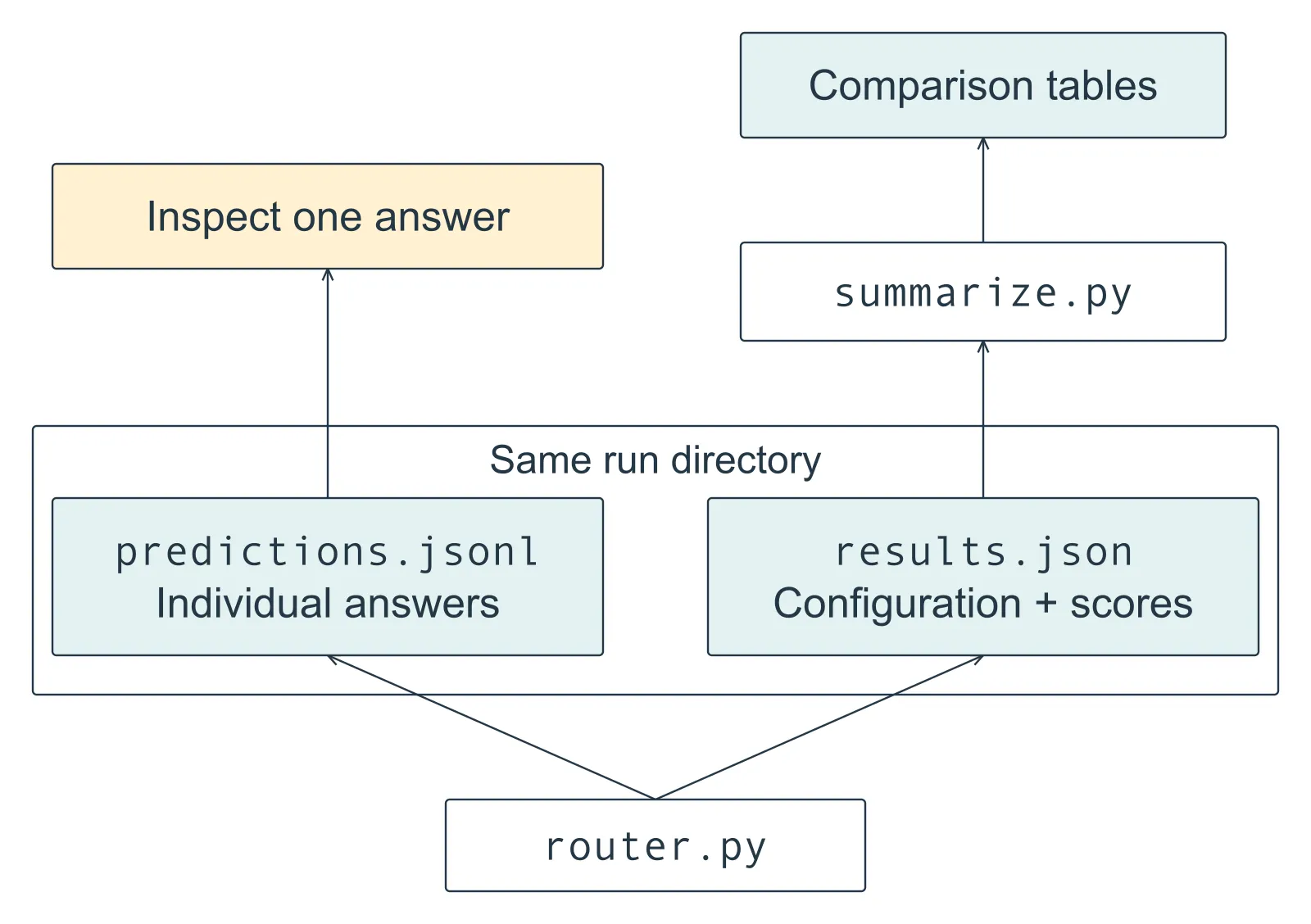
Figure 04.1. Read upward. The runner saves individual answers and a summary in the same directory. Open predictions.jsonl to investigate a response; use results.json to identify the configuration and compare scores. summarize.py reads the saved summary to print tables without running the model again.
The record includes hashes, content fingerprints of the data files, runner source, and policy. They help detect a changed file — the files themselves are still needed to reproduce the experiment. Training fields are null because this run did not update weights or produce a trained artifact.
We now have a completed summary, its individual answers, and the configuration behind them. The next section connects these files to the request-to-label path through the three calls in router.py that do the work. Appendix A preserves the surrounding setup lines, the timing internals, and the memory counters for closer inspection.
Follow one request through the runner
Return to the smoke-test request: “How many orders did our bookshop receive yesterday?” The runner prepares it, asks for a continuation, and checks that continuation against our five labels. Each step is one call, and the three excerpts below are taken from router.py. They use its already-loaded tokenizer, model, and selected device, so they are something to read beside the file rather than paste into an empty session.
First, messages_for puts the policy before the request. For few-shot methods, solved user/assistant pairs appear between them. The tokenizer’s chat template turns those messages into the format expected by Qwen, marking their roles and the place where the assistant’s answer begins, and then represents that formatted input as token IDs:
inputs = tokenizer.apply_chat_template(
    messages_for(request_text, examples),
    tokenize=True,
    add_generation_prompt=True,
    enable_thinking=False,
    return_dict=True,
    return_tensors="pt",
).to(device)
add_generation_prompt=True leaves the sequence ready for the assistant’s answer, and enable_thinking=False is the choice recorded in model.json. This is why the recorded input count includes the policy and conversation markers as well as the customer’s words.
Next, the model generates new tokens under the settings in model.json. We call these new tokens the continuation. The twelve-token limit applies to this answer, not to the combined prompt and answer:
with torch.inference_mode():
    output = model.generate(
        **inputs,
        do_sample=False,
        temperature=None,
        top_p=None,
        top_k=None,
        max_new_tokens=12,
        eos_token_id=tokenizer.eos_token_id,
        pad_token_id=tokenizer.pad_token_id,
    )
The runner passes do_sample=False at the call site and clears the three settings that only sampling uses. A checkpoint can carry generation defaults of its own, and we want this comparison to use greedy decoding whatever the files say.
Finally, the runner keeps only the continuation and converts its token IDs back into text. The returned sequence includes the input prompt as well as the new tokens, so the code uses a slice to remove the prompt. This matters because the policy and demonstrations already contain destination labels; those labels are not the answer to the new request:
continuation = output[0, inputs["input_ids"].shape[-1]:]
raw = tokenizer.decode(continuation, skip_special_tokens=True)
prediction = parse_label(raw)
Keeping the suffix after the input tokens gives us only the model’s new answer. We convert that answer to text and check its label, saving the original response even when the format is invalid.
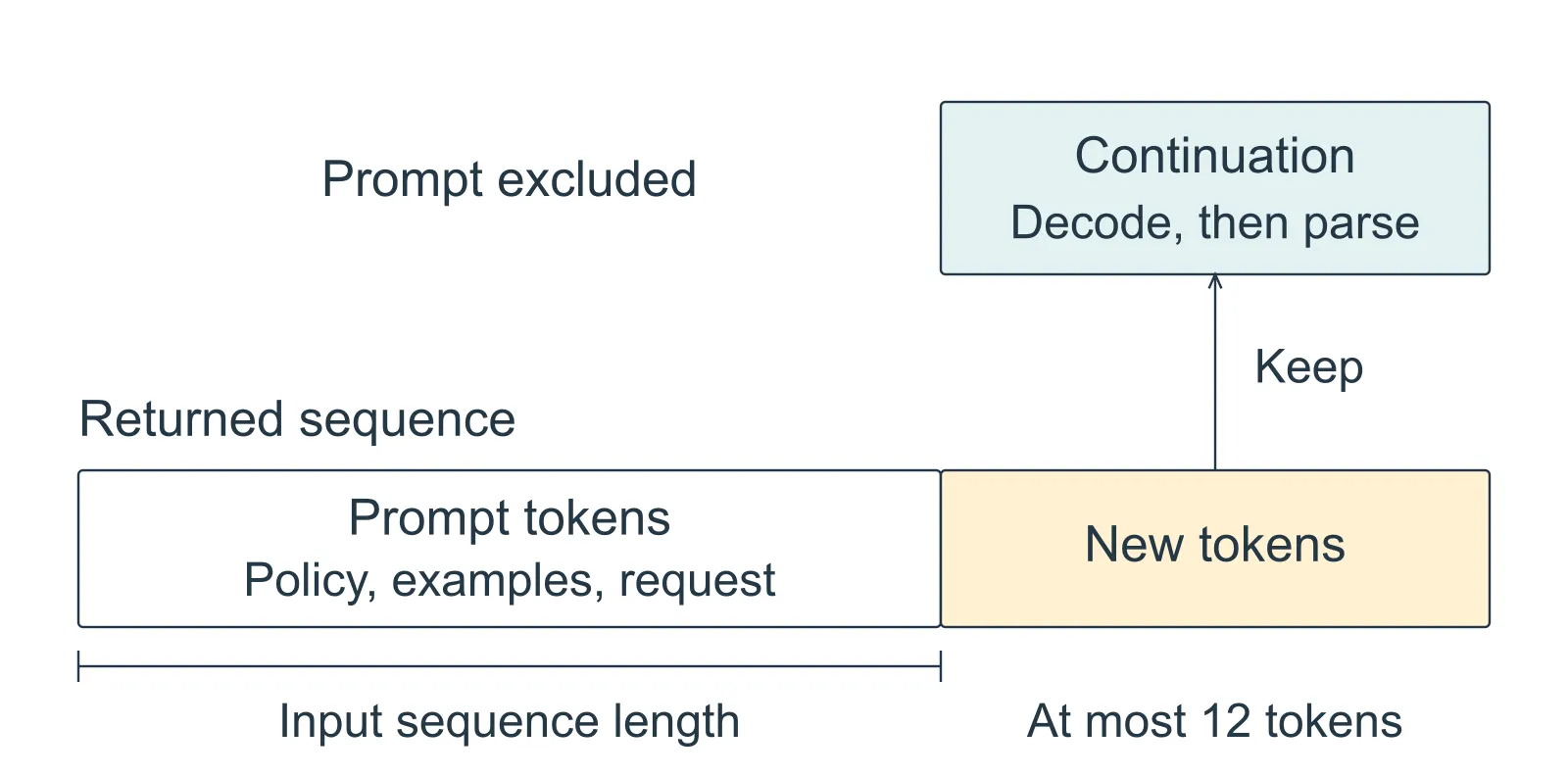
Figure 04.2. Read upward from the returned sequence. The slice keeps the suffix after the input tokens, so labels already present in the policy or examples cannot be mistaken for the generated answer. Segment widths are schematic; the continuation can stop before twelve tokens.
The parser accepts an allowed label only when it is the complete response after removing surrounding whitespace, so DOCUMENT passes the format check in our smoke test even though it chooses the wrong route. The saved expected label lets the scoring step detect that second failure. The same preparation and checking rules apply to every prompting method.
Exercises
1. Follow a changed tokenizer
Two runs use the same model ID and package versions but different tokenizer revisions. Why might the same visible request no longer represent the same experiment?
Answer
The tokenizer or chat template can change the token sequence supplied to the model. The experiment therefore records and loads both model and tokenizer revisions. Matching only the human-readable model name and request text is insufficient.
2. Interpret a wrong smoke-test answer
The model loads on MPS and returns DOCUMENT for a request expected to be DATABASE. What has the smoke test established, and what remains to check?
Answer
It has established that this model path can load, prepare an input, and generate a response. It has not established routing quality. Investigate the policy, examples, and behavior on the evaluation cases before assuming that rebuilding the environment will repair the route.
3. Investigate a different response
Change the saved-answer script to select test-037, keeping method twenty, repetition 0, and the published baseline-v1 path. Before running it, decide which route “Compare the payment deadlines in these uploaded supplier letters” needs. Does the saved response fail the label format or the routing rule? What would you inspect next?
Answer
The supplied letters require DOCUMENT. The saved raw and prediction are both GENERAL_LLM, while gold is DOCUMENT, so the script prints Correct: False. The label has the required form; the destination is wrong. Inspect the policy and selected demonstrations to investigate the mistake. This record alone does not tell us its cause, and any examples designed from it belong to development rather than a fresh final test.
4. Recognize a completed comparison
A run stops after writing some prediction rows, before it writes results.json. Has it produced a completed comparison? Which files would you look for before taking a run into Chapter 5?
Answer
The partial predictions are evidence of the requests that finished, but the comparison is incomplete. A completed run has predictions.jsonl and results.json in the same directory. The summary contains configuration metadata and scores, and the individual rows let us inspect the answers behind those scores. Use a fresh directory for another run so the existing evidence remains intact.
A result we can return to
Whether we ran the router or inspected the published files, we can now connect a request to its recorded answer and find the configuration behind it. A poor score will still give us something useful to inspect. The next chapter reads the recorded comparison, starting with what the router got right and where its requests went wrong.
Comments