What Fine-Tuning Actually Changes
Follow one small weight update, connect it to the router's training examples, and understand what full fine-tuning, LoRA, and QLoRA change and save.
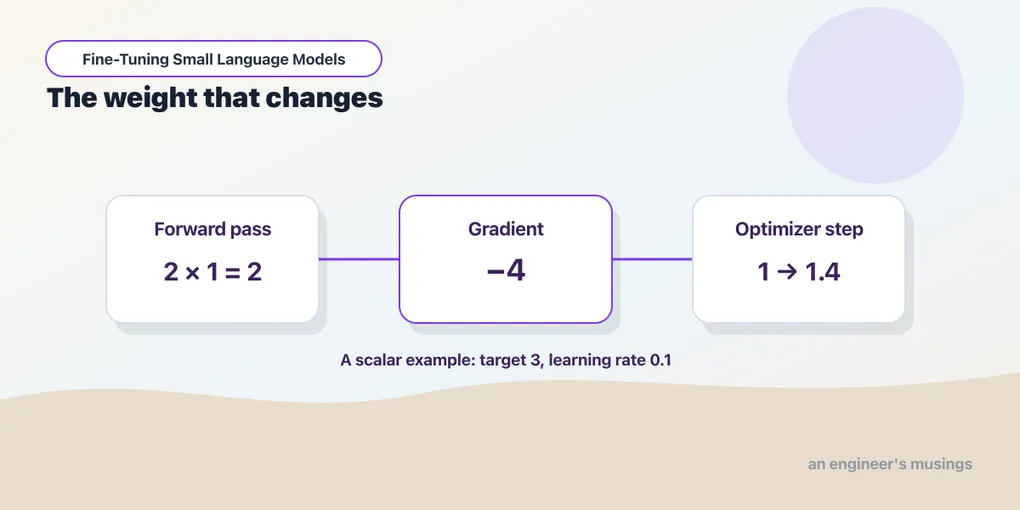
Our router can receive twenty solved examples in its prompt and still keep exactly the same stored weights; fine-tuning uses examples during a separate training process to change the model, then saves the result for later requests.
To understand how those changes could improve routing, we need to see how an update affects a model’s answer, and the router has many weights working together, which makes that relationship difficult to follow directly.
We can make the relationship visible with a much smaller model: a predictor whose answer depends on just one adjustable weight. It takes a number as input and multiplies it by that weight. After following one update in this simple model, we can return to the router and connect the same basic process to learning from requests and their desired routes.
What changes when a model learns?
Our predictor receives the number 2 as its input, and we call its adjustable weight w — with w = 1, its answer is 2 × 1 = 2.
The input and the weight have different jobs. The input is information we supply for this request, while the weight is a stored value the predictor uses to calculate its answer. So supplying 4 instead of 2 changes the question, and changing the weight changes how the predictor answers questions.
A parameter is one of these adjustable values inside a model; we often call the model’s parameters its weights. A language model has many such values working together, but the distinction between input and stored values still holds.
When the model answers a request, it calculates with its current weights — a calculation called a forward pass. Reading examples in a prompt can affect the answer without updating those stored values, just as changing the input changes our little predictor’s answer without changing w.
Training adds an operation that ordinary answering leaves out — it updates the weights — and once we save the updated values, later requests use the changed predictor.
How can an example guide an update?
Our predictor currently answers 2, but suppose the desired answer for this input is 3; we now have a training example, with input 2 and target 3.
We measure how far the prediction is from the target with a quantity called the loss. For this numerical example, subtract the target from the prediction and square the difference. The mistake is 2 - 3 = -1, giving a loss of (-1)² = 1 — squaring makes errors in either direction positive, and an exact answer has a loss of zero.
Increasing the weight a little would help, and here is a preview of the update we derive below. At w = 1.4, the prediction becomes 2 × 1.4 = 2.8, closer to the target, and the loss becomes (2.8 - 3)² = 0.04.
The companion’s small training example makes that update, producing these rounded values:
| Quantity | Before the update | After the update |
|---|---|---|
| Input | 2 | 2 |
| Desired answer | 3 | 3 |
| Weight | 1 | 1.4 |
| Prediction | 2 | 2.8 |
| Loss | 1 | 0.04 |
The example and its target stayed the same; changing the stored weight brought the prediction closer and reduced the loss.
For one weight, we can see the useful direction ourselves. Training software calculates a gradient: the rate at which the loss changes as we make a small change to the current weight. To see where its value comes from, calculate the loss at weights just below and above w = 1:
| Weight | Prediction (2 × weight) | Loss (prediction − 3)² |
|---|---|---|
| 0.9 | 1.8 | 1.44 |
| 1.0 | 2.0 | 1.00 |
| 1.1 | 2.2 | 0.64 |
Across the two outer rows, the weight increases by 1.1 - 0.9 = 0.2, while the loss changes by 0.64 - 1.44 = -0.8. Dividing the change in loss by the change in weight gives a rate:
Change in loss / change in weight = -0.8 / 0.2 = -4The negative sign tells us that the loss falls as the weight increases over this interval, and the size of the rate tells us how strongly the loss responds to that change.
This comparison gives the average slope between the two outer weights. For this particular squared-error curve it also equals the exact local slope at the middle weight, w = 1 — that is where the gradient of −4 comes from. For other loss curves, comparing nearby values generally gives an approximation to the local slope.
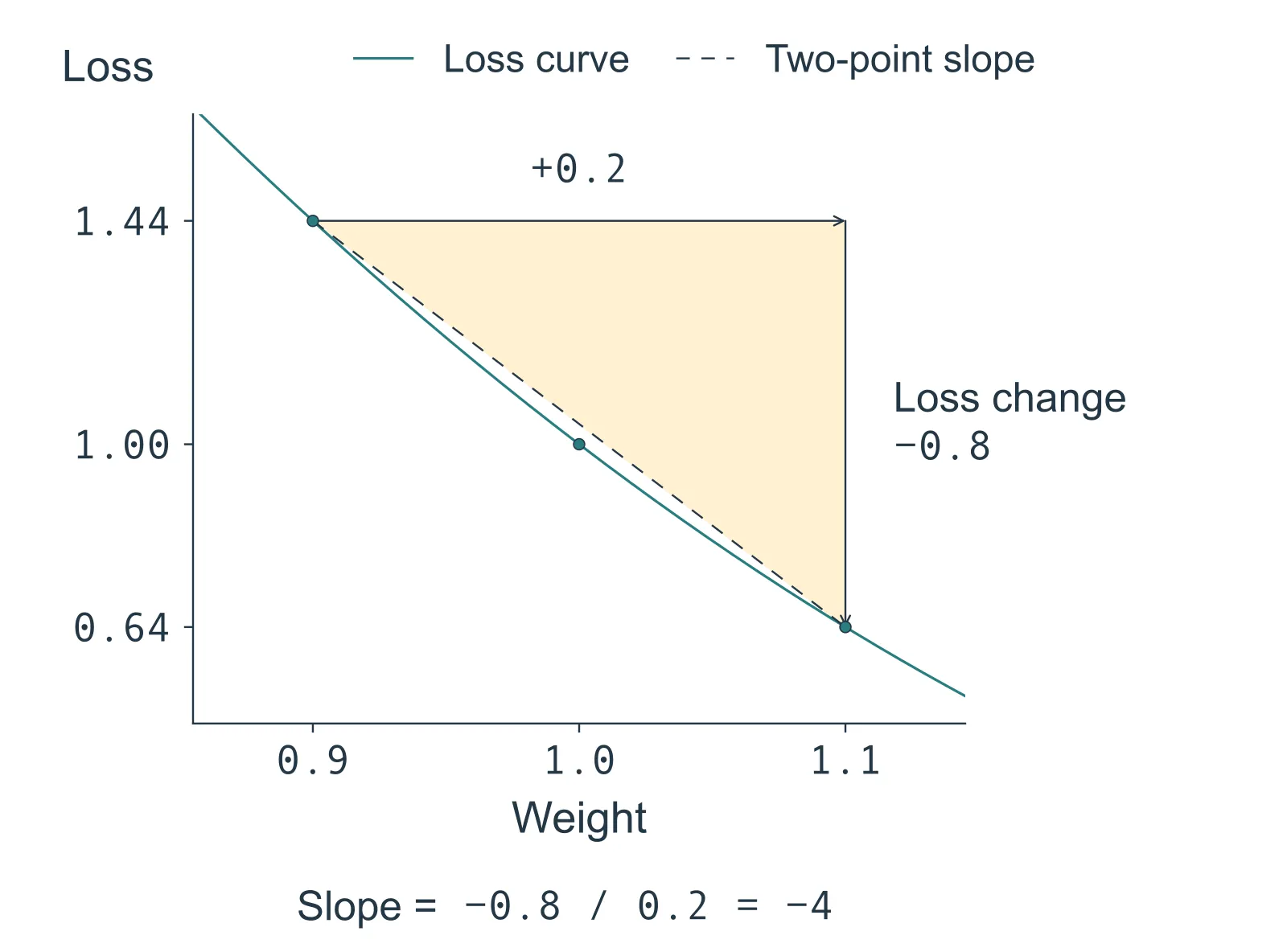
Figure 03.1. The solid curve is the loss for this predictor; the dashed line compares the two outer points. The shaded triangle shows the weight increase and loss decrease used in the calculation. Its slope is −0.8 divided by 0.2, or −4. For this quadratic, that average slope also equals the local slope at the middle weight, 1.0.
The training library calculates the local slope from the model’s computation automatically; the nearby-weight comparison lets us see what that slope means without working through calculus.
An optimizer uses that information to choose and apply an update, with a learning rate controlling the scale of the move. With a learning rate of 0.1, the new weight is 1 - 0.1 × (-4) = 1.4 — subtracting a negative gradient moves the weight up, toward the lower loss. The gradient describes the local behavior of the loss; the optimizer is what changes the weights.
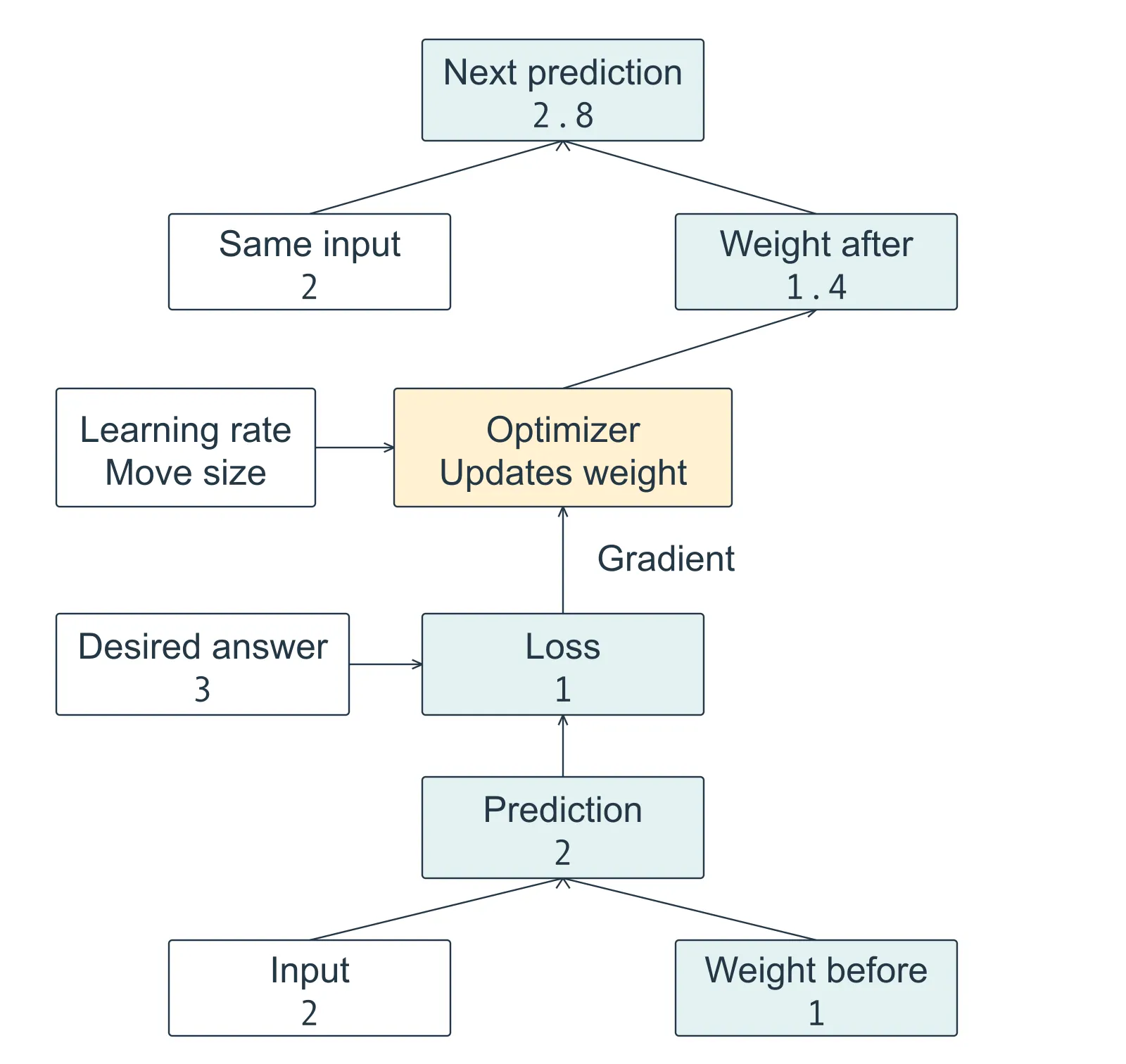
Figure 03.2. Read from bottom to top. The desired answer enters the loss calculation. The gradient guides the optimizer, which updates the stored weight; the next prediction uses that new weight with the same input. This shows one update, with rounded values from the numerical example.
Try the update in Python
The arithmetic fits in a small Python script with no packages to install. Save it as one_update.py and run python3 one_update.py. For this squared-error loss, the slope at any weight is 2 × x × (prediction − target); at weight 1 that is 2 × 2 × (2 − 3) = −4, the same value the nearby-weight comparison found. The script computes it from the current prediction instead of typing it in, and the update follows new_weight = weight - learning_rate * gradient.
x, target, weight = 2.0, 3.0, 1.0
learning_rate = 0.1

prediction = x * weight
loss = (prediction - target) ** 2
print(f"Before: weight={weight:.1f}, prediction={prediction:.1f}, loss={loss:.2f}")

gradient = 2 * x * (prediction - target)
weight = weight - learning_rate * gradient
prediction = x * weight
loss = (prediction - target) ** 2
print(f"After:  weight={weight:.1f}, prediction={prediction:.1f}, loss={loss:.2f}")
Before: weight=1.0, prediction=2.0, loss=1.00
After: weight=1.4, prediction=2.8, loss=0.04Before rerunning, change only learning_rate to 1.0 and predict the result. The weight becomes 5, the prediction becomes 10, and the loss rises to 49. A larger move can pass the useful region even when it starts in a helpful direction.
Because the gradient is recalculated from the current prediction, the same three lines can run again from the weight the previous update left behind. That is what training does: it repeats the process across examples, each time computing the slope where the weights now are. Put the update in a loop and watch the loss fall:
x, target, weight = 2.0, 3.0, 1.0
learning_rate = 0.1

for step in range(1, 6):
    prediction = x * weight
    gradient = 2 * x * (prediction - target)
    weight = weight - learning_rate * gradient
    loss = (x * weight - target) ** 2
    print(f"step {step}: gradient={gradient:.3f}, weight={weight:.3f}, loss={loss:.4f}")
step 1: gradient=-4.000, weight=1.400, loss=0.0400
step 2: gradient=-0.800, weight=1.480, loss=0.0016
step 3: gradient=-0.160, weight=1.496, loss=0.0001
step 4: gradient=-0.032, weight=1.499, loss=0.0000
step 5: gradient=-0.006, weight=1.500, loss=0.0000The gradient shrinks as the prediction approaches the target, so each step moves the weight less than the one before, and the weight settles at 1.5, where 2 × 1.5 is exactly 3. A language model has hundreds of millions of weights and the training library computes every gradient for us, but each one is this loop with a different loss. Improvement on familiar examples must still be checked against new requests.
The single-weight implementation remains in the companion’s mechanics.py for closer inspection once Chapter 4 has set the project up. Chapter 7 introduces the training code and its settings while applying these operations to the bookshop router.
What does the model learn from a routing example?
For our bookshop, the desired answer is a destination rather than the number 3. A training example can pair the request “Has order BK-907 been dispatched?” with the response DATABASE. The routing policy still accompanies the request, so the example teaches a choice under the same rules we use when asking for an answer.
Supplying an input together with its desired response is called supervised fine-tuning — the training process uses those pairs to adjust the model toward producing the responses we want.
Chapter 2 introduced tokens, the pieces of text the model processes. The router generates its label as text, and a label can contain several tokens. At each position, the language model assigns probabilities to possible next tokens. Generating an answer chooses a token and continues; training instead uses the known desired response to measure how much probability the model assigned to its next token.
That gives us something to compare even before a complete label is generated. If the next desired token receives little probability, it contributes a larger loss; assigning it more probability lowers that contribution. For a response with several tokens, training checks each desired next token using the request and the desired response tokens that precede it.
The single-weight predictor compared its numerical answer with 3, and the router compares token probabilities with the desired response — the loss calculation changes, but the process remains prediction → loss → update. Training software calculates a gradient for each trainable weight so the optimizer can adjust many values together. The update seeks to make the desired response more likely; checking complete labels afterward tells us whether routing actually improved.
For the dispatch request, we want training to strengthen the choice of DATABASE when private order records are needed. The example provides a destination, not the order’s dispatch status — answering that later question still requires reading the records.
Other examples must teach the boundaries too. “What is an invoice?” calls for a general explanation, even though an invoice may also be a private shop record. A useful router learns to distinguish what the request needs, rather than sending every mention of an invoice to the same destination.
After training, we give the model new requests and inspect its complete answers, because a lower training loss is encouraging but the bookshop needs correct routes in the required format. If the model adds an explanation after DATABASE, it still fails our one-label interface. The same evaluation rules must apply before and after training.
Which weights do we change?
The single-number example let us change its only weight. With a language model, we also choose how much of the existing model to make available for learning, and the book compares three approaches to that choice.
Full fine-tuning: update the existing weights
Full fine-tuning makes all the original model parameters eligible for updating: we start with a pretrained model, which already has language capabilities, and adjust it using our task examples.
This gives training broad freedom to change the model — which also means we should check any existing behavior that our application still needs. A better router score alone cannot tell us whether other capabilities survived the changes.
LoRA: learn an addition to the existing model
We can instead keep the original weights fixed and train a smaller set of additional weights. LoRA, short for Low-Rank Adaptation, uses this approach in selected parts of the model, and the learned addition is called an adapter.
The original model is the base model, and its weights are frozen: training leaves their values unchanged. They still participate in calculating every answer — the adapter contributes an adjustment alongside them.
Within an adapted part of the model, the same input contributes through both the frozen base and the trainable adapter. Their contributions are added to produce that part’s output.
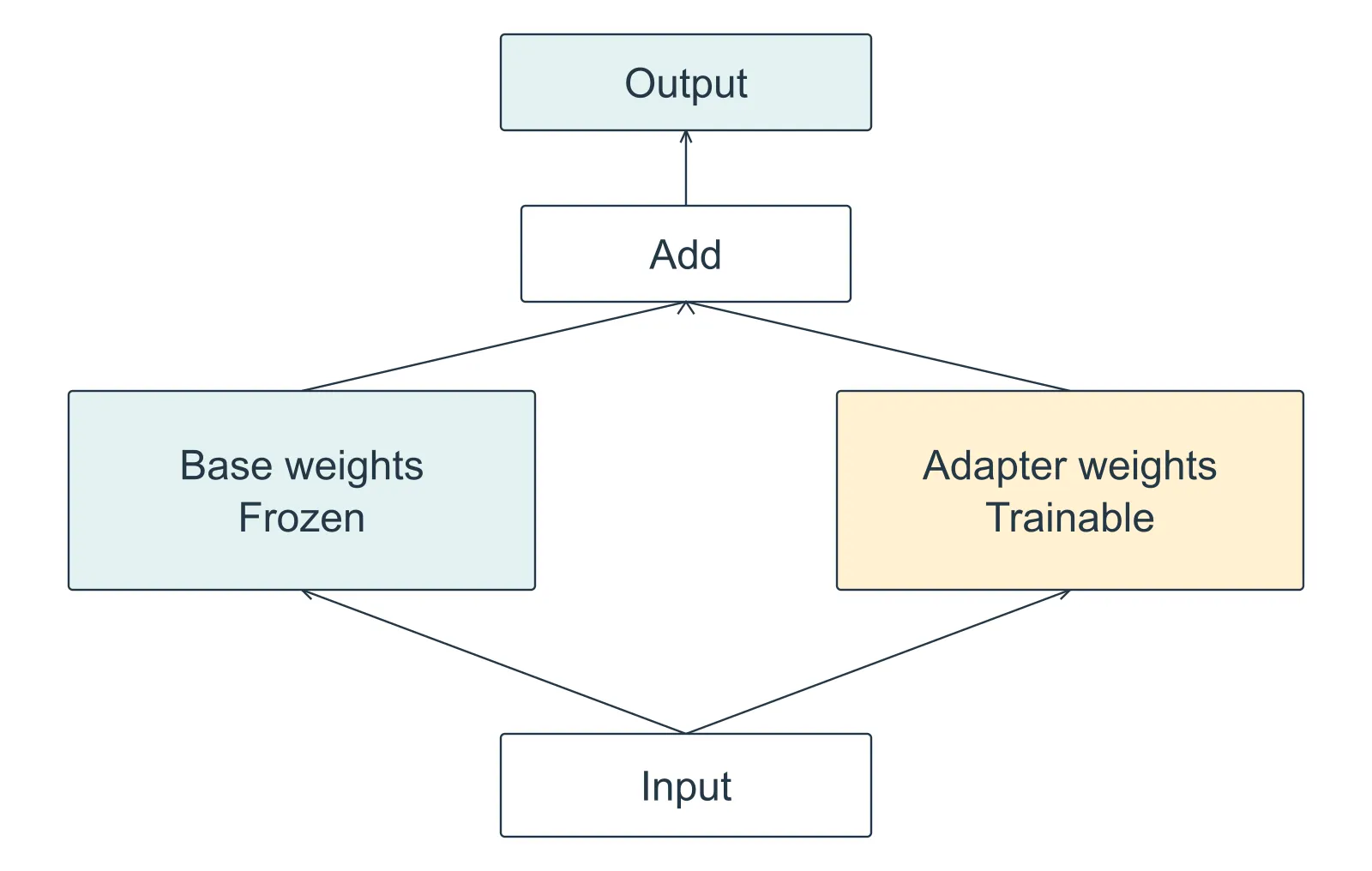
Figure 03.3. Within an adapted part of the model, the frozen base and trainable adapter contribute to the same output. Read upward from the shared input. Freezing the base keeps its weights unchanged while the adapter learns; the base still takes part in the calculation.
This separates two jobs: the base supplies its existing computation, while the adapter supplies the change learned for our task. The adapter uses a smaller set of adjustable values to construct that change, so it cannot choose every adjustment independently. That restriction makes the learned addition compact while still allowing it to affect many parts of the output. Chapter 8 introduces the matrices behind this construction and works through what low-rank means.
Training fewer values can reduce parts of the training cost and lets us save a smaller learned addition — for our model, the adapter used in Chapter 8 trains 1,146,880 values out of 596,049,920, about 0.2 percent. The base still needs to be loaded, so the adapter’s small size does not describe the memory needed to run the whole model.
QLoRA: store the frozen base more compactly
The base model can still take substantial memory even when its weights are frozen, and quantization represents its numerical values more compactly, using fewer bits and accepting some approximation.
QLoRA combines a quantized frozen base with a trainable LoRA adapter. It addresses the space occupied by the base while keeping the same division of responsibility: the base remains fixed during training, and the adapter learns. Whether that tradeoff preserves the quality we need is something to measure.
Chapters 7–9 put these methods to work in order — full fine-tuning, LoRA, then QLoRA — each on the same routing task, so we can compare the resulting behavior and resource costs.
What do we save, and how do we judge it?
The training method determines what we need to keep for later requests. For the setups used in this book:
| Method | Learned result we save | What we need to reproduce its use |
|---|---|---|
| Full fine-tuning | A complete set of updated model weights | Those weights and the matching model configuration and tokenizer |
| LoRA | Adapter weights and their configuration | The adapter and its compatible base model, with the matching tokenizer |
| QLoRA | Adapter weights and their configuration | The compatible base loaded with the recorded quantization setup, plus the adapter and matching tokenizer |
An adapter file alone is therefore an incomplete delivery: it describes an addition to a particular base, so its record must identify the exact base version. The tokenizer, prompt rules, and generation settings also belong with the result: they determine how requests enter the model and how answers come out.
These files let us use the trained candidate again; the evaluation tells us whether we should. We need to compare its answers with the unchanged model’s answers under the same conditions, using requests kept out of training.
For the bookshop, the useful result is a model that routes unfamiliar requests reliably at an acceptable cost. Changing weights is the mechanism — the saved candidate and its measured behavior are what we carry into the application.
Exercises
1. Change a request or change the predictor
Our predictor has weight 1.4. We give it input 4, and it answers 5.6. Has it learned anything from this new request? What would have to happen for another training update?
Answer
It has calculated an answer using its existing weight. The new input alone has not changed that weight. A training update would need a desired answer, a loss calculation, and an optimizer applying a change to the weight.
2. Explain a frozen base
A teammate says a LoRA adapter is the only part we need to load because the base weights were frozen during training. What does “frozen” actually mean, and what does the diagram show?
Answer
Frozen means the base weights kept their values during training. The base still contributes to the calculation alongside the adapter, and their contributions are combined. We need the compatible base as well as the adapter to produce the answer.
3. Separate a lower loss from a better router
Training loss falls, but the model increasingly answers with DATABASE followed by an explanation. Has it improved under our one-label interface? What evidence should decide?
Answer
Those responses fail the required format. Compare complete answers on held-out requests using the same label parser and expected destinations as before training. A lower loss on training examples does not establish that the router became more useful.
4. Make a saved result usable
A teammate sends an adapter and reports better routing results, but leaves out the base model version. What is missing from the delivery, and what is missing from the quality claim?
Answer
The adapter needs its compatible base model. Reproducing the setup also needs the adapter configuration, tokenizer, prompt, and generation settings. Assessing the claimed improvement needs the evaluation requests and results, including a comparison with the unchanged model under the same conditions.
From an update to an experiment
We now have a way to describe a fine-tuning experiment: which examples guide the updates, which weights may change, and which files preserve the result. Its purpose is to improve the specialist’s behavior on new requests. The next step is to build the laboratory that lets us measure the starting model and compare later candidates with it.
Run against: The companion’s single-weight update ran on CPU with Python 3.13.3 and PyTorch 2.8.0. The before-and-after table uses its rounded recorded values; the implementation and unrounded values remain in mechanics.py and the experiment records. The standalone one_update.py activity and its five-step loop ran with Python 3.13.5, using only built-in arithmetic, at learning rates 0.1 and 1.0; the printed outputs are those runs.
Not run. Full Qwen router training, trained Qwen adapter merging, and QLoRA are outside this mechanics experiment. Chapters 7–9 supply those measurements; the single-weight example here does not establish router quality or memory improvements.
Comments