Queries Without Query Strings
The relational API — building a query as Python objects, reading back the SQL it generated, the alias you must set before a join will bind, and the fact that a relation is a plan rather than a result.
SQL is excellent at describing a query and poor at being assembled. The moment a query depends on runtime conditions, you are concatenating strings:
sql = "select * from hits"
if status:  sql += f" where status = {status}"
if country: sql += f" and country = '{country}'"      # and now the `and` is wrong
Two conditions in and it is already broken, because the second clause assumed the first one ran. Fix that with a list of predicates and a join, add parameter binding so the values are not interpolated, and you have written a small query builder. Everyone writes this function. Nobody enjoys it.
DuckDB’s Python client offers the other option: build the query as objects and never hold a string at all.
Run against: DuckDB 1.5.5 on Python 3.13.
A relation is a plan
con.sql() looks like execute and is not:
r = con.sql("select * from 'edge/**/*.parquet'")
type(r)         # DuckDBPyRelation
r.columns[:5]   # ['site_id', 'ts', 'path', 'status', 'bytes']
r.types[:5]     # ['BIGINT', 'TIMESTAMP', 'VARCHAR', 'INTEGER', 'BIGINT']
It returned a DuckDBPyRelation, and it already knows the column names and types — which means it consulted the Parquet schema and did not read a row. A relation is a query that has been described but not run.
The laziness is measurable:
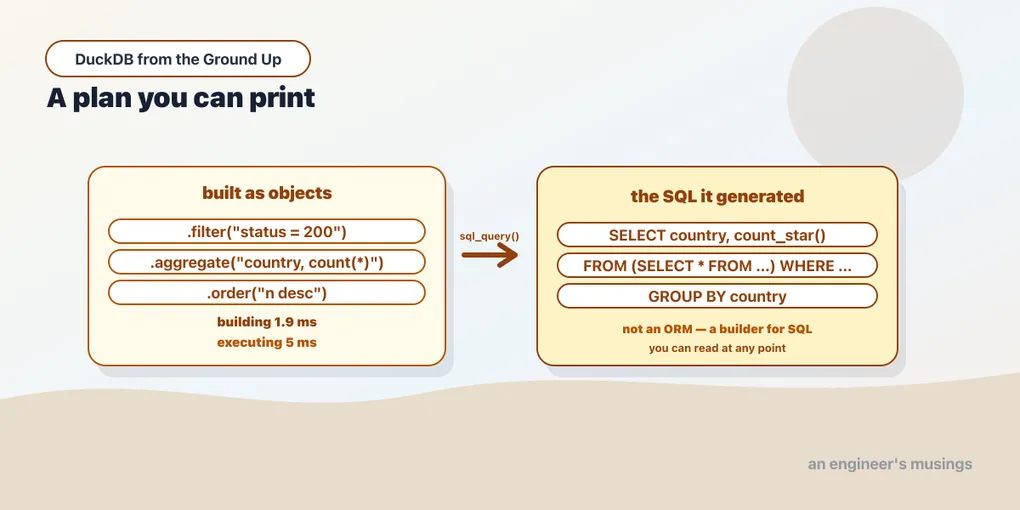
q = (con.sql("select * from 'edge/**/*.parquet'")
        .filter("status = 200")
        .aggregate("client.country, count(*) n", "client.country"))
building took 1.9 ms
executing took 5 msBuilding the whole chain cost under two milliseconds because nothing happened. The work started at fetchall().
The verbs
The relation methods cover the shape of an ordinary query:
rel.filter("status = 200")                    # WHERE
rel.project("i * 2 as d")                     # SELECT
rel.aggregate("country, count(*) n", "country")  # SELECT ... GROUP BY
rel.order("i desc")                           # ORDER BY
rel.limit(2)                                  # LIMIT
rel.distinct()                                # SELECT DISTINCT
Plus shortcuts that skip the aggregate ceremony — rel.count("i"), rel.min("i"), rel.max("i"), rel.sum("i") — and set operations between two relations:
a.union(b)       # everything, duplicates kept
a.except_(b)     # in a, not in b   (trailing underscore: `except` is a keyword)
a.intersect(b)   # in both
Each returns a new relation, so chaining composes rather than mutates.
The alias you will forget
Joins have one requirement that is not obvious, and the error is unhelpful:
a = con.sql("select * from range(4) t(i)")
b = con.sql("select i, i*10 v from range(2,6) t(i)")
a.join(b, "a.i = b.i")
Binder Error: Referenced table "a" not found!The Python variables are named a and b; the relations are anonymous. The join condition is a SQL string, and SQL cannot see your variable names. Name them:
a = con.sql("select * from range(4) t(i)").set_alias("a")
b = con.sql("select i, i*10 v from range(2,6) t(i)").set_alias("b")

sorted(a.join(b, "a.i = b.i").fetchall())
# [(2, 2, 20), (3, 3, 30)]

sorted(a.join(b, "a.i = b.i", how="left").fetchall())
# [(0, None, None), (1, None, None), (2, 2, 20), (3, 3, 30)]
set_alias before every join is the habit to build. It is the only place in this API where the Python side and the SQL side need to be told about each other.
Reading back what you built
The feature that makes this trustworthy rather than magical:
q.sql_query()SELECT client.country, count_star() AS n
FROM (SELECT * FROM (SELECT * FROM "edge/**/*.parquet") AS unnamed_relation_c9dc…
WHERE (status = 200)) AS unnamed_relation_c9dc…
GROUP BY client.countryThere is the SQL, generated exactly. Nested subqueries rather than the flat query you would have written by hand, and it makes no difference — the optimizer flattens them, which you can confirm the usual way:
[line for line in q.explain().split('\n') if 'SCAN' in line or 'GROUP' in line]['HASH_GROUP_BY', 'PARQUET_SCAN']One scan, one group-by. The subquery nesting was structural, not executed.
sql_query() and explain() are the reason to be comfortable here. This is not an ORM that hides a query from you and produces something unrecognisable at scale. It is a builder for SQL you can read at any point.
Composition, which is the actual point
Here is the loop that motivated the whole chapter:
rel = con.sql("select * from 'edge/**/*.parquet'")
for col, val in active_filters:
    rel = rel.filter(f"{col} = {val}")

rel.aggregate("count(*)").fetchall()[(71429,)]No WHERE-versus-AND bookkeeping. No first-iteration special case. No half-built string. Zero filters produces a valid query, and so does eight.
That is the pattern worth taking: anywhere a query’s structure is decided at runtime, this is easier to get right than string assembly. A filter panel in a dashboard. A CLI with optional flags. A pipeline stage whose steps come from config. Each of those is a loop over relation methods, and none of them is a query builder you had to write.
A relation re-executes every time
One property will bite if you assume otherwise:
r = con.sql("select client.country cc, count(*) n from 'edge/**/*.parquet' group by 1")
r.fetchall()   # 3 ms
r.fetchall()   # 2 ms
r.fetchall()   # 2 ms
Three fetches, three executions. The relation held a plan, and each fetch ran it. There is no result cache, and a relation you keep on hand and query repeatedly is doing the work repeatedly.
When you want the result to stop being recomputed, say so:
r.to_table("t1")                  # a real table in the catalog
r.create_view("v1")               # a view — still recomputed, but named for SQL
r.df()                            # a pandas DataFrame
r.arrow()                         # a RecordBatchReader
r.write_parquet('rel.parquet')    # straight to disk
to_table is the one that ends the recomputation. create_view gives the query a name without materialising anything, which is what you want when it should stay live.
The two styles meet
The bridge between this chapter and the last is short and easy to miss:
myrel = con.sql("select 42 as answer")
con.sql("select answer * 2 from myrel").fetchall()[(84,)]A relation is usable as a table name, by the same replacement scan that found the DataFrame in chapter 13. So the choice is not exclusive. Build the parts that vary with the relational API, then write the tricky part as SQL over them:
base = con.sql("select * from 'edge/**/*.parquet'").filter("status = 200")

con.sql("""
    select client.country,
           count(*) n,
           n / sum(n) over () as share
    from base group by 1 order by n desc
""")
The window function is far clearer as SQL. The conditional filter is far clearer as a method call. Nothing forces you to pick one.
When to use which
Write SQL when the query is fixed. A report, a model definition, anything you will read more often than you assemble. SQL is more readable than an equivalent method chain, and there is no reason to translate a query you already know how to write.
Use the relational API when the query is assembled. Runtime conditions, optional filters, a pipeline built from configuration. This is where string concatenation goes wrong and where method chaining is simply correct.
Use SQL for the parts SQL is better at. Window functions, CTEs, GROUPING SETS, anything recursive. The relational API does not try to cover the whole language, and reaching for con.sql() over a relation is the intended move rather than a workaround.
The honest limitation: this is a Python client feature. It is not a portable API and not a full DataFrame library. If your team will read the query more often than build it, plain SQL is the kinder choice.
Final thoughts
The relational API is not an abstraction over SQL — it is a way of building SQL that you can print. sql_query() and explain() are what separate it from an ORM, because the thing it produces is always inspectable and always the SQL you would have accepted.
Two facts to keep. set_alias before a join, because the relation does not know it is called a. And a relation is a plan, not a result, so a repeatedly-fetched relation is repeated work — to_table when you want that to stop.
The rest is a preference, and the useful version of it is narrow: write SQL when you know the query, build relations when you are deciding it.
Next: When the Database Is a Library — cursors, thread safety, and what changes when DuckDB is a component rather than a tool.
Comments