Your Variable Name Is a Table Name
Replacement scans, measured — joining a pandas DataFrame to an Arrow Table to a Polars DataFrame in one query, the live-rebinding behaviour nobody documents, and why fetchall() is fifteen times slower than every other way out.
Everything so far has treated DuckDB as a database you query. This chapter is about the other half of what it is, and it is the half that explains why so many people ended up using it.
DuckDB runs inside your process. Not next to it, not over a socket — in the same memory. Every other database has a boundary where data is serialised out of your program, into the database, and back. That boundary is not here. There is nothing to cross.
What that looks like in practice is a little startling the first time.
Run against: DuckDB 1.5.5 with pandas 3.0.5, pyarrow 25.0.0 and polars 1.43.2 on Python 3.13.
The thing that looks like a mistake
import duckdb, pandas as pd

df = pd.DataFrame({'a': [1, 2, 3], 'b': ['x', 'y', 'z']})
duckdb.connect().execute("select sum(a) from df").fetchall()[(6,)]There is no register, no CREATE TABLE, no INSERT. The string "from df" refers to a Python variable, and DuckDB found it.
This is a replacement scan. When the SQL parser hits a table name that is not in the catalog, DuckDB looks in the calling Python frame for a variable of that name. If it finds something it knows how to read, it reads it.
It is not only pandas:
atab = pa.table({'a': [1, 2, 3]})          # Arrow
pdf  = pl.DataFrame({'a': [1, 2, 3]})      # Polars

con.execute("select sum(a) from atab")     # [(6,)]
con.execute("select sum(a) from pdf")      # [(6,)]
And since they are all just table names now, they compose:
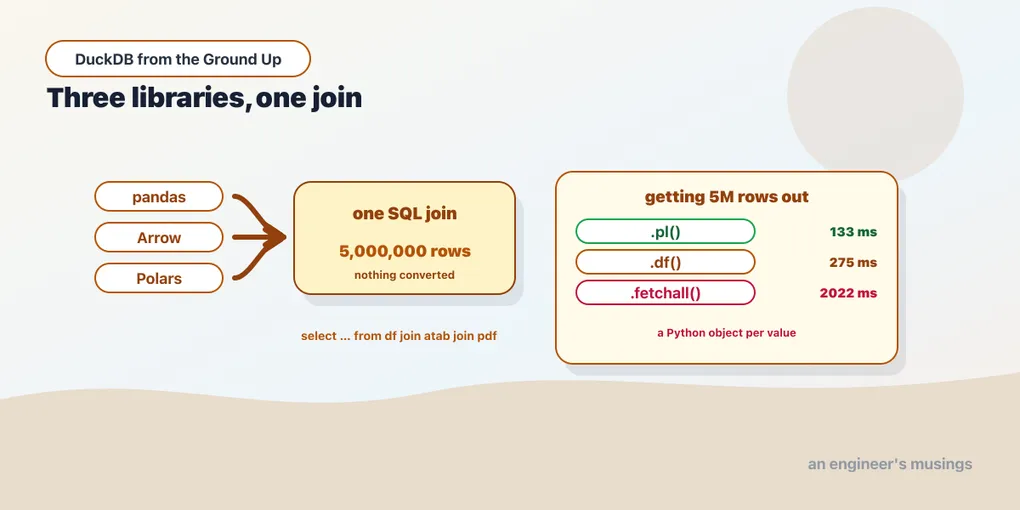
con.execute("select count(*) from df join atab using(a) join pdf using(a)")[(5000000,)]A pandas DataFrame joined to an Arrow Table joined to a Polars DataFrame, in one SQL query, five million rows. Nothing was converted and nothing was loaded. No library learned about any other. SQL is the common language, and DuckDB speaks all three memory layouts.
It really is not copying
The reasonable suspicion is that DuckDB quietly materialises a copy and the convenience is hiding a cost. Five million rows, summing one column:
pandas DataFrame  :   5.8 ms
arrow Table       :   9.9 ms
polars DataFrame  :   8.9 ms
native duckdb tbl :   1.9 ms
pandas own .sum() :   3.7 ms
Reading a pandas DataFrame through SQL took 5.8 ms against pandas’ own df['a'].sum() at 3.7 ms. That gap is DuckDB’s scan overhead, not a copy. Copying 5 million float64 values would cost far more than two milliseconds.
The native DuckDB table at 1.9 ms is the floor. It is faster for the reasons chapter 7 laid out: its own storage format and its own statistics. But the in-place numbers are the same order of magnitude, which is the point. Querying a DataFrame is a normal thing to do, not a fallback.
The mechanism is Arrow’s memory layout. Pandas 2+, Polars and PyArrow all describe columns in a way DuckDB can read directly, so the scan reads buffers your DataFrame already owns.
The parts nobody writes down
Replacement scans work by inspecting the Python frame, and that has consequences worth knowing before they surprise you.
Both local and global scope work. A DataFrame defined inside a function is visible to a query run there. A module-level one is visible from anywhere:
def inner():
    local_df = pd.DataFrame({'a': [10, 20]})
    con.execute("select sum(a) from local_df")   # [(30,)]
    con.execute("select sum(a) from gdf")        # [(6,)]  — module level
The reference is live, not a snapshot. Rebind the variable and the next query sees the new object:
mdf = pd.DataFrame({'a': [1, 2, 3]})
con.execute("select sum(a) from mdf")   # [(6,)]

mdf = pd.DataFrame({'a': [100]})
con.execute("select sum(a) from mdf")   # [(100,)]
Nothing was re-registered. The name resolves at query time, every time. That is usually what you want. It is occasionally a source of real confusion, because a query that returned one answer earlier in a notebook returns a different one later with no visible cause.
A real table wins. If a catalog table and a Python variable share a name, the table takes it:
shadow = pd.DataFrame({'a': [1]})
con.execute("create table shadow as select 999 a")
con.execute("select a from shadow")     # [(999,)]
The DataFrame is not consulted, and no warning is issued. Replacement scans are the fallback for a name that is not in the catalog. That is the safe ordering. It also means a CREATE TABLE earlier in a long script can silently change what a later query reads.
When any of that matters, name things explicitly:
con.register('named', pd.DataFrame({'a': [7, 8]}))
con.execute("select sum(a) from named")     # [(15,)]
con.unregister('named')
con.execute("select * from named")          # Catalog Error: Table with name named does not exist!
register decouples the SQL name from the variable name and works regardless of scope. Prefer it in a library, a long-lived application, or anywhere the SQL is assembled far from where the data lives. Interactively, let the replacement scan do its job.
Getting data back out, where the cost actually is
The way in is nearly free. The way out is not, and the spread is much wider than most people expect. Five million rows, two columns:
.arrow().read_all() :    151 ms
.pl()               :    133 ms
.df()               :    275 ms
.fetchall()         :   2022 ms
.fetchall() is fifteen times slower than .pl(), and this is the single most useful practical fact in the chapter.
The reason is what each one builds. .arrow() and .pl() hand over columnar buffers close to DuckDB’s own layout. .df() costs more because pandas wants its own arrangement. .fetchall() constructs five million Python tuples, each holding boxed Python objects. That allocation is the entire two seconds.
So the rule: .fetchall() is for small results. A count, a handful of rows, a debugging peek. For anything you would put in a variable and work with, use .arrow(), .pl() or .df(). Better still, do the work in SQL and fetch a small answer.
Two API details worth having correct, because the common advice is stale:
type(con.execute("select 1 a").arrow())              # RecordBatchReader
type(con.execute("select 1 a").arrow().read_all())   # Table
.arrow() returns a RecordBatchReader, not a Table. Most tutorials say Table. A streaming reader is better, because you can consume a result larger than memory without materialising it. But it means .read_all() is an extra call when you do want a Table.
And the older spelling warns:
con.execute("select 1 a").fetch_arrow_table()DeprecationWarning: fetch_arrow_table() is deprecated, use to_arrow_table() instead..fetchdf() and .fetch_df() still work as aliases for .df() and do not warn.
When to reach for which
Having SQL and a DataFrame library in the same process means choosing between them constantly. The choice is less about performance than it looks.
Use SQL for the shape of the work. Joins, grouped aggregates, window functions, filtering across several sources. A five-line query beats a chain of merges you have to read twice. It is also where DuckDB’s engine has the most to offer, since the whole query is planned at once.
Use the DataFrame library for what it is good at. Plotting, scikit-learn, anything that expects a DataFrame, and the manipulations that are genuinely awkward in SQL.
Do not move data back and forth to decide. Both operate on the same memory. Query the DataFrame with SQL, get an Arrow result, hand it to Polars, query that with SQL again. Each hop is milliseconds, and none is a serialisation.
Push the reduction into SQL. The most common performance mistake in Python-plus-DuckDB code is fetching a large intermediate into Python, then aggregating it. The 2,022 ms above is what that costs. Aggregate first, then fetch the answer.
Final thoughts
select sum(a) from df looks like a party trick, and for the first five minutes it is. What it represents is the absence of a boundary every other database charges you for. There is no export step, because there is no “over there” for the data to go.
The measurements say the convenience is real rather than paid for elsewhere. Scanning a pandas DataFrame through SQL costs about what pandas costs, and three libraries’ memory can meet in a single join.
The cost that does exist is on the way out, and it has one name. .fetchall() builds a Python object per value. On five million rows that is two seconds, against 133 milliseconds for the columnar path. Every other rule in this chapter is a preference. That one is arithmetic.
Next: Queries Without Query Strings — composing a query as Python objects, and when that is better than the SQL you would have written.
Comments