Four Things Are in the Binary
How DuckDB stays small — what ships statically linked, what downloads silently on first use, the one core extension that refuses to autoload, and a community package that installed a binary for the wrong CPU.
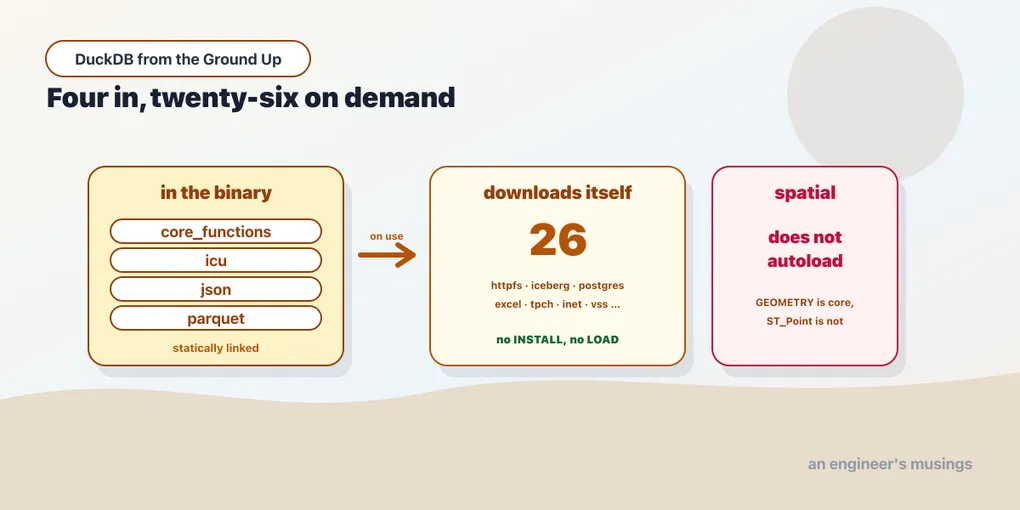
Chapter 2 made a claim in passing that deserves scrutiny. uv pip install duckdb gives you a complete analytical database in a few megabytes. The reason it is a few megabytes rather than a few hundred is that almost nothing is in it.
That sounds like a criticism and it is not. It is the design that makes the install story work. It is why a database you install in four seconds can also read S3, query Postgres, do geospatial joins and speak Iceberg. Those capabilities exist; they arrive on demand.
The interesting part is what “on demand” means in practice, because it is not uniform. Some things download without telling you. One core extension refuses to. And the community repository is a genuinely different quality tier — which showed up as a broken binary on the first package I tried.
Run against: DuckDB 1.5.5 on an Intel Mac.
Every install started from a throwaway extension directory, so nothing was cached.
What is actually in there
select extension_name, loaded, installed, install_mode
from duckdb_extensions() where installed order by 1;
On a completely fresh extension directory:
('core_functions', True, True, 'STATICALLY_LINKED')
('icu',            True, True, 'STATICALLY_LINKED')
('json',           True, True, 'STATICALLY_LINKED')
('parquet',        True, True, 'STATICALLY_LINKED')
Four. core_functions is the standard library, icu is collations and timezones, json reads JSON, and parquet reads Parquet. That is the whole binary’s worth of extensions.
Note what is missing from that list. CSV is not an extension at all. It is part of the core engine, which is why chapter 4 worked with nothing installed.
Now ask what the binary knows about:
select count(*) from duckdb_extensions();30Thirty entries, four of them present. The other twenty-six are names and download locations:
autocomplete, avro, aws, azure, delta, ducklake, encodings, excel, fts,
httpfs, iceberg, inet, lance, motherduck, mysql_scanner, odbc_scanner,
postgres_scanner, quack, spatial, sqlite_scanner, tpcds, tpch, ui,
unity_catalog, vortex, vss
That list is the answer to “what can DuckDB do”. Cloud storage, three lakehouse formats, four other databases, full-text search, vector similarity, geospatial, a web UI. None of it costs you anything until you use it.
Autoloading, which is more aggressive than you expect
Two settings govern the whole thing:
select current_setting('autoinstall_known_extensions');   -- True
select current_setting('autoload_known_extensions');      -- True
Both default to on. Together they mean that when a query needs an extension DuckDB knows about, it downloads and loads it without asking.
Here is that happening. Fresh extension directory, nothing installed beyond the four, and one query naming a URL:
select count(*) from 'https://blobs.duckdb.org/data/taxi_2019_04.parquet';7433139Seven and a half million rows from a remote Parquet file. No INSTALL, no LOAD, no configuration. DuckDB saw https://, worked out that it needed httpfs, fetched it, loaded it, then ran the query. Check afterwards and httpfs is installed.
It is not only file paths. Calling a function from an extension does the same thing:
call dbgen(sf = 0.001);                    -- pulls tpch
select host('127.0.0.1'::INET);            -- pulls inet
select count(*) from read_xlsx('x.xlsx');  -- pulls excel
All three worked from nothing. The read_xlsx call failed, but only on the missing file. The extension had already loaded by then, which is the interesting part.
So the model is: name something from an extension, and the extension appears. For a tool people reach for to answer one question, that is the right default. It is a large part of why DuckDB feels like it has no setup.
The one that does not play along
Then there is spatial:
select ST_Point(1, 2);Catalog Error: Scalar Function with name "st_point" is not in the catalog,
but it exists in the spatial extension.Read that against the previous section. tpch, inet and excel each autoinstalled from a function call. Spatial has autoloading on and is known to the binary, and it tells you it exists without fetching it.
The error is helpful and slightly maddening. It identifies the extension by name, so DuckDB knew exactly what to install, and then did not. The fix is one line:
install spatial;
load spatial;
select st_astext(ST_Point(1, 2));
POINT (1 2)Spatial has a second trap, and it catches anyone reading release notes. The GEOMETRY type is core:
select typeof('POINT(1 2)'::GEOMETRY);GEOMETRYThat cast works in a bare install with nothing loaded. So does select 'x'::VARIANT. It is easy to read “there is now a built-in GEOMETRY type” and conclude that geospatial is built in. The type is. Every function that does anything with it is not. You can hold a geometry in a column and compute nothing about it until you install spatial.
When there is no network
Autoloading means a first run does a download. That is fine on a laptop and not fine in a locked-down container. Turn it off to see what a restricted environment looks like:
set autoinstall_known_extensions = false;
select count(*) from 'https://blobs.duckdb.org/data/taxi_2019_04.parquet';
An error occurred while trying to automatically install the required extension 'httpfs'And LOAD on something that was never fetched:
load spatial;IO Error: Extension "extdirX/v1.5.5/osx_amd64/spatial.duckdb_extension" not found.That path is the whole caching model in one line. Look at what is in it:
extdir/v1.5.5/osx_amd64/spatial.duckdb_extension
        ▲       ▲
        │       └── platform
        └── DuckDB version
Extensions are pinned to both a DuckDB version and a platform. They are compiled shared libraries linked against a specific engine version. Upgrading DuckDB invalidates the entire cache, and every extension is fetched again on first use.
Two consequences worth planning for. A Docker image that installs its extensions at build time keeps working only while the DuckDB version is pinned. Bump it and the image starts reaching for the network at runtime. And when you build that image, install what you need explicitly rather than relying on autoload. Then a failure happens at build time, where you will see it.
The community repository
Core extensions come from DuckDB’s own repository. They are built for every platform and they are signed. allow_unsigned_extensions defaults to false, and there is no need to change it.
There is a second repository:
select current_setting('allow_community_extensions');    -- True
install h3 from community;
The install succeeded. 442,542 bytes landed in the cache. Then:
load h3;IO Error: Extension "extdir2/v1.5.5/osx_amd64/h3.duckdb_extension" could not
be loaded: dlopen(…): tried: 'extdir2/v1.5.5/osx_amd64/h3.duckdb_extension'
(mach-o file, but is an incompatible architecture (have 'arm64',
need 'x86_64h' or 'x86_64'))The file served from the osx_amd64 path was an arm64 binary. DuckDB asked for the Intel build, got the Apple Silicon one, and the dynamic loader refused it.
Be fair about what that does and does not show. It is one package, on Intel Mac, which is a minority platform in 2026. And it is a packaging error rather than anything about the extension’s code. But it is a clean illustration of the tier difference. Core extensions are built by the DuckDB project against every supported platform and version. Community extensions are built by their authors, and the platform matrix is only as complete as whoever ran the build.
The practical rule: treat INSTALL … FROM community the way you treat any third-party dependency. Someone else’s build, on someone else’s schedule, loaded into your process as native code. Often exactly what you want, and worth a decision rather than a reflex.
Working with all this
Let autoload work interactively. On your own machine it is the feature, and fighting it gains nothing.
Install explicitly in anything reproducible. In a Dockerfile, a CI job, or a deployed service, name the extensions and install them at build time. Pin the DuckDB version so the cache stays valid. INSTALL is idempotent, so this costs nothing when it is already there.
Check duckdb_extensions() when a function is missing. The catalog error usually names the extension. When it does not, that view tells you what exists and what is loaded, which is faster than searching the documentation.
Remember spatial is different. It will not arrive on its own, and its type existing in core is not the same as its functions existing.
Treat the community repository as third-party. Which it is.
Final thoughts
The four-extensions-in-the-binary number is the point of the whole chapter. It explains the four-second install, a wheel small enough to be a dependency without an argument, and a long capability list that is not weight you carry.
The design costs you one thing, and it is real: the capability surface depends on the network. On a laptop that is invisible. In a container, in CI, or on an air-gapped box, it is the difference between a working job and an error nobody saw coming. And the error arrives at query time, not at startup.
So: let it autoload while you are exploring, and pin it before it matters. And if a geospatial function comes back “not in the catalog” while GEOMETRY casts perfectly well, that is not a bug. It is the one extension that makes you ask.
Next: The Parts You Stop Writing — the syntax DuckDB adds on top of standard SQL, and the one addition that is a performance feature in disguise.
Comments