Three Answers to a Directory That Can't Be Trusted
Iceberg, Delta and DuckLake — what a table format adds on top of Parquet, running a REST catalog in one container, reading a format v3 deletion vector, and the append option that silently threw away a hundred rows.
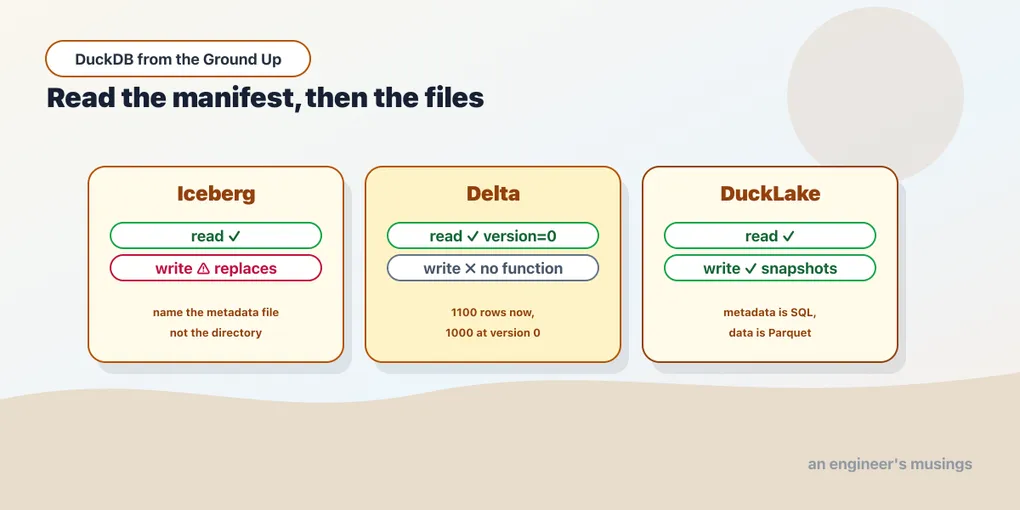
The previous chapter ended somewhere satisfying. A directory of Parquet files is a table, you can query it without loading it, and the engine skips the files it does not need.
Now break it.
Two jobs write to that directory at once. One is halfway through when you run a query, so you read three complete files and one partial. Someone reruns yesterday’s job, and now there are two files for the same day. A column changes type, and a glob across the whole directory either unions with nulls or errors. You want yesterday’s numbers back, and the files that produced them were overwritten.
None of these are exotic. They are Tuesday. And a directory of Parquet has no answer to any of them, because a directory is not a data structure. It is whatever the filesystem happens to contain at the moment you looked.
A table format is a layer of metadata that turns a pile of files into a table with a defined state. This chapter is about the three that matter, what DuckDB can actually do with each, and where the sharp edges are.
Run against: DuckDB 1.5.5, with pyiceberg 0.11.1 and deltalake 1.6.2 standing in for the other engines, and Apache’s iceberg-rest-fixture:1.10.1 container standing in for a catalog.
What the metadata buys
Every table format works the same way at heart. Alongside the data files sits a manifest that says: these specific files, right now, are the table. Adding data means writing new files and then writing a new manifest. The manifest swap is the commit.
That one indirection is what fixes Tuesday:
Atomic commits. A reader resolves the manifest first, then reads exactly the files it names. A half-finished write is invisible because its files are not in any manifest yet. The partial-read problem disappears.
Time travel. Old manifests are kept, so “the table as of yesterday” is a manifest that still exists and still points at files that still exist. Yesterday’s numbers are one query away.
Schema evolution. The schema lives in the metadata, not inferred from whatever files happen to be present. Adding a column is a metadata change with rules, not a hope that every reader unions correctly.
Statistics without opening files. The manifest carries per-file min/max, so the engine can skip files without reading their footers. Partition pruning without a partition scheme.
The cost is that you can no longer write to the table by copying a Parquet file into the directory. That is the whole trade: you give up “it’s just files” and get a table in exchange.
The three, briefly
Apache Iceberg came out of Netflix and is the format with the most industry momentum. Snowflake, BigQuery, Spark, Trino and most cloud catalogs read and write it. If you are picking a format to interoperate with other people’s systems, this is the default.
Delta Lake came out of Databricks. Technically similar, culturally centred on the Spark ecosystem. If your data platform is Databricks, your tables are probably Delta.
DuckLake is DuckDB’s own, and it makes a different bet. Iceberg and Delta store their metadata as files next to the data — JSON, Avro, more Parquet. DuckLake stores it in a SQL database. Data files stay as ordinary Parquet in object storage; the manifest becomes a set of tables you can query with SQL.
That sounds like a small implementation detail. It is the most interesting idea in the chapter, and we will come back to it.
Reading Delta
Delta is read-only from DuckDB, and reading works cleanly. Here is a table written by the deltalake Python library — 1,000 rows, then 100 more appended:
load delta;
select count(*) from delta_scan('lh2/delta_hits');1100Both writes, visible as one table. Now ask for the state before the second write:
select count(*) from delta_scan('lh2/delta_hits', version=0);1000That is time travel, and it is the whole pitch in two queries. Version 0 is not a backup or a snapshot you remembered to take. It is the table as the manifest described it at that moment, reconstructed from files that were never deleted.
The directory shows how little magic is involved:
_delta_log/
part-00000-8ffd3c79-…-c000.snappy.parquet
part-00000-96d76a2c-…-c000.snappy.parquet
Two ordinary Parquet files and a log directory. Nothing was rewritten when the second write landed. _delta_log gained an entry saying the table is now both files.
Ask for a version that does not exist and the error is specific, which is what you want:
IO Error: DeltaKernel GenericError (5): Generic delta kernel error:
LogSegment end version 1 not the same as the specified end version 99
DuckDB cannot write Delta. There is no copy function for it, and the error says so plainly:
Catalog Error: Copy Function with name delta does not exist!So the Delta story is: something else owns the table, DuckDB queries it. For most people that is exactly the arrangement they have.
Reading Iceberg, and the trap in the path
Iceberg reading works too, but the first thing everyone tries fails. Point iceberg_scan at the table directory, the way every tutorial shows:
select count(*) from iceberg_scan('lh2/ice/wh/edge/hits');Failed to read iceberg table. No version was provided and no version-hint
could be found, globbing the filesystem to locate the latest version is
disabled by default as this is considered unsafe and could result in
reading uncommitted data. To enable this use 'SET unsafe_enable_version_guessing'Read that error carefully, because it is telling you something real rather than complaining about configuration. An Iceberg table directory contains many metadata files, one per commit. Picking “the latest” by looking at the filesystem means guessing, and a guess can land on metadata for a commit that has not finished. DuckDB refuses by default. That refusal is correct.
The error names an escape hatch, so try it:
set unsafe_enable_version_guessing=true;
select count(*) from iceberg_scan('lh2/ice/wh/edge/hits');1100It works, and that is the problem. The setting is not called unsafe because it is unreliable. It is called unsafe because it succeeds quietly and never tells you what it picked. The metadata directory of this table holds three files, one per commit:
00000-a2d27a27-….metadata.json
00001-696b7d42-….metadata.json
00002-35fa310c-….metadata.json
Name them one at a time and you can see what the guess was choosing between:
select count(*) from iceberg_scan(
'lh2/ice/wh/edge/hits/metadata/00001-696b7d42-….metadata.json');1000select count(*) from iceberg_scan(
'lh2/ice/wh/edge/hits/metadata/00002-35fa310c-….metadata.json');1100Same directory, two different tables. Which metadata file you read is which version of the table you get. On a directory nobody is writing to, the newest file is the one you want and the guess is right every time, which is what makes the setting so easy to leave on. On a directory a job is committing into, the newest file is the one whose commit is least likely to have finished.
So name the metadata file, not the directory. That is exact rather than guessed, and naming an older one is how you read an older version on purpose.
That leaves the obvious question of where the path comes from, since you are not going to hand-type a UUID every morning. The answer is a catalog, the service that maps a table name to its current metadata location. DuckDB attaches to one:
attach 'my-warehouse' as ice (type iceberg);That fails before it has touched a single file:
Invalid Configuration Error: AUTHORIZATION_TYPE is 'oauth2', yet no 'secret' was
provided, and no client_id+client_secret were provided. Please provide one of the
listed options or change the 'authorization_type'.
ATTACH … (TYPE ICEBERG) expects a REST catalog, which is a service rather than a folder. That is Iceberg being honest about its own shape. Iceberg is a format for shared tables in an organisation, and a shared table needs something to arbitrate what “current” means. The catalog is that something.
Now read the error to the end, because the last clause is the fix. DuckDB assumes OAuth2, which is what a hosted catalog uses, and a catalog wanting no credentials at all has to be told so. One option changes the outcome.
A catalog is one container away
The other half of the answer is that you do not need a data platform to have a catalog. Apache publishes a reference REST catalog as a container, and it runs against a plain local directory:
WH=/absolute/path/to/warehouse
docker run -d --name icerest -p 8181:8181 -v $WH:$WH \
  -e CATALOG_WAREHOUSE=file://$WH \
  -e CATALOG_CATALOG__IMPL=org.apache.iceberg.jdbc.JdbcCatalog \
  -e CATALOG_URI='jdbc:sqlite:file:/tmp/iceberg_rest_mode=memory' \
  -e CATALOG_JDBC_INITIALIZE=true \
  apache/iceberg-rest-fixture:1.10.1
Look at what that catalog actually is. A Java service, backed by SQLite, pointed at a folder. Nothing in the shape of a catalog requires the cloud. What it requires is a single authority over the pointer, and one process listening on one port is enough to be that.
With the auth default corrected, DuckDB attaches:
install iceberg; load iceberg;
attach 'warehouse' as ice (type iceberg, endpoint 'http://localhost:8181',
                           authorization_type 'none');
select schema, name from (show all tables) order by schema, name;
┌──────────┬──────────┐
│ schema │ name │
├──────────┼──────────┤
│ bookshop │ newv3 │
│ bookshop │ orders │
│ bookshop │ updates │
│ bookshop │ v3orders │
└──────────┴──────────┘Those tables were written by other engines through the same catalog. From DuckDB they are ordinary three-part names:
select count(*) from ice.bookshop.orders;24No metadata path, no UUID, no guess. The catalog resolved the name, which is the entire job of a catalog and the reason the previous section was so awkward.
What the catalog lets you see
bookshop.v3orders is an Iceberg format v3 table, and it is the interesting one. Three rows were written, then one was deleted in merge-on-read mode. The delete did not rewrite the data file. It recorded a deletion vector in a Puffin file sitting next to the data:
00000-3-f6c1abfe-….parquet                   1 row
00001-4-f6c1abfe-….parquet                   2 rows
00000-10-30c37f2d-…-00001-deletes.puffin     1 delete
Read those two Parquet files directly and you get three rows, deleted one included. Read the table through the catalog and you get two:
select * from ice.bookshop.v3orders order by order_id;┌──────────┬─────────┬────────┐
│ order_id │ status │ amount │
├──────────┼─────────┼────────┤
│ 1 │ placed │ 10.0 │
│ 3 │ shipped │ 30.0 │
└──────────┴─────────┴────────┘Order 2 is in the Parquet and not in the table. DuckDB read format v3 and applied a Puffin deletion vector, which is a good deal more than the read-any-Iceberg-file story it is usually credited with.
Two things this section is not. The container above is Apache’s reference fixture, intended for testing clients; production catalogs such as Polaris, Lakekeeper, Glue or a vendor’s open catalog behave differently, and on those AUTHORIZATION_TYPE 'none' is exactly the wrong answer. And the warehouse is a local directory, not object storage, so the credential and path handling of an S3-backed warehouse is untested on this page.
Writing Iceberg, and the option that lies
DuckDB 1.5.5 does have an Iceberg copy function, which is more than Delta gets:
copy (select * from range(100) t(a)) to 'w3' (format iceberg);
select count(*) from iceberg_scan('w3');100It writes a real Iceberg table — data Parquet, an Avro manifest, a metadata JSON, and a version-hint.text. That last file is why DuckDB reads its own tables back by directory path with no unsafe setting anywhere in sight. The hint names the current version, so there is nothing left to guess.
Now add fifty more rows the way the option name promises:
copy (select * from range(100,150) t(a)) to 'w3' (format iceberg, append true);
select count(*) from iceberg_scan('w3');50select min(a), max(a) from iceberg_scan('w3');(100, 149)The append replaced the table. A hundred rows went in, fifty rows came out, and the fifty are the new ones. The original hundred are not in the table, no error was raised, and the operation reported success.
The reason is worse than the symptom. Try an option that does not exist at all:
copy (select 1 a) to 'wx' (format iceberg, banana true);It succeeds. Unknown copy options are silently accepted, so append true was never an append — it was an unrecognised word next to a plain write, and a plain write replaces.
The snapshot chain confirms it. After a create, an “append”, and an overwrite, the table has exactly one snapshot every time:
after create : [(0, 2484491416841964285)]
after append : [(0, 7851033770975314928)]
after overwr : [(0, 3224445283198124659)]
Sequence number 0, three different snapshot ids. Each write produced a fresh single-snapshot table rather than a new commit on an existing one. There is no history here, and time travel over a DuckDB-written Iceberg directory has nothing to travel to.
So the honest reading of COPY … (FORMAT ICEBERG) in 1.5.5: it is a bulk export, not a table you maintain. Writing a query result out as Iceberg so another engine can read it works and is genuinely useful. Treating that directory as something you accumulate into will silently destroy data. Verify the row count after any write you did not fully understand — that check takes one query and would have caught this immediately.
The same engine, through a catalog
Now do the same thing with a catalog in the picture, and the behaviour inverts. Attached to the REST catalog from earlier, a five-row table takes an ordinary INSERT:
insert into ice.shop.orders values (99);
select count(*) from ice.shop.orders;6Five rows became six. Nothing was replaced. And the snapshot chain is a chain:
select sequence_number, operation
from iceberg_snapshots('ice.shop.orders') order by sequence_number;
┌─────────────────┬───────────┐
│ sequence_number │ operation │
├─────────────────┼───────────┤
│ 1 │ append │
│ 2 │ append │
└─────────────────┴───────────┘Two commits, sequence numbers 1 and 2, both appends. Compare that with the three separate sequence-number-0 tables the directory path produced. An UPDATE and a DELETE extend the same chain rather than restarting it:
┌─────────────────┬───────────┐
│ sequence_number │ operation │
├─────────────────┼───────────┤
│               1 │ append    │
│               2 │ append    │
│               3 │ overwrite │
│               4 │ delete    │
└─────────────────┴───────────┘
Because there is real history there is real time travel, and it arrives in the same syntax DuckLake uses further down this chapter. Take the snapshot_id that the query above reports for sequence number 1, which will be a different number in your warehouse, and ask the table what it looked like then:
select count(*) from ice.shop.orders at (version => 9040685683121472807);5The catalog is not a nicety on top of Iceberg writing. It is the thing that turns an Iceberg write into a commit rather than an export, because a commit is a swap of the pointer the catalog owns.
There is one sharp edge, and it is a small one worn on the outside. Creating a table on a local-filesystem warehouse fails on the metadata write:
TransactionContext Error: Failed to commit: Failed to commit Iceberg transaction:
Cannot open file ".../shop/orders/metadata/c2c8e283-….avro": No such file or directory
DuckDB creates the table’s data/ directory and not its metadata/ one. Create the missing directory by hand and the identical statement succeeds. Object storage has no directories to create, so this is unlikely to bite there, but that was not tested on this page.
DuckLake, and the idea underneath it
DuckLake starts from an observation about the other two. Iceberg and Delta put their metadata in files because they had to: when they were designed, the only thing everyone could agree on was a blob store. So the metadata became a tree of JSON and Avro on top of a filesystem, and finding the current state means reading a chain of small files.
But metadata is exactly the kind of thing databases are good at. It is transactional, it is queried with joins and filters, and it is small. DuckLake’s bet is: put the data in Parquet where it belongs, and put the metadata in a SQL database where it belongs.
Attaching creates the catalog if it is not there:
attach 'ducklake:lakehouse/meta.ducklake' as lake (data_path 'lakehouse/data/');
create table lake.hits as select * from 'edge/**/*.parquet' limit 1000;
select count(*) from lake.hits;1000From here it behaves like an ordinary schema. The interesting part is that the history is queryable as a table:
select snapshot_id, changes from lake.snapshots();(0, {'schemas_created': ['main']})
(1, {'tables_created': ['main.hits'], 'tables_inserted_into': ['1']})That is not a log file you parse. It is a relation, with a changes column that is a struct, and you can filter and join it like anything else. Snapshot 0 is the empty catalog; snapshot 1 created the table and inserted into it.
Now change the data:
update lake.hits set status = 418 where status = 200;572select count(*) from lake.hits at (version => 1) where status = 200;572select count(*) from lake.hits where status = 200;0The table now has zero rows with status 200. Version 1 still has 572. AT (VERSION => n) is time travel as SQL syntax, not a table function with a path argument. That is the same difference as _delta_log versus a snapshots() relation, showing up in the query language.
The files on disk explain how the update was done:
lakehouse/meta.ducklake
lakehouse/data/main/hits/ducklake-019fe9e7-3dec-….parquet
lakehouse/data/main/hits/ducklake-019fe9e7-3e28-….parquet
lakehouse/data/main/hits/ducklake-019fe9e7-3e28-…-delete.parquet
The original data file is untouched. The update wrote a new data file with the changed rows and a delete file marking which rows of the original no longer apply. Readers apply the deletes as they scan.
This is merge-on-read, and it is why time travel is nearly free. Nothing was mutated, so the old version is still fully present. It is also why a table taking many small updates gets slower to read over time, since every scan pays for the delete files. That is what compaction exists to fold back in.
Everything except the metadata database is ordinary Parquet in an ordinary directory. If DuckLake stopped existing tomorrow, your data is still there and still readable by anything.
Choosing
Use nothing. Files you write once and read many times, one writer, no history requirement: a hive-partitioned directory from the previous chapter is the right answer. A table format is overhead you would not use. Do not adopt one because it sounds more professional.
Read Iceberg or Delta when another system owns the table. This is the common case, and DuckDB is good at it: point it at a metadata path or a REST catalog and query. You are a reader in someone else’s data platform.
Write Iceberg through a catalog, never into a directory. With a catalog attached, INSERT, UPDATE and DELETE are real commits with a real snapshot chain and working time travel. Without one, COPY … (FORMAT ICEBERG) is an export that replaces whatever was there.
Write DuckLake when you want the guarantees on your own tables, DuckDB is doing the writing, and you would rather not run a service to get them. Attaching a DuckLake catalog creates it; an Iceberg catalog is a process somebody has to keep alive. Having the metadata be SQL is a further ergonomic win: you can debug your table format with a SELECT.
What is going to go stale
This is the chapter with the shortest shelf life in the book, and pretending otherwise would be dishonest.
Iceberg write support in DuckDB is new and visibly incomplete. An option parser that accepts banana is not a finished feature, a CREATE TABLE that needs you to make a directory for it is not either, and both are likely to be fixed rather than kept. DuckLake is younger still and moving quickly. The read paths for Iceberg and Delta are the most settled part of the chapter, and even they depend on extension versions that update independently of DuckDB itself.
So: everything above is what DuckDB 1.5.5 with the extensions available in August 2026 actually did, on tables written by pyiceberg 0.11.1, deltalake 1.6.2 and Spark, against Apache’s reference REST catalog. Run the check yourself before trusting any of it on a newer build. The mechanics — manifests, atomic commits, merge-on-read, catalogs — will outlast every specific behaviour on this page.
Final thoughts
A table format is one indirection: read the manifest, then read the files it names. Everything else — commits, time travel, schema evolution, statistics — falls out of that.
DuckDB’s relationship with the three is not symmetrical, and the asymmetry is worth carrying. It reads Delta and Iceberg well, which covers the case where someone else owns the table. It reads Iceberg further than its reputation suggests, down to a format v3 deletion vector. It writes Iceberg two ways that behave nothing alike, and the difference is whether a catalog is in the picture. And it writes DuckLake properly, because DuckLake was designed around the idea that metadata is a database problem.
Two findings to carry out of here. A write reported success, the row count went from 100 to 50, and nothing warned anyone, so check the count after the write. And an error message that reads like a closed door named its own fix in its last clause, so read them to the end.
Not run. Production catalogs — Polaris, Lakekeeper, Glue, a vendor’s open catalog — were not exercised.
Next: What the Engine Refuses to Read — the plan that comes back empty, the index the planner never used, and what EXPLAIN ANALYZE shows about how the engine actually executes.
Comments