A Directory Is a Table
Querying half a million rows of Parquet without loading any of it — globs, hive partitioning that turns a path into a column, reading metadata without touching rows, and the pruning you can watch in the plan.
Every database you have used draws a hard line between data that is in it and data that is not. Getting across that line is a project: a loader, a schema, a job that runs, a place for the failures to go. The line exists because the database owns its storage format, and yours is not.
DuckDB does not draw that line in the same place. A Parquet file is a table. A directory of Parquet files is also a table. You do not load them; you query them.
That sounds like a convenience feature. It is closer to a change in what a database is for, and this chapter is about what it lets you stop doing entirely.
Run against: DuckDB 1.5.5 on the book’s running example — five days of edge request logs, 500,000 rows, written as one Parquet file per day.
The running example
edge/dt=2026-03-01/data_0.parquet   1,122 KB
edge/dt=2026-03-02/data_0.parquet   1,122 KB
edge/dt=2026-03-03/data_0.parquet   1,122 KB
edge/dt=2026-03-04/data_0.parquet   1,122 KB
edge/dt=2026-03-05/data_0.parquet   1,122 KB
Request logs with a timestamp, a path, a status, bytes, a duration, a client struct and a tags list. Five and a half megabytes on disk for half a million rows — the compression story from chapter 1 showing up again.
Note the directory names. dt=2026-03-01 is not decoration — that is hive partitioning, the convention of encoding a column value in the path, and we will come back to what it buys.
The whole directory, as one table
select count(*) from 'edge/**/*.parquet';500000That is the entire chapter in one query. No CREATE TABLE, no COPY, no import step, no schema declared anywhere. A glob sits where a table name goes, and half a million rows across five files answer as one relation.
** recurses through subdirectories; * matches within one. read_parquet() is the explicit form and takes options, but bare string works when you want none.
Everything downstream is ordinary SQL:
select client.country as country, count(*) n, round(avg(duration_ms), 2) avg_ms
from 'edge/**/*.parquet'
where status = 200
group by 1 order by n desc, country limit 3;
('DE', 57144, 21.0)
('BR', 57143, 20.98)
('GB', 57143, 21.02)A grouped aggregate with a struct field access, over five files, with nothing loaded.
Note the , country in the ORDER BY. Four of the five countries tie at 57,143 rows, so without a tiebreaker DuckDB is free to return any three of them and the answer changes between runs. That is correct behaviour and a good habit to build: if you LIMIT an ordering that can tie, add a column that cannot.
Where the row came from
Reading many files raises a question a single table never does: which file is this row in? filename=true answers it by adding a column:
select filename, count(*)
from read_parquet('edge/**/*.parquet', filename=true)
group by 1 order by 1;
('edge/dt=2026-03-01/data_0.parquet', 100000)That is the tool for the bad afternoon when one day’s numbers are wrong and you need to know which file to open. It is also how you find the file that is short, or duplicated, or written twice by a retrying job.
The path as a column
Now the part that makes the directory layout worth caring about.
The dates in those directory names are data. hive_partitioning=true tells DuckDB to parse them and hand them back as a real column:
select dt, count(*)
from read_parquet('edge/**/*.parquet', hive_partitioning=true)
group by 1 order by 1;
(2026-03-01, 100000)
(2026-03-02, 100000)
(2026-03-03, 100000)
(2026-03-04, 100000)
(2026-03-05, 100000)dt is a DATE, typed and queryable, and it is not stored in any of the files. It exists only in the directory names. DuckDB recovered it from the path.
That is not just tidy. The column you filter on most often costs zero bytes of storage, and the engine can evaluate a filter on it without opening a file.
Watching the pruning happen
Filter on the partition column and ask for the plan:
explain select count(*)
from read_parquet('edge/**/*.parquet', hive_partitioning=true)
where dt = date '2026-03-02';
Buried in the scan node:
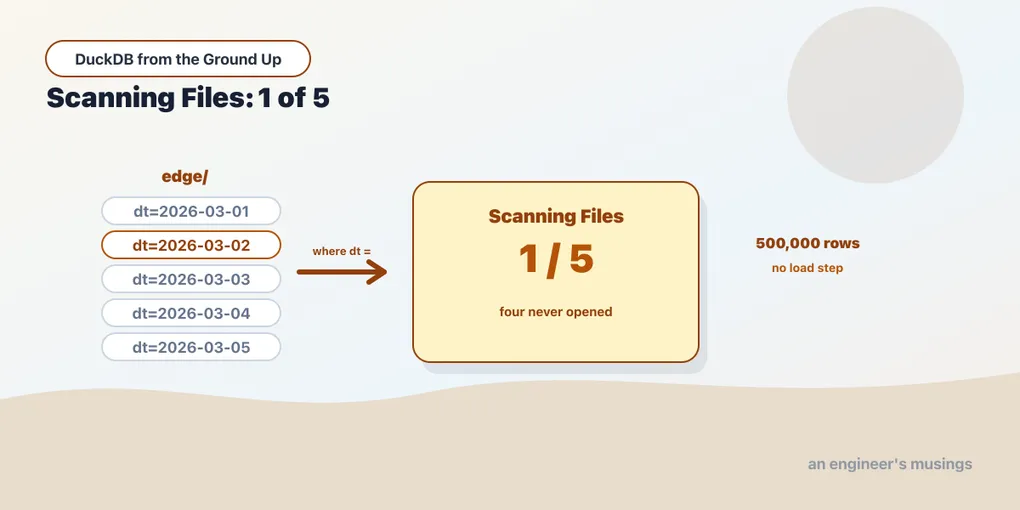
│ Scanning Files: 1/5 │One file out of five. DuckDB read the directory names, worked out that four of them cannot contain a row matching dt = '2026-03-02', and never opened them. Not “read them and discarded the rows” — never opened.
This is the highest-leverage thing in the chapter, and why the directory layout is a design decision rather than a filing preference. Partition by the column you filter on, and a query touching one day does a fifth of the work. Partition by something you never filter on and you have created a lot of small files for nothing.
It also explains a failure people hit and misdiagnose. Query the same data without hive_partitioning=true and there is no dt column at all. The filter cannot be pushed down because the column does not exist, so you get an error rather than a slow query. The fix is the flag, not the layout.
Reading a file without reading its rows
Parquet files carry a footer describing their contents, and DuckDB will read just that:
select num_rows, num_row_groups
from parquet_file_metadata('edge/dt=2026-03-01/data_0.parquet');
(100000, 2)select * from parquet_schema('edge/dt=2026-03-01/data_0.parquet');Thirteen schema entries, returned without scanning a single row of data.
This is how you answer “what is in this file?” for one you have just been handed and do not want to open. The column names, the types, the row count, and how many row groups it is split into. Row groups matter for the same reason partitions do: they are the unit at which the engine can skip, using per-group statistics. A file with two row groups gives the engine two chances to skip; a file with one gives it none.
When the directory is a bucket
Everything so far used a local path, and that is the least interesting version of this. The same glob works against object storage, which is where most people’s Parquet actually lives.
Try it with no credentials first, because the error is worth recognising:
select count(*) from 's3://warehouse/edge/**/*.parquet';HTTP Error: HTTP GET error reading 's3://warehouse/edge' in region 'eu-central-1' (HTTP 403 Forbidden)Two things in that one line. It reached the network, so httpfs autoloaded on its own — the mechanism chapter 9 takes apart. And it guessed a region, because nothing told it one. A 403 here usually means “no credentials”, not “wrong permissions”.
Credentials go in a secret rather than in the connection string:
create secret lake (
    type s3,
    key_id 'duckadmin',
    secret 'duckadmin123',
    endpoint '127.0.0.1:9111',
    url_style 'path',
    use_ssl false
);
The last three lines are what makes this work against any S3-compatible store — MinIO, Ceph, R2 — rather than AWS itself. Against real S3 you drop them and give region instead. duckdb_secrets() shows what is registered:
select name, type, persistent, storage from duckdb_secrets();('lake', 's3', False, 'memory')Secrets are session-scoped by default. CREATE PERSISTENT SECRET writes one to disk instead, and storage becomes local_file. That is what you want on a laptop and emphatically not what you want in a container image. There is also provider credential_chain, which picks up ambient AWS credentials — environment variables, an instance role — so nothing is written down at all. That is the right choice in anything deployed.
The available types are s3, gcs, r2, aws, http and huggingface. Google Cloud Storage and Cloudflare R2 are the same three lines with a different word.
With the secret in place, the bucket behaves exactly like the directory:
copy (select * from 'edge/**/*.parquet' limit 50000)
to 's3://warehouse/edge' (format parquet, partition_by (site_id));

select count(*) from 's3://warehouse/edge/**/*.parquet';50000Hive partitioning still recovers the column from the path, and the pruning still happens:
select count(*) from read_parquet('s3://warehouse/edge/**/*.parquet', hive_partitioning=true)
where site_id = 1;12500A quarter of the rows, from one of four partitions, over the network. glob('s3://warehouse/**') lists objects the same way it lists files.
This is the point at which “a directory is a table” stops being a laptop convenience. The bucket your team already writes to is queryable from your machine with three lines of credentials and no infrastructure in between.
Not run. AWS S3 itself. These examples ran against MinIO on
127.0.0.1:9111, which speaks the same protocol.The SQL, the secret mechanics and the pruning are exercised for real. What is not tested is AWS-specific behaviour — IAM roles, regional endpoints, request pricing and the latency of a bucket that is genuinely far away. Expect the shapes to hold and the timings not to.
What this changes
The habit this replaces is worth naming, because most of us built it without noticing.
The old shape is: get the data, define a schema, write a loader, run the loader, wait, then query. Every exploratory question has that preamble in front of it, so you batch your questions. You decide what you want to know before you start, because asking is expensive.
The new shape is: query the files. Ask the first question in ten seconds, let the answer suggest the second question, and iterate. Nothing was loaded, so nothing was wasted when the first question turned out to be the wrong one.
The honest limits:
Repeated scans are still scans. A file you query fifty times is decompressed fifty times. When a dataset becomes the thing you work with all day, load it into a DuckDB table. That buys the storage format, statistics and clustering a general-purpose Parquet file cannot assume. The rule of thumb: query in place while you are exploring, materialise once the access pattern settles.
Small files hurt. Five files of 100,000 rows is fine. Fifty thousand files of ten rows is a per-file overhead problem no engine solves for you.
The schema must agree. Globbing files whose columns have drifted gets you a union with nulls, or an error, depending on how far they diverged. parquet_schema on a sample is the cheap check before a large glob.
Final thoughts
“A directory is a table” is the sentence to carry out of this chapter. The pruning result is why it is more than a slogan: Scanning Files: 1/5, with the partition column recovered from a path and never stored in a file.
What makes it feel different in practice is not the speed. It is that asking a question now costs nearly nothing, so questions you would never have loaded data for become worth asking.
Next: Three Answers to a Directory That Can’t Be Trusted — what Iceberg, Delta and DuckLake add on top of a directory of Parquet, and whether you need them.
Comments