Where Data Comes From: Sources and Seeds
Two ways raw data enters a dbt project — sources that name tables someone else loaded, and seeds that load small CSVs you control — plus freshness checks on the stuff you don't.
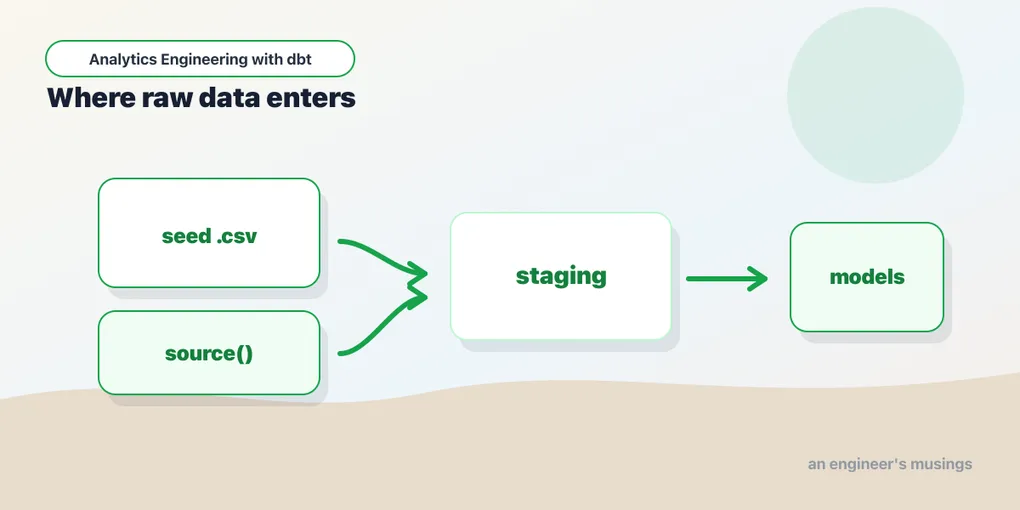
Every model in the last post read from something upstream, and eventually you hit the top of the graph — the raw data itself. dbt gives you two front doors for it. Sources name tables that some other process loaded. Seeds are small CSV files dbt loads for you. Knowing which is which keeps your project honest about where data actually comes from.
Seeds: CSVs dbt loads
A seed is a .csv file in the seeds/ folder that dbt loads into your warehouse as a table. It’s built for small, static, version-controlled data — the kind of thing that belongs in git: a country-code lookup, a mapping of accounts to regions, or sample data for a tutorial like this one.
Our bookshop starts as three CSVs:
seeds/
├── raw_customers.csv
├── raw_orders.csv
└── raw_payments.csv
# seeds/raw_orders.csv
id,customer_id,order_date,status
101,1,2025-01-05,completed
102,1,2025-02-10,completed
103,2,2025-01-11,completedLoad them with one command:
$ dbt seed
OK loaded seed file main.raw_customers ... [INSERT 10 in 0.12s]
OK loaded seed file main.raw_orders ...... [INSERT 15 in 0.11s]
OK loaded seed file main.raw_payments .... [INSERT 15 in 0.11s]
Done. PASS=3 WARN=0 ERROR=0 SKIP=0 NO-OP=0 TOTAL=3
dbt inferred the column types, created the tables, and inserted the rows. Once loaded, a seed is ref()-able exactly like a model — {{ ref('raw_orders') }} — so it slots into the DAG at the top.
A warning that saves pain later: seeds are not for big or changing data. They’re loaded by parsing a CSV and running inserts, which is fine for a few hundred rows and miserable for a few million. If the data changes constantly or comes from a real system, it’s a source, not a seed. We’ll draw the exact line at the end of this chapter.
Seed configuration: don’t let inference guess
That dbt seed run did something quietly dangerous: it guessed the type of every column. dbt reads the CSV, samples the values, and picks a type — integer, date, boolean, text — before creating the table. When the data is clean and the guesses are right, you never notice. When they’re wrong, you get silent corruption at the very root of your graph, and every model downstream inherits it.
Configuration lives in dbt_project.yml under the seeds: key, or per-seed in a YAML properties file. The project-level version keys off folder path, exactly like model config:
# dbt_project.yml
seeds:
  bookshop:
    +schema: seed_data      # land all seeds in a dedicated schema
    raw_orders:
      +column_types:
        id: varchar
        customer_id: varchar
        order_date: date
        status: varchar
+column_types is the one you reach for most, and here’s the failure mode it fixes. Every column in our three seeds happens to infer cleanly — the ids are plain 1, 2, 3 so integer is right, order_date reads as a date, amount as an integer. That clean run is exactly what lulls you: the moment a column is “all digits but not really a number,” inference betrays you.
Picture it with a concrete case. Suppose the shop later starts stamping each customer with a zero-padded account code — 0042, 0117 — the way a lot of billing systems mint ids, and it rides along in a seed:
# a zero-padded id column — the classic inference trap
account_code,customer_id
0042,1
0117,2
Load that with inference on and DuckDB reads account_code as an integer, because every value happens to be digits. 0042 becomes 42 — the leading zeros are gone, and the code is now unjoinable to any table that stored it as text. This is the classic seed bug: any identifier that is “all digits but not really a number” — account codes, zip codes, phone numbers, ISBNs — must be pinned to varchar or inference will eat the leading zeros:
seeds:
  bookshop:
    raw_customers:
      +column_types:
        account_code: varchar    # keep it text so 0042 survives
The other two inference traps are worth naming:
- Dates.
order_datelike2025-01-05is usually inferred correctly as adateby DuckDB, but ambiguous formats (01/05/2025— is that Jan 5 or May 1?) get read as text and then quietly compare and sort wrong. Pin the column todateand let the loader’s parser do the coercion, or fix the format in the CSV. Don’t leave a date living as a string. - Booleans.
true/falsereads as a boolean, butTRUE/FALSE,Y/N, or1/0may not —Y/Nbecomes text,1/0becomes integer. If you want a real boolean, either normalize the CSV totrue/falseor pin the type and let the warehouse cast.
column_types values are literal SQL types in the warehouse’s dialect. On DuckDB that means varchar, date, integer, boolean, decimal(10,2), and so on. dbt puts the type into the CREATE TABLE, so anything DuckDB understands is fair game.
A few more seed knobs, all set the same way:
seeds:
  bookshop:
    raw_orders:
      +delimiter: ";"          # for European-style semicolon CSVs
      +quote_columns: true     # wrap every column name in quotes on create
      +enabled: true           # set false to exclude a seed from the project
+full_refresh: false # protect a seed from being dropped/recreated+delimiter— for the export that isn’t actually comma-separated. TSVs use"\t"; a lot of European tooling emits";"because their locale uses the comma as a decimal separator.+quote_columns— force-quotes column identifiers in the generated DDL. Turn it on when a header contains a space, a reserved word (order,select), or mixed case you need preserved. Off by default because most headers are plain.+enabled: false— removes the seed from the graph entirely without deleting the file. Handy for parking a WIP CSV.+full_refresh: false— makes the seed refuse to be dropped and recreated. More on that next.
Encoding and nulls. dbt reads seed CSVs as UTF-8. A file exported as Latin-1 or UTF-16 will either error or mangle accented characters (Barbara Lïskov turns to mojibake), so re-encode upstream — iconv -f latin1 -t utf8 in.csv > raw_customers.csv — rather than hoping. For nulls, an empty field becomes NULL, but the literal text NULL in a cell stays the four-character string "NULL". That bites when a source system writes the word NULL for missing values: your not_null test passes (the value isn’t null, it’s a string) while the data is meaningless. Fix it in the CSV, or handle it in the staging model with nullif(col, 'NULL').
Reloading a seed: --full-refresh
dbt seed on an existing seed truncates and re-inserts — it keeps the table but replaces the rows. That’s usually what you want. But if you change a column type in column_types, or add/remove/rename a column, a truncate-and-insert can’t reshape an existing table. You need dbt to drop and recreate it:
$ dbt seed --full-refresh
$ dbt seed --full-refresh --select raw_orders  # just the one
This is why +full_refresh: false exists: on a seed holding data you can’t easily regenerate, it prevents even --full-refresh from dropping the table, so a stray flag can’t nuke it. For our version-controlled bookshop CSVs the opposite is true — they’re disposable and reproducible, so we leave full-refresh on and reach for it any time the schema changes.
Seeds can be documented and tested too
A seed is a first-class node, so it takes the same properties as a model: a description, per-column docs, and data_tests. Put them in a properties YAML alongside the CSV — and this is a much better home for config than dbt_project.yml when the settings belong to one specific seed:
# seeds/_seeds.yml
version: 2

seeds:
  - name: raw_orders
    description: "Sample orders for the bookshop — one row per order."
    config:
      column_types:
        id: varchar
        order_date: date
    columns:
      - name: id
        description: "Order id, kept as text so it never loses a leading zero."
        data_tests:
          - unique
          - not_null
      - name: status
        data_tests:
          - accepted_values:
              arguments:
                values: [completed, returned, pending]
Now dbt build runs the seed and then tests it, and dbt test --select raw_orders checks it on its own. Testing a seed is exactly as valuable as testing a source: if a hand-edited CSV picks up a duplicate order id or an unknown status, you want the build to fail on the seed, not three marts later. Hand-maintained data is edited by humans, which is precisely why it’s worth guarding.
Sources: naming what’s already there
In production, raw data lands in your warehouse by way of an ingestion tool (Fivetran, Airbyte, a Kafka sink) dropping tables into a schema. dbt didn’t create those tables and doesn’t own them. It just needs to name them so models can read from them and so the lineage graph knows they exist.
That’s a source. You declare it in a YAML file — no SQL — describing the schema and the tables in it:
# models/staging/_sources.yml
version: 2

sources:
  - name: raw
    description: "Raw data from our ingestion pipeline."
    schema: main
    tables:
      - name: raw_customers
      - name: raw_orders
      - name: raw_payments
Now staging models read from the source with source() instead of ref():
-- models/staging/stg_orders.sql
select id as order_id, customer_id, status
from {{ source('raw', 'raw_orders') }}
source('raw', 'raw_orders') takes the source name and the table name, and dbt resolves it to the real relation — here "bookshop"."main"."raw_orders". Same idea as ref(), but pointing at data dbt doesn’t build.
Why bother, instead of just hardcoding the table? Three payoffs: the raw tables show up in your lineage graph as the true origin; you can test them; and you can check whether they’re fresh.
Seed or source in this series? Because we have no live ingestion, our bookshop seeds the raw CSVs and staging reads them with
ref(). In a real project those same raw tables would arrive from a loader and staging would read them withsource(). The two are interchangeable at the top of the graph — pick by where the data actually comes from.
Names, identifiers, and multiple loaders
The name you give a source is a project-internal alias, not necessarily the real table name. Three keys let the alias and the physical location diverge:
schema:— the physical schema the table lives in. If omitted, dbt assumes it equals the sourcename.database:— the physical database/catalog. On DuckDB this is an attached database; on Snowflake/BigQuery it’s the catalog or project. Omit it and dbt uses the target’s default.identifier:— the real table name, when it differs from the friendlynameyou want to type insource().
That last one is the workhorse. Fivetran likes to prefix tables and preserve source casing; you don’t want source('raw', 'PUBLIC_ORDERS_V2') sprinkled through your SQL. Alias it once:
sources:
  - name: shop
    database: raw_prod          # attached DuckDB db / warehouse catalog
    schema: fivetran_shop
    tables:
      - name: orders            # what you type: source('shop', 'orders')
        identifier: PUBLIC_ORDERS_V2   # what actually exists
A single project routinely has several sources for several loaders — shop from the app database, stripe from the payments processor, sheets from a Google Sheet someone maintains — each its own entry with its own schema and freshness rules. The optional loader: field is pure documentation of who lands the data; it shows up in the generated docs so a reader knows stripe comes from Fivetran and sheets from a manual export.
If the warehouse is case-sensitive about identifiers, quoting: controls whether dbt wraps names in quotes:
sources:
  - name: shop
    quoting:
      identifier: true    # emit "PUBLIC_ORDERS_V2" verbatim, don't fold case
    tables:
      - name: orders
        identifier: PUBLIC_ORDERS_V2
DuckDB is largely case-insensitive so you rarely need this locally, but Snowflake — which upper-cases unquoted identifiers — makes it essential when a loader created lower- or mixed-case tables.
Sources also carry meta and tags, same as models. meta is free-form key–value documentation (owner, PII flag, upstream system); tags let you select groups of sources at the command line:
sources:
  - name: shop
    meta:
      owner: "data-platform"
      contains_pii: true
    tags: ["daily", "critical"]
    tables:
      - name: orders
Now dbt source freshness --select tag:critical checks only the sources that matter for the morning dashboard.
Freshness: catching stale data
The best thing sources unlock is freshness checks. If an ingestion job silently dies, your models keep building happily on yesterday’s data and nobody notices until a number looks wrong. Freshness catches it. You point dbt at a timestamp column and give it thresholds.
Here’s a fuller _bookshop__sources.yml showing freshness at both levels:
# models/staging/_bookshop__sources.yml
version: 2

sources:
  - name: shop
    database: raw_prod
    schema: fivetran_shop
    loader: fivetran
    # Source-level defaults — every table inherits these...
    loaded_at_field: _fivetran_synced
    freshness:
      warn_after:  {count: 12, period: hour}
      error_after: {count: 24, period: hour}
    tables:
      - name: customers        # inherits both thresholds as-is

      - name: orders
        # ...but a table can tighten or override them:
        freshness:
          warn_after:  {count: 1, period: hour}
          error_after: {count: 6, period: hour}
          # only measure recent rows, so a slow backfill of old
          # partitions doesn't look "fresh" and mask a stalled sync:
          filter: "order_date >= current_date - 7"

      - name: order_events     # high-volume; never mind freshness
        freshness: null        # explicitly opts out of the inherited rule
Three things to read out of that:
Inheritance. freshness and loaded_at_field set at the source level apply to every table under it. A table can override either — orders tightens the window to hours because a stalled order sync is urgent — or opt out entirely with freshness: null, which is how you exempt a table (like a huge append-only event log) from a source-level rule.
warn_after / error_after. Each takes a count and a period (minute, hour, or day). Over warn_after, the check reports warn; over error_after, it reports error and exits non-zero — the thing that fails a scheduled job and pages someone.
filter — note it nests inside the freshness: block, alongside the thresholds — is a raw SQL predicate injected into the freshness query’s WHERE. Without it, dbt runs select max(_fivetran_synced) from ... over the whole table; with it, only over rows matching the predicate. That matters when a loader backfills historical partitions — the max timestamp could be old even though today’s data arrived — or on a giant table where you only want to scan a recent slice.
loaded_at_field vs. warehouse metadata
loaded_at_field names a column dbt runs max() over. If your loader stamps every row with a sync time (_fivetran_synced, _loaded_at), use it. Newer dbt can also compute freshness from warehouse metadata — the table’s last-modified time — when you omit loaded_at_field, so you don’t need a timestamp column at all.
DuckDB honesty flag: metadata-based freshness depends on the adapter exposing table modification times, and dbt-duckdb does not provide it. On DuckDB you must supply a loaded_at_field; a source with no timestamp column simply can’t have its freshness measured here. (Our seeded CSVs carry no load timestamp, which is exactly why freshness is a feature for real, continuously-loaded sources, not for this tutorial’s seeds.)
Running it, and the sources.json artifact
$ dbt source freshness                                # all sources
$ dbt source freshness --select source:shop           # one source
$ dbt source freshness --select source:shop.orders    # one table
dbt runs the max() query, compares to now, and prints PASS / WARN / ERROR per table. It also writes target/sources.json — a machine-readable artifact recording, for each table, max_loaded_at, snapshotted_at, the computed staleness, and the criteria it was judged against. That file is what a monitoring job parses, and it’s also the input to the slickest use of freshness in CI.
source_status:fresher+ for CI
In a scheduled run you don’t want to rebuild the entire project every time — you want to rebuild only what has new data. The source_status selector does exactly that by diffing two sources.json files:
# nightly job: rebuild only models fed by sources that got fresher,
# plus everything downstream of them
$ dbt source freshness                       # writes a new sources.json
$ dbt build --select source_status:fresher+ --state ./prod-artifacts
source_status:fresher+ means “sources whose max_loaded_at is newer than in the saved state” — and the trailing + pulls in everything downstream. --state points at a directory holding the previous run’s sources.json. The result is an incremental, data-driven build: sources that didn’t change don’t trigger any work. We’ll lean on this selector again in the deployment chapter.
Documenting and testing sources
Sources take the same description and data_tests keys as models, so your raw layer can be documented and guarded too:
tables:
  - name: raw_orders
    description: "One row per order, straight from the app database."
    columns:
      - name: id
        description: "Primary key — the order's unique id."
        data_tests:
          - unique
          - not_null
      - name: customer_id
        data_tests:
          - relationships:
              arguments:
                to: source('shop', 'customers')
                field: id
Testing at the source is worth it — if id isn’t unique in the raw table, you want to know before it corrupts every join downstream, not after. Run source tests on their own with selection:
$ dbt test --select source:shop # every test on the shop sourceOne thing to hold onto: sources are read-only. dbt names them, tests them, and checks their freshness, but it never creates or writes one. dbt build runs seeds, models, snapshots, and tests — it will never “build” a source, because a source is data that already exists by the time dbt looks at it. If a source table is missing, that’s an upstream loader problem; dbt can only tell you it’s gone.
Seed, source, or external table?
Three ways in, one decision. The deciding factors are who produces the data, how it changes, and how big it is.
- Seed — you own it, it’s small and static, and it belongs in git. Lookup tables, mappings, config, or the sample customers/orders/payments a tutorial like this one seeds. Rule of thumb: if it’s under ~1,000 rows and a few hundred KB, and a human edits it occasionally, seed it. Past a few thousand rows,
dbt seed’s parse-and-insert gets slow and git diffs get ugly. - Source — someone else loads it into the warehouse on a schedule, and it changes. Anything from a real ingestion pipeline. You name it, test it, and watch its freshness; you never store the data in your repo.
- External table — a big file (or many files) sitting in object storage or on disk that you want to query in place without loading it into the warehouse first. This is where seeds stop making sense: you’d never commit a 2 GB Parquet export to git.
That last option has a DuckDB-native flavour that’s genuinely useful in this project. DuckDB can read files directly, so a “source” can be a file path wrapped in read_csv/read_parquet:
-- query a large export in place, no seed, no loader
select * from read_parquet('s3://bookshop/exports/orders_2025.parquet')
select * from read_csv('data/big_returns.csv', header = true)
For a repeatable version of that — external tables declared as dbt sources — the dbt-external-tables package lets you describe the file in YAML and have dbt register it as a queryable relation:
sources:
  - name: exports
    tables:
      - name: orders_archive
        external:
          location: "s3://bookshop/exports/orders_*.parquet"
Then dbt run-operation stage_external_sources wires it up and your models source() it like anything else. That’s the escape hatch when the data is too big to seed and too file-shaped to be a normal warehouse table — common for archival exports, data-lake landings, and one-off bulk backfills.
Final thoughts
The distinction is really about ownership. Seeds are data you own and version — small, static, checked into git, and only trustworthy once you’ve pinned the types so inference can’t eat a leading zero. Sources are data you don’t — loaded by someone else, named so dbt can build on it, tested at the boundary, and watched for freshness so you find out when it goes stale instead of shipping yesterday’s numbers. External tables are the third door for data too big for either. All three sit at the top of the DAG; getting them declared properly is what makes the lineage graph tell the truth about where your numbers come from.
Comments