ref() Is the Whole Trick
One function turns a folder of loose queries into a dependency graph dbt can order, parallelize, and reason about. Meet the DAG, and the staging-to-marts layering everyone uses.
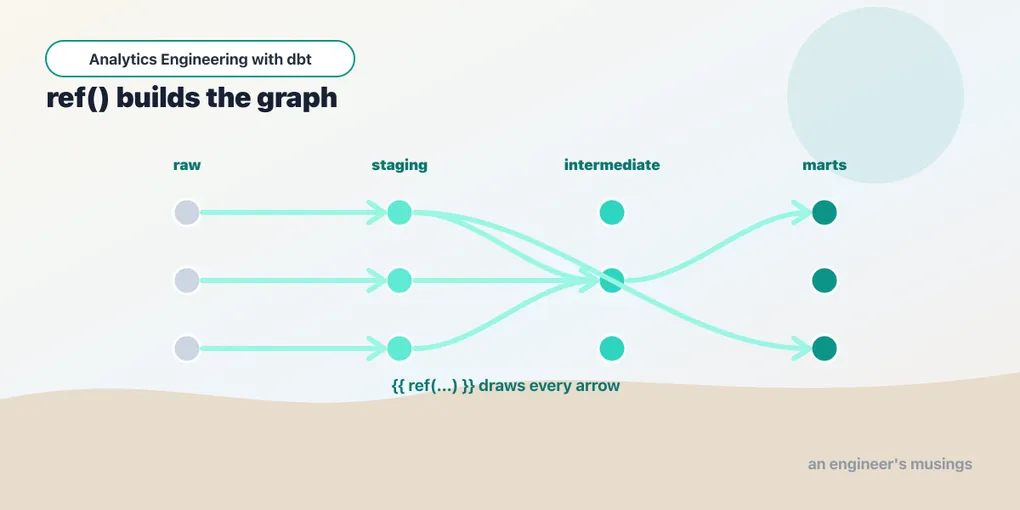
In the last post you built a single model that stood alone. Real projects have dozens of models that build on each other, and the thing that makes that manageable, the single most important idea in dbt, is one function: ref().
Referring, not naming
Say you have raw order data and you want a cleaned-up version. The naive way hardcodes the table name:
select id as order_id, customer_id, status
from raw_orders          -- brittle: which schema? which database?
The dbt way refers to the model instead:
select id as order_id, customer_id, status
from {{ ref('raw_orders') }}
{{ ref('raw_orders') }} is a Jinja expression — the {{ }} marks a placeholder dbt fills in before the SQL runs. It does two things:
- It declares a dependency. dbt now knows this model reads from
raw_orders, soraw_ordersmust be built first. - It resolves to a real name. At compile time dbt swaps it for the fully-qualified relation —
"bookshop".main.raw_orderson DuckDB,analytics.staging.raw_orderson Snowflake. Same model code, different targets, no edits.
Get those two things and you understand 80% of dbt. Everything else is detail.
Three ways to point at a table
It’s worth being precise about what you don’t do, because the three options look similar and only one of them is right.
Hardcoding — from raw_orders — compiles to exactly raw_orders, resolved against whatever schema search path your warehouse happens to have. It works in dev right up until you point at prod and the table lives in a different schema, and it tells dbt nothing about the build order. dbt will happily try to build a model before the table it reads from exists, because you never told it there was a relationship.
ref() — from {{ ref('stg_orders') }} — points at another dbt model in this project. This is the one you reach for 95% of the time. It edges into the DAG and resolves to the right relation per target.
source() — from {{ source('bookshop', 'raw_orders') }} — points at a table dbt doesn’t build: raw data that some other system landed in the warehouse. It also edges into the DAG (a source is a node too) and resolves to a relation you declare once in a YAML file, but the crucial difference is that dbt never issues a create for it — it’s an input, not an output. The bookshop actually loads its raw_* tables as seeds (CSVs dbt loads for you), which is why we ref() them here; the moment that raw data comes from an ingestion tool instead, you’d flip those refs to source(). That whole distinction gets its own treatment in Where Data Comes From: Sources and Seeds — for now just hold onto the shape: ref for things dbt builds, source for things it only reads.
What ref() actually resolves to
The resolution is the part people gloss over, so let’s watch it happen. When you compile, dbt writes the fully-substituted SQL to target/compiled/. Compile the orders mart and open it:
$ dbt compile -s orders
$ cat target/compiled/bookshop/models/marts/orders.sql
with orders as (
select * from "bookshop"."main"."stg_orders"
),
order_payments as (
select * from "bookshop"."main"."int_order_payments"
)
select
orders.order_id,
orders.customer_id,
orders.order_date,
orders.status,
coalesce(order_payments.amount, 0) as amount
from orders
left join order_payments
on orders.order_id = order_payments.order_idRead that carefully, because it tells you exactly how little dbt does. Your CTEs are still CTEs — dbt did not flatten, reorder, or optimise anything. The only thing that changed is that each ref() became a three-part "database"."schema"."identifier". Compilation is substitution, not transformation: the SQL the warehouse runs is the SQL you wrote, with the names filled in. On DuckDB the database is bookshop (the file), the schema defaults to main. Run the same project against Snowflake with a staging schema and those exact refs compile to analytics.staging.stg_orders instead — you never touched the model. That indirection is the whole reason a dbt project is portable across a laptop, CI, and prod.
Where does the schema part come from? dbt runs a macro called generate_schema_name to decide, and you can override it to route, say, staging models into a staging schema and marts into marts. That’s a whole lever we pull in One dbt Project, Many Places to Run It — just know for now that the schema in a compiled ref is computed, not fixed, which is exactly why hardcoding a schema name never survives contact with a second environment.
The other forms of ref()
Ninety-five percent of your refs are the one-argument form, but two variants show up and it’s better to recognize them than to be surprised:
Two-argument, cross-project. {{ ref('finance', 'stg_invoices') }} points at a model named stg_invoices in a different dbt project called finance. This is how dbt Mesh lets one team consume another team’s models by name instead of by raw table. You won’t need it in a single-project bookshop, but when you see two arguments, read it as “project, then model.”
Versioned. {{ ref('orders', version=2) }} (or ref('orders', v=2)) pins to a specific version of a model that has been declared with versions in YAML — a way to evolve a model’s schema while old consumers keep reading the shape they expect. Omit the version and you get the model’s latest_version. Again, not something the bookshop needs yet; it lands properly in the governance material.
{{ this }}
A quick word on getting a name wrong, because you will. ref() matches on the model’s file name minus extension, not the table it produces (they’re usually the same, but they don’t have to be). Typo it — {{ ref('stg_order') }} when the file is stg_orders.sql — and dbt fails at parse time with a clear message:
Compilation Error in model orders
  depends on a node named 'stg_order' which was not found
That’s a feature, not a nuisance: a mistyped ref is caught before anything runs, whereas a mistyped hardcoded table name sails through compilation and blows up mid-query in the warehouse. The ref graph gives you a spell-check on your dependencies.
One relative of ref() deserves a mention: {{ this }} resolves to the current model’s own relation — the same three-part name you’d get if a model could ref() itself. You reach for it when a model needs to read from the table it’s about to replace (incremental models filter on where updated_at > (select max(updated_at) from {{ this }})) or in a post-hook that grants or indexes the thing you just built. It’s not a dependency — a model doesn’t depend on itself — it’s just a tidy handle to “me.” We put it to real work when we get to incremental models; file it away until then.
The DAG
When you run dbt run, dbt does two distinct things, and it helps to separate them.
First it parses every .sql and .yml file in the project — not by running the SQL, but by rendering the Jinja and recording every ref(), source(), and config() it finds. The output is a big JSON file, target/manifest.json, that describes every node and, crucially, its depends_on list. (You can produce it without building anything: dbt parse.) The manifest is dbt’s model of your project.
Then it hands those depends_on edges to a linker, which assembles them into a DAG — a directed acyclic graph of what depends on what. “Acyclic” is load-bearing: if model A refs B and B refs A, there is no valid order to build them in, so dbt refuses to run and tells you which nodes form the loop rather than spinning forever. (You’ll trip a cycle exactly once in your dbt life, usually by having a mart accidentally read from a model that reads from it, and the error names both ends.)
If you ever do induce a cycle — the classic way is to make int_order_payments read from orders after orders already reads from int_order_payments — dbt stops at parse time with something like:
Compilation Error
  Found a cycle: model.bookshop.orders --> model.bookshop.int_order_payments --> model.bookshop.orders
Notice it fails before running a single query. The graph is validated up front, so a structural mistake costs you a parse, not a half-built warehouse.
With a valid graph in hand, dbt walks it in dependency order, building independent branches in parallel and never building a model before its inputs exist.
Here’s our bookshop’s shape. Raw seeds feed staging models, staging feeds an intermediate model and the marts, and the marts feed each other:
raw_customers ─▶ stg_customers ─────────────────▶ customers
raw_orders    ─▶ stg_orders    ─▶ orders ────────▶ (feeds customers)
raw_payments  ─▶ stg_payments  ─▶ int_order_payments ─▶ orders
You never wrote that order down. dbt derived it from the ref() calls and ran it; you can see it happen in the log:
$ dbt run
START sql view model main.stg_customers ....... [RUN]
START sql view model main.stg_orders .......... [RUN]
START sql view model main.stg_payments ........ [RUN]
OK created sql view model main.stg_orders ..... [OK]
...
START sql table model main.int_order_payments . [RUN]
START sql table model main.orders ............. [RUN]
START sql table model main.customers .......... [RUN]
The three staging views start together — they don’t depend on each other. orders waits for int_order_payments. customers waits for orders. dbt figured all of that out from the refs.
Threads, and why the three staging models start at once
That parallelism isn’t magic; it’s a number. In your profiles.yml there’s a threads: setting:
bookshop:
  target: dev
  outputs:
    dev:
      type: duckdb
      path: bookshop.duckdb
      threads: 4
dbt keeps a ready-queue of nodes whose upstreams have all finished, and pulls up to threads of them at a time. On our tiny graph, stg_customers, stg_orders, and stg_payments have no upstreams among the models (their seeds are already loaded), so all three are ready at t=0 and — with threads: 4 — all three start together. int_order_payments only becomes ready once stg_payments finishes; orders waits for int_order_payments; customers waits for orders. So even with four threads available, the tail of this graph runs one-at-a-time, because it’s a chain. Threads speed up width, not depth — bumping to threads: 8 does nothing for a pipeline that’s a single long dependency line, and does a lot for a project with forty independent staging models. Four to eight is the usual starting point; the ceiling is really your warehouse’s appetite for concurrent queries, not dbt.
The layering everyone uses
You could put every model in one folder, but there’s a near-universal convention worth adopting from day one: staging → intermediate → marts. Each layer has a job, a naming prefix, and a rule about what it’s allowed to do.
Staging models are one-to-one with your raw sources. One stg_ model per source table, doing nothing but light cleanup — renaming columns, casting types, the occasional case statement. Staging never joins. That’s the rule that keeps the layer honest: a staging model is a clean, renamed, retyped mirror of exactly one input, and nothing more. This is where you draw a clean boundary around messy source data:
-- models/staging/stg_orders.sql
select
    id           as order_id,
    customer_id,
    order_date,
    status
from {{ ref('raw_orders') }}
Boring on purpose. Every other model reads from stg_orders, never from raw_orders directly — so if the raw column is renamed from id to order_id upstream, you fix it in exactly one place.
The full naming convention is stg_<source>__<entity> — note the double underscore between source and entity, as in stg_stripe__payments or stg_shopify__orders. The double underscore is doing real work: it namespaces the entity by the system it came from, so when two systems both hand you a “payments” table you get stg_stripe__payments and stg_paypal__payments instead of a collision. Our bookshop draws from a single source, so we’ve kept the short form stg_payments for readability — but the day you add a second source, reach for the full stg_<source>__<entity> and you’ll be glad of the namespace.
Intermediate models (int_) are the middle steps — a join or an aggregation that more than one mart needs, or a piece of logic gnarly enough that a mart reads better with it factored out. The bar for creating one is real: don’t add an intermediate just to have a layer. Add it when (a) two or more marts would otherwise duplicate the same join, or (b) a single mart’s query has grown a stage complex enough to name and test on its own. Ours rolls payments up to one row per order — a grain shift the orders mart needs and shouldn’t have to inline:
-- models/intermediate/int_order_payments.sql
select
    order_id,
    sum(amount) as amount
from {{ ref('stg_payments') }}
group by 1
One idea underneath all of this is one model, one grain. stg_payments is one row per payment. int_order_payments is one row per order. customers is one row per customer. If you can’t say in a sentence what one row of a model is, the model is doing two jobs and wants splitting.
Grain confusion is the single most common cause of a sum() that’s silently double-counted, and int_order_payments is precisely the model that exists to prevent it. Order 1 in the bookshop was paid in two installments — a card charge and a gift-card top-up — so stg_payments has two rows for it. Imagine orders skipped the intermediate and joined straight to stg_payments:
-- the WRONG shortcut
select orders.order_id, sum(stg_payments.amount) as amount
from {{ ref('stg_orders') }} as orders
left join {{ ref('stg_payments') }} as stg_payments
    on orders.order_id = stg_payments.order_id
group by 1
That happens to be fine — until the next mart joins orders to something else that also has multiple rows per order (a shipments table, say) and now every payment is counted once per shipment. The join fans out, rows multiply, and your revenue is wrong with no error to show for it. int_order_payments collapses payments to one row per order first, so anything downstream can join to it safely. That’s the whole justification for the layer: it fixes the grain once, in a named model you can test, instead of hoping every future join gets it right.
Marts are the finished tables people actually query — one per business concept, joined and enriched. orders stitches each order to its payment total; customers rolls orders up per customer:
-- models/marts/customers.sql
with customers as (
    select * from {{ ref('stg_customers') }}
),

customer_orders as (
    select
        customer_id,
        count(order_id)  as number_of_orders,
        sum(amount)      as lifetime_value
    from {{ ref('orders') }}
    group by 1
)

select
    customers.customer_id,
    customers.first_name,
    customers.plan,
    coalesce(customer_orders.number_of_orders, 0) as number_of_orders,
    coalesce(customer_orders.lifetime_value, 0)   as lifetime_value
from customers
left join customer_orders
    on customers.customer_id = customer_orders.customer_id
Look at the shape of that model, because it’s the house CTE style and it’s deliberate. The model opens with import CTEs — one named CTE per input, each doing nothing but select * from {{ ref(...) }}. Then come the logical CTEs that actually transform. Then a single final select at the bottom. Read top-to-bottom it’s a little pipeline: here are my inputs, here’s what I do to them, here’s what I hand back. Every ref() lives in an import CTE at the top, so you can see a model’s entire dependency list in the first ten lines without scanning the whole file — and so can a reviewer. That’s not a rule dbt enforces; it’s a convention that pays off the first time you open a colleague’s 120-line mart.
The left join plus coalesce matters too: a customer with no orders (we have one, Donald, on the free plan) still shows up, with a lifetime value of 0 instead of vanishing.
Marts naming is where teams diverge. This companion keeps its marts flat — plain business names like orders and customers, in the style dbt’s own reference project popularized — because on a project this size the short names read cleanly and there’s nothing to disambiguate. The Kimball-flavored convention instead prefixes facts and dimensions: our orders mart would be fct_orders (the event, one row per order) and customers would be dim_customer (the entity, one row per customer). Both are fine; pick one and be consistent. On a larger project, the fct_/dim_ split tends to earn its keep — especially if your marts feed a BI tool or a semantic layer — because it signals grain and role at a glance. We keep the flat names here for simplicity, and go deep on why the folder layout looks the way it does in A dbt Project Is a Product, Not a Junk Drawer — this chapter is about the graph the layering produces; that one is about the drawers you file it in.
Dropping a model out of the graph
Sometimes you want a model to exist in the repo but not build — a work-in-progress, a model you’re retiring, one that’s only relevant on certain warehouses. Set enabled: false and dbt treats it as if it weren’t there at all:
-- models/marts/experimental_forecast.sql
{{ config(enabled=false) }}

select ...
or in dbt_project.yml for a whole folder:
models:
  bookshop:
    marts:
      experimental:
        +enabled: false
Disabled isn’t the same as unselected. An unselected model is still in the graph — dbt knows about it, other models can ref() it, it just wasn’t part of this run. A disabled model is gone from the graph: it won’t build, it won’t appear in dbt ls, and if another live model still ref()s it you get a compile error, because from the DAG’s point of view that node no longer exists. It’s the clean way to shelve a model without deleting the file.
Seeing the graph
You don’t have to take dbt’s word for the DAG — you can print it. dbt ls (alias for dbt list) walks the graph and lists nodes in dependency order:
$ dbt ls --resource-type model
bookshop.marts.customers
bookshop.intermediate.int_order_payments
bookshop.marts.order_events
bookshop.marts.orders
bookshop.marts.orders_by_customer
bookshop.staging.stg_customers
bookshop.staging.stg_orders
bookshop.staging.stg_payments
Add --output json when you want the machine-readable version — each line becomes a JSON object with the node’s depends_on, config, tags, and original_file_path, which is exactly what you’d feed a script that audits the project or draws its own lineage picture:
$ dbt ls -s orders --output json --output-keys "name depends_on"
{"name": "orders", "depends_on": {"nodes": ["model.bookshop.stg_orders", "model.bookshop.int_order_payments"]}}
There’s orders’ dependency list, straight from the manifest — the same edges dbt used to schedule the run.
And because the graph is a real object, you can select slices of it. The selector syntax uses + for graph traversal — before a name for ancestors, after for descendants — so you can build a model and everything it depends on, or a model and everything downstream:
$ dbt run -s +customers      # customers and all its upstreams
$ dbt run -s stg_orders+     # stg_orders and everything downstream
$ dbt ls   -s tag:finance    # everything tagged finance
Change a staging model and dbt run -s stg_orders+ rebuilds only what could possibly be affected, instead of the whole project.
If you’d rather see the graph than read it, dbt docs generate && dbt docs serve spins up a local site with a clickable lineage diagram built from the very same manifest — the bookshop’s raw → stg → int → mart arrows, rendered. We give that its own walkthrough in Docs, Lineage, and Shipping It; it’s the same DAG, just drawn instead of printed. That selection language — +, @, tag:, path:, unions and intersections, and how dbt build weaves tests into the same graph walk — is a deep enough topic that it gets its own chapter, dbt build Is a Graph Command. For now the point is smaller: the DAG isn’t an abstraction dbt keeps to itself. It’s a thing you can list, filter, and rebuild in slices, because every edge in it came from a ref() you wrote.
Final thoughts
ref() looks like a small convenience, a way to avoid typing schema names. It’s really the load-bearing wall of the whole tool. Because every dependency is declared in code, dbt can order your build, parallelize it across threads, rebuild only what changed, drop disabled nodes, and draw you a lineage graph — all for free, all from those double braces. Write your dependencies as ref(), lay your models out in staging → intermediate → marts, keep each model to one grain, and the rest of dbt has something solid to stand on.
Comments