Share Helpers and Automate Their Checks
The line-total calculation is now useful in an order summary, a category report and an enriched report.
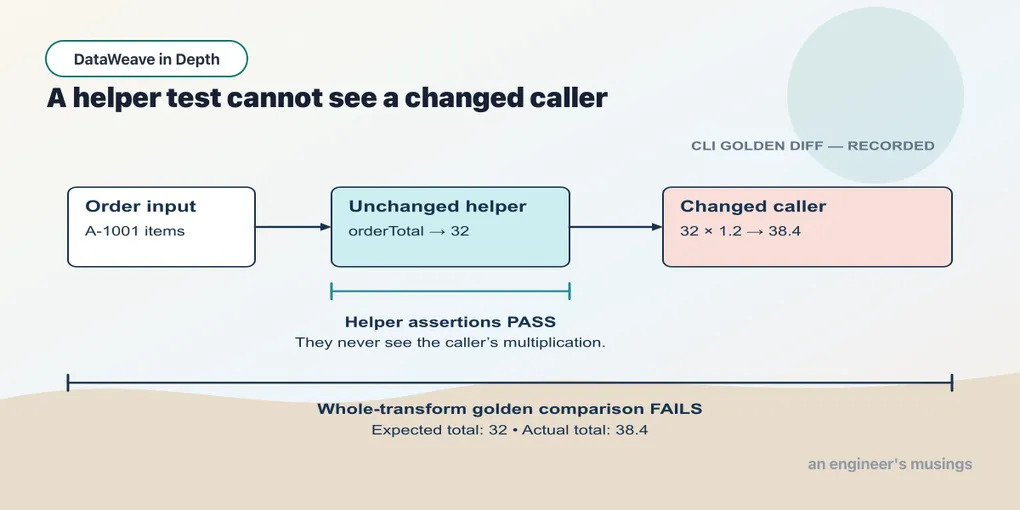
The line-total calculation is now useful in an order summary, a category report and an enriched report. Put that calculation in a module so each caller imports the same definition. Then check both the definition and the complete outputs that use it.
A module is a file with no body
A module is a DataWeave file that declares things and produces nothing: %dw 2.0, then funs, vars and types, and no ---. Here is the order maths that keeps getting re-derived, at orders/OrderMath.dwl:
Example 122 — Shared order calculations.
Module source; import it from the following scripts.
%dw 2.0

import sumBy from dw::core::Arrays

type LineItem = { sku: String, price: Number, qty: Number }

/**
 * Extended price for a single line.
 */
fun lineTotal(item: LineItem): Number = item.price * item.qty

/**
 * Total of every line on an order.
 */
fun orderTotal(items: Array<LineItem>): Number =
  items sumBy (i) -> lineTotal(i)
There is no trailing expression or output: callers use the declarations. The type LineItem states the shape both functions require. Run the file as if it were a script and the CLI says what it is missing:
[ERROR] Error while executing the script:
[ERROR] Missing Mapping Expression ie. var a = 1
 ---
 a

16|   items sumBy (i) -> lineTotal(i)
...

Location:
OrderMath (line: 16, column:34)
The reverse attempt also fails: importing a function from a file that has a body. Here orders/Broken.dwl defines lineTotal above the --- and then uses it in the body. A separate script tries to import that function:
Example 123 — Reject a module with a body.
Input payload — order.json:
{ "orderId": "A-1001", "customer": "Dana", "coupon": null, "tags": ["gift", null, "rush"],
  "items": [
    { "sku": "PEN-01", "price": 2.5, "qty": 4, "note": null },
    { "sku": "PAD-22", "price": 6.0, "qty": 2 },
    { "sku": "CLP-08", "price": 1.0, "qty": 10 }
  ] }
%dw 2.0
import lineTotal from orders::Broken
output application/json
---
lineTotal(payload.items[0])[ERROR] Error while executing the script:
[ERROR] Unable to resolve reference of: `lineTotal`.
5| lineTotal(payload.items[0])
^^^^^^^^^
Location:
123-module-with-body-fails (line: 5, column:1)
Unable to resolve reference of: `lineTotal`.
2| import lineTotal from orders::Broken
^^^^^^^^^
Location:
123-module-with-body-fails (line: 2, column:8)The file was found; the function was not exported from it. A file with a body is a script, and a script exports nothing. If a function is worth sharing, it goes in a file with no ---.
Where the file lives is the module’s name
orders::OrderMath is orders/OrderMath.dwl under some root, with :: for each folder. The CLI’s root is whatever --path says. Leave it off and the import cannot be resolved:
[ERROR] Error while executing the script:
[ERROR] Unable to resolve module with identifier orders::OrderMath.

2| import orderTotal from orders::OrderMath
                          ^^^^^^^^^^^^^^^^^
Location:
01_import_name (line: 2, column:24)
With --path=. from the folder that contains orders/, the same script runs. In a Mule application the root is src/main/resources, so src/main/resources/orders/OrderMath.dwl is the same module name. That last sentence is from MuleSoft’s documentation.
Importing it, four ways
From a transform you reach the module with the same import syntax used for dw::core::Arrays. To DataWeave there is no difference between your module and the standard library’s. Import a name, import everything, alias a name, or import the module qualified:
Example 124 — Import the order module functions.
Use order.json as payload, as above.
%dw 2.0
import * from orders::OrderMath
output application/json
---
{ id: payload.orderId, lines: payload.items map lineTotal($), total: orderTotal(payload.items) }
{
"id": "A-1001",
"lines": [
10,
12,
10
],
"total": 32
}import orderTotal from orders::OrderMath brings in that one name. import orderTotal as total from orders::OrderMath brings it in as total. import orders::OrderMath brings the module in qualified, and the call is OrderMath::orderTotal(payload.items). All three print { "id": "A-1001", "total": 32 } for the two-key version of that script. Selective imports keep the header honest about what the script depends on. import * is for exploring — and worth tightening before it ships, for a reason two sections down.
The types at the boundary
The LineItem parameter type lets orderTotal reject a line that has no quantity at the call boundary:
Example 125 — Call the module with a missing quantity.
%dw 2.0
import orderTotal from orders::OrderMath
output application/json
---
orderTotal([ { sku: "PEN-01", price: 2.5 } ])
[ERROR] Error while executing the script:
[ERROR] Missing required property: `qty` required by `LineItem`.
|-- From: `LineItem`
|---- From: orderTotal(items: Array<LineItem>) -> Number
5| orderTotal([ { sku: "PEN-01", price: 2.5 } ])
^^^^^^^^^^^^^^^^^^^^^^^^^^^^^
Location:
125-type-mismatch-fails (line: 5, column:14)The diagnostic identifies the missing property, its required type and the function that demanded it. Without the type, selecting the absent qty would pass null into price * null. The annotation moves that failure to the caller’s line, where the incomplete item enters the module. A supplied field can fail this boundary check too, as this deliberately textual price shows:
Example 126 — Call the module with a textual price.
%dw 2.0
import orderTotal from orders::OrderMath
output application/json
---
orderTotal([ { sku: "PEN-01", price: "2.50", qty: 4 } ])
[ERROR] Error while executing the script:
[ERROR] Expecting Type: `Number`, but got: `"2.50"` at `price`.
|-- From: `LineItem`
|---- From: orderTotal(items: Array<LineItem>) -> Number
5| orderTotal([ { sku: "PEN-01", price: "2.50", qty: 4 } ])
^^^^^^
Location:
126-type-mismatch-string (line: 5, column:38)Chapter 3 showed that "2.50" * "4" runs, coerces, and produces 10. The structural LineItem check refuses the string field. Unlike a scalar Number parameter from chapter 5, an object-shaped parameter does not coerce each nested field. Convert the fields while normalizing the source, then pass the resulting item to the shared calculation. Callers use a shared module without its author beside them, and typed exported parameters give them a useful failure at their own call site.
Two modules, one name
A second module, orders/Pricing.dwl, introduces a collision: it also defines lineTotal, with a 20% uplift baked in:
Example 127 — A second line-total implementation.
Module source; import it from the following scripts.
%dw 2.0
fun lineTotal(item) = item.price * item.qty * 1.2
Import both with * and call the ambiguous name:
Example 128 — Inspect colliding selective imports.
Use order.json as payload, as above.
%dw 2.0
import * from orders::OrderMath
import * from orders::Pricing
output application/json
---
lineTotal(payload.items[0])10No error, and the answer is OrderMath’s. Swap the two import lines and the same script prints 12, which is Pricing’s. Importing the name selectively from both modules also runs without complaint, and also prints the first one. The rule, from five runs: when two imports supply the same name, the first import wins, and nothing tells you. Two functions with the same shape are decided by line order in the header.
The fix is to alias one, which also makes the script say what it means:
Example 129 — Alias the two line-total functions.
Use order.json as payload, as above.
%dw 2.0
import lineTotal from orders::OrderMath
import lineTotal as taxedLineTotal from orders::Pricing
output application/json
---
{ net: lineTotal(payload.items[0]), gross: taxedLineTotal(payload.items[0]) }
{
"net": 10,
"gross": 12
}When a module outgrows one project, the MuleSoft-native home for it is Anypoint Exchange. The .dwl files are packaged as a library and published as a versioned asset; other projects declare it as a dependency and import from it. That is build-and-publish territory rather than language. It needs an Anypoint account.
A module’s functions see the module’s variables, not yours
The companion also contains Orders.dwl, whose declarations include var taxRate = 0.08 and fun withTax(amount) = amount * (1 + taxRate). Its withTax function reads that module variable. The question that decides whether a module is safe to share is whose taxRate. Declare a different one in the importing script and call the module’s function:
Example 130 — Keep a module binding in its own scope.
Input payload — orders.json:
[
  { "orderId": "A-1001", "customer": "Dana",
    "items": [
      { "sku": "PEN-01", "price": 2.5, "qty": 4 },
      { "sku": "PAD-22", "price": 6.0, "qty": 2 },
      { "sku": "CLP-08", "price": 1.0, "qty": 10 }
    ] },
  { "orderId": "A-1008", "customer": "Femi",
    "items": [
      { "sku": "PEN-01", "price": 2.5, "qty": 1 },
      { "sku": "INK-03", "price": 3.0, "qty": 3 }
    ] }
]
%dw 2.0
output application/json
import * from Orders
var taxRate = 0.20
---
{ local: taxRate, viaModule: withTax(100) }{
"local": 0.2,
"viaModule": 108
}The module’s function used the module’s 0.08. A module is closed over its own declarations — importing it cannot change what it does, and a script cannot reconfigure it by redeclaring a name. If a module needs a rate the caller chooses, the rate is a parameter — pass that rate explicitly instead of relying on a caller’s variable.
Pinning behaviour: assertions in plain DataWeave
Comparing a CLI result with an expected value turns a one-off run into a check for changed behavior. The documentation describes a testing framework under dw::test, with a describedBy suite DSL and must equalTo assertions. The CLI does not have it:
Example 131 — Try the dw::test modules in the CLI.
%dw 2.0
import * from dw::test::Tests
import * from dw::test::Asserts
import orderTotal from orders::OrderMath
---
"OrderMath" describedBy [
  "sums the line items" in do {
    orderTotal([ { sku: "PEN-01", price: 2.5, qty: 4 }, { sku: "PAD-22", price: 6.0, qty: 2 } ]) must equalTo(22.0)
  }
]
[ERROR] Error while executing the script:
[ERROR] Unable to resolve module with identifier dw::test::Tests.
2| import * from dw::test::Tests
^^^^^^^^^^^^^^^
Location:
131-dwtest (line: 2, column:15)
Unable to resolve module with identifier dw::test::Asserts.
3| import * from dw::test::Asserts
^^^^^^^^^^^^^^^^^
Location:
131-dwtest (line: 3, column:15)import * from dw::test fails the same way. According to the documentation the framework ships with the DataWeave tooling for VS Code and its Maven plugin. Check its assertion DSL against whatever version of that tooling you install.
The CLI can run a test written in DataWeave itself. Fixed inputs make the function’s result repeatable; expected values let the test judge that result. A table of cases keeps the input, expectation and comparison together:
Example 132 — Check a table of function cases.
%dw 2.0
import orderTotal from orders::OrderMath
output application/json
var cases = [
  { name: "sums the lines",   items: [ { sku: "PEN-01", price: 2.5, qty: 4 }, { sku: "PAD-22", price: 6.0, qty: 2 } ], want: 22.0 },
  { name: "empty order is 0", items: [],                                                                             want: 0 },
  { name: "deliberately wrong", items: [ { sku: "CLP-08", price: 1.0, qty: 10 } ],                                want: 11 }
]
---
cases map (c) -> do {
  var got = orderTotal(c.items)
  ---
  { name: c.name, pass: got == c.want, got: got, want: c.want }
}
[
{
"name": "sums the lines",
"pass": true,
"got": 22,
"want": 22
},
{
"name": "empty order is 0",
"pass": true,
"got": 0,
"want": 0
},
{
"name": "deliberately wrong",
"pass": false,
"got": 10,
"want": 11
}
]The third case is wrong on purpose, to show what a failure looks like. The empty-order case checks the [] behaviour from chapter 13; orderTotal passes because sumBy is seeded. The table’s 22.0 printed as 22, but got == c.want compared numbers rather than text. Chapter 3’s single Number type makes that equality hold.
A table that prints "pass": false still exits 0, so a shell script will not notice the failure. fail from dw::Runtime turns it into an abort with a message:
Example 133 — Make a failed assertion stop the command.
%dw 2.0
import orderTotal from orders::OrderMath
import fail from dw::Runtime
output application/json
var cases = [
  { name: "sums the lines",     items: [ { sku: "PEN-01", price: 2.5, qty: 4 } ], want: 10 },
  { name: "deliberately wrong", items: [ { sku: "CLP-08", price: 1.0, qty: 10 } ], want: 11 }
]
---
cases map (c) -> do {
  var got = orderTotal(c.items)
  ---
  if (got == c.want) { name: c.name, pass: true }
  else fail(c.name ++ ": expected " ++ (c.want as String) ++ ", got " ++ (got as String))
}
[ERROR] Error while executing the script:
[ERROR] deliberately wrong: expected 11, got 10
50| fun fail (message: String = 'Error'): Nothing = native("system::fail")
^^^^^^^^^^^^^^^^^^^^^^
Trace:
at dw::Runtime::fail (line: 50, column: 49)
at 133-assert-fail-loud::main (line: 14, column: 8) at:
50| fun fail (message: String = 'Error'): Nothing = native("system::fail")
^^^^^^^^^^^^^^^^^^^^^^The shell can now detect the failure through exit 255, and the message supplies the case name and both numbers. This runner needs only the CLI, but it stops at the first failure. I use the table form while developing to see every case, then the aborting form in the pipeline so a failed assertion also fails the command.
Golden files for whole transforms
A table of cases pins a function. A whole transform needs its output pinned as well, and the durable pattern for that is the golden file — commit the expected output beside a fixed input, and check that the transform still produces it. With the CLI that is -o and diff. The transform under test imports both functions from the module:
Example 134 — Normalize an order with module functions.
Use order.json as payload, as above.
%dw 2.0
import orderTotal, lineTotal from orders::OrderMath
output application/json
---
{
  id: payload.orderId,
  customer: payload.customer,
  lines: payload.items map (i) -> { sku: i.sku, qty: i.qty, lineTotal: lineTotal(i) },
  total: orderTotal(payload.items)
}
{
"id": "A-1001",
"customer": "Dana",
"lines": [
{
"sku": "PEN-01",
"qty": 4,
"lineTotal": 10
},
{
"sku": "PAD-22",
"qty": 2,
"lineTotal": 12
},
{
"sku": "CLP-08",
"qty": 10,
"lineTotal": 10
}
],
"total": 32
}That output, saved as book/15-modules-and-checks/expected-order.json and committed, is the golden file. From the companion root, run the commands in a shell that stops when either the transform or comparison fails:
set -eu
./dw.sh run -s --path=book/support/14-modules-and-testing \
  -i payload=book/support/14-modules-and-testing/order.json \
  -f book/15-modules-and-checks/134-normalize-order.dwl -o actual.json
diff book/15-modules-and-checks/expected-order.json actual.json
echo "golden: OK"
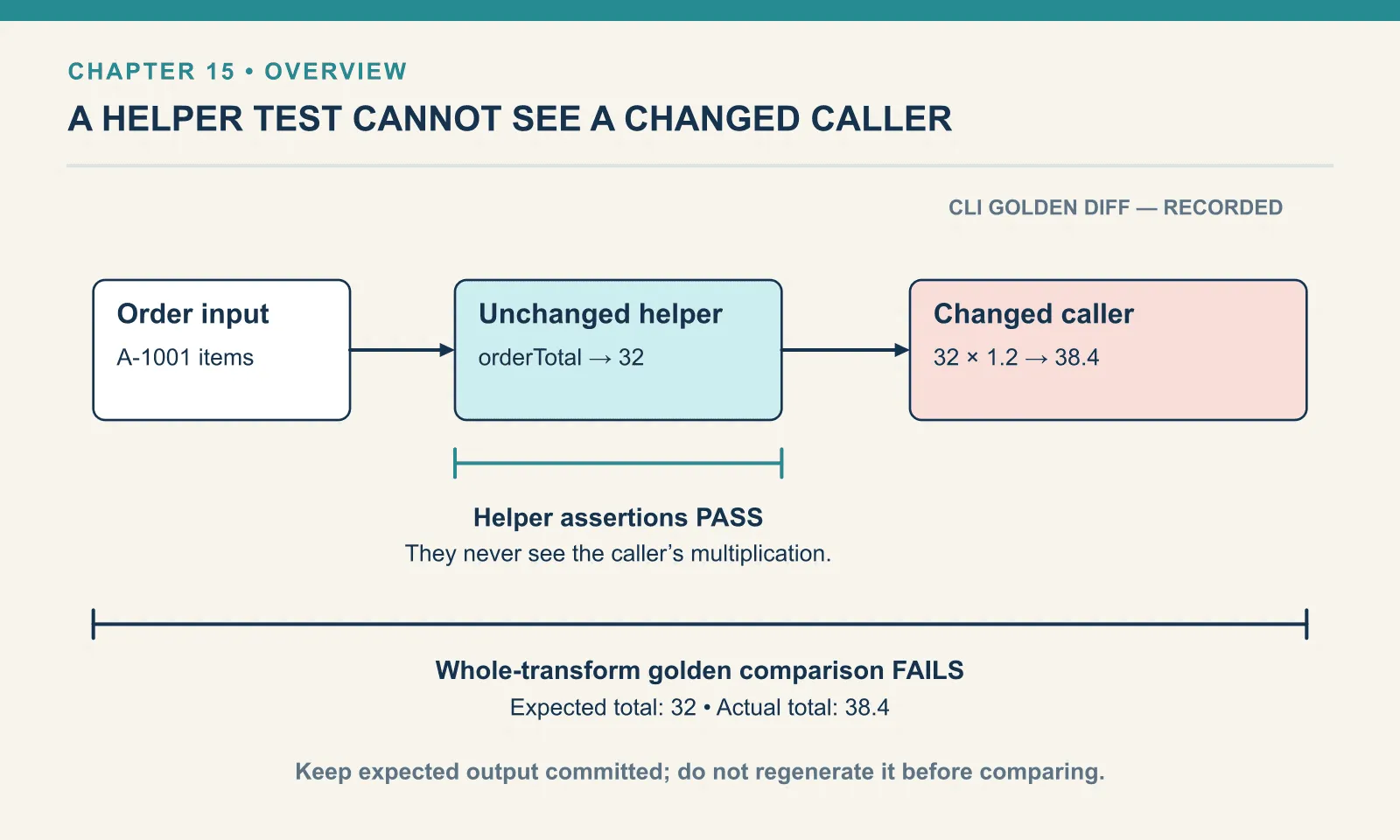
golden: OKFor a negative check, multiply the total by 1.2 in a copy of the transform and run the same shell script:
21c21
<   "total": 32
---
>   "total": 38.4
diff exits 1 on a difference. With set -e, that status stops the script before the success message. The diff shows one line, the old value and the new. When the change is intended, regenerate the golden file with -o, read the diff in the pull request, and commit it. The history of the golden file becomes the change log of the mapping.
A golden file compares bytes, so the field order and numeric representation become part of the check. A mergeWith that moves a colliding key can fail it even when a JSON consumer accepts the reordered object. The writer changing 6.0 to 6 is a difference too, despite both representing the same number.
I want those differences visible when reviewing what goes over the wire. Generate the expected output through the same pinned writer, then review changes instead of hand-editing the golden file to make a test pass. When the contract permits key-order or formatting differences, compare parsed data and test the properties the consumer actually requires.
Exercises
Both totals, no ambiguity. Import lineTotal from OrderMath and from Pricing into one script and print the net and the taxed total for the first line of A-1001. Run it. What would the script have printed with two plain selective imports and no alias, and why is that worse than an error?
Show answer
Example 135 — Compare net and taxed line totals.
Use order.json as payload, as above.
%dw 2.0
import lineTotal from orders::OrderMath
import lineTotal as taxedLineTotal from orders::Pricing
output application/json
---
{ net: lineTotal(payload.items[0]), gross: taxedLineTotal(payload.items[0]) }
{
"net": 10,
"gross": 12
}Without the alias, both calls would have resolved to whichever import came first and printed 10 twice, with no error. An error stops the pipeline; a silently wrong number reaches the invoice.
Break the golden on purpose. In a copy of Example 134 — Normalize an order with module functions, change total to orderTotal(payload.items) * 1.2. Run the golden-file shell script above against that copy and read the result. What did the golden file catch here that the assertion table on orderTotal would have missed?
Show answer
21c21
<   "total": 32
---
>   "total": 38.4
The assertion table tests orderTotal, which still returns 32; the change is in the transform, after the function. A unit test on the module cannot see it. The golden file tests the whole output, so it catches a change anywhere between the input and the bytes on the wire.
A passing helper test does not protect a caller that adds the wrong operation afterward. Keep a complete-transform check beside the function cases, and make the command fail when the comparison fails.
Comments