Transform Object Fields and Keys
So far, we have named output fields directly.
So far, we have named output fields directly. Some transforms need to process fields whose names come from the input: cleaning a supplier header, constructing a lookup, or applying a set of defaults. Start by constructing one dynamic key before asking a function to construct many.
Dynamic and conditional keys
So far the keys in the output objects have been literals typed into the script. They do not have to be. Wrap a key in parentheses and it becomes an expression DataWeave evaluates — and the result can be built from anything:
Example 67 — Construct a dynamic field name.
Input payload — lines.json:
[
  { "orderId": "A-1001", "sku": "PEN-01", "name": "Gel Pen",      "category": "writing", "price": 2.5, "qty": 4 },
  { "orderId": "A-1001", "sku": "PAD-22", "name": "Notepad A5",   "category": "paper",   "price": 6.0, "qty": 2 },
  { "orderId": "A-1001", "sku": "CLP-08", "name": "Binder Clips", "category": "desk",    "price": 1.0, "qty": 10 },
  { "orderId": "A-1008", "sku": "PEN-01", "name": "Gel Pen",      "category": "writing", "price": 2.5, "qty": 1 },
  { "orderId": "A-1008", "sku": "INK-03", "name": "Ink Refill",   "category": "writing", "price": 3.0, "qty": 3 }
]
%dw 2.0
output application/json
var field = "grandTotal"
---
{
(field): 43.5,
("total_" ++ payload[0].sku): payload[0].price * payload[0].qty,
(payload[0].qty): "a number as a key"
}{
"grandTotal": 43.5,
"total_PEN-01": 10,
"4": "a number as a key"
}A variable, a concatenation and a number all became keys. The number became the key "4", a conversion we can use when a source value must identify an output field. The mapping operations below use this 067-dynamic-key syntax.
Spreading an object into another
Parentheses around a whole object inside an object literal do something different: they spread its pairs into the enclosing object. The same works for an array of objects, and spreads every pair of every element:
Example 68 — Splice field pairs into an object.
Use lines.json as payload, as above.
%dw 2.0
output application/json
---
{
  withFlag: { (payload[0]), flagged: true },
  bySku: { (payload map (line) -> { (line.sku): line.qty }) }
}
{
"withFlag": {
"orderId": "A-1001",
"sku": "PEN-01",
"name": "Gel Pen",
"category": "writing",
"price": 2.5,
"qty": 4,
"flagged": true
},
"bySku": {
"PEN-01": 4,
"PAD-22": 2,
"CLP-08": 10,
"PEN-01": 1,
"INK-03": 3
}
}withFlag is the first line with a field added — the idiom for “copy this object and extend it”. bySku 068-spreads an array of single-pair objects into one object. It also carries a problem: PEN-01 appears twice. A DataWeave object permits repeated keys, and the JSON writer wrote both. That is legal JSON, and most parsers will silently reduce it to one of the two values; which one depends on the parser. If the array can contain the same key twice, either distinctBy first or tell the writer what to do about it:
Example 69 — Collect duplicate fields into arrays.
Use lines.json as payload, as above.
%dw 2.0
output application/json duplicateKeyAsArray=true
---
{ (payload map (line) -> { (line.sku): line.qty }) }
{
"PEN-01": [
4,
1
],
"PAD-22": 2,
"CLP-08": 10,
"INK-03": 3
}The writer property collects the duplicate values into an array; the unusual indentation is exactly what the CLI printed. Spreading objects can create duplicates even when every individual input object has unique keys, so this decision belongs alongside the spread. Chapter 17 examines reader and writer properties in more detail.
Conditional keys
A key-value pair can be conditional, present only when a condition holds. Wrap the pair in parentheses and follow it with if (...):
Example 70 — Include a field conditionally.
Use lines.json as payload, as above.
%dw 2.0
output application/json
---
payload map (line) -> {
  sku: line.sku,
  qty: line.qty,
  (bulk: true) if (line.qty >= 3)
}
[
{
"sku": "PEN-01",
"qty": 4,
"bulk": true
},
{
"sku": "PAD-22",
"qty": 2
},
{
"sku": "CLP-08",
"qty": 10,
"bulk": true
},
{
"sku": "PEN-01",
"qty": 1
},
{
"sku": "INK-03",
"qty": 3,
"bulk": true
}
]The bulk field appears on lines ordering three or more. Every other object omits the pair, so this transform needs no later pass to remove a null bulk field. The parentheses around the condition are optional; (bulk: true) if line.qty >= 3 also parses.
It is natural to expect a mirror-image unless (...) for the opposite sense. There is not:
Example 71 — Try unless in a conditional field.
Use lines.json as payload, as above.
%dw 2.0
output application/json
---
payload map (line) -> {
  sku: line.sku,
  (single: true) unless (line.qty >= 3)
}
[ERROR] Error while executing the script:
[ERROR] Invalid input ' ', expected `}` or ',' for the object expression. (line 6, column 17):
6| (single: true) unless (line.qty >= 3)
^
Location:
071-conditional-key-unless (line: 6, column:17)The parser reads (single: true) as a complete pair and then expects a comma or the closing brace. The word unless is not part of the conditional-key grammar at all — with or without parentheses around the condition. For the opposite sense, negate the condition:
Example 72 — Negate a field condition.
Use lines.json as payload, as above.
%dw 2.0
output application/json
---
payload map (line) -> {
  sku: line.sku,
  (single: true) if (not (line.qty >= 3))
}
[
{
"sku": "PEN-01"
},
{
"sku": "PAD-22",
"single": true
},
{
"sku": "CLP-08"
},
{
"sku": "PEN-01",
"single": true
},
{
"sku": "INK-03"
}
]unless does exist, but only as an expression that chooses between two values, the mirror of if ... else:
Example 73 — Choose a fallback with unless.
Use lines.json as payload, as above.
%dw 2.0
output application/json
---
payload map (line) -> unless (line.qty >= 3) line.sku ++ " (single)" else line.sku
[
"PEN-01",
"PAD-22 (single)",
"CLP-08",
"PEN-01 (single)",
"INK-03"
]The distinction to carry: if works on a key (include this pair or not) and on a value (this one or that one). unless works only on a value.
mapObject: map, but for objects
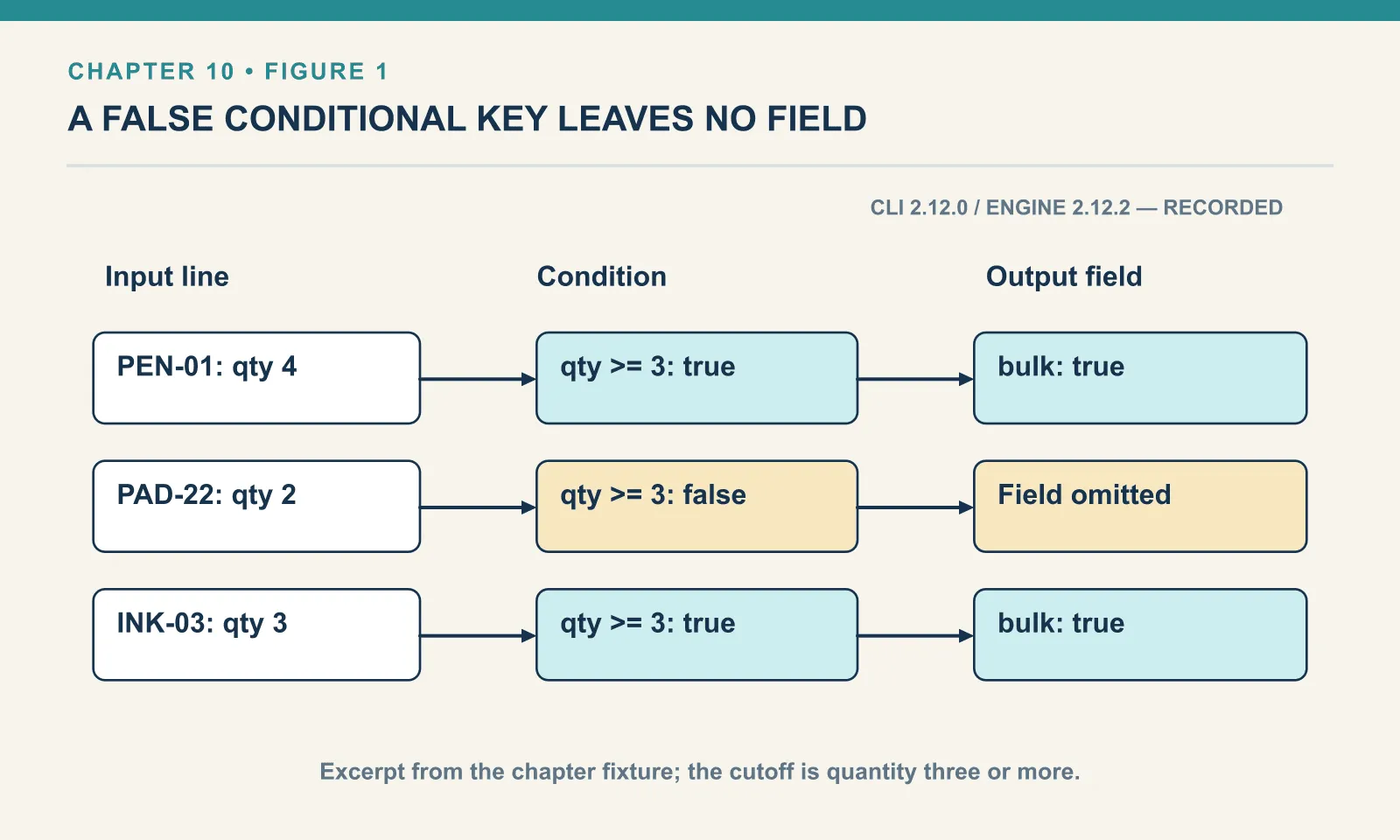
mapObject transforms each key-value pair of an object and returns an object. Its lambda gets the value, the key and the index, and each pair it returns is merged into the result:
Example 74 — Transform object fields with mapObject.
Input payload — order.json:
{
  "orderId": "A-1001",
  "customer": "Dana",
  "items": [
    { "sku": "PEN-01", "price": 2.5, "qty": 4 },
    { "sku": "PAD-22", "price": 6.0, "qty": 2 },
    { "sku": "CLP-08", "price": 1.0, "qty": 10 }
  ]
}
%dw 2.0
output application/json
---
{ pen: 2.5, pad: 6.0 } mapObject (value, key, index) -> { (key): value * 100, ("pos_" ++ index): key }{
"pen": 250,
"pos_0": "pen",
"pad": 600,
"pos_1": "pad"
}The lambda returns two pairs for each input pair, and they land in the output in the order produced, so pos_0 follows pen rather than trailing at the end. And both keys are dynamic: (key) re-uses the incoming key, and ("pos_" ++ index) builds a new one from a string and the index. Unlike array mapping, mapObject can rewrite the keys as well as the values.
filterObject: the same idea for objects
Objects have their own version. filterObject keeps key-value pairs rather than array elements, and its lambda gets the value first:
Example 75 — Remove null object fields.
Use order.json as payload, as above.
%dw 2.0
output application/json
---
{ orderId: "A-1001", coupon: null, note: "gift" } filterObject (value) -> value != null
{
"orderId": "A-1001",
"note": "gift"
}coupon is gone. This is the standard way to prune nulls before writing JSON, and it is one of the cases where the parameter order matters. For filterObject and mapObject the lambda receives (value, key, index) — value first, because the value is what you filter on most of the time.
Example 76 — Turn fields into entries.
Input payload — turn-fields-into-entries-input.json:
{
  "sku": "PEN-01",
  "price": 2.5,
  "qty": 4
}
%dw 2.0
output application/json
---
payload pluck (value, key, index) -> { name: key as String, value: value, position: index }Result:
[
  {
    "name": "sku",
    "value": "PEN-01",
    "position": 0
  },
  {
    "name": "price",
    "value": 2.5,
    "position": 1
  },
  {
    "name": "qty",
    "value": 4,
    "position": 2
  }
]
pluck walks an object and returns an array. Its callback receives the value, key and index, in that order. In contrast, mapObject returns an object. Choose the operation by the shape the next consumer needs.
The key has type Key; converting it to String makes a text comparison explicit. For example, compare (key as String) == "sku" when filtering by a field name. An ordinary equality comparison between a Key and a String does not make that conversion.
Objects: merging, and the merge that is not one
dw::core::Objects applies defaults and walks objects whose keys you do not know in advance. When an order overrides a default, the merge changes both the colliding value and its position:
Example 77 — Merge defaults and inspect entries.
Input payload — order.json:
{ "orderId": "A-1001", "customer": "Dana", "coupon": null, "tags": ["gift", null, "rush"],
  "items": [
    { "sku": "PEN-01", "price": 2.5, "qty": 4, "note": null },
    { "sku": "PAD-22", "price": 6.0, "qty": 2 },
    { "sku": "CLP-08", "price": 1.0, "qty": 10 }
  ] }
%dw 2.0
import mergeWith, nameSet, entrySet from dw::core::Objects
output application/json
var defaults = { currency: "USD", giftWrap: false }
var order = { id: "A-1001", giftWrap: true }
---
{
merged: defaults mergeWith order,
keys: nameSet(order),
entries: entrySet(order)
}{
"merged": {
"currency": "USD",
"id": "A-1001",
"giftWrap": true
},
"keys": [
"id",
"giftWrap"
],
"entries": [
{
"key": "id",
"value": "A-1001",
"attributes": {
}
},
{
"key": "giftWrap",
"value": true,
"attributes": {
}
}
]
}mergeWith(source, target) layers the second object over the first, and the second wins on collision — the semantics you want for defaults-then-overrides. It is tempting to expect the keys to come out currency, giftWrap, id, source keys first. They do not. The colliding key moves to the position it has in the target: currency from the defaults, then id and giftWrap in the order the order supplied them. Key order rarely matters to a JSON consumer and always matters to a golden-file test, which chapter 15 is about.
nameSet returns the keys as strings. entrySet explodes an object into entries, and each entry has three fields, not two: key, value and attributes. The third is empty for JSON and looks like noise until you feed the function an XML value. entrySet on <order id="A-1001"><customer>Dana</customer></order> gives one entry: key order, value { customer: "Dana" }, attributes { id: "A-1001" }. XML attribute decoration, introduced in chapter 19, surfaces there as data, and the empty attributes on a JSON entry is the price of one function serving both formats.
mergeWith versus ++
Object spreading gives us another way to combine fields. It is tempting to think defaults ++ order and defaults mergeWith order are the same thing. The difference is a duplicate key:
Example 78 — Compare merge and concatenation.
Use order.json as payload, as above.
%dw 2.0
import * from dw::core::Objects
output application/json
var defaults = { currency: "USD", giftWrap: false }
var order    = { id: "A-1001", giftWrap: true }
---
{
  reversed:   order mergeWith defaults,
  plusOp:     defaults ++ order,
  hasId:      order someEntry (value, key) -> key ~= "id",
  allSet:     order everyEntry (value, key) -> value != null,
  fromEntries: entrySet(order) map { ($.key): $.value }
}
{
"reversed": {
"id": "A-1001",
"currency": "USD",
"giftWrap": false
},
"plusOp": {
"currency": "USD",
"giftWrap": false,
"id": "A-1001",
"giftWrap": true
},
"hasId": true,
"allSet": true,
"fromEntries": [
{
"id": "A-1001"
},
{
"giftWrap": true
}
]
}plusOp contains giftWrap twice because ++ concatenates the objects’ pairs. The model permits repeated keys and the JSON writer emits them both, as this output shows. A consumer that reduces those pairs to a map decides which value survives, so different parsers may produce different answers. Use mergeWith when the second object’s value should win a collision. ++ suits disjoint keys, when the key sets are disjoint.
reversed shows precedence from the other side: order mergeWith defaults lets the defaults win, and giftWrap is back to false. someEntry and everyEntry are the quantifiers, with (value, key) in that order like filterObject. The last line is the round trip, entrySet then map back into single-key objects — the generic form of “do something to every key” when mapObject is not enough.
The null that overrides a default
Dana’s coupon: null raises a different defaults question: should a present key with no value override "NONE"? The merge treats it as an override:
Example 79 — Choose whether null replaces a default.
Use order.json as payload, as above.
%dw 2.0
import mergeWith from dw::core::Objects
output application/json
var defaults = { currency: "USD", coupon: "NONE" }
---
{
  merged:   defaults mergeWith { coupon: payload.coupon },
  guarded:  defaults mergeWith { coupon: payload.coupon default "NONE" },
  stripped: defaults mergeWith ({ coupon: payload.coupon } filterObject (v) -> v != null)
}
{
"merged": {
"currency": "USD",
"coupon": null
},
"guarded": {
"currency": "USD",
"coupon": "NONE"
},
"stripped": {
"currency": "USD",
"coupon": "NONE"
}
}A key that is present with a null value is a real key, and it wins. The default is replaced by nothing. Whether that is right depends on what the source meant by null, and the two fixes encode the two answers. default "NONE" on the value says “null means use the default”. filterObject (v) -> v != null on the whole override says “null keys are not overrides at all”. I use the second when the override object is built from a feed, because it handles every key at once instead of needing a default on each.
Pair parallel arrays
zip combines two parallel arrays. It stitches them into pairs and stops at the shorter one:
Example 80 — Pair arrays with zip.
Use lines.json as payload, as above.
%dw 2.0
output application/json
---
{
  even:   ["PEN-01", "PAD-22"] zip [2.5, 6.0],
  uneven: ["PEN-01", "PAD-22", "CLP-08"] zip [2.5, 6.0],
  toObject: { (["PEN-01", "PAD-22"] zip [2.5, 6.0] map { ($[0]): $[1] }) }
}
{
"even": [
[
"PEN-01",
2.5
],
[
"PAD-22",
6
]
],
"uneven": [
[
"PEN-01",
2.5
],
[
"PAD-22",
6
]
],
"toObject": {
"PEN-01": 2.5,
"PAD-22": 6
}
}CLP-08 had no price to pair with and was dropped without comment. The toObject line turns the pairs into a lookup. It uses the two object-construction forms introduced earlier in this chapter: a dynamic key, ($[0]), and an array of objects in parentheses inside { }.
Exercises
Shout the keys. Use mapObject to return the first item with every key upper-cased and every value unchanged. Run it. Why does the key need parentheses?
Show answer
Example 81 — Uppercase object keys.
Use order.json as payload, as above.
%dw 2.0
output application/json
---
payload.items[0] mapObject (value, key) -> { (upper(key)): value }
{
"SKU": "PEN-01",
"PRICE": 2.5,
"QTY": 4
}Without the parentheses, upper(key): value is not a valid key. Parentheses tell DataWeave to evaluate the expression and use its result as the key; a bare word is taken literally.
Object concatenation, replacement on collision and omission of a field express different policies. Check a colliding key and a present null before accepting a merge as a defaults mechanism.
Next: Group Records into Reports.
Comments