Group Records into Reports
The category report needs a total for each group of lines.
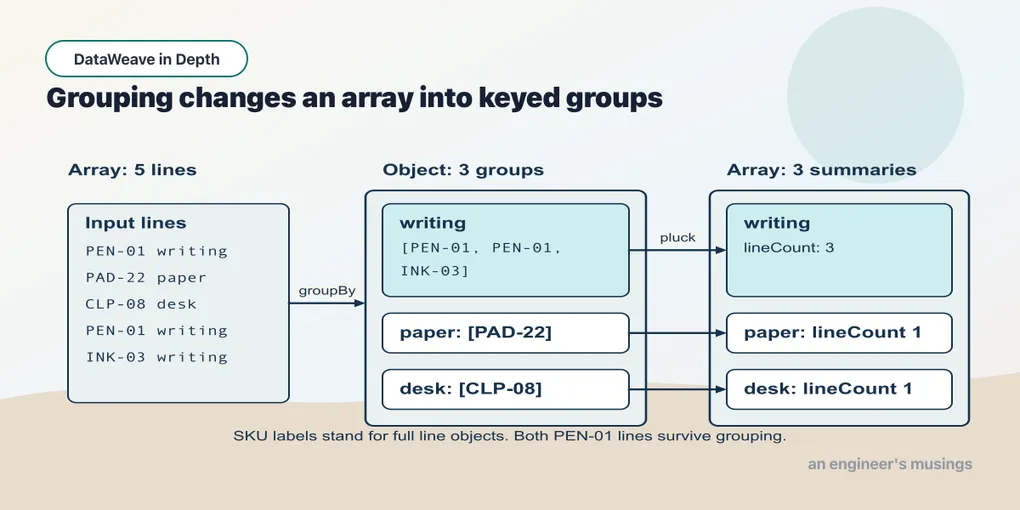
The category report needs a total for each group of lines. We already know how to sum an array and transform an object. groupBy supplies the missing step: the collection of arrays to summarize.
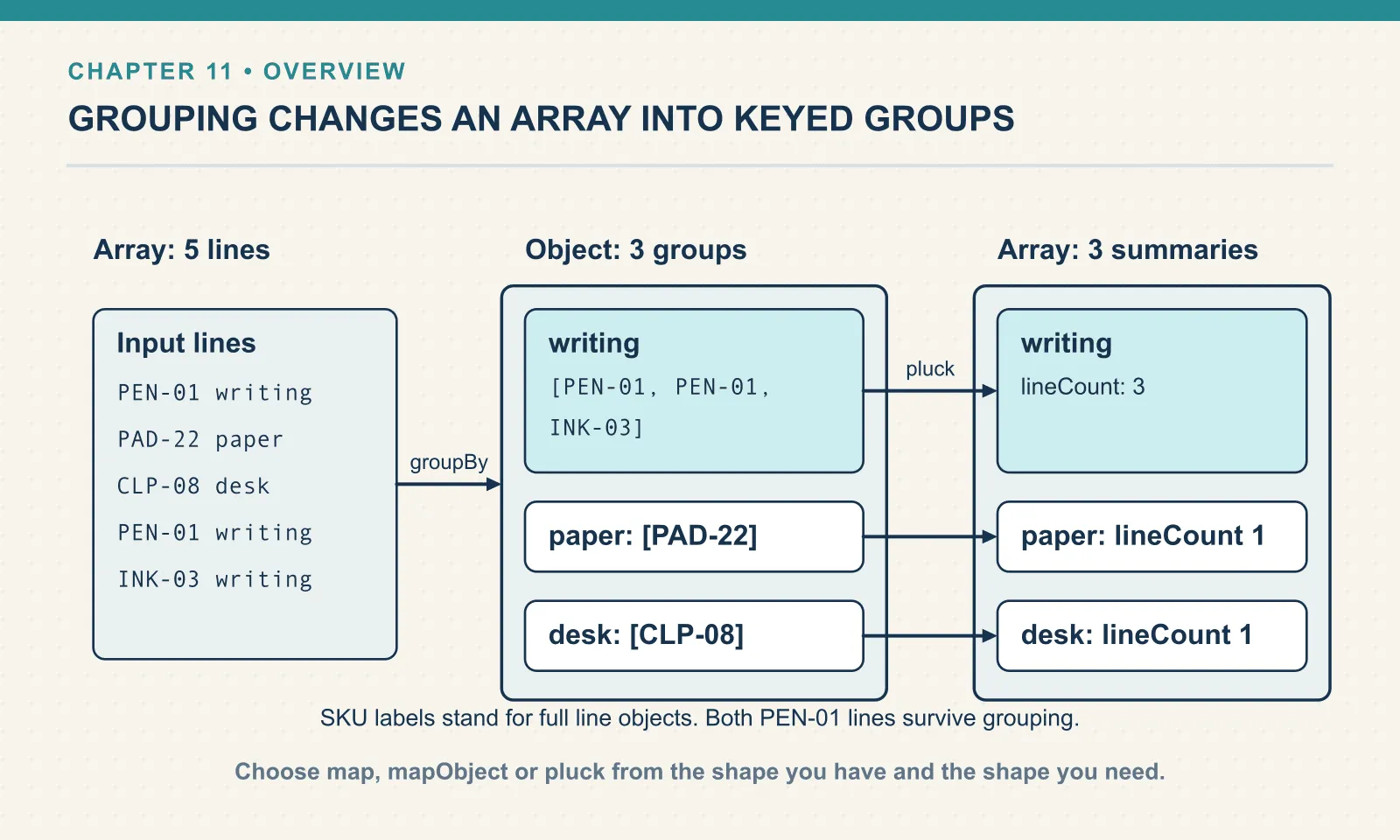
groupBy: an array becomes an object
groupBy takes an array and a key expression, and returns an object. Each grouping value becomes a key; its value is an array of the items in that group:
Example 82 — Group lines by category.
Input payload — lines.json:
[
  { "orderId": "A-1001", "sku": "PEN-01", "name": "Gel Pen",      "category": "writing", "price": 2.5, "qty": 4 },
  { "orderId": "A-1001", "sku": "PAD-22", "name": "Notepad A5",   "category": "paper",   "price": 6.0, "qty": 2 },
  { "orderId": "A-1001", "sku": "CLP-08", "name": "Binder Clips", "category": "desk",    "price": 1.0, "qty": 10 },
  { "orderId": "A-1008", "sku": "PEN-01", "name": "Gel Pen",      "category": "writing", "price": 2.5, "qty": 1 },
  { "orderId": "A-1008", "sku": "INK-03", "name": "Ink Refill",   "category": "writing", "price": 3.0, "qty": 3 }
]
%dw 2.0
output application/json
---
payload groupBy (line) -> line.category{
"writing": [
{
"orderId": "A-1001",
"sku": "PEN-01",
"name": "Gel Pen",
"category": "writing",
"price": 2.5,
"qty": 4
},
{
"orderId": "A-1008",
"sku": "PEN-01",
"name": "Gel Pen",
"category": "writing",
"price": 2.5,
"qty": 1
},
{
"orderId": "A-1008",
"sku": "INK-03",
"name": "Ink Refill",
"category": "writing",
"price": 3.0,
"qty": 3
}
],
"paper": [
{
"orderId": "A-1001",
"sku": "PAD-22",
"name": "Notepad A5",
"category": "paper",
"price": 6.0,
"qty": 2
}
],
"desk": [
{
"orderId": "A-1001",
"sku": "CLP-08",
"name": "Binder Clips",
"category": "desk",
"price": 1.0,
"qty": 10
}
]
}Three keys, in the order their first member appeared. The writing group holds three lines from two different orders. The lambda gets (item, index) like map does, and whatever it returns becomes a key.
Keys are keys, not numbers
Grouping by quantity shows a distinction between a number and a field name: the keys are the quantities, but they are no longer numbers:
Example 83 — Inspect numeric group keys.
Use lines.json as payload, as above.
%dw 2.0
output application/json
---
{
  byQty: (payload groupBy (line) -> line.qty) mapObject (lines, key) -> { (key): lines map $.sku },
  keyTypes: keysOf(payload groupBy (line) -> line.qty) map typeOf($),
  pickByString: (payload groupBy (line) -> line.qty)."4" map $.sku,
  pickByNumber: (payload groupBy (line) -> line.qty)[4]
}
{
"byQty": {
"4": [
"PEN-01"
],
"2": [
"PAD-22"
],
"10": [
"CLP-08"
],
"1": [
"PEN-01"
],
"3": [
"INK-03"
]
},
"keyTypes": [
"Key",
"Key",
"Key",
"Key",
"Key"
],
"pickByString": [
"PEN-01"
],
"pickByNumber": [
{
"orderId": "A-1008",
"sku": "INK-03",
"name": "Ink Refill",
"category": "writing",
"price": 3.0,
"qty": 3
}
]
}Every key of an object is of type Key, whatever you grouped by, and it prints as a string. To select the group for quantity four you select the key named "4". The bracket form [4] is a positional selector. On an object it returns the value at position four, counting from zero: the fifth group, which is the ink refill. There is no error, because both are valid selections. Whenever you group by a number, a date, or anything that is not already a string, you will be reading it back by name.
pluck: the inverse trip
pluck provides the next step when the grouped object needs to become report rows. It walks an object and returns an array, handing the lambda (value, key, index) for each entry. mapObject would keep the result as an object; pluck makes a list you can sort, count or reduce. Here each category group becomes one summary row:
Example 84 — Turn groups into summary rows.
Use lines.json as payload, as above.
%dw 2.0
output application/json
---
(payload groupBy (line) -> line.category) pluck (lines, category) -> {
  category: category,
  lineCount: sizeOf(lines)
}
[
{
"category": "writing",
"lineCount": 3
},
{
"category": "paper",
"lineCount": 1
},
{
"category": "desk",
"lineCount": 1
}
]groupBy then pluck turns these line items into summary rows — grouping collects the data by category, and plucking summarizes each group. The positional shorthands follow the parameter order. $ is the value, $$ the key and $$$ the index:
Example 85 — Inspect pluck callback parameters.
Use lines.json as payload, as above.
%dw 2.0
output application/json
---
{ orderId: "A-1001", customer: "Dana" } pluck { key: $$, value: $, index: $$$ }
[
{
"key": "orderId",
"value": "A-1001",
"index": 0
},
{
"key": "customer",
"value": "Dana",
"index": 1
}
]This one-liner is also the quickest way to turn any object into a list of its entries, which is what you want when a target asks for [{ key, value }] pairs instead of a map.
Example 86 — Name the stages of a category report.
Input payload — name-the-stages-of-a-category-report-input.json:
[
  {
    "orderId": "A-1001",
    "sku": "PEN-01",
    "name": "Gel Pen",
    "category": "writing",
    "price": 2.5,
    "qty": 4
  },
  {
    "orderId": "A-1001",
    "sku": "PAD-22",
    "name": "Notepad A5",
    "category": "paper",
    "price": 6.0,
    "qty": 2
  },
  {
    "orderId": "A-1001",
    "sku": "CLP-08",
    "name": "Binder Clips",
    "category": "desk",
    "price": 1.0,
    "qty": 10
  },
  {
    "orderId": "A-1008",
    "sku": "PEN-01",
    "name": "Gel Pen",
    "category": "writing",
    "price": 2.5,
    "qty": 1
  },
  {
    "orderId": "A-1008",
    "sku": "INK-03",
    "name": "Ink Refill",
    "category": "writing",
    "price": 3.0,
    "qty": 3
  }
]
%dw 2.0
output application/json
var groups = payload groupBy (line) -> line.category
var rows = groups pluck (lines, category) -> { category: category as String, revenue: sum(lines map (line) -> line.price * line.qty) }
---
rows orderBy (row) -> -row.revenueResult:
[
  {
    "category": "writing",
    "revenue": 21.5
  },
  {
    "category": "paper",
    "revenue": 12
  },
  {
    "category": "desk",
    "revenue": 10
  }
]
The first definition produces an object of groups. The second produces an array of report rows. The body sorts that array. Each name identifies both a useful intermediate result and a place to inspect the transformation if a total is wrong.
The source contains five lines, so the writing group includes both PEN-01 orders and the ink refill. Grouping by category preserves all their contributions. Deduplicating by SKU beforehand would answer a different question and lose revenue.
Putting it together, and the lambda that eats the rest
The flat line items now need to become revenue by category, sorted highest first, with a flag on the big group. Here is a first attempt — chaining pluck and orderBy the way the prose reads:
Example 87 — A sort inside the wrong expression.
Use lines.json as payload, as above.
%dw 2.0
output application/json
---
(payload groupBy (line) -> line.category)
  pluck (lines, category) -> {
    category: category,
    revenue: sum(lines map (l) -> l.price * l.qty)
  }
  orderBy (row) -> -row.revenue
[ERROR] Error while executing the script:
[ERROR] You called the function '-' with these arguments:
1: Null (null)
But it expects arguments of these types:
1: Number
9| orderBy (row) -> -row.revenue
^^^^^^^^^^^^
Trace:
at 087-precedence-swallowed::orderBy (line: 9, column: 20)
at 087-precedence-swallowed::main (line: 9, column: 3) at:
9| orderBy (row) -> -row.revenue
^^^^^^^^^^^^The null reaching unary minus tells us that the callback did not receive the summary row it expected. A lambda’s body extends as far to the right as the parser can take it, so the pluck body includes { ... } orderBy (row) -> -row.revenue. Each group becomes an object, and orderBy then runs on that single object. Its callback receives individual values rather than complete summary rows. A pair of parentheses closes the pluck call before orderBy begins. The sort then receives the array of rows, each with the revenue field its callback needs:
Example 88 — Sort the completed category report.
Use lines.json as payload, as above.
%dw 2.0
output application/json
---
((payload groupBy (line) -> line.category)
  pluck (lines, category) -> {
    category: category,
    revenue: sum(lines map (l) -> l.price * l.qty),
    (topSeller: true) if (sizeOf(lines) >= 3)
  })
  orderBy (row) -> -row.revenue
[
{
"category": "writing",
"revenue": 21.5,
"topSeller": true
},
{
"category": "paper",
"revenue": 12
},
{
"category": "desk",
"revenue": 10
}
]Grouping, summarising, ranking and adding the conditional flag now fit in one expression, with no intermediate variables. The rule that makes it work is the one chapter 8’s two-key sort also needed: when a call with a lambda is followed by another infix call, parenthesise the first. The map calls earlier in the chapter got away without it only because a comma or a closing brace ended the lambda for them. A chain of infix calls with lambdas is the one place in DataWeave where I add parentheses before I have seen the error. The error, when it comes, points at the wrong line.
Exercises
Units per order. From the flat line list, produce one row per order with the order id, the total units ordered, and the list of SKUs. Run it. Which two functions did you use, and in which order?
Show answer
Example 89 — Summarize units per order.
Use lines.json as payload, as above.
%dw 2.0
output application/json
---
(payload groupBy (line) -> line.orderId) pluck (lines, orderId) -> {
  orderId: orderId,
  units: sum(lines.qty),
  skus: lines.sku
}
[
{
"orderId": "A-1001",
"units": 16,
"skus": [
"PEN-01",
"PAD-22",
"CLP-08"
]
},
{
"orderId": "A-1008",
"units": 4,
"skus": [
"PEN-01",
"INK-03"
]
}
]groupBy then pluck. lines.qty and lines.sku are chapter 9’s dot on an array, projecting over the elements — it saves a map each.
The best-selling SKU. Across both orders, find the single SKU with the highest revenue, as { sku, revenue }. Run it. Count your parentheses before you run it, then count them again after.
Show answer
Example 90 — Find the highest-revenue SKU.
Use lines.json as payload, as above.
%dw 2.0
output application/json
---
(((payload groupBy (line) -> line.sku)
  pluck (lines, sku) -> { sku: sku, revenue: sum(lines map (l) -> l.price * l.qty) })
  orderBy (row) -> -row.revenue)[0]
{
"sku": "PEN-01",
"revenue": 12.5
}PEN-01 wins because its two lines add up, 10 plus 2.5, ahead of the notepad’s 12. Three opening parentheses: one for the groupBy, one closing the pluck before orderBy, and one closing orderBy before [0]. Drop the middle one and you get the null error from the last section.
Check a grouped report against an independent total of the source lines. Agreement does not prove every label is right, but disagreement is a useful signal that a line was lost, duplicated or assigned to the wrong group.
Next: Enrich Records from a Lookup.
Comments