Workflow or Agent? The Decision Before the Code
The architectural choice that precedes writing any agent — a workflow's code-controlled path versus an agent's model-controlled loop, the decision criteria between them, and where supervisor hierarchies and subagents fit — contrasted with runnable examples.
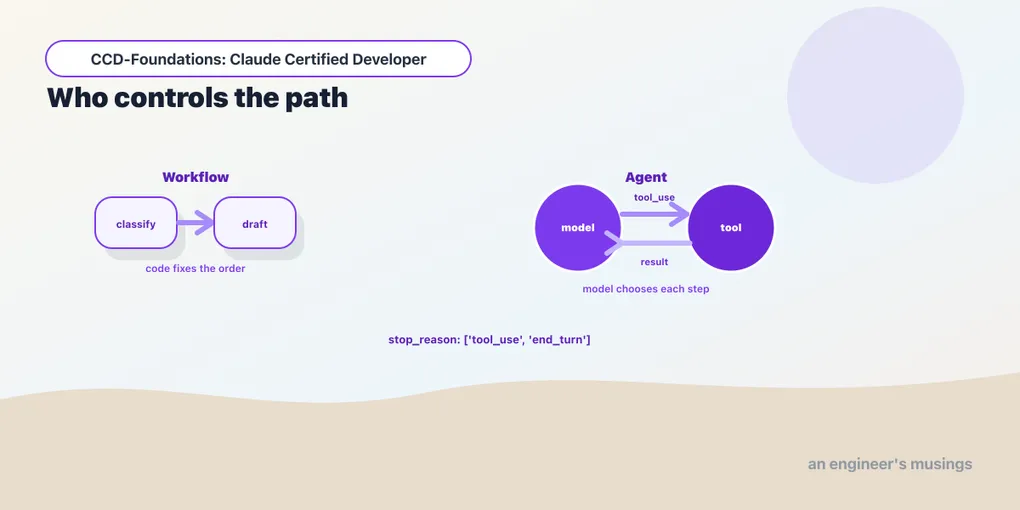
Before you write a single line of agent code, one question decides the shape of everything after it. Is the thing you’re building a workflow or an agent? They are not synonyms. They have different reliability profiles and different cost profiles, and picking the wrong one is an expensive mistake. Reach for an agent where a workflow would do, and you pay for unpredictability you didn’t need. Build a workflow where the task needed an agent, and it can’t handle the inputs you never foresaw. This chapter is that decision: the distinction, the criteria, and where hierarchies and subagents fit, grounded in two runnable examples. It opens Arc 2, Agents & Workflows, the second-largest area the exam tests after integration.
The distinction that decides everything
The difference is who controls the path: your code, or the model.
A workflow follows a predetermined sequence that you orchestrate in code. The model does discrete pieces of work. But the control flow is fixed by your program: which step runs, in what order, and when it ends. An agent hands that control to the model. It runs a loop where the model decides, at each step, what to do next — call a tool, ask a question, finish. Your code just executes those decisions until the model stops.
Made concrete. A workflow that classifies a customer message and then drafts a reply:
msg = "my order A17 is late and I want a refund"

def classify(m):
    return "REFUND"             # your classifier — e.g. a small Claude call returning one label

def draft_reply(intent):        # your drafter — e.g. a Claude call conditioned on the intent
    return "I'll process a refund for your delayed order A17 right away."

intent = classify(msg)          # call 1 — our code then decides what to do with it
draft  = draft_reply(intent)    # call 2 — always runs, always after classify
The message “my order A17 is late and I want a refund” classifies as REFUND, and the draft step produces “I’ll process a refund for your delayed order A17 right away.” Our code fixed the order: classify always runs first, draft always second. The model never chose the sequence.
Now the same domain as an agent, a loop on stop_reason:
import anthropic
client = anthropic.Anthropic()

TOOLS = [{
    "name": "lookup_order",
    "description": "Look up a bookshop order's status by id.",
    "input_schema": {"type": "object",
                     "properties": {"order_id": {"type": "string"}}, "required": ["order_id"]},
}]
DB = {"A17": {"status": "shipped", "eta": "June 2, 2026"}}

def run_tools(r):
    tool_results = []
    for b in r.content:
        if b.type == "tool_use":
            out = DB.get(b.input["order_id"], {"status": "unknown"})
            tool_results.append({"type": "tool_result", "tool_use_id": b.id, "content": str(out)})
    # append the model's turn, then our tool results, so the loop can continue
    return [{"role": "assistant", "content": r.content},
            {"role": "user", "content": tool_results}]

messages = [{"role": "user", "content": "is order A17 shipped yet?"}]
while True:
    r = client.messages.create(model="claude-haiku-4-5", max_tokens=300,
                               tools=TOOLS, messages=messages)
    if r.stop_reason == "tool_use":
        messages += run_tools(r)     # the model asked for a tool; we run it and continue
        continue
    break                            # the model is done
Asked “is order A17 shipped yet?”, the loop produces the stop_reason sequence ['tool_use', 'end_turn']. The model decided to call lookup_order. We ran it and fed the result back, and the model then answered “yes, order A17 has been shipped.” We did not sequence the tool call; the model did. That single difference is the entire distinction between a workflow and an agent: the while loop hands control to the model.
The tradeoff, and the decision criteria
Neither is “better”; they trade the same axis in opposite directions.
Workflows are predictable, cheaper, and easy to test. The path is fixed. So you know exactly how many model calls happen, you can unit-test each step, and there are no surprises in production. The cost is rigidity: a workflow can only handle the paths you coded.
Agents are flexible and handle open-ended tasks, at the price of predictability. Because the model chooses the path, an agent can handle inputs you never explicitly planned for. But it may take a different number of steps each run. It costs more, since every loop iteration is a model call over a growing context. And it may occasionally do something you didn’t anticipate. That unpredictability is the thing to respect.
The decision criteria the exam wants:
- Use a workflow when the steps are known and fixed. If you can draw the flowchart ahead of time — extract, then validate, then store — a workflow is simpler, cheaper, and more reliable. Don’t reach for an agent because it’s fashionable. An agent for a fixed pipeline is just an expensive, less predictable workflow.
- Use an agent when the path depends on reasoning the model must do at runtime. Sometimes the next step genuinely can’t be known until you see the input. A support request might need any of a dozen tools in any order. That’s where an agent earns its unpredictability.
- Prefer the simplest thing that works. Anthropic’s own material documents an escalation. Start with a single well-crafted call. Move to a workflow when you need multiple deterministic steps. Reach for an agent only when the task genuinely needs model-driven control. Complexity is a cost, not a feature.
There’s a practical middle ground. Many real systems are workflows with agentic steps: a fixed pipeline where one stage is an agent because that stage is open-ended, while the rest stays deterministic. You don’t have to make the whole system one or the other.
Supervisor hierarchies and subagents
As tasks grow, a single agent’s context fills with the details of every subtask, and its focus degrades. The architectural answer is hierarchy. A supervisor (or manager) agent coordinates subagents, each handling a scoped piece.
- The supervisor owns the high-level plan and delegates. It decides which subagent handles a given subtask and composes their results, without holding all the low-level detail itself.
- Each subagent is specialized and context-isolated. It gets only the scope it needs, does its piece, and returns a result. Because it doesn’t inherit the whole conversation, its context stays focused. That’s precisely why subagents improve task execution: they keep each unit of work small enough for the model to do well. This is the same context-isolation property the Architect exam leans on. In the CCA series, a subagent inherits its own instructions and tools but not the parent’s history.
The exam’s framing is “the role of subagents in improving task execution,” and this is exactly it. Delegation isn’t just organization, it’s a reliability technique. Splitting a big task across focused subagents beats one agent trying to hold everything, for the same reason a small, single-purpose function beats a thousand-line one. We build these hierarchies concretely with the SDK and frameworks in the next two chapters.
Final thoughts
The workflow-versus-agent choice comes down to who controls the path. Your code controls a workflow: predictable, cheap, testable, rigid. The model controls an agent: flexible, open-ended, less predictable, more expensive. The contrast is the whole lesson. The workflow’s steps ran in the order we wrote; the agent’s tool call happened because the model chose it. Pick a workflow when the steps are knowable in advance, an agent when the path genuinely depends on runtime reasoning, and don’t be afraid of the hybrid. When one agent isn’t enough, a supervisor delegating to context-isolated subagents keeps each piece of work small enough to do well. Make this decision deliberately, before you write the loop, and the rest of Arc 2 is implementation detail.
Next: building agents — the custom loop, the Agent SDK, and hooks for the steps you don’t want the model deciding.
Comments