Designing the Application Around the Call
How Claude reads instructions across its interfaces, drawing content boundaries against untrusted input, schema and session hygiene, and the configuration that keeps a deployment reproducible — CLAUDE.md, settings.json, model pinning, and prompt versioning.
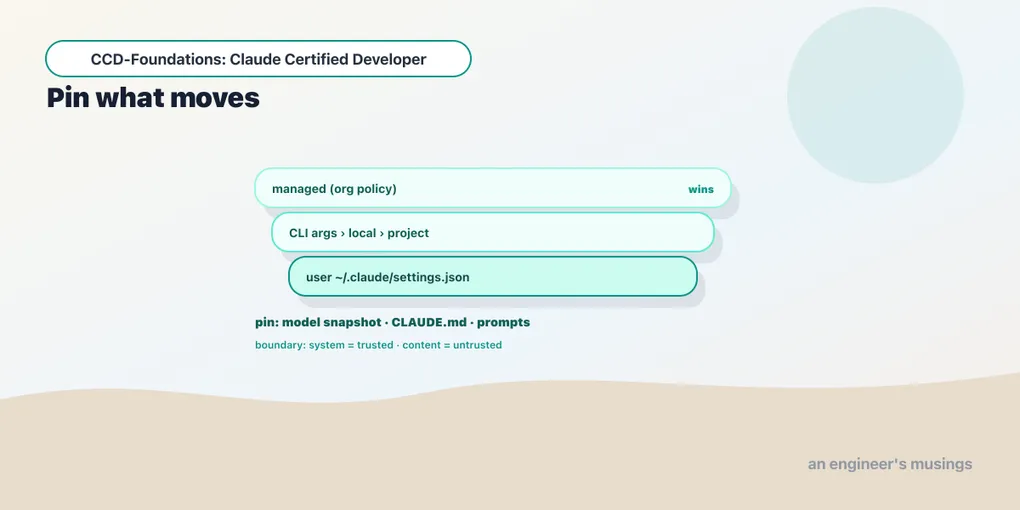
The Messages API is a single call: text in, completion out. An application is everything wrapped around that call that makes it reliable, safe, and reproducible. Almost none of it shows up in any one request. It’s the instruction context you own, the boundary you draw between your rules and the data you feed the model, the schemas your downstream code trusts, and the configuration that makes next month’s run behave like this one’s. These are the decisions that separate a demo that worked once from a system that keeps working. This chapter closes Arc 1 on them: how Claude interprets instructions across its surfaces, where to draw content boundaries, how to keep schemas and sessions clean, and how to pin a deployment so it doesn’t drift. In blueprint terms this is Domain 2’s two design sub-skills — Claude Application Design (8.6%) and Configuration Management (4.1%), together its largest slice. But what the exam rewards is the design thinking, not the percentages.
Same model, different interfaces
Claude reaches you through several surfaces — the API and client SDKs, Claude Code, the desktop app, and claude.ai — and a design mistake is assuming they’re interchangeable. They run the same models, but each wraps them in a different harness, system prompt, and set of available tools. The consequence: context is not portable.
- A prompt tuned for claude.ai will not behave identically when you send the same text through the API. claude.ai has its own system prompt, a conversational UI, and built-in tools. On the API, you own the entire system prompt, and there are no tools unless you add them.
- Claude Code adds a coding harness — file tools, a project CLAUDE.md, commands and skills — so instructions there interact with machinery that the raw API doesn’t have.
When you build an application, you’re building on the API/SDK surface, and that means you’re responsible for the whole instruction context. Don’t assume behavior you saw in claude.ai transfers; the surface changed what surrounds your prompt. This is why “it worked when I pasted it into the chat” is not evidence that an API integration will behave the same way.
Content boundaries: trusted instructions vs. untrusted data
One design habit outranks the rest, and it recurs in Domain 7 security: keep your instructions separate from content you don’t control. When your app feeds Claude a user’s message, a fetched web page, a customer’s document, or a tool result, that material is data, not instructions. If it lands in a place where the model reads it as a command, you’ve built a prompt-injection hole.
The design discipline:
- Put your real instructions in the
systemprompt, which you control, and keep untrusted content inuser-turn content blocks clearly framed as data (“Here is the document to summarize:”). - Never concatenate untrusted text into your instruction string.
system=f"Summarize this: {user_text}"invites the user’s text to become part of the instruction. Pass it as a separate block instead. - Delimit and label untrusted spans so the model treats them as inert. A documented, effective pattern: wrap retrieved content and tell the model it’s reference material, not a directive.
We go deep on the attacks and defenses in Arc 6; the design-time version is simply this boundary. Draw it before there’s an incident. Retrofitting it after untrusted input has been flowing into your system prompt is far harder.
Schema design and session hygiene
Two smaller design habits round out the picture:
Schema design. When you define tool inputs and structured outputs (Arcs 3 and 5), the schema is a contract your downstream code depends on. Keep fields tightly typed, mark truly-optional fields nullable so the model can decline rather than fabricate, and don’t overload one schema with three unrelated jobs. A clean schema is both easier for the model to fill correctly and easier for your parser to trust. This is the same “one clear job” discipline that applies to tools.
Session hygiene. Because the API is stateless (chapter 1), a “session” is a messages list you maintain. Hygiene means being deliberate about what stays in it. Don’t let a conversation accumulate stale tool outputs, superseded instructions, or another user’s data. For multi-tenant apps especially, never let one user’s history bleed into another’s context. The conversation you resend is the context the model reasons over; keep it clean, scoped, and free of anything a later turn shouldn’t see. Context engineering (Arc 5) is the systematic version; hygiene is the baseline.
Configuration management: pin everything that moves
An application that behaves differently next week without a code change is a debugging nightmare. Configuration management is about making behavior reproducible, and there are four things worth pinning.
Model version pinning. Recall from chapter 1 that model="claude-haiku-4-5" is an alias that resolved to the dated snapshot claude-haiku-4-5-20251001 in the response. Aliases float — they move to newer snapshots over time. So for production you often want to pin the dated snapshot explicitly, test against it, and upgrade deliberately when a new one ships. The blueprint’s Domain 5 flags “breaking behavior changes across model releases”: a floating alias is convenient in development and a source of silent drift in production. Log the returned model field either way, so you always know which snapshot produced a given output.
CLAUDE.md. For Claude Code and the Agent SDK, CLAUDE.md is the persistent instruction file — project conventions, constraints, context — loaded automatically. It’s version-controlled with your repo, so the instructions travel with the code and every teammate (and every agent run) gets the same ones. Its scoping hierarchy is a Domain 3 topic we detail in Arc 6.
settings.json. Claude Code’s configuration — permissions, hooks, environment, model — lives in settings.json. It resolves through a precedence chain: managed (enterprise) settings override command-line arguments, which override local (.claude/settings.local.json, personal and gitignored), which override project (.claude/settings.json, team-shared), which override user (~/.claude/settings.json). Higher scopes win — except permission rules, which merge across scopes rather than replacing. Knowing which file a setting belongs in (team convention → project; personal preference → local; org policy → managed) is the exam-tested skill.
Prompt versioning. Your prompts are as much a part of your application’s behavior as your code, and they change. Version them in source control, and note the model snapshot they were tuned against. Then, when output quality shifts, you can tell whether a prompt edit, a model upgrade, or a data change caused it. An un-versioned prompt is an un-reproducible result.
Final thoughts
The application around the call is where reliability lives. The models are the same across surfaces, but each interface wraps them differently. So own your whole instruction context on the API, and don’t assume claude.ai behavior transfers. Draw the trusted-instruction / untrusted-data boundary by design, not after an incident. Keep schemas single-purpose and sessions clean and scoped. And make behavior reproducible by pinning what moves — the model snapshot, CLAUDE.md, the right settings.json scope, and your prompts — so that when something changes, you changed it on purpose. That discipline is what separates a demo that worked once from a system that keeps working.
Next: Arc 2 opens with workflow versus agent — the architectural decision that precedes writing any agent code at all.
Comments