Three Ways to Build an Agent
Constructing Claude agents — the custom loop you write yourself, the Tool Runner that loops over your tools, and the Agent SDK's full harness — plus self-hosted versus managed deployment and hooks for the deterministic actions you don't want the model deciding.
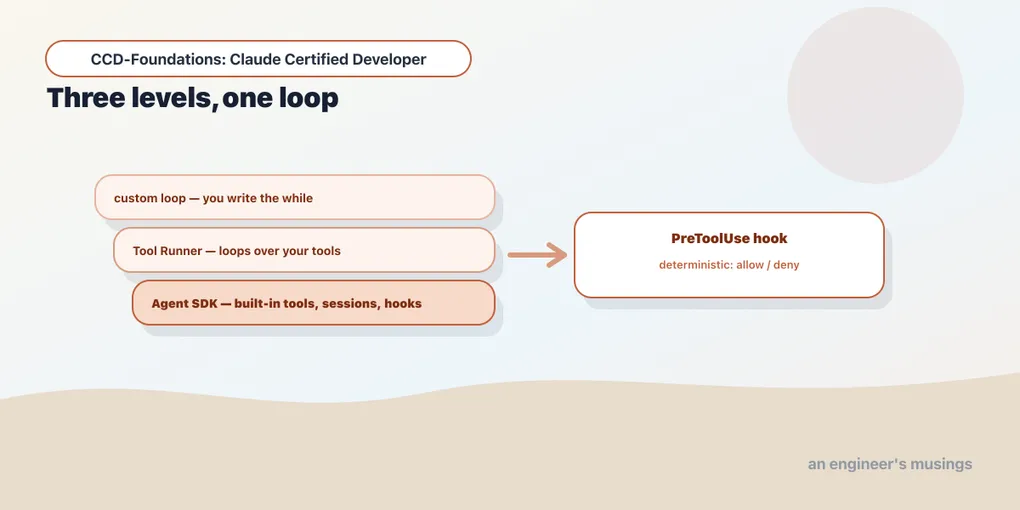
Chapter 7 settled whether you want an agent. This chapter is how to build one, and the useful surprise is that there isn’t a single way — there’s a spectrum. Every agent needs the same core machinery: a loop that calls the model, runs the tool it asks for, feeds the result back, and decides when to stop. What changes from one build to the next is how much of that machinery you write versus inherit. At one end you hand-roll every line; at the other you hand a managed harness a prompt and it runs the entire thing for you. Choosing the right point on that spectrum is the skill this chapter builds: enough control, and no more machinery than the task actually needs. We walk the three levels, the deployment models underneath them, and hooks: the deterministic escape hatch for the steps you don’t want a probabilistic model in charge of.
Level 1: the custom loop
At the bottom is the loop from chapter 7 — you own every line. The model emits tool_use, you run the tool, you feed the result back, you decide when to stop:
import anthropic
client = anthropic.Anthropic()

TOOLS = [{
    "name": "lookup_order",
    "description": "Look up a bookshop order's status by id.",
    "input_schema": {"type": "object",
                     "properties": {"order_id": {"type": "string"}}, "required": ["order_id"]},
}]
DB = {"A17": {"status": "shipped", "eta": "June 2, 2026"}}

def run_tool(b):
    out = DB.get(b.input["order_id"], {"status": "unknown"})
    return {"type": "tool_result", "tool_use_id": b.id, "content": str(out)}

messages = [{"role": "user", "content": "Is order A17 shipped yet?"}]
while True:
    r = client.messages.create(model="claude-haiku-4-5", max_tokens=300,
                               tools=TOOLS, messages=messages)
    messages.append({"role": "assistant", "content": r.content})
    if r.stop_reason == "tool_use":
        results = [run_tool(b) for b in r.content if b.type == "tool_use"]
        messages.append({"role": "user", "content": results})
        continue
    break
The stop_reason sequence is ['tool_use', 'end_turn']. This is a custom agent harness, and its virtue is total control — you decide the stopping condition, the error handling, what tools exist, how context is trimmed. Its cost is that you build all of that. For a tightly-scoped agent with a few tools, the custom loop is often the right amount of machinery. Understanding it is non-negotiable: every abstraction above is this loop with the bookkeeping hidden.
Level 2: the Tool Runner
You rarely want to hand-write the loop. The API SDK ships a helper that runs it for you over your own tools: client.beta.messages.tool_runner. You define the tools and their implementations. The Tool Runner drives the model-calls-tool-feeds-result cycle until the model finishes, then hands you the result. You skip the while loop and the message bookkeeping, but you still own the tools and the process.
The Tool Runner sits between the raw loop and the full Agent SDK: more convenient than hand-rolling, lighter than the Agent SDK. It has no built-in tools and no session store — it’s specifically “loop over the tools I gave you.” Reach for it when your custom loop would just be boilerplate around a handful of your own functions.
Level 3: the Agent SDK
At the top is the Claude Agent SDK (claude-agent-sdk, formerly claude-code-sdk) — the entire Claude Code harness as a library. It exports query and ClaudeSDKClient, and it brings far more than a loop:
- Built-in tools: file operations (Read, Write, Edit), Bash, Glob, Grep, WebSearch, WebFetch — so an agent can act on a codebase or the web without you implementing any of it.
- Context management, sessions, subagents, and hooks out of the box.
The simplest entry point runs the whole loop autonomously:
import asyncio
from claude_agent_sdk import query, ClaudeAgentOptions

async def main():   # requires the claude CLI (installed with claude-agent-sdk)
    async for message in query(prompt="Summarize the README", options=ClaudeAgentOptions(model="haiku")):
        ...  # SystemMessage, AssistantMessage(s), then a ResultMessage

asyncio.run(main())
A query() run terminates with ResultMessage.subtype == "success". The key mental shift from the custom loop: with the Agent SDK you do not inspect stop_reason. The SDK runs the loop for you and reports completion via ResultMessage.subtype — success, or an error_* variant like error_max_turns. You describe the agent; the harness runs it. ClaudeSDKClient is the stateful counterpart for multi-turn, interactive sessions.
The rule of thumb across the three levels: custom loop for full control over a small tool set; Tool Runner to drop the boilerplate while keeping your own tools and process; Agent SDK when you want built-in tools, sessions, hooks, and subagents without building a harness. Match the abstraction to how much machinery the task actually needs.
Self-hosted vs. managed deployment
A deployment distinction the blueprint calls out explicitly. The Agent SDK is self-hosted: it’s a library you run, in your process, on your infrastructure, and you own the session storage and scaling. That’s maximum control and also maximum operational responsibility.
The alternative is a managed model: Anthropic-hosted agents. The agent, its sandbox, and its state live on Anthropic’s side, and you drive it through an API. You trade control and customizability for not operating the infrastructure. The tradeoff is the whole point: self-hosted = your process, your control, your ops; managed = Anthropic’s process, less to operate, less to customize. Which one fits is the same build-vs-buy decision as anywhere in software. Know both exist, and know what each costs you.
Hooks: deterministic actions around a probabilistic loop
An agent’s loop is probabilistic — the model decides what to do. Sometimes you need a step to be deterministic and non-negotiable: never delete a file without approval, always redact a secret before it reaches a tool, block a dangerous command outright. That’s what hooks are for, and the blueprint names them precisely: “hooks for deterministic actions.”
A hook is a callback the harness fires at a defined point in the loop, matched to specific events and tools. The most important is PreToolUse, which fires before a tool runs and can allow, deny, or rewrite the call. In the companion Architect work, a PreToolUse hook registered with a HookMatcher on the Write tool fired when the model attempted a write. It returned a deny decision that blocked the call. The model wanted to act; the hook — your deterministic code — overrode it.
That’s the design pattern to carry: wrap the model’s probabilistic decisions in deterministic guardrails. The loop stays flexible. But the actions you can’t afford to leave to chance are enforced by code that runs every single time, regardless of what the model decided. Hooks are how you make an agent safe enough to give real tools — the security depth is Arc 6, but the construction primitive is here.
Final thoughts
Building an agent is choosing a level of abstraction. The custom loop is the foundation — the while on stop_reason that every higher layer hides — and worth knowing cold. The Tool Runner loops over your own tools without the boilerplate. The Agent SDK is the full harness: built-in tools, sessions, subagents, and hooks. Run it self-hosted (your process, your control) or against a managed deployment (Anthropic’s, less to operate). And hooks are the deterministic guardrails you wrap around the model’s probabilistic choices — a PreToolUse that denies is your code having the final say. Pick the lightest abstraction the task needs, and reach for hooks wherever “the model decided to” isn’t an acceptable answer.
Next: the agent frameworks — LangGraph, Strands, and PydanticAI, each building the same bookshop agent, compared.
Comments