Multi-Agent Orchestration: When One Agent Isn't Enough
Design a delegation before configuring an agent: divide a warehouse migration decision into owned tasks, pass context explicitly, then use the Agent SDK to bound, monitor, and recover the work.
The previous chapter built a single agent: a model in a loop with tools, deciding its own next step. Suppose we ask it, “Should we migrate our warehouse from Redshift to Snowflake?” A product comparison won’t answer that. We need to know how our workload behaves today and what it would cost to move, including the pipelines someone will have to rewrite.
There may be enough work here for several agents. But assigning one to Snowflake, one to Redshift, and one to cost leaves an awkward question: who is investigating the migration? That’s the first problem in multi-agent orchestration, before any SDK configuration. We have to divide the work so the reports will answer what the user asked.
Exam objectives covered here. 1.2 Orchestrate multi-agent systems with coordinator-subagent patterns. 1.3 Configure subagent invocation, context passing, and spawning. 1.6 Design task decomposition strategies for complex workflows. Numbering follows the Claude Certified Architect – Foundations Exam Guide, version 1.0, effective July 2026.
Run against: claude-agent-sdk 0.2.128 and the Claude Code CLI it bundles, version 2.1.220. Where a claim comes from reading the installed package rather than from running an agent, the text says so.
What multi-agent orchestration actually is
A multi-agent system coordinates several agents toward one task. Each agent has its own instructions, context, and tools, and without a structure that is all they have: two of them research the same question, nobody owns a third, and the answer is whichever report arrived last. Coordination determines who owns each part, what information crosses between agents, and how their results become an answer.
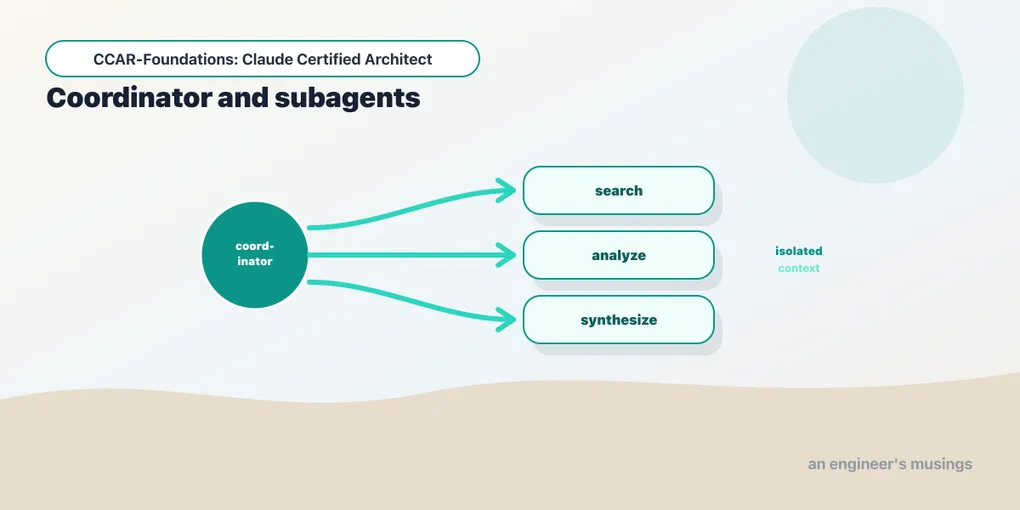
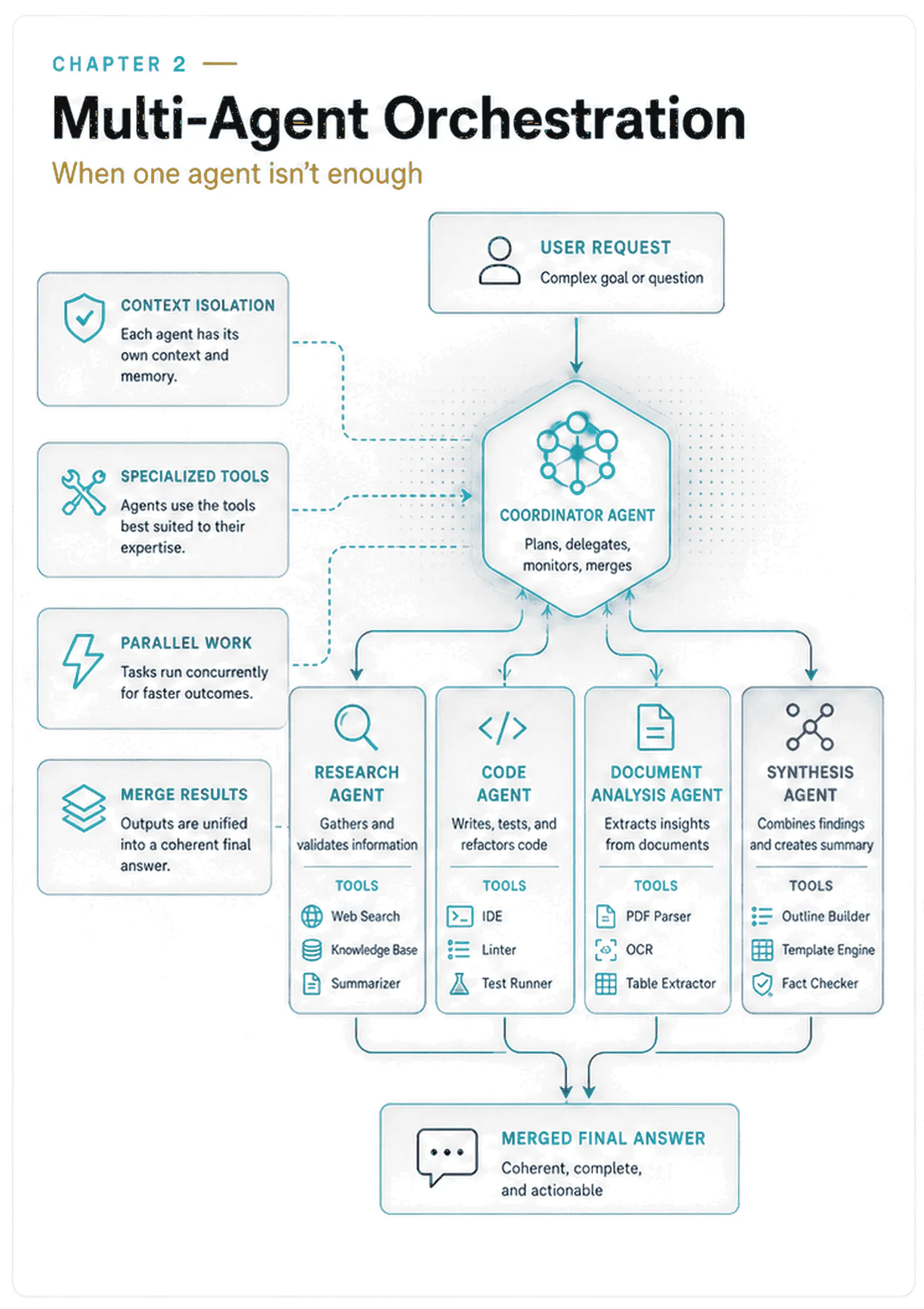
This chapter uses the coordinator–subagent model, also called manager–worker or hub-and-spoke. A coordinator holds the overall request and delegates scoped work to specialists. Each subagent works on its assignment and reports back to the coordinator. A specialist may research a topic, analyze a document, or review code; its role comes from its instructions and tools.
The coordinator has four jobs:
- Decompose: identify the work needed to answer the request.
- Delegate: give each subtask an owner, the necessary context, and a clear expected result.
- Aggregate: inspect the reports, reconcile disagreements, and identify missing work.
- Decide: request more work, recover from failure, or present the answer.
The coordinator is still the agentic loop from chapter 1. Its tools now include other agents, and their reports become evidence for its next decision.
Why reach for multiple agents, and when not to
Start with a single agent. Add coordination when you can name a limit it will address:
- Context limits. A single agent accumulates every tool result and every step in one window, resent each turn. On a large task that window fills and its focus degrades: it starts forgetting earlier findings and citing “typical patterns” instead of the specifics it found. A specialist can examine one part in its own small context, then return the evidence the coordinator needs.
- Specialization. Web research and code review need different instructions and tools. Separate agents let you give each role a focused prompt and an appropriate tool roster.
- Parallelism. Independent assignments can run at the same time, and unrelated parts of a large question may finish sooner that way. The saving is bounded by the slowest branch, not the average, so measure the tail rather than the mean.
- Failure containment. A failed assignment can be retried or replaced without repeating successful work, provided the coordinator has a recovery policy.
Each additional agent needs tokens to establish its context, and the coordinator spends time assigning work and merging reports. There is more to debug, too: two specialists may duplicate a search or work from different assumptions. Parallel execution can still finish sooner, but it won’t necessarily cost less.
The migration request might justify several agents if the workload evidence and technical investigation exceed one agent’s useful context. A question such as “What is a Snowflake virtual warehouse?” probably does not. A fixed extract–transform–validate flow may need ordinary functions, with model calls only where judgment is useful.
Anthropic’s multi-agent research account describes the same tradeoff: parallel research benefits from separate contexts, while heavily interdependent work is harder to divide. Evaluate the simplest design that answers your actual workload well before adding agents.
The bundled CLI’s delegation guidance also cautions against spawning just because a request has several parts:
A task with "multiple angles," "thorough," or several parts is not a request
to spawn; handle it inline with your own tools.
Treat that as guidance from this pinned runtime. Restraint is not a stylistic preference here; it is written into the tool that does the spawning.
The landscape of coordination patterns
Hub-and-spoke describes who coordinates. Pipeline and parallel fan-out describe how work flows. They can appear in the same system: a coordinator can gather a baseline first, then launch independent investigations, then merge their reports.
| Pattern | How it works | What to watch |
|---|---|---|
| Manager / supervisor | A central coordinator delegates and merges; specialists report back to it and do not talk to each other. | The coordinator must track coverage and reconcile results. |
| Hierarchical | A coordinator delegates to sub-coordinators that divide their own assignments. | Each level adds handoffs; nesting also depends on runtime limits. |
| Sequential / pipeline | One stage’s output becomes the next stage’s input. | A dependent stage must wait for its inputs. Fixed stages do not each need an agent. |
| Parallel / map-reduce | Independent branches run concurrently, then their outputs are merged. | The slowest branch and the merge determine completion time. |
| Network / mesh | Agents communicate directly with peers. | More communication paths make routing, loops, and failure attribution harder to trace. |
Hub-and-spoke wins as the default because a single coordinator is easy to reason about and easy to debug. Every routing and error-handling decision lives in one place, so when work is missing or repeated there is exactly one agent to look at. The mesh is the opposite: interaction paths multiply, failures are hard to trace, and the system can loop or thrash. It is usually the wrong choice, and worth knowing mainly so you can recognise it. Hub-and-spoke stays the starting point even when some branches run sequentially and others in parallel.
Dividing the work well
Before choosing agent names or models, decide what a satisfactory answer must contain. For the migration request, that means understanding today’s workload, the proposed destination, the transition, and the cost of reversing the decision. The coordinator should choose work from the request, rather than send every question through every available specialist.
Good decomposition is complete and disjoint at the level of ownership. Complete means no required part is missing. Disjoint means each deliverable has one primary owner. Two agents may use the same evidence without owning the same job.
Working one decomposition
Consider this plausible split:
subagent 1: research Snowflake
subagent 2: research Redshift
subagent 3: research cost
It fails both tests, in the two ways a decomposition usually fails: an overlap, where two agents own the same question, and a gap, where nobody owns one. “Cost” overlaps the first two assignments, so three agents may collect incompatible prices or assumptions. Yet nobody owns migration effort, even though whether to migrate is the user’s question. True facts about two products do not necessarily answer it.
Cut along the decision instead of the product names:
subagent 1: our current Redshift usage — data volume, workload shape, spend
subagent 2: Snowflake's behaviour on that workload shape, at that volume
subagent 3: the one-time migration cost — schema, pipelines, downtime, retraining
subagent 4: the reversal path — what leaving Snowflake later would cost
The coordinator can use these four reports to make the recommendation. It still has to check the assignments against the user’s constraints. If the user specified a downtime limit or needs to retain an existing integration, that requirement must reach the specialist assessing the move.
Dependencies determine the order
These assignments have different owners, but they are not all ready to run at once. The destination assessment needs the workload shape that the first subagent discovers. Migration and exit estimates also need agreed assumptions about what is moving.
If the user has already supplied a usable workload profile, the coordinator can include it in the relevant assignments immediately. Otherwise, it should gather that baseline first. It then passes the accepted profile and constraints to the specialists whose work depends on them. Those branches can run concurrently where their remaining inputs are independent.
Disjoint ownership does not mean independent inputs. The destination specialist can use the baseline specialist’s findings, provided the coordinator actually passes them along. Launching both at once without that handoff would leave the destination specialist guessing at the workload.
To estimate completion time, add up the baseline work, the dispatch, the slowest concurrent branch with its retries, and the final merge. Runtime concurrency caps and API rate limits can add further delay. Having four assignments tells you little about the speedup until you know which can overlap.
This is model-driven control applied to delegation: the coordinator chooses work based on the request and available evidence. A fixed sequence remains appropriate when the dependencies are fixed. The mistake is running the same expensive investigation for every question regardless of what it needs.
Where disjoint is the wrong goal
Complete-and-disjoint ownership divides the work. Verification deliberately revisits it:
- Independent verification. A fact-checker re-derives a claim from sources the researcher did not hand it. The overlap is the whole mechanism: give it the same sources and it confirms the researcher’s reading rather than the underlying fact.
- Review and safety gates. A reviewer inspects another agent’s output with different instructions and acceptance criteria.
- Deliberate redundancy. Two extractors can read the same contract so disagreements become visible. Agreement alone does not prove that either is correct.
Separate the coverage layer, where each deliverable has one owner, from the verification layer, where selected work gets checked again. Name who resolves disagreement before launching the checks. For this migration assessment, conflicting cost estimates should send the coordinator back to their workload assumptions and sources. If the evidence cannot resolve a material difference, the report should expose it or ask for review. Choosing whichever agent sounds most confident would hide the uncertainty.
What a subagent can see: the isolation rule
A normal subagent invocation does not inherit the coordinator’s conversation history. The specialist has its own prompt and tools, plus the context explicitly included in its assignment. Project instructions and other session settings may also apply; the inheritance table below separates those from conversation history.
Two things follow from that rule, and they are the reason it exists. It keeps each subagent’s context small and focused: a researcher handed the coordinator’s entire transcript would reason worse, and a focused context was the reason for splitting the work in the first place. And it forces deliberate information flow. Nothing is shared by default, so the coordinator has to decide what each subagent needs and hand it exactly that. A design that assumes the subagent already knows what we are doing fails at the first assignment.
The Agent tool’s description in the pinned CLI states the rule:
Any agent other than a fork starts with zero context.
... a new Agent call starts a fresh agent with no memory of prior runs,
so the prompt must be self-contained.
A subagent does not automatically see the user’s original wording or another specialist’s findings. In the migration example, “assess Snowflake against the workload we discussed” leaves out the very evidence the specialist needs. Pass the workload profile itself, or an explicit reference it can read with its available tools.
Turn an assignment into a usable prompt
A self-contained assignment names the objective, relevant evidence, constraints, expected output, and what to do if information is missing. Here is an illustrative handoff after the coordinator has accepted a workload baseline. The figures are invented to show the prompt’s shape, not a benchmark or migration recommendation:
Assignment: destination assessment for the warehouse migration decision.

Baseline supplied by the coordinator:
- 8 TB stored; nightly batch loads; about 40 concurrent dashboard users.
- The current monthly spend is not yet confirmed.
- Existing dashboards must remain usable during the transition.

Assess Snowflake against this workload. Use cited technical sources and
identify which performance claims would require a workload benchmark.
Do not estimate the one-time migration effort or the exit cost; those
have separate owners. Do not make the overall migration recommendation.

Return: findings, source URLs, assumptions, missing evidence, and status
(complete or blocked). Keep operating-cost estimates separate from facts.
If an input is missing, name it; do not substitute a typical customer's data.
Notice that current spend is explicitly missing. The specialist can report that gap, and the coordinator can decide whether it prevents a recommendation. Leaving the field out entirely would make it harder to distinguish an unavailable figure from an input the coordinator forgot to supply.
There is no need to pass the whole conversation. Include the evidence for this assignment and check that the summary hasn’t dropped a user constraint. In this example, the requirement to keep dashboards usable matters as much as the data volume.
The CLI’s guidance makes that obligation concrete:
Never delegate understanding. Don't write "based on your findings, fix the
bug" ... Write prompts that prove you understood: include file paths, line
numbers, what specifically to change.
Before sending an assignment, read it as someone who hasn’t seen the conversation. References such as “the earlier findings” need to point to evidence included in the prompt or accessible through the specialist’s tools.
Persistent memory is a separate input
AgentDefinition also offers persistent memory:
memory: Literal["user", "project", "local"] | None = NoneThose are the same three scopes the SDK uses for setting_sources. Setting memory attaches a persistent memory scope to the subagent, allowing it to carry state across invocations that no coordinator handed it. It still does not inherit the coordinator’s conversation, but its assignment may no longer be its only source of remembered context.
Persistent memory adds another source of context to account for when reproducing a result. Even without it, a subagent can encounter changing files and tool results; conversation isolation does not make execution deterministic. The field, its type and its three legal values were read from the installed dataclass.
The inheritance matrix
Conversation history is only one part of a subagent’s context. Working directories and project settings also matter. This table separates them and records how each claim was checked:
| What | Crosses to a subagent? | Set by | Evidence |
|---|---|---|---|
| Parent conversation history | No | — | run |
| The user’s original wording | No | only what the coordinator passes | run |
| Another subagent’s findings | No | only via the coordinator | follows |
| System prompt | No, it has its own | AgentDefinition.prompt | read |
Project CLAUDE.md | Yes | session setting_sources, which must include "project" | run + read |
| Filesystem settings | Yes | session setting_sources | read |
| Working directory | Yes | session cwd; AgentDefinition has no cwd | read |
| Environment variables | Yes | one subprocess, one environment | read |
| Built-in tools | No, it has its own | tools / disallowedTools on the definition | read |
| Turn budget | No, it has its own | maxTurns | read |
| Permission posture | Its own when set | permissionMode, else the session’s | read |
| MCP servers | Its own when set | mcpServers | read |
| Model | Follows the parent only on "inherit" | model | read |
| Persistent memory | Only if you opt in | memory | read |
| Transcript | No, it gets its own file | subagents/agent-<id>.jsonl | read |
The first three rows describe conversation isolation. The remaining rows show why that is not a filesystem or environment sandbox. In particular, project instructions can apply even when the specialist has no access to the parent conversation. With setting_sources=[], the example below disables those filesystem settings.
Read the evidence column strictly. Run means executed against a live agent. Read means taken from a docstring, a dataclass, or a string inside the bundled CLI on claude-agent-sdk 0.2.128 with CLI 2.1.220. That records the package’s stated intent for that version, which is not the same as a measurement.
Two defaults remain deliberately unclaimed: what a subagent that omits model or mcpServers actually inherits was not probed here. Re-probe the rows you depend on against your own version. Logging SubagentStart helps identify each invocation, but checking its effective context or tool access requires a probe for that particular behavior.
The coordinator and its subagents
In the SDK, an agent definition describes a reusable specialist. Each invocation gives it a particular assignment. The same researcher definition can therefore serve several topics, with a different prompt for each.
In the Agent SDK you declare subagents on the options object. The coordinator invokes them through a built-in tool named Agent, passing a subagent_type that names which definition to use. The following example isolates that mechanism with public web research about table formats. It is not an implementation of the private-workload migration assessment above. Create the scratch directory /tmp/coordinator-lab before running it; the package setup is in the introduction.
import anyio
from claude_agent_sdk import (
    query, ClaudeAgentOptions, AgentDefinition,
    AssistantMessage, ResultMessage, ToolUseBlock,
)

RESEARCHER = AgentDefinition(
    description="Researches one narrow topic and returns cited findings. "
                "Use for any request that needs facts from the web.",
    prompt=(
        "You research exactly one topic, the one named in your prompt.\n"
        "Return at most five findings. Every finding carries a source URL.\n"
        "If the topic is outside your assignment, say so and stop."
    ),
    tools=["WebSearch", "WebFetch"],   # this subagent's own tool set
    model="haiku",                     # alias, full model id, or "inherit"
    maxTurns=6,                        # its own turn budget, not the parent's
)

COORDINATOR = (
    "You are a research coordinator. You do not research anything yourself.\n"
    "Break the request into non-overlapping topics that together cover it, "
    "then invoke the 'researcher' subagent once per topic using the Agent tool.\n"
    "Each invocation must be self-contained: state the topic, the constraints, "
    "and the output shape, because the subagent cannot see this conversation.\n"
    "When every topic is answered, merge the findings into one report."
)

options = ClaudeAgentOptions(
    agents={"researcher": RESEARCHER},
    system_prompt=COORDINATOR,
    allowed_tools=["Agent"],                        # delegation runs without prompting
    disallowed_tools=["WebSearch", "WebFetch"],     # the coordinator cannot research
    max_turns=20,
    cwd="/tmp/coordinator-lab",   # a clean directory
    setting_sources=[],           # do not inherit this project's CLAUDE.md
)

async def main():
    async for message in query(prompt="Compare the three main open table formats.",
                               options=options):
        if isinstance(message, AssistantMessage):
            for block in message.content:
                if isinstance(block, ToolUseBlock) and block.name == "Agent":
                    print("delegated ->", block.input.get("subagent_type"),
                          "|", block.input.get("description"))
        elif isinstance(message, ResultMessage):
            print(message.subtype, message.num_turns, message.total_cost_usd)

anyio.run(main)
The print statements help establish whether the coordinator delegated at all. A ToolUseBlock named Agent records the request, while ResultMessage reports how the parent run ended. You’ll still need to inspect the findings to judge whether the researcher answered its assignment.
Make the prompt and configuration agree
Registering RESEARCHER makes it available; it doesn’t tell the coordinator when to use it. That’s why COORDINATOR explicitly requires delegation and tells the parent how to divide the topics. Without those instructions, the model may answer directly. The prompt also requires self-contained invocations so the researcher gets the context it needs.
COORDINATOR also says the parent researches nothing. Leaving WebSearch and WebFetch available would give it a direct route to web research despite that instruction. The example removes those tools from the coordinator with disallowed_tools and declares them on the researcher instead.
The subagent’s roster is resolved from its own AgentDefinition, filtered by that definition’s disallowedTools. That is why the researcher declares WebSearch and WebFetch separately. This resolution detail was read out of the bundled CLI rather than exercised here.
Keep the example isolated and the field names exact
The scratch cwd comes from a problem encountered while verifying this book. The SDK spawns the Claude Code CLI as a subprocess; by default it loads the project’s CLAUDE.md and settings. The book’s project instructions interfered with the toy assignments used by the verification harnesses. Passing setting_sources=[] disables filesystem settings, and a scratch working directory keeps the example out of the project.
Watch the field spelling when copying between the session options and an AgentDefinition. The definition uses maxTurns, along with disallowedTools, permissionMode, and mcpServers, because these names are forwarded verbatim to the CLI. Writing max_turns=6 inside an AgentDefinition raises a TypeError, even though max_turns is correct on ClaudeAgentOptions.
Three tool options that are not the same option
The example uses allowed_tools on the session to auto-approve delegation and tools on the researcher to specify its roster. Confusing those settings can leave an agent with more access than you intended. The installed package documents three separate controls on ClaudeAgentOptions:
tools             Specify the base set of available built-in tools.
                  To restrict which tools the model may call without being
                  prompted, use allowed_tools instead.

allowed_tools     Tool names that are auto-allowed without prompting for
                  permission. These tools execute automatically without
                  asking the user for approval. To restrict which tools
                  are available at all, use tools.

disallowed_tools  Tool names that are disallowed. These tools are removed
                  from the model's context and cannot be used, even if
                  they would otherwise be allowed.
Chapter 1 walks the three: tools is availability, allowed_tools is prompting, disallowed_tools is presence. For delegation the consequence is this. allowed_tools=["Agent"] auto-approves delegation, subject to applicable permission rules; it does not add the tool to the roster, and leaving it out only removes the auto-approval. If the resulting permission decision needs a prompt, an interactive user can answer it. A headless run with no permission handler has nobody to ask, so the call may be refused or the run may wait. When a coordinator fails to delegate, inspect the permission result as well as the tool roster, because a blocked decision and a missing tool need different fixes. And to prevent a tool call, removing auto-approval is not enough: use disallowed_tools, a narrower tools list, or a deny rule.
A permission rule can also name an individual subagent type, forbidding one specialist while leaving Agent available for the others. The CLI reports the denial like this:
Agent type 'deployer' has been denied by permission rule 'Agent(deployer)'
from projectSettings.
Two neighbouring errors from the same code path are worth recognizing, because they look alike and mean different things:
Agent type 'reseacher' not found. Available agents: researcher, reviewer
Agent type 'review' is ambiguous — matches reviewer, review-bot.
  Use the exact name: reviewer or review-bot
The first is a typo in the coordinator’s own call. The second is a naming collision in your definitions. Neither is a permission problem, and both are cheap to fix once you can tell them apart.
Scoping a subagent: the rest of the definition
After choosing the tool roster, bound the specialist’s work and choose its other inputs. AgentDefinition carries eleven optional fields beyond description and prompt:
| Field | What it configures |
|---|---|
tools | which built-in tools exist for this subagent |
disallowedTools | tools removed from its context outright |
model | an alias (sonnet, opus, haiku), a full model id, or "inherit" |
maxTurns | how many turns this subagent may take, independent of the parent |
effort | reasoning depth: low through max, or an integer |
permissionMode | the permission posture inside this subagent only |
skills | which skills it can reach |
mcpServers | which MCP servers it connects to |
memory | a persistent memory scope, as above |
background | whether it runs detached, covered below |
initialPrompt | a first message injected before the coordinator’s |
Choose the model deliberately. model="inherit" explicitly follows the parent; a fixed "haiku" keeps workers on that model when the coordinator changes. As the inheritance table notes, the omitted-model behavior was not probed here.
Be deliberate about tools too, because calling an agent a specialist does not narrow its roster. The CLI’s own agent listing renders a definition that omits tools as All tools, or All tools except ... when disallowedTools is set.
Turn limits, spending limits, and budget hints
maxTurns bounds a specialist’s turns independently of the parent’s max_turns. At the session level, ClaudeAgentOptions adds two more controls:
options = ClaudeAgentOptions(
    max_budget_usd=2.50,                 # stop when the run costs this much
    task_budget={"total": 200_000},      # tell the model its own token budget
)
max_budget_usd stops the run with an error_max_budget_usd result. TaskBudget does not enforce a cutoff. Its docstring says the model “is made aware of its remaining token budget so it can pace tool use and wrap up before the limit.” Use that to guide the model’s effort, but keep the enforced spending limit if the run must stay within a budget.
Runtime caps still apply
The CLI also enforces nesting and concurrency caps. These messages identify the relevant configuration names:
Subagent nesting limit reached (depth 3 of 3). Complete this task directly
using your tools instead of spawning another agent. ...
CLAUDE_CODE_MAX_SUBAGENT_SPAWN_DEPTH

Concurrent subagent limit reached. You can run N subagents at once.
Do not retry. ... CLAUDE_CODE_MAX_CONCURRENT_SUBAGENTS
There is a per-session spawn cap in the same family, governed by CLAUDE_CODE_MAX_SUBAGENTS_PER_SESSION. The three environment variable names and the shape of the messages come from the bundled CLI.
Do not infer an automatic queue from a concurrency cap: the quoted error says the spawn was refused. With ten assignments and a cap of N, you launch N and hold the rest, so the run costs at least two waves, and the latency budget has to say so.
When a subagent finishes, and when it fails
Once work is delegated, the coordinator must account for every assignment before presenting an answer. A successful tool call is not enough; the returned report must cover the assigned work.
A report is evidence to inspect
The Agent tool returns a single message to the coordinator. Its description says: “When the agent is done, it will return a single message back to you. The result returned by the agent is not visible to the user.” The coordinator sees the specialist’s report; details omitted from it remain in the transcript. It also has to present the findings to the user, who cannot see that returned message.
For work that changes files, the tool’s guidance calls for checking the changes themselves:
Trust but verify: an agent's summary describes what it intended to do, not
necessarily what it did. When an agent writes or edits code, check the
actual changes before reporting the work as done.
Decide the failure policy before the run
A failed Agent call comes back as a failed tool result, so the coordinator can respond on its next turn. Depending on the assignment, it might retry with a corrected prompt, use another specialist, proceed with declared gaps, or stop.
Which response is appropriate depends on the subtask. A model can choose among permitted recovery paths; application code can also enforce retries and stopping rules. Recovery does not require handing every decision to the model.
Decide which of those responses is acceptable when you design the assignment. A missing source and a failed authorization check need different treatment. The following four classes give the coordinator an explicit policy to follow; mandatory gates also need enforcement in the surrounding application:
| Class | On failure | Example |
|---|---|---|
| Optional | drop it, note the gap | a fifth source that would have been nice |
| Degradable | proceed on partial data, label the result | four of five regions returned |
| Required | bounded retry, then stop and report the blocker; withhold the dependent answer or action | the subagent that reads the actual contract |
| Safety-critical | stop immediately, no retry, escalate | a compliance, authorization, or policy check |
A degradable subtask can fail open with an annotation; a required or safety-critical one fails closed. A research report missing an optional source can still be useful if it names the gap. A refund workflow must not proceed when its authorization check crashes. The failure policy establishes that difference before the coordinator encounters it.
The safety-critical row uses a conservative policy: stop and escalate rather than let the coordinator improvise retries. An unavailable authorization check never grants permission. The retry policy belongs to the application; no model-generated explanation can substitute for the missing authorization.
Return to the migration assessment. An additional source may be optional; the actual workload baseline is required. If that baseline is unavailable, five polished product comparisons cannot replace it. Require the coordinator to enumerate every assignment and status before merging, and block a final recommendation when required evidence is missing. A partial report should identify the gap and the next action.
Keep those statuses in the run log alongside the attempts. They should explain why the coordinator stopped or continued when you investigate the run later.
Background subagents and the task lifecycle
Foreground delegation waits for a report. Background execution lets the coordinator continue while a specialist works, which introduces a second responsibility: tracking when that work actually reaches a terminal state.
Set background=True on an AgentDefinition, or pass run_in_background on the Agent call, and the subagent detaches. The coordinator does not block on it. What you get back instead is a stream of typed lifecycle messages, all subclasses of SystemMessage:
TaskStartedMessage— carriestask_id,description,session_id.TaskProgressMessage— adds ausagedict oftotal_tokens,tool_uses,duration_ms, pluslast_tool_name.TaskNotificationMessage— terminal:statusiscompleted,failedorstopped, with asummaryand anoutput_file.TaskUpdatedMessage— a state patch, whosestatusmay bepending,running,paused,completed,failedorkilled.
The SDK documents a lifecycle edge case:
Lifecycle note: a background task's terminal state can arrive *only* as a
TaskUpdatedMessage with no accompanying TaskNotificationMessage — for
example a task stopped via TaskStop reports status="killed" here, and the
matching notification is sometimes suppressed.
So the correct way to know a background subagent is finished is to treat a terminal status from either message as terminal. The SDK even exports the set to compare against, TERMINAL_TASK_STATUSES, holding completed, failed, stopped and killed. Waiting only for TaskNotificationMessage gives you a coordinator that hangs forever on a task somebody stopped.
To stop a task programmatically, use the streaming client’s stop_task() method. The following fragment belongs inside an async function; is_runaway represents your application’s stopping policy:
from claude_agent_sdk import ClaudeSDKClient, TaskStartedMessage

async with ClaudeSDKClient(options) as client:
    await client.query("Audit every module and report findings.")
    async for msg in client.receive_response():
        if isinstance(msg, TaskStartedMessage) and is_runaway(msg):
            await client.stop_task(msg.task_id)
Telling ten subagents apart
A coordinator can report that an assignment failed, but you still need the evidence behind that status. Inspect transcripts after the run and attribute events while it is running.
After a run, subagent transcripts are addressable. Supply the parent session_id captured from its ResultMessage and the directory used for that run:
from claude_agent_sdk import list_subagents, get_subagent_messages

agent_ids = list_subagents(session_id, directory="/tmp/coordinator-lab")
for agent_id in agent_ids:
    msgs = get_subagent_messages(session_id, agent_id,
                                 directory="/tmp/coordinator-lab")
    print(agent_id, len(msgs), "messages")
Each subagent gets its own transcript file, stored beneath the parent session at subagents/agent-<agentId>.jsonl. You can read a failed researcher’s conversation without searching through every other agent’s work.
During a run, use the two optional fields on tool-lifecycle hook inputs to identify the subagent. The SDK describes them as follows:
agent_id: Sub-agent identifier. Present only when the hook fires from
inside a Task-spawned sub-agent; absent on the main thread. ...
When multiple sub-agents run in parallel their tool-lifecycle hooks
interleave over the same control channel — this is the only reliable
way to attribute each one to the correct sub-agent.

agent_type: Agent type name (e.g. "general-purpose", "code-reviewer").
Ten researchers can produce interleaved PreToolUse and PostToolUse events on one channel. Use agent_id to associate those tool events with a subagent; timestamps and arrival order do not identify the owner. The quoted comment retains the older Task name. This chapter’s pinned runtime invokes subagents through Agent.
What to log besides agent_id
A retry launched as a fresh subagent gets a new agent_id. Grouping only by that field would make two attempts at the destination assessment look like unrelated assignments. To follow the retry, keep a stable identifier for the subtask as well as the SDK’s identifier for each agent. You’ll also need the attempt count and coordinator decision to explain what happened, with cost recorded separately below.
Carry your own identifiers alongside the SDK’s. In this helper, run, task, and attempt belong to your application; the SDK does not construct them or infer which business subtask an agent owns.
def span(hook_input, run, task, attempt):
    """One log record per tool event inside a subagent."""
    return {
        # yours: the tree the SDK does not know about
        "trace_id":    run.trace_id,        # one id for the whole coordinator run
        "parent_span": run.coordinator_span,
        "task_id":     task.id,             # the SUBTASK, stable across retries
        "attempt":     attempt,             # 1, 2, 3 — a retry is not a new subtask
        "class":       task.failure_class,  # optional | degradable | required | safety
        # the SDK's: the leaf
        "session_id":  hook_input["session_id"],
        "agent_id":    hook_input.get("agent_id"),      # None on the main thread
        "agent_type":  hook_input.get("agent_type"),
        "tool_name":   hook_input.get("tool_name"),
        "tool_use_id": hook_input.get("tool_use_id"),
        "event":       hook_input["hook_event_name"],
    }
The SDK keys come from two levels. session_id, transcript_path, cwd, and permission_mode sit on the hook base. tool_name, tool_input, and tool_use_id are fields on the three tool-lifecycle events.
On SubagentStart and SubagentStop, agent_id and agent_type are required rather than optional. Those events therefore make useful span boundaries. SubagentStop also carries agent_transcript_path, so a failing span can link to its transcript.
Log these events together:
SubagentStartopens the span. Recordtask_idandattemptagainst theagent_idhere, and every later event about that subagent joins to the right subtask.PostToolUseFailurerecords the tool error and anis_interruptflag, distinguishing a failure from an interruption. Logging only successful tool calls would omit this evidence.SubagentStopcloses the span and supplies the transcript path. Use recorded start and stop times to calculate duration; record the assignment’s outcome separately from the fact that the agent stopped.
Cost and tokens do not arrive per subagent on this channel. Take them from the run’s ResultMessage — total_cost_usd, usage, model_usage — and attribute them at the run level rather than inventing a per-subagent number the SDK never gave you. If per-subagent cost is a hard requirement, the honest source is the subagent transcripts, read afterwards.
Try tracing a run where one of ten subagents needed three attempts. You should be able to find the failed assignment and follow both retries to completion. Twelve unrelated agent transcripts won’t tell that story unless you’ve recorded which attempts belong to the same subtask. The next chapter develops the hooks used to collect this evidence.
Final thoughts
What to carry forward.
- Split work when one agent’s context, focus or specialization gives out, not before. Coordination has real costs.
- Hub-and-spoke: the coordinator decomposes, delegates, aggregates and decides; subagents talk only through it, which is what makes the system debuggable.
- A subagent inherits no conversation history. Context is passed explicitly in the assignment, and that is what keeps the subagent focused.
- Decomposition should be complete and disjoint. Overlap is reserved for deliberate verification and needs a rule for reconciling what it finds.
- The scoping fields on
AgentDefinition,tools,maxTurnsandpermissionModeamong them, are containment boundaries you get by declaring them.agent_idon a hook input is what tells ten parallel subagents apart.
At the end of the warehouse investigation, read the recommendation against the original request. Does it account for the current workload and the work of moving it? Did every estimate use the same assumptions? If the workload specialist failed, does the answer say what is missing, or does it quietly substitute a generic product comparison?
Those are the checks I’d make before worrying about how many agents ran. A coordinator that notices the missing baseline and asks for it has done useful work, even if the final recommendation has to wait.
Not run. What a memory-enabled subagent actually recalls across runs was not exercised. The three environment variables’ numeric defaults were not measured.
Next: workflows, hooks, and sessions — enforcing multi-step workflows, intercepting tool calls with hooks, and managing session state, resumption, and forking.
Comments