The Agentic Loop: What Actually Ends It
What an agent really is — a model in a loop with tools — and what drives each turn and ends it: stop_reason and the full set of stop reasons, the Agent SDK's autonomous loop and its ResultMessage subtypes, model-driven control, and the three loop-termination anti-patterns to recognize on sight.
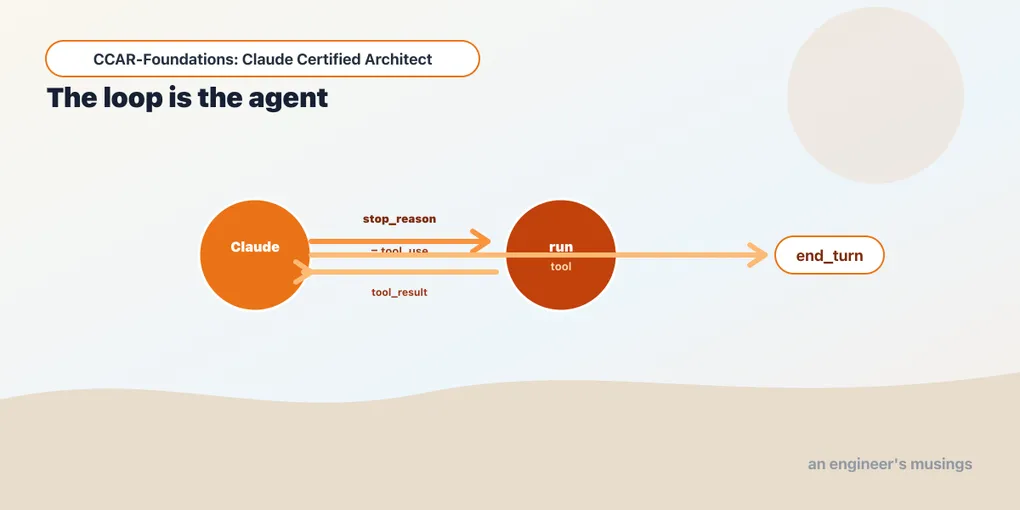
An agent is a language model in a loop with tools. A customer asks for the status of order A17: the model needs to request a lookup, read the result, and then answer. The loop connects those steps by executing requested tools and returning their results to the model.
Exam objectives covered here. 1.1 Design and implement agentic loops for autonomous task execution. Numbering follows the Claude Certified Architect – Foundations Exam Guide, version 1.0, effective July 2026.
A plain model call is one shot: you send a prompt, you get text back, you are done. For “summarize this paragraph” or “answer this from what you already know,” that is enough. It stops being enough the moment the task needs information the model does not hold, or actions it cannot take on its own. Look up an order, read a file, query a database, call an API. For those, the model has to act, see what came back, and decide what to do next — often several times before it can answer. So you wrap the model in a loop that runs the tools it asks for and feeds the results back. That is what turns a text generator into an agent.
Why a loop, and when one call is enough
On an open-ended support request you do not know in advance how many lookups it will take, or which ones, or in what order. That depends on what each result turns out to say. A request might resolve in one tool call or need five, and only the model can tell, reading the results as they arrive. The loop is what lets it find out, within the tools and limits the application supplies.
A single transformation may need only one model call: rewriting supplied text, classifying a ticket, or extracting fields from a document already in the request. A plain call is simpler, cheaper and easier to reason about. Add the loop only when the task has to act and react, and then the first thing to define is how the application tells completion from interruption and failure.
Three levels, not two
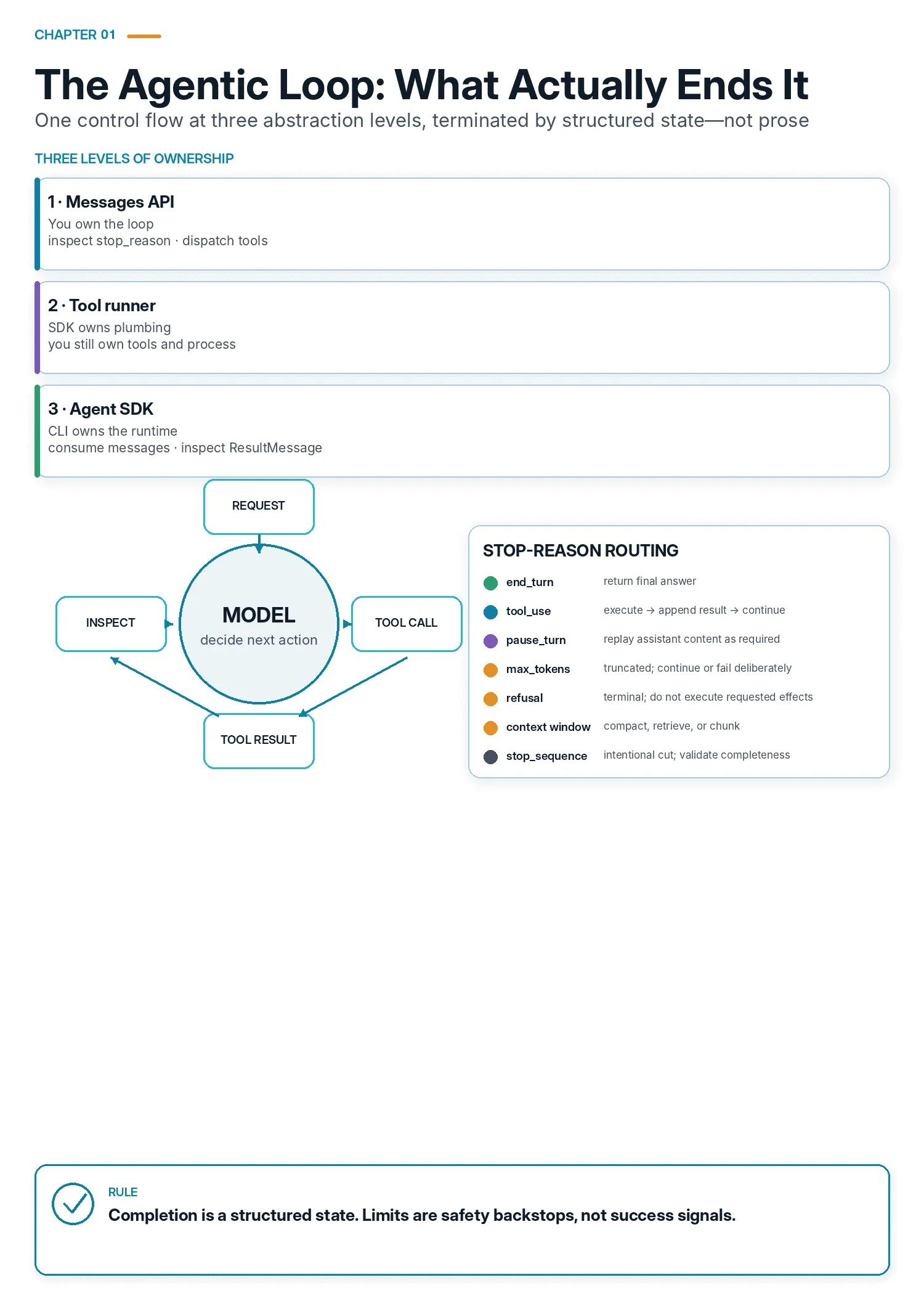
There are three altitudes you can work at: implement the loop yourself, let the API client run it over your tools, or use the Claude Agent SDK to run a whole Claude Code agent. The middle one is the one most people have never seen.
Level 1, the raw Messages API. You write the loop. You inspect stop_reason yourself, you dispatch tools yourself, you decide when to stop. Total control, and every moving part is visible.
Level 2, client.beta.messages.tool_runner. Present in anthropic 0.120.0, it runs the loop over tools you define in your process, without a CLI subprocess.
Level 3, the Claude Agent SDK. query() runs a full Claude Code agent for you, with built-in tools, MCP servers, permission handling, hooks, and sessions. You describe a task and consume a stream of typed messages.
The levels are not better and worse; they trade control for machinery. Start at level 1, because levels 2 and 3 are level 1 with progressively more hidden. Once you can read the raw loop you can predict what the other two do.
The loop, at the raw API level
At the lowest level everything turns on one field: stop_reason. Each turn, you send the conversation to Claude with a set of tools; Claude replies; you inspect why it stopped. If it stopped to call a tool, you run the tool, append the result, and go again.
import anthropic
client = anthropic.Anthropic()          # reads ANTHROPIC_API_KEY from the environment

tools = [{
    "name": "lookup_order",
    "description": "Look up a bookshop order's status by its order id.",
    "input_schema": {
        "type": "object",
        "properties": {"order_id": {"type": "string"}},
        "required": ["order_id"],
    },
}]

def run_tool(name, tool_input):         # your real implementation goes here
    return '{"status": "shipped", "eta": "2026-06-02"}'

MAX_TURNS = 8                           # a backstop, not the exit condition
messages = [{"role": "user", "content": "What's the status of order A17?"}]
resp = None

for _ in range(MAX_TURNS):
    resp = client.messages.create(
        model="claude-haiku-4-5",
        max_tokens=1024,
        tools=tools,
        messages=messages,
    )
    if resp.stop_reason == "end_turn":
        break                           # the ONLY normal exit
    if resp.stop_reason != "tool_use":
        raise RuntimeError(f"stopped without answering: {resp.stop_reason}")

    messages.append({"role": "assistant", "content": resp.content})
    results = []
    for block in resp.content:
        if block.type == "tool_use":            # block.id, block.name, block.input
            results.append({
                "type": "tool_result",
                "tool_use_id": block.id,        # ties the result to the request
                "content": run_tool(block.name, block.input),
            })
    messages.append({"role": "user", "content": results})
else:
    raise RuntimeError(f"no answer within {MAX_TURNS} turns")

print("".join(b.text for b in resp.content if b.type == "text"))
That is the entire mechanism, and every part of it is exam-relevant. The assistant reply carries tool_use content blocks, each with an id, name, and input. You run the named tool with that input and return the output as a tool_result block whose tool_use_id matches the request’s id. The loop continues while stop_reason == "tool_use" and terminates on end_turn. Against a live model and a one-tool task, this produces the stop_reason sequence ['tool_use', 'end_turn']: one turn that asks for the tool, one that answers.
The completion check and the turn limit serve separate purposes:
The completion test is == "end_turn", not != "tool_use". Those are not the same test. There are seven stop reasons, and five of them are neither. A truncated response and a refusal both fail != "tool_use" and neither is an answer.
MAX_TURNS is the for bound, and its handler is the else clause. Python’s for/else runs the else only when the loop was never broken. That is precisely the “ran out of turns without finishing” case. The structure says out loud what the cap is for: it is a runaway guard that raises, not a completion condition that returns.
The raise on anything else is a placeholder, not a policy. It is there so a state this loop does not handle is impossible to miss, which is what you want while learning and what you do not want in a service. Five other stop reasons are reachable, and a later section routes all seven.
The application uses the structured stop reason to choose its next action. The model’s accompanying text may be narration, a partial answer, or a refusal, so text alone cannot make that decision.
When a tool fails
The loop above assumes tools succeed. Real ones do not. The order id is malformed, the database is down, the refund exceeds a policy limit. The question is what you put in the conversation when that happens, and the protocol has an answer for it: the tool_result block carries an is_error flag. Here is the shape of the block, straight from the installed package:
class ToolResultBlockParam(TypedDict, total=False):
    tool_use_id: Required[str]
    type: Required[Literal["tool_result"]]
    cache_control: Optional[CacheControlEphemeralParam]
    content: Union[str, Iterable[Content]]
    is_error: bool
So a failing tool becomes a normal turn of the loop, not an exception that escapes it.
import logging, uuid

log = logging.getLogger(__name__)


class ToolError(Exception):
    """Raised by your own tool, carrying a message written for the model."""


SAFE_MESSAGE = {                # exception type -> what the model may read
    "ValueError":      "The arguments were invalid. Check the schema and retry.",
    "KeyError":        "No record matched those arguments.",
    "TimeoutError":    "The upstream service did not respond. A retry may work.",
    "PermissionError": "This operation is not permitted. Do not retry it.",
}


def call_tool(block):
    try:
        return {
            "type": "tool_result",
            "tool_use_id": block.id,
            "content": run_tool(block.name, block.input),
        }
    except ToolError as exc:                      # you wrote this text on purpose
        content = str(exc)
    except Exception as exc:                      # you did not write this text
        ref = uuid.uuid4().hex[:12]
        log.exception("tool %s failed [ref=%s]", block.name, ref)
        fallback = "The tool failed. Try a different approach."
        content = f"{SAFE_MESSAGE.get(type(exc).__name__, fallback)} (ref {ref})"
    return {
        "type": "tool_result",
        "tool_use_id": block.id,
        "content": content,
        "is_error": True,
    }
A tool failure is information, not a crash. Returning it as content gives the model a chance to recover. It can correct an argument, try another permitted tool, or explain why it cannot proceed. Catch expected tool failures at the dispatch boundary so the next turn receives useful information.
But notice the two except clauses, because the difference between them is a security boundary. A tool_result is model-visible content, and much of it ends up in front of a user. An exception you raised deliberately is safe to forward: you chose every word. An exception from somewhere below you is not. A database driver puts the connection string in its message, an HTTP client puts the full URL — query string, bearer token and all — and a file operation puts an absolute path that names your deployment layout. Forward f"{type(exc).__name__}: {exc}" unfiltered and you have piped your internals into the conversation, into any transcript store, and into whatever the model repeats back.
So map the unknown ones. The model gets a sentence it can act on plus an opaque ref; your logs get the stack trace under that same ref. When a user quotes the ref, you can reconstruct the failure without ever having exposed it.
The error text is prompt, so write it for a reader. order_id 'A-17' is malformed; expected three digits, e.g. A017 teaches the model how to fix the call, while KeyError teaches it nothing — which is exactly why the deliberate ToolError path exists and why it should carry most of your failures. And a failing tool that keeps failing will keep being retried. That is why the iteration cap in the loop above stops being decorative the moment tools can error.
Anthropic’s own tool runner implements the same policy one level less carefully, because it is a library and cannot know what your exceptions contain. It sets "is_error": True in three places: for an unknown tool name, for a ToolError raised deliberately by a tool, and for any other exception at all. Its rendering helper explains its choice in a docstring: a non-ToolError exception “is rendered with repr (which, unlike str, keeps the exception type).” Keeping the type is a good habit to copy. Passing the payload through is the part you should override once a tool calls anything you did not write.
More than one tool in a single turn
An assistant message’s content is a list, and nothing says it holds only one tool_use block. When a task needs three independent lookups, Claude can ask for all three in one turn. You are expected to run them all and return every result together. The loop above already handles this, which is why it iterates resp.content rather than reaching for the first tool block it finds.
The rule for the reply is strict: all the results go back in one user message, as a list of tool_result blocks. Not one message per tool. Anthropic’s tool runner shows the shape, collecting results across every tool_use block and returning a single message:
tool_use_blocks = [block for block in content if block.type == "tool_use"]
if not tool_use_blocks:
    return None
results: list[BetaToolResultBlockParam] = []
for tool_use in tool_use_blocks:
    ...
return {"role": "user", "content": results}
Parallel tool use is usually what you want. Three lookups in one turn cost one round trip instead of three, and one turn instead of three, which is why the turn-budget section below counts assistant responses rather than tool calls. But it is not always what you want, and there is a switch. Every tool-choice variant except none accepts disable_parallel_tool_use, documented as: “Defaults to false. If set to true, the model will output at most one tool use.”
resp = client.messages.create(
    model="claude-haiku-4-5",
    max_tokens=1024,
    tools=tools,
    tool_choice={"type": "auto", "disable_parallel_tool_use": True},
    messages=messages,
)
Reach for it when tools have side effects that must be ordered. Or when a tool’s right arguments depend on another tool’s output, and you would rather the model discovered that one step at a time. The four tool-choice shapes in anthropic 0.120.0 are auto, any, tool (named), and none. The first three carry the flag; none has no tools to parallelize.
The full set of stop reasons
The exam’s task statement frames it as “tool_use vs end_turn,” but a well-designed agent handles all of them, and items may probe the edges. Message.stop_reason in anthropic 0.120.0 is exactly:
Literal["end_turn", "tool_use", "max_tokens", "stop_sequence",
        "pause_turn", "refusal", "model_context_window_exceeded"]
What each means for your loop:
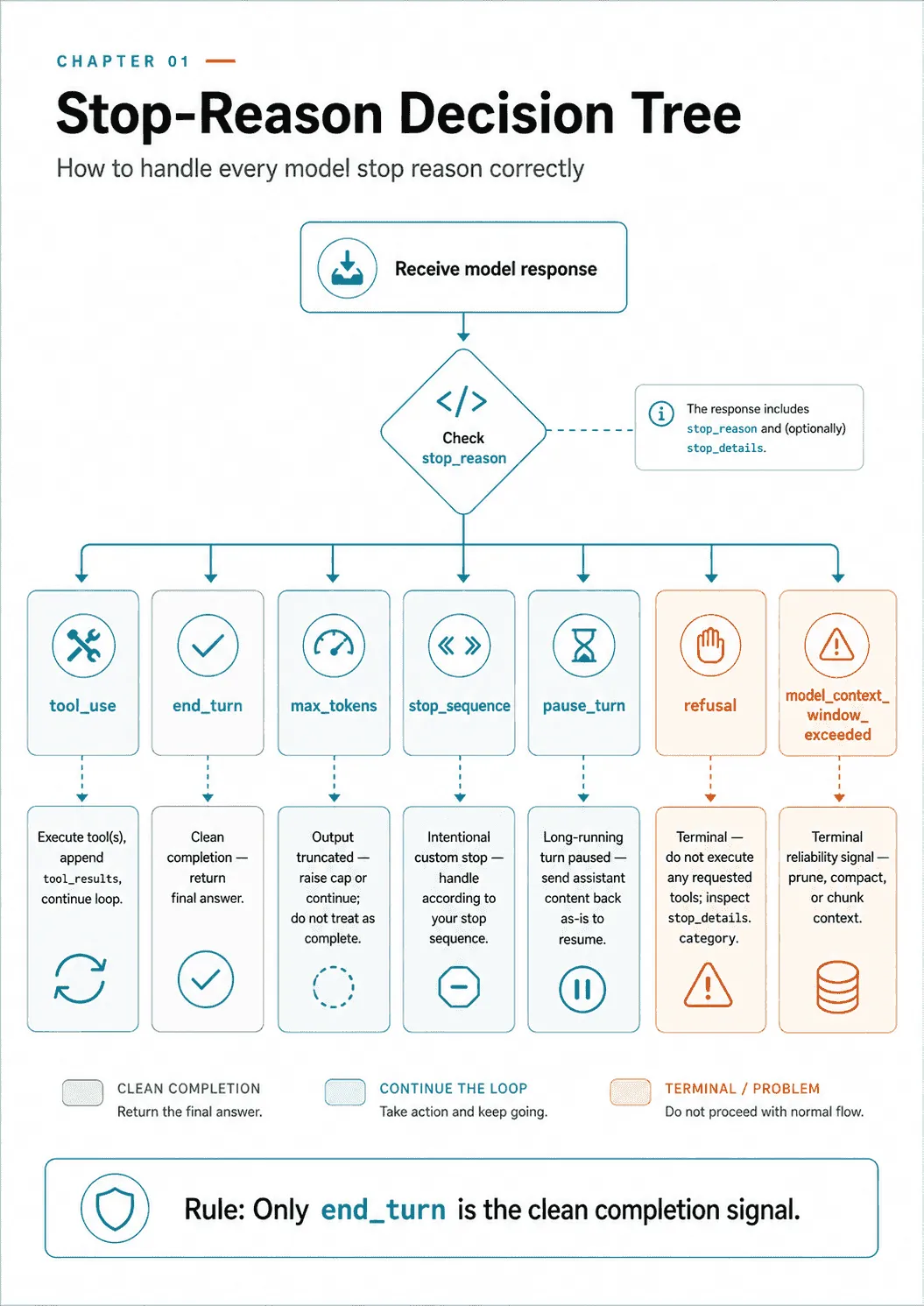
tool_use: Claude wants a tool run. Execute, append results, continue. (the loop continues)end_turn: Claude reached a natural stopping point. (the loop ends, and this is the only clean ending)max_tokens: the response hit themax_tokenscap mid-generation. The output is truncated, not complete. Raise the cap or continue; never treat it as an answer.stop_sequence: one of your customstop_sequenceswas generated.resp.stop_sequencetells you which. Expected, if you set one.pause_turn: a long-running turn was paused, which happens with certain server-side tools. Not an ending.refusal: streaming classifiers intervened over a potential policy violation. Terminal.model_context_window_exceeded: the conversation outgrew the context window. This is a reliability signal, and preventing it is the job of the context management chapter. An agent that ignores it simply fails.
Two of those deserve code, because handling them is not obvious from the name.
pause_turn is resumed by sending the response straight back. The documentation is unusually literal about this: “we paused a long-running turn. You may provide the response back as-is in a subsequent request to let the model continue.” As-is means the assistant content, unmodified, appended as the next assistant message.
while resp.stop_reason == "pause_turn":
    messages.append({"role": "assistant", "content": resp.content})
    resp = client.messages.create(
        model="claude-haiku-4-5",
        max_tokens=1024,
        tools=tools,
        messages=messages,
    )
You add nothing and you strip nothing. A loop written as if stop_reason != "tool_use": break treats a pause as an answer and returns half a turn.
refusal carries structure, not just a name. Message has a second field for it, stop_details, typed Optional[RefusalStopDetails].
if resp.stop_reason == "refusal":
    print(resp.stop_details.category)      # e.g. "cyber"
    print(resp.stop_details.explanation)   # human-readable, may be None
category is one of cyber, bio, frontier_llm, reasoning_extraction, or general_harms. Each is documented with the caveat that benign work in that area can also trigger it. explanation is “not guaranteed to be stable” and is null when no explanation is available. So log the category — it is an enum you can branch on and count. Show the explanation to a human if you have one. And do not parse either into control flow.
Refusal is terminal in a stronger sense than the loop merely happening to end. If a turn both requests tools and ends in a refusal, do not run the tools. Anthropic’s tool runner enforces that: it exits on a refusal before dispatching anything, and the source comment says why. “Refusal-terminated turns are terminal: executing their tool_use blocks would fire side effects the model never confirmed, and the resulting tool_results cannot be replayed coherently.”
Knowing this set shows why “end the loop when it is not tool_use” is almost right and materially incomplete. Five of seven stop reasons are neither tool_use nor an answer.
One dispatcher for all seven
The loop at the top of this chapter raises on those five. That is the right shape for teaching and for a script you are watching, because an unhandled state is loud. It is the wrong shape for a service. Production code should route every stop reason deliberately, and the routing is small enough to write once and test:
CONTINUE, DONE, TRUNCATED, TERMINAL = "continue", "done", "truncated", "terminal"

def classify(stop_reason):
    if stop_reason == "tool_use":      return CONTINUE   # run tools, append results
    if stop_reason == "pause_turn":    return CONTINUE   # resend the turn unmodified
    if stop_reason == "end_turn":      return DONE
    if stop_reason == "stop_sequence": return DONE       # you asked for this ending
    if stop_reason == "max_tokens":    return TRUNCATED  # partial text, not an answer
    if stop_reason == "refusal":       return TERMINAL   # do not run its tools
    if stop_reason == "model_context_window_exceeded":
        return TERMINAL
    return TERMINAL                                      # newer than this code
Four dispositions, and each carries a different obligation.
CONTINUE covers two mechanically different continuations. tool_use appends tool results; pause_turn appends the assistant content untouched. Both go around again, and both count against your iteration cap.
DONE covers two endings, and only one of them is the model finishing. stop_sequence means your sequence fired, so the text is complete only in the sense that you cut it there. Check resp.stop_sequence to see which one, and be sure the truncated tail was not going to matter.
TRUNCATED means max_tokens cut off real text mid-sentence, so preserve the partial output for recovery. Decide whether to raise max_tokens and repeat the request or continue from the partial assistant turn. Do not present the unfinished text as a complete answer.
TERMINAL ends the run without an answer, and the default arm is the point of the whole function. stop_reason is a closed Literal of seven values today. A new member is a normal thing for a platform to add, and your deployed code will meet it before your type checker does. Falling through to TERMINAL fails closed: the run stops, you log the unrecognized value, and nothing is treated as complete on the strength of a string you have never seen. A dispatcher whose else branch returns DONE will one day hand a user a refusal-shaped state as a finished answer.
Test it against the enumeration rather than against your imagination. typing.get_args gives you the seven members, so a test that asserts every one of them maps to a disposition — and that an invented eighth maps to TERMINAL — is four lines long and will outlive this chapter.
Level 2: the loop someone else runs over your tools
Between writing the loop and handing the whole task to an agent harness sits client.beta.messages.tool_runner. It runs the send/dispatch/continue cycle for you, in your process, over tools you define with the beta_tool decorator, which infers the JSON schema from the function’s type hints.
from anthropic import Anthropic, beta_tool

client = Anthropic()

@beta_tool
def lookup_order(order_id: str) -> str:
    """Look up a bookshop order's status by its order id."""
    return '{"status": "shipped", "eta": "2026-06-02"}'

runner = client.beta.messages.tool_runner(
    model="claude-haiku-4-5",
    max_tokens=1024,
    tools=[lookup_order],
    max_iterations=8,
    messages=[{"role": "user", "content": "What's the status of order A17?"}],
)
final = runner.until_done()      # or: for message in runner: ...
print(final.stop_reason)
The runner is iterable, yielding each parsed message as it arrives, and until_done() drains it and returns the last one. Its loop is the loop from the top of this chapter with the same shape and the same exits:
while not self._should_stop():          # _should_stop() is the max_iterations check
    ...
    if message.stop_reason == "refusal":
        return                          # terminal, before any dispatch
    response = self.generate_tool_call_response()
    if response is None:
        return                          # no tool_use blocks -> the model answered
Note where the cap lives. _should_stop() is the while condition, evaluated before each request, and max_iterations defaults to None, meaning no cap at all unless you pass one. The normal exit is further down, when a turn produces no tool_use blocks. Anthropic’s own implementation separates the backstop from the completion test exactly the way the anti-pattern section below insists you should.
Use this level when you want the loop managed but the tools, the process, and the deployment surface to stay yours. No subprocess, no filesystem access, no built-in tool set. That is a common shape for a service exposing a narrow, audited set of business operations.
Level 3: the Agent SDK
The Claude Agent SDK runs the loop and brings a whole agent with it. You call query() and consume a stream of messages; the SDK handles tool-use iterations internally and signals completion with a final ResultMessage.
import asyncio
from claude_agent_sdk import query, ClaudeAgentOptions, ResultMessage

async def main():
    options = ClaudeAgentOptions(
        tools={"type": "preset", "preset": "claude_code"},  # availability: the built-in set
        disallowed_tools=["Bash"],                          # removed from context entirely
        allowed_tools=["Read", "Grep"],                     # auto-approved; the rest prompt
        max_turns=8,
        max_budget_usd=0.50,
    )
    async for message in query(prompt="What's the status of order A17?", options=options):
        if isinstance(message, ResultMessage):
            print(message.subtype, message.num_turns, message.total_cost_usd)

asyncio.run(main())
A reminder from the setup notes: the SDK launches the claude CLI. The CLI reads ANTHROPIC_API_KEY from the environment it inherits, or an existing claude login. A .env file is not loaded for you.
The three tool options are three different things
The example uses three controls: the available tool roster, automatic permission approval, and explicit removal. The docstrings in claude-agent-sdk 0.2.128 define each separately.
tools— “Specify the base set of available built-in tools.” Pass a list of names,[]to “Disable all built-in tools”, or{"type": "preset", "preset": "claude_code"}for the full Claude Code set. The docstring closes by naming its neighbour: “To restrict which tools the model may call without being prompted, useallowed_toolsinstead.”allowed_tools— “Tool names that are auto-allowed without prompting for permission. These tools execute automatically without asking the user for approval.” The docstring closes with the mirror image: “To restrict which tools are available at all, usetools.”disallowed_tools— “These tools are removed from the model’s context and cannot be used, even if they would otherwise be allowed.” The strongest of the three.
To restrict an agent to read-only operations, narrow tools and remove unwanted capabilities with disallowed_tools. Setting only allowed_tools=["Read"] auto-approves reads; it leaves every other available tool subject to permission handling, which is not a read-only roster.
Two related notes from the same source. disallowed_tools is the stronger statement of the two removals. The tool is not merely rejected at call time, it is absent from the model’s context, so no tokens are spent describing a capability you will refuse. And passing "Skill" in allowed_tools is deprecated in this version, in favor of the skills option, which configures the whole path itself.
What the stream actually yields
query() is an async iterator, and each message it yields is a typed object. The return annotation names the full union, which beats any prose summary.
AsyncIterator[UserMessage | AssistantMessage | SystemMessage
              | ResultMessage | StreamEvent | RateLimitEvent]
Four of them carry the flow.
SystemMessage— lifecycle and metadata, beginning with aninitevent carrying the session id, the model, and the tools available for the run. It is a two-field dataclass,subtypeand adatadict.AssistantMessage— a turn from the model. Itscontentis the same list of blocks as the raw API: text, thinking,tool_use,tool_result. It also carriesmodel,usage,parent_tool_use_id, and, worth noticing,stop_reason. The per-turn stop reason is still there; the SDK simply does not require you to act on it.UserMessage— the SDK feeding a tool result back into the conversation. You did not send this. The SDK synthesized the user turn carrying the tool’s output, exactly thetool_resultstep you appended by hand at level 1. Its blocks areToolResultBlock, which hastool_use_id,content, and the sameis_errorflag you set yourself earlier.ResultMessage— the single terminal message, emitted once when the run ends.
So a run that calls one tool streams roughly SystemMessage(init) → AssistantMessage(tool_use) → UserMessage(tool_result) → AssistantMessage(text) → ResultMessage.
The other two in the union are conditional, and one of them is a trap.
StreamEvent requires opting in, silently. It carries the raw incremental API events, and it is only emitted when ClaudeAgentOptions.include_partial_messages is True. That field defaults to False, and the transport turns it into a --include-partial-messages CLI flag only when set. Write a handler for StreamEvent, forget the option, and your handler never runs. Nothing errors, nothing warns; you just get no partial output and a plausible-looking stream of complete messages.
RateLimitEvent arrives unasked. The CLI emits it whenever rate-limit state transitions. It carries a RateLimitInfo whose status is allowed, allowed_warning, or rejected, plus a utilization fraction and resets_at. The rate_limit_type is one of five_hour, seven_day, seven_day_opus, seven_day_sonnet, overage. The value of allowed_warning is that it fires before you are blocked, so a long-running agent can back off while it still has room.
Reading the ResultMessage properly
Termination is reported by that final ResultMessage, whose subtype says how the run ended:
success— the agent completed the task.error_max_turns— it hit themax_turnslimit.error_max_budget_usd— it hit themax_budget_usdcap.error_during_execution— an error occurred mid-run.error_max_structured_output_retries— structured-output validation failed too many times.
This maps cleanly onto the raw picture. subtype == "success" corresponds to the loop reaching end_turn. The error_* subtypes are the guardrails, the turn limit and the budget cap, exactly where the for/else backstop sat at level 1.
Check is_error alongside subtype. The source describes api_error_status as the HTTP status of a failing API call when is_error is true and subtype is success. A successful subtype alone therefore does not establish that the run completed without an API failure.
ResultMessage has nineteen fields, and six of them carry the operational load:
async for message in query(prompt=..., options=options):
    if isinstance(message, ResultMessage):
        ok = message.subtype == "success" and not message.is_error
        print(ok, message.subtype, message.terminal_reason)
        print(message.api_error_status)     # 429/500/529 on a failing API call
        print(message.errors)               # list[str] | None
        print(message.permission_denials)   # tools the agent was refused
        print(message.duration_ms, message.duration_api_ms)
print(message.structured_output) # parsed object, when one was requestedapi_error_status— the HTTP status behind a failure. The source notes it is “Safe to log (no message content)”, which makes it the right thing to put in a metric.errors—list[str] | None, the accumulated error strings.permission_denials— every tool call the agent asked for and was refused. An agent that looks lazy is often an agent being denied, and this is where that shows up. An empty list is weaker evidence than it looks, and the next section says why.terminal_reason— “Why the query loop terminated”, with documented values includingcompleted,max_turns,aborted_streaming, andaborted_tools. The twoaborted_*values mean the turn was cancelled byClaudeSDKClient.interrupt()or an equivalent control request. It isNoneon older CLI versions, or when a result bypassed the query loop — a local slash command, for instance.duration_msandduration_api_ms— wall clock, and time inside API calls. Subtracting the second from the first gives you non-API elapsed time, which is the right name for it and worth insisting on. Your tools live in there, and so does everything else outside an API call: process startup, JSON serialization over the control channel, permission checks, hooks, MCP server round-trips, and the SDK’s own scheduling. The difference is where to start looking when an agent feels slow, not an answer about tools. If you need the tool number, measure it: wrap each handler in a timer, key the spans bytool_use_id, and report their sum alongside these two rather than inferring it from them. A fat difference with a thin tool total means the cost is in the harness, and that is a finding you cannot reach by subtraction.structured_output— the parsed object when the run requested one, so you are not re-parsingresulttext.
An empty permission_denials proves less than it looks
An empty list means no denial was recorded. It does not establish whether the expected tool was available, requested or executed. Three different situations produce the same empty list:
- Not attempted. The model never asked for the tool. No request, no denial.
- Not visible. The tool was absent from the roster because of
toolsordisallowed_tools. - Allowed. The call ran, either because it passed the applicable checks or because it was auto-approved: an
allowed_toolsentry, or apermission_modeofbypassPermissionsoracceptEdits.
A refused call is the one case the field reports: it appears in the list rather than explaining an empty one.
Read the tool trace alongside the permission result:
- Did it ask? Scan
AssistantMessage.contentforToolUseBlocks and count them by name. - Could it see the tool? Check the available tools in the
SystemMessageinitevent. - Which controls applied? Read the permission mode, allow and deny rules, and matching hooks.
bypassPermissionsskips the permission callback, but aPreToolUsehook can still deny the call, as chapter 3 demonstrates. - What outcome came back? Match the
ToolResultBlockto itstool_use_id, then inspect its error flag and content. A result can report a permission denial; its presence alone does not prove that the tool body ran. - Was anything refused? Read
permission_denialsanderrors, and compare them with the attempted calls.
A matching PreToolUse hook records the attempt before execution. Combine that trace with tool results and, for state changes, the external system’s record. Investigate the prompt only after separating a tool-selection problem from an unavailable tool, a denied call or a failed execution.
query() versus ClaudeSDKClient
query() is one-shot: a prompt in, a stream out, and when the iterator is exhausted the connection is gone. For anything conversational, the SDK has ClaudeSDKClient, an async context manager holding an open connection across many turns.
from claude_agent_sdk import ClaudeSDKClient, AssistantMessage, ResultMessage

async with ClaudeSDKClient() as client:
    await client.query("What's the status of order A17?")
    async for msg in client.receive_response():     # stops after the ResultMessage
        if isinstance(msg, ResultMessage):
            print(msg.subtype)
    await client.query("And order A18?")            # same session, retained context
client.query(prompt, session_id="default") sends. receive_response() yields messages “until and including a ResultMessage” and then terminates, while receive_messages() keeps going. The client also exposes interrupt() to cancel a turn in flight, which is what produces terminal_reason == "aborted_streaming" or "aborted_tools". Its docstring notes that interrupt() “only works with streaming mode.” Alongside it sit set_model(), set_permission_mode(), get_context_usage(), get_mcp_status(), and rewind_files().
What “one-shot” means, precisely. It is easy to read query() as destroying the conversation, and it does not. Three lifetimes are in play, and they end at different times.
- The client object and its subprocess die together, at the end of the
async foror on exit from theasync with. Nothing in your process survives. - The session transcript is written by the CLI and outlives both. Every
ResultMessagecarries thesession_idnaming it, which is why that field is required rather than optional. - The conversation resumes from that id.
ClaudeAgentOptions(resume=session_id)is documented as “Loads the conversation history from the specified session”;continue_conversation=Truepicks up the most recent session in the current directory;fork_session=Truealongsideresumebranches to a new id instead of continuing the old one.
So the accurate statement is that query() keeps no state in your process, not that the conversation is unrecoverable. The function is stateless; the session is not. What query() genuinely cannot do is what its own docstring lists: send a follow-up conditioned on a response, or interrupt a turn in flight. Resuming starts a fresh run over an old transcript. Staying in one is what ClaudeSDKClient is for. Chapter 3 covers resume and fork in full, including what a fork carries and what it drops.
The rule of thumb: query() for a task, ClaudeSDKClient for a conversation or anything a human might need to stop.
Turning a tool budget into max_turns
max_turns is the SDK’s runaway guard, and choosing a number for it requires knowing what it counts. The docstring is precise: “Maximum number of conversation turns before the query stops. A turn consists of a user message and assistant response.”
That is the unit, and the unit is not the tool call. A turn is one assistant response plus the user message that fed it. So budget against assistant responses on the longest path, never against a raw count of tools.
The difference is not academic, because of parallel tool use. Four sequential lookups cost four assistant responses, since each one has to see the previous result before it can ask for the next. The same four issued as one parallel batch cost one response: the model asks for all four in a single message, your loop returns all four results in a single user message, and the assistant answers on the turn after that. The tool count is identical and the budget differs by three.
So count the path, then pad it.
- Four sequential lookups then an answer: one opening exchange, four working turns, one answering turn. Roughly six.
- Four parallel lookups then an answer: one opening exchange, one working turn, one answering turn. Roughly three.
- Add a turn for every branch you expect the model to take. Each
is_errorit has to react to buys another response, as does each retry it chooses. Two of either on the sequential path takes six to eight.
Setting max_turns=4 because you counted four tools stops the agent mid-task with error_max_turns and no answer. That looks like a model failure and is a configuration one. And it is worth checking num_turns on a successful run against your estimate, because a model that batches its lookups will come in far under budget while a model that serializes them will not.
Pair it with max_budget_usd, which stops on cost rather than count and returns error_max_budget_usd. Turns are the right guard against a stuck loop; dollars are the right guard against an expensive one. They fail differently, and a production agent usually wants both.
Model-driven versus pre-configured
For an agentic task, Claude chooses the next tool from the current conversation and tool results. For a fixed workflow, application code chooses the sequence and may use the model within individual steps.
A support agent might call get_customer, see that the account is delinquent, and decide to call escalate_to_human rather than process_refund. That is a path you did not hard-code, and it is what lets the agent handle an ambiguous request. An agent that always runs A, then B, then C regardless of results is a pipeline wearing an agent’s name.
And if your flow really is A then B then C, do not build an agent for it. You will pay for a model call to make a decision that has only one answer. And you will get a nondeterministic version of something a function already does.
The three anti-patterns to recognize on sight
Three unreliable completion checks recur in agent implementations, and they tempt for the same reason: each substitutes a heuristic for the structured signal the API already gives you. Each can stop the loop without establishing that the requested work has finished:
-
Parsing the model’s natural language to decide the loop is done. Watching for the model to say “I’m finished” or “here is your answer” and terminating on that. Wrong because the text is not a contract. The model might say “let me check that” and then stop, or produce a complete answer without any such phrase. The
stop_reasonfield is the contract; the prose is not. This is the anti-pattern most likely to appear as a plausible distractor. -
Using an arbitrary iteration cap as the primary stopping mechanism. Capping at ten iterations and calling that your loop’s control. Wrong because a cap is a safety backstop, not a completion condition. A task that legitimately needs twelve tool calls fails, and a task that finished in two tells you nothing about why it stopped. Caps exist precisely as backstops against a runaway, which is why they surface as
error_max_turnsanderror_max_budget_usdrather than assuccess. Note how consistently the real implementations enforce that separation. The tool runner putsmax_iterationsin thewhilecondition and the completion test in the body. The level-1 loop putsMAX_TURNSin theforand raises in theelse. Leaning on the cap as the main exit is designing for the failure case instead of the success case. -
Checking for assistant text content as a completion indicator. Treating “the assistant produced some text” as “the agent is done”. Concretely: reading
resp.content[0].text, or scanning for any text block and breaking the moment one is present.# WRONG — text presence is not a completion signal def is_complete(resp): for block in resp.content: if block.type == "text": return block.text # "done" even on a turn that ALSO asked for a toolThe trap is that an assistant message is a list of content blocks, and a single turn can hold both a text block and a
tool_useblock. Claude often narrates (“Let me look that up…”) in the very message where it requests a tool. On such a turn,resp.content[0]may well be that narration whileresp.stop_reasonistool_use. Readcontent[0].textas “the answer” and you return the narration and stop the loop before the tool it just asked for ever runs. Text can appear on any turn, so its presence tells you nothing about completion. Reading the text is perfectly fine after you have confirmedstop_reason == "end_turn". That is exactly what the loop at the top of this chapter does, and why it joins every text block rather than taking the first.
Use the structured stop reason, or the SDK result fields, to distinguish a completed turn from a limit or failure. Then check whether the result satisfies the task. A cleanly terminated loop may still have an unresolved order or a denied tool call.
Final thoughts
What to carry forward.
- The loop is send, inspect
stop_reason, execute tools, repeat. The completion test is== "end_turn", not!= "tool_use"; there are seven stop reasons, route all of them, and fail closed on one you do not recognise. - A failing tool re-enters the loop as a
tool_resultwithis_error, not as an exception. Filter what you forward: a raw driver message can carry a connection string. toolsis availability,allowed_toolsis auto-approval,disallowed_toolsis removal. Only the first and third prevent anything.- In the SDK,
ResultMessage.subtypeandis_errorare separate axes; check both. An emptypermission_denialsproves little on its own. - Three termination anti-patterns: ending on the model’s prose, on an iteration cap as the primary condition, or on
content[0].text.
For order A17, follow the lookup request through to its matching tool result and the final response. If the lookup failed, check that the model received a useful error. If a budget stopped the run, report that limit instead of returning the last piece of text as an answer. Those checks remain necessary whether you write the loop or let an SDK run it.
Next: multi-agent orchestration — coordinator–subagent systems, what a subagent can and can’t see, and how to decompose a task without leaving gaps.
Comments