Workflows, Hooks, and Sessions: The Control Plane
The control plane around the agent loop: enforcing multi-step workflows with clean handoff, intercepting tool calls with Agent SDK hooks (PreToolUse/PostToolUse and their decisions), and persisting session state so a run can resume and fork.
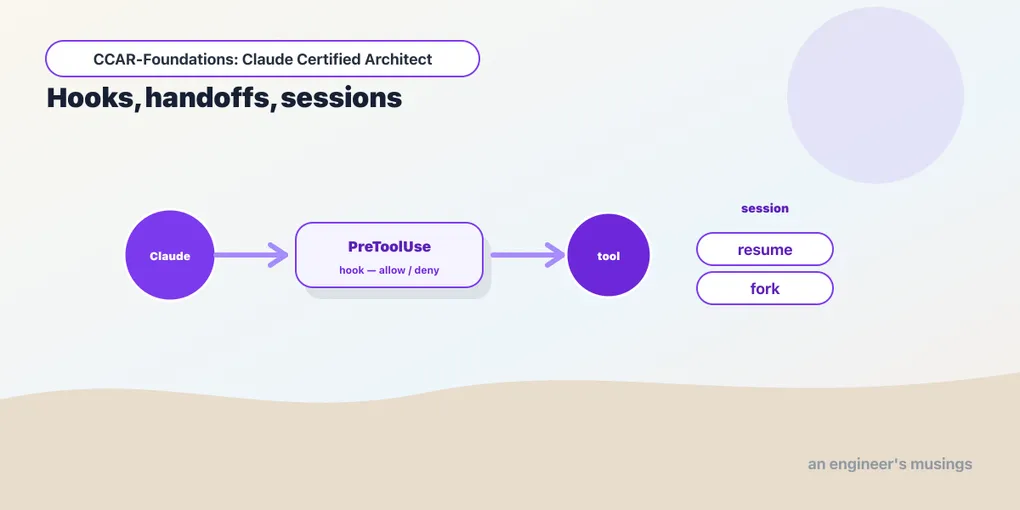
Consider a migration workflow that must validate its inputs, apply a change, and then notify the owner. The agentic loop lets the model choose its own actions, and that freedom is the point. But freedom is not the same as fitness for production. The application must enforce the required order, inspect proposed tool calls, and retain enough state to recover if the process stops.
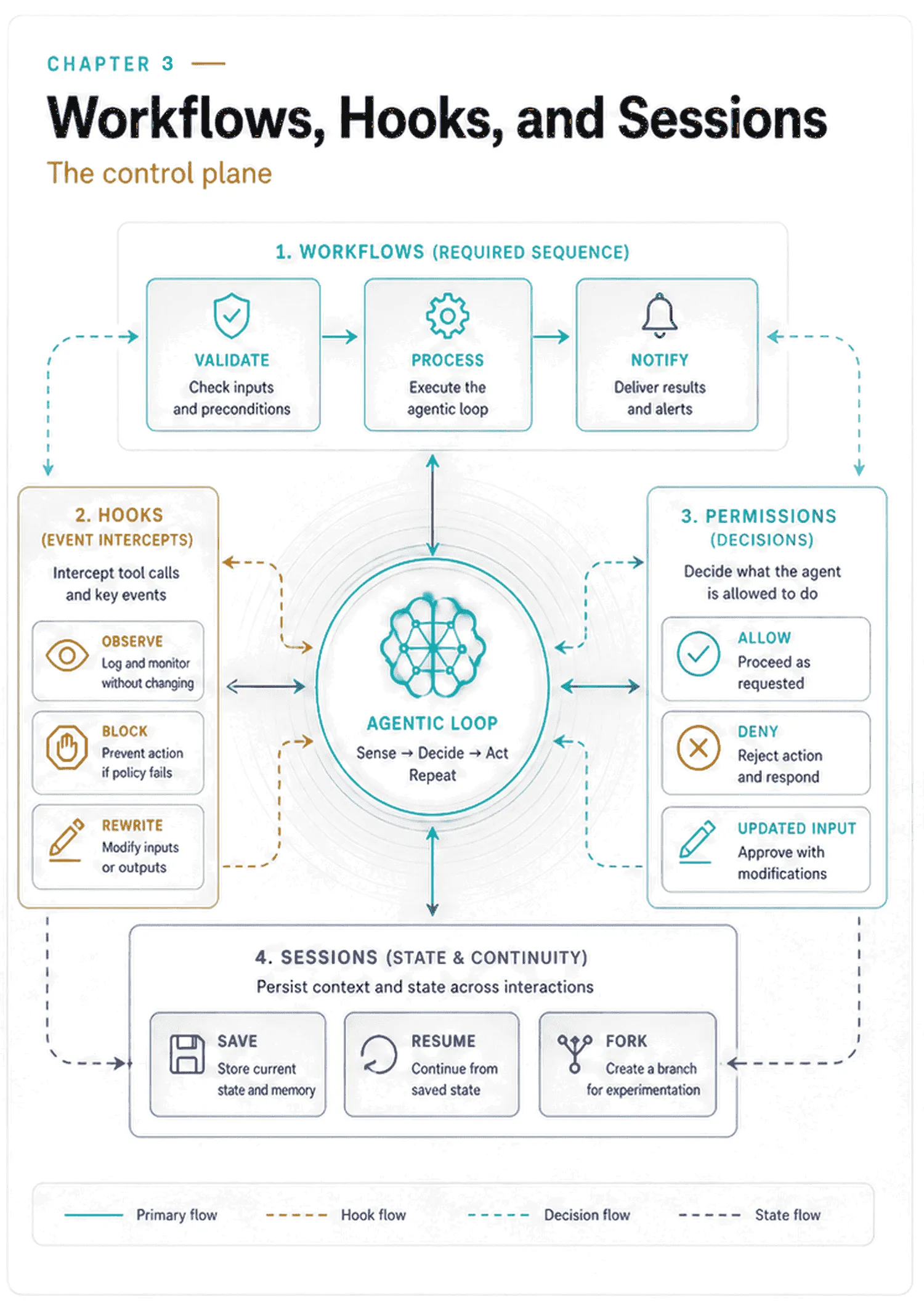
Exam objectives covered here. 1.4 Implement multi-step workflows with enforcement and handoff patterns. 1.5 Apply Agent SDK hooks for tool call interception and data normalization. 1.7 Manage session state, resumption, and forking. Numbering follows the Claude Certified Architect – Foundations Exam Guide, version 1.0, effective July 2026.
Workflows, hooks, permissions, and sessions supply this control plane. For the migration, each answers a different operational question: when a step may run, whether a proposed call is permitted, and which conversation to restore after an interruption.
Run against: claude-agent-sdk 0.2.128 and the Claude Code CLI it bundles, version 2.1.220. Field names, enum members, error strings and file layouts were read out of, or produced by, that installation. Where a claim describes model behavior rather than SDK structure, the text says whether it was observed.
Read the exact rosters below as a snapshot of one locked environment, not as something to memorize. Hook events, enum members and field names move between releases, and you will see the CLI and the SDK disagree about a mode name before this chapter is over. Regenerate them against your own install instead:
import typing, claude_agent_sdk.types as t
print([typing.get_args(e)[0] for e in typing.get_args(t.HookEvent)])
print(typing.get_args(t.PermissionMode))
Use the rosters to locate the fields on your installed version. The design question is where a check sits in the call path and whether every relevant action reaches it.
Governance belongs in structure, not the prompt
A prompt can tell the model to validate before processing, and for low-stakes behavior that is the cheapest thing that works. But an instruction is advice the model can misread, forget under a full context window, or reason its way around. When a step is mandatory, an action is consequential, or state must survive a restart, you want enforcement: something that runs in your code rather than the model’s, and holds whether the model cooperates or not. If validation is mandatory, the application must prevent processing until it succeeds. Tool availability, permission checks, and hooks let you enforce parts of that rule. Session storage addresses a separate need: preserving the conversation when the process exits.
For each control, identify what it covers, because a rule about one tool may leave another route to the same action open. That is the refrain of this chapter, and the matcher experiment later proves it.
Multi-step workflows: what actually enforces order
Some tasks have a required order: validate input, then process, then notify, where skipping or reordering a step is a bug. The agentic loop gives the model freedom to choose its next action. That’s exactly what you want for open-ended work, and exactly what you don’t want when a step is mandatory. So workflow enforcement is about constraining that freedom at the points that matter, without turning the whole agent into a rigid script.
“Constrain the tool surface” is the usual advice, and it is right, but it is not one mechanism. It is four, and they differ in whether they can change while the run is happening — which is precisely what an ordered workflow needs.
The static lever is tools. Set at session start, it defines the base set of built-in tools that exist. It governs availability, which makes it the broadest of the four and the least useful for sequencing. A workflow needs step 2’s tool to become available only after step 1 finished, and a session-level list cannot express “after.”
The runtime lever is a permission rule. Rules can be added, replaced and removed mid-session through a PermissionUpdate, and the session destination scopes the change to this run only:
from claude_agent_sdk import PermissionUpdate
from claude_agent_sdk.types import PermissionRuleValue   # not re-exported at top level

update = PermissionUpdate(
    type="addRules",
    rules=[PermissionRuleValue("Bash", "npm run deploy:*")],
    behavior="deny",
    destination="session",
)
That object serializes to exactly what goes over the control protocol:
{'type': 'addRules', 'destination': 'session',
 'rules': [{'toolName': 'Bash', 'ruleContent': 'npm run deploy:*'}],
 'behavior': 'deny'}
Note the import line. PermissionUpdate is exported from the package root and PermissionRuleValue is not, so the obvious one-line import raises ImportError: cannot import name 'PermissionRuleValue'. You reach it through claude_agent_sdk.types.
The type field takes six values: addRules, replaceRules, removeRules, setMode, addDirectories, removeDirectories. behavior takes allow, deny or ask. Rules reach the CLI from a permission callback, covered below, on PermissionResultAllow(updated_permissions=[...]). That is how a decision about one tool call changes the rules for the next one.
The posture lever is the permission mode, and it moves mid-run:
async with ClaudeSDKClient(options) as client:
    await client.query("Draft the migration plan.")
    # ... review the plan ...
    await client.set_permission_mode("acceptEdits")
    await client.query("Now apply it.")
The six legal modes are default, acceptEdits, plan, bypassPermissions, dontAsk and auto. Two are workflow tools in their own right. plan runs read-only tools freely and withholds the ones that change your project until you approve a plan, which makes it a “decide before you commit” stage rather than a sandbox — reading is still execution, and chapter 8 is where that distinction earns its keep. dontAsk denies anything not already pre-approved — turning an ambiguous prompt into a refusal instead of a question nobody is there to answer.
One naming trap while you have the list in front of you. That is the SDK’s enum, and the CLI advertises a different set. Ask it for something invalid and it names its own six:
$ claude --permission-mode notamode --version
error: option '--permission-mode <mode>' argument 'notamode' is invalid.
Allowed choices are acceptEdits, auto, bypassPermissions, manual, dontAsk, plan.
manual stands where the SDK says default. The obvious inference is that --permission-mode default is rejected, and it is worth resisting, because it is wrong: both default and manual are accepted by the parser. The advertised list is narrower than the accepted one.
So the seam is a documentation seam rather than a runtime one. Nothing breaks, and that is what makes it worth knowing — a value the tool declines to advertise is a value it may stop accepting, so write manual in anything you commit to a workflow and keep default for the SDK, where it is the documented name.
The MCP lever is toggle_mcp_server. Disabling a server “disconnects it and removes its tools from the available tool set,” in the client’s own words, and re-enabling reconnects it. If a workflow stage is defined by an external system, that is the switch for the stage.
After validation succeeds, pass its result explicitly to the processing stage. In a multi-agent workflow, the coordinator includes that result in the next specialist’s prompt. The order can be correct while the handoff is incomplete; the receiving agent still needs the evidence from the preceding stage.
Hooks: intercepting tool calls
Hooks are the Agent SDK’s interception points: callbacks that fire around the agent’s actions so you can observe, block, or modify them without touching the loop. They are the mechanism behind guardrails, audit logging, data redaction, and workflow enforcement alike. They are also the cleanest example of the structure-over-prompt idea, because a hook runs in your code, not the model’s.
claude-agent-sdk 0.2.128 exposes ten hook events:
PreToolUse   PostToolUse   PostToolUseFailure   UserPromptSubmit   Stop
SubagentStart   SubagentStop   PreCompact   Notification   PermissionRequest
Several more exist in the TypeScript SDK. That parity gap is real and it moves between releases, so check before you build on a specific event.
You attach hooks with a HookMatcher, which pairs a matcher with the callbacks:
from pathlib import Path
from claude_agent_sdk import ClaudeAgentOptions, HookMatcher

WORKSPACE = Path("/workspace").resolve()

async def confine_writes(input, tool_use_id, context):
    raw = input["tool_input"].get("file_path", "")
    try:
        target = Path(raw).resolve()   # collapses "..", follows symlinks
    except (OSError, RuntimeError):
        target = None
    if target is None or not target.is_relative_to(WORKSPACE):
        return {"hookSpecificOutput": {
            "hookEventName": "PreToolUse",
            "permissionDecision": "deny",
            "permissionDecisionReason": f"Writes are confined to {WORKSPACE}.",
        }}
    return {}   # an empty dict lets the call proceed unchanged

options = ClaudeAgentOptions(
    hooks={"PreToolUse": [HookMatcher(matcher="Write|Edit",
                                      hooks=[confine_writes],
                                      timeout=10)]},
)
Resolve the path before you compare it, and compare the resolved form against a resolved root. The obvious path.startswith("/workspace/") looks like the same check and is not one. "/workspace/../etc/passwd".startswith("/workspace/") is True, so a .. walks straight out; a symlink inside the workspace pointing anywhere else does the same without needing .. at all; and "/workspace-public/x".startswith("/workspace") is True, which admits a sibling directory outright. Path.resolve() handles all three, and it works on paths that do not exist yet, which a write target usually does not. is_relative_to then answers containment rather than string prefix.
Even resolved, this is a policy check and not a security boundary. It reads the path at decision time and the tool opens it a moment later, so a link swapped in between wins. It only sees the argument it was handed, so a write routed through another tool never reaches it — the experiment later in this chapter shows exactly that. Treat it as the layer that stops the ordinary mistake, and put an OS-level sandbox underneath it if the containment has to hold against something trying to get out.
The matcher is a filter. Pass a pipe-separated list of exact tool names like "Write|Edit", a regex like "^mcp__" to match all MCP tools, or omit it to match everything. HookMatcher() with no arguments is HookMatcher(matcher=None, hooks=[], timeout=None), and timeout is in seconds with a default of 60 applied downstream. A hook that reaches out to a policy service needs that number set deliberately, in both directions. Too low and legitimate calls fail. Too high and a hung dependency freezes the agent for a minute per tool call.
One structural fact that changes how you write hooks: matchers on the same event run concurrently. The option’s own docstring says multiple matchers “are dispatched concurrently by the CLI.” The instruction that follows is blunt: “design each hook to be independent; do not rely on one completing before another starts.” An audit hook and a policy hook on PreToolUse are racing. If one must observe the other’s decision, they are one hook.
What a hook is handed
Hook inputs are typed, and the differences between them are the whole reason to know more than two events. Every input carries session_id, transcript_path, cwd and usually permission_mode. On top of that:
| Event | What it adds |
|---|---|
PreToolUse | tool_name, tool_input, tool_use_id |
PostToolUse | the same, plus tool_response |
PostToolUseFailure | the same, plus error and is_interrupt |
UserPromptSubmit | prompt |
Stop | stop_hook_active |
SubagentStart | agent_id, agent_type |
SubagentStop | agent_id, agent_type, agent_transcript_path, stop_hook_active |
PreCompact | trigger ("manual" or "auto") and custom_instructions |
Notification | message, notification_type, optional title |
PermissionRequest | tool_name, tool_input, permission_suggestions |
Three of those inputs change how the application should respond:
PostToolUseFailure is not PostToolUse with a bad result. It is a separate event with an error string, and is_interrupt tells you whether the failure was a user cancellation rather than a genuine fault. Retry logic that cannot tell those apart will cheerfully retry something a human just cancelled.
PreCompact.trigger distinguishes a compaction you asked for from one the context window forced. That is the difference between a routine event and a signal that your agent is running out of room. The field is how you count the second kind.
Stop.stop_hook_active is a re-entrancy guard, and it is the sharpest footgun in the list. A Stop hook can block the stop, sending the agent back around for another turn. If it blocks unconditionally, the agent finishes, the hook blocks, the agent finishes again, the hook blocks again. The flag tells you a stop hook is already in play on this stop. A hook that does not check it is an infinite loop with an API bill attached:
async def require_tests(input, tool_use_id, context):
    if input.get("stop_hook_active"):
        return {}                       # already looping — let it stop
    if not tests_have_run():
        return {"decision": "block",
                "reason": "Run the test suite before finishing."}
    return {}
The tool-lifecycle events also carry the optional agent_id and agent_type fields from the previous chapter. They are how you attribute an interleaved stream of hook events to the right parallel subagent.
What a hook returns
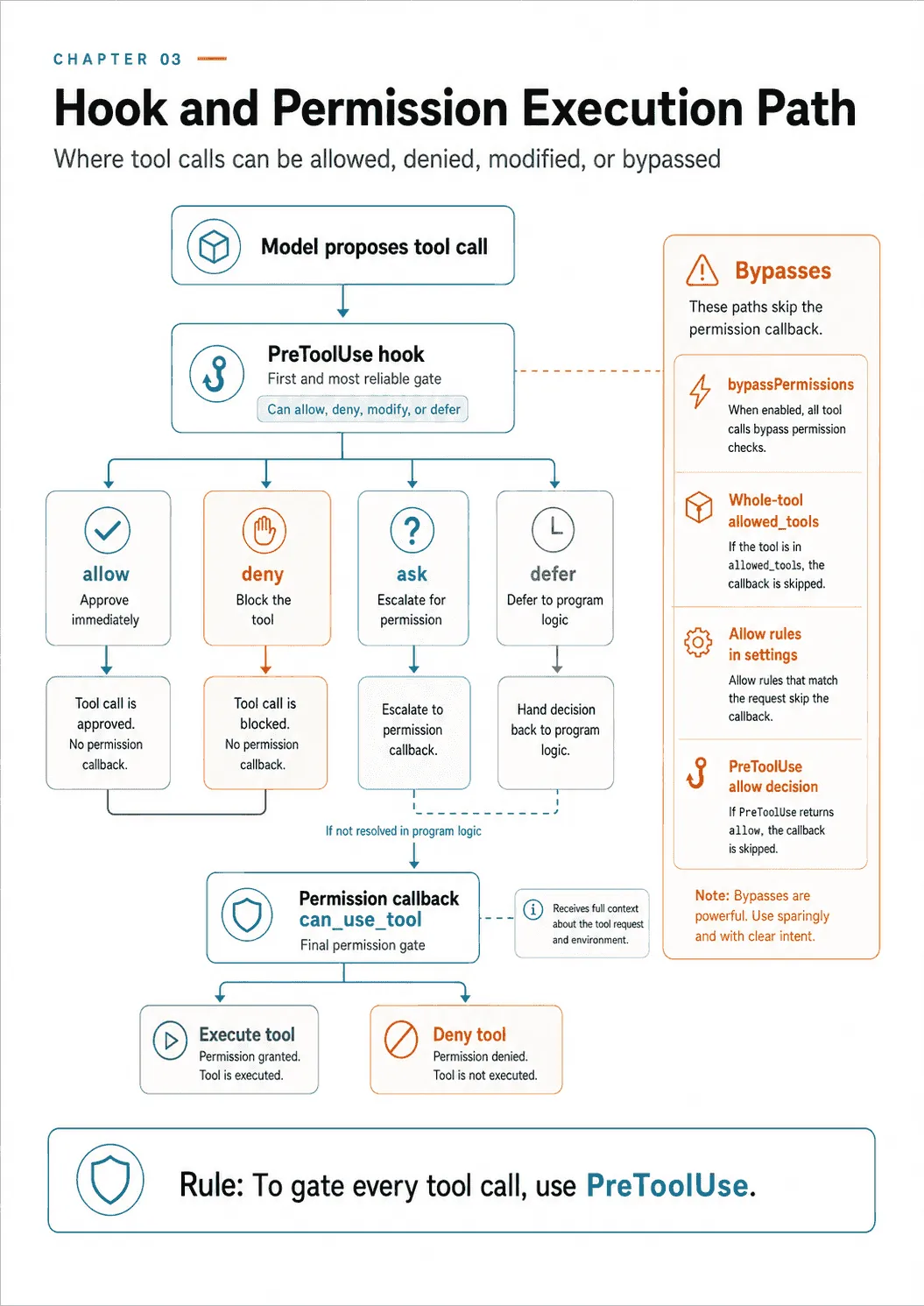
PreToolUse returns a hookSpecificOutput block, and its permissionDecision has four legal values, not one:
permissionDecision: NotRequired[Literal["allow", "deny", "ask", "defer"]]
permissionDecisionReason: NotRequired[str]
updatedInput: NotRequired[dict[str, Any]]
additionalContext: NotRequired[str]denyblocks the call. This is the one everyone knows about, and it blocks exactly the calls the matcher matched.allowapproves it outright, and does so before the permission callback runs. An allow decision from a hook skipscan_use_toolentirely.askescalates. The call does not proceed and does not fail — it goes to a permission decision. This is the primitive for “a human, or my own policy code, decides this one,” and it is the one most people never discover.deferstops the run and hands the pending call back to the caller. TheResultMessagethen carries aDeferredToolUsewith the call’sid,nameandinput, so the calling program can inspect it and decide whether to resume.
Use permissionDecisionReason for the reason, not additionalContext. They are different channels. The reason field is attached to the decision. On an ask it is forwarded into the permission callback’s context as decision_reason, which the SDK documents explicitly: “When a PreToolUse hook returns permissionDecision: "ask" with a permissionDecisionReason, that reason is forwarded here.” additionalContext injects a free-form note into the model’s context, which is a different thing that happens at a different time.
updatedInput rewrites the call’s arguments before the tool runs. Clamp a limit, redirect a path, strip a field.
Outside the hookSpecificOutput block, every hook shares a set of control fields:
continue_: NotRequired[bool]        # False stops Claude entirely
stopReason: NotRequired[str]        # the message shown when continue is False
suppressOutput: NotRequired[bool]   # hide stdout from transcript mode
decision: NotRequired[Literal["block"]]
systemMessage: NotRequired[str]     # a warning shown to the user
reason: NotRequired[str]            # feedback to Claude about the decision
continue_=False is the biggest hammer in the chapter. It does not block one tool call — it halts the agent. Pair it with stopReason or the user gets a run that stopped for no stated cause.
The trap that Python cannot express
Look at the field names continue_ and async_, with their trailing underscores. That is not a style choice, and it is not optional. The SDK puts the reason in capitals in its own source:
IMPORTANT: The Python SDK uses `async_` and `continue_` (with underscores) to
avoid Python keyword conflicts. These fields are automatically converted to
`async` and `continue` when sent to the CLI. You should use the underscore
versions in your Python code.
The conversion is a five-line function in the SDK that rewrites async_ to async and continue_ to continue on the way out, and does nothing else. Every other key passes through unchanged.
The trap is that the official hook documentation is language-neutral and shows the wire names. A reader who copies {"continue": False} from a web page into Python has written a dict whose key is a reserved word. Python accepts that inside a dict literal, and the SDK will never rewrite it. The CLI then receives a continue key alongside no continue_ key. Depending on where it lands, the hook either silently fails to stop the agent or stops it for reasons your code cannot explain. It is not a syntax error, so nothing tells you. In Python, write continue_ and async_, and treat any hook field you copied out of documentation as a name that may need translating.
The silent no-op that leaks secrets
PostToolUse returns a smaller output block, and one of its two fields carries a security hazard the docstring states plainly:
updatedToolOutput: NotRequired[Any]
"""Replaces the tool output before it is sent to the model.

For built-in tools (Bash, Read, Edit, etc.) the value must match the tool's
output schema (e.g. {"stdout": ..., "stderr": ..., "interrupted": ...}
for Bash); a mismatched shape is rejected and the original output is kept.
"""
If the replacement has the wrong shape, the original output reaches the model. The hook can run successfully without applying the redaction.
Now put it in the obvious use case, which is redaction. You have a Bash tool that runs a deploy script, and the script echoes a token. You write a PostToolUse hook to scrub it:
# WRONG — a bare string does not match Bash's output schema.
async def redact(input, tool_use_id, context):
    clean = SECRET_RE.sub("[REDACTED]", str(input["tool_response"]))
    return {"hookSpecificOutput": {
        "hookEventName": "PostToolUse",
        "updatedToolOutput": clean,          # silently discarded
    }}
That hook runs. It matches the tool. It computes a correct redaction. And the model receives the unredacted output — because a string is not {"stdout": ..., "stderr": ..., "interrupted": ...}. Your logs show the hook fired. Your test, if it asserts that the hook returned a redacted string, passes. The secret is in the transcript.
The fix is to preserve the schema:
async def redact(input, tool_use_id, context):
    original = input["tool_response"]
    if not isinstance(original, dict) or "stdout" not in original:
        return {}                            # unknown shape: don't pretend
    return {"hookSpecificOutput": {
        "hookEventName": "PostToolUse",
        "updatedToolOutput": {
            **original,
            "stdout": SECRET_RE.sub("[REDACTED]", original.get("stdout", "")),
            "stderr": SECRET_RE.sub("[REDACTED]", original.get("stderr", "")),
        },
    }}
Assert on the effect, never on the return value. A hook that returns the right dictionary has proven nothing; the test that matters reads what the model actually received. In the following run, the secret existed only in a file read by the tool. It was absent from the prompt, so any repetition had to come through the tool result:
wrong-shape (bare string)      secret reached the model: True    sees [REDACTED]: False
right-shape (Bash schema)      secret reached the model: False   sees [REDACTED]: True
The bare-string replacement failed despite the hook firing. The schema-preserving replacement withheld the secret in this test.
There is a sibling field, updatedMCPToolOutput, which applies to MCP tools only. The SDK says to prefer updatedToolOutput, which works for both.
Why redaction here is a backstop, not the control
Fix the shape and the hook works. It is still the wrong place to put your only secret control, and the docstring tells you why in its first line: it “replaces the tool output before it is sent to the model.” That is one surface, named precisely.
Count what the secret has already touched by the time this hook runs. PostToolUse fires after the tool executed, so the deploy script has read the token, put it in an argument list, and printed it. It went to the tool’s own stdout and to whatever that process logs. If the call failed, the text may be in the error string on PostToolUseFailure instead, which is a different event your matcher may not cover. And the transcript is a .jsonl file on disk, mirrored line by line to your session_store if you configured one — both covered later in this chapter, and neither of them is “the model.” A hook that rewrites the model’s copy has not been promised anything about the rest. Assume nothing is redacted until you have grepped that surface yourself.
So order the controls by how early they act:
- Do not let the tool reach the secret. A tool that runs with a scoped, short-lived credential cannot print the long-lived one. This is the only control that holds regardless of what the tool does with what it is given.
- Make the tool return less. A wrapper that emits
deploy ok, revision 41instead of a full script log removes the leak at source and costs fewer tokens. - Redact before anything observes it — inside the tool, on the way out, rather than in a hook that runs afterwards.
- The
PostToolUsehook, as the layer that catches what the first three missed.
The acceptance test is a canary. Put a value in the credential store that nothing legitimate should ever print, run the workflow, and grep for it in the tool’s own logs, the transcript .jsonl, the mirrored store, your hook’s audit output and any traces. A test that asserts the hook returned a redacted string has checked the one place the secret was never going to end up.
The permission callback
Hooks are one of two ways your code gets a say in a tool call. The other is can_use_tool, and it fills a different slot: it is the SDK’s replacement for the interactive permission prompt.
from claude_agent_sdk import (
    ClaudeAgentOptions, ClaudeSDKClient,
    PermissionResultAllow, PermissionResultDeny, ToolPermissionContext,
)

async def decide(tool_name: str, tool_input: dict, ctx: ToolPermissionContext):
    if tool_name == "Bash" and "rm -rf" in tool_input.get("command", ""):
        return PermissionResultDeny(message="Destructive delete refused.",
                                    interrupt=True)
    if tool_name == "Write":
        # approve, but rewrite where it writes — resolve-then-contain, as above
        safe = {**tool_input, "file_path": confine(tool_input["file_path"])}
        return PermissionResultAllow(updated_input=safe)
    return PermissionResultAllow()
Read the rm -rf line as a shape, not as a policy you would ship. Substring matching on a shell command is a filter with an open back door, and the back door is wide. rm -fr reorders the flags. rm --recursive --force spells them out. $TOOL -rf /data and bash cleanup.sh never contain the string at all. And none of that is the interesting bypass, because deleting a tree does not require rm: find . -delete, python -c "import shutil; shutil.rmtree('/data')", git clean -xfd and a truncating shell redirect all reach the same outcome by a different spelling. You are not enumerating a command. You are enumerating a language.
That is the same failure the matcher experiment further down this chapter demonstrates, one level lower: a rule written against a name does not govern an outcome. Denying deletion reliably means moving the check to a layer that does not read strings.
- Take the shell away.
toolsdecides availability, so a roster withoutBashcannot run any of the variants above. The CLI has a packaged version of this:claude --restricted“removes the built-in tools that run commands or code (Bash, PowerShell, REPL and the other code-running tools) and WebFetch unless--toolsnames them,” and confines the file tools to the working directories. That is a capability decision, and no spelling defeats it. - Replace it with a structured tool. If the agent needs to remove build output, give it
clean_build_dir(target)with an enum of the three directories it may target. It cannot express the other cases, so you never have to detect them. - Allowlist, never denylist, if a shell is unavoidable. Enumerate the commands you intend to permit and refuse everything else, because the set of things you meant to allow is finite and the set of things you meant to deny is not. Parse the command rather than searching it, and refuse anything you cannot parse — a pipeline, a substitution, a
;or&&, an argument you cannot resolve. Refusing on ambiguity is the whole trick. - Put a sandbox underneath. Run the process without write access to the paths that matter. Then a bypass you did not think of fails at the filesystem instead of succeeding quietly.
The acceptance test is the one to keep: try the variants — flags reordered, an alias, a variable, find -delete, a Python one-liner, two commands joined by && — and confirm each is refused because the capability is absent, not because you recognized the words.
PermissionResultDeny carries a message and an interrupt flag; interrupt=True stops the turn rather than letting the model try something else. PermissionResultAllow can carry updated_input, which rewrites the call. It can also carry updated_permissions, a list of the PermissionUpdate objects from earlier — which is how one decision installs a rule that governs later ones.
The ToolPermissionContext handed to the callback is richer than it looks. Its fields are signal, suggestions, tool_use_id, agent_id, blocked_path, decision_reason, title, display_name and description. agent_id tells you which subagent is asking. blocked_path names the file that triggered the request. decision_reason is where an ask decision’s reason arrives. title is the full prompt sentence, such as “Claude wants to read foo.txt.” The SDK asks you to use it rather than reconstructing your own from the tool name.
Two ValueErrors greet most first attempts, and both fire before anything is spawned:
ValueError: can_use_tool callback requires streaming mode.
            Please provide prompt as an AsyncIterable instead of a string.

ValueError: can_use_tool callback cannot be used with
            permission_prompt_tool_name. Please use one or the other.
The first is the one that catches everybody. A permission callback needs the bidirectional control protocol, which means ClaudeSDKClient or an async-iterable prompt. It does not work with a plain string passed to query().
That restriction belongs to a version. It is raised by claude-agent-sdk 0.2.128, the pin this book runs on. By 0.2.152 the guard is gone: the transport sets is_streaming_mode=True unconditionally and configures the callback through a helper, so a plain string prompt works with can_use_tool. Nothing about the design changed — the callback still sits downstream of the approval path, and a PreToolUse hook is still the mechanism that sees every call. What changed is a constraint on how you may pass the prompt. If you are on a newer SDK and the first ValueError does not appear, that is the reason.
The exception that decides which mechanism is load-bearing
A hook and a permission callback both look like places to put a rule. They sit at different points in the approval path, and only one of them is on every path. The SDK is generous enough to say so itself.
can_use_tool is invoked only when the CLI’s permission rules evaluate to “ask.” It is not invoked for calls that never reach a prompt. So a callback can be entirely bypassed by configuration elsewhere, and the SDK warns at connect time when it can detect that:
>>> ClaudeAgentOptions(can_use_tool=cb, permission_mode="bypassPermissions")
CanUseToolShadowedWarning: can_use_tool will not be invoked: permission_mode
'bypassPermissions' auto-approves every tool call (except explicit deny rules)
before the callback is consulted. To gate every tool call, use a PreToolUse
hook instead.

>>> ClaudeAgentOptions(can_use_tool=cb, allowed_tools=["Read", "Bash(ls:*)"])
CanUseToolShadowedWarning: can_use_tool will not be invoked for: Read.
An allowed_tools entry that allows a whole tool auto-approves it before the
callback is consulted. ... Allow rules from settings files can also shadow
the callback but are not visible here.
Both of those are real warnings, produced by constructing those options. Three things fall out of them.
First, for a check that must inspect every attempted call to a tool, use a PreToolUse hook with a matching filter. A permission callback covers only calls that reach the approval prompt. The matcher experiment below shows why even the hook needs its scope checked.
Second, notice which entry shadowed and which did not. "Read" allows the whole tool, so it shadows. "Bash(ls:*)" allows only matching invocations, so other Bash calls still fall through to the callback. That is the same three-lever distinction from the last chapter showing up again: allowed_tools is about prompting, and a tool named there stops asking.
Third, the last sentence is the honest one. Allow rules in settings files can shadow the callback too, and the SDK cannot see them from where the warning is raised. So the warning is a partial detector, not a guarantee — and a can_use_tool callback that has never fired in production may be doing nothing at all.
A PreToolUse hook returning allow also skips the permission callback. If both contain policy checks, do not assume that approval by the hook will be followed by the callback.
The gate is only as wide as its matcher
The hook holds, and it holds even under bypassPermissions. Run against this version, a PreToolUse deny stops a Write in both modes, and the run reports it:
control (no hook, bypassPermissions)   file created: True
deny hook, default                     file created: False   permission_denials: 1
deny hook, bypassPermissions           file created: False   permission_denials: 1
So far so good. Now widen the question from was this tool blocked to was the outcome prevented, and run the same experiment with the matcher left at "Write":
matcher "Write"        hook fired on: ['Write']          file created: TRUE
matcher "Write|Bash"   hook fired on: ['Write','Bash']   file created: False
The hook fired. The Write was denied. The file exists anyway, because the model wrote it with Bash — a tool the matcher never saw, and one that bypassPermissions auto-approved on its way past.
Two halves are worth separating here. The structural half is deterministic, and it is the part to design against: a hook fires only for the tools its matcher matches, so every unmatched tool is ungated. The behavioral half is that the model went looking for another route at all. That was observed on a single run, and it is not a guarantee about any particular model or prompt.
The lesson is the previous chapter’s lesson arriving from a new direction. allowed_tools is not availability, and a per-tool gate is not a per-capability gate. If the thing you need to stop is “a file gets written”, enumerate every tool that can write a file — or invert the problem, and use tools so that only the ones you have thought about are on the table at all.
It is worth writing down what each layer actually does, because they are routinely quoted as if they were interchangeable:
| Layer | What it governs |
|---|---|
| System prompt | Nothing. Instructions are advice the model may or may not follow. |
tools / disallowed_tools | Availability. A tool that is not in the set cannot be called. |
allowed_tools | Auto-approval. It removes the prompt, it does not add a restriction. |
Permission rules and can_use_tool | The calls that reach the approval path. bypassPermissions, a whole-tool allow entry, a settings-file allow rule, or a hook allow decision each skip it. |
PreToolUse hook | Every call to the tools its matcher matches. Unmatched tools are ungated. |
| OS sandbox, container, credentials | What the process can reach, whatever the agent decides to call. |
| Human approval | The action itself, at the cost of a person in the loop. |
Every row above the sandbox governs calls, named one at a time. None of them governs an outcome, because an outcome is reached through a capability and a capability usually has more than one tool leading to it. That is the whole content of the experiment above. Pick the layer that matches the thing you are actually trying to stop, and if the answer has to hold against something looking for a way around, the layer is one of the bottom two.
Sessions: state, resumption, and forking
A session is a persisted conversation the SDK can save and reload. It’s the mechanism behind an agent that survives a restart, resumes a paused task, or branches to explore alternatives. Where a hook governs a single action, a session governs the run’s memory, so it can outlive one process.
Where sessions actually live
Sessions are files on disk, in a directory derived from the working directory. The SDK’s own module docstring says it in one line: it “scans ~/.claude/projects/<sanitized-cwd>/ for .jsonl session files.” The sanitization is mechanical, replacing path separators with dashes, and the SDK exposes it:
>>> from claude_agent_sdk import project_key_for_directory
>>> project_key_for_directory("/Users/me/workspace/cca-verify")
'-Users-me-workspace-cca-verify'
That key is a real directory name. On the machine this chapter was written on:
$ ls ~/.claude/projects
-Users-me                              -> 1 .jsonl
-Users-me-workspace-my-project  -> 6 .jsonl
-Users-me-workspace-projects           -> 1 .jsonl
-Users-me-workspace-typescript         -> 0 .jsonl
-private-tmp                           -> 3 .jsonl
And that partitioning is exactly what list_sessions() reflects:
>>> list_sessions()                                        # every project
11
>>> list_sessions(directory="/private/tmp")                # one project
3
>>> list_sessions(directory="/Users/me/workspace/cca-verify")
0
The consequence is the important part. A session id captured in one working directory will not resume in another. Passing resume=session_id to a run whose cwd is somewhere else looks for a file that is not there. It is looking in a different project directory. The SDK’s own helpers make the failure explicit rather than mysterious:
>>> fork_session(sid, directory="/Users/me/workspace/cca-verify")
FileNotFoundError: Session 2d4c73a4-... not found in project directory for
                   /Users/me/workspace/cca-verify
Every session function takes a directory argument for exactly this reason. Omitting it is not “use the current directory” for all of them, and the difference matters. list_sessions() with no argument searches all projects; project_key_for_directory() with no argument uses the current one. Read the signature rather than assuming a uniform default. In production, store the working directory alongside the session id — on its own the id is only half an address.
Capture, resume, fork
Capture the session id when a run ends. It is on the final ResultMessage:
import anyio
from claude_agent_sdk import query, ClaudeAgentOptions, ResultMessage

async def main():
    async for message in query(prompt="Start the migration audit.",
                               options=ClaudeAgentOptions()):
        if isinstance(message, ResultMessage):
            print(message.session_id, message.subtype, message.num_turns)

anyio.run(main)
Resume a specific past session by passing its id. The agent picks up with the full prior context:
options = ClaudeAgentOptions(resume=session_id)          # continue this exact session
# or, to continue the most recent session in this directory without naming it:
options = ClaudeAgentOptions(continue_conversation=True)
Fork to branch, creating a new session that starts from a past one’s state so you can try a different path without disturbing the original:
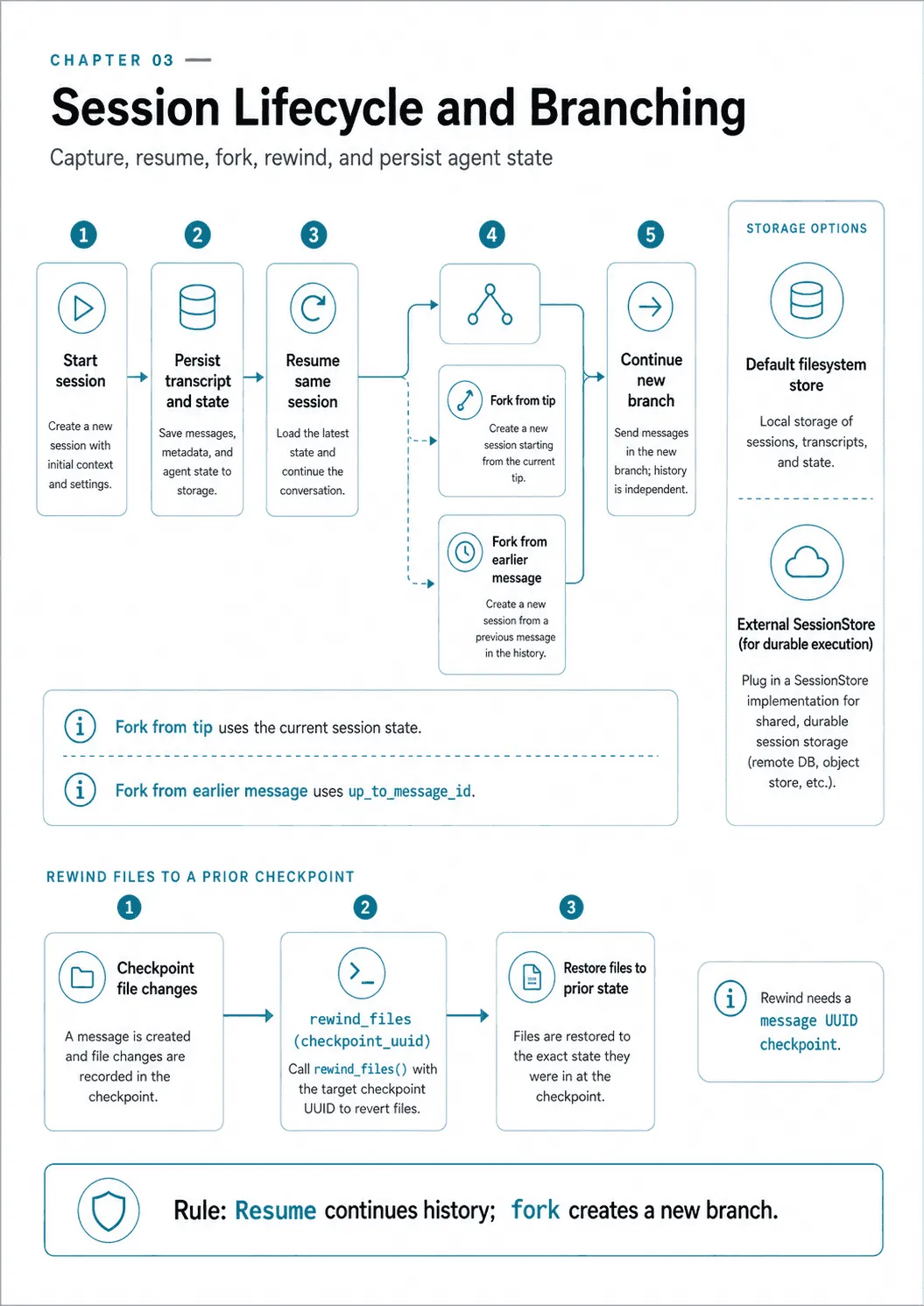
options = ClaudeAgentOptions(resume=session_id, fork_session=True)Resume continues a session in place — fork branches it into a new one. There is one constraint here that produces a flat refusal rather than a subtle bug, and the CLI states it exactly:
Error: --session-id can only be used with --continue or --resume
       if --fork-session is also specified.
That is the enforcement behind the session_id option’s docstring, “Cannot be used with continue_conversation or resume unless fork_session is also set.” It makes sense once you see it as arithmetic. resume says which session to read, session_id says which session to write — and those can only differ if you are forking.
Forking from a point in history
fork_session is two different things with the same name. Conflating them is why “you can time travel” often turns out to mean “you can branch from the end.”
The option fork_session: bool forks from the tip. Whatever the session’s last state was, that is where the branch starts.
The function fork_session() takes a message id:
fork_session(session_id: str,
             directory: str | None = None,
             up_to_message_id: str | None = None,
             title: str | None = None) -> ForkSessionResult
up_to_message_id is the time travel. Fork at message four of a nine-message session and the new session has four messages, not nine. Run against a real six-message session:
>>> [ (m.type, m.uuid[:8]) for m in get_session_messages(sid, directory="/private/tmp") ]
[('user','68b5373c'), ('assistant','9947f324'), ('assistant','bec41969'),
 ('user','b274fdfa'), ('assistant','edbbbbf2'), ('assistant','19ceddb0')]

>>> fork_session(sid, directory="/private/tmp").session_id
'4040f719-...'                        # 6 messages — forked from the tip

>>> fork_session(sid, directory="/private/tmp",
...              up_to_message_id="bec41969-971c-470d-8c73-587309ea44ef",
...              title="branch-A").session_id
'eba250e3-...'                        # 3 messages — forked from message three

>>> len(get_session_messages(sid, directory="/private/tmp"))
6                                     # the original is untouched
Six, three, and six. That is a branch from the middle of history, with the original intact, which is what “explore a second approach from a known-good point” actually requires. The failure mode is explicit too, rather than silently forking from the tip:
ValueError: Message 68b5373c-...-000000000000 not found in session 2d4c73a4-...Both forks were written into the same project directory as new .jsonl files, and title is what shows up in a session listing. The companion utilities round it out: list_sessions(), get_session_messages(), get_session_info(), rename_session(), tag_session() and delete_session() are all real functions in claude-agent-sdk 0.2.128.
Putting sessions somewhere other than a laptop
Local .jsonl files are fine until the agent runs in a container that will be gone in an hour. session_store mirrors every transcript line to a store you supply:
from claude_agent_sdk import ClaudeAgentOptions, InMemorySessionStore

options = ClaudeAgentOptions(
    session_store=InMemorySessionStore(),
    session_store_flush="batched",   # or "eager"
    load_timeout_ms=60_000,
)
InMemorySessionStore is a test double and the SDK labels it one. Its own docstring:
In-memory SessionStore implementation for testing and development.

Stores entries in a dict keyed by a composite ``project_key/session_id``
string (with an optional ``/subpath`` suffix). Not suitable for production —
data is lost when the process exits.
Use the in-memory implementation to check the integration during development. A production adapter needs storage that survives the process.
SessionStore is a Protocol, so a duck-typed class works without subclassing. Only two methods are required, append and load. Four more are optional: list_sessions, list_session_summaries, delete and list_subkeys. The SDK probes for them at runtime.
What a real adapter has to answer
Implementing append and load connects a store to the SDK. A production adapter must also decide how to handle incomplete writes, concurrent callers, access control, and retention.
Durability and atomicity. append is the write path for a transcript that is the record of what the agent did. A partial append is a corrupt session, so write the batch as one transaction, or to an append-only object with a single commit, and make a retried append land once rather than twice — the SDK may re-send after a failure, so identify entries rather than counting them.
Concurrency. Two processes resuming the same session id will both append. Nothing in the protocol arbitrates that. Carry a version on the session and reject a write whose expected version has moved, then have the caller reload and decide. Without it, an interrupted run and its replacement interleave into one transcript that describes something neither of them did.
Tenancy. Note the composite key the docstring names: project_key/session_id. That is a path, and paths are attacker-shaped. Scope keys under a tenant prefix you derive server-side and never take from the caller, and enforce the scope in the store, not in the code that calls it. One tenant reading another’s transcript is a data breach made of string concatenation.
Encryption and retention. A transcript holds every prompt, every tool argument and every tool result — the highest-value text in your system. Encrypt it at rest and keep the keys somewhere the agent process cannot read. Retention is explicitly yours: the SDK “never deletes from your store” unless you call the delete variant, so a TTL, a lifecycle policy or a scheduled sweep is the adapter’s job, not a feature you are waiting for.
Schema version. Stamp a version on every entry you write. The transcript format belongs to a CLI that changes, and a store full of unversioned lines is a store you cannot migrate.
The test that settles it is not a unit test. Kill the process mid-run and resume; run two resumes of one session concurrently; and confirm you end with exactly one consistent history rather than two plausible ones.
That optionality is not free, and the errors are specific about which method you skipped:
>>> class Minimal:                      # only the required two
...     async def append(self, key, entries): ...
...     async def load(self, key): return None
>>> ClaudeAgentOptions(session_store=Minimal(), continue_conversation=True)
ValueError: continue_conversation with session_store requires the store to
            implement list_sessions()

>>> ClaudeAgentOptions(session_store=store, enable_file_checkpointing=True)
ValueError: session_store cannot be combined with enable_file_checkpointing
            (checkpoints are local-disk only and would diverge from the
             mirrored transcript)
The first is logical: continuing “the most recent” conversation requires knowing what exists, and a store that cannot list cannot answer. Naming an explicit resume id avoids it entirely, because resume wins over continue and the listing is never consulted. The second is an architectural incompatibility rather than a missing feature, and the parenthetical says why.
The session functions come in store-backed variants with two naming conventions, which is a useful tell. Readers end in _from_store: list_sessions_from_store, get_session_messages_from_store, get_session_info_from_store, list_subagents_from_store, get_subagent_messages_from_store. Mutators end in _via_store: fork_session_via_store, delete_session_via_store, rename_session_via_store, tag_session_via_store.
One operational note from the protocol’s own documentation, and it is the one most likely to be read as reassurance. An append failure is non-fatal, because the local transcript is already durable. The failure surfaces as a MirrorErrorMessage in the message stream. A store that is quietly failing looks exactly like one that is working, unless you watch for that message.
Read the because clause, though, and notice that it is a claim about the environment rather than about the SDK. “The local transcript is already durable” is true on your laptop, where ~/.claude/projects/ outlives every run. It is false in exactly the situation that made you configure a store in the first place: a container that will be gone in an hour. There, the local transcript is the copy that dies, the mirror is the copy that was supposed to survive, and a swallowed MirrorErrorMessage is total loss of the session with a run that reported success.
So classify the state by what happens if the write is lost, and set the policy per workflow rather than globally:
| Environment | If append fails | Policy |
|---|---|---|
| Local disk that persists | The mirror lags; the transcript survives locally. | Fail open. Log it, alert on a rate, reconcile later. |
| Ephemeral runner or container | The session is gone at teardown. | Fail closed. Treat the MirrorErrorMessage as fatal and stop the run. |
| Shared store, several writers | The history may already be divergent. | Fail closed on a version conflict; retry a transport error. |
Fail-closed here means your code reacts, because the SDK will not: watch for MirrorErrorMessage in the stream and decide. The default is fail-open, and the default is wrong wherever the local disk is not going to be there in the morning. Test all three cases — durable disk, ephemeral CI, and a distributed store under a concurrent resume — because a store that only ever ran on a developer laptop has only ever been tested in the case where losing it does not matter.
Rewinding the filesystem
Sessions persist the conversation. They do not persist the files the agent edited. That is a separate switch:
options = ClaudeAgentOptions(
    enable_file_checkpointing=True,
    extra_args={"replay-user-messages": None},   # needed to receive message uuids
)

async with ClaudeSDKClient(options) as client:
    await client.query("Refactor the payment module.")
    async for msg in client.receive_response():
        if isinstance(msg, UserMessage) and msg.uuid:
            checkpoint = msg.uuid
    # ... the refactor went badly ...
    await client.rewind_files(checkpoint)
Checkpointing backs files up before modification so they can be restored to their state at a given user message. The second option is the part people miss. Without replay-user-messages, the UserMessage objects arrive without the uuid you need to name a checkpoint — so the feature is on and unusable. And as the ValueError above establishes, it is mutually exclusive with session_store.
Resuming restores the conversation, not the world
Before resuming the migration workflow, distinguish the saved conversation from the operations it describes. A transcript may survive while the outcome of its last tool call remains unknown.
A session is a transcript. Restoring one restores what was said, and says nothing about what was done. Those two records are written at different moments, and the gap between them is where the bug lives.
Suppose a payment tool charges a card, then the process dies before appending the tool_result. The restored transcript has a call with no result. If the resumed agent repeats it without checking the provider, the customer may be charged twice. A fork from before the payment creates the same risk if it issues the operation again.
enable_file_checkpointing does not rescue this. It rewinds files, which is exactly why it is a separate switch. It cannot un-POST a request.
Three things close the gap, and none of them lives in the session layer.
Key the operation, not the attempt. The tool_use_id on the hook input identifies this call, and a resumed run issues a new one — which makes it the right key for correlating a call to its result in a log, and the wrong key for deduplication. The idempotency key has to come from the intent, so that the retry and the original carry the same value. Chapter 13 builds that ledger.
Reconcile before you replay. A resumed run that finds a tool call with no result knows precisely one thing: the outcome is unknown. Not failed. Look the operation up by its key before reissuing it, and record the result you find rather than repeating the work. Chapter 4 gives the unknown-outcome error the tool returns so the agent can tell that state from a plain failure.
Order the writes so ambiguity is survivable. Commit the intent before the side effect, and the outcome after, so a crash leaves a row saying “this was started” rather than leaving nothing at all. Then reconciliation has something to look up.
For the migration workflow, restore the conversation and reconcile any unfinished operation before allowing the next stage. Transcript storage supplies the history; the tool’s operation record establishes what actually happened. The rule underneath all three is the one this chapter keeps arriving at from different directions: a session store makes resumption possible; it does not make it safe. Safety is a property of the tools the resumed agent is about to call again.
Final thoughts
What to carry forward.
- Workflow enforcement is structural:
toolsfor the static surface,PermissionUpdatefor rules that change mid-run,set_permission_modefor posture,toggle_mcp_serverfor a whole external stage. PreToolUsedecides with four values:denyblocks,allowapproves before the permission callback sees it,askescalates,deferhands the call back to your program. Give the reason.continue_andasync_keep their underscores. An unrecognisedupdatedToolOutputis discarded silently.- The permission callback is skipped by
bypassPermissions, by a whole-toolallowed_toolsentry, by a settings allow-rule, and by a hookallow. To gate every call, use aPreToolUsehook. - Sessions live in a directory derived from the working directory. The
fork_sessionfunction branches from a chosen message; the option branches from the tip. - A restored session restores the transcript, not the side effects it describes. Anything that resumes needs an idempotency key and a reconciliation step.
Underneath all four levers sits one lesson: each structure enforces something narrower than its name suggests. A hook covers its matcher, allowed_tools covers prompting, the permission callback covers the calls that reach it. Name the layer, name what it covers, and put a sandbox under anything where being wrong is expensive.
Before running the migration, try processing an input that has not passed validation. Then try reaching the same operation through another available tool. Those checks show whether the required order holds across the actual tool surface.
Interrupt the run after an operation succeeds but before its result is recorded. On resumption, the application should find the existing outcome rather than repeat the action. Testing that gap tells you more about recoverability than successfully loading a transcript alone.
Next: Arc 2 opens with tool interfaces and structured errors — designing tools a model uses correctly, and error responses it can recover from.
Not run. What a hook’s rewrite leaves on disk was not measured.
Comments