Reading a Real One: ResNet Up Close
Open a famous deep network — ResNet-18 — and read it like a spec sheet: the layer tree, the eleven million parameters, and the named weights, all using the same nn.Module skills you built on a toy. Math-free and beginner-friendly.
Series: Practical PyTorch: Running Models — Vision — Part 2 of 5
You’ve built models from parts (in the build-a-model post), traced the famous lineage they belong to (in the perceptron-to-deep-net post), and met convolution — the layer that lets a network see (Part 1). Time to open a grown-up. ResNet-18 is a real, pretrained image classifier — a deep descendant of LeNet, the same convolutional idea stacked far deeper — with about eleven million numbers inside. It sounds like the moment the box turns opaque again. It doesn’t. We’re going to read it with the exact skills you already have, and find nothing in it but layers and parameters you can name.
Open the companion notebook in ColabThe three layers you’ll see everywhere
A real model’s printout is a wall of layer types, but you can run almost anything in the Running Models series knowing just three — and you’ve already met all of them:
nn.Linear— a weighted sum (the build-a-model post). Every “fully connected” layer is this. The one at the very end of a classifier turns the model’s internal numbers into one score per category.nn.Conv2d— slides a small filter over an image (Part 1, the heart of LeNet). It drags a little window across the picture hunting for a pattern and reports where it found one. The workhorse of vision models, ResNet included.nn.ReLU— keep the positives (the build-a-model post). Negatives become zero, positives pass through — the nonlinear kink between the heavier layers.
You’ll also spot BatchNorm2d, MaxPool2d, and Dropout in the wild. They’re supporting cast — steadying, shrinking, and regularizing the signal — and you can read right past them on a first pass. Weighted sum, slide a filter, keep the positives carries you a long way.
Loading ResNet-18 and reading it
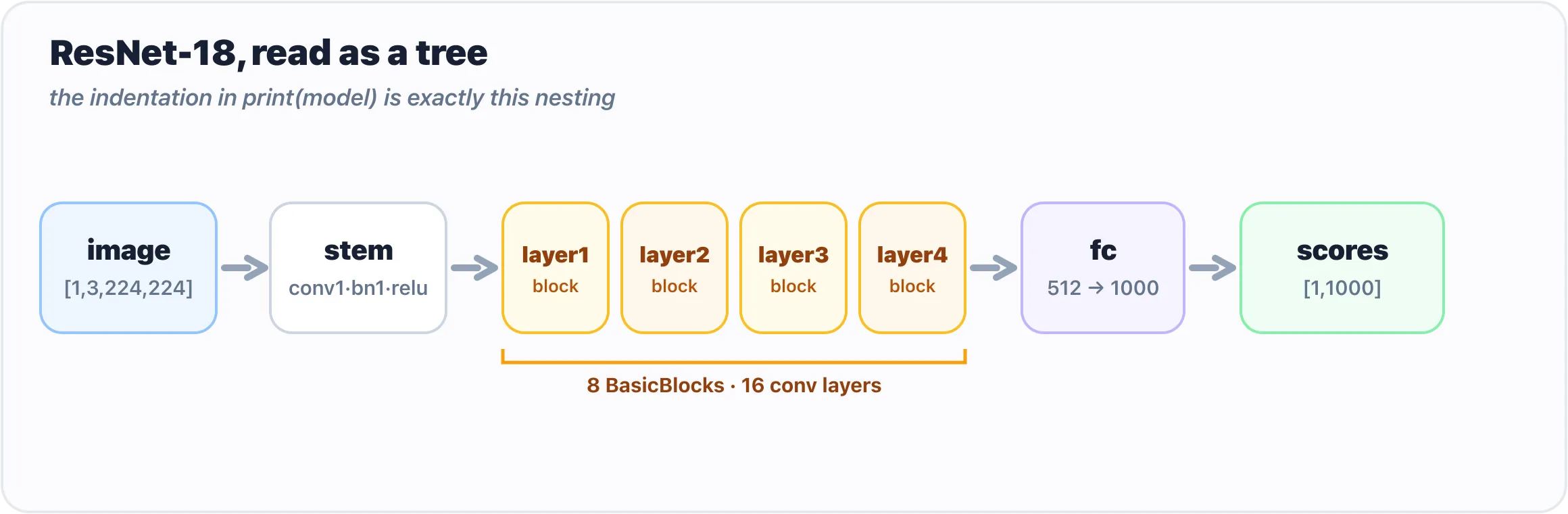
The indentation in print(model) is exactly this nesting: a stem, four stages, and one classifier.
Let’s grab a small, famous vision model with its pretrained weights already loaded:
from torchvision.models import resnet18, ResNet18_Weights

model = resnet18(weights=ResNet18_Weights.DEFAULT)
That weights=ResNet18_Weights.DEFAULT is torchvision’s modern way of saying “give me the best official pretrained weights for this model.” (You’ll still see older tutorials write pretrained=True; that’s the deprecated spelling of the same idea.) The first run downloads the weights; after that they’re cached.
Now do the exact same thing you did with your tiny Sequential — just print it:
print(model)You’ll get a long, indented outline. Don’t read every line; read the shape of it, the same way you read your three-line stack. The top says ResNet(, and then nested inside are things like:
ResNet(
  (conv1): Conv2d(3, 64, kernel_size=(7, 7), ...)
  (bn1): BatchNorm2d(64, ...)
  (relu): ReLU(inplace=True)
  (layer1): Sequential(
    (0): BasicBlock(
      (conv1): Conv2d(64, 64, kernel_size=(3, 3), ...)
      ...
    )
  )
  ...
  (fc): Linear(in_features=512, out_features=1000, bias=True)
)
That indentation is the tree — the same kind your toy had, just deeper. ResNet contains a conv1, a bn1, a relu, then several Sequential blocks (layer1…layer4), and finally an fc at the end. Notice the familiar faces: Conv2d, ReLU, Sequential, and a closing Linear (fc) turning 512 numbers into 1000 — one score per ImageNet category, exactly like LeNet’s final Linear produced one score per digit. Each named line is a sub-module. This printout is basically the model’s table of contents — and you just read it without knowing any math.
Counting the parameters
The parameters are the actual learned numbers living inside those layers — the weights tuned during training so the model does something useful. Same idea as your toy’s sixty-seven numbers; there are just a great many more. Count ResNet-18’s in one line:
total = sum(p.numel() for p in model.parameters())
print(f"{total:,} parameters")   # 11,689,512 parameters
It’s the same line you ran on your three-layer net. Roughly 11.7 million numbers — which sounds enormous until you remember today’s language models are in the billions. ResNet-18 is the compact, friendly one.
To see where those numbers live, iterate over them by name — but just the first few, or you’ll be scrolling for a while:
for name, p in list(model.named_parameters())[:5]:
    print(name, tuple(p.shape))
conv1.weight (64, 3, 7, 7)
bn1.weight (64,)
bn1.bias (64,)
layer1.0.conv1.weight (64, 64, 3, 3)
layer1.0.bn1.weight (64,)Two things worth noticing. First, the names mirror the tree you saw in print(model): layer1.0.conv1.weight is “the weight of conv1, inside block 0, inside layer1.” It’s just a path — the same kind of path as the 0.weight / 2.weight on your Sequential, only longer. Second, every parameter is a tensor with a shape. You don’t need to know why conv1.weight is (64, 3, 7, 7); you just need to recognize it as a stack of numbers with a size, and you do.
Gotchas
print(model)shows structure, not the weights. It lists layers and their sizes — it does not dump eleven million numbers (thank goodness). To touch actual values you go through.parameters()or.named_parameters().for p in model.parameters()will flood your screen. A real model has hundreds of parameter tensors. Always slice —list(model.named_parameters())[:5]— when you just want a peek.- Random weights ≠ a useful model.
resnet18()with noweights=gives you the architecture with random numbers — an empty shell that outputs noise. The pretrained weights are the whole product; always passweights=...when you want a model that actually works. - You don’t need
model.eval()ortorch.no_grad()just to look. Those matter when you actually run the model for real predictions (next post), but printing structure and counting parameters needs neither. - The depth is the only thing that’s new. If ResNet feels intimidating, it’s the length of the printout, not the kind of thing in it. Same layers as your toy, same parameters, same tree — just more.
What’s next
The box is glass, even at eleven million numbers. ResNet is an nn.Module — a deep tree of the same Conv2d, ReLU, and Linear layers you built and named yourself — and reading it took nothing you didn’t already have. You’ve now seen the whole arc: build a model, place it in its lineage, and read a real deep one. Every bit of it was structure and numbers, never magic.
Enough looking. Next we stop reading models and start running them — hand a real network an actual image and read back what it thinks it’s seeing.
Next: Your First Real Model Run, From Photo to Verdict, where we point ResNet at a photo and get a verdict.
Target keyword(s): pytorch resnet18, read a pytorch model, nn.Module parameters, pytorch model layers.
Comments