Greedy, Random, or Wise: How a Model Picks the Next Word
Decoding is the step the model leaves to you: greedy versus sampling, temperature, top-k, top-p, repetition penalty, beam search, stopping, seeds, and the one batching rule decoders care about — with the same prompt run through every knob so you can see what each one does.
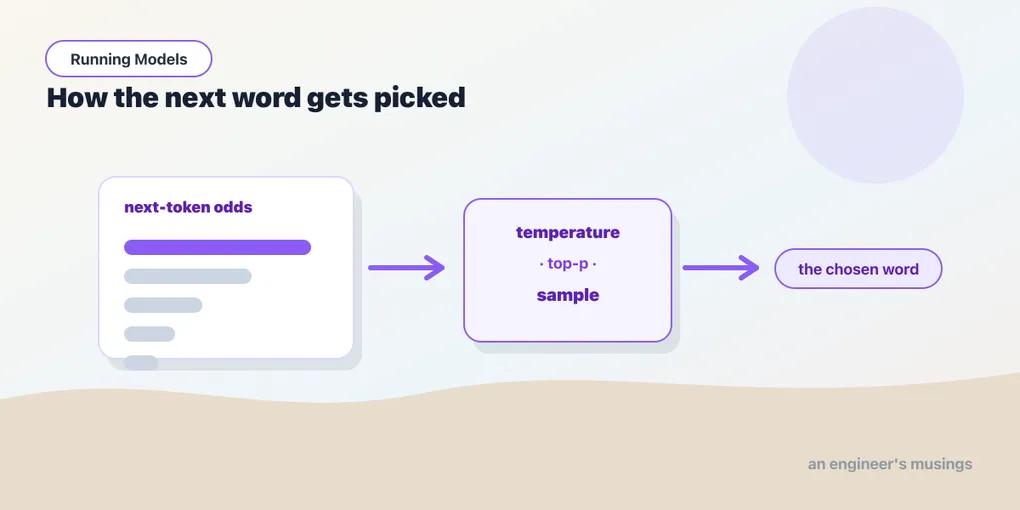
Last chapter, every turn of the generation loop ended with the model handing you a probability for every possible next token, and you watched one step of it by hand. We skipped the obvious question: which one do you actually pick? It turns out this choice — called decoding — matters as much as the model itself. The same GPT-2, on the same prompt, can sound like a broken record or a caffeinated poet depending entirely on how you sample. This chapter is the handful of knobs that control it, each run on the same prompt so you can see the difference rather than take it on faith.
▶ Open the companion notebook in Colab
Run against: PyTorch 2.2.2 and transformers 4.57.6 on CPU (macOS), with distilbert/distilgpt2. Sampled outputs below were produced with set_seed(0); your text will differ unless you set the same seed.
The naive choice: always take the top token
The simplest rule is “pick the single most likely token every time.” It’s called greedy decoding, and it’s just the argmax from chapter 6 applied at each step:
from transformers import pipeline

gen = pipeline("text-generation", model="distilbert/distilgpt2")
print(gen("My favorite hobby is", max_new_tokens=40, do_sample=False)[0]["generated_text"])
# My favorite hobby is to make a little bit of a little bit of a little bit of a little bit of a little bit of a little bit of a little bit of a little bit of a l
do_sample=False is greedy. It sounds safe — always the best guess — but it has a notorious failure, and there it is on the page: it gets stuck. The highest-probability path often circles back on itself, because once “a little bit of” has appeared, “a little bit of” is the likeliest thing to follow it. Always taking the safest next word makes for dull, repetitive writing. Real language needs a little chance.
One prompt, every knob
To compare the knobs honestly, the rest of this chapter uses one prompt and the lower-level generate call from the last chapter, with a fixed seed so sampling is reproducible:
from transformers import AutoTokenizer, AutoModelForCausalLM, set_seed

tok = AutoTokenizer.from_pretrained("distilbert/distilgpt2")
model = AutoModelForCausalLM.from_pretrained("distilbert/distilgpt2")
inputs = tok("The best thing about PyTorch is", return_tensors="pt")

def run(**kw):
    set_seed(0)
    out = model.generate(**inputs, max_new_tokens=25, pad_token_id=tok.eos_token_id, **kw)
return tok.decode(out[0], skip_special_tokens=True)(pad_token_id=tok.eos_token_id silences a warning: GPT-2 has no padding token of its own, so we tell it to reuse the end-of-text one. It matters for batches, below.)
Greedy, for reference:
run(do_sample=False)
# ...that it's a very simple, simple, and easy to use tool. It's a simple, simple, and easy to
Same disease, milder case: “simple, simple” twice in twenty-five tokens.
Sampling: roll the dice, but loaded
The fix is to sample — treat the probabilities as odds and draw a token at random, so likely words come up often and unlikely ones occasionally. Turn it on with do_sample=True:
run(do_sample=True)
# ...that we do everything in our power to get a feel for these projects and not be afraid to take them to the next
The loop is gone and the sentence goes somewhere. But pure sampling can also wander into nonsense — sometimes it draws a genuinely bad token from the long tail of the vocabulary. The next three knobs shape how the dice are loaded.
Temperature — how wild the dice are
temperature scales how sharply the model favors its top guesses. Low temperature makes it timid and focused, close to greedy; high temperature flattens the odds so rarer words get a real chance. Same seed, two settings:
run(do_sample=True, temperature=0.3)
# ...that it's a very simple, simple, simple, and simple solution to the problem of the problem of the problem of t

run(do_sample=True, temperature=1.5)
# ...that we do everything within PyTorch so that things seem to stay completely separate. There has already been a
At 0.3 the dice are so loaded that sampling collapses back into greedy’s loop. At 1.5 the sentence is varied and still just about coherent; push further and it turns to word salad. Around 0.7 is the usual happy medium. Think of it as a creativity dial: down for focused, predictable text; up for variety.
Top-k and top-p — shrink the pool first
Rather than risk the whole vocabulary, you can let the model only sample from its best candidates:
top_k=50— consider just the 50 highest-probability tokens, ignore the long tail.top_p=0.9(“nucleus sampling”) — consider the smallest set of tokens whose probabilities add up to 90%. The pool grows when the model is unsure and shrinks when it’s confident.
run(do_sample=True, top_k=50)
# ...that we do everything in our power to get a feel for these projects and not be afraid to take them to the next

run(do_sample=True, temperature=0.7, top_p=0.9)
# ...that it's really easy to get a lot of things you've never done before. It's very easy to get very little
The top_k run is identical to plain sampling here, which is itself informative: with this seed the dice never landed outside the top 50 anyway, so the cap cost nothing. top_p is the modern default most people reach for, and it combines with temperature: shrink the pool, then sample from it with whatever wildness you set.
Repetition penalty — stop the broken record
repetition_penalty lowers the odds of tokens that already appeared, which curbs the looping that plagues greedy decoding:
run(do_sample=False, repetition_penalty=1.3)
# ...that it's a very simple, easy-to use tool. It can be used to create and manage your own projects in
Greedy again, no dice at all, and the loop is gone — the second “simple” was penalised out. A light touch (1.1–1.3) helps; too much makes the model avoid normal repeated words like “the.”
Beam search: look a few steps ahead
Greedy picks the best token now. Beam search keeps the num_beams most promising partial sentences alive at each step and, at the end, returns the one whose whole sequence scored highest. It is the classic decoder for translation and summarization, where there is a right answer to find rather than a mood to set:
run(do_sample=False, num_beams=4)
# ...that it’s easy to use,’’’’’’’’

run(do_sample=False, num_beams=4, no_repeat_ngram_size=2)
# ...that it’s easy to use,” he said. “It“s a lot of fun.
Two things to take from that. Beam search has its own failure mode — it loves short, safe, repetitive continuations, and on a small model it can degenerate into punctuation — and the standard fix, no_repeat_ngram_size=2 (never emit the same two-token pair twice), rescues it. For open-ended text, sampling with top_p usually reads better than beams; for tasks with a correct output, beams with a no-repeat guard are worth trying first.
When to stop
Every call so far ran exactly max_new_tokens turns of the loop. Two other things end generation earlier:
- The model emits its end-of-sequence token. GPT-2’s is
<|endoftext|>; chat models have their own.generatestops when it sees it, which is why a chat reply can be shorter than the budget you gave it. - A stop token you choose.
eos_token_idaccepts any token id, so you can stop at the first full stop:
stop = tok.encode(".")[0]
out = model.generate(**inputs, max_new_tokens=60, do_sample=False,
                     pad_token_id=tok.eos_token_id, eos_token_id=stop)
print(tok.decode(out[0], skip_special_tokens=True))
# The best thing about PyTorch is that it's a very simple, simple, and easy to use tool.
Sixty tokens allowed, nineteen used. And note the budget’s name: max_new_tokens counts generated tokens; the older max_length counts prompt plus generation, which is why a long prompt under max_length sometimes leaves no room to answer. Use max_new_tokens.
Reproducibility: seeds
Sampling means a different answer each run — that is the point. When you need the same answer twice (a demo, a test, a bug report), set the seed before each call:
set_seed(0); a = run(do_sample=True)
set_seed(0); b = run(do_sample=True)
print(a == b)   # True
transformers.set_seed seeds Python, NumPy and PyTorch together. The same seed on a different machine, PyTorch version or device is not guaranteed to reproduce the text; within one environment it does.
Batches: decoders pad on the left
Chapter 16 promised this rule would matter here. To generate for several prompts at once you pad them to one length, and a decoder continues from the last position of each row. Pad on the right and the last position of the short prompt is filler:
tok.pad_token = tok.eos_token
prompts = ["The best thing about PyTorch is", "Hello"]

tok.padding_side = "right"
batch = tok(prompts, return_tensors="pt", padding=True)
print(batch["attention_mask"][1])   # tensor([1, 0, 0, 0, 0, 0, 0, 0])  <- real token first, then padding
out = model.generate(**batch, max_new_tokens=8, do_sample=False, pad_token_id=tok.eos_token_id)
# A decoder-only architecture is being used, but right-padding was detected! For correct
# generation results, please set `padding_side='left'` when initializing the tokenizer.

tok.padding_side = "left"
batch = tok(prompts, return_tensors="pt", padding=True)
print(batch["attention_mask"][1])   # tensor([0, 0, 0, 0, 0, 0, 0, 1])  <- padding first, real token last
out = model.generate(**batch, max_new_tokens=8, do_sample=False, pad_token_id=tok.eos_token_id)
The library warns on the first call, and the warning is the whole lesson. In this tiny example the two batches happened to produce the same continuations — transformers compensates where it can — but it cannot always, and the symptom when it fails is a short prompt getting a strange, truncated, or empty answer while the long one in the same batch is fine. Encoders pad right, decoders pad left, set once on the tokenizer.
A sensible default
You rarely tune all of these. A good general-purpose recipe for readable, varied text:
gen("Once upon a time,",
    max_new_tokens=60,
    do_sample=True,
    temperature=0.7,
    top_p=0.9,
    repetition_penalty=1.15)
# Once upon a time, we are constantly looking for new ideas to improve our performance and efficiency. This is why you can find out about the best ways to deliver...
That’s the difference between output you’d paste into a demo and output you’d quietly delete. Same model — the knobs did the work.
Gotchas
- Greedy ≠ “best.”
do_sample=Falsefeels principled but produces flat, looping text. For anything human-facing, sample; for anything with a correct answer, try beams withno_repeat_ngram_size. - The sampling knobs only apply with
do_sample=True. Passtemperatureunder greedy andtransformerslogsThe following generation flags are not valid and may be ignored: ['temperature']— the usual cause of “why is nothing changing?” - The pipeline and
generatehave different defaults. As the last chapter showed,pipeline("text-generation")picks up GPT-2’stask_specific_paramsand samples; baregenerateis greedy. Say what you want explicitly and neither surprises you. - High temperature breaks coherence. Past about 1.3 the model starts emitting word salad. If output goes haywire, turn temperature down first.
max_lengthis notmax_new_tokens. The first counts the prompt; a long prompt can leave it no room to generate.- These are the same knobs everywhere.
temperatureandtop_pare exactly the parameters you’ll set on a hosted chat API. Learn them on GPT-2 and they transfer straight to the big models. - More tokens, more time.
max_new_tokensis the main cost lever — generation time grows with output length, on every model.
What’s next
You can now drive generation — focused or freewheeling, on demand, reproducibly, and in batches. But GPT-2, however well you sample it, still only continues text; it was never taught to answer you. Closing that gap — from plausible continuation to helpful reply — took a second kind of training, and it’s exactly what separates a chatbot from autocomplete.
Next: From Autocomplete to Assistant: Instruction-Tuned and Chat Models.
Comments