The Hub: Finding Models, Reading Cards, and the Licence You Must Not Skip
Where the model names come from: how to browse the Hugging Face Hub by task and trust, read a model card like an adult, check the licence before anything ships, get through a gated model's form, and know where the weights land on disk.
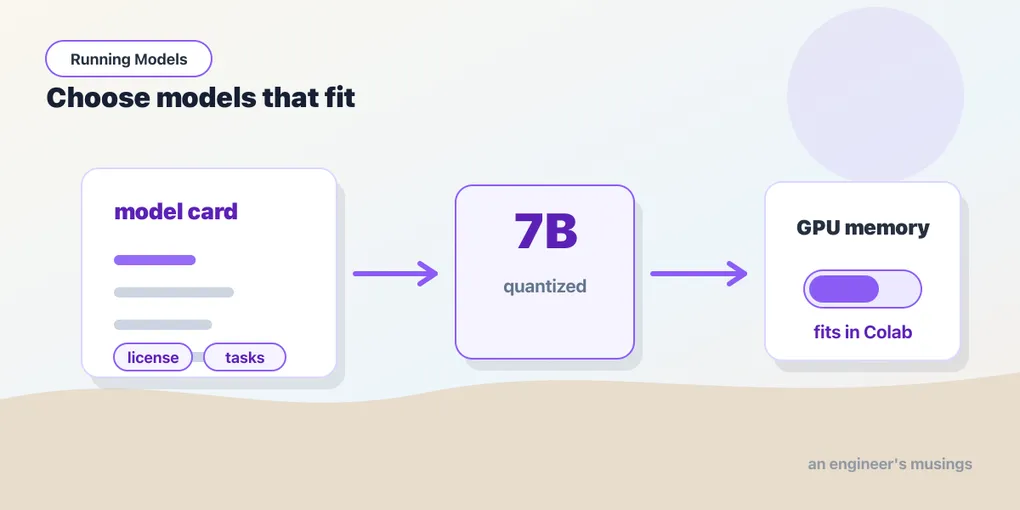
So far you’ve run models that someone handed you by name. You typed "distilbert/distilbert-base-uncased-finetuned-sst-2-english" or "microsoft/resnet-50" into a pipeline() and it just worked. But where do those names come from, and how would you find the next one — the model for your language, your domain, your task? This chapter is about the place the names point to, and about reading what you find there before you build on it. It is the chapter that turns “running the three models a tutorial mentioned” into “running whatever the field shipped last week.”
▶ Open the companion notebook in Colab
Run against: transformers 4.57.6 and huggingface_hub 0.36 on macOS; the Hub facts (redirects, licences, stored dtypes) were read from the Hub’s API on 4 Oct 2026.
The Hub is the App Store for models
huggingface.co/models is where the open-model world keeps its inventory — hundreds of thousands of pretrained models, each with a name, a page, and (usually) the actual weights you can download. Those model names you’ve been pasting into pipeline() are just addresses on the Hub, in the form org/name. (Older tutorials use bare names like distilgpt2; the Hub redirects those to their current home, distilbert/distilgpt2, so they still work. Prefer the full address in anything you keep.)
The left sidebar is the part that matters. Filter by task first — “Text Generation,” “Image Classification,” “Automatic Speech Recognition,” and so on. The task names line up with the pipeline() tasks you already know, so a model filed under “Text Classification” is one you can hand straight to pipeline("text-classification", model=...). Filtering by task instantly cuts the catalog from “everything” down to “things that do the job I have.”
Then sort by downloads or likes. This is a crude but honest popularity signal: a model with millions of downloads has been battle-tested by a lot of people, and its quirks are probably documented in some forum thread you can find. A brand-new model with 40 downloads might be brilliant or might be someone’s half-finished experiment. For your first attempt at a task, boring and popular beats exciting and obscure. The sentence-embedding model Part III uses has over two hundred million downloads; that is why Part III uses it.
Reading the model card
Click any model and you land on its model card — a README the authors wrote, and your single best source of truth. A good card tells you four things, and you should look for all four:
- What it does — the task, the training data, the languages it speaks. A model trained only on English will disappoint you in German.
- Inputs and outputs — what you feed it and what shape comes back. This is where you confirm a “text-generation” model wants a string and returns a string, versus a “fill-mask” model that wants a
[MASK]token. - Intended use (and misuse) — the authors often spell out what it’s good for and where it falls down. Worth reading before you build on top of it.
- How to load it — most cards include a copy-paste snippet. When in doubt, use theirs; it encodes choices (the right tokenizer, the right class) you’d otherwise have to guess.
The card is prose, not a spec, so quality varies. But three facts next to it are always there and always machine-readable, and they will steer most of your choices:
- How big. The parameter count, and the stored dtype of the weights — whether the file holds each number as 32-bit, 16-bit or something smaller. Click “Files” and the
.safetensorsentries show both.Qwen/Qwen2.5-0.5B-Instructis 494 million parameters stored inbfloat16; its 7B sibling is 7.6 billion, alsobfloat16. Those two facts decide whether a model fits on your GPU, and chapter 21 does the arithmetic. - How trusted. Downloads and likes.
- Under what licence. Next section.
The licence is not optional
Here’s the part engineers skip and regret. Every model has a licence, and it governs what you’re allowed to do with it. It’s listed in the card’s metadata, usually right at the top.
- Apache-2.0 / MIT / BSD — permissive. Commercial use is fine. These are the ones you want for anything that might ship. Every model this book runs is one of these, with one exception noted where it appears.
- Llama / Gemma / and other custom licences — usually fine for most uses but carry conditions (acceptable-use clauses, sometimes a user-count threshold). Readable, but actually read them.
- CC-BY-NC / “research only” / “non-commercial” / “community” — exactly what it says. Great for a demo, a lawsuit waiting to happen in a product. (
stabilityai/sdxl-turbo, the image generator chapter 10 glances at, is in this bucket; its Hub tag is simplyother, which is itself the signal to go and read.)
If you’re running something for fun in a notebook, the licence rarely bites. The moment a model is going into a product — even an internal one — the licence is a real constraint, and “I didn’t check” is not a defence. When in doubt, filter the Hub to Apache-2.0 and MIT and never think about it again.
Gated models: when you have to ask first
Some models — Llama, Gemma, a few others — are gated. The card shows a form instead of a download button: you accept the terms (sometimes the authors review the request), and only then can you pull the weights. Everything about a gated model is behind that gate, including its file listing: ask the Hub’s API about meta-llama/Llama-3.1-8B-Instruct without being logged in and you get You are trying to access a gated repo, not a parameter count. To use one from code, you log in with a Hugging Face access token so the Hub knows it’s you and you’ve agreed.
You create a token once at huggingface.co/settings/tokens (a read-scoped one is enough), then:
from huggingface_hub import login

login()  # paste your token when prompted — or set HF_TOKEN in Colab's secrets
In Colab, the tidier path is the key icon in the left sidebar: add a secret named HF_TOKEN, and transformers will pick it up automatically — no pasting a token into a cell where it might get committed somewhere it shouldn’t. Either way, once you’re logged in and you’ve accepted the terms on the model’s page, the gated model loads exactly like any other.
Not run. No gated model is used in this book, so
login()and the secrets path were not exercised; they are documented behaviour ofhuggingface_hub.
Where the weights go, and running without the network
Every from_pretrained and every pipeline() downloads to one place: the Hugging Face cache, at ~/.cache/huggingface/hub by default (Colab’s runtime included — which is why a second call in the same session is instant and the first call after a restart is not). Each model is a folder of the files you saw under “Files”: the config, the tokenizer, and the weights.
Two things follow. The cache is why “the first run is slow” in every chapter so far; a 7B model is fifteen gigabytes of it. And once a model is cached, you can run with the network off — HF_HUB_OFFLINE=1 in the environment makes the library refuse to look online and load what it has — which is the right setting for anything that has to start reliably. If you need to pull a model ahead of time, outside a model call:
from huggingface_hub import snapshot_download

path = snapshot_download("Qwen/Qwen2.5-0.5B-Instruct")   # fetch everything, return the cache folder
About those weight files. Current checkpoints ship as .safetensors, a format that is exactly what its name says: a plain map of tensor names to tensors (the state dict chapter 11 introduces) that cannot carry executable code. Older checkpoints are .bin files written with torch.save, which can, and transformers now refuses to load them on older PyTorch versions for that reason; if a model only offers .bin and the library balks, that is the message you are seeing, and upgrading PyTorch is the fix.
Gotchas
- The licence applies to you, not Hugging Face. Downloading a non-commercial model and shipping it in a product is on you. Check the card before you build, not after legal asks.
- Gated models need login and acceptance. Logging in isn’t enough — you also have to click “Agree” on the model’s page. If you get a 401/403 after
login(), you skipped the form. - A task filter is not a guarantee. “Text Classification” tells you the head the model has, not that it classifies your categories. The card’s labels section does.
- Download counts can be gamed and can be stale. They are a prior, not a verdict. A model with a tenth of the downloads and a card that names your exact domain is often the better pick.
- The cache grows. Each model you try stays on disk until you delete it;
huggingface-cli delete-cachelists and removes them. On Colab the runtime’s disk resets with the session.
What’s next
You can now find a model, vet its card and licence, see how big it is and in what dtype, and know where it lands on your disk. Bigger models mean bigger downloads, GPUs, and fresh ways to fail — so before Part I’s capstone, let’s collect the errors you’re most likely to hit and how to fix them fast.
Comments