Reading a Real Transformer: DistilBERT Up Close
Open a famous language model — DistilBERT — and read it like a spec sheet: the embeddings table, six stacked attention blocks, sixty-six million parameters, and named weights, all with the same nn.Module skills you used on ResNet. Math-free and beginner-friendly.
Series: Practical PyTorch: Running Models — Language — Part 3 of 9
Last post you met the transformer block — self-attention, a feed-forward network, a couple of norms — and built an empty one you could print. Now we open a real one. DistilBERT is a genuine, pretrained language model with about sixty-six million numbers inside. This is the text-world twin of the ResNet post, where we cracked open ResNet: same move, same skills, same payoff. We’re going to print it, read the tree, and find nothing in it but the pieces you already named.
Open the companion notebook in ColabThe pieces you’ll see
A transformer’s printout is longer than ResNet’s, but it’s built from a shorter list of parts — and you met all of them last post:
Embedding— a lookup table that turns each token ID into a vector. There’s one row per word in the vocabulary; “give me token 2,054” just reads off row 2,054. This is the entry point of every language model, the text equivalent of ResNet’s firstConv2d.MultiHeadSelfAttention— the new idea from Part 2: every word looks at every other word and gathers what’s relevant.FFN— the feed-forward network, the small MLP that processes each position after attention.LayerNorm— the steadying supporting cast, same as in ResNet. Read right past it on a first pass.
Look up the word, let the words look at each other, think a little, repeat — that carries you through the whole model.
Loading DistilBERT and reading it
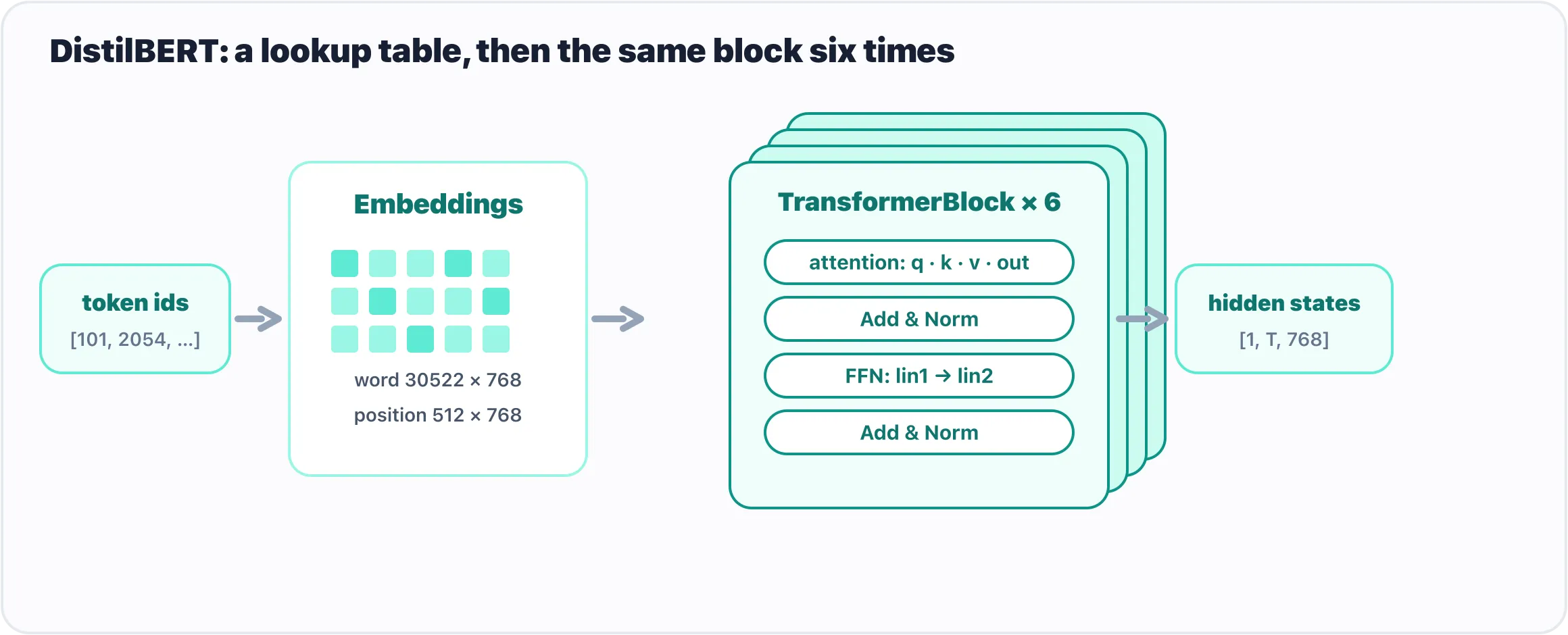
DistilBERT is an embeddings table feeding six identical transformer blocks.
We’ll grab DistilBERT and its pretrained weights straight from the Hugging Face Hub. (The transformers library isn’t in Colab by default, so install it once first.)
!pip install -q transformersfrom transformers import AutoModel
model = AutoModel.from_pretrained("distilbert-base-uncased")AutoModel.from_pretrained downloads the architecture and its trained weights and hands you the assembled model — the text-world counterpart of resnet50(weights=...). The first run downloads; after that it’s cached. Now do the exact thing you did with ResNet — just print it:
print(model)You’ll get a long, indented outline. Don’t read every line; read the shape of it. The top says DistilBertModel(, and nested inside are three things:
DistilBertModel(
  (embeddings): Embeddings(
    (word_embeddings): Embedding(30522, 768, padding_idx=0)
    (position_embeddings): Embedding(512, 768)
    (LayerNorm): LayerNorm((768,), ...)
  )
  (transformer): Transformer(
    (layer): ModuleList(
      (0-5): 6 x TransformerBlock(
        (attention): MultiHeadSelfAttention(
          (q_lin): Linear(in_features=768, out_features=768, bias=True)
          (k_lin): Linear(in_features=768, out_features=768, bias=True)
          (v_lin): Linear(in_features=768, out_features=768, bias=True)
          (out_lin): Linear(in_features=768, out_features=768, bias=True)
        )
        (sa_layer_norm): LayerNorm((768,), ...)
        (ffn): FFN(
          (lin1): Linear(in_features=768, out_features=3072, bias=True)
          (lin2): Linear(in_features=3072, out_features=768, bias=True)
        )
        (output_layer_norm): LayerNorm((768,), ...)
      )
    )
  )
)
That indentation is the tree, the same kind ResNet had. Read it top to bottom:
embeddingsturns token IDs into 768-number vectors.Embedding(30522, 768)is the vocabulary table — 30,522 known tokens, each a row of 768 numbers — plus a smallposition_embeddingstable so the model knows word order (the thing a plainLinearcouldn’t track).transformeris the stack.(0-5): 6 x TransformerBlockis PyTorch telling you there are six identical blocks in a row. And inside each block? Exactly Part 2’s anatomy: anattention(here you can even see its fourLinears — the query, key, value, and output projections that make attention work), aLayerNorm, anffnwith its twoLinears, and anotherLayerNorm.
That’s the whole model: a lookup table, then the same block six times. The printout is just its table of contents — and you read it knowing no math.
Counting the parameters
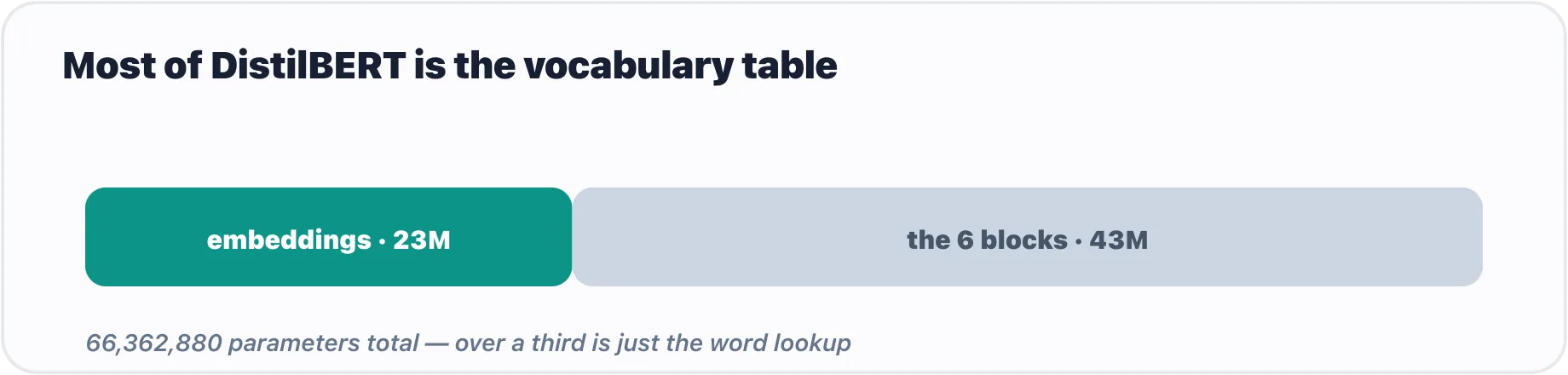
Over a third of DistilBERT’s 66M parameters live in the word-embedding table.
The parameters are the actual learned numbers — the weights tuned during training. Count them with the same one-liner you ran on ResNet:
total = sum(p.numel() for p in model.parameters())
print(f"{total:,} parameters")   # 66,362,880 parameters
About 66 million numbers. That’s why it’s called DistilBERT — it’s a distilled, slimmed-down BERT, built to be small and fast while keeping most of the ability. (Full BERT is more than twice the size; today’s large language models are a thousandfold bigger still. DistilBERT is the friendly one.)
Here’s a detail worth pausing on. Look where those numbers live:
for name, p in list(model.named_parameters())[:4]:
    print(name, tuple(p.shape))
embeddings.word_embeddings.weight (30522, 768)
embeddings.position_embeddings.weight (512, 768)
transformer.layer.0.attention.q_lin.weight (768, 768)
transformer.layer.0.attention.q_lin.bias (768,)That first line alone — the word-embeddings table — is 30,522 × 768, which is over 23 million numbers, more than a third of the whole model. A huge share of a language model is just the dictionary: a learned vector for every token it knows. The same naming logic as ResNet applies, too — transformer.layer.0.attention.q_lin.weight is “the query projection’s weight, in attention, in block 0.” It’s a path through the tree you just printed.
Gotchas
print(model)shows structure, not the weights. It lists layers and sizes — it does not dump sixty-six million numbers. To touch values you go through.parameters()or.named_parameters(), exactly as with ResNet.AutoModelgives you the backbone, not a prediction.AutoModelreturns the bare transformer — its output is hidden states (a vector per token), not an answer. To get a task — sentiment, classification — you want anAutoModelFor...class that adds a head on top, which we’ll use properly in Part 7. The plain backbone is what you read here and what powers embeddings (Part 8).for p in model.parameters()will flood your screen. A real transformer has hundreds of parameter tensors. Always slice —list(model.named_parameters())[:4]— when you just want a peek.- The vocabulary is most of the model. It surprises people that the “intelligence” layers are a minority of the parameters and the embedding table is so large. That’s normal for smaller models like this one.
- The depth is the only thing that’s new. Six identical blocks read longer than ResNet’s printout, but it’s the same short list of parts repeated. If it looks intimidating, it’s the length, not the kind of thing in it.
What’s next
The box is glass here too. DistilBERT is an nn.Module — an embedding table feeding six copies of the attention-and-feed-forward block you built last post — and reading it took nothing you didn’t already have. You’ve now done for transformers exactly what you did for vision models: met the idea, then opened a real one.
There’s one practical gap left before you can run it. ResNet ate a tensor of pixels; a transformer eats token IDs — and turning a sentence into those IDs is its own small craft. That’s the tokenizer, and it’s next.
Next: Tokens, Batches, and Model Inputs Across Text and Images, where we turn raw text into the integers a transformer can actually read.
Target keyword(s): distilbert pytorch, read a transformer model, bert architecture beginner, huggingface automodel.
Comments