Drag-and-Drop Is Not a Deployment Strategy
The Mule Maven plugin, MUnit gates, and a real CI pipeline — how to ship Mule apps like software instead of clicking Deploy and hoping.
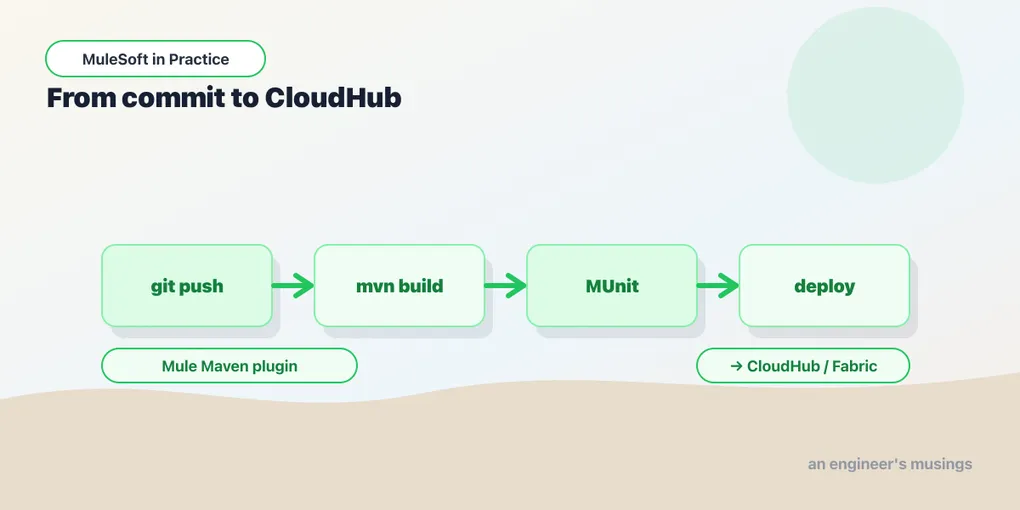
There’s a moment early in every MuleSoft team’s life where deployment means one person, one open Anypoint Studio, and the “Deploy to CloudHub” button. It works. It works right up until that person is on holiday, or deploys a branch they forgot to commit, or ships to prod what they meant to send to test. The canvas that made building an app feel easy quietly convinced you that shipping it should be easy too — and shipping is where easy turns expensive.
This is the last post of two series, so let me be direct about the through-line: a Mule application is a Maven artifact — an XML build descriptor, tests, and dependencies, no more exotic than a Spring service. Everything CI/CD knows how to do with a Java service, it can do with a Mule app. The graphical tooling is a convenience for authoring, not a substitute for a pipeline. Treat the app like software and the drag-and-drop stops being a liability.
The build is already Maven
Every Mule project Studio generates has a pom.xml. The engine that turns your project into a deployable .jar and pushes it anywhere is the Mule Maven plugin, and once it’s configured you never need the IDE to deploy again:
mvn clean package                 # produces target/my-app-1.0.0-mule-application.jar
mvn clean deploy -DmuleDeploy     # packages and deploys, per the pom's deployment block
That -DmuleDeploy flag is what flips deploy from “publish the jar to a Maven repository” to “push this app to a Mule runtime.” Where it goes depends entirely on the deployment block in your pom — CloudHub, CloudHub 2.0, Runtime Fabric, or a standalone on-prem runtime all have their own element, and the plugin abstracts the differences:
<plugin>
  <groupId>org.mule.tools.maven</groupId>
  <artifactId>mule-maven-plugin</artifactId>
  <version>4.3.0</version>
  <extensions>true</extensions>
  <configuration>
    <cloudHub2Deployment>
      <uri>https://anypoint.mulesoft.com</uri>
      <provider>MC</provider>
      <environment>${env}</environment>
      <target>Cloudhub-US-East-2</target>
      <applicationName>orders-experience-${env}</applicationName>
      <connectedAppClientId>${connected.app.id}</connectedAppClientId>
      <connectedAppClientSecret>${connected.app.secret}</connectedAppClientSecret>
      <connectedAppGrantType>client_credentials</connectedAppGrantType>
      <properties>
        <mule.env>${env}</mule.env>
      </properties>
      <secureProperties>
        <secure.key>${secure.key}</secure.key>
      </secureProperties>
    </cloudHub2Deployment>
  </configuration>
</plugin>
Notice there’s no username or password in there. Authenticating a pipeline with a person’s credentials is a recipe for a broken build the day they rotate their password — so you use a connected app instead: a machine identity in Anypoint with client-credentials and exactly the scopes it needs to deploy. The pipeline gets its own key, revocable without touching a human account.
The pipeline runs your MUnit tests
Back in the foundations series you wrote MUnit tests and mocked the connectors so they didn’t hit the network. Those tests were an investment; the pipeline is where it pays out. mvn test runs the whole suite, and — this is the part that separates a pipeline from a glorified deploy script — a failing test stops the build before anything ships.
You can go further and gate on coverage, so a PR that adds a flow but no test fails the build rather than quietly eroding your safety net:
<plugin>
  <groupId>com.mulesoft.munit.tools</groupId>
  <artifactId>munit-maven-plugin</artifactId>
  <version>3.1.0</version>
  <configuration>
    <coverage>
      <runCoverage>true</runCoverage>
      <failBuild>true</failBuild>
      <requiredApplicationCoverage>80</requiredApplicationCoverage>
    </coverage>
  </configuration>
</plugin>
Pick the number honestly. Eighty percent that tests real behavior is worth more than a hundred percent of assertions that only prove the flow doesn’t throw — coverage is a floor against neglect, not a target to game.
A pipeline, sketched
Put the pieces in order and the shape is unremarkable — which is the compliment. Here’s a GitHub Actions job that builds, tests, and deploys to whichever environment the branch maps to:
name: build-and-deploy
on:
  push:
    branches: [develop, main]

jobs:
  deliver:
    runs-on: ubuntu-latest
    steps:
      - uses: actions/checkout@v4
      - uses: actions/setup-java@v4
        with:
          distribution: temurin
          java-version: '17'

      - name: Build and test
        run: mvn clean test

      - name: Deploy
        env:
          CONNECTED_APP_ID: ${{ secrets.CONNECTED_APP_ID }}
          CONNECTED_APP_SECRET: ${{ secrets.CONNECTED_APP_SECRET }}
          SECURE_KEY: ${{ secrets.SECURE_KEY }}
          TARGET_ENV: ${{ github.ref_name == 'main' && 'Production' || 'Sandbox' }}
        run: |
          mvn deploy -DmuleDeploy \
            -Denv=$TARGET_ENV \
            -Dconnected.app.id=$CONNECTED_APP_ID \
            -Dconnected.app.secret=$CONNECTED_APP_SECRET \
            -Dsecure.key=$SECURE_KEY
The same jar built once should be the jar that reaches every environment — you don’t rebuild for prod, you re-target. The -Denv property flows into the app name and the property file it loads, so dev/test/prod differ only in configuration, never in code. That’s the whole promise of the secure-properties and configuration-properties work from earlier: one artifact, many environments, and the only thing that changes between them is a set of values injected at deploy time. The decryption key arrives as a pipeline secret — the same discipline as post seven, now automated.
Publishing what others reuse
Deployment ships an app. The other half of doing MuleSoft well is shipping assets — the RAML specs, connector configurations, and libraries that other teams build on. Anypoint Exchange is that shared shelf, and mvn deploy publishes to it just as readily as it deploys a runtime app, given an Exchange asset descriptor in the pom.
This is where the API-led architecture from the start of this series stops being a diagram and becomes an operating model. A System API published to Exchange with a clear contract is something three Process APIs can consume without asking the original team a single question. Reuse isn’t a slogan you print on the wiki; it’s the observable fact that nobody rebuilt the Salesforce integration for the fourth time this quarter. The pipeline that publishes those assets is what makes the reuse real.
Final thoughts
Two series ago the goal was to get a single flow to say “Hello, Mule!” Now you can design an API from a contract, transform between anything and anything with DataWeave, process millions of records in batches, survive downstream failures, guard the gateway with policies and tokens, remember state between runs — and ship all of it through a pipeline that tests before it deploys and rebuilds nothing between environments. That arc is the actual argument of these posts.
Here’s the point of view I’ll leave you with, because the tooling invites the opposite conclusion. The canvas, the connectors, the drag-and-drop — they lower the cost of authoring, and that’s genuinely valuable. What they don’t do is lower the cost of operating, and teams that mistake one for the other end up with a graph of flows nobody can safely change and a deploy process that lives in one person’s muscle memory. MuleSoft done well looks like disciplined software engineering wearing an integration platform’s clothes: version control, tests that gate, a repeatable pipeline, secrets that stay secret, reusable assets with real contracts. The platform will happily let you skip all of that. Don’t. The teams that treat their Mule apps like software are the ones still moving fast in year three — everyone else is clicking Deploy and hoping.
Comments