The Bouncer Your API Deserves
API Manager and runtime policies — rate limiting, client ID enforcement, spike control, and autodiscovery — so you govern who calls your API and how often, without touching a line of app code.
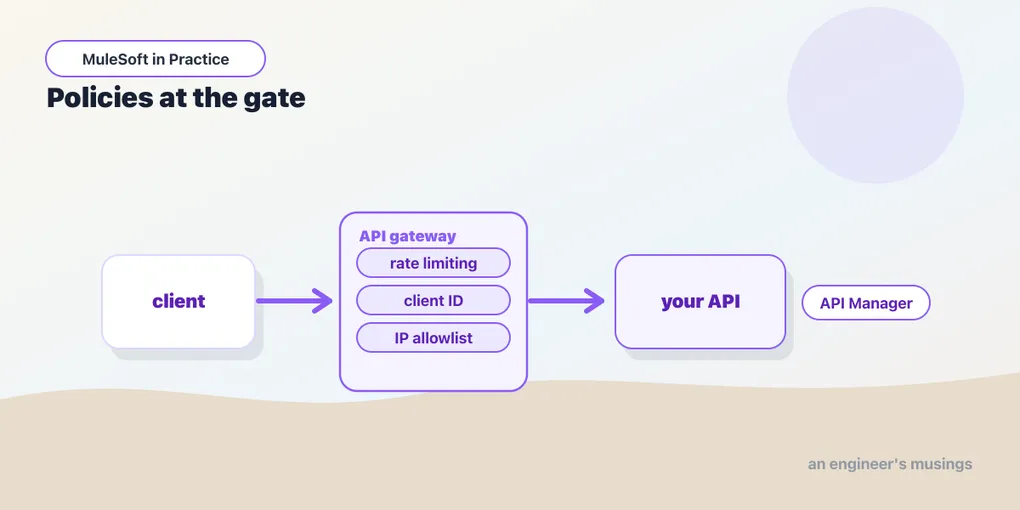
Your Mule app knows how to do its job. What it doesn’t know is that this particular caller has already made ten thousand requests this minute, or that they never registered for access at all, or that the payload they just sent is a 40-megabyte JSON bomb designed to blow up your parser. You could teach the app all of that — write the rate-limit counter, the credential check, the payload guard. You’d be rewriting, per app, a set of concerns that every API shares and that have nothing to do with what your app actually does.
API Manager is MuleSoft’s answer: govern the API at the gateway, as configuration, separate from the code. You register the API, apply policies, and the runtime enforces them in front of your flows — no redeploy of the app to change a rate limit, no business logic tangled up with security plumbing. It’s the clean line between “what my API does” and “who’s allowed to use it, and how much.”
API Manager and the managed API
In Anypoint Platform, API Manager is where an API becomes governed. You register an API instance — a specific deployment of a specific API in a specific environment — and from that point API Manager is the control plane for it. Policies, access, SLA tiers, contracts, and analytics all hang off that instance.
The enforcement point is the API Gateway, which is just the Mule runtime doing gateway duty. When a request arrives, the gateway runs the applied policies before the request reaches your flows, and runs response policies on the way out. Your app never sees a request that a policy rejected. That ordering is the whole value: a rate-limited or unauthenticated call is turned away at the door, spending none of your app’s resources.
Autodiscovery: linking the app to its managed API
The link between “the API instance I configured in API Manager” and “the Mule app running my flows” is autodiscovery. When you register the API, API Manager gives you an API ID. You drop that ID into the app’s configuration, and on startup the app phones home, matches itself to that managed API, and pulls down the policies to enforce.
<api-gateway:autodiscovery
    apiId="${api.id}"
    flowRef="ordersApiMain"/>
Two things to notice. The apiId is externalized as a property — the same app artifact carries a different ID per environment, so dev, test, and prod each bind to their own managed API without a rebuild. And flowRef points at the flow that policies wrap — typically your APIkit main flow, so every resource and method the API exposes sits behind the gateway. Get autodiscovery right and the app you deploy and the API you govern are the same thing, wired together at boot.
Policies: governance without code
A policy is a rule the gateway enforces. You apply them from API Manager’s UI, ordered, and the runtime pulls them in via autodiscovery. The ones you’ll reach for first:
- Rate limiting — a hard ceiling on requests per window (say 1000 per minute) across all callers. Over the limit, the gateway returns
429 Too Many Requests. It protects the backend from load, full stop. - Rate limiting – SLA-based — the same ceiling, but per client according to the tier they registered for. This is how you offer a free tier at 100/minute and a paid tier at 10,000/minute from one API.
- Spike control — smooths bursts. Instead of rejecting everything over the limit outright, it can queue and delay requests to shave the peak, protecting a backend that hates sudden spikes more than it hates sustained load.
- Client ID enforcement — requires every request to carry a valid client ID and secret (as headers or query params), and rejects those that don’t. This is the policy that makes SLA tiers possible and gives you a per-consumer identity to meter against.
- IP allowlist / denylist — accept or reject by source IP, for APIs that should only be reachable from known networks.
- JSON / XML threat protection — caps structural nastiness: maximum nesting depth, array length, field-name length, total payload size. It’s the guard against the maliciously-deep or maliciously-huge document meant to exhaust your parser.
None of these live in your app. You apply, reorder, or remove them in API Manager and the running gateway picks up the change — governance you tune at runtime, not at build time.
Contracts and SLA tiers
For anything per-client — SLA rate limits especially — you need to know which client is calling, and that they’re entitled to. That’s what contracts and SLA tiers formalize.
An SLA tier is a named service level you define on the API: a name, a rate limit, and whether approval is manual or automatic. “Silver: 1000 requests/minute, auto-approved.” A contract is the agreement between one client application and one tier. A developer discovers your API in Anypoint Exchange, requests access at a tier, and — on approval — gets a client ID and secret bound to that contract. From then on, every request they make carries that client ID; client ID enforcement validates it; and the SLA-based rate-limiting policy meters them against their tier’s ceiling. The gateway is doing per-consumer accounting, and all you configured was a tier and two policies.
Applying a rate-limit policy, end to end
The concrete path from “ungoverned” to “governed”:
- In API Manager, register the API instance for your environment. It hands you an API ID.
- Put that ID in the app’s config (
${api.id}) and add the autodiscovery element pointingflowRefat your APIkit main flow. Deploy the app — it binds to the managed API on startup. - In API Manager, add the Client ID Enforcement policy so the gateway knows who’s calling.
- Add the Rate Limiting – SLA-based policy above it, and define your SLA tiers (free, paid).
- Publish the API to Exchange so consumers can request access. Each approved contract issues a client ID/secret bound to a tier.
From here, a caller without a client ID gets rejected, a caller over their tier’s limit gets a 429, and you changed exactly zero lines of application code to make it so.
Final thoughts
The separation is the point. Your app is responsible for what the API means — the orders, the transformations, the downstream calls. The gateway is responsible for the terms of access — who, how often, how large. Keeping those apart means a security or capacity decision doesn’t require a code change, an audit doesn’t require reading your flows, and the same app can be free-tier in one environment and locked down in another purely through configuration. Policies are boring in the best way: they turn cross-cutting anxieties into a checklist you apply at the gate.
Next: Tokens at the Door
Comments