Streaming: Showing the Work as It Happens
A graph that only returns at the end feels broken for anything slow. The stream modes surface progress live — values for the accumulating state, updates for per-node deltas, messages for token-by-token model output — how to combine and filter them, and the async form a real UI needs.
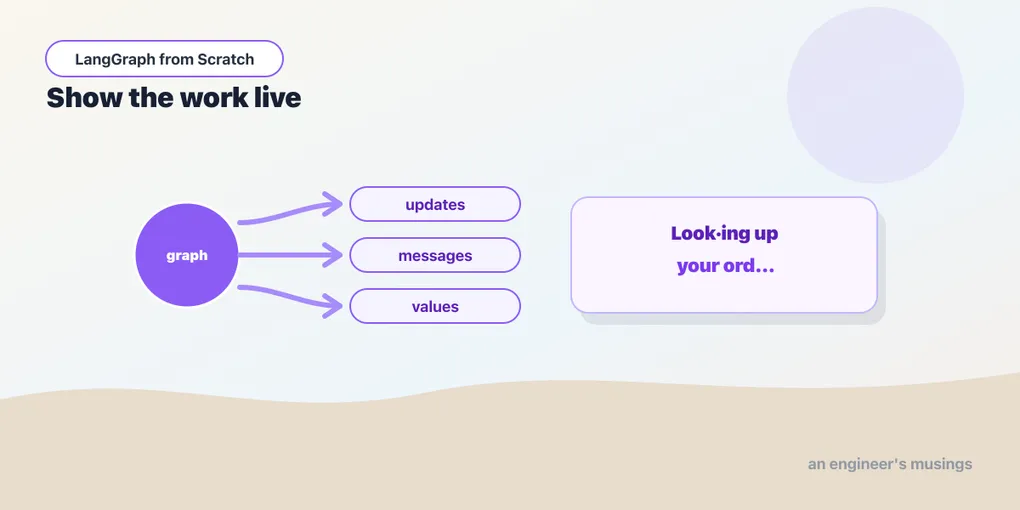
A multi-step graph takes real time — several model calls, a retrieval, a tool or two. If it only produces output when the whole thing finishes, the user stares at a spinner and assumes it hung. Streaming fixes the perception: it shows something is happening. It also gives you the hooks to build a genuinely live UI. A graph has two different things worth streaming, and keeping them straight is the skill. One is the model’s tokens as it types. The other is the graph’s progress as each node completes. LangGraph surfaces both, plus the accumulating state, through one method with a stream_mode switch. Run against langgraph 1.2.9.
stream instead of invoke
Every compiled graph has stream alongside invoke. Same input, but instead of one final result you get an iterator of chunks:
for chunk in app.stream(inputs, config, stream_mode="updates"):
    print(chunk)
What each chunk is depends on stream_mode. There are three modes you’ll use, one for each of “what changed,” “the full picture,” and “the tokens.”
updates: what each node just did
stream_mode="updates" yields one chunk per node as it finishes. Each chunk contains only that node’s partial update, keyed by the node’s name:
for chunk in app.stream(inputs, stream_mode="updates"):
    print(chunk)
# {'model': {'messages': [AIMessage(...)]}}
# {'tools': {'messages': [ToolMessage('96')]}}
# {'model': {'messages': [AIMessage('The answer is 96.')]}}
This is the mode for progress. It tells you which node ran and what it produced, in order, so you can show “calling the model… running tools… composing answer.” Verified: over a two-node graph, the chunks arrived keyed n1 then n2 — the node names, each with its delta. When you want to narrate an agent’s steps to a user — “searching the catalog”, “checking your order” — updates drives the narration. The node name tells you which step is happening, and the delta tells you what it found.
values: the whole state, each step
stream_mode="values" yields the entire accumulated state after each step, not just the delta:
for state in app.stream(inputs, stream_mode="values"):
    print(len(state["messages"]))   # grows as the graph runs
Verified over a two-node graph, this produced three snapshots: the initial state, then the state after each node. The message list grew each time. Use values when you want the current full picture at every step — rendering the whole conversation as it builds, or logging complete state transitions. Use updates when you only care about the change. The trade-off is weight: values re-emits everything each step, updates emits just the delta. Reach for updates by default and values when you specifically need the running total.
messages: token by token
The two modes above stream at node granularity — a chunk when a node finishes. For a chatbot you want finer: the model’s text appearing token by token, mid-node. That’s stream_mode="messages":
for token, meta in app.stream(inputs, stream_mode="messages"):
    print(token.content, end="", flush=True)
Each item is a (chunk, metadata) tuple. chunk is an AIMessageChunk, a piece of the model’s output; metadata says which node produced it. Verified: the tuples carried AIMessageChunk content plus metadata including langgraph_node. This is how you get the “typing” effect through a whole graph, not just a bare model. It threads through cycles and subgraphs without extra wiring.
That metadata solves a real problem. A graph often has several model calls, and you don’t want to stream all of them at the user. A supervisor’s routing call, a critic’s internal check — the user shouldn’t see those tokens; they should see the final reply. Filter on the node name:
for token, meta in app.stream(inputs, stream_mode="messages"):
    if meta["langgraph_node"] == "final_answer":   # stream only the reply node
        ui.append_token(token.content)
Now the machinery streams silently and only the answer types out. That’s the difference between a UI that shows its work as noise and one that shows the reply as it forms.
Combining modes for a real UI
You rarely want just one mode. A real chat UI wants both: tokens for the reply and step updates for a progress indicator. Pass a list of modes. Each item then becomes a (mode, chunk) tuple, so you can route each to the right place:
for mode, chunk in app.stream(inputs, stream_mode=["updates", "messages"]):
    if mode == "messages":
        token, meta = chunk
        ui.append_token(token.content)      # stream the reply into the bubble
    else:  # mode == "updates"
        node = next(iter(chunk))            # the node that just ran
        ui.show_step(f"{node}…")             # update the "thinking" indicator
Verified: with stream_mode=["updates", "messages"], each yielded item was a (mode, chunk) pair. That single loop drives an entire live interface from one pass over the graph: a progress line that reads “checking your order…” then “composing answer…”, with the answer typing out beneath it. This is the shape you’ll actually deploy. Streaming is a first-class concern rather than an afterthought: the graph was already producing these events, and streaming just lets you see them as they happen.
Nested graphs, and async
Two extensions matter as systems grow. Once you nest graphs as nodes, pass subgraphs=True. The stream then surfaces events from inside the nested graphs too, and the tuple is extended to name which subgraph a chunk came from. So a multi-agent system’s inner steps aren’t invisible.
And everything here has an async twin: astream, with the identical modes and tuple shapes. In a web handler serving many users concurrently, you want the async form. One user’s slow model call then doesn’t block everyone else’s:
async for mode, chunk in app.astream(inputs, config, stream_mode=["updates", "messages"]):
    ...   # push each event to this user's connection (SSE, WebSocket)
This is the exact loop behind a streaming HTTP endpoint, which the deployment chapter returns to. And because a create_agent is a compiled graph, all of it works on the prebuilt agent unchanged — every mode, the combining, the filtering, the async form. agent.astream(inputs, stream_mode="messages") streams tokens out of it with no extra code. It’s the same object as a graph you’d build by hand.
Final thoughts
Streaming is one method and a mode switch, over the two things a graph produces: progress and tokens. updates narrates step by step, and values gives the full state each step. messages streams the model’s tokens with metadata that says which node they came from, so you can filter to stream only the reply. A list of modes yields (mode, chunk) tuples that drive a real UI from a single pass. subgraphs=True reaches inside nested graphs, and astream does it all without blocking. The default worth reaching for is updates for progress plus messages for the reply, filtered to the answer node. That completes the graph core — state, routing, memory, human pauses, live output. Everything you need to build one capable agent is on the table, so next we turn back to the prebuilt one and see it for the graph it is.
Next: building an agent — create_agent seen properly, its customization surface, and the honest test for when to use it versus hand-building the graph.
Comments