Models and Messages: How a Chat Model Actually Talks
A chat model takes a list of messages and returns one message — not text in, text out. Why roles matter, the four message types, a conversation as a growing list, invoke/stream/batch and async, token accounting, structured output, and init_chat_model.
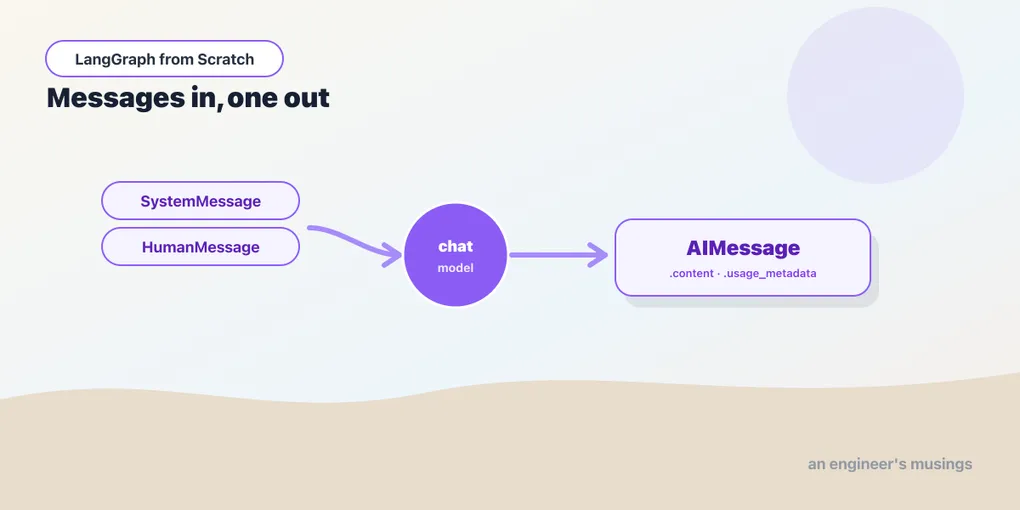
If you’ve used an LLM through a simple API, you probably think of it as text-in, text-out: send a string, get a string. That mental model will quietly hurt you here, because a modern chat model doesn’t work that way. It takes a list of messages and returns one message. That difference isn’t pedantry. It’s how you give a model instructions separately from a user’s words, how you feed it the results of tools, and how a conversation carries forward. Every node you build in this series is, underneath, a function that assembles some messages and calls a model. So this chapter treats that one operation completely. Run against langchain-core 1.5.1 with langchain-ollama and langchain-anthropic 1.5.2.
Why messages, not text
The earliest LLM APIs really were text-in, text-out — “completion” models that continued a prompt. Chat models replaced them, and the reason is roles. When you build an assistant, three very different kinds of text go into a single request: your instructions (“be terse, never invent order data”), the user’s input (“where’s my order?”), and, later, the results of tools the model asked for. If all three were one flat string, the model couldn’t reliably tell which was which. A user could type “ignore your instructions” and have it blend right in with yours. Messages keep them separate. Each message carries a role that tells the model who is speaking, so your instructions stay distinct from the user’s words stay distinct from a tool’s output. That separation is the foundation everything else is built on.
The four message types
There are four roles you’ll use, each a class in langchain_core.messages:
SystemMessage— your instructions, the behavior you want. Usually first, usually one. This is where “you are a bookshop support assistant; be concise” goes.HumanMessage— input from the user.AIMessage— what the model said back. You also construct these yourself when replaying a past conversation to the model.ToolMessage— the result of a tool call, handed back to the model. It carries an id linking it to the request it answers, and it earns its own treatment in the tools chapter; it’s here so the cast is complete.
A request is a list of these:
from langchain_core.messages import SystemMessage, HumanMessage

messages = [
    SystemMessage("You are a bookshop assistant. Be terse."),
    HumanMessage("What is the capital of France? One word."),
]
Every message also exposes a .type: "system", "human", "ai", "tool". That’s handy when you’re inspecting or filtering a message list — say, to pull out only the AI’s replies. The role is not decoration; it’s structural.
A conversation is a growing list
Here is the idea that unlocks memory later, so it’s worth slowing down on. The model has no memory of its own. Each call is independent — the model that answered your last question retains nothing. A conversation continues only because you keep the message list and hand the whole thing back each turn:
history = [SystemMessage("You are a bookshop assistant. Be terse.")]

history.append(HumanMessage("My name is Ada."))
reply = model.invoke(history)          # -> AIMessage("Hello, Ada.")
history.append(reply)                   # keep the AI's turn in the list

history.append(HumanMessage("What's my name?"))
model.invoke(history).content           # 'Ada.' — because the list still holds it
The second question is answerable only because the list still contains the first exchange. Drop the history and the model forgets instantly. This is why “memory” in this series will turn out to be nothing mystical — it’s saving and reloading this list. Hold onto the picture of a conversation as a list that grows by two messages a turn; the entire persistence story is built on it.
invoke: the basic call
invoke takes your message list and returns a single AIMessage:
from langchain_ollama import ChatOllama

model = ChatOllama(model="llama3.2:3b", temperature=0)
reply = model.invoke(messages)

reply.content            # 'Paris.'
type(reply).__name__     # 'AIMessage'
The AIMessage is richer than its .content, and two attributes pay off immediately:
reply.usage_metadata
# {'input_tokens': 24, 'output_tokens': 3, 'total_tokens': 27}
reply.response_metadata
# provider-specific dict: model name, stop/finish reason, timing, ...
usage_metadata is your token accounting, and it matters because of cost. Providers bill per token, and this field reports input_tokens, output_tokens, and total_tokens with the same keys across every provider. That uniformity lets you track spend the same way whether you’re on Claude or a local model. It’s also the field the observability chapter sums to answer “which agent is burning the budget?”. response_metadata, by contrast, is provider-specific. On the local model it carries things like the finish reason and generation timings; on Claude it carries Anthropic’s own fields. Reach for usage_metadata when you want portable numbers and response_metadata when you need a provider detail.
The convenience forms
Constructing HumanMessage(...) for every turn gets tedious, so the model accepts shorthands. A bare string becomes a single HumanMessage, and (role, content) tuples expand to the matching types:
model.invoke("Capital of France?")                    # one HumanMessage
model.invoke([("system", "Be terse."),
              ("human", "Capital of France?")])         # System + Human
These are sugar — they become the same message objects internally — but they’re what you’ll actually write for quick prompts. The explicit classes matter when you construct messages programmatically (building history, injecting a tool result); the tuples matter when you’re writing a prompt inline.
stream, batch, and async
invoke waits for the whole reply. Three variations cover the other shapes of call you’ll need.
stream yields the reply as it’s generated, one AIMessageChunk at a time — the “typing” effect:
for chunk in model.stream("Count to five."):
    print(chunk.content, end="", flush=True)
Each chunk is an AIMessageChunk, a partial AIMessage that supports +, so you can add them up into a whole message if you need one at the end. Streaming is what keeps a UI from feeling frozen, and the streaming chapter scales the idea up to streaming a whole graph’s progress.
batch runs many independent inputs concurrently, with the provider’s parallelism handled for you:
model.batch(["Capital of France?", "Capital of Japan?"]) # -> [AIMessage, AIMessage]Use batch for unrelated calls (classify a hundred reviews at once); use a loop only when each call depends on the previous one’s answer.
Async twins exist for every method — ainvoke, astream, abatch — and return the same types. In a web handler serving many users, you want the async forms so one slow model call doesn’t block the others:
reply = await model.ainvoke("hi") # -> AIMessage, without blocking the event loopVerified: ainvoke returns an AIMessage just like invoke. You’ll reach for async once the graph is behind an HTTP endpoint in the deployment chapter; until then, the sync forms keep examples simple.
Structured output: a typed object, not a string
Often you don’t want prose, you want fields — a category, a score, a set of extracted values. with_structured_output binds a schema (a Pydantic model) to the chat model so invoke returns a validated instance of that class instead of an AIMessage:
from pydantic import BaseModel, Field

class Book(BaseModel):
    title: str = Field(description="the book title")
    year: int = Field(description="year first published")

extractor = model.with_structured_output(Book)
book = extractor.invoke("Extract the book: 'Dune' came out in 1965.")
book.title    # a str
book.year     # an int
You get a Book back, with .title and .year already validated to the right types. No parsing, and no “please respond in JSON” prompt-wrangling. Under the hood LangChain uses the provider’s native structured-output or tool-calling mechanism to enforce the shape. The field descriptions are load-bearing: the model reads them to know what to put where, so Field(description=...) is worth writing carefully.
Now the caveat, and it’s the kind of thing only running reveals: structured output guarantees the shape, not the content. Run the example above against the small local llama3.2:3b and the returned object is a valid Book with year=1965. But the model mis-filled title with "Publication Year" instead of "Dune". The framework did its job: a typed, validated object came back. The 3B model’s extraction was simply weak; Claude fills both fields correctly. The lesson generalizes across the whole series: structured output removes parsing failures, never reasoning failures, and what lands in the fields is still the model’s problem. A validated wrong answer is still a wrong answer.
init_chat_model: the provider is a detail
Every example so far names ChatOllama directly. Real code rarely hard-codes a provider class, because you’ll want to swap models by configuration: Claude in production, a local model in tests, a cheaper model for a bulk step. init_chat_model is the generic initializer. Hand it a "provider:model" string and it returns the right chat model.
from langchain.chat_models import init_chat_model

model = init_chat_model("anthropic:claude-haiku-4-5")   # needs an Anthropic key
model = init_chat_model("ollama:llama3.2:3b")            # fully local, no key
The object it returns has the identical interface: invoke, stream, batch, with_structured_output, bind_tools, and the async twins. So nothing downstream changes when you switch the string. This is the seam that makes LangGraph model-agnostic, and it’s not just a convenience. Because the model is one swappable slot, this series verifies its mechanics against the local model, confident the Claude swap is lossless.
Common tuning parameters are constructor arguments and mean what you’d expect: temperature (0 for deterministic output, higher for more varied), max_tokens (a cap on reply length), timeout. Set them where the model is created so the whole graph inherits one configured model. A graph with a temperature=0 model routes and reasons the same way every run — exactly what you want while you’re building and testing.
Final thoughts
The shape is the lesson: messages in, a message out. A model call is a pure function from a list of role-tagged messages to one AIMessage. A conversation is that list growing by two messages a turn — which is why there’s no hidden memory to manage, only a list to keep. Roles keep your instructions, the user’s words, and tool results distinct. invoke blocks, stream yields chunks, batch parallelizes, and the a-prefixed twins do it without blocking. usage_metadata gives you portable token counts. with_structured_output swaps the reply for a validated object while leaving the reasoning to the model, and init_chat_model turns the provider into one line of config. Every node in the rest of this series is built on exactly this call.
Next: prompts, LCEL, and structured output — turning a template plus a model into a composable pipeline with the | operator, and the Runnable interface that makes it work.
Comments