What an Agent Is, and Why It's a Graph
Start here with no assumptions: what an LLM can't do on its own, what an agent adds, and why LangGraph models an agent as a graph of steps you can see and change. Build a working agent in a dozen lines, then meet the LangChain/LangGraph stack it runs on.
Ask a language model, on its own, “where is my order?” and it will give you a confident, useless answer. It has no idea what your orders are. It can’t look them up, it can’t remember what you told it a minute ago, and it can’t take an action on your behalf. A raw model is a text function: you give it words, it gives you words back. That’s genuinely powerful — but it is not, by itself, an application.
The gap between “a model that talks” and “a system that helps a customer” is what this series is about. LangGraph is the tool for closing it. This first chapter builds the mental model everything else rests on: what an agent actually is, why an agent is naturally a graph, and how the pieces of the LangChain/LangGraph stack fit together. No prior LangChain knowledge is assumed. In fact, if you have some, part of this chapter warns you which of it is out of date. Everything here was run against the versions this series pins: langchain 1.3.14, langgraph 1.2.9 on Python 3.13.
What a model can’t do alone
Start with the limitation, because the whole design follows from it. A chat model takes a list of messages and returns one message. That’s the entire contract. Within it, the model is remarkable — it can write, summarize, reason, translate. But three things sit stubbornly outside that contract:
- It can’t access anything. Your order database, today’s prices, the document a user just uploaded — none of it is in the model. It knows only what its training left it with, frozen in the past.
- It can’t remember. Each call is independent. The model that answered your last question has no memory of it unless you resend the whole conversation every time.
- It can’t act. It can say “I’ll issue that refund,” but it cannot issue one. It produces text, never effects.
A useful assistant needs all three: it has to look things up, carry a conversation, and take actions. None of that is the model’s job — it’s the job of the code around the model. Give the model a way to request a database lookup, run the lookup for it, hand back the result, keep the conversation in a store, and let it decide what to do next. That surrounding orchestration turns a text generator into an application. Building it well is exactly what LangGraph exists for: keeping it from collapsing into a tangle of if statements and retry loops.
An agent is a loop
The word “agent” gets used loosely, so here is a precise, unglamorous definition you can hold onto: an agent is a language model running in a loop, with access to tools. That’s it. The loop has three beats:
- Reason. The model looks at the conversation and decides what to do next — answer directly, or use a tool.
- Act. If it needs a tool, it requests one (a database query, an API call, a calculation), and your code runs it.
- Observe. The tool’s result goes back to the model, which now knows something it didn’t.
Then it loops: reason again with the new information, act again if needed, until it has what it needs to answer. This reason–act–observe cycle has a name in the literature: ReAct. Strip away the buzz, and “building an agent” means building this loop. A customer asks “where’s order A17?”; the model reasons I should look that up, acts by calling a lookup_order tool, observes that it shipped, and answers. One trip around the loop. A harder question might take several trips: look up the order, check the shipping carrier, then compose a reply. It’s the same three beats repeating.
The reason this matters for what follows: a loop with a decision in it is not a straight line. It branches (answer, or use a tool?) and it repeats (loop back after the tool). Straight-line code doesn’t capture that shape well. A graph does.
Your first agent
Before any more theory, let’s see the loop run. Here is a complete, working agent — a model, one tool, and a question:
from langchain.agents import create_agent
from langchain_core.tools import tool
from langchain_ollama import ChatOllama   # a local model; swap for Claude below

@tool
def lookup_order(order_id: str) -> str:
    """Look up the current status of an order by its ID."""
    return f"Order {order_id}: shipped, arriving Tuesday"

agent = create_agent(
    model=ChatOllama(model="llama3.2:3b"),
    tools=[lookup_order],
)

result = agent.invoke({"messages": [("user", "Where is order A17?")]})
print(result["messages"][-1].content)
# Order A17 has shipped and should arrive Tuesday.
That’s a real agent, and it ran. create_agent from LangChain wires up the loop; you supplied the model and a single tool — an ordinary Python function with a description. When invoked, the agent reasoned that answering required the tool, called lookup_order("A17"), read the result, and composed a reply. You wrote a function and asked a question; the agent worked out that the function was the way to answer, and used it.
Notice what you didn’t write: no loop, no “did the model ask for a tool? if so, run it and call the model again” plumbing. That orchestration is what create_agent gave you. And the shape of that orchestration — the thing doing the looping and branching — is a graph.
Why an agent is a graph
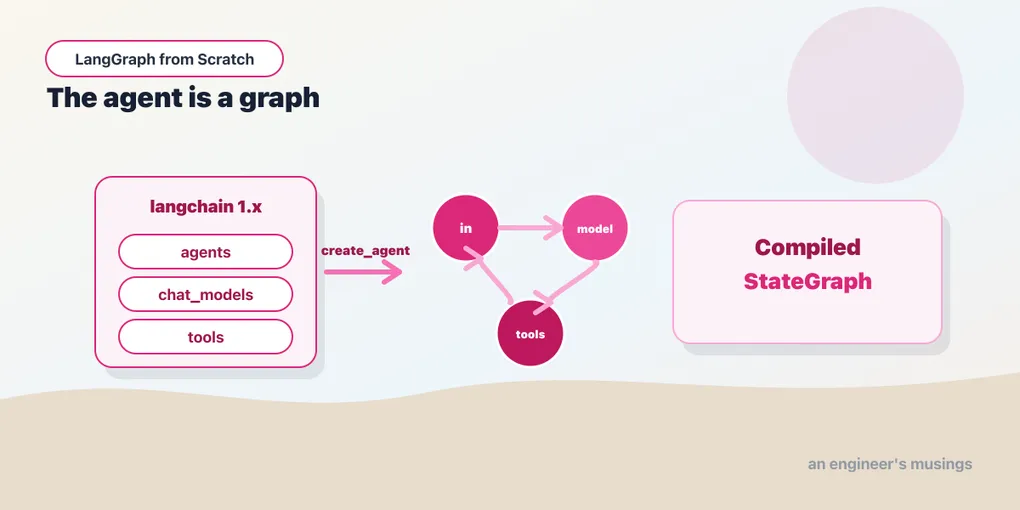
Look again at the loop: start, reason (call the model), then either finish or act (run a tool) and loop back to reason. Draw that and you get boxes and arrows — nodes and edges — with one arrow that loops backward. That is a graph, and it’s not a metaphor. LangGraph represents an agent as a literal graph of steps, and because your agent is one, you can ask it to show you:
print(agent.get_graph().draw_mermaid())graph TD;
__start__ --> model;
model -.-> __end__;
model -.-> tools;
tools -.-> model;Read it as the loop you already understand. Control enters at model (the LLM reasons). From there it either goes to __end__ (the model had a final answer) or to tools (the model requested one). After tools runs, the arrow loops back to model so it can reason about what the tool returned. Four nodes, four edges, one cycle. That is the entire agent — there is no hidden machinery beneath it. The “agent” is a small graph with a loop in it.
This is LangGraph’s central idea, and its whole value. Other ways of building agents hide the loop inside a framework you can’t see into; when the agent misbehaves, you’re debugging a black box. LangGraph makes the loop an object you can print, draw, and — crucially — edit. Want a step that validates the model’s answer before replying? Add a node. Want to check a customer’s account before the model runs? Add a node earlier. Want a human to approve refunds? Add a pause. The graph is not a diagram of your agent; it is your agent, and everything in this series is a way of shaping it. By the end you’ll build graphs like this by hand, and this four-node loop will look small.
The stack: LangChain and LangGraph
You’ll see two names throughout this world, and it’s worth thirty seconds to place them, because their relationship confuses people.
- LangChain gives you the building blocks: a uniform way to call any model, the message and tool abstractions, prompt templates, connectors to data. The
create_agent,@tool, andChatOllamayou just used are all LangChain. - LangGraph gives you the graph: the runtime that executes those blocks as a graph of steps, with the state, looping, memory, and pausing that a real agent needs.
The key thing for a newcomer: in the current versions, these are one integrated stack, not competing choices. create_agent lives in LangChain, and what it returns is a LangGraph graph. Verified, its type is CompiledStateGraph — exactly the object we just drew. So “should I learn LangChain or LangGraph?” is the wrong question. You learn the building blocks (the first third of this series) and the graph that orchestrates them (the rest); they’re two layers of one thing.
One practical warning, and it’s the only reason this chapter looks backward at all. LangChain went through a large 1.0 reset that deleted its most-taught early APIs. If you find a tutorial built on LLMChain, initialize_agent, or AgentExecutor, it is out of date. Those classes were removed, and pasting their code into a current install raises ImportError. There’s a lot of that material out there, written before the reset, and it will send you down dead ends. This series is written against the current stack and pins its versions so you’re not guessing. When something you read elsewhere doesn’t match, trust the version that imports.
What this series builds
The path from here is deliberate, oldest-chapter to newest, as a curriculum:
- The primitives (next few chapters): models and messages, prompts, tools, and retrieval — the blocks every node is made of.
- The graph from scratch: building a
StateGraphfrom an empty constructor, adding state, branching, loops, memory, human approval, and streaming. This is where “an agent is a graph” becomes something you do with your hands, not just a fact. - Multi-agent systems: several agents that hand off to each other, run in parallel, and compose.
- The capstone: a complete bookshop support agent — a supervisor that routes customers to specialists, an orders agent that runs real SQL, a recommendations agent backed by retrieval, and a refund path gated behind a human. Every pattern in the series lands in that one system, and it runs end to end.
You don’t need any of it yet. You need the mental model from this chapter: a model that can’t act, an agent that wraps it in a reason–act–observe loop, and a graph that makes that loop visible and editable.
Following along
The examples show a local model (llama3.2:3b via Ollama) because it’s free and needs no account. Install Ollama, run ollama pull llama3.2:3b, and every example in this series runs on your laptop at zero cost. In production you’d use a stronger model like Claude, and switching is a single line:
from langchain.chat_models import init_chat_model
model = init_chat_model("anthropic:claude-haiku-4-5")   # needs an Anthropic API key
init_chat_model takes a "provider:model" string and returns a model with the same interface, so the provider is a detail you set once. This matters beyond convenience. Because the model is one swappable slot in the graph, the mechanics work the same on a free local model as on Claude. A small local model reasons and uses tools less reliably than Claude. Where a result genuinely depends on model quality, the text will say so plainly rather than pretend the local run proves it.
Final thoughts
A language model is a text function that can’t look things up, remember, or act. An agent is that model wrapped in a loop — reason, act with a tool, observe, repeat — that supplies exactly those missing abilities. And because a loop with a decision in it is a shape of nodes, edges, and a cycle, an agent is a graph. create_agent proved it by drawing itself for us: a four-node loop with nothing hidden underneath. That’s the idea to carry forward: the thing you’re building is a graph you can see and shape. Not that LangChain and LangGraph merged; that’s a footnote. Learning LangGraph is learning to shape it.
Not run. The mechanics of this series were exercised against a local model rather than against Claude.
Next: models and messages — the first building block, how a chat model actually talks, and why “messages in, a message out” is the shape everything else is built on.
Comments