The Anatomy of a Call: Requests and Responses
Everything flows through `call`. Read headers and bodies from the request, and reply with the right status codes, content types, and headers from the response.
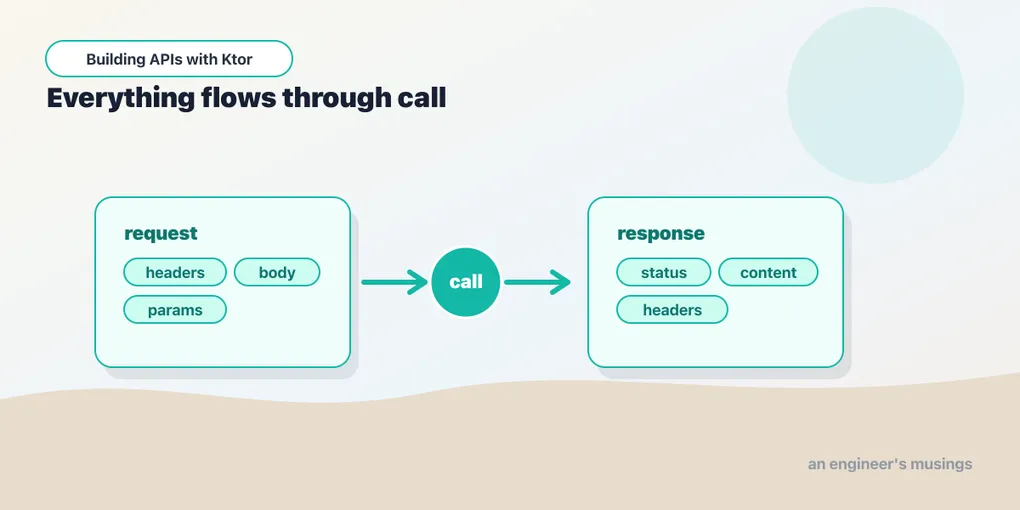
Every handler you’ve written takes the same shape: a lambda with a call in scope. That call is an ApplicationCall, and it’s the whole conversation — the incoming request on one side, the outgoing response on the other. This post is a tour of both. We’ll keep responses as plain text and raw bodies for now; structured JSON is the next post.
Reading the request
The request lives at call.request. The things you’ll reach for most:
get("/inspect") {
    val userAgent = call.request.headers["User-Agent"]
    val host = call.request.host()
    val path = call.request.path()
    call.respondText("$userAgent hit $host$path")
}
Headers come from call.request.headers (a map-like lookup, case-insensitive, returns String?). There are convenience accessors like call.request.host() and call.request.path() for common bits of the URL.
Reading the body
To read the raw request body as text:
post("/echo") {
    val body = call.receiveText()
    call.respondText("You sent: $body")
}
receiveText() is a suspend call — it awaits the full body without blocking a thread. You can also receive raw bytes or a stream for large uploads. But hand-parsing JSON out of receiveText() is something you’ll almost never do. Next post, call.receive<Task>() will hand you a typed object directly. For now, know that the raw body is one call away when you need it.
Writing the response
You’ve used respondText. Its full form lets you set the status and content type:
get("/page") {
    call.respondText(
        "<h1>Hello</h1>",
        contentType = ContentType.Text.Html,
        status = HttpStatusCode.OK,
    )
}
ContentType and HttpStatusCode are typed constants, not magic strings and numbers — ContentType.Text.Html, HttpStatusCode.OK, HttpStatusCode.NotFound. Your editor autocompletes them and the compiler catches typos.
Status codes carry meaning
In an HTTP API the status code is part of your contract. Respond with the one that fits:
post("/tasks") {
    // ... create the task ...
    call.respond(HttpStatusCode.Created)        // 201
}

get("/tasks/{id}") {
    val found = false                            // pretend we looked it up
    if (!found) {
        call.respond(HttpStatusCode.NotFound)    // 404
        return@get
    }
}

delete("/tasks/{id}") {
    // ... delete ...
    call.respond(HttpStatusCode.NoContent)       // 204, no body
}
call.respond(HttpStatusCode.X) sends just a status with no body — exactly right for 204 No Content or a bare 404. The common codes you’ll use: 200 OK, 201 Created, 204 No Content, 400 Bad Request, 401 Unauthorized, 404 Not Found, 500 Internal Server Error.
Setting response headers
Add headers before you send the body:
post("/tasks") {
    call.response.headers.append("Location", "/tasks/42")
    call.respond(HttpStatusCode.Created)
}
A Location header on a 201 tells the client where the new resource lives — a standard REST courtesy we’ll use for real in the CRUD post.
Redirects
get("/old-path") {
    call.respondRedirect("/new-path", permanent = true)
}
permanent = true sends a 301; the default is a 302.
Putting it together
A small handler that reads input and crafts a deliberate response:
post("/greet/{name}") {
    val name = call.parameters["name"] ?: "stranger"
    val shout = call.request.queryParameters["shout"] == "true"
    val message = if (shout) "HELLO, ${name.uppercase()}!" else "Hello, $name"

    call.response.headers.append("X-Greeting-Length", message.length.toString())
    call.respondText(message, status = HttpStatusCode.OK)
}
Path parameter, query parameter, a custom header, an explicit status — all the moving parts of call in one handler, and it still reads like ordinary Kotlin.
Final thoughts
call is the one object to understand: call.request for what came in, call.respond* for what goes out. Typed HttpStatusCode/ContentType constants keep the compiler honest about your contract. Get fluent with status codes especially. In an API they’re not decoration — they’re how the client knows what happened.
Right now we’re stringly-typed: reading raw text, writing raw text. Next: JSON and content negotiation — let Ktor turn your Kotlin data classes into JSON and back, automatically.
Comments