The Bookshop on Kubernetes: One Command, Fifteen Chapters
The whole application, assembled and running — and a line-by-line defence of every decision in it, each one paid for by a chapter that broke something first.
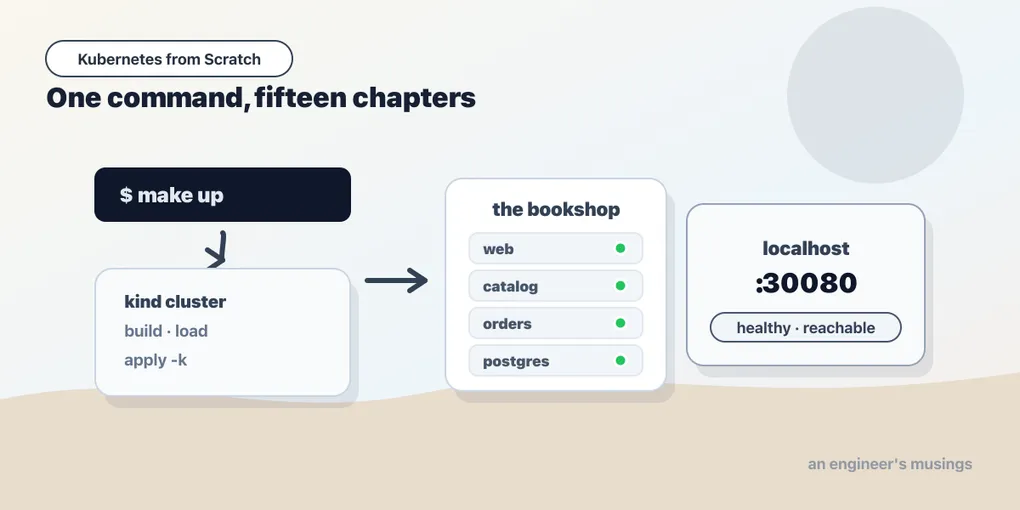
git clone https://github.com/book-companion/k8s-bookshop
cd k8s-bookshop
make up
Three minutes later, most of it Docker pulling Go and Alpine, there is a three-node Kubernetes cluster on your laptop with a bookshop running on it: a storefront, a catalog service, an orders service, and a Postgres database with four books in it. Open http://localhost:30080 and it renders.
That is the whole chapter, in the sense that there is nothing left to teach. Every object in that repository is something you have already met, and every awkward-looking line in it is there because something broke without it. So this is not a new lesson — it is a walk through the manifests with the receipts attached: what each decision costs, which chapter charged you for it, and what happens when you take it out.
One honesty up front, because a capstone that only says “and it all works” is worthless. Most of the interesting content in these files is defensive — and that is what production YAML is.
What make up actually does
up: cluster build load deploy status

cluster:
	kind create cluster --config cluster/kind.yaml

build:
	docker build --build-arg VERSION=v1 -t bookshop:v1 .
	docker build --build-arg VERSION=v2 -t bookshop:v2 .

# kind nodes do not share your Docker image cache. Without this, every pod is ErrImagePull.
load:
	kind load docker-image bookshop:v1 bookshop:v2 --name k8s-lab

deploy:
	$(KUBECTL) create namespace bookshop --dry-run=client -o yaml | $(KUBECTL) apply -f -
	$(KUBECTL) create secret generic bookshop-secrets -n bookshop \
		--from-literal=API_KEY=sk-live-abcd1234 \
		--from-literal=PGPASSWORD=s3cret \
		--dry-run=client -o yaml | $(KUBECTL) apply -f -
	$(KUBECTL) apply -k manifests/bookshop
	$(KUBECTL) wait -n bookshop --for=condition=available deploy --all --timeout=180s
Five targets, and three of them are load-bearing.
load is the one everybody forgets. docker build puts an image in your laptop’s Docker daemon — and your kind nodes are containers running their own container runtime, which cannot see it. Skip kind load docker-image and every pod comes up ErrImagePull while you stare at an image you can plainly see in docker images. This is the imagePullPolicy trap from the pods chapter wearing a different hat: bookshop:v1 gets imagePullPolicy: IfNotPresent (because the tag is not latest), which means the kubelet will use a local image if the node has one — and the node has one only because you loaded it.
The --dry-run=client -o yaml | kubectl apply -f - idiom is the same trick the controller in the extending chapter used to make create idempotent. kubectl create namespace bookshop fails on the second run. This does not, which means make up is re-runnable, which means the repo is usable.
The Secret is created imperatively, from literals, in a Makefile. That is not a pattern to copy, and the repo says so. It exists because a Secret committed to a public git repository is not a secret — and because base64 in a YAML file is not encryption, as you proved by decoding sk-live-abcd1234 out of one with a single pipe in the config chapter. A real cluster gets its secrets from a secrets manager: External Secrets Operator pulling from Vault or a cloud KMS, or Sealed Secrets so that an encrypted form can live in git. A teaching repo gets a Makefile line with a fake key in it, honestly labelled.
The cluster: three nodes, on purpose
kind: Cluster
apiVersion: kind.x-k8s.io/v1alpha4
name: k8s-lab
nodes:
  # Three nodes on purpose. A single-node cluster hides everything interesting about
  # scheduling, and the taints chapter has nowhere to put a pod.
  - role: control-plane
    extraPortMappings:
      # The bookshop's NodePort, mapped to localhost:30080 on your machine.
      - containerPort: 30080
        hostPort: 30080
        protocol: TCP
  - role: worker
  - role: worker
One control plane, two workers. A single-node kind cluster is faster and teaches you nothing — the scheduler has no choice to make, a taint has nowhere to repel a pod to, and you never see the control-plane’s own node-role.kubernetes.io/control-plane:NoSchedule taint doing its job. With three nodes, the FailedScheduling message from the scheduling chapter — 0/3 nodes are available: 1 node(s) had untolerated taint(s), 2 Insufficient cpu — accounts for every node in the cluster and actually means something.
extraPortMappings is what makes localhost:30080 work. kind’s nodes are Docker containers, and a NodePort opens a port on the node — which is inside Docker’s network, not on your machine. The port mapping bridges the two. It is also why the base manifests pin nodePort: 30080 instead of letting Kubernetes allocate one — and, as the packaging chapter found out the hard way, that pin is a cluster-wide singleton that a second environment cannot reuse. The staging overlay has to strip it back out. That is a bargain the repo makes knowingly: a fixed URL you can bookmark, at the cost of a base that is not quite environment-neutral.
One image, three binaries
FROM golang:1.24-alpine AS build
ARG VERSION=v1
...
RUN CGO_ENABLED=0 go build -ldflags "-s -w -X ...bookshop.Version=${VERSION}" -o /out/catalog ./cmd/catalog && \
    ... -o /out/orders ./cmd/orders && \
    ... -o /out/web ./cmd/web

FROM alpine:3.21
# curl and wget are here on purpose: several chapters exec into a running pod to
# prove a Service or a probe works, and a distroless image would leave you with
# no shell to do it from. A production image would drop them.
RUN apk add --no-cache curl
COPY --from=build /out/catalog /out/orders /out/web /usr/local/bin/
RUN adduser -D -u 10001 shop
USER 10001
Three services, one image, three binaries inside it. Each Deployment picks its binary with command: — the pod-level override of the image’s CMD — so one image behaves as three different services depending on the manifest that runs it.
The version string is stamped at build time with -ldflags -X, which is why bookshop:v1 and bookshop:v2 are byte-for-byte identical programs that report different versions. That is the whole point of them — a rollout you cannot observe teaches nothing, and curl /version in a loop while a Deployment rolls is how the deployments chapter caught the dropped requests.
The comment about curl is the part I want you to argue with. This image is deliberately worse than a production image: it has a package manager, a shell, and an HTTP client in it, so that you can kubectl exec into a pod and prove a Service resolves. A real production image would be distroless or scratch — and then, as the debugging chapter showed and the controller in chapter 13 discovered by crashing, you would have no shell at all, and kubectl debug --target with a fat image attached to the pod’s namespaces would be your only way in. USER 10001 is the one production habit the image does keep: the process does not run as root, because there is no reason for a web server to be root and every reason for a compromised one not to be.
The three Deployments
Here is catalog, which is the most interesting of them, with the noise removed:
spec:
  replicas: 2
  template:
    spec:
      containers:
        - name: catalog
          image: bookshop:v1
          command: ["/usr/local/bin/catalog"]
          env:
            - name: PGPASSWORD
              valueFrom:
                secretKeyRef: { name: bookshop-secrets, key: PGPASSWORD }
            - name: DATABASE_URL
              value: postgres://bookshop:$(PGPASSWORD)@postgres:5432/bookshop?sslmode=disable
            - name: POD_NAME
              valueFrom: { fieldRef: { fieldPath: metadata.name } }
          readinessProbe:
            httpGet: { path: /readyz, port: http }
            periodSeconds: 3
          livenessProbe:
            httpGet: { path: /healthz, port: http }
            periodSeconds: 5
          resources:
            requests: { cpu: 20m, memory: 32Mi }
            limits: { memory: 128Mi }
$(PGPASSWORD) — and why the order of that list matters
That DATABASE_URL is doing something people do not expect to work — Kubernetes expands $(VAR) inside an env var’s value, using variables declared earlier in the same container’s env list. Verified from inside the running pod:
postgres://bookshop:s3cret@postgres:5432/bookshop?sslmode=disableThe password came out of a Secret; the rest of the DSN — which is not sensitive and does not want to be trapped inside a Secret where you cannot read it — stays in plain sight in the manifest. This is the right shape for a connection string, and it is also a trap: the order is significant. Move DATABASE_URL above PGPASSWORD in that list and the expansion does not happen; you get the literal string $(PGPASSWORD) in your DSN and a connection failure that reads like a password problem. A YAML list looks unordered. This one is not.
POD_NAME and NODE_NAME come from the downward API — the pod telling the container about itself. They are why the storefront can print which pod served your page, which is what makes rollouts, scaling, and load-balancing visible rather than theoretical.
Liveness on the process, readiness on the dependency
This is the single most consequential pair of lines in the repo, and the health chapter spent itself proving why.
catalog’s readiness fails while Postgres is unreachable. Its liveness does not. The Go code pings the database every three seconds and flips readiness accordingly, while /healthz keeps answering 200 the whole time, because the process is fine — it is the world that is broken.
Get this backwards and you have built a bomb. Point liveness at the database, and a thirty-second Postgres blip becomes something else entirely — every catalog pod fails liveness, the kubelet kills every catalog container, they all restart, they all fail liveness again because the database is still down, and now you have a cluster-wide restart storm stacked on top of a database outage, with a CrashLoopBackOff timer growing exponentially so that recovery lags the fix by minutes. Readiness withdraws traffic; liveness kills processes. A dependency outage is a routing problem, never a lifecycle problem.
The difference shows up in the objects exactly as the health chapter measured it: a readiness failure leaves the pod Running with RESTARTS 0 and READY 0/1, and its address stays in the EndpointSlice with ready: false — kube-proxy skips it, but the IP does not disappear. A liveness failure increments the restart counter and does not change the pod’s name, because it restarts a container in place, not a pod.
Requests, limits, and the QoS you get whether you ask or not
requests: {cpu: 20m, memory: 32Mi}, limits: {memory: 128Mi} — requests set, limits partial, so every bookshop pod is Burstable. QoS class is derived from what you wrote, never declared: set requests equal to limits on both CPU and memory and you would get Guaranteed, set nothing at all and you get BestEffort — and BestEffort is first out the door when a node comes under memory pressure.
The requests are what the scheduler does arithmetic with — 20m of CPU is a promise the node makes, and it is why six pods fit comfortably on two 2-CPU workers. The memory limit is what the kernel enforces, and it is real: curl /debug/eat?mb=200 against a 128Mi limit earns an honest OOMKilled with exit code 137 and no graceful shutdown, because the kernel does not negotiate. Note the missing CPU limit — deliberate. A memory limit protects the node from a leak; a CPU limit mostly throttles your own service into latency nobody asked for.
The preStop hook on web
lifecycle:
  # Without this, a rolling update drops requests: the pod stops serving the
  # moment it gets SIGTERM, while kube-proxy is still routing to it. The sleep
  # keeps it serving until every node has removed it from the EndpointSlice.
  preStop:
    exec:
      command: ["sleep", "5"]
Five seconds of doing nothing, and it is the difference between a clean deploy and dropped customer requests. The deployments chapter measured it: three rollouts without the hook dropped one to two requests each, while kubectl rollout status cheerfully reported success. Three rollouts with it: 708 consecutive 200s, zero failures.
The reason is a race nobody tells you about. When a pod is deleted, two things happen in parallel — the kubelet sends SIGTERM to your container, and the endpoints controller removes the pod from the EndpointSlice, from which kube-proxy on every node must then update its rules. There is no ordering between them. Your process can be shutting down while a node three hops away is still routing new connections to it. The sleep does not make your app shut down more gracefully; it makes it shut down later, serving until the removal has propagated. It is spent inside the 30-second terminationGracePeriodSeconds, so it costs you nothing but five seconds of rollout.
“Zero-downtime by default” is a marketing claim. Zero-downtime is five seconds of sleep and knowing why.
Services, and the DNS that proves them
apiVersion: v1
kind: Service
metadata:
  name: catalog
spec:
  selector: { app: catalog }
  ports:
    - { name: http, port: 80, targetPort: http }
Three Services (catalog, orders, postgres) with no type:, which means ClusterIP — reachable only inside the cluster — and one (web) with type: NodePort, because something has to be reachable from your browser.
The thing worth noticing is that orders is configured with CATALOG_URL: http://catalog. Not an IP, not a hostname with a namespace glued on — just catalog. POST an order, orders validates the ISBN by calling that URL, and it works, which is a live proof of two things at once: cluster DNS resolves the short name (via the pod’s search path, which appends bookshop.svc.cluster.local), and the Service’s stable virtual IP hides the fact that catalog is two pods with two ephemeral IPs that change on every rollout.
And it is where the services chapter caught the standard debugging advice lying. nslookup catalog.bookshop from inside a busybox pod returns NXDOMAIN, while the application resolving that exact name gets a 200 — because busybox’s nslookup ignores the resolver’s ndots:5 search-path behavior for dotted names and Go’s resolver does not. The tool everyone reaches for to debug DNS reports a broken cluster that is working perfectly. If you take one debugging habit from this book, take this one: test the resolution the way your application does it, with the client your application uses.
Config: the ConfigMap that updates live, and the one that never will
kind: ConfigMap
metadata:
  name: bookshop-config
data:
  GREETING: "The Bookshop"
  CURRENCY: "$"
  # Consumed as a MOUNTED FILE, not an env var — so that editing this ConfigMap
  # changes the running banner without restarting a pod. An env var would not.
  banner.txt: "Free shipping on orders over 30"
One ConfigMap, consumed two ways by the same pod, and that is the entire lesson of the config chapter compressed into a manifest. web takes GREETING and CURRENCY through envFrom, and mounts the same ConfigMap as a volume at /etc/bookshop so it can read banner.txt off disk.
Edit the ConfigMap and change nothing else, and three different things happen:
- The env vars never update. Not in five seconds, not in five minutes, not ever — an environment is handed to a process at exec time, and there is no mechanism to change it afterwards. Only a new pod picks it up. The fix is to stamp a checksum of the ConfigMap into the pod template’s annotations, so that changing the config changes the pod template, which rolls the Deployment (Kustomize’s
configMapGeneratordoes this for you, by hashing the content into the ConfigMap’s name). - The mounted file updates in place, with no restart — though not instantly. The kubelet refreshes projected volumes on a periodic sync, and in the lab the new banner landed somewhere between 35 and 70 seconds after the edit. Call it “eventually consistent, on the order of a minute”. That is why the banner is a file and the greeting is not.
- A
subPathmount never updates, ever. It looks nearly identical in YAML and behaves like an env var. The repo does not use one, and that is a decision, not an omission.
The Secret, meanwhile, arrives as env (envFrom: secretRef) and is rendered by web with everything but the last four characters starred out — a small honesty about what a Secret actually is. It is base64, not encryption. Anyone with get secrets in the namespace has your plaintext, and RBAC is the only thing standing between them and it.
Postgres, a PVC, and the strategy that saves your data
spec:
  replicas: 1
  strategy:
    # A ReadWriteOnce volume cannot be attached to an old and a new pod at once,
    # and the default RollingUpdate would try exactly that.
    type: Recreate
Three decisions here, all of them the same decision.
strategy: Recreate because the default RollingUpdate starts the new pod before stopping the old one, and both would mount the same ReadWriteOnce PersistentVolumeClaim — and ReadWriteOnce means one node, not one pod. The storage chapter took the guard rail off and found out what actually happens: the rollout succeeds, both pods land on the same node, both report Ready, and the second Postgres runs crash recovery over the live data directory of the first. Two postmasters, one volume, no error anywhere. Recreate is the only thing standing between this Deployment and that.
A PVC, not an emptyDir, because the storage chapter is the one that proves the point — write a row, delete the pod, and the row is still there when the new pod comes up. That test is meaningless without persistence and trivial with it. Note kind’s StorageClass is rancher.io/local-path with WaitForFirstConsumer binding: the PVC sits Pending until a pod actually needs it, which is not a bug, and which confuses everyone the first time.
The schema is a ConfigMap mounted into /docker-entrypoint-initdb.d, which the Postgres image runs exactly once, on an empty data directory. Restore the pod and it does not run again — which is precisely what makes the persistence test meaningful, because if initdb re-ran, you could not tell “the data survived” from “the data was recreated.”
And PGDATA: /var/lib/postgresql/data/pgdata, one level below the mount point, because Postgres refuses to initialize into a directory that already contains a lost+found, which many volume mounts do.
Every one of those lines is a scar. This is what people mean when they say stateful workloads on Kubernetes are harder — not that it does not work, but that all four of those decisions are load-bearing and not one of them is the default.
Labels, and the kustomization that holds it together
labels:
  - pairs: { part-of: bookshop }
    includeSelectors: false
resources: [config.yaml, catalog.yaml, orders.yaml, web.yaml, postgres.yaml]
Every pod carries app: <service> and part-of: bookshop. app is the selector — the one the Service matches on, the one the Deployment matches on, and therefore the one that is immutable for the life of the object. part-of is a cross-cutting label that no selector uses, which is exactly why it can be added freely: kubectl get pods -l part-of=bookshop returns all six pods across four Deployments and is the fastest way to see the whole application at once.
Note includeSelectors: false — that is the fix from the packaging chapter, applied. The modern labels transformer deliberately does not inject into spec.selector; the deprecated commonLabels did. Migrating between the two on a running system means deleting and recreating every Deployment, because a selector is immutable. The repo uses the new field from the first commit, so you never meet that wall.
The staging overlay is about twenty lines: a different namespace, replica counts of 1, a patch on the bookshop-config ConfigMap that rewrites the greeting to The Bookshop (STAGING), and a JSON 6902 patch that removes the pinned nodePort so the cluster can allocate its own (staging came up on 31863). Everything else — the probes, the preStop, the resource requests, the Secret references, and every future change to the base — is inherited. An overlay patches; it never copies.
It patches the ConfigMap rather than the Deployment because GREETING arrives through envFrom, and the packaging chapter shows what happens when you forget that: a JSON pointer at env[0] overwrites CATALOG_URL instead, the greeting never changes, and staging quietly loses its catalog.
The whole thing, running
After a full teardown — kubectl delete ns bookshop — and a rebuild straight from the repo:
catalog-8c6d8db8c-2kd49     1/1   Running   0     33s
catalog-8c6d8db8c-7fp5c     1/1   Running   0     33s
orders-db6c9c86c-blbfb      1/1   Running   0     33s
postgres-84bfd89b75-lmppf   1/1   Running   0     32s
web-7854c84bc8-2r2z4        1/1   Running   0     32s
web-7854c84bc8-lt6fv        1/1   Running   0     32s
Catalog is reading the database, not its in-memory fallback:
    "source": "postgres",
    "version": "v1"
The storefront renders, on localhost:30080:
<h1>The Bookshop</h1>
<p class="meta">web v1 · pod web-7854c84bc8-2r2z4 · node k8s-lab-worker · banner: Free shipping on orders over 30</p>
<p class="meta">catalog v1 served by catalog-8c6d8db8c-2kd49 (source: postgres)</p>
<p class="meta">0 order(s) placed · api key: ************1234</p>
Read that HTML as a receipt. The Bookshop came from a ConfigMap through envFrom. banner: Free shipping on orders over 30 came from the same ConfigMap through a mounted file — which is why editing it changes that line and not the <h1> above it. pod web-7854c84bc8-2r2z4 · node k8s-lab-worker came from the downward API. catalog v1 served by catalog-8c6d8db8c-2kd49 means web resolved http://catalog over cluster DNS, hit a Service, and got load-balanced to one of two pods. source: postgres means that pod talked to a database whose password was expanded out of a Secret into the middle of a connection string. api key: ************1234 is a Secret being handled with the small amount of respect a Secret deserves.
And an order, placed through the entire chain — browser to web, web to orders, orders to catalog to validate the ISBN, catalog to Postgres:
{
  "id": 1,
  "isbn": "978-0132350884",
  "title": "Clean Code",
  "qty": 1,
  "createdAt": "2026-07-14T01:46:26.082340261Z"
}
Four Deployments, six pods, four Services, a database on a real volume, and a request that crosses every one of them. That is an application on Kubernetes.
What this cluster is not
I would rather end on the gap than the achievement, because the gap is where the next year of your learning is.
There is no TLS anywhere. Every hop in that order — browser to web, web to orders, orders to catalog, catalog to Postgres — is plaintext HTTP or plaintext Postgres wire protocol (sslmode=disable, right there in the DSN where you can see it). Anything on the pod network can read all of it.
There are no NetworkPolicies. Every pod in this cluster can reach every other pod, including Postgres — nothing stops orders from talking straight to the database, or a compromised web pod from doing whatever it likes to your data. Kubernetes’ default network posture is allow all, which surprises people, and fixing it means NetworkPolicy objects and a CNI that enforces them.
Postgres is a single replica on a local-path volume. The data lives in a directory on one node’s filesystem. Lose that node and you lose the bookshop. There is no replication, no failover, no backup, and no point-in-time recovery, and shipping that shape to production would be malpractice. If you must run a database on Kubernetes, run a real operator — one of those controllers-with-domain-knowledge from chapter 13 — and read its reconcile logic before you trust it with anything you cannot rebuild.
There is no metrics-server, so there is no kubectl top, no HPA, and no autoscaling of any kind. Everything here has a hand-set replica count.
There is no GitOps. You applied this with kubectl and make, from a laptop. The cluster’s actual state is whatever the last person to run a command made it, and no controller is reconciling it against a git repository. On a real system, kubectl apply in production is a smell — Argo CD or Flux watching a repo is the shape you want, and it is the same reconcile loop again, with git playing the part of the desired state.
And it is one cluster on one machine — no multi-tenancy, no admission control beyond schema validation, no audit logging, no pod security standards, no resource quotas. Every one of those is a chapter someone else has written.
What you can do now is the part that matters: read a manifest and know what each line will do, watch a pod fail and know which of the three loops — scheduler, kubelet, controller — you should be looking at, and debug it without guessing. Pending means the scheduler. ImagePullBackOff means the node. CrashLoopBackOff means your process. Running but 0/1 means readiness, which means a dependency, which means it was never a Kubernetes problem at all.
Where this goes next
Look at that order path once more: web calls orders calls catalog calls Postgres, all in plaintext, with no identity, no authorization between services, no retries, no timeouts beyond the two-second one hard-coded into the Go client, and no way to see the shape of the traffic without adding instrumentation to every service by hand.
Kubernetes gave you the platform — scheduling, identity, storage, config, health, and the reconcile loop that ties them together. It gave you nothing about the traffic between your services, and it never intended to. That is a separate problem with a separate answer, and you already hold the two pieces that explain how such an answer can exist at all: ServiceAccounts, which are the cluster’s notion of workload identity, and CRDs, which are how a project bolts an entire new control plane onto a cluster it does not own. A service mesh is those two ideas, pointed at the network.
A follow-on series picks up from this exact cluster, on this exact bookshop, and goes there.
Final thoughts
The thing I want you to take from this book is not that Kubernetes is complicated. It is that Kubernetes is small, and the complication is in the honesty.
There is one idea in the whole system: write down what you want, and run a loop that compares it to what exists and closes the gap. The Deployment controller does it. The kubelet does it. The endpoints controller does it. Your fifteen lines of shell did it. Everything else — the six hundred flags, the CRDs, the operators, the mesh you are about to install — is that same loop, wearing an outfit.
What makes it feel complicated is that Kubernetes refuses to lie to you. Zero-downtime deploys are not free, so you learn about preStop. Config changes do not reach a running process, so you learn the difference between an env var and a mounted file. A database cannot roll like a stateless app, so you learn what Recreate is for. A pod that cannot reach its dependency is not dead, so you learn which probe is which. Every one of those is a distributed-systems truth that your previous platform also had — it just handled it badly and quietly, and you shipped it anyway, and the failure showed up as a customer complaint instead of a FailedScheduling event with a message that names every node.
Kubernetes makes you say it out loud. That is the tax, and it is also the entire value: a manifest that says exactly what will happen, verified by a cluster that will tell you when you are wrong. Go break some things.
Comments